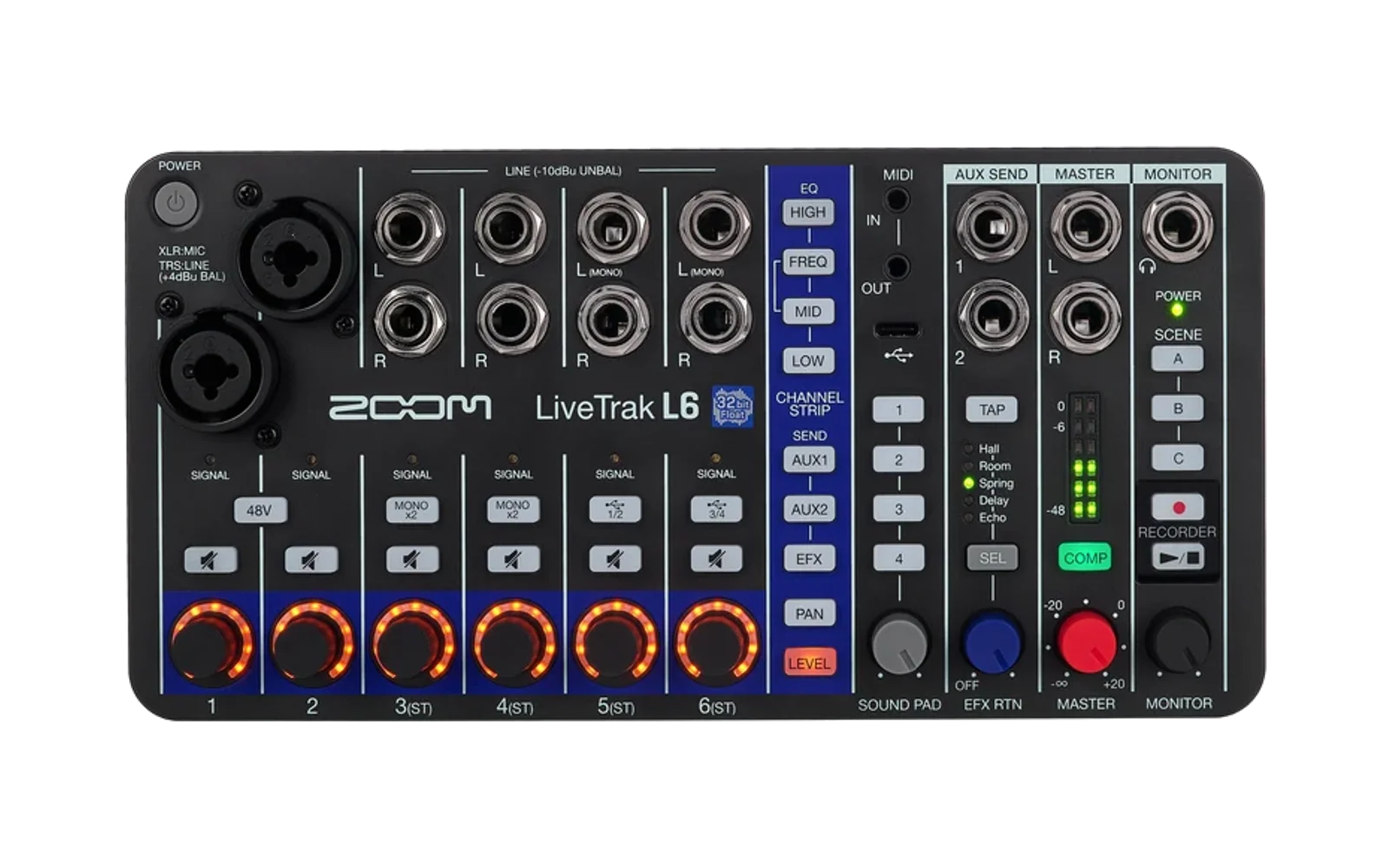
zoom-l6-firmware
Loud80/100Unofficial firmware for the Zoom LiveTrak L6. It lets you overdub using only the mixer, and adds a switchable stereo AUX send. Not affiliated with Zoom.
zoom-l6-firmware is custom firmware for the Zoom LiveTrak L6, by @thade. Latest release v0.3.0 (October 2026), 10 stars on GitHub.
forZoom LiveTrak L6·by@thade
Unclaimed. Is this yours? Sign in with GitHub as @thade to claim it.
No release files yet. Build from source.
Custom license· thade/zoom-l6-firmware·thade.github.io/zoom-l6-firmware/·downloads come from the creator’s GitHub releases
v0.3.00.3.0Latest0 files
The unofficial overdub/stereo AUX firmware for the original Zoom LiveTrak L6 (not the L6max), built on Zoom's firmware v1.10. Independent work, not affiliated with or endorsed by Zoom.
New in 0.3.0
- One limiter for the stereo AUX send. In stereo, the two AUX jacks now share one output limiter, as the mixer's main outputs do. When a loud peak on one side makes the limiter act, both sides are turned down by the same amount, so the stereo image stays put. In 0.2.0 each jack had its own limiter, and a loud peak on one side turned that side down alone for a moment. The limiters only act near full scale, so most of the time nothing changes. In mono the two sends keep their separate limiters, as in Zoom's firmware.
- Measured on a mixer. With test tones played into the mixer and both AUX jacks recorded, the quiet side was turned down by the same amount as the loud side, one dB for each dB the loud side went over the limit, and not at all below it. The same test on 0.2.0 never moved the quiet side. In mono, and with the usual stereo tones, 0.2.0 and 0.3.0 measured the same (experiment 41).
Everything else is as in 0.2.0: the browser patcher makes the file from Zoom's download and, in Chrome or Edge, sends it to the mixer; only
L6.BINneeds installing; recovery from a firmware that fails to start has been tested.What it does
- Your last four takes on the sound pads. With the overdub chain on, pad 1 plays the take you just made, pad 2 the one before, and so on to pad 4. Play pad 1 while you record the next take to layer over it. Hold EFX + PAN for 1.5 s to turn the chain on or off (off by default; remembered).
- A history in every take folder.
HISTORY.TXTlists the earlier takes and pad sounds a take includes, newest first (format). - Stereo AUX send, switchable. Hold AUX 1 + AUX 2 for 1.5 s to switch between Zoom's two mono sends and one stereo send (AUX 1 left, AUX 2 right), with one shared output limiter.
Before you install
- This changes your mixer's firmware. Zoom's firmware licence notice forbids altering or reverse engineering its firmware without permission: installing this is your decision and responsibility.
- No firmware image is attached: images contain Zoom's firmware. Make yours with the browser patcher or build it (docs/setup.md); both give exactly:
34df789bc9eabf0b6060a12700cbd889d39ef4b8833f2c34db05b3bf72f3e90b L6.BINStock firmware needed: Zoom L6 v1.10
L6.BIN, SHA25664f1f36b8383176b5d841911fbf3c16205139a313ee88be906f313b1a98a33fb. Install steps: the README. Upgrading from 0.2.0 or 0.1.0: installL6.BINthe same way. Your takes, pad sounds, the chain and stereo settings and theMASTER.WAVfiles on the card all stay. The patcher page can still make the 0.2.0 file: add?version=0.2.0to its address.Tips and limitations
- Keep the MASTER and SOUND PAD knobs at unity and the master compressor off while overdubbing.
- The limiters were measured with test tones, not with music, and only the quiet side's reduction could be read directly (the recording interface clips at the loud side's level).
- Sending to the mixer from the patcher has been checked with Chrome on macOS; Windows is untested (the download route works everywhere).
- Known limitations: README. Development record: experiments (0.3.0 is experiment 41).
v0.2.00.2.00 files
The unofficial overdub/stereo AUX firmware for the original Zoom LiveTrak L6 (not the L6max), built on Zoom's firmware v1.10. Independent work, not affiliated with or endorsed by Zoom.
New in 0.2.0
- Make it in your browser. The browser patcher turns Zoom's own v1.10 download into this firmware on your computer: no Python, git or compiler, and it works on Windows. Nothing is uploaded, and the page contains none of Zoom's firmware. It accepts only Zoom's exact v1.10 file and only offers a result identical to the published image.
- Send it straight to the mixer (Chrome or Edge on a computer): the patcher puts the L6 into File Transfer Mode over USB, writes
L6.BINto the card and checks it, then you eject and update with PLAY/STOP as usual. - Just one file to install. The firmware now creates the small
MASTER.WAVfiles the pad folders need by itself, so you only copyL6.BIN. While the overdub chain is on it uses pads 1–4; turn the chain off to keep your own sounds on the pads. - Recovery shown. A firmware that hangs at startup was installed on purpose and recovered with the normal PLAY/STOP update, because the mixer's bootloader runs the update before the firmware starts. If your mixer ever stays dark after an update, see If the mixer won't start after an update: power it fully off (both USB cables and the batteries) first.
What it does
- Your last four takes on the sound pads. With the overdub chain on, pad 1 plays the take you just made, pad 2 the one before, and so on to pad 4. Play pad 1 while you record the next take to layer over it. Hold EFX + PAN for 1.5 s to turn the chain on or off (off by default; remembered).
- A history in every take folder.
HISTORY.TXTlists the earlier takes and pad sounds a take includes, newest first (format). - Stereo AUX send, switchable. Hold AUX 1 + AUX 2 for 1.5 s to switch between Zoom's two mono sends and one stereo send (AUX 1 left, AUX 2 right).
Before you install
- This changes your mixer's firmware. Zoom's firmware licence notice forbids altering or reverse engineering its firmware without permission: installing this is your decision and responsibility.
- No firmware image is attached: images contain Zoom's firmware. Make yours with the browser patcher or build it (docs/setup.md); both give exactly:
0c72755eaa9e24854ddd60187765b4ff05d0f86df3edd76ef2b08423a775f0af L6.BINStock firmware needed: Zoom L6 v1.10
L6.BIN, SHA25664f1f36b8383176b5d841911fbf3c16205139a313ee88be906f313b1a98a33fb. Install steps: the README. Upgrading from 0.1.0: installL6.BINthe same way; theMASTER.WAVfiles already on the card stay.Tips and limitations
- Keep the MASTER and SOUND PAD knobs at unity and the master compressor off while overdubbing.
- Sending to the mixer from the patcher has been checked with Chrome on macOS; Windows is untested (the download route works everywhere).
- Known limitations: README. Development record: experiments (0.2.0 is experiment 40).
v0.1.00.1.00 files
First release of the unofficial overdub/stereo AUX firmware for the original Zoom LiveTrak L6 (not the L6max), built on Zoom's firmware v1.10. Independent work, not affiliated with or endorsed by Zoom.
What it adds
- Your last four takes on the sound pads. With the overdub chain on, after each ordinary recording pad 1 plays the take you just made, pad 2 the one before, and so on to pad 4. Play pad 1 while you record the next take and the new take contains both. Nothing is copied: the pads play each take's own
MASTER.WAV. Hold EFX + PAN for 1.5 s to turn the chain on or off (off by default; remembered through power cycles). - A history in every take folder.
HISTORY.TXTlists the earlier takes and pad sounds a take includes, newest first (at most 100 entries), so you can find every original recording behind a mix. See the format. - Stereo AUX send, switchable. Hold AUX 1 + AUX 2 for 1.5 s to switch between Zoom's two mono sends and one stereo send (AUX 1 left, AUX 2 right, following channel pan).
Before you install
- This changes your mixer's firmware. If a firmware ever fails to start, Zoom's own firmware can be put back from the card with the PLAY/STOP update, which runs from the bootloader before the firmware (tested 16 October 2026; see the README's If the mixer won't start after an update section).
- Zoom's firmware licence notice forbids altering or reverse engineering its firmware without permission. Building and installing this is your decision and responsibility.
- No firmware image is attached: images contain Zoom's firmware, so you build your own from Zoom's v1.10 download.
Build and install
Follow docs/setup.md (Python 3.12+, a full git clone, Zoom's
L6_v1.10_E.zip), then the README's install steps. The build is reproducible and stops if your image differs:99ded4b1fcefa1d968a7317e5df4ee65c670018c4a495cfc1ed903aa5aa70bb0 L6.BIN 58a0bc492b292ac5a0b95889a58fa354c27bf394562b6dbde64d517b6acba791 MASTER.WAVStock firmware needed: Zoom L6 v1.10
L6.BIN, SHA25664f1f36b8383176b5d841911fbf3c16205139a313ee88be906f313b1a98a33fb.To go back to stock, install Zoom's
L6.BINthe same way (tools/device/install_release.py --stock).Tips and limitations
- Keep the MASTER and SOUND PAD knobs at unity and the master compressor off while overdubbing (the recorded master is post-fader and plays back through the master again, as on a stock L6).
- To use AUX sends as an effects loop, set the channels' send point to Pre Fader in ZOOM L6 Editor.
- Known limitations are listed in the README; the development record is in experiments (0.1.0 is experiment 38).
- Your last four takes on the sound pads. With the overdub chain on, after each ordinary recording pad 1 plays the take you just made, pad 2 the one before, and so on to pad 4. Play pad 1 while you record the next take and the new take contains both. Nothing is copied: the pads play each take's own