TastyWaves
A wavetable synthesizer firmware for the M-VAVE FM-1. · tastysynth.com

TastyWaves turns the FM-1 into a 12-voice wavetable synth with two oscillators per voice, a resonant filter, two envelopes, an LFO, a four-slot effects chain, an arpeggiator and two step sequencers that can play chords and counterpoint on one clock. Patches are saved on the device, and a browser tool manages them and loads your own wavetables in four common wavetable formats. The philosophy of TastyWaves is to do one thing well and in depth, focusing on intuitive performance and usability, and to provide a rich nuanced sound engine equally useful for creating pattern-based music and evolving soundscapes. We aim to be the definitive wavetable synth on the FM-1.
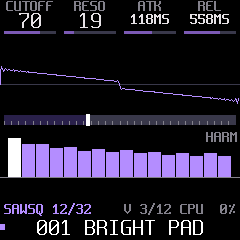
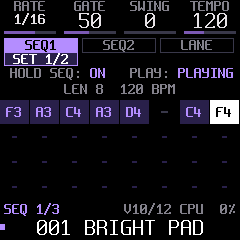
Version 1.0.1. Tested on the FM-1 against docs/DEVICE-TEST-PLAN.md. It is free software (GPL-3.0), built on Dinghy, which is built on Felucca and SLOOP. See Credits.
Contents
- Features
- Install
- Playing it
- The pages
- Arpeggiator and sequencers
- Patches
- The web tool: your own wavetables, patch library
- MIDI and USB audio
- Compatibility
- Build from source
- Credits and licence
Features
| Voices | 12 voices, POLY, MONO or LEGATO, with glide; HI or ECO quality |
| Oscillators | 2 wavetable oscillators per voice, each with its own table, position, semitone, fine tune and level; a sub oscillator and noise; BEND, a wave warp on either or both oscillators |
| Wavetables | 12 built-in tables of 32 frames (SAWSQ, PWM, HARM, VOWEL, FMIDX, FOLD, ORGAN, BELL, NOISE, SHAPE, REED, STAIR), band-limited, plus 8 slots for your own tables (Serum, WaveEdit, Ableton or Surge exports) |
| Filter | Resonant state-variable filter: low-pass, band-pass, high-pass, with key tracking |
| Envelopes | AMP and MOD ADSR envelopes; MOD moves the cutoff, the table position and BEND; linear or exponential curves |
| LFO | Sine, triangle, saw, square, sample and hold; to position, pitch, cutoff and amplitude |
| Control | Mod wheel to position and vibrato, aftertouch to cutoff, velocity to amplitude and cutoff, pitch bend range, volume, drive |
| Effects | A chain of 4 slots: chorus, flanger, phaser, delay, reverb. Hold FX to bypass the chain (a click-free crossfade; delay and reverb tails keep ringing underneath) |
| Arpeggiator | UP, DOWN, UP-DN, UP-DN2, RANDOM, PLAYED, CHORD; 1/4 to 1/32 with triplets; 1 to 4 octaves; gate, swing, tempo 40 to 240 BPM; LATCH |
| Two sequencers | SEQ1 and SEQ2, 32 steps each, with rests and ties, on one clock. Each has its own rate, gate, swing, chord, arpeggiator, octaves and level; both are mixed through a soft clip. Held keys transpose both |
| Chords | Every step can play a chord: MAJ, MIN, 7, MAJ7, MIN7, SUS4, or HELD (the shape of the keys you hold). Shown on a keyboard |
| Modulation lane | A value per step of SEQ1 that moves position, cutoff, BEND or drive, with depth and glide |
| Patches | 8 factory patches and 32 of your own, saved on the FM-1 with both sequences |
| Sync | Follows MIDI clock (Start restarts the patterns on the beat) |
| USB | Class-compliant USB-MIDI in and out; the FM-1 is also a 16-bit stereo USB audio input at 44.1 or 48 kHz |
| Help | Long-press HOME for help: global help, and contextual help for every screen |
| Safe | The FM-1's update path and USB rescue stay intact: you can always install another firmware |
Install
In your browser (easiest). Open tastysynth.com/tool in Chrome or Edge, plug the FM-1 in by USB, switch it on and press Install on the FM-1. It takes about a minute; keep the page open and the cable in. Updating TastyWaves keeps your saved patches and wavetables.
Or download the firmware: tastywaves-1.0.1.fwsc
(all versions on the Releases page), for any FM-1 installer
that takes a .fwsc file, or the manual install below.
If something goes wrong: hold OCT- while switching the FM-1 on. It starts in the USB rescue (no sound, only the updater), and either install works from there. A firmware that crashes twice at boot lands there by itself.
Going back: the FM-1 Firmware Hub installs the official firmware, or any other, over the same USB update path. Another firmware erases TastyWaves' patches and user wavetables: back them up with the web tool first (Backup all, and Save on each table slot), and restore them after you come back.
Manual install
You need a computer with Python 3.
-
Download
tastywaves-1.0.1.fwsc(above). -
Get the installer (this repository) and its two Python packages:
git clone https://github.com/marksweiss/tastywaves.git cd tastywaves python3 -m venv .venv && .venv/bin/pip install mido python-rtmidi -
Plug in the FM-1, switch it on, and install:
tools/install_fw.sh ~/Downloads/tastywaves-1.0.1.fwscIt shows what runs on the FM-1, asks before it writes, and checks the result after the FM-1 restarts.
tools/install_fw.sh --infoshows what is installed.
Playing it
The four knobs under the screen always set the four values shown at the top of the page you're on. A page button opens its page; pressing it again steps through the page's tabs.
| Control | What it does |
|---|---|
| Keys | Play (velocity sensitive); the notes also go out over USB-MIDI |
| OCT- / OCT+ | Octave down / up (remembered) |
| KNOB 1-4 | The four values at the top of the screen |
| ALGORITHM | The wavetable (factory, then your own) |
| SELECT | The position in the table (on the LANE tab: the step) |
| PRESETS | The patch: factory 1-8, then your U01-U32 (loads after a short pause) |
| HOME | Back to HOME (four knobs: cutoff, resonance, attack, release); hold it for HELP |
| EDIT FX ENV LFO SEL GLO | Open that page; again: its next tab |
| ARP / SEQ | Press: open its page. Hold half a second: switch it on or off (the button lights when on) |
| FX | Press: the FX page. Hold: bypass the effects chain (HOLD FX: BYPASS) |
| PLAY | With SEQ lit: start / stop both sequences, from any page. Otherwise: LATCH (held notes keep sounding) |
| REC | On the SEQ page: step input for the sequence shown. Hold, then REC again: clear it |
| SAVE | Save the patch (see Patches) |
| MASTER | Volume |
The line above the patch name shows the page and tab, the voices in use (V 3/12, an L when LATCH is on) and the
CPU load.
The pages
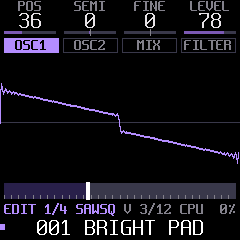 | EDIT: OSC1 and OSC2 (position, semitone, fine, level; the wave drawn as it plays, BEND included), MIX (sub, noise, BEND and where it goes, the levels), FILTER (cutoff, resonance, mode, key tracking, with the response curve) |
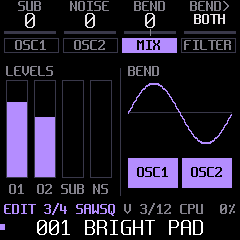 | MIX: the four levels and BEND on a sine, with the oscillators it acts on |
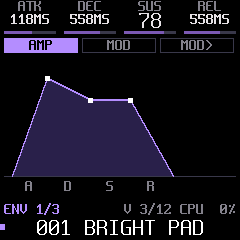 | ENV: AMP and MOD envelopes, drawn; MOD> sets what the MOD envelope moves (cutoff, position, BEND) and the curve |
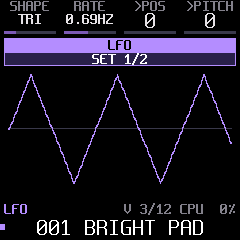 | LFO: shape and rate, to position and pitch (set 1) or cutoff and amplitude (set 2) |
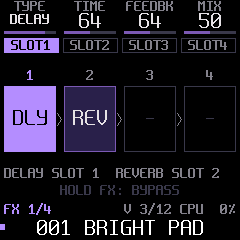 | FX: four slots in series, each a TYPE with two values and a MIX. Delay and reverb take one slot each |
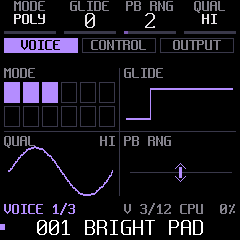 | SEL: VOICE (mode, glide, bend range, quality), CONTROL (mod wheel, aftertouch, velocity routes), OUTPUT (volume, drive, velocity to cutoff) |
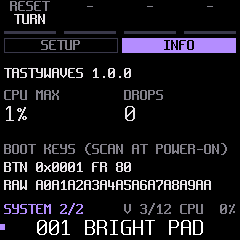 | GLO: SETUP picks the HOME look (waterfall, spectrum, minimal); INFO shows the version, the highest CPU load and any audio drops |
Arpeggiator and sequencers
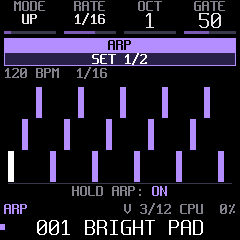
The arpeggiator. Hold ARP to switch it on (HOLD ARP: ON), then hold notes. Press PLAY for LATCH and
let go: the arpeggio keeps playing while you turn knobs. Press ARP to set MODE, RATE, OCT, GATE (set 1) and
SWING, TEMPO (set 2).
Recording a sequence.
- Press SEQ to open its page (SEQ1, SEQ2 and LANE tabs; press SEQ again to step through them).
- On the SEQ1 or SEQ2 tab, press REC. Each key you play is a step; PLAY enters a rest, SEQ ties the step before. Press REC again to finish (or stop at 32 steps).
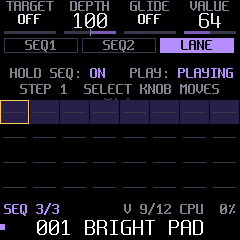
- Hold SEQ to switch the sequencer on, then press PLAY. The status row on every SEQ tab shows
HOLD SEQ: ON / OFFandPLAY: PLAYING / STOPPED. - Hold a key to transpose: the pattern moves by that key minus C4. LATCH a key to keep it transposed.
Two sequences. SEQ1 and SEQ2 share the tempo and PLAY, and start together. Each has its own RATE, GATE and SWING (set 1) and CHORD, ARP, OCT and LEVEL (set 2), so SEQ2 can run at 1/8 against SEQ1's 1/16, or arpeggiate chords under a plain melody. LEVEL balances them; the mix is soft-clipped, so thick textures stay clean.
Chords. CHORD makes every step play a chord on its note: a fixed shape (MAJ, MIN, 7, MAJ7, MIN7, SUS4) or HELD, the shape of the keys you hold (the lowest one is the root). The chord tab draws it on a keyboard, the root in amber. With the pattern's ARP on, each step lasts a beat and the arpeggiator plays its chord at RATE.
The modulation lane. The LANE tab holds one value per step of SEQ1. TARGET picks what it moves (position, cutoff, BEND, drive), DEPTH how far, GLIDE whether it slides between steps. SELECT picks the step and the fourth knob sets its value.
With external MIDI clock the arpeggiator and both sequences follow it; MIDI Start restarts them on the beat.
Patches
Loading. Turn PRESETS: the 8 factory patches come first, then your saved ones (U01 to U32).
Saving. The SAVE button lights when the sound differs from the patch it came from.
- Press SAVE: a user patch is saved over itself; a factory patch goes to the first free number.
- Hold SAVE and turn PRESETS to pick another number (a number in use asks first: press SAVE again).
- Hold SAVE for 2 seconds on a user patch to delete it (press SAVE again to confirm).
A patch holds every sound setting, the arpeggiator settings, both sequences with their settings, and the
modulation lane. ARP, SEQ and the bypass are performance switches: changing patches doesn't stop a running
sequence. The patch store holds about 32 patches without sequences and fewer with long ones; SAVE says
STORE FULL when it is.
The web tool: your own wavetables, patch library
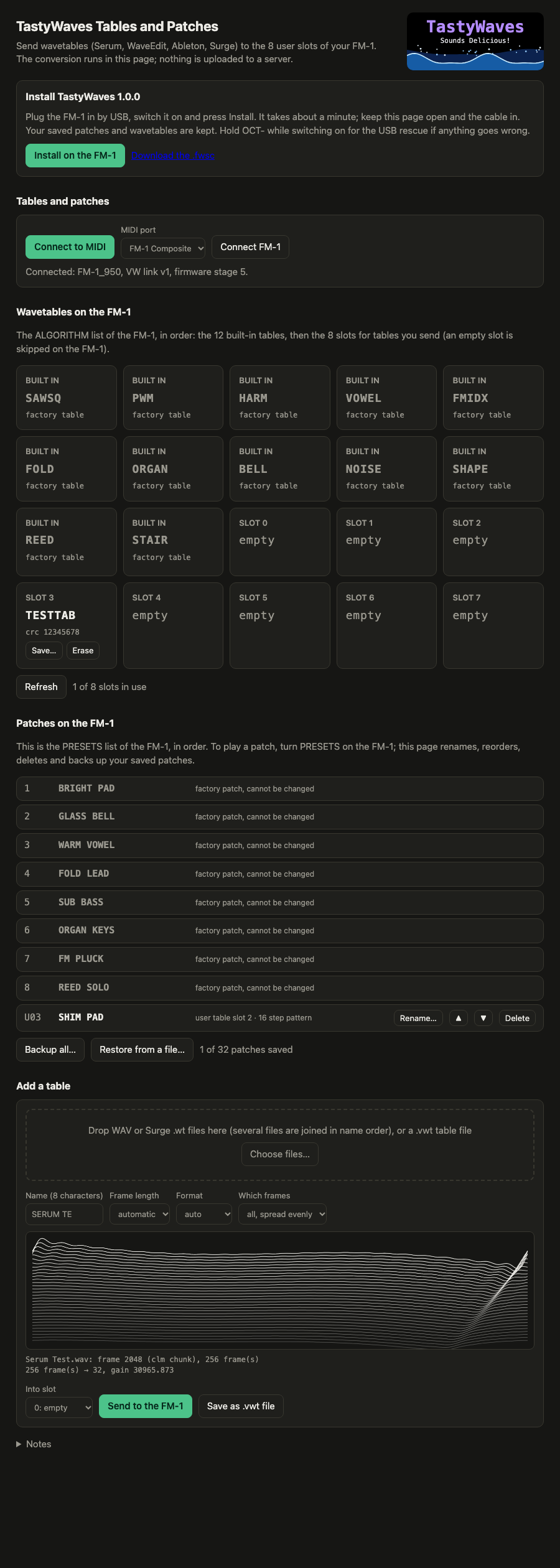
A page in your browser that talks to the FM-1 over USB-MIDI: tastysynth.com/tool
(or tools/web_tool.sh in this repository, at http://localhost:8000). Everything runs in the page; nothing is
uploaded anywhere. Use Chrome or Edge (Safari has no Web MIDI), press Connect to MIDI and allow SysEx.
-
Install: puts the TastyWaves release bundled with the page on the FM-1 (see Install).
-
Wavetables: drop a wavetable WAV (Serum, WaveEdit, Ableton) or a Surge
.wtfile, check the preview and send it to one of the 8 user slots. ALGORITHM lists it after the factory tables. Save a slot to a.vwtfile to keep it. -
Patches: one list in PRESETS order. Rename, reorder, delete, and back up all your patches to a JSON file (both sequences included); restore puts them back.
tools/web/README.md has the details, and tools/fm1_wavetable.py does the same conversion on
the command line.
MIDI and USB audio
- In: notes with velocity, pitch bend, channel aftertouch, mod wheel (CC 1), MIDI clock and Start, and a CC
map for most sound parameters (firmware/src/patch.h,
patch_cc). All Notes Off and All Sound Off release everything, latched notes included. - Out: the notes you play on the keys.
- USB audio: the FM-1 appears as a stereo audio input; record it in any DAW without a cable.
Compatibility
TastyWaves reads only its own patches and wavetables. It does not read projects, patches or samples saved by other
FM-1 firmwares, the official one included: save or back up what you keep in another firmware before switching. The
other way round, installing another firmware erases TastyWaves' patches and user wavetables: back them up with the
web tool first, and restore them when you come back. Its FM-1 identity is FM-1_937.
Build from source
You need Linux on x86-64, or macOS or Windows with Docker (the build runs the chip's toolchain in a linux/amd64
container by itself), plus Python 3 and uv.
tools/install.sh        # once: a venv, JieLi's toolchain, three files of the JieLi AC79 SDK; then a build and a host test
./build.sh              # -> build/tastywaves.fwsc
./build.sh --release 1.0.1    # -> build/tastywaves-1.0.1.fwsc
tools/web_release.sh 1.0.1    # bundle it with the web tool (its Install button, GitHub Pages)
tools/install_fw.sh     # install build/tastywaves.fwsc on the connected FM-1
The release process, step by step, and what every script does: tools/README.md.
The build refuses what would break the FM-1: a 64-bit division, a call into the chip ROM, too much RAM, a hardware
register touched outside firmware/hal/.
Host mode runs the same firmware on your computer, with no FM-1: a script presses keys and turns knobs; out come the sound as a WAV and the screen as images. Every screenshot here was made that way.
tests/run_host.sh       # -> build/host/tastywaves.wav and screen PNGs
tests/run_panel.sh      # the panel; tests/run_*.sh are the test suites
Where to read next: docs/CODEMAP.md (the code), docs/RULES.md (the chip's rules: integers only, the audio interrupt's budget), docs/API.md (the platform), and the design notes: WAVETABLE_DESIGN, SYNTH-DESIGN, ARP-SEQ-DESIGN, EFFECTS-DESIGN, PATCH-STORAGE-DESIGN, UI-DESIGN, UPLOAD-DESIGN.
Credits and licence
TastyWaves is by Mark Weiss (@marksweiss), written with Claude (Anthropic). It stands on:
- Dinghy by zvenson: the smallest FM-1 firmware to build on, with host mode and the build checks. TastyWaves started as a copy of it.
- Felucca by Leo Kuroshita (Hügelton Instruments): the platform, the update loader, USB, the installer.
- SLOOP by isod89: Felucca's platform as Dinghy carries it.
- The Spleen fonts by Frederic Cambus (BSD 2-Clause).
GPL-3.0-only: see LICENSE, and LICENSING.md for who made which part. "M-VAVE" and "FM-1" belong to their owners; TastyWaves is not made or endorsed by them.