take-taker
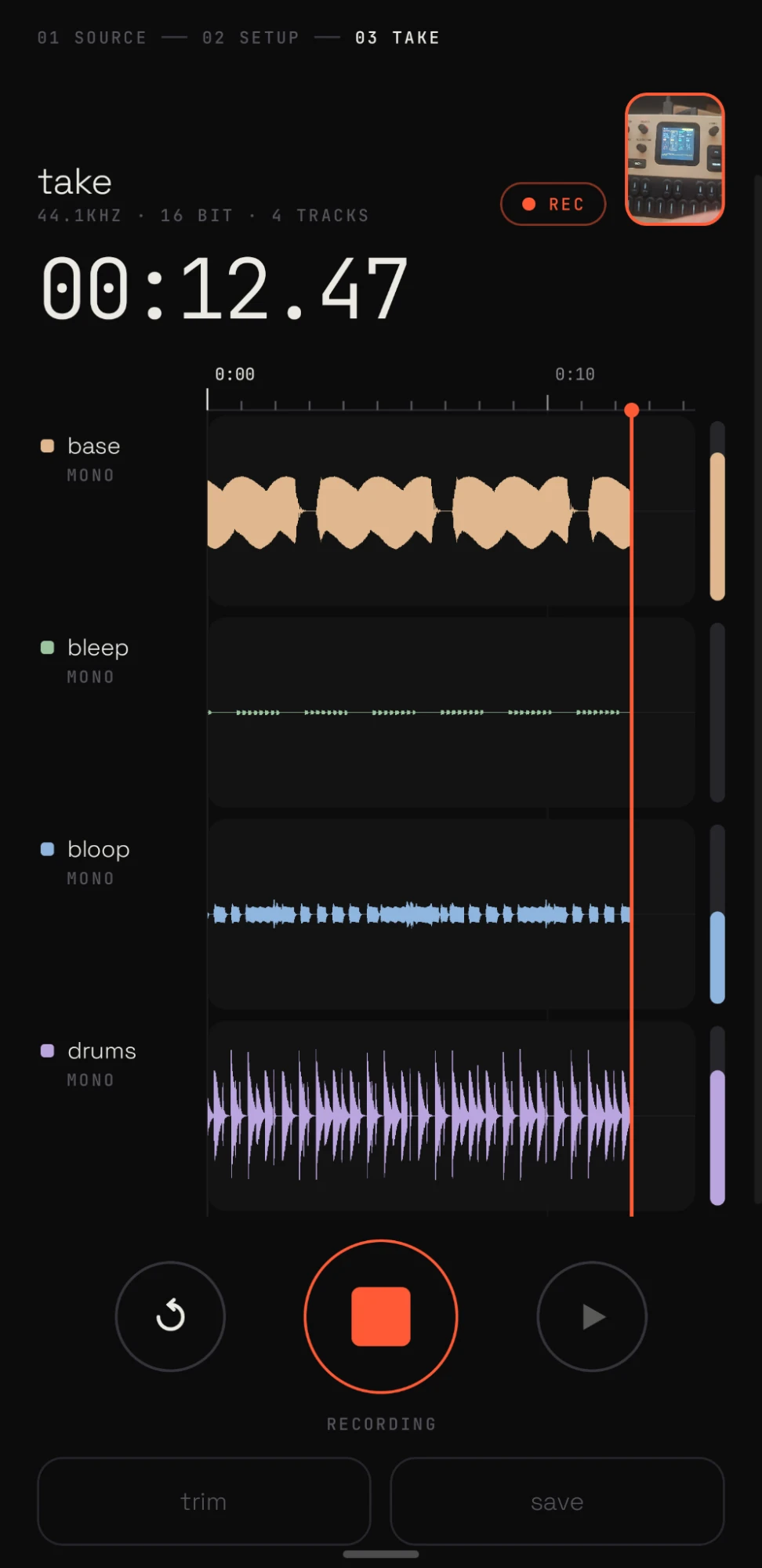
Loud84/100Agentically engineered Android multitrack recorder for USB audio interfaces (all 4 FM-1 / melodee outputs via raw USB). FLAC stems, MP3 mix, video.
take-taker is custom firmware for the M-VAVE FM-1, by @groundstation1. Open source under MIT, latest release v0.6.2 (October 2026), 11 stars on GitHub.
forM-VAVE FM-1·by@groundstation1
Unclaimed. Is this yours? Sign in with GitHub as @groundstation1 to claim it.
take-taker-0.6.2.apk· 21 MB
MIT· groundstation1/take-taker·downloads come from the creator’s GitHub releases
v0.6.2take taker 0.6.2Latest1 file
Install: download
take-taker-0.6.2.apkand open it (upgrades over 0.5.x / 0.6.x).New since 0.5.1
- Full-screen camera (#1): tap the camera thumbnail (expand badge) to frame your shot full-screen, with the live mix scrolling over it, timecode and a record button.
- Footage follows the timeline: after recording, the thumbnail, the full-screen view and a new panel in trim show what you filmed — playing along with playback, and jumping to the cursor or the trim handle you're dragging.
- 🧪 USB Audio Class 2 in raw mode (#3): Newer class-compliant multichannel interfaces (e.g. the EP-136) can be read directly over USB; they default to their deepest format. If raw doesn't work for your device, choose system on the source screen. Reports welcome.
Status: alpha, tested with the melodee firmware only.
🤖 Agentically engineered
Built by a human and an AI agent (Claude Code), and proud of it. Exercised on one phone with one instrument (FM-1 / melodee), reviewed by its makers rather than an outside pair of eyes. No warranty; see LICENSE.
v0.6.1take taker 0.6.1 (experimental)Beta1 file
Install: download
take-taker-0.6.1.apkand open it (upgrades over 0.6.0 / 0.5.x).🧪 Pre-release. Same experimental features as 0.6.0 (full-screen camera, USB Audio Class 2 raw capture), untested on real hardware. 0.5.1 is the last tested release.
Changes since 0.6.0
- USB Audio Class 2 devices in raw mode now default to their deepest sample format (e.g. 32-bit on the EP-136). Class-1 devices like the FM-1 keep defaulting to their lightest format. You can still change it under "usb format" at the bottom of setup.
For EP-136 testers (#2, #3)
Pick the EP-136 on the source screen with raw selected; setup should show 8 inputs and a "class 2 · experimental" label. Expected mapping: 1/2 master mix, 3/4 input CH1, 5/6 CH2, 7/8 aux. If raw doesn't work, the system chip falls back to Android's audio path.
Status: alpha, tested with the melodee firmware only.
🤖 Agentically engineered
Built by a human and an AI agent (Claude Code), and proud of it. Exercised on one phone with one instrument (FM-1 / melodee), reviewed by its makers rather than an outside pair of eyes. No warranty; see LICENSE.
v0.6.0take taker 0.6.0 (experimental)Beta1 file
Install: download
take-taker-0.6.0.apkand open it (upgrades over 0.5.x).🧪 Pre-release. Both new features below are experimental and untested on a real device. If they misbehave, 0.5.1 is the last tested release.
New
- Full-screen camera (#1, experimental): tap the camera thumbnail on the take screen for a full-screen view to frame your shot. Shows the whole frame, the live mix as scrolling waveforms, timecode and a record button. Back or ✕ to return.
- USB Audio Class 2 in raw mode (#3, experimental, untested on hardware): class-compliant UAC2 interfaces (e.g. newer multichannel devices) can now be read directly over USB, like the FM-1. The app reads the class-2 descriptors, asks the device clock which rates it supports, picks 48 / 44.1 kHz when available, and handles high-speed USB packets. It has only been tested against synthetic descriptors in unit tests — reports welcome. If raw mode fails, switch the device to system on the source screen.
Status: alpha, tested with the melodee firmware only.
🤖 Agentically engineered
Built by a human and an AI agent (Claude Code), and proud of it. Exercised on one phone with one instrument (FM-1 / melodee), reviewed by its makers rather than an outside pair of eyes. No warranty; see LICENSE.
v0.5.1take taker 0.5.11 file
Install: download
take-taker-0.5.1.apkand open it (upgrades over 0.5.0).Changes
- The app stays in portrait. Filming in landscape still works: video orientation follows how the phone is physically held.
Status: alpha, tested with the melodee firmware only.
🤖 Agentically engineered
Built by a human and an AI agent (Claude Code), and proud of it. Exercised on one phone with one instrument (FM-1 / melodee), reviewed by its makers rather than an outside pair of eyes. No warranty; see LICENSE.
v0.5.0take taker 0.5.01 file
Install: download
take-taker-0.5.0.apkand open it (upgrades over 0.4.x).New
- Listen: hear the live input mix through the phone's output (setup → listen). Use headphones with the phone mic, or it will feed back.
- Video preview: the save sheet shows a still of the chosen video (camera, waveform or overlay, including the turn) before you export.
- Bigger camera thumbnail while filming.
- Setup scrolls as a whole, so it works in landscape too.
Status: alpha, tested with the melodee firmware only.
🤖 Agentically engineered
Built by a human and an AI agent (Claude Code), and proud of it. Exercised on one phone with one instrument (FM-1 / melodee), reviewed by its makers rather than an outside pair of eyes. No warranty; see LICENSE.
v0.4.2take taker 0.4.21 file
Install: download
take-taker-0.4.2.apkand open it (upgrades over 0.4.x).Changes
- Smoother overlay waveforms: antialiased, and stable while scrolling (no shimmer).
- Video orientation follows the phone: recordings start the way the phone is held, and exports turn to whichever orientation you held it in most during the take.
- Turn button in the save sheet (camera / overlay): add 90° steps if auto got it wrong.
Status: alpha, tested with the melodee firmware only.
🤖 Agentically engineered
Built by a human and an AI agent (Claude Code), and proud of it. Exercised on one phone with one instrument (FM-1 / melodee), reviewed by its makers rather than an outside pair of eyes. No warranty; see LICENSE.
v0.4.1take taker 0.4.11 file
Install: download
take-taker-0.4.1.apkand open it (upgrades over 0.4.0).Changes
- Overlay video is now a side-scroller: the right edge is "now", the waveforms scroll left (8 s of history across the frame), nothing ahead of the playhead is shown. Lanes fill most of the frame; colours are saturated and at full strength so they hold up over footage.
Status: alpha, tested with the melodee firmware only.
🤖 Agentically engineered
Built by a human and an AI agent (Claude Code), and proud of it. Exercised on one phone with one instrument (FM-1 / melodee), reviewed by its makers rather than an outside pair of eyes. No warranty; see LICENSE.
v0.4.0take taker 0.4.01 file
Install: download
take-taker-0.4.0.apkand open it (upgrades over 0.3.x).New
- Overlay video: when a take was filmed, the save sheet offers off / camera / waveform / overlay. Overlay puts the waveforms (plus session and track names) over the footage, screen-blended so it glows on top without boxes. Rendered at the footage's own resolution and orientation.
Status: alpha, tested with the melodee firmware only.
🤖 Agentically engineered
Built by a human and an AI agent (Claude Code), and proud of it. Exercised on one phone with one instrument (FM-1 / melodee), reviewed by its makers rather than an outside pair of eyes. No warranty; see LICENSE.
v0.3.1take taker 0.3.11 file
Install: download
take-taker-0.3.1.apkand open it (upgrades over 0.3.0).Changes
- The waveform visualization is now available as video export even when the take was filmed: the save sheet offers off / camera / waveform.
Status: alpha, tested with the melodee firmware only.
🤖 Agentically engineered
Built by a human and an AI agent (Claude Code), and proud of it. Exercised on one phone with one instrument (FM-1 / melodee), reviewed by its makers rather than an outside pair of eyes. No warranty; see LICENSE.
v0.3.0take taker 0.3.01 file
Install: download
take-taker-0.3.0.apkand open it. Signed with a development key (same as 0.2.0, so it upgrades over it).New in 0.3.0
- Video alongside takes: pick back/front camera in setup. Video-only capture with a small preview while recording; the audio path is unchanged.
- MP4 export (optional, in the save sheet) into
Movies/TakeTaker/:- with footage: the camera video (no re-encode) + the mixdown, lined up and cut to your trim
- without footage: a rendered square waveform video — lanes, playhead, meters, timecode — + the mixdown
- After saving: preview the mixdown in place, open or share mixdown and video, share a zip of everything (built on demand)
- Fixes: an old save result could show up for a new take; Back now closes the save sheet first
Still true from 0.2.0
- USB raw mode reads class-compliant (UAC1) interfaces directly, so all channels arrive (e.g. all 4 FM-1 outputs)
- Phone mic modes: stereo (dual mic), voice, raw
- FLAC stems / MP3 mix, optional normalize, press-and-hold for destructive actions
🤖 Agentically engineered
Built by a human and an AI agent (Claude Code), and proud of it. Exercised on one phone with one instrument (FM-1 / melodee), reviewed by its makers rather than an outside pair of eyes. No warranty; see LICENSE.
v0.2.0take taker 0.2.01 file
Install: download
take-taker-0.2.0.apk, allow installs from your browser/file manager, open it. Signed with a development key, so it won't upgrade over a build signed differently.What it does
- Multitrack recording from USB audio interfaces and the phone mic
- USB raw mode: reads class-compliant (UAC1) devices directly over USB, so every channel arrives — e.g. all 4 FM-1 outputs, which some phones' audio stacks otherwise downmix to stereo. Defaults to the device's lightest format.
- Phone mic modes: stereo (dual mic), voice (noise suppressed), raw (unprocessed)
- Live view with auto-zooming timeline (1 s / 10 s / minute ticks), pinch zoom, trim with in/out handles
- Save as FLAC stems, FLAC + MP3 mix, or MP3 mix only, into
Music/TakeTaker/; optional mix normalize - Share the mixdown or a zip of everything after saving
- Destructive actions are press-and-hold
🤖 Agentically engineered
Built by a human and an AI agent (Claude Code), and proud of it. Exercised on one phone with one instrument (FM-1 / melodee), reviewed by its makers rather than an outside pair of eyes. No warranty; see LICENSE.