take taker
Android multitrack recorder for USB audio interfaces. Plug in an FM-1 running the melodee firmware, get its four outputs as four separate tracks, and save them as FLAC stems, a mixdown, and optionally a video.
Status
- Alpha. It works, it's young, expect rough edges.
- Tested with the melodee firmware only (FM-1, over USB), on one phone. Other class-compliant interfaces and phones should work but haven't been tried.
- Get it: APK on the releases page.
Features
- Multitrack recording: every channel of a USB interface as its own track, including all 4 FM-1 outputs, which Android itself would downmix to stereo (raw USB mode). Name tracks, pair channels into stereo, add the phone mic.
- Optional video or visualization: film with the phone camera alongside the take, export a rendered waveform video, or overlay side-scrolling waveforms (right edge = now, plus session and track names) onto the footage. Either way the soundtrack is the mixdown.
- Normalized mixdown: stereo MP3 mix normalized to -1 dBFS (or left as is), next to lossless FLAC stems.
- Listen: optionally hear the live input mix through the phone's output while you play.
- Auto-zooming live timeline, trim with in/out handles, still preview of the video before saving, preview / open / share after saving.
How it works
- 01 source — pick one or more inputs (USB interfaces, phone mics). Hot-plug aware.
- 02 setup — per-channel live meters, name channels, link neighbours into stereo tracks, pick sample rate (defaults to the highest any selected source offers).
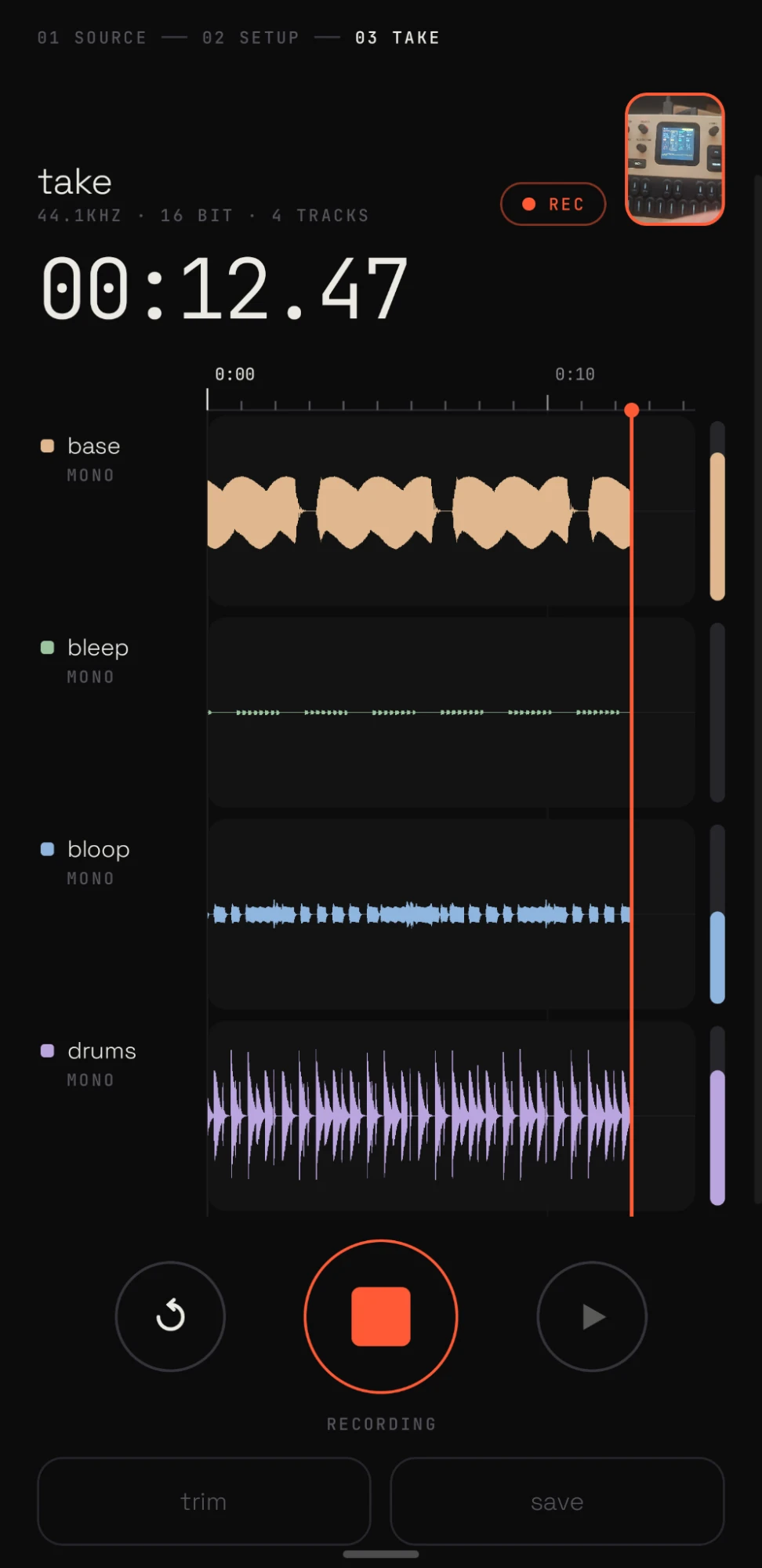
- 03 take — record / restart (discard) / play / trim / save. The timeline auto-zooms out (10 s → 5 min window) with a 1 s / 10 s / minute tick hierarchy so zooming keeps its feel; pinch to zoom, drag to pan, double-tap to follow again, tap to place the play cursor.
- trim — drag in/out handles, play the selection.
- save — multitrack (one FLAC per track), multitrack + MP3 mix, or MP3 mix only, with the
mix optionally normalized to -1 dBFS. Files land in
Music/TakeTaker/<name>_<yyyy-MM-dd_HHmm>/. Optionally also an MP4 inMovies/TakeTaker/: the camera footage recorded alongside the take (copied without re-encoding, lined up with the audio), or — without footage — a rendered waveform video (lanes, playhead, meters, timecode). Either way the soundtrack is the mixdown as AAC. - video — pick back/front camera in setup to film alongside a take. Video-only capture (CameraX); the audio path doesn't change and the two are aligned by start time at export. Tap the camera thumbnail (it has an expand badge) for a full-screen view to frame the shot, with the live mix scrolling over it and a record button. Once a take exists, the thumbnail, full-screen view and a panel in trim show the recorded footage: playing along with playback, and jumping to the cursor or the trim handle you're dragging.
- after saving — preview the mixdown in place, open or share mixdown / video, or share a zip of everything (built only when asked for).
- Destructive actions (restart, recording over an unsaved take) are press-and-hold.
Known limitations
- Two capture paths for USB interfaces, switchable per device on the source screen:
- raw — the app claims the device's USB audio streaming interface and reads the isochronous
stream itself (
src/main/cpp/usbiso.c, usbfs, no root). Every channel, untouched. Needs a one-time USB permission; Android can't use the device while the app holds it. USB Audio Class 1 is tested (FM-1). Class 2 support is experimental and untested on hardware: it reads the class-2 descriptors, asks the device clock for its rates and sets 48/44.1 kHz when offered, and handles high-speed packet sizes, but nobody has run it against a real UAC2 device yet. Raw mode defaults to the device's lightest format at full channel count (16 bit on the FM-1, whose 24-bit format only pads 16-bit audio), which helps small synths near their CPU limit. A tucked-away "usb format" line at the bottom of setup lets you change it. - system — the normal Android audio path. Works with anything, but is subject to the vendor audio policy: on the test phone the HAL opens the FM-1 at 4 channels and then downmixes to stereo for apps. The app detects this and says so.
- raw — the app claims the device's USB audio streaming interface and reads the isochronous
stream itself (
- The phone's built-in mics show up as one Phone mic source. Android gives an app a single built-in-mic input whichever capsule it asks for (selecting "bottom" and "back" separately recorded bit-identical audio), so what you choose instead is the recording preset: stereo (camcorder preset → real dual-mic input), voice (call preset: noise suppression, echo cancelling, mono) or raw (unprocessed, mono).
- Multiple sources record side by side with best-effort sync; independent device clocks will drift slowly over long takes.
- Raw takes are buffered uncompressed in the app cache until saved (~700 KB/s for 4 ch @ 44.1 kHz).
- MP3 is encoded with a pure-Java LAME port (jump3r), so mixdowns of long takes are slow-ish.
- Camera footage can only start on a keyframe, so a trimmed video export may begin up to about a second before the in point (the audio starts at the same moment, so they stay in sync).
- The FLAC encoder is a small hand-rolled one (fixed predictors + Rice coding). Output is verified
bit-exact against ffmpeg in
EncoderTest, but it compresses a bit worse than libFLAC.
Build
Android SDK 36, NDK 28.2 (the one C file is compiled by a small Gradle task calling the NDK's clang directly; ndk-build can't cope with spaces in the project path), JDK 17+.
./gradlew :app:assembleDebug
adb install -r -g app/build/outputs/apk/debug/app-debug.apk
./gradlew :app:testDebugUnitTest writes test FLACs and expected samples to app/build/enc-test/.
Layout
app/src/main/java/app/taketaker/
  AppModel.kt        state machine (source → setup → live ⇄ trim, save)
  audio/Engine.kt    one capture thread per input (AudioRecord or raw USB), meters, takes to disk
  audio/UsbRaw.kt    UAC1 descriptor parsing + JNI binding for the iso reader
cpp/usbiso.c         isochronous IN streaming over usbfs
  audio/Take.kt      raw float32 per channel + peak summaries
  audio/Flac.kt      FLAC encoder
  audio/Exporter.kt  stems / mixdown / MediaStore publishing / zip
  video/CameraRig.kt video-only CameraX capture alongside a take
  video/VideoExport.kt  AAC mix + camera remux, rendered waveform video, or overlay → MP4
  video/GlCompositor.kt GL: decoded footage + screen-blended waveform layer into the encoder
  ui/Timeline.kt     ruler, waveforms, gestures, trim handles
  ui/Screens.kt      the screens
Credits
- Fonts: Space Grotesk and JetBrains Mono, both SIL Open Font License 1.1.
- MP3: jump3r (LGPL), a Java port of LAME.
javax/sound/sampled/AudioFormat.javais a minimal stub so it runs on Android.
License
MIT for the app code. Bundled fonts remain under the OFL; jump3r under the LGPL.
🤖 Agentically engineered
Built by a human and an AI agent, and proud of it. The human set the direction, held the hardware and made the calls; Claude Code wrote the code. Along the way it read the phone's audio HAL logs to find out why 4 channels became 2, wrote a userspace USB audio driver to get them back, and checked its own FLAC encoder bit-for-bit against ffmpeg.
Know what you're running: it has been exercised on one phone with one instrument (FM-1 / melodee firmware), and reviewed by its makers, not by an outside pair of eyes. Use it, fork it, file issues. No warranty — see LICENSE.