SP-1 tape looper
Hype1/100Four-track tape style looper firmware.
forTeenage Engineering / KANO Stem Player (SP-1)·by@chattock
Unclaimed. Is this yours? Sign in with GitHub as @chattock to claim it.
sp1_looper.bin· 204 KB· +5 files
MIT· chattock/sp1-tape-looper·downloads come from the creator’s GitHub releases
v3.1.1-officialv3.1.1 — the beat repeat, the chop, and the popsLatest6 files
No format change. Songs recorded on 3.0 play as they are. Flash and play.
Flash: download
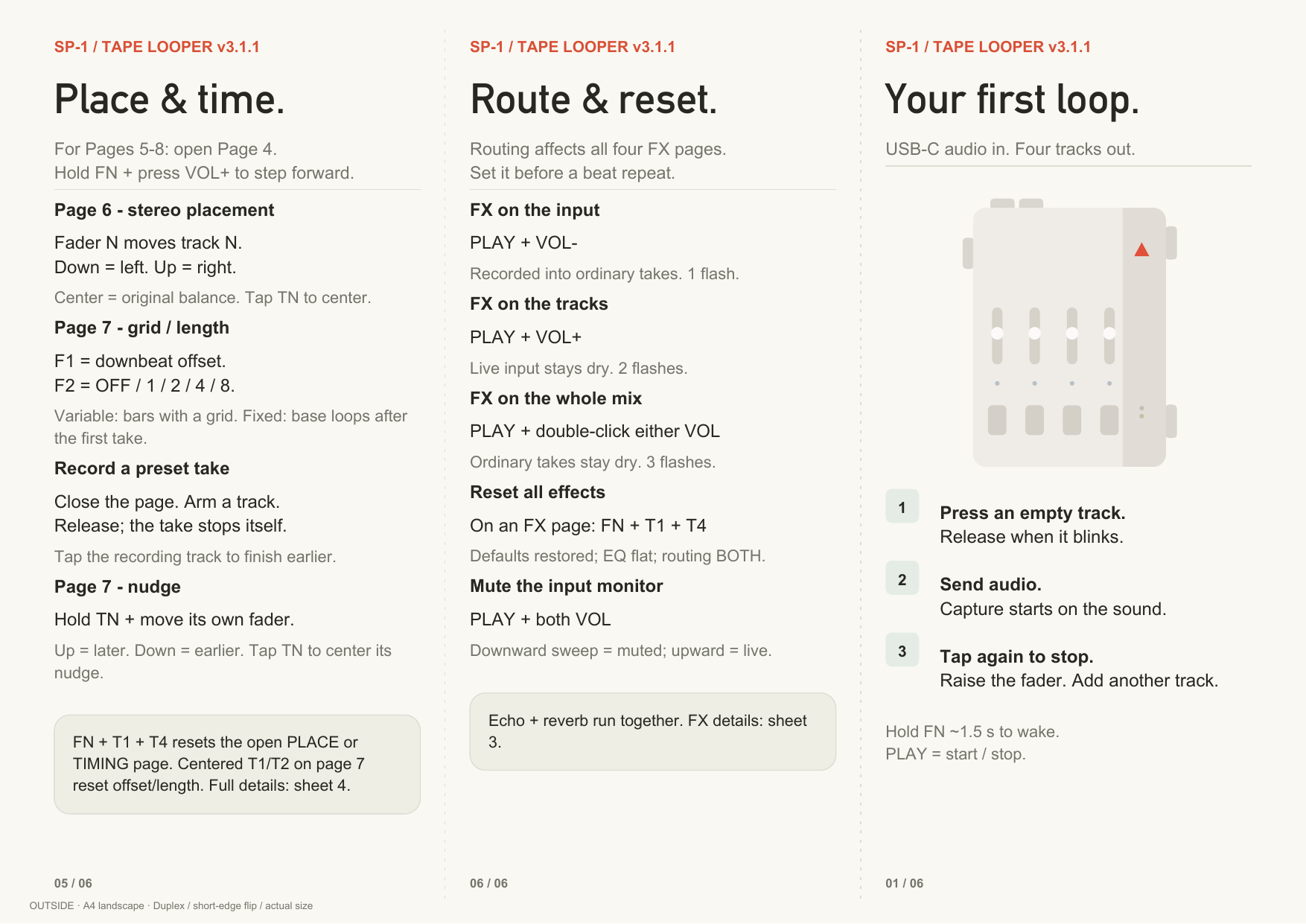
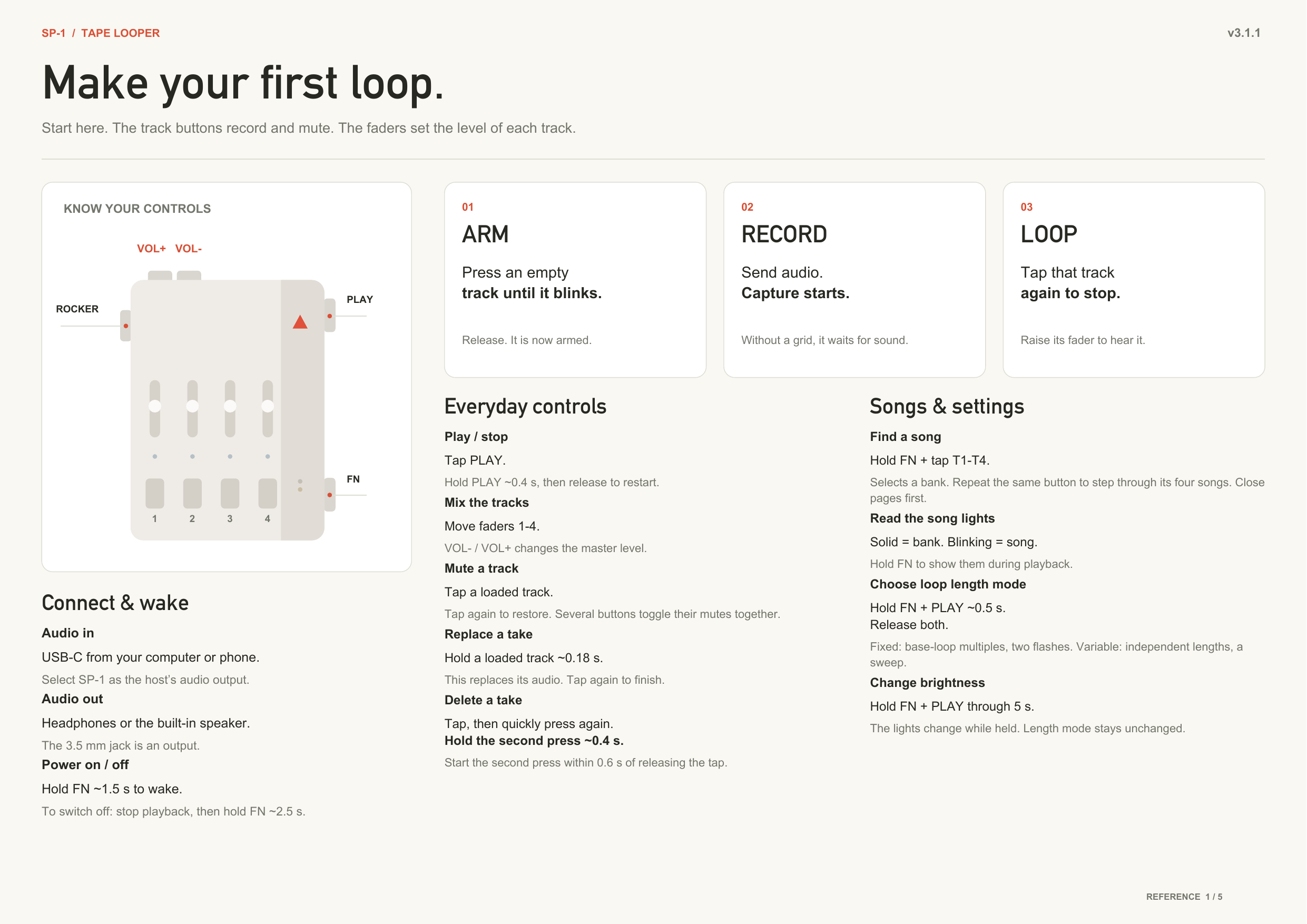
sp1_looper.bin. Flash it with the firmware utility at solderless.engineering. To enter the bootloader, hold Track 1 + Track 4 for 3 seconds, or plug in USB while you hold them.Controls: the pocket guide, reference sheets and a what's-new sheet are in
docs/and attached below.Transfer site: https://chattock.github.io/sp1-tape-looper/ reads and writes 3.x cards, unchanged.
No format change. Songs recorded on 3.0 play as they are. Flash and play.
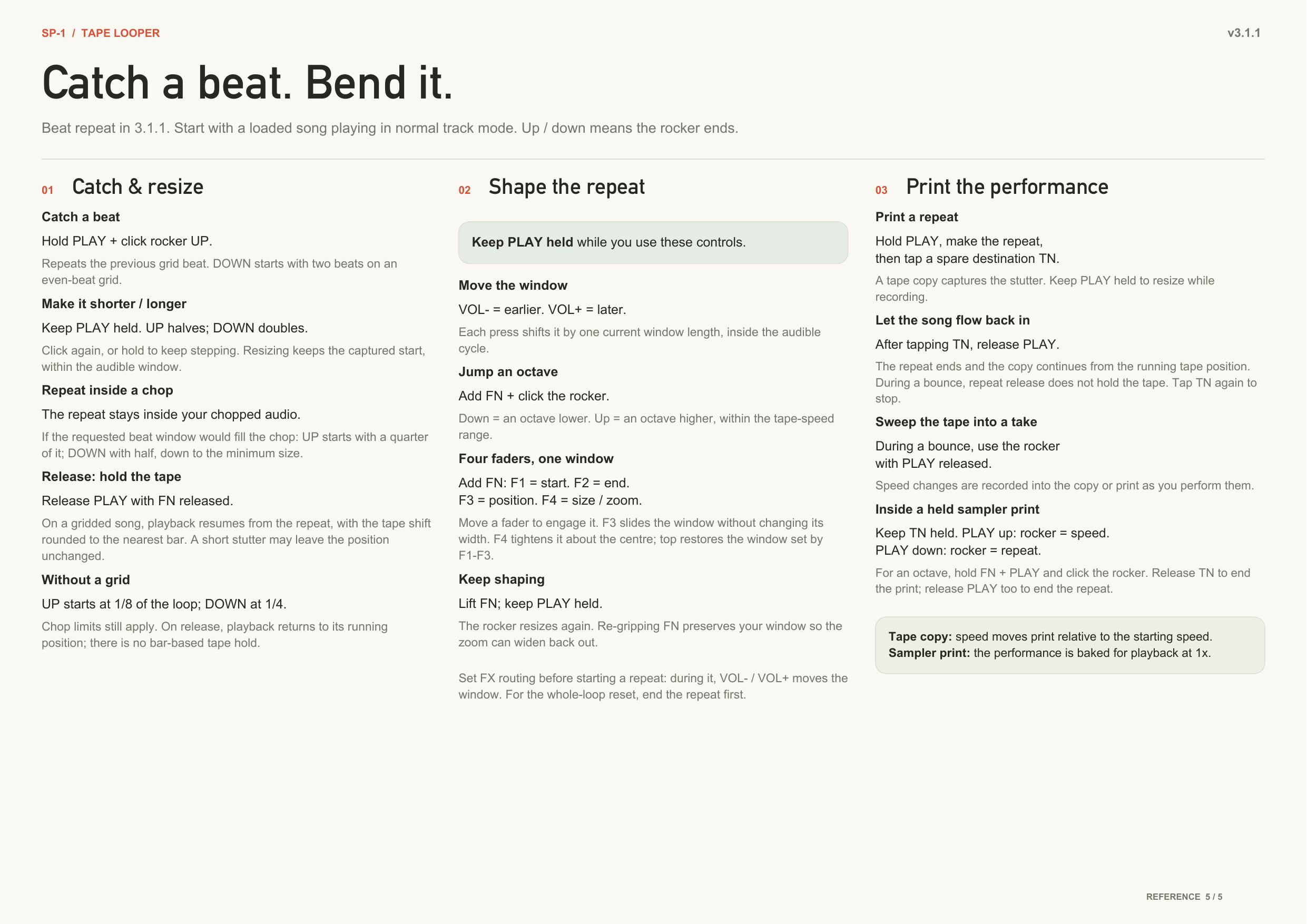
The beat repeat
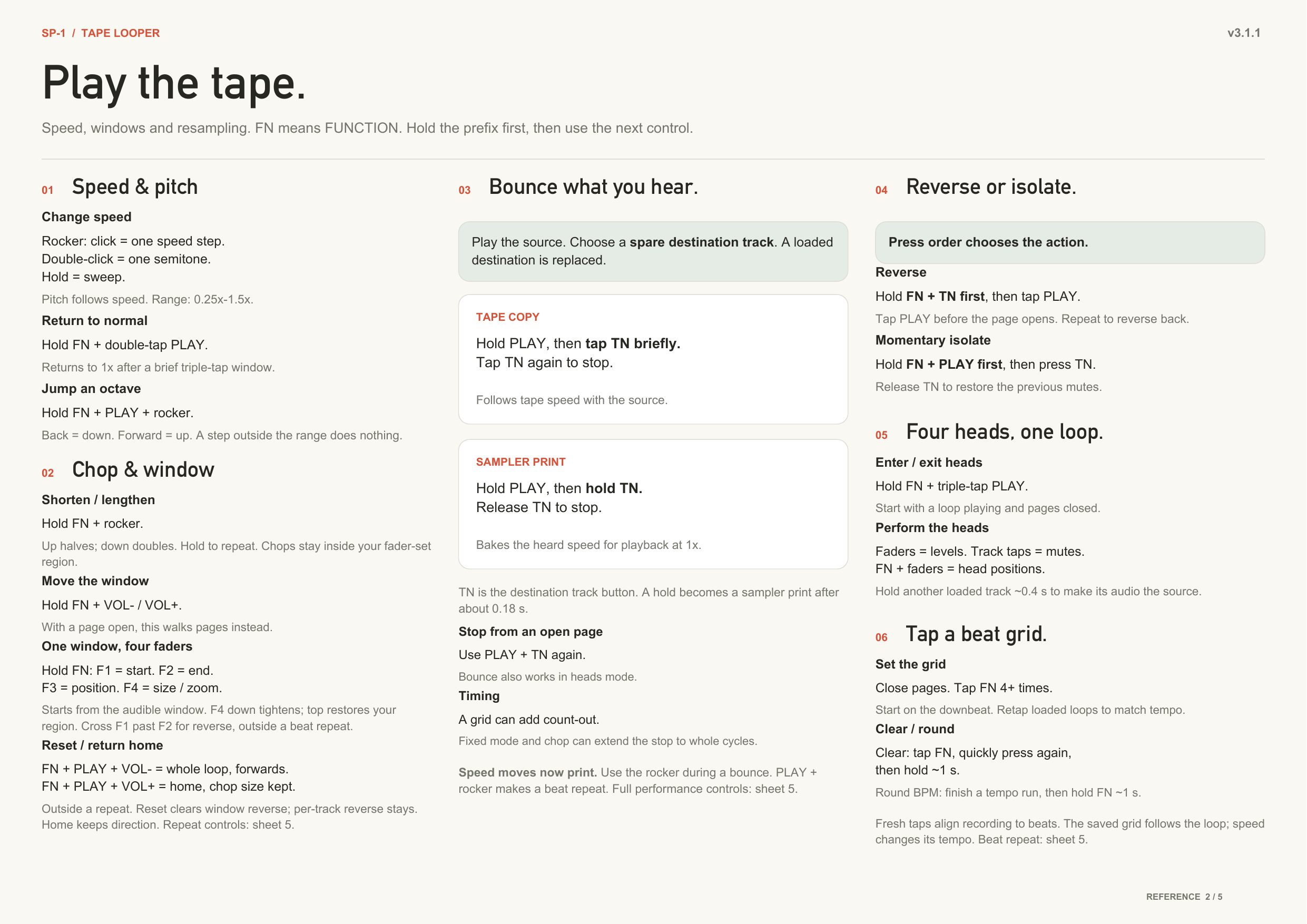
- Hold PLAY, click the rocker. UP = the last beat; UP again or hold = shorter. DOWN = the last two beats; DOWN again or hold = longer. Lift PLAY: it releases, in time.
- While it is live: VOL− / VOL+ = the window earlier / later. FN + rocker = octave. FN + the four faders shape the repeat's window.
- It stays inside a chop. A chop live, and the repeat played audio from outside the chopped slice. It is a window inside what you hear now.
- It always does something. On a chop shorter than a beat the repeat did nothing. UP gives a quarter of the chop, DOWN a half.
- It holds the tape. Let go and each track stays where the repeat left it, rounded to the nearest bar. To let the tape run underneath instead, release PLAY and FN together.
- It survives a bounce, and can start during one. A page-7 nudge moves the repeat with the track.
The window — FN + the four faders
- One window, four handles. Faders 1 and 2 are its edges, 3 is its position, 4 is its size. The rocker does position and size in musical steps.
- They start from what you are hearing. Grab any of them while a chop or a repeat is live and they continue from that window, instead of jumping out to the whole loop.
- The rocker chops inside the window you set. Set a region with FN + faders 1/2, then work the rocker: it divides and steps within that region instead of throwing it away.
- Fader 4 zooms, and zooms back out. It tightens the window about its centre and returns it exactly. Take it back to the top and you have the window you set.
- Slide fader 1 past fader 2 and the loop plays backwards.
- FN + PLAY + VOL− is the reset: the whole loop, forwards, no chop. FN + PLAY + VOL+ moves the window home and keeps its size. A track you reversed with FN + track + PLAY stays reversed — that is its own control.
Bounce
- The rocker is free during a bounce. Every block bakes at the speed you hear.
- In a held bounce: lift PLAY, rocker = tempo. Keep PLAY down, rocker = the repeat.
Playing
- Monitor mute = PLAY + both VOL. Anywhere, any page.
- Delete = tap, then press and hold within 600 ms.
Sound
- Echo and reverb together.
- The pops are gone: the reverb rail pop, the dropout ticks, the rare hard click at max speed.
- Headroom. Four stereo tracks at 1.5× with USB in and echo + reverb at max: six minutes, zero dropouts. Heavy stacks on top of that can still drop out.
Timing
- The grid comes from the tape. Beats per loop and the 1 are derived from the loops and saved with the song. No drift.
- A gridded song no longer drifts against its own metronome and MIDI clock. The song's loop is the length the tape plays. Old songs are corrected when they load. Nothing is written to your card unless you record.
- Chopped tracks stay locked. Tracks recorded at different points in the loop walked apart from each other the deeper you chopped. They hold at every depth now.
- A deep chop keeps time. The chop window rounds to the musical division instead of truncating to whole blocks. A held /16 chop slid about 88 ms a lap against the grid; it is under 6 ms now. The end of the take is reachable at every depth.
- The chop depth limit is correct on mono songs.
- The loop seam no longer dips at the join.
Not fixed
- A chop window is still a whole number of blocks, so it can sit up to 3 ms from the exact division.
Removed
- FN + both VOL on a page. The mute is PLAY + both VOL, everywhere.
- FN + fader 4 no longer duplicates the page 1 filter. The filter keeps its page fader and its track-tap bypass.
v3.0.0-officialv3.0.0 — stereo, fx, and much more5 files
Back up first. 3.0 changes the storage format. Open the transfer site on your current firmware and use Download all. Then flash. The first boot formats the card and every song on it is gone.
Flash: download
sp1_looper.bin. Flash it with the firmware utility at solderless.engineering. To enter the bootloader, hold Track 1 + Track 4 for 3 seconds, or plug in USB while you hold them.Controls: the reference sheets and the pocket guide are in
docs/and attached below. Most gestures changed. Read the pocket guide once.Transfer site: https://chattock.github.io/sp1-tape-looper/ reads and writes 3.0 cards. It still reads 2.x cards, so back up from it before you flash.
[3.0.0] - stereo, fx, and much more
Back up first. 3.0 changes the storage format. Use Download all on the transfer site before you flash. The first boot formats the card. Every song on it is gone. Songs recorded on 3.0 survive later 3.x flashes.
Sound
- Stereo. Takes record in stereo. Playback is stereo.
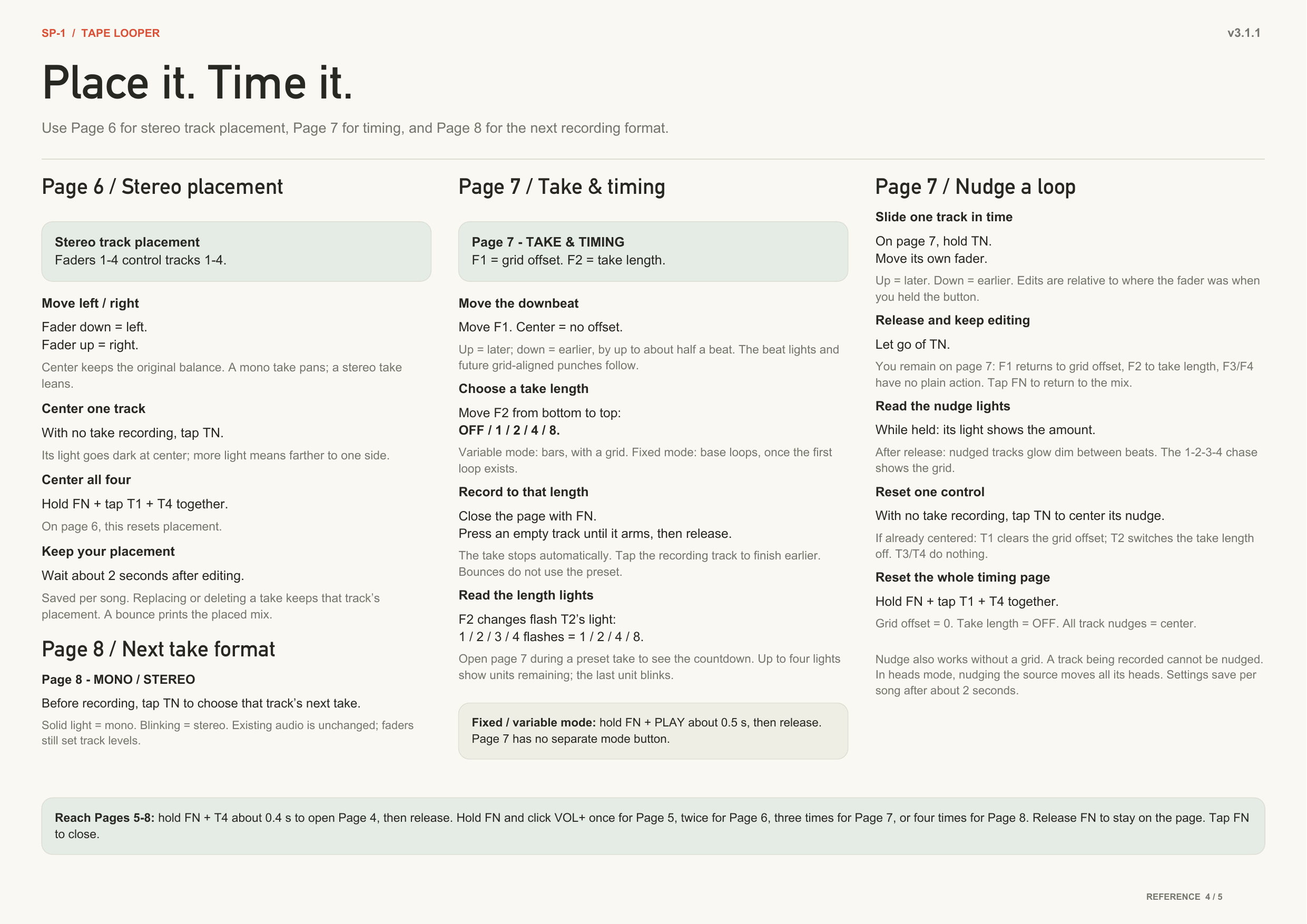
- Mono or stereo per take. Page 8: tap a track to set its next take.
- Speed range 0.25× to 1.5×. Pitch follows speed, as before.
- The dropouts at max speed are gone. Four tracks at 1.5× with USB audio in plays clean. The one edge left: heavy effect stacks at that corner can still drop out.
Effects — eight pages
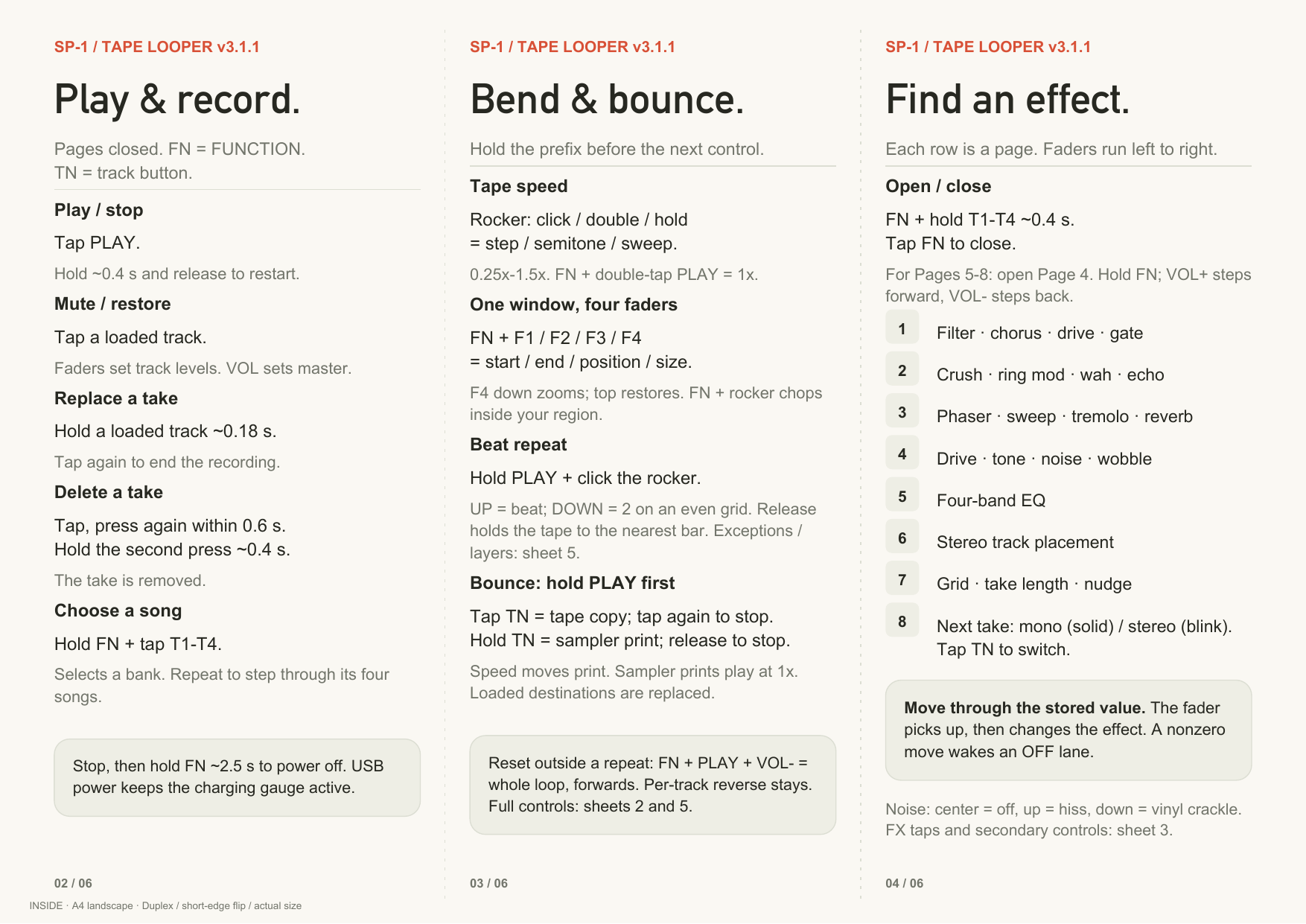
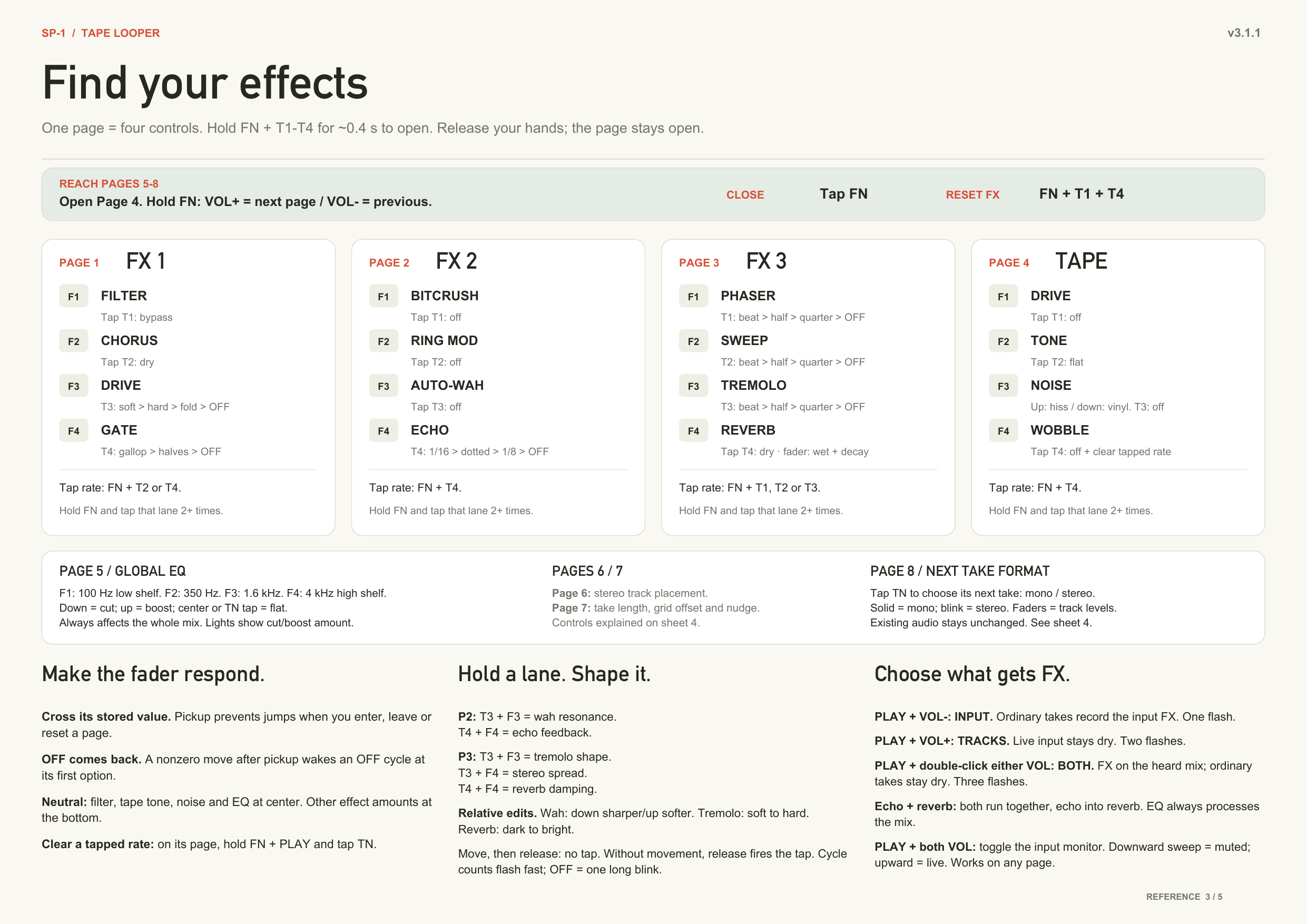
- Open a page: hold FN + a track button ~0.4 s. The faders become that page's controls. Tap FN to close. FN + VOL−/VOL+ steps through all eight pages.
- Page 1 FX: filter, chorus, distortion, trance gate.
- Page 2 FX: bitcrush, ring mod, auto-wah, echo.
- Page 3 FX: phaser, sweep, tremolo, reverb.
- Page 4 TAPE: drive, tone, hiss / vinyl crackle, wobble.
- Page 5 EQ: four bands on the whole mix.
- Page 6 PLACE: stereo placement per track, saved with the song.
- Page 7 TAKE & TIMING: downbeat offset, next take's length in bars, and a per-track nudge (hold the track button, move its fader).
- Page 8 MODE: mono / stereo for each track's next take.
- Taps on a page are resets. FN + T1 + T4 resets every page.
- Second controls. Hold a track button and move its fader: wah resonance, echo feedback, tremolo shape and spread, reverb damping.
- Tap a rate. Hold FN and tap a lane's button in time. That lane follows your taps instead of the grid.
- Routing. PLAY + VOL− = effects on the input (takes record with them). PLAY + VOL+ = effects on the tracks only. PLAY + double-click VOL = the whole mix.
- Monitor mute. FN + both VOL on a page.
Bounce
- Tape copy. Hold PLAY, tap a track: the mix records into it at the speed you hear. Tap again to stop.
- Sampler print. Hold PLAY, hold a track: records while you hold, baked to play back at 1×.
Playing
- Record = hold an empty track. Release; it is armed. Capture starts on the first sound. Tap it to stop.
- Delete = tap a track, then press again and hold ~0.4 s. A double-tap no longer deletes.
- Reverse a track. Hold FN + the track, tap PLAY. Works in every mode.
- Isolate. Hold FN + PLAY, press a track: a momentary solo.
- Octave up / down. Hold FN + PLAY, click the rocker.
- Chop reset / home. FN + PLAY + VOL− resets the window. FN + PLAY + VOL+ moves it home.
- The chop window reaches one block.
Timing
- The grid stays on the loops. The beat lights and the MIDI clock no longer drift off the audio over minutes. A pause keeps the beat phase.
- Tap tempo retunes against the loops' native tempo. A fifth tap no longer undoes the fourth. A rocker move no longer skews the next tap run.
- Preset take length. Set bars on page 7. The take stops itself on the grid.
Lights
- VU meter on the side row while playing.
- Page lights. Each lane shows its depth. Page 7 shows the beat chase.
- Hardware PWM. The LEDs no longer cost CPU.
Not fixed
- A bounce at the full corner (three stereo tracks at 1.5× with USB audio in) can overrun. Bounce at 1× when it matters.
Transfer site (ships with this firmware)
- Reads and writes the 3.0 format: stereo WAV in and out, mono and stereo takes side by side, Download all.
Removed
- Heads-mode double-tap reverse (use FN + track, then PLAY).
- The FN + rocker double-click chop reset (use FN + PLAY + VOL−). Every FN + rocker click now halves or doubles.
v2.7.2-officialv2.7.2 — the dropout fix1 file
- USB streaming: no more dropouts at normal speeds. USB traffic made each storage read take twice as long. Now the tape streamer gets priority when a loop runs low. It steps back when the loop recovers. Buttons stay responsive.
- Max speed while streaming: much, much better. Dropouts are rare now. Max speed without streaming is clean.
- Heads mode: double-tap reverses the source track. Before, the other heads reversed and the source did not. Bug since v2.3.0.
- No more short silence when you let go of FUNCTION after a window change. Releasing FUNCTION after you move the window (or glide the chop) always caused a short gain dip. Now the dip happens only if you release while still moving a fader.
Flash: download
sp1_looper.bin. Flash it with the firmware utility at solderless.engineering. To enter the bootloader, hold Track 1 + Track 4 for 3 seconds, or plug in USB while you hold them.Your loops are safe. This release does not change the storage format.
v2.7.1-officialv2.7.1 — instant record1 file
No format change: songs, grids and settings survive when flashed.
Added
- Instant record, on by default. But recording still keeps the same behavior of audio-threshold activation or right on the grid if there is one.
- Opt for slight-hold record. Uncheck instant record on the transfer site and takes keep only what comes after the short arm delay, like before.
Fixed
- Grids hold still. The machine measured each gridded take and moved the grid afterward. It does not move the grid anymore. The grid you set is the grid you keep, until you re-tap it.
Transfer site (ships with this firmware)
- Play. Listen to any track in the browser before you download or replace it. It loops at the song's tape speed.
- Delete. Remove a track from the site. Same as double-tap delete.
- Upload many. Select a batch of downloaded files. Each file goes to its song and track by name. With Download all, this is a full backup and restore.
- True lengths. Cells show the recorded audio's length, not the loop region. No more "56.3 s" on a two-bar take.
- A settings panel with the instant-record switch, and progress bars in a sticky activity log.
Flash
sp1_looper.binas usual.v2.7.0v2.7.0 — stabilization1 file
No format change — flash normally (Track 1 + Track 4 -> solderless.engineering with sp1_looper.bin); songs, grids and settings survive.
Heads up for the NEXT release (3.0): it changes how loops are stored, so its first boot reformats loop storage. Export anything you want to keep (Download all on the transfer page) before flashing THAT one. This release needs none of that.
We measured the button ladder on hardware, all sixteen states. That explained mutes that missed, low end that vanished, and random song jumps. Flash reads also got 20% cheaper. Dropouts with 4 tracks at high speeds are still an issue with audio feeding in over USB (no dropouts if audio input is paused)
Optimizations
- Fewer dropouts. Each 512-byte flash read gets a CRC check, and that check ran one byte at a time. It was 42% of the read path. The CRC now folds four bytes per pass.
- A muted track stops reading from flash during a take. That bandwidth goes to what you can hear.
Added
- Mute any set of tracks at once. The four track buttons share one analog pin. A multi-button press makes its own voltage, and most of those voltages had no meaning in the decode table. All sixteen states are measured and mapped now. Tap the other three tracks to solo one. This was filed as a hardware limit for months. It was a table.
- Track 1 + Track 4 is two gestures. A quick press mutes tracks 1 and 4. A 3 s hold enters the bootloader. Only exactly 1+4 can arm it. 1+2+4, 1+3+4 and all four are their own codes and can never reach it.
Fixed
- The high-pass no longer turns on by itself. The FUNCTION fader layer engaged at 1.2% of travel. A loose fader or a hand-wobble crossed that. The gate is 2.7% now, still trivial to cross on purpose.
- The window and the chop no longer edit themselves.
- The start/end faders no longer flip to reverse when they are only near.
- FUNCTION + several track buttons no longer changes the song.
- FUNCTION + three or four track buttons no longer counts as PLAY.
- The device can always power off. A phantom song change latched the transport with nothing loaded. The power-off gate then refused to run.
- Power-off no longer competes with the transport. Holding function no longer accidently powers off device. The tape must be stopped to power-off.
- Tape speed survives power-off. The speed reached the song index only on a song switch. Power-off now stores the live speed before the final flush.
v2.6.0v2.6.0 — one clock1 file
One clock. No format change — flash normally (Track 1 + Track 4 -> solderless.engineering with sp1_looper.bin); songs, grids and settings survive.
v2.5.0's bench ran at 120 BPM — one of only twelve integer tempos whose eight-beat loop lands exactly on a flash-block boundary — so it could not see what was left. A 128.000 BPM bench found it, plus five bugs of its own and a way to round to the nearest whole number BPM. An eight-beat take now comes back as exactly 180000 samples at exactly 128.000 BPM and stays locked to takes recorded minutes later. No format change: songs, grids and settings survive.
Added
- The grid learns the tempo from what you played. Every gridded take leaves a landmark — its first onset — and the music runs at one tempo through all of them. Each take is measured against your first, so the baseline grows all session and the estimate sharpens. Bench: a tap of 128.24 refined to 127.985, converged on 128.000, then found nothing left to correct. Fixes tempo, not phase — the downbeat stays yours.
- Round to a whole BPM. Tap a tempo, hold FUNCTION about a second: the lights sweep, catch the beat, and the grid rounds. If the tap isn't near a whole number it declines and all four lights blink.
Changed
- Loop geometry is samples, not 512-byte blocks. At 128 an eight-beat take stored 179968 against a true 180000 — 32 samples a lap, ~10.7 ms/min. Worse, the grid kept the true beat while the loop wrapped at the stored one, so they slid apart at four samples per beat and a late overdub punched where the grid was, not where the loop was. That was the layering complaint.
- Window gestures no longer flush the audio. Every edit used to drop the read-ahead and dip master gain to zero; the fader commits every 60 ms, so a sweep was a ~16 Hz tremolo with real silence under it. Reported by geraasmasjien and luuuciano. Continuous gestures settle once on release now; button presses stay instant. The window trails your hand instead of jumping.
- A late punch is forgiven up to a third of a beat, was a quarter.
- One owner for the beat — it lived in three variables written from twelve places, tied by a convention asserted once and never re-checked.
Fixed
- A later take could shove an earlier one half a beat out of time, in one step, when a second recording finished. The rescale after a tempo correction clamped each loop to its recorded audio — but a gridded take is deliberately longer, since the stop rounds to the nearest beat and pads to the line. That pad was discarded. Needs a second landmark to fire, which is why take one was always fine.
- The loop and the grid could land on different tempos — 22612 against 22504, 0.48%, walking the first take ~290 ms/min away from everything after it.
- Overdubs came back at the wrong point in the loop after a song switch or power-cycle: the anchor was read one line before it was loaded, so it used the previous song's value. First takes anchor at zero and always survived.
- Reverse survived a rocker reset. With the faders crossed, FUNCTION + rocker double-click silently un-reversed playback while the faders still said reverse. Reported by nervouskidz.
- Deleting a still-flushing take switched off the late-punch rescue for the session, silently.
- MIDI clock ran fast — the tick truncated and accumulated, ~32 ms/min.
- The DJ filter ducked entering high-pass, and could wrap and click on a loud four-track mix near its top corner.
Known limits
- Prints and chopped windows stay block-quantized and can drift slightly over several minutes. Recorded takes don't. (This can be improved in the future)
- Anchors reload rounded to a block (<3 ms, once per song load, this can be improved in the future).
- Printing is slower at high tape speed: the render yields to playback.
v2.5.0v2.5.0 — timing truth1 file
Timing truth. No format change — flash normally (Track 1 + Track 4 -> solderless.engineering with sp1_looper.bin); songs, grids and settings survive.
Bench: 120.000 BPM click over USB, recorded, exported, measured per sample. An eight-beat take now comes back as exactly 192000 samples with 0.02 ms of drift across the loop. The same series measured 7.94 / 7.77 / 7.02 / 6.94 beats before.
Timing truth. luuuciano reported that loops recorded over a track he was mixing never quite sat on it and drifted apart from each other. A click-track bench — 120.000 BPM over USB, recorded, exported and measured per sample — cleared the engine (clicks landed 24000 samples apart with zero in-loop drift) and found five separate causes. All are fixed here. An eight-beat take now comes back as exactly 192000 samples: eight beats to the sample, with 0.02 ms of drift across the loop. The same series measured 7.94, 7.77, 7.02 and 6.94 beats before.
Fixed
- Loop lengths rounded once, not per beat. Lengths live in whole flash blocks and the code rounded EACH BEAT before multiplying: at 120 BPM a beat is 93.75 blocks, forced to 94, so even a perfect tap recorded a loop that played at 119.68 — 1.33 ms per beat, compounding every lap, about 160 ms of slide per minute. The metronome runs off the unquantized grid clock, which is exactly why the lights looked locked while the audio slid. The whole take is rounded once now, and later takes reference the base, so lengths track the true tempo AND stay exact multiples of each other.
- A freshly tapped grid is the truth. The first take used to re-anchor the song's downbeat to wherever recording happened to start, discarding the phase you had just tapped in against the music (bench: 21–82 ms off). When a grid was tapped this session, the first take now punches ON it like an overdub. Songs whose grid came from a first take keep the classic feel: your take IS the "1".
- Stops round to the nearest beat. First takes trimmed back past a 16% window, so releasing a hair early lost a whole beat — an intended 8-beat loop became 7 and phased against its 8-beat siblings forever. The window is half a beat now, matching overdubs.
- Punch on the beat, not the bar, and schedule from the press. The count-in waited up to a bar (~2 s). Worse, a 100 ms hold filter ran before the punch was scheduled, so pressing exactly ON the beat was the worst possible moment: the line had passed, and the take waited a full beat. Punches now key off the instant your finger lands.
- Tap tempo is timed on the PRESS, not the release. A tap cannot be classified until the button comes up, but the moment it names is the press — so the grid was being planted late by however long your finger rested on the button, tens of milliseconds and different every tap. The beat spacing also comes from the sample clock now instead of being rounded through a millisecond counter and back from BPM.
- The estimator no longer runs forever.
tempo_finish()is the only thing that clears the onset estimator's active flag and the gridded stop path never called it, so since 1.0 it kept sampling through every later overdub for an answer nobody reads.
Added
- The first take teaches the tempo. The onset estimator has run through every first take since 1.0; on tapped-grid songs its answer was thrown away. It now REFINES the tapped beat from the audio just recorded — a coarse pass over ~4 beats, then a fine pass over up to 24 counted with the coarse result as the ruler, plus a subdivision sanity check. Accepted only within 5% of the tap; the grid, metronome and MIDI clock retune with it. Human tapping is 0.2–1% off and that error is what walks a loop off its source — the recording knows better. Ambiguous or non-percussive material keeps the tapped value.
- Pre-roll: a punch pressed late still starts on the beat. The record ring sat empty whenever nothing was capturing; it now holds the input at all times, so the machine always remembers what it just heard. An armed punch takes the NEAREST grid line — press before it and it waits as before, press just after and the take begins on the line you passed, its head adopted straight out of the ring with the length, playhead and overdub phase anchor all backdated to match. Reach is a quarter beat, capped at 120 ms: half a beat was tried first and was too generous, since a press 250 ms after a line usually MEANT the next line, and reaching back made the take a beat too long. The ring fills on empty songs too, so the very first take of a song can reach back. Costs zero RAM — the buffer already existed.
Changed
- The any-time grid clear is far easier to hit: tap FUNCTION, then press again and hold ~1 s (a double-tap where you hold the second press). The window went from 1.5 s to 3 s — the gesture was real but nearly impossible to land.
Known limits
- The downbeat itself is still placed by your hand, and hands anticipate a beat they are following by a few tens of milliseconds. Invisible playing alone, since every track punches on the same grid; it does offset the MIDI clock against the music by that much. Measured and understood.
- The MIDI clock's tick interval is a truncating divide, so it runs slightly fast and accumulates against external gear over a long session. Both of these will get tackled next-ish
v2.4.0v2.4.0 — the resample release1 file
The resample release. No format change — flash normally (T1+T4 -> solderless.engineering with sp1_looper.bin); songs, grids and settings survive.
The resample release — heads mode learns to print.
Added
- The BOUNCE: in heads mode, hold an EMPTY track (~0.4 s) and the whole heads performance — positions, directions, per-head levels and mutes, the window, reversed or not — prints into it as ONE loop. It is not a recording: it's an offline render of exactly one audible cycle, so the seam is perfect by construction and the print lands IN PHASE with its source. The destination fast-blinks while it prints (a few seconds), then heads mode exits by itself with the new loop playing — you hear exactly what you just built. Print it, re-head it, print again: the resample spiral. (Live filter sweeps and tape speed are NOT baked in — they stay live tools on top of the print, like on any track.)
- Heads on ANY track: the triple-tap engages on the lowest playing unmuted track, and holding any LOADED track inside heads mode makes IT the tape (your head positions and directions carry over).
- You can see what's printable: a head with nothing underneath chases at a faint ghost intensity — faint = empty = a bounce target; full bright = loaded = a source you can grab.
Changed
- Heads-mode mutes are performance state now: entering heads un-mutes all four heads (a muted track no longer sits silent in the canon), taps mute freely without ever touching the song's saved mutes, and the original mutes return exactly on exit.
- The muted-track ghost glow is a touch fainter in dim mode, so muted reads clearly darker than playing; full-brightness mode is unchanged.
v2.3.1v2.3.1 — pocket-proof power-on1 file
Patch release. No format change — flash normally (T1+T4 -> solderless.engineering with sp1_looper.bin); songs, grids and settings survive.
Fixed
- Pocket-proof power-on: waking from full power-off used to skip the hold check entirely — one accidental press in a bag switched the device fully on ("playing breakbeats in your pants", community report) and drained the battery. Every power-on now requires the same deliberate hold, lengthened to a stock-like ~1.5 s, with the side row filling as a countdown (the power-off animation, mirrored). Releasing early drops straight back to off; an accidental blip costs milliseconds and shows one dim LED for an instant. Power-off is unchanged (~2.5 s, countdown). Watchdog/crash recovery still boots directly, preserving forensics.
v2.3.0v2.3.0 — the fader release1 file
The fader release. No format change — flash normally (T1+T4 -> solderless.engineering with sp1_looper.bin); songs, grids and settings survive.
The fader release — while FUNCTION is held, the four faders become a performance surface. Everything here is session-state: songs on flash are never touched, and letting go of FUNCTION always returns the faders to volume duty without a jump.
Added
- Heads mode scrub: hold FUNCTION and the faders move the four heads' positions on the loop, live — all four, track 1's own phase included. Grabbing jumps the head to the fader (it's a scrub); each step is declicked per head; the light chase follows.
- Heads mode reverse: double-tap a track and that head plays BACKWARD (the gesture was free — delete is blocked in heads mode). Double-tap again for forward; everything resets forward at heads entry; the light chase walks backward with the audio.
- Window faders: hold FUNCTION outside heads mode — fader 1 = window START, fader 2 = END, free fractions of the chop period at any width (down to a ~1/128 sliver), not just the stepped halves; fader 3 = SHIFT (width and direction kept). CROSS start past end and the window plays in REVERSE. Any chop button returns to the stepped window.
- DJ filter: FUNCTION + fader 4 (outside heads mode) — center = clean, slide down = low-pass sweep (to ~80 Hz), slide up = high-pass sweep (to ~4.5 kHz). Sits on the master mix, so it colors everything, including the live input. Latches where you leave it; neutral at power-on.
- Chop length glide: holding FUNCTION+FWD/RWD now auto-repeats the halve/double — steady declicked steps, full range in ~2.3 s.
Fixed
- FUNCTION+PLAY triple-tap (the heads toggle) registers reliably: fast taps no longer merge, unhurried triples still count, and a missed triple can no longer flip the fixed/variable loop mode. The double-tap 1.0x snap now waits out the triple window (~0.6 s), so a completed triple never touches the tape speed — heads engage at the speed you are playing.
v2.2.0v2.2.0 — heads & lights1 file
Heads & lights. No format change — flash normally (T1+T4 -> solderless.engineering with sp1_looper.bin); songs, grids and settings survive.
Added
- Heads mode: with track 1 playing, hold FUNCTION and TRIPLE-tap PLAY — tracks 2-4 stop playing their own loops and become three extra tape heads on track 1's loop, offset by quarters of its cycle. One loop in four phases, like a canon: each head has its own fader and mute, the four lights chase in sequence, and chop moves all four heads at once. Playback only — recording and delete are blocked while it's on (taps still mute); triple-tap again to exit and tracks 2-4 return untouched. Switching songs or powering off also exits (like speed, mutes and chop, every song opens as itself). The second tap of the triple is still the 1.0x snap, so heads always enter at native speed.
Changed
- Songs without a grid: each playing light now pulses when ITS OWN loop wraps (chop-aware) instead of all four pulsing one shared beat — different-length loops paint their polyrhythm on the panel; long loops flash ~2 beats at each wrap. Gridded songs keep the shared grid pulse and metronome chase — except in heads mode, where the canon chase takes over on gridded songs too.
v2.1.0v2.1.0 — the feel release1 file
The feel release. No format change — flash normally (T1+T4 -> solderless.engineering with sp1_looper.bin); songs, grids and settings survive.
Added
- Hold FUNCTION+Vol to glide the chop window: the shift auto-repeats after ~450 ms, accelerating from ~250 ms to ~125 ms per step, each step declicked — a tape-scrub across the loop on the existing buttons.
Fixed
- Chop edits no longer click: a short declick envelope (dip ~5 ms, recover ~27 ms) masks the window-jump discontinuity — steps, halve/double and double-click reset alike.
- The power-off pop is gone: the mix fades over ~85 ms, then both output stages are soft-muted (CS42L42 headphone mute, TAS2505 Class-D mute) before power-down.
Notes
- Recording follows tape speed (since 2.0): a slowed tape stores proportionally less bandwidth — classic tape behavior. Snap to exactly 1.0x (FUNCTION+PLAY double-tap) before critical takes for full fidelity.
v2.0.0v2.0.0 — sp1-tape-looper 2.01 file
EXPORT YOUR SONGS FIRST — 2.0 reformats loop storage
On your CURRENT firmware: open the transfer page, hit Download all, then flash (hold Track 1 + Track 4 while plugging in -> solderless.engineering with sp1_looper.bin), reconnect and re-upload. The same page serves 1.x and 2.0 devices. The classic 4-song firmware stays on the v1 branch.
The big one — 2.0 is everything the development line built, merged into the official repo as one release.
Added
- 16 songs in 4 banks of 4 (was 4). FUNCTION+Track N jumps to bank N; the same track again (still held) steps through the bank. Song row: solid = position, blinking = bank.
- Per-song memory: loops, tape speed/pitch, chop window, loop-length mode and mutes all persist across power-off.
- 8-minute takes: 643-beat regions (8:00 at 1.0x; one beat = 35,840 samples; 44 MB per track, 76.4% of the 7,553,024-block card, ~912 MB spare). Recording follows tape speed — a half-speed tape holds ~16 min.
- Loop chop: FUNCTION+FWD/RWD halves/doubles the playing window, FUNCTION+Vol shifts it, rocker double-click resets. Per song, persistent.
- Tapped grids: 4+ FUNCTION-taps set tempo (50-200 BPM) and downbeat; lights become a metronome; grid persists per song. Quantized capture (instant first punch, bar-line overdub punch-in with count-in, stops snapped to whole beats), tap-to-beatmatch (0.5-1.5x vinyl-style) with FUNCTION+PLAY double-tap 1.0x snap, MIDI clock out on the sync jack.
- Dim-by-default lights (merged from chattock's dim build, tuned two-row) with FUNCTION+PLAY 5 s hold for full brightness; ghost glow distinguishes muted-with-content from empty.
- Charge-standby battery gauge (smoothed, hysteresis); powering off while plugged lands in the gauge instead of going dark.
- Transfer page 2.0: 16-song aware, Download all, speed-compensated WAV round-trip, serves 1.x and 2.0 devices from the same URL.
- In-repo board definition — the repo builds with stock Zephyr v4.3.1 + SDK 0.17.4, one west command.
Fixed
- Headphone/line output pad (-19 dB) removed — full-scale output.
- Loop seams: stops act on the press; release latency no longer smears loop lengths.
- Export pitch: sub-80-BPM songs no longer export fast/high.
- Torn-index: the song index writes magic-last, surviving power cuts.
BREAKING — export your songs before flashing
- New on-flash layout (magic 'S816'). First boot reformats loop storage: on your CURRENT firmware, export everything (Download all), flash, then re-upload on the same page. Grids survive; tape speeds reset to 1.0x (songs still sound the same — uploads are rate-compensated). Max take for 1.x owners changes ~10 min -> 8:00 (slow the tape for more).


