SP-1 Tape Looper
A tape-machine-style looper for the Teenage Engineering SP-1: four loop tracks per song, sixteen remembered songs in four banks.
This is custom firmware that turns the SP-1 stem player into a hands-on tool for building layered loops. You feed audio in over USB-C (the SP-1 appears on your computer or phone as a USB sound card / speaker), record loops with the four track buttons, and they play back layered together through the speaker or headphones. The rocker changes playback speed and pitch together, like tape. Everything — loops, tempo/pitch, chop, placement, loop mode — persists per song on the SP-1's internal flash, surviving power-off and re-flashing.
What's new in 3.0
3.0 is stereo. Takes record and play in stereo (mono per take if you want the storage bandwidth). On top of that: eight effect pages on the faders (filter, chorus, distortion, gate, bitcrush, ring mod, wah, echo, phaser, sweep, tremolo, reverb, tape drive / tone / hiss / wobble, a 4-band EQ, stereo placement, take timing), effects on the input or the tracks or both, bounce (tape copy and sampler print), reverse and isolate per track, octave jumps, a speed range of 0.25×–1.5×, and a beat grid that stays locked to the loops. The dropouts at max speed with USB audio in are gone.
Everything is listed per release in CHANGELOG.md. The classic
4-song 1.x line lives on the v1 branch; 2.x is tagged v2.7.2-official.
Updating from 2.x is a format break. Back up first: open the transfer page, Download all. Flash. The first boot formats the card and every song on it is gone. Then Upload many to restore. Songs recorded on 3.0 survive later 3.x flashes.
Flashing it onto the SP-1
⬇ Download the latest firmware — sp1_looper.bin
The SP-1 is flashed with the Solderless updater (the same tool used for any SP-1 custom firmware) — no soldering or opening the device required:
- Open the Solderless SP-1 update tool: https://solderless.engineering
- Connect the SP-1 to your computer with a USB-C cable.
- Put the SP-1 into firmware-loading mode: hold Track 1 + Track 4 for 3 seconds while the firmware runs, or hold them while you plug in USB. The four track lights come on solid.
- Select
sp1_looper.bin, flash, then unplug and replug.
Controls
The interactive 3D guide
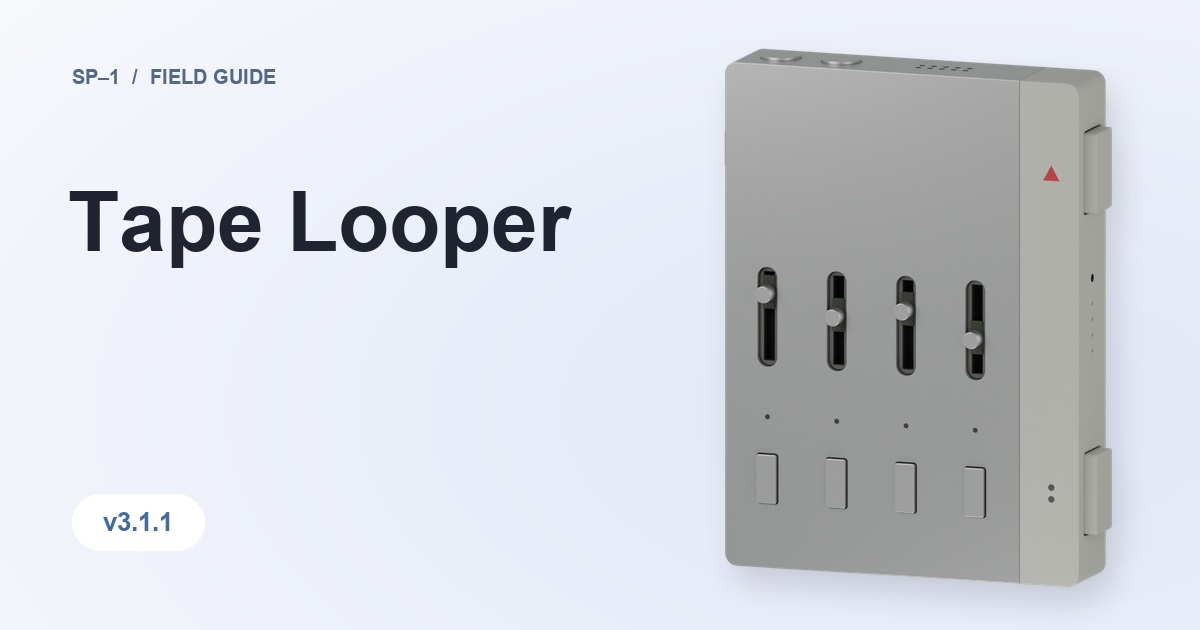
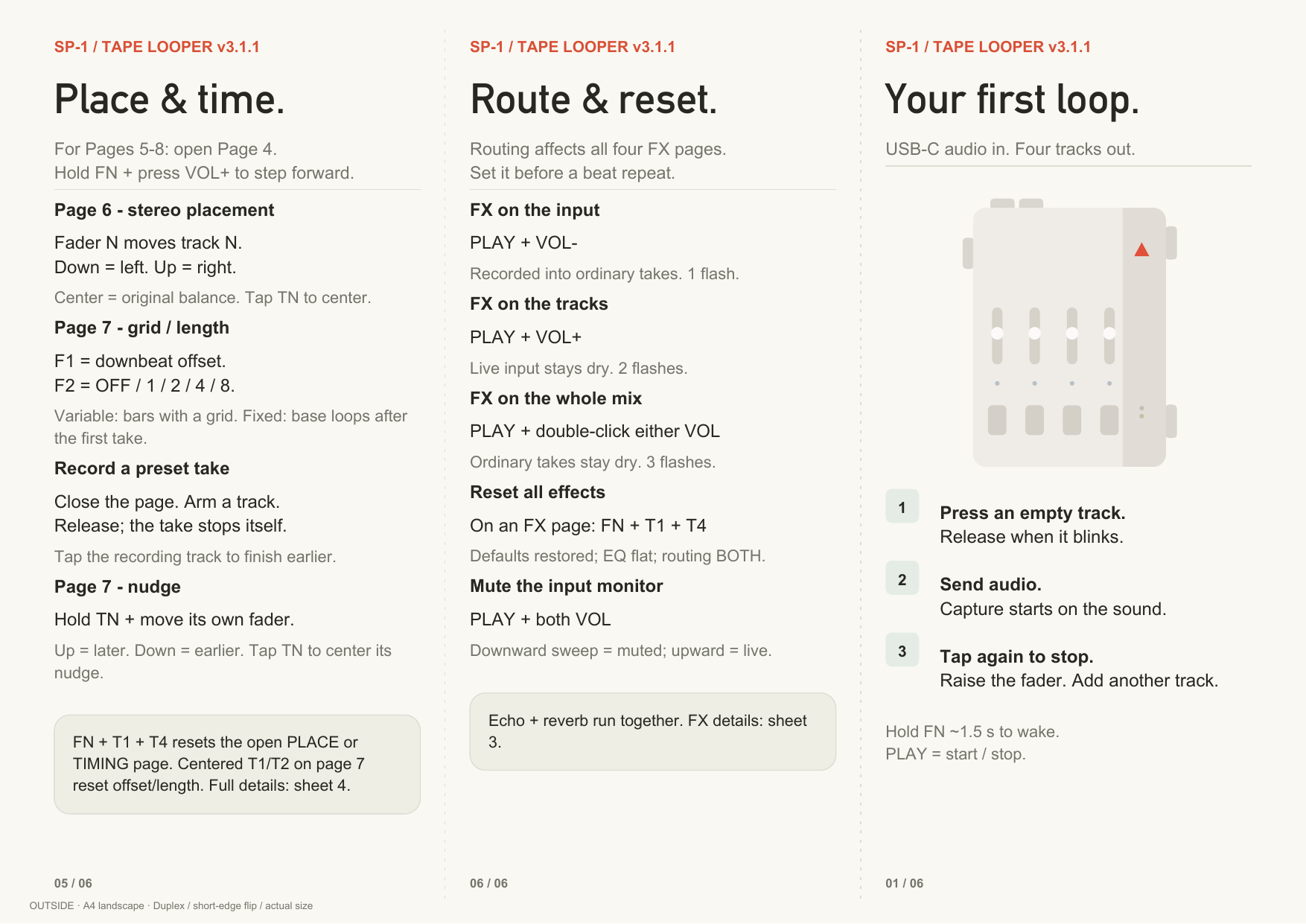
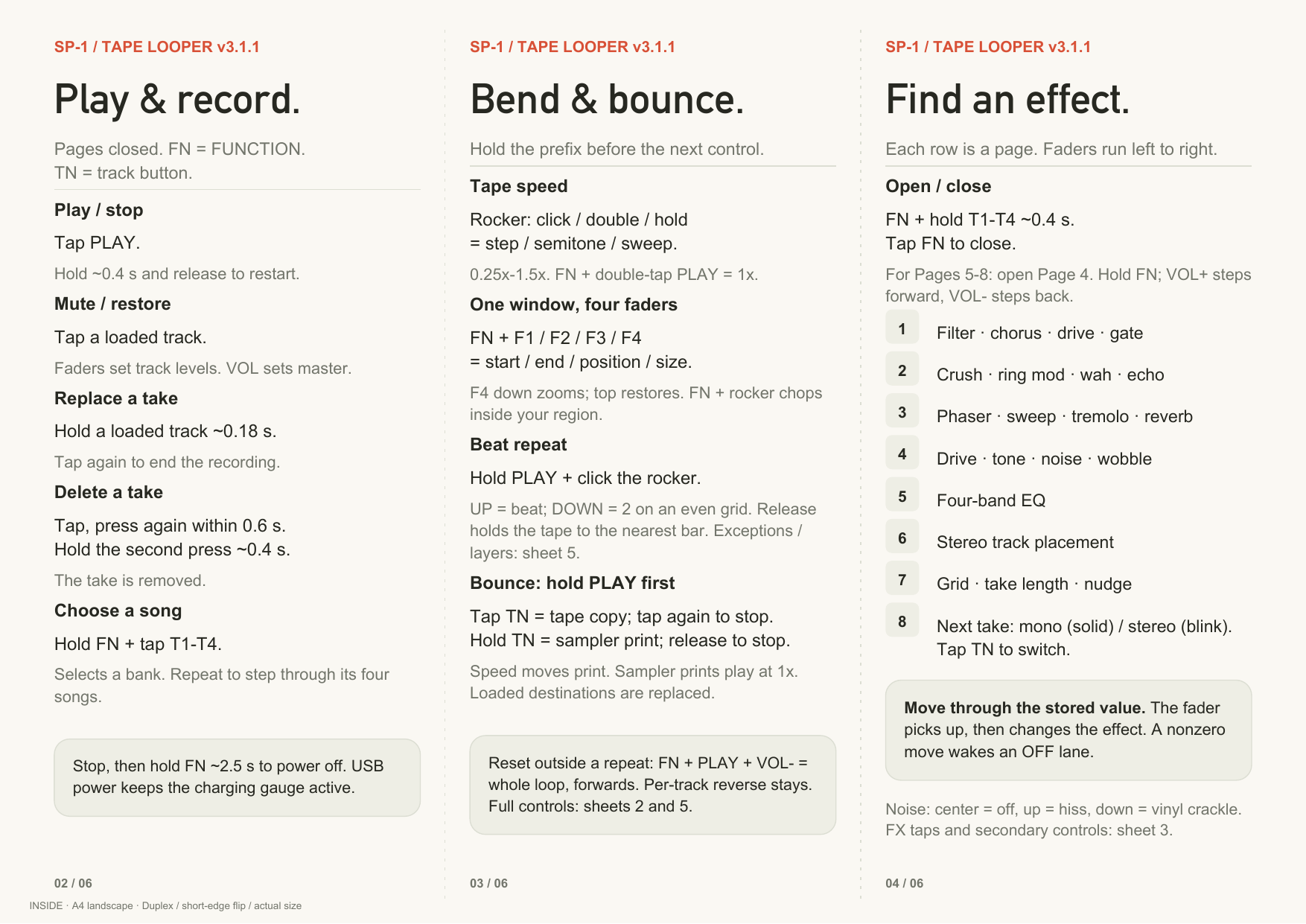
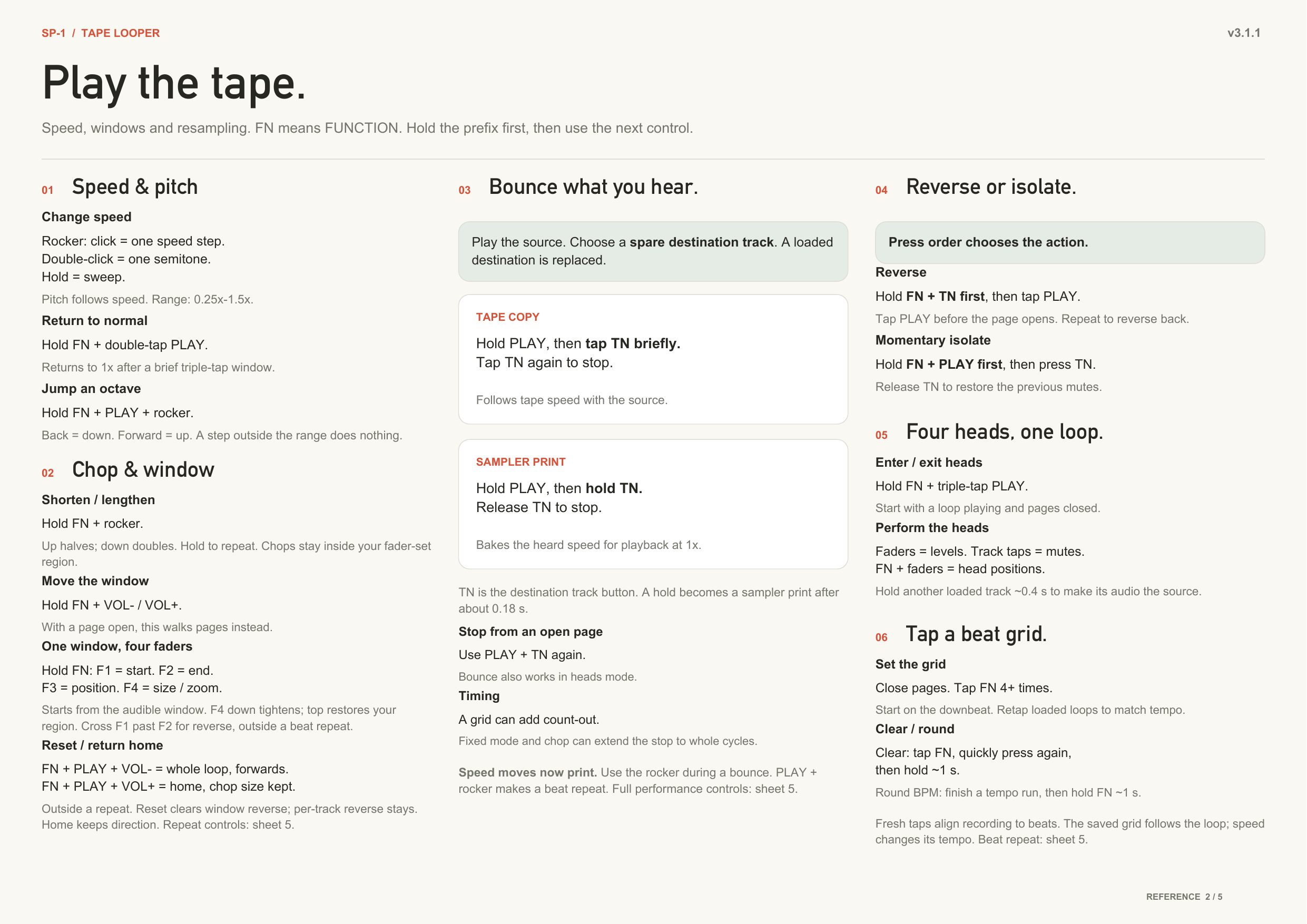
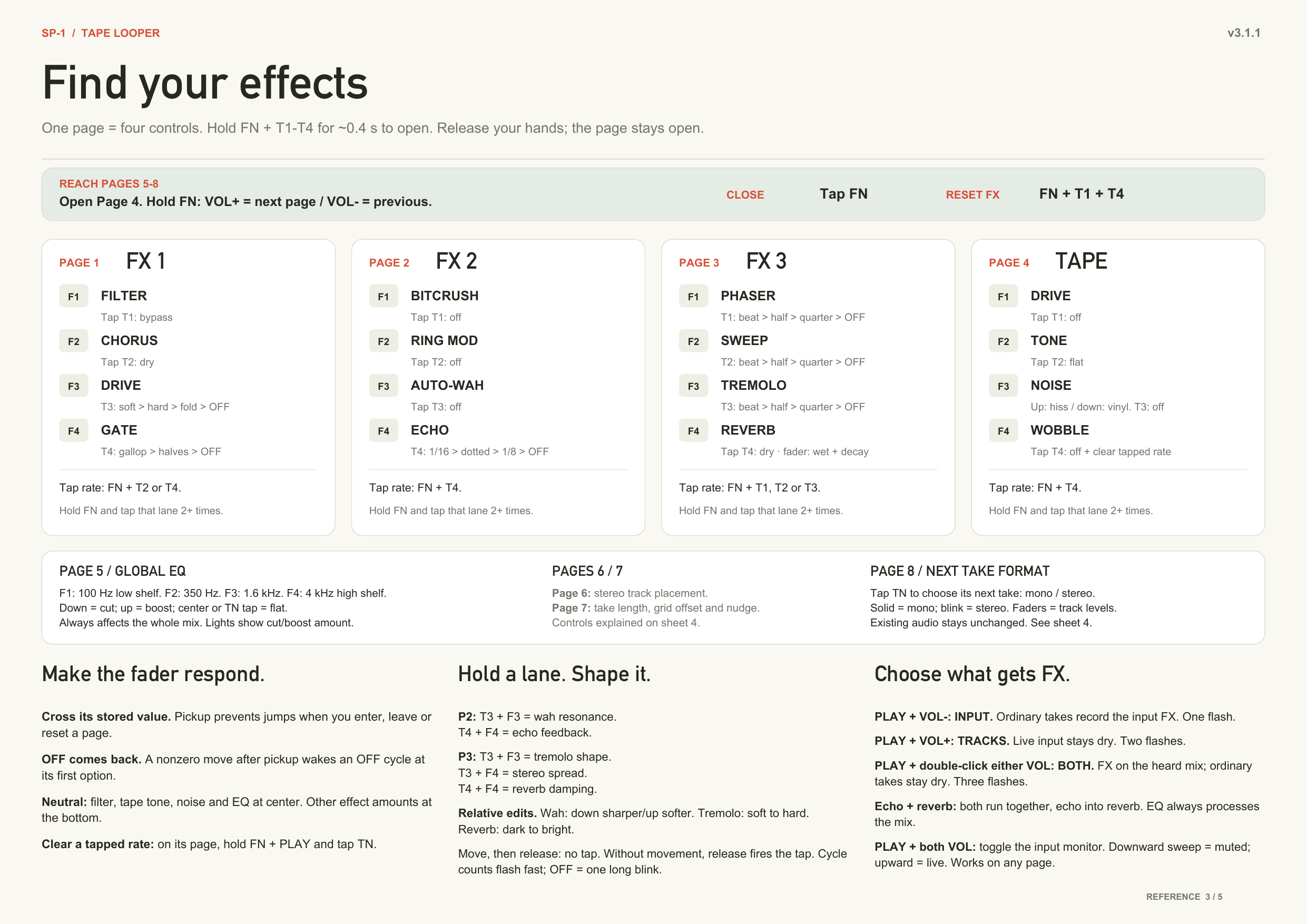
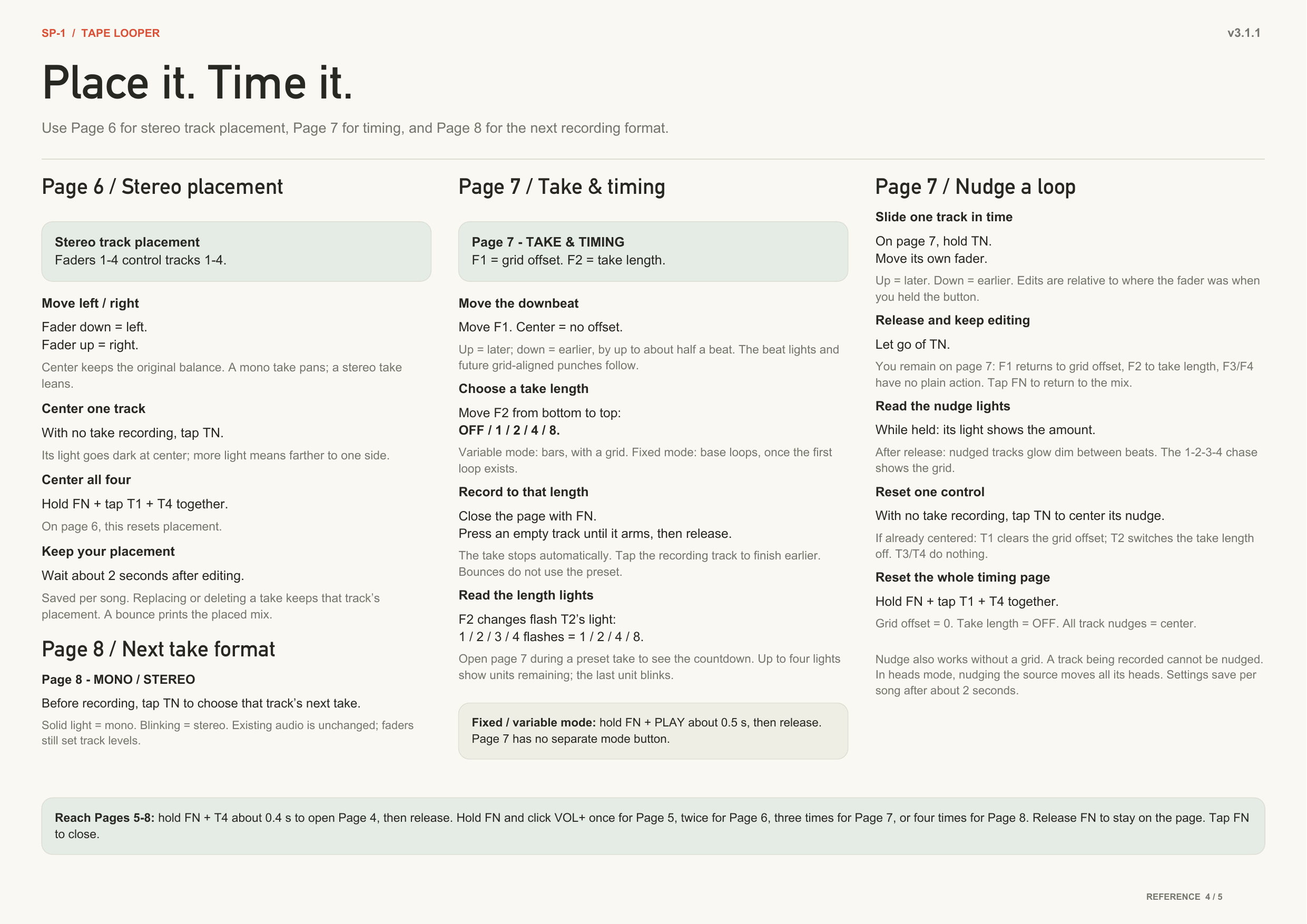
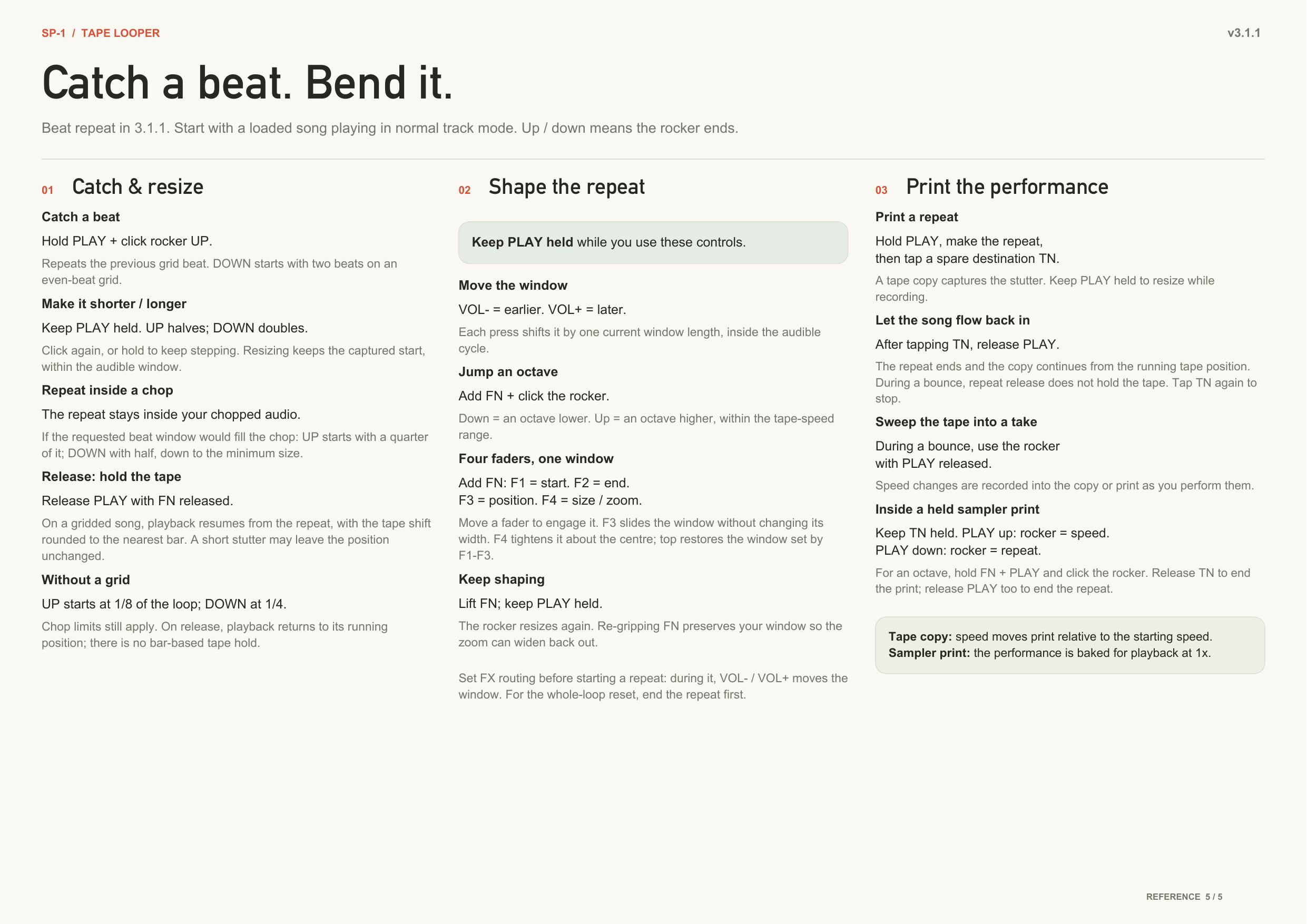
The pocket guide
PDF.
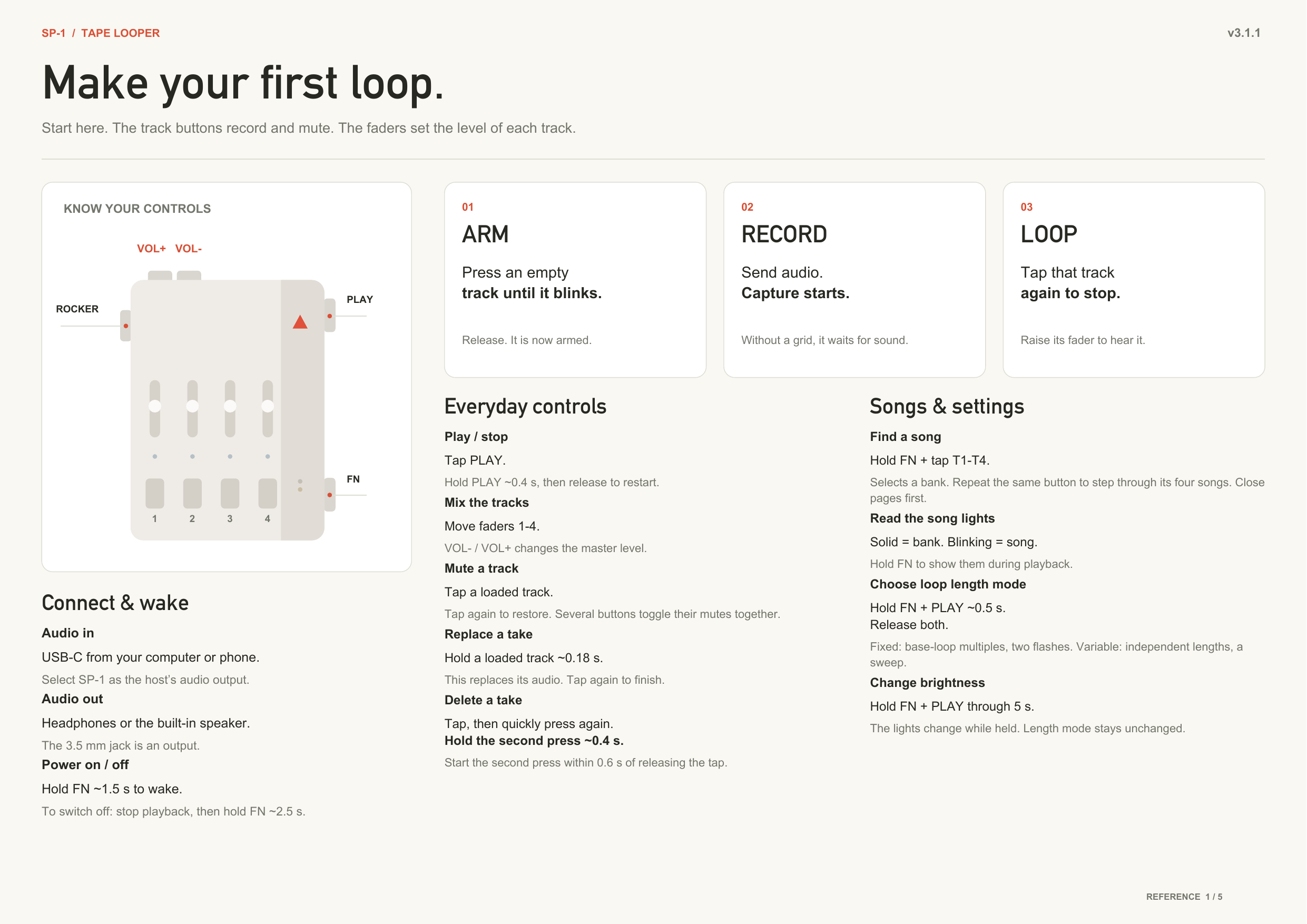
The full reference guide
Loop transfer tool
Move loops between your computer and the SP-1 as WAV or MP3:
→ https://chattock.github.io/sp1-tape-looper/
Open it in Chrome or Edge with the SP-1 plugged in and powered on normally
(no button combo — not the bootloader mode), click Connect, and pick the
SP-1 Audio port. The looper switches itself into transfer mode while the page
is connected (playback pauses, the four track lights blink together) and
returns to normal when you disconnect. Download any track as a stereo WAV, or
upload a WAV/MP3 into a chosen song and track — clips are resampled to the
device's rate, and every track keeps its own length, exactly like recording on
the device. Download all / Upload many back up and restore a whole card.
The page reads 2.x and 3.0 cards; it detects the format.
Connecting to phones
- USB-C iPhone / iPad / Android: a normal USB-C to USB-C cable works — the SP-1 shows up as an audio output (and the browser transfer tool works from Android Chrome).
- Lightning iPhone / iPad: a plain USB-C-to-Lightning cable does not work — Lightning only speaks USB host through Apple's own adapter. Use the Apple Lightning to USB 3 Camera Adapter (or "Camera Connection Kit"), then any USB-A/USB-C cable to the SP-1. Third-party adapters must be MFi-certified; most cheap ones aren't, and won't pass audio.
What's in this folder
sp1-tape-looper/
├── README.md               you are here
├── CHANGELOG.md            what each release adds/fixes
├── sp1_looper.bin          the firmware — flash this one
├── boards/                 the SP-1 board definition (makes the repo buildable)
├── zephyr-patches/         patch for the Zephyr tree (Windows USB fix)
├── docs/                   the transfer page (GitHub Pages) + the control sheets
└── firmware/               full source code (for reading / rebuilding)
    ├── src/
    │   ├── main.c          the whole looper: audio engine, controls, power, USB
    │   ├── sp1_emmc.c      the flash-memory driver (stores/loads the loops)
    │   └── sp1_emmc.h
    ├── zephyr-uac2-backport/  the USB Audio 2.0 class files this build uses
    ├── app.overlay         hardware pin map (ADC channels for buttons/faders)
    ├── prj.conf            Zephyr build configuration
    ├── CMakeLists.txt
    └── Kconfig
Audio
- Takes are 24 kHz stereo (14-bit, block-scaled) or 24 kHz mono (16-bit), chosen per take on page 8. Output is 48 kHz stereo.
- Every playing track is a separate stream read off the flash in real time, while the track you are recording is written back. Four stereo tracks at 1.5× with USB audio in and echo + reverb at max runs clean for minutes at a time; heavier stacks on top of that, or a bounce at that corner, can still drop out. At 1× it is clean.
- Up to 8 minutes per track at 1×, on all 16 songs.
The status line
Open the SP-1's USB-serial port (115200 baud) for a repeating status report.
Healthy signs: ovr=0 (no record-buffer overflow), rerr=0 werr=0 (clean
flash bus), flt=ffffffff@0 (no crash recorded). After any unexpected reboot
the flt= and rr= fields carry the crash details — including them makes a
bug report immediately actionable.
Building from source
Zephyr v4.3.1 + SDK 0.17.4. Copy firmware/zephyr-uac2-backport/ over
subsys/usb/device_next/class/ in your Zephyr tree (it carries the
USBD_UAC2_FS_WINDOWS_WORKAROUND option that prj.conf turns on), then
west build -p -b stem_player firmware -- -DBOARD_ROOT=$(pwd)
and flash build/zephyr/zephyr.bin.
The most important rule when modifying the firmware: the SP-1 has no hardware reset, so the firmware must always feed the watchdog and must always offer a path back to the bootloader (here: hold FUNCTION to power off, or the Track 1 + Track 4 recovery combo, held 3 s). Do not remove those.
If it ever locks up
Hold Track 1 and Track 4 together for 3 s to return to firmware-loading mode, so you can always re-flash. If the firmware does not respond, hold Track 1 + Track 4 while you plug in USB power — that path is part of the bootloader and always works. It must be those two alone.
Disclaimer
This is unofficial, community-made firmware, not affiliated with or endorsed by Teenage Engineering. Flashing custom firmware is at your own risk. It has been tested and works well, but no warranty is implied. If in doubt, make sure you understand the Solderless update process and the recovery options above before flashing.
Credits and licence
- Built on the SP-1 hardware reverse-engineering and board support documented in Tim Knapen's SP-1-dev project — the pin map, the codec and clock notes, and the eMMC protocol all came from there.
- chattock's original looper is the foundation; 3.0 was developed by marc (marcabisamra). Thanks to everyone on the SP-1 Discord who tested the 3.0 builds and reported back.
- Flashing is made possible by the Solderless SP-1 updater.
- Runs on the Zephyr RTOS.
Released under the MIT License (see LICENSE). Contributions and forks
welcome.