
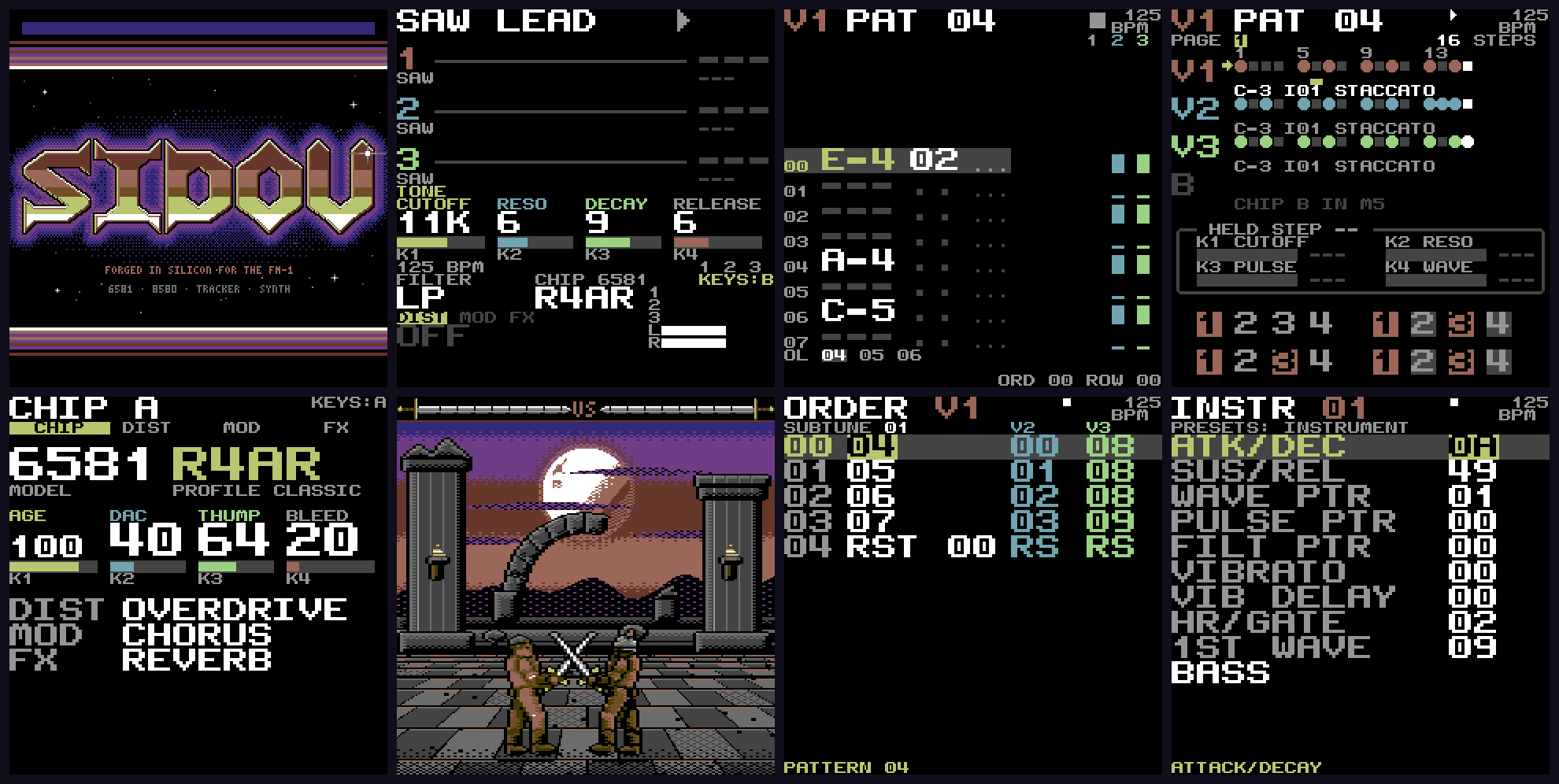
SIDOU
Tracker synth with an emulation of the Commodore 64 sound chip.
forM-VAVE FM-1·by@dsablic
Unclaimed. Is this yours? Sign in with GitHub as @dsablic to claim it.
sidou-1.1.0.fwsc· 596 KB· +80 files
GPL-3.0· dsablic/sidou·downloads come from the creator’s GitHub releases
v1.1.0SIDOU 1.1.0Latest81 files
SIDOU 1.1.0: hear it before you keep it
Try it in your browser first: https://dsablic.github.io/sidou/, the cheat sheet and the how-to videos ("What's new in 1.1" is new).
New
- LAB grows. FILTER's K4 is a filter LFO (the cutoff sweeps at the PWM's rate, the drawing shows the band); MOD's K4 is the arpeggio's RATE; a sixth page, MACRO, links the resonance to the cutoff and the PWM's depth to the pulse width, on LIVE's knobs and over MIDI too; and the keys played while EDIT is held sound the sound as kept (A), to compare as you play. Sounds kept in 1.0 load as they were.
- Hear before you write. TABLE's ARP helper plays its draft on the keys (
HEARING DRAFT), and a held STEP step sounds with its cutoff, resonance, filter, route and pulse locks. - Generative TRACKER. EDIT + ARP is MUTATE and EDIT + SCL is DICE in TRACKER too; DICE has a range and a rhythm (K2, K4), a root from a note key and a scale for each lane; EDIT + ENV writes a filter sweep. All of it is plain GoatTracker data. A song with 1.1's DICE settings still loads in 1.0.
- Knob curves. The PWM's rate and depth, the vibrato's rate, depth and delay, and every effect slot's knobs step evenly to the ear. Stored values keep their meaning.
- Songs to MIDI reads from the FM-1: the site lists the songs on a connected FM-1 and converts one, wavetable arpeggios included.
Changed
- REC from the keys lands where you played (6 ms earlier than the key is read).
- An upload waits for quiet while a song plays or a computer records the USB audio, so the music never dips; with only the keys sounding, writes are 250 ms apart. The Songs page shows the wait. An older SysEx tool may time out while a song plays: stop the song first.
- The vibrato's CCs (76-78) and the effect slots' CCs (102-116) land on the knob curves' positions. DAW automation of them recorded with 1.0 can sound different; their NRPNs still set exact values.
Fixed
- CLOCK OUT: PLAY after a stop sends a start, so a synced DAW restarts with SIDOU, and a start, stop or continue is no longer lost while a SysEx reply is going out.
- EDIT chords work whichever finger lands first in LAB, STEP and TRACKER.
- The Songs page waits and resends when the FM-1 answers BUSY.
- The settings are saved after two failed flash writes in a row.
- The Distortion slot is heard: TAPE saturates, OVERDRIVE and FUZZ clip instead of only getting louder, CRUSH's top is a 4-bit buzz. Saved sounds with a distortion sound more driven than in 1.0. EDIT + K1-K4 on LIVE show the effect, the control and its value in a large popup.
Tested in the emulator, not yet on a real FM-1 (reports welcome): an upload from the Songs page while a song plays (it waits for quiet), CLOCK OUT with a synced DAW after a stop, and Songs to MIDI reading from a connected FM-1.
The full list is in CHANGELOG.md.
Install
Over USB, at your own risk; the official firmware is one install away. Use Felucca's installer:
fm1_install.py sidou-1.1.0.fwsc, from the stock firmware, a Felucca-family firmware or an earlier SIDOU (it finds the FM-1 as "SIDOU FM-1"). Back to stock: install M-VAVE'sFM-1.fwscthe same way. Holding OCT- at power-on is a rescue.sidou-1.1.0.fwsc, identity FM-1_964, SHA-256
31b73ec12f361d2638acedee1ae7121ade22b9fa9b38c4a36ed5a47bb56b06de.- sidou-1.1.0.fwsc596 KB7↓
- video-play-over-a-song-vertical.mp44.2 MB6↓
- video-shape-in-lab-square.mp42.9 MB6↓
- video-track-lead-square.mp41.9 MB6↓
- video-mute-and-solo-square.mp41.9 MB6↓
Show all 81 filesHide 76 files
- video-sidou-intro-vertical.mp47.9 MB5↓
- video-sidou-intro.mp47.5 MB5↓
- video-whats-new-vertical.mp46.0 MB5↓
- video-whats-new.mp45.5 MB5↓
- video-sidou-intro-square.mp45.2 MB5↓
- video-shape-in-lab-vertical.mp44.7 MB5↓
- video-shape-in-lab.mp44.3 MB5↓
- video-step-a-beat-vertical.mp44.3 MB5↓
- video-step-a-beat.mp43.9 MB5↓
- video-play-over-a-song.mp43.8 MB5↓
- video-whats-new-square.mp43.7 MB5↓
- video-remix-a-song-vertical.mp43.2 MB5↓
- video-step-generative-vertical.mp43.1 MB5↓
- video-mute-and-solo-vertical.mp43.0 MB5↓
- video-chip-character-vertical.mp42.9 MB5↓
- video-remix-a-song.mp42.9 MB5↓
- video-step-generative.mp42.9 MB5↓
- video-play-over-a-song-square.mp42.9 MB5↓
- video-track-bass-vertical.mp42.8 MB5↓
- video-rec-over-loop-vertical.mp42.8 MB5↓
- video-track-lead-vertical.mp42.7 MB5↓
- video-step-a-beat-square.mp42.7 MB5↓
- video-chip-character.mp42.7 MB5↓
- video-save-and-load-vertical.mp42.7 MB5↓
- video-play-a-sid-vertical.mp42.6 MB5↓
- video-mute-and-solo.mp42.6 MB5↓
- video-track-bass.mp42.6 MB5↓
- video-rec-over-loop.mp42.5 MB5↓
- video-track-lead.mp42.5 MB5↓
- video-play-a-sid.mp42.4 MB5↓
- video-save-and-load.mp42.4 MB5↓
- video-chip-spread-vertical.mp42.3 MB5↓
- video-chord-arpeggio-vertical.mp42.2 MB5↓
- video-add-an-effect-vertical.mp42.2 MB5↓
- video-chip-spread.mp42.2 MB5↓
- video-shape-a-sound-vertical.mp42.2 MB5↓
- video-first-sound-vertical.mp42.2 MB5↓
- video-remix-a-song-square.mp42.1 MB5↓
- video-add-an-effect.mp42.0 MB5↓
- video-step-generative-square.mp42.0 MB5↓
- video-shape-a-sound.mp42.0 MB5↓
- video-chord-arpeggio.mp42.0 MB5↓
- video-first-sound.mp42.0 MB5↓
- video-track-bass-square.mp41.9 MB5↓
- video-rec-over-loop-square.mp41.9 MB5↓
- video-midi-learn-vertical.mp41.9 MB5↓
- video-play-a-sid-square.mp41.7 MB5↓
- video-midi-learn.mp41.7 MB5↓
- video-save-and-load-square.mp41.7 MB5↓
- video-chip-character-square.mp41.7 MB5↓
- video-chip-spread-square.mp41.6 MB5↓
- video-add-an-effect-square.mp41.4 MB5↓
- video-first-sound-square.mp41.4 MB5↓
- video-chord-arpeggio-square.mp41.4 MB5↓
- video-shape-a-sound-square.mp41.3 MB5↓
- video-midi-learn-square.mp41.1 MB5↓
- video-whats-new.srt1.7 KB1↓
- video-sidou-intro.srt1.4 KB1↓
- video-shape-in-lab.srt1.3 KB1↓
- video-step-a-beat.srt954 B1↓
- video-play-a-sid.srt901 B1↓
- video-step-generative.srt850 B1↓
- video-remix-a-song.srt733 B1↓
- video-save-and-load.srt685 B1↓
- video-mute-and-solo.srt672 B1↓
- video-play-over-a-song.srt642 B1↓
- video-shape-a-sound.srt573 B1↓
- video-rec-over-loop.srt569 B1↓
- video-chip-character.srt568 B1↓
- video-first-sound.srt557 B1↓
- video-track-bass.srt537 B1↓
- video-midi-learn.srt532 B1↓
- video-chip-spread.srt489 B1↓
- video-add-an-effect.srt415 B1↓
- video-chord-arpeggio.srt769 B0↓
- video-track-lead.srt400 B0↓
v1.0.0SIDOU 1.0.081 files
SIDOU 1.0.0: shape one sound and keep it
Try it in your browser first: https://dsablic.github.io/sidou/, the cheat sheet and the how-to videos ("Shape a sound in LAB", "Play a .sid" and "What's new in 1.0" are new).
New
- LAB. A view for experimenting on the go: five pages (OSC, ENVELOPE, FILTER, MOD, FX), each with a drawing of what its four knobs do, from the pulse's width to the filter's curve and the effect chain. ENV, LFO and FX on LIVE open it at their page; SELECT turns the pages; ALGORITHM is the page's choice; HOME goes back to LIVE with the sound as edited.
- Keep it in one press. SAVE keeps the sound as one of sixteen USER sounds (
KEPT AS U01 LAB 01); EDIT + SAVE names it with the keys. PRESETS on LIVE plays them after the built-ins and DICE. An unsaved edit comes back at power-on. - Compare, undo, roll. Tap EDIT for A/B; EDIT + LFO undoes (sixteen steps); EDIT + ARP varies the page, EDIT + SCL rolls the whole voice, and neither is ever silent. SAVE + a knob learns any card for MIDI.
- DICE's settings on STEP. Hold EDIT + SCL and turn K1 for the density (SPARSE to FULL) or K3 for the scale (minor pentatonic to chromatic); let go to roll. Saved with the song.
- The ARP helper picks its waveform with PRESETS.
- Readable TABLE and STEP: their small text is at 2×.
- Store health on STATUS, and a background save that failed is retried and reported.
Changed
- ENV, LFO and FX on LIVE open LAB. The chip model is now ALGORITHM on LIVE's TONE page (CC 25 as before); the next effect algorithm is ALGORITHM on LAB's FX page.
Fixed
- Dense
.sidplayers write on time: a block of the audio renders in up to 23 parts instead of 15, so tunes such as Thomkat, Kill Me and The Last Ninja show LATE 0 on STATUS. - A sound edit no longer asks about the song before SIDS plays a tune, and the sound stays as it was when the tune ends.
- EDIT + SCL on STEP is the same chord whichever finger lands first.
Known untested: long USB audio recordings at 48 kHz (an hour or more) have not been run on a real FM-1; Felucca's resampler may meet a CPU erratum there (felucca-bsp#16). 44.1 kHz is not affected. If a long 48 kHz recording resets the unit or clicks, please open an issue.
The full list is in CHANGELOG.md.
Install
Over USB, at your own risk; the official firmware is one install away. Use Felucca's installer:
fm1_install.py sidou-1.0.0.fwsc, from the stock firmware, a Felucca-family firmware or an earlier SIDOU (it finds the FM-1 as "SIDOU FM-1"). Back to stock: install M-VAVE'sFM-1.fwscthe same way. Holding OCT- at power-on is a rescue.sidou-1.0.0.fwsc, identity FM-1_964, SHA-256
5a6b32bdf8a021a0c0ce9dbdebe5809fd339e526ed41c6bb9322ace051bb32f6.- sidou-1.0.0.fwsc596 KB41↓
- video-sidou-intro.mp47.5 MB20↓
- video-whats-new.mp45.0 MB20↓
- video-remix-a-song.mp42.9 MB20↓
- video-mute-and-solo.mp42.6 MB20↓
Show all 81 filesHide 76 files
- video-first-sound.mp42.0 MB20↓
- video-midi-learn-square.mp41.1 MB20↓
- video-sidou-intro-vertical.mp47.9 MB19↓
- video-whats-new-vertical.mp45.4 MB19↓
- video-sidou-intro-square.mp45.2 MB19↓
- video-shape-in-lab-vertical.mp44.7 MB19↓
- video-shape-in-lab.mp44.3 MB19↓
- video-step-a-beat-vertical.mp44.3 MB19↓
- video-play-over-a-song-vertical.mp44.2 MB19↓
- video-step-a-beat.mp43.9 MB19↓
- video-play-over-a-song.mp43.9 MB19↓
- video-whats-new-square.mp43.5 MB19↓
- video-remix-a-song-vertical.mp43.2 MB19↓
- video-step-generative-vertical.mp43.1 MB19↓
- video-mute-and-solo-vertical.mp43.0 MB19↓
- video-chip-character-vertical.mp42.9 MB19↓
- video-step-generative.mp42.9 MB19↓
- video-shape-in-lab-square.mp42.9 MB19↓
- video-play-over-a-song-square.mp42.9 MB19↓
- video-track-bass-vertical.mp42.8 MB19↓
- video-rec-over-loop-vertical.mp42.8 MB19↓
- video-track-lead-vertical.mp42.7 MB19↓
- video-step-a-beat-square.mp42.7 MB19↓
- video-chip-character.mp42.7 MB19↓
- video-save-and-load-vertical.mp42.7 MB19↓
- video-play-a-sid-vertical.mp42.6 MB19↓
- video-track-bass.mp42.6 MB19↓
- video-rec-over-loop.mp42.5 MB19↓
- video-track-lead.mp42.5 MB19↓
- video-play-a-sid.mp42.4 MB19↓
- video-save-and-load.mp42.4 MB19↓
- video-chip-spread-vertical.mp42.3 MB19↓
- video-chord-arpeggio-vertical.mp42.2 MB19↓
- video-add-an-effect-vertical.mp42.2 MB19↓
- video-chip-spread.mp42.2 MB19↓
- video-shape-a-sound-vertical.mp42.2 MB19↓
- video-first-sound-vertical.mp42.2 MB19↓
- video-remix-a-song-square.mp42.1 MB19↓
- video-step-generative-square.mp42.0 MB19↓
- video-add-an-effect.mp42.0 MB19↓
- video-chord-arpeggio.mp42.0 MB19↓
- video-shape-a-sound.mp42.0 MB19↓
- video-track-bass-square.mp41.9 MB19↓
- video-rec-over-loop-square.mp41.9 MB19↓
- video-track-lead-square.mp41.9 MB19↓
- video-midi-learn-vertical.mp41.9 MB19↓
- video-mute-and-solo-square.mp41.9 MB19↓
- video-play-a-sid-square.mp41.7 MB19↓
- video-midi-learn.mp41.7 MB19↓
- video-save-and-load-square.mp41.7 MB19↓
- video-chip-character-square.mp41.7 MB19↓
- video-chip-spread-square.mp41.6 MB19↓
- video-add-an-effect-square.mp41.4 MB19↓
- video-first-sound-square.mp41.4 MB19↓
- video-chord-arpeggio-square.mp41.4 MB19↓
- video-shape-a-sound-square.mp41.3 MB19↓
- video-whats-new.srt1.8 KB2↓
- video-shape-in-lab.srt1.3 KB2↓
- video-chord-arpeggio.srt769 B2↓
- video-chip-character.srt568 B2↓
- video-track-lead.srt400 B2↓
- video-sidou-intro.srt1.4 KB1↓
- video-step-a-beat.srt954 B1↓
- video-play-a-sid.srt901 B1↓
- video-step-generative.srt850 B1↓
- video-remix-a-song.srt733 B1↓
- video-save-and-load.srt685 B1↓
- video-mute-and-solo.srt672 B1↓
- video-play-over-a-song.srt642 B1↓
- video-shape-a-sound.srt573 B1↓
- video-rec-over-loop.srt569 B1↓
- video-first-sound.srt557 B1↓
- video-track-bass.srt537 B1↓
- video-midi-learn.srt532 B1↓
- video-chip-spread.srt489 B1↓
- video-add-an-effect.srt415 B1↓
v0.5.0SIDOU 0.5.01 file
SIDOU 0.5.0: .sid tunes on the FM-1
Try it in your browser first: https://dsablic.github.io/sidou/ (the browser demo's store has no tunes), the cheat sheet and the how-to videos.
New
.sidplayback. PSID tunes (one or two SID chips, PAL or NTSC) play on the FM-1 from its store. SIDOU's own 6502 runs a frame ahead of the audio and stamps each SID write with its cycle, so a tune plays as it was written, and never makes the audio wait. OSC3 and ENV3 read the chip's real voices, as on a C64. Every GoatTracker 2 example and SIDOU song plays sample for sample the same as the host's reference. RSID tunes and MUS files are refused by name.- SIDS and NOW PLAYING. The menu's SIDS lists the tunes; ALGORITHM or SAVE plays one. NOW PLAYING shows the title, author, year, the song (ALGORITHM changes it), the time, PAL or NTSC, each chip's model and the voices with their envelopes. PLAY stops, EDIT + PLAY pauses, GLO mutes and solos the voices, MIDI start, stop and continue follow. The keys play chip B under a one-chip tune.
- SETTINGS → SID MODEL. AUTO plays each tune on the chip model its file names.
- Tunes over SysEx.
sidou-sysex sidturns.sidfiles into SysEx to send over USB or the TRS jack; the FM-1 checks a tune before writing anything. See the manual. - A starter pack: eleven openly licensed tunes, five of SIDOU's songs and six of GoatTracker's
example songs by Cadaver, in
assets/starter. - STATUS is readable: at 2× on three pages that SELECT turns; while a tune plays, page 1 is the 6502: its share of the CPU, late writes and overruns.
Measured on a real FM-1: the 6502 takes 4-12 % of the CPU on the heaviest HVSC tunes tried. A tune that writes the chip very densely can have a few writes land up to 3 ms late (STATUS's LATE); more room for those is planned.
The full list is in CHANGELOG.md.
Install
Over USB, at your own risk; the official firmware is one install away. Use Felucca's installer:
fm1_install.py sidou-0.5.0.fwsc, from the stock firmware, a Felucca-family firmware or an earlier SIDOU (it finds the FM-1 as "SIDOU FM-1"). Back to stock: install M-VAVE'sFM-1.fwscthe same way. Holding OCT- at power-on is a rescue.sidou-0.5.0.fwsc, identity FM-1_964, SHA-256
fdebaf41074fc0284a3a34d5a65c4a1639054e16e228c2d19109d008e0f019b2.v0.4.0SIDOU 0.4.073 files
SIDOU 0.4.0: drums, chance and USB audio
Try it in your browser first: https://dsablic.github.io/sidou/, and the how-to videos.
New
- A SID drum kit. A NEW song comes with eight drums made on the chip's own voices: KICK, SNARE, CL HAT, OP HAT, CLAP, TOM LO, TOM HI and RIM, picked by name on a STEP lane. They are plain GoatTracker 2 instruments, so the song plays the same in GoatTracker.
- Digi drums. Four short sampled drums (DG KICK, DG SNARE, DG CLAP, DG HAT), gritty as a C64's, played the way C64 tunes play samples. GoatTracker plays the matching chip drum in their place, so the song still opens there.
- Generative STEP. Hold a step and turn ALGORITHM to give it a chance to play (100 % down to 0). EDIT + ARP is MUTATE, a small change to the lane's pattern; EDIT + SCL is DICE, a new pattern in a minor pentatonic (or a groove on a drum lane). All of it stays GoatTracker data.
- Record over the USB cable. The FM-1 is also a USB audio input, no driver needed, on a Mac, Windows, Linux or an iPad: a DAW records what the line out plays, at 44.1 or 48 kHz.
- The button LEDs show more. A dim glow means set or available, full light means active now: ARP flashes with the arpeggio, PLAY on the beat, REC through the count-in, SAVE while a question waits for it; with GLO the keys show which voices sound, and in STEP the keys show the page and the playhead.
- An ARP helper in TABLE. Press ARP on a wavetable row and type an arpeggio as semitone steps, a speed and a loop point; SAVE writes plain GoatTracker wavetable rows.
- SETTINGS → RESET. Sounds and settings back to factory, confirmed with SAVE; songs, USER chip profiles and MIDI learn mappings stay.
- Songs to MIDI on the site: https://dsablic.github.io/sidou/midi.html turns a
.snginto a.mid, a track per voice, timed as GoatTracker plays it. - Profile words everywhere: STATUS says
6581 CLASSIC, not6581 R4AR. - About 25 KB of flash won back, with nothing heard differently, so the next release
(
.sidplayback) has room.
The full list is in CHANGELOG.md.
Install
Over USB, at your own risk; the official firmware is one install away. Use Felucca's installer:
fm1_install.py sidou-0.4.0.fwsc, from the stock firmware, a Felucca-family firmware or an earlier SIDOU (it finds the FM-1 as "SIDOU FM-1"). Back to stock: install M-VAVE'sFM-1.fwscthe same way. Holding OCT- at power-on is a rescue.sidou-0.4.0.fwsc, identity FM-1_964, SHA-256
731ea917806d53399deea369105294b880281fe5dcd1ad5dd8ddcdc8621e3950.- sidou-0.4.0.fwsc596 KB58↓
- video-remix-a-song.mp42.9 MB30↓
- video-rec-over-loop-vertical.mp42.8 MB30↓
- video-rec-over-loop.mp42.5 MB30↓
- video-chip-spread.mp42.2 MB30↓
Show all 73 filesHide 68 files
- video-sidou-intro-vertical.mp48.1 MB29↓
- video-sidou-intro.mp47.7 MB29↓
- video-sidou-intro-square.mp45.2 MB29↓
- video-step-a-beat-vertical.mp44.3 MB29↓
- video-play-over-a-song-vertical.mp44.2 MB29↓
- video-play-over-a-song.mp43.8 MB29↓
- video-remix-a-song-vertical.mp43.2 MB29↓
- video-mute-and-solo-vertical.mp43.0 MB29↓
- video-chip-character-vertical.mp42.9 MB29↓
- video-play-over-a-song-square.mp42.9 MB29↓
- video-track-bass-vertical.mp42.8 MB29↓
- video-step-a-beat-square.mp42.8 MB29↓
- video-chip-character.mp42.7 MB29↓
- video-save-and-load-vertical.mp42.7 MB29↓
- video-mute-and-solo.mp42.6 MB29↓
- video-save-and-load.mp42.4 MB29↓
- video-chip-spread-vertical.mp42.3 MB29↓
- video-add-an-effect-vertical.mp42.2 MB29↓
- video-chord-arpeggio-vertical.mp42.2 MB29↓
- video-shape-a-sound-vertical.mp42.2 MB29↓
- video-first-sound-vertical.mp42.2 MB29↓
- video-remix-a-song-square.mp42.1 MB29↓
- video-add-an-effect.mp42.0 MB29↓
- video-step-generative-square.mp42.0 MB29↓
- video-shape-a-sound.mp42.0 MB29↓
- video-chord-arpeggio.mp42.0 MB29↓
- video-first-sound.mp42.0 MB29↓
- video-rec-over-loop-square.mp41.9 MB29↓
- video-midi-learn-vertical.mp41.9 MB29↓
- video-mute-and-solo-square.mp41.9 MB29↓
- video-save-and-load-square.mp41.7 MB29↓
- video-midi-learn.mp41.7 MB29↓
- video-chip-character-square.mp41.7 MB29↓
- video-chip-spread-square.mp41.6 MB29↓
- video-add-an-effect-square.mp41.4 MB29↓
- video-first-sound-square.mp41.4 MB29↓
- video-chord-arpeggio-square.mp41.4 MB29↓
- video-shape-a-sound-square.mp41.3 MB29↓
- video-midi-learn-square.mp41.1 MB29↓
- video-whats-new-vertical.mp44.1 MB28↓
- video-step-a-beat.mp43.9 MB28↓
- video-whats-new.mp43.8 MB28↓
- video-step-generative-vertical.mp43.1 MB28↓
- video-step-generative.mp42.9 MB28↓
- video-whats-new-square.mp42.8 MB28↓
- video-track-lead-vertical.mp42.7 MB28↓
- video-track-bass.mp42.6 MB28↓
- video-track-lead.mp42.5 MB28↓
- video-track-bass-square.mp41.9 MB28↓
- video-track-lead-square.mp41.9 MB28↓
- video-whats-new.srt1.5 KB3↓
- video-sidou-intro.srt1.3 KB3↓
- video-play-over-a-song.srt633 B3↓
- video-chip-spread.srt489 B3↓
- video-track-lead.srt400 B3↓
- video-add-an-effect.srt396 B3↓
- video-step-a-beat.srt954 B2↓
- video-step-generative.srt850 B2↓
- video-chord-arpeggio.srt769 B2↓
- video-remix-a-song.srt733 B2↓
- video-save-and-load.srt685 B2↓
- video-mute-and-solo.srt672 B2↓
- video-shape-a-sound.srt573 B2↓
- video-rec-over-loop.srt569 B2↓
- video-chip-character.srt568 B2↓
- video-first-sound.srt557 B2↓
- video-track-bass.srt537 B2↓
- video-midi-learn.srt532 B2↓
v0.3.1SIDOU 0.3.11 file
SIDOU 0.3.1
An install over another firmware now boots straight into SIDOU. Installed over Felucca, 0.3.0's first boot went to the chip's USB boot screen (WL80UBOOT1.00) for about 45 seconds before SIDOU started, and the installer reported "did not come back". Nothing was wrong with the install, but it looked like it. 0.3.1 comes back in under a second.
- Fixed: the boot-loop guard no longer mistakes another firmware's leftovers in RAM for failed boots.
- Fixed: a store full of another firmware's data no longer holds up the boot; it is reclaimed in the background.
- New on the website: the how-to videos play in the browser.
Everything else is as in 0.3.0, whose notes cover what SIDOU does, the songs to start with and the install. The full list is in CHANGELOG.md.
Install
Over USB, at your own risk; the official firmware is one install away. Use Felucca's installer:
fm1_install.py sidou-0.3.1.fwsc, from the stock firmware, a Felucca-family firmware or an earlier SIDOU (it finds the FM-1 as "SIDOU FM-1"). Back to stock: install M-VAVE'sFM-1.fwscthe same way. Holding OCT- at power-on is a rescue.sidou-0.3.1.fwsc, identity FM-1_964, SHA-256
bcba824441b0ee62151e8a13d216c1379c6381367f043792eab28bc8325cdc57.v0.3.0SIDOU 0.3.0: C64 music on the FM-120 files
Write C64 songs on the M-VAVE FM-1, in GoatTracker 2's own format. SIDOU's tracker and step sequencer save GoatTracker
.sngfiles, and its player plays them as GoatTracker's own does, register for register: start a tune on the FM-1, finish it in GoatTracker on your computer, play it back on the FM-1. Underneath are two SID chips, a 6581 and an 8580, whose character you dial in like an amp, and a live instrument you can play over a song the moment it boots.Try it in your browser first: https://dsablic.github.io/sidou/. The emulated FM-1 keeps its flash in your browser, so what you save stays.
Watch: SIDOU in 77 seconds · What's new in 0.3.0 · 17 how-to videos (attached below).
What it does
- The chip's character, dialled in like an amp. A 6581 and an 8580, five chip profiles (BRIGHT, DARK, CLASSIC, CLEAN, GRITTY) plus eight of your own, and the character of a real chip: age, worn DACs, the 6581's thump on every note, and filter bleed.
- GoatTracker 2, both ways. SIDOU's songs are GoatTracker
.sngfiles; a C player on the device matches GoatTracker's own 6502 player register for register. - STEP: the 16 keys as a drum machine's steps, numbered by beat, with parameter locks on held steps. TRACKER, ORDER, INSTR and TABLE: the whole song, edited from the panel.
- REC from the keys: play over a looping song and the notes land in the pattern, quantised to the row (or with a count-in); K1 and K2 record filter locks. TRACKER follows the playhead while you record.
- LIVE: four presets that remember your edits, DICE for a new sound at every turn, three effect slots (distortion, modulation, FX), and a SCENE of generative visuals that move to the music.
- MIDI: follows and sends clock, start, stop and song position; live, multitimbral, whole-chip and omni modes; program change with banks; every parameter as a CC or NRPN; MIDI learn on any knob.
- SysEx over USB: songs, instruments and files to and from the FM-1's store, at about 12 KB/s up and 27 KB/s down.

- CHIP SPREAD: SETTINGS → SPREAD separates the two chips in stereo while both sound: a song on one chip and your playing on the other sit side by side; a chip playing alone stays centred.
- Chord arpeggios: tap ARP on LIVE and a held chord plays as one voice stepping through its notes at the frame rate, the C64's classic sound; hold ARP and turn K1 to K3 for rate, order and span (or sync it to MIDI clock).
- Help on the device: hold HOME for a card that says what every control does in the view you're in.
New since 0.2.0
- Readable at arm's length: STEP, ORDER, INSTR, TABLE, TRACKER, CHIP and SAVE AS redrawn in larger, higher-contrast text; the small text at the bottom of the screens is gone.
- A simpler menu: SAVE opens the highlighted item on every list, the settings live under SETTINGS, and SEQ goes back to the song view you used last.
- SysEx 13 to 22 times faster: a 64 KB file now takes 5.5 s up and 2.4 s down (was 73 s and 53 s), and an upload works while you play.
- Steadier MIDI clock: a song stays within a millisecond of an external clock over ten minutes, also across flash writes, which used to knock it out of step.
- Fixed:
- PWM BASS never goes silent at narrow pulse widths.
- Parameter locks are never lost at a pattern boundary or to a pending edit.
- REC lands notes in the right pass of a repeated pattern, and records the pitch you heard on a transposed orderlist entry.
- The song views no longer edit ABOUT's tune.
- A fast turn on STORE can no longer format a store: SAVE confirms it.
- No MIDI input is lost when the device is busy.
- Nothing clips: a soft limiter after the effects keeps every setting off the rails.
- More room: about three times the free RAM for what comes next (
.sidplayback in M3).
The full list is in CHANGELOG.md.
Songs to start with
LOAD always lists SIDOU's own SIDOU LOOP. The four showcase songs (CHROME COMET, IRON RITE, NEON HIGHWAY, PAPER LANTERNS) are a click away: open https://dsablic.github.io/sidou/songs.html in Chrome or Edge with the FM-1 connected and press Send all.
Install
SIDOU installs like the other FM-1 firmwares, over USB, at your own risk; the official firmware is one install away.
- From the stock firmware or a Felucca-family firmware: the Firmware Hub, or Felucca's
installer:
fm1_install.py sidou-0.3.0.fwsc. - From an earlier SIDOU: the same installer; it finds the FM-1 as "SIDOU FM-1". On a Mac, if it doesn't, delete the old device in Audio MIDI Setup and replug.
- Back to the stock firmware: install M-VAVE's
FM-1.fwscthe same way. Save the songs you want first (SysEx GET): the stock firmware uses the same flash. - Rescue: holding OCT- while switching on opens the chip's own boot mode, from which any package can be restored (how).
SIDOU answers the installers as
FM-1_964.Known limits
.sidfile playback is the next milestone (M3); RSID tunes and PlaySID digis come later.- The store holds 48 entries: songs, settings and profiles together.
- Uploads while sound plays are paced with short dips in the audio, about 28 s for 64 KB.
Open items are in TODO.md. Questions, songs and bug reports are welcome as GitHub issues. SIDOU comes with no warranty.
SHA-256 of
sidou-0.3.0.fwsc:08a22e368a1aade7151cab81398ae1e725be827ed1d47ca09351d0c63c799fac(built by CI from the tag; the same bytes as the package that passed on a real FM-1). The package includes Felucca's update loader (GPL-3.0-only) and third-party code under their own licences, attached asLICENSE-*.txt; see LICENSING.md.Show all 20 filesHide 19 files
Other files- video-sidou-intro.mp47.7 MB25↓
- video-first-sound.mp42.0 MB25↓
- video-whats-new.mp44.8 MB22↓
- video-play-over-a-song.mp43.9 MB22↓
- video-step-a-beat.mp43.4 MB22↓
- video-remix-a-song.mp42.9 MB22↓
- video-chip-character.mp42.7 MB22↓
- video-mute-and-solo.mp42.7 MB22↓
- video-rec-over-loop.mp42.5 MB22↓
- video-track-lead.mp42.5 MB22↓
- video-track-bass.mp42.5 MB22↓
- video-save-and-load.mp42.4 MB22↓
- video-chip-spread.mp42.2 MB22↓
- video-add-an-effect.mp42.0 MB22↓
- video-chord-arpeggio.mp42.0 MB22↓
- video-shape-a-sound.mp42.0 MB22↓
- video-midi-learn.mp41.7 MB22↓
- LICENSE-GPL-3.0-only.txt34 KB3↓
- LICENSE-Apache-2.0.txt10 KB3↓
v0.2.0SIDOU 0.2.0: write C64 music on the FM-13 files
M2 is complete: write C64 music on the FM-1. SIDOU turns the M-VAVE FM-1 into a two-SID instrument and a GoatTracker 2 compatible tracker. This release has run on one real FM-1; the first release for everyone, v0.3.0, follows after a wider test. Installing custom firmware carries a risk: read the recovery route first.
Try it in your browser: https://dsablic.github.io/sidou/.
What's new since 0.2.0-m2-preview
- Make a song on the device. SEQ steps STEP (the 16 keys as a drum machine's steps, with parameter locks on held steps), TRACKER, ORDER, INSTR and TABLE. PLAY plays and stops; GLO and a key mutes or solos a voice; SAVE saves it to the FM-1's flash, and the file opens in GoatTracker 2.
- REC from the keys: with REC on and the song playing, the keys write their notes into the playing pattern, quantised to the nearest row (or OFF, or after a COUNT-IN bar). K1 and K2 record cutoff and resonance locks.
- Two SIDs: chip B renders beside chip A, the keys play B while a song plays on A, and the character's expert layer exposes every analogue parameter as a control and an NRPN.
- MIDI: follows and sends MIDI clock, start, stop, continue and song position; live, multitimbral, whole-chip and omni modes; program change with bank select; SysEx for inquiry, instrument and song dumps and the store's directory (sysex.md).
- Readable screens: a high-contrast theme, large text, a value popup over any view, and a help card for every view (hold HOME).
- LIVE: presets that keep your edits while you browse, and DICE, a new sound at every turn.
- RED MOON RITE, a barbarian duel that the song plays.
Fixed
- USB-MIDI out works on the FM-1. On the preview almost nothing SIDOU sent reached the host, so a unit could not be updated over USB from SIDOU. SIDOU now uses Felucca's USB code byte for byte. On a real FM-1 it installs and updates over USB, answers SysEx and sends its knobs' CCs, also after a replug and with the cable plugged in after a battery boot (the diagnosis).
- The unit is "SIDOU FM-1" on USB, so the FM-1 installers find it. macOS keeps a port's old name: delete the device in Audio MIDI Setup to see the new one.
- Everything the end-of-M2 review marked for this release: notes from the keys over a playing song, notes above G#7, GLO in the song views, HOME deep in the menus, the help cards, the store's error paths and SysEx after a gap in incoming MIDI.
The full list is in CHANGELOG.md.
Install
- From V15 or a Felucca-family firmware: Felucca's installer (
fm1_install.py sidou-0.2.0.fwsc) or its web installer. From M-VAVE's FM1 Open, go back to V15 first. - From an earlier SIDOU build: the same installer, over USB.
- Back to the stock firmware: install M-VAVE's
FM-1.fwscthe same way. - If a unit won't boot: hold OCT- at power-on for the chip's ROM boot mode, then restore with the unbricker (flash-day.md).
Known limits: the identity is the development
FM-1_900, shared with other community firmwares' development builds; SIDOU's own identity comes with v0.3.0. Open items are in TODO.md. SIDOU comes with no warranty.SHA-256 of
sidou-0.2.0.fwsc:f1219c72889d5242b95b4e06fd43eb40bd16f4e360e3d26cfe6f60b735c52d52(built by CI run 39728448869; the same bytes as the local release build that passed hardware test 8.1 on a real FM-1). The package includes Felucca's loader and third-party code under their own licences, attached asLICENSE-*.txt; see LICENSING.md.Show all 3 filesHide 2 files
v0.2.0-m2-previewSIDOU 0.2.0-m2-preview (M2 in progress, untested on hardware)Beta3 files
⚠️ Do not install this build. On its first run on a real FM-1 (2026-10-17) it played, but its USB-MIDI output did not work, so it cannot be updated or replaced over USB. That unit had to be recovered through the chip ROM boot mode (the report). The browser demo is unaffected. Fixed in v0.2.0, which installs and updates over USB.
A preview of M2 in progress: untested on hardware, not for installing on an FM-1. No FM-1 has run SIDOU yet; installing custom firmware can leave a unit unable to boot. It is published so the work so far can be heard in the browser demo. The first release proper comes after M3 and the hardware checklist.
Try it in your browser: https://dsablic.github.io/sidou/. Press Start, then Space (or PLAY, button 12) to hear SIDOU's first song, SIDOU LOOP.
What's new since M1
- Songs: GoatTracker 2's
.sngis SIDOU's song file. A C player on the device runs in the audio interrupt and matches GoatTracker's own 6502 player register for register. Parameter locks pin the filter, the pulse width or the chip's character for one row. - Song views (first part): SEQ opens them. PLAY plays and stops, EDIT + PLAY continues, REC toggles record mode. Hold GLO and press keys 1–3 to mute voices, or 4–6 to solo them. The note keys audition the song's instrument.
- Chip B: a second SID, rendered while in use and mixed with chip A. The keys play chip B while a song plays on chip A. The CHIP view has a B tab. UI sounds play on chip B's spare voice (off by default).
- Storage: a power-loss-safe store in flash, written between audio blocks; its erases wait for quiet. Its timings are the datasheet's maxima until they are measured on a unit.
- MIDI: realtime and system common messages, and a clock follower (driving the player comes later).
Not in this preview
Saving from the panel, the TRACKER and STEP views' editing, MIDI modes and clock driving the player, RED MOON RITE on the device, SysEx. See CHANGELOG.md and the M2 overview.
sidou.fwscis attached for the emulator and for testing. SIDOU comes with no warranty.SHA-256 of
sidou.fwsc:4132aa0b1f5cdfde82e1c4ff410186f6fd45d253c4ddec33d08ef2b20857ee96(built by CI run 39017762159; a local build gives the same bytes). The package includes Felucca's loader and third-party code under their own licences, attached asLICENSE-*.txt; see LICENSING.md.Show all 3 filesHide 2 files
- Songs: GoatTracker 2's