
SIDOU

SIDOU is free firmware that turns the M-VAVE FM-1 into a C64 SID music machine. It has two SID chips, each with its own character: age, DAC sloppiness, thump and filter bleed. It plays and saves GoatTracker 2 songs, so a song made on the panel opens in GoatTracker and a GoatTracker song plays on the device. You write songs on the panel with STEP and a tracker, and you can play the chip live from the keys or over MIDI.
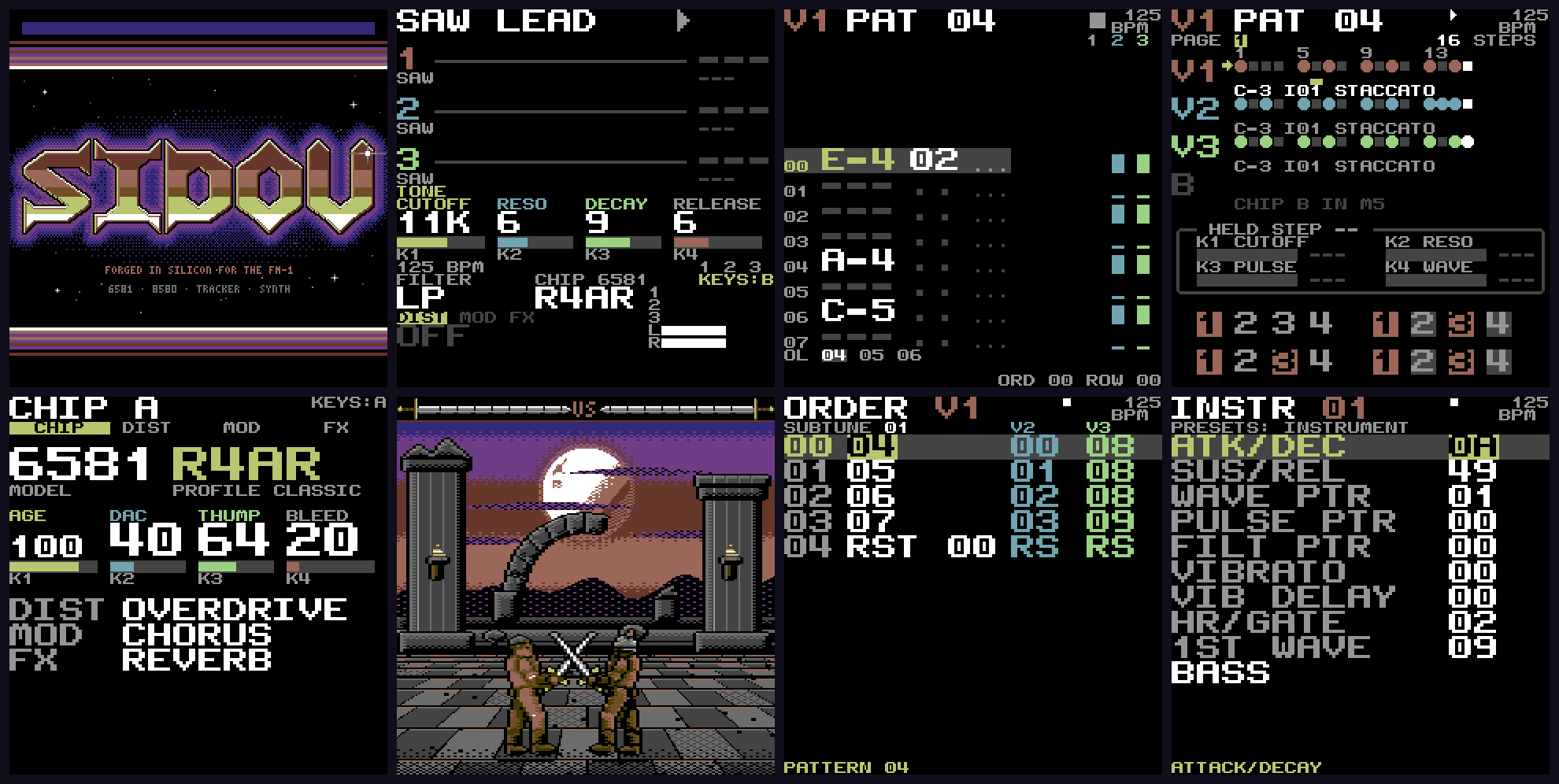
The boot title, LIVE, TRACKER, STEP, CHIP, the RED MOON RITE scene, ORDER and INSTR, from the screenshots the tests check.

Watch: SIDOU in 79 seconds · What's new · all the how-to videos · the cheat sheet
What's new
Every release and what it brought is in CHANGELOG.md, with each release's notes and package on the releases page; what comes next is in docs/ROADMAP.md.
What you can do
- Play the SID live. Four presets (SAW LEAD, PWM BASS, SYNC LEAD, NOISE PERC) and DICE, which rolls a new sound at each turn. Cutoff, resonance, the sound's own control and the release are on K1 to K4.
- Shape the chip. The CHIP view picks the model (6581 or 8580) and a profile, and sets its character: age, DAC, thump and bleed. Three effect slots (distortion, modulation, FX) follow the chip in stereo.
- Shape a sound and keep it (LAB, new in 1.0). ENV, LFO and FX on LIVE open LAB: six pages (OSC, ENVELOPE, FILTER, MOD, FX, MACRO) draw what their four cards do, so you turn K1 to K4 and see it: a filter LFO on FILTER, the arpeggio's rate on MOD, and on MACRO links that make the resonance follow the cutoff and the PWM follow the width. EDIT's tap compares A and B, holding EDIT while you play peeks at A, EDIT + LFO undoes (16 steps), EDIT + ARP varies a page and EDIT + SCL rolls the voice (neither is ever silent). One SAVE keeps the sound as one of 16 USER sounds, which PRESETS plays after DICE; EDIT + SAVE names it on the keys. A slot turned to OFF on the FX page bypasses the effect (shape a sound in LAB). REC in LAB sends the sound to the song as a GoatTracker instrument while it plays, and ENV on INSTR pulls one back into LAB (new in 1.5).
- Use two SIDs. Songs play on one chip while the keys play the other, on top of the song.
- Make songs on the panel. STEP is a drum-machine view of a pattern, and a NEW song comes with a SID drum kit (kick, snare, hats, clap, toms, rim) and C64-style digi drums to put on its lanes. TRACKER is GoatTracker's layout, one voice at a time. ORDER, INSTR and TABLE edit the rest. REC records the keys and the filter knobs while the song plays, each note where you played it against what you heard, and parameter locks are on STEP, with a chance for each step; a held step sounds with its locks. TABLE's ARP helper writes arpeggios as wavetable rows, and the keys play the draft before you save it. MUTATE, DICE (density, range, scale, rhythm and a root for each lane) and a filter sweep write patterns in STEP and TRACKER.
- Keep GoatTracker 2 songs. SAVE writes a
.sngto the device's flash. Power loss does not corrupt it. - Play
.sidtunes. SIDOU's own 6502 plays PSID tunes (one or two SIDs, PAL or NTSC) from the device's flash: the menu's SIDS lists them, NOW PLAYING shows the tune, its songs and its voices, with mute and solo, pause and stop, and MIDI start, stop and continue (put a tune on the FM-1 and play it). Solo a voice and press REC to lift its next note as a GoatTracker instrument for your own song (lift a sound). - Keep the FM-1's store from a browser. The site's Library
page lists everything on a connected FM-1 (songs,
.sidtunes, instruments) with its size and CRC and the free space, downloads, sends (an identical file is left alone, a different one replaced only after you confirm), renames and deletes files, and backs the whole store up to one.zipand restores it. It exports any song, from the FM-1 or a file, as a.sngwith SIDOU's settings or as a plain GoatTracker file, and each instrument as a GoatTracker.ins, with SIDOU's own song code compiled to WebAssembly, so it accepts and refuses what the FM-1 does (the manual). - Take a song into a DAW. The site's Songs to MIDI
page turns any GoatTracker 2
.sng, from a file or read straight from the connected FM-1 (the current song, or one stored on it), into a.mid, a MIDI channel a SID voice, with the notes where GoatTracker's player puts them, wavetable arpeggios included. - Play from MIDI. Notes on every channel, CCs for the main controls, program change for presets and songs (midi.md).
- Record over USB. The FM-1 is also a USB audio input, with no driver, on a computer or an iPad: a DAW records what the line out plays, in stereo at 44.1 or 48 kHz, over the same cable as USB-MIDI.
- Look at it. SCENE has generative pieces, and RED MOON RITE is the first illustrated piece.
- Learn it from the device. A first-run tour, and a help card on every screen.
Eleven openly licensed tunes for the store, a starter pack, are in assets/starter,
and one sidou-sysex sid --pack command makes them a single upload
(the manual). STATUS shows how much of the CPU the
6502 takes.
Try it in your browser
https://dsablic.github.io/sidou/ runs the newest build in an emulated FM-1 (it follows the main branch, so it can be ahead of the latest release) (fm1-emu). Play it from the computer keyboard, the mouse, touch or a MIDI keyboard (Web MIDI). The emulated FM-1 keeps its flash in the browser, so your settings and songs survive a reload. The page can export and import that flash.
Install
Installing is at your own risk, and SIDOU comes with no warranty; the official firmware is one install away, and holding OCT- at power-on is a rescue (docs/flash-day.md).
- Download the
sidou-<version>.fwscfile from the latest release. - Install it with Felucca's installer (
fm1_install.py sidou-<version>.fwsc). The unit then shows up on USB as "SIDOU FM-1", and later versions install over it the same way. - Back to stock: install M-VAVE's official
FM-1.fwsc(V15) the same way. - Recovery: if the unit does not boot, hold OCT- alone while switching on, for about a
second. That enters the chip's ROM boot mode, and the unbricker (
tools/fm1-unbrick-mac, or MvaveFM1Unbricker) can restore a package. It needs nothing of SIDOU.
The installer has no backup, so save your songs first (see below). The hardware checklist says what has passed on a real unit and what has not.
Controls
On LIVE:
| Control | Does |
|---|---|
| Note keys | play the chip (F3 to G5 at the current octave) |
| OCT- / OCT+ | octave down and up |
| K1, K2 | cutoff, resonance |
| K3 | the sound's own control: pulse width, decay or sync ratio |
| K4 | release |
| PRESETS | the preset (DICE after the fourth) |
| SELECT / ALGORITHM | the knob page (TONE, DIST, MOD, FX) / the chip profile (the 6581s and the 8580) or the effect's algorithm |
| EDIT held + K1 to K4 | the selected effect slot's amount, A, B and mix |
| SCL | the next effect slot |
| ENV / LFO / FX | open LAB at its envelope, modulation or effects page |
| MASTER | volume |
| SEQ | the song views, back to the one you used last; again: STEP, TRACKER, ORDER, INSTR, TABLE |
| PLAY / REC | play and stop the song (with a .sid tune loaded, the tune; EDIT held pauses it) / record mode |
| SAVE | in the menu: opens the highlighted item; in a song view: saves the song |
| HOME | the menu from LIVE, back one view elsewhere (settings are under SETTINGS in the menu) |
In LAB: K1 to K4 are the page's four cards and ALGORITHM its choice; SELECT, or ENV, LFO and FX, change the page; SAVE keeps the sound as a USER sound; tap EDIT for A/B, hold it and play to peek at A; EDIT + LFO undoes, EDIT + ARP varies, EDIT + SCL rolls, EDIT + SAVE names; REC sends the sound to the song (EDIT + REC over INSTR's instrument); HOME goes back to LIVE (shape a sound in LAB).
Hold HOME on any screen for its help card: it says what each control does there, for what the screen is doing (SELECT turns a two-page card). Every control, every screen and every MIDI message is in docs/reference/controls.md and docs/reference/midi.md.
Songs and GoatTracker
SIDOU's songs are GoatTracker 2 .sng files (format notes).
- On the device: SAVE in a song view stores the song in the FM-1's flash. The menu's SONG item loads, creates, saves under a name and deletes songs.
- Over USB: SysEx GET reads a song from the device and PUT writes one to it (protocol); while a song plays, an upload waits for quiet so the music never dips.
- Screen mirror (FM-1 Live Link): a computer can show the FM-1's screen and press its buttons over the same USB-MIDI port (protocol, open to the other FM-1 firmwares); the browser viewer comes later.
- The showcase songs: a fresh install lists only the built-in SIDOU LOOP. The
Songs page of the browser demo sends
CHROME COMET, IRON RITE, NEON HIGHWAY and PAPER LANTERNS (
assets/songs) to a connected FM-1 in one click (Chrome or Edge: Web MIDI with SysEx; Safari has none). Run locally,tools/web-demoserves it athttp://localhost:8642/songs.html. - Your own files: the Library page lists, downloads, sends, renames, deletes, backs up and restores the FM-1's files, and exports a song for GoatTracker 2 with its instruments (docs/manual/library.md).
- On your computer: the
.sngopens in GoatTracker 2, and a GoatTracker 2 song put on the device plays there if it fits the device's limits. The device refuses one it cannot play, with a message.
For developers
- BUILDING.md: building the host tools, the firmware and the package.
- TESTING.md: the test layers, and what a failure means.
- docs/videos.md: the how-to videos, made from the recipes in the emulator
(
tools/make-videos). - docs/decisions/: decision records, starting with 0001 (C on the device, Rust for host tooling) and 0002 (M0 SID cost).
- docs/hardware.md and docs/hardware-test.md: the FM-1, and the checklist for a real unit.
- CONTRIBUTING.md: how to report bugs and send changes.
In the emulator (no hardware needed). Build the firmware and the package
(BUILDING.md), then, from host/:
SIDOU_FM1_BUILD=$PWD/../build/fm1 cargo nextest run --release -p emu-gate
(cargo install --locked cargo-nextest once; plain cargo test --release -p emu-gate also works, more slowly.)
The tests boot the firmware and the package in fm1-emu, play the keys,
knobs and MIDI, and check the sound and the screen
(TESTING.md). build/fm1/sidou_package.wav is what the
package plays with the A4 key held from power-on. fm1-emu's own command
line runs the package too (fm1-emu --fwsc build/fm1/sidou.fwsc --ms 10000).
To run your working tree's firmware in the browser (Docker, Rust and Python 3 needed; BUILDING.md, "Browser demo"):
tools/web-demo # builds everything, then serves http://localhost:8642/
Status and roadmap
The releases and what each brought: CHANGELOG.md. What comes next: docs/ROADMAP.md.
Installs, updates, the way back to stock, the OCT- recovery, MIDI and SysEx over USB, the song views, REC and .sid playback (its flash day) have run on a real unit; the first-run tour is still to be checked there. See the
roadmap and the
design document.
Credits and licence
SIDOU stands on Felucca (the FM-1 platform code and installer), reSID and reSIDfp (the SID models), GoatTracker 2 (the song format), and fm1-emu (the emulator the tests and the browser demo run on). The full list is in CREDITS.md.
SIDOU is an independent community project. It is not affiliated with M-VAVE or with Commodore trademark holders.
SIDOU is free software under the GNU General Public License v3.0 or later. Third-party components keep their own licences. See LICENSING.md and CREDITS.md.