polyend-tracker-re
Reverse engineering notes and experimental firmware.
forPolyend Tracker·by@sandlbn
Unclaimed. Is this yours? Sign in with GitHub as @sandlbn to claim it.
PolyendTrackerOTv223.ptf· 1.8 MB· +4 files
Apache-2.0· sandlbn/polyend-tracker-re·downloads come from the creator’s GitHub releases
2.2.3Latest5 files
OpenTracker 2.2.3: release notes
OpenTracker is an open-source, clean-room firmware for the original Polyend Tracker, written from behavioural specifications. It contains no Polyend code, fonts, icons or graphics, and is not affiliated with or endorsed by Polyend.
2.0 brings the newer Trackers features to the original hardware: 16 tracks, synth engines, stereo samples, Mini/Plus-compatible project files and USB Storage mode.
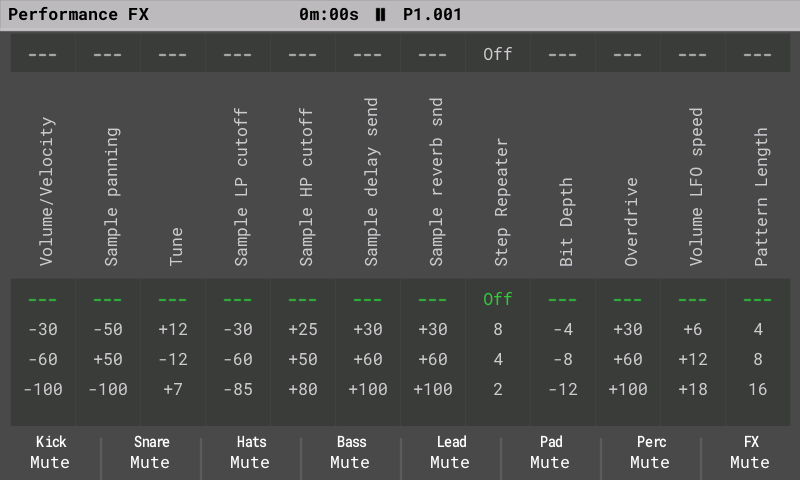
Performance screen (fixes planned for the next version): a couple of reported Performance screen issues are still open, among them how the global Pattern length behaves in Song mode (the song moves on after the shortened length, as on stock). They need more work and testing, so they come in the next release rather than in 2.2.3.
New in 2.2.3
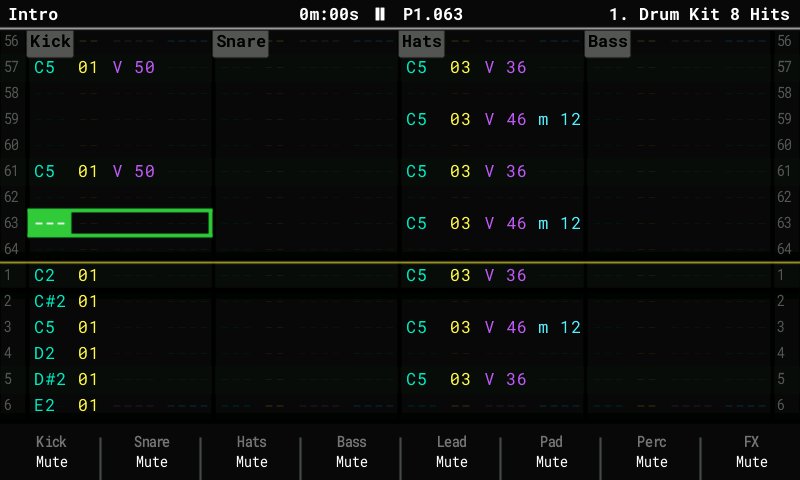
- Your own colour themes put a theme file in
/Themeson the SD card and choose it under Config > General > Display theme, after Original, Monochrome and Anniversary. A theme is a short text file with lines likeaccent = #FF2BD6. It starts from one of the built-in themes and changes only the colours you list. The new Export theme row saves the current theme to/Themes, so you can copy it and edit it on a computer. A theme that would make text unreadable (text in the same colour as its background) gets its text colour back from the built-in theme. The built-in themes are unchanged. Without a/Themesfolder everything looks as before. - 12 example themes (separate download,
OpenTracker-2.2.3-Themes.zip): Neon, Amber, Paper, Bubblegum, Barbie, Matrix, GameBoy, Vaporwave, Lava, Ocean, C64 and Halloween (contributed by AnthonyBerg1983). Unzip it to the root of the SD card; the files land in/Themes. - Steady MIDI clock on the DIN jack: the clock to external gear no longer wobbles while you change screens or audition samples on the pads. MIDI out now leaves the jack at the audio block rate, not when the screen has finished drawing. Measured on a Tracker driving a microKORG XL+: the clock goes out under 1 ms after it is due, also while the screen is busy for seconds. (Reported on Discord with a Mother-32 and a DFAM.)
- Pitch bend from a MIDI keyboard: the bend wheel bends notes you play live by up to 2 semitones. It works on sample instruments, on the synths and on MIDI instruments (the bend goes out on their channel). It is not recorded into patterns. (Requested on Discord.)
- Stream long samples from the card (optional, Off by default): Config > General > Stream from card (Off / Auto / All) and Stream threshold (5 to 30 s). Long samples then load only their start into memory and play the rest from the SD card, so projects with long stems or recordings fit. Editing a streamed sample asks to load it into memory first. With Off, everything works and sounds exactly as before.
- Sample Loader and streaming: Add follows Stream from card too. Files that will stream
are marked with
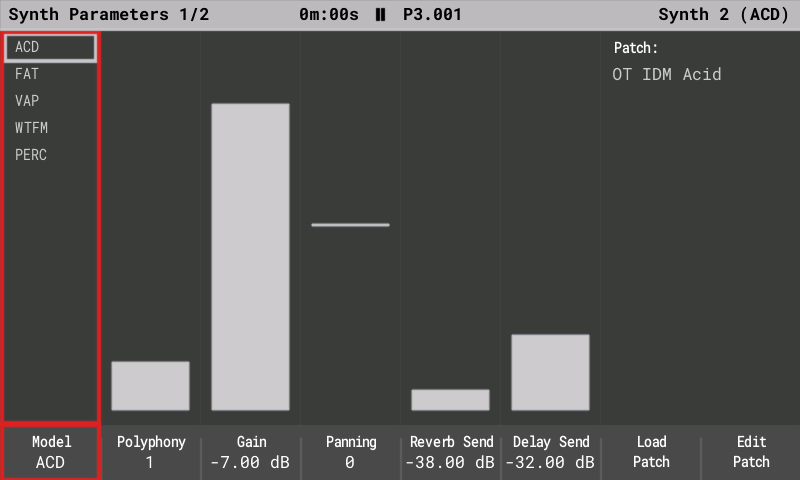
~in the list, a message says why a file streams, and the card is checked before a long conversion starts, so a file that cannot stream is refused at once. Trim refuses a file too long for the memory straight away. A card whose free space is only in pieces still takes long files, a refused import keeps the slot's old instrument, and a streamed Add no longer pauses for seconds to count the free space. Fixes from the beta: previews after Add next could stay silent because finished streams were not released, and a second long file could fail with "format the SD card". - Synth stereo: a new Width setting for ACD, FAT, VAP and WTFM, and Stereo for FAT. Both are 0 (mono, the old sound) in every existing patch.
- Synth Macros: turning a macro by hand takes over from a pattern FX CC at once (the bar turns white). Before, the pattern value held the macro until Stop, so it looked locked.
- Synth notes in the pattern editor (GitHub issue #117): in edit mode, turning the note encoder on a synth step plays the note for one step and then the patch's release, as the original firmware re-triggers the row. Before, the note held until the next preview.
- Sample Editor with full memory: the pads still play the selected part (without the effect) when the sample memory is full; before, every pad press said "The result would be too long". Preview and Apply still need free memory and now say "Not enough free sample memory"; "too long" now means only the length limit (about 44.6 s).
- Stack overflow protection (contributed by syamajala): if the firmware ever runs out of stack, the Tracker restarts and shows a notice instead of silently corrupting memory.
- No SD card at power-on: switching on without a card no longer shows a crash report; the Tracker waits for a card as before.
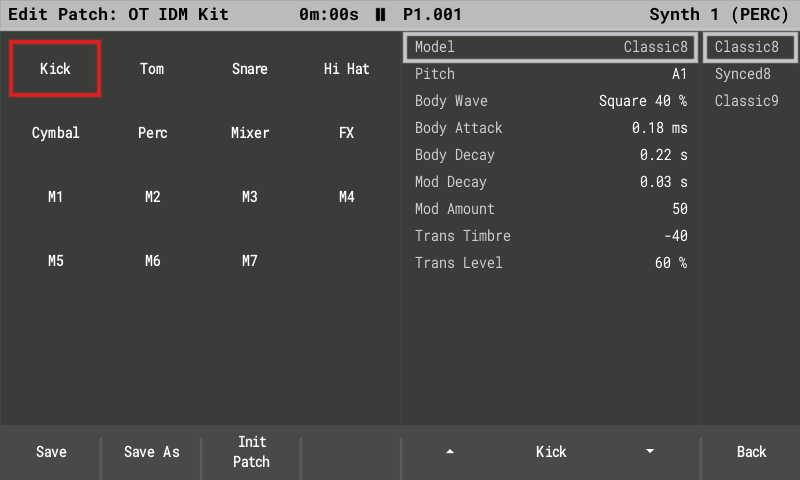
- PERC sends follow the instrument: a drum kit's per-drum delay and reverb sends now scale with the instrument's send and with the Delay / Reverb Send step FX, so you can turn them down; before, the snare and hats always reached the delay. Projects that relied on the old always-on sends need the instrument send raised.
- CPU meter with Polyend's levels: yellow from 85 %, orange from 93 %, red from 99 %, as on the Tracker Mini and Tracker+ (before: 60, 70 and 85 %, so busy songs that played fine showed red). Like Polyend's, it is a warning; the voice limiter is unchanged.
- Song screen progress line also when you play a single pattern (Play Pattern), not only the whole song.
- Stack and line-in health on the USB log (contributed by syamajala): the 5 s telemetry line reports the deepest stack use since power-on and line-in recoveries, so memory problems can be caught before they cause a crash.
What's Changed
- Song screen: progress line for Play Pattern by @sandlbn in https://github.com/sandlbn/polyend-tracker-re/pull/80
- PERC: per-drum sends follow the instrument's and the step's sends by @sandlbn in https://github.com/sandlbn/polyend-tracker-re/pull/81
- MIDI input pitch bend on live notes (+-2 semitones) by @sandlbn in https://github.com/sandlbn/polyend-tracker-re/pull/82
- Telemetry: stack high-water mark and line-in RX health by @syamajala in https://github.com/sandlbn/polyend-tracker-re/pull/75
- SD streaming: long samples play from the SD card by @sandlbn in https://github.com/sandlbn/polyend-tracker-re/pull/83
- MIDI clock out on DIN keeps the audio block timing by @sandlbn in https://github.com/sandlbn/polyend-tracker-re/pull/84
- CPU meter: Polyend's levels (yellow 85 %, orange 93 %, red 99 %) by @sandlbn in https://github.com/sandlbn/polyend-tracker-re/pull/85
- Config: values clear the scroll bar of a scrolling list by @sandlbn in https://github.com/sandlbn/polyend-tracker-re/pull/87
- Preset pack: eight synthwave PERC kits (OT Kit SW ...) by @sandlbn in https://github.com/sandlbn/polyend-tracker-re/pull/88
- Add full support for usb streaming by @sandlbn in https://github.com/sandlbn/polyend-tracker-re/pull/89
- Add Stereo synth for all engines by @sandlbn in https://github.com/sandlbn/polyend-tracker-re/pull/94
- Synth pages: names show without control bytes (stray glyph after "Cut… by @sandlbn in https://github.com/sandlbn/polyend-tracker-re/pull/95
- Display: a frame that faults on a static screen is redrawn, not frozen by @syamajala in https://github.com/sandlbn/polyend-tracker-re/pull/76
- Granular: the shaded grain is the grain that plays (#92) by @sandlbn in https://github.com/sandlbn/polyend-tracker-re/pull/98
- Sample Loader: memory follows the trim and the import (#93) by @sandlbn in https://github.com/sandlbn/polyend-tracker-re/pull/99
- Theme files from the card (/Themes), Export theme by @sandlbn in https://github.com/sandlbn/polyend-tracker-re/pull/100
- Stack guard: a no-access SYSMPU window between the heap and the stack by @syamajala in https://github.com/sandlbn/polyend-tracker-re/pull/101
- Stack guard: frames checks the image's objects; notice and README note by @sandlbn in https://github.com/sandlbn/polyend-tracker-re/pull/106
- Add Halloween theme by @AnthonyBerg1983 in https://github.com/sandlbn/polyend-tracker-re/pull/105
- SD streaming fixes by @sandlbn in https://github.com/sandlbn/polyend-tracker-re/pull/107
- Prevent simulator SD symlinks from accessing host files by @guaka in https://github.com/sandlbn/polyend-tracker-re/pull/103
- Stack headroom limit 90 KiB -> 75 KiB by @syamajala in https://github.com/sandlbn/polyend-tracker-re/pull/104
- Synth Macros: a hand edit takes over from the FX CC override by @sandlbn in https://github.com/sandlbn/polyend-tracker-re/pull/108
- SD streaming import: the Sample Loader follows Stream from card, with up-front checks by @sandlbn in https://github.com/sandlbn/polyend-tracker-re/pull/109
- SD streaming import: pre-check before the conversion, reserve allocates by @sandlbn in https://github.com/sandlbn/polyend-tracker-re/pull/110
- SD streaming import: no free-space scan before a streamed Add by @sandlbn in https://github.com/sandlbn/polyend-tracker-re/pull/111
- SD: no card at boot no longer HardFaults in sdhc::release() by @sandlbn in https://github.com/sandlbn/polyend-tracker-re/pull/112
- Update halloween theme by @AnthonyBerg1983 in https://github.com/sandlbn/polyend-tracker-re/pull/113
- SD streaming import: a card with room only in pieces still streams; a… by @sandlbn in https://github.com/sandlbn/polyend-tracker-re/pull/119
- Pattern editor: the note encoder no longer holds a synth note (#117) by @sandlbn in https://github.com/sandlbn/polyend-tracker-re/pull/120
- Sample Editor: pads play with sample memory full; the popup names the… by @sandlbn in https://github.com/sandlbn/polyend-tracker-re/pull/121
New Contributors
- @AnthonyBerg1983 made their first contribution in https://github.com/sandlbn/polyend-tracker-re/pull/105
- @guaka made their first contribution in https://github.com/sandlbn/polyend-tracker-re/pull/103
Full Changelog: https://github.com/sandlbn/polyend-tracker-re/compare/2.2.2...2.2.3
- Your own colour themes put a theme file in
2.2.3-beta3Beta5 files
I hope this is the last beta before the next release. SD streaming takes a lot of time to debug and get right.
What's Changed
- Stack guard: a no-access SYSMPU window between the heap and the stack by @syamajala in https://github.com/sandlbn/polyend-tracker-re/pull/101
- Stack guard: frames checks the image's objects; notice and README note by @sandlbn in https://github.com/sandlbn/polyend-tracker-re/pull/106
- Add Halloween theme by @AnthonyBerg1983 in https://github.com/sandlbn/polyend-tracker-re/pull/105
- SD streaming fixes by @sandlbn in https://github.com/sandlbn/polyend-tracker-re/pull/107
- Prevent simulator SD symlinks from accessing host files by @guaka in https://github.com/sandlbn/polyend-tracker-re/pull/103
- Stack headroom limit 90 KiB -> 75 KiB by @syamajala in https://github.com/sandlbn/polyend-tracker-re/pull/104
- Synth Macros: a hand edit takes over from the FX CC override by @sandlbn in https://github.com/sandlbn/polyend-tracker-re/pull/108
- SD streaming import: the Sample Loader follows Stream from card, with up-front checks by @sandlbn in https://github.com/sandlbn/polyend-tracker-re/pull/109
- SD streaming import: pre-check before the conversion, reserve allocates by @sandlbn in https://github.com/sandlbn/polyend-tracker-re/pull/110
- SD streaming import: no free-space scan before a streamed Add by @sandlbn in https://github.com/sandlbn/polyend-tracker-re/pull/111
- SD: no card at boot no longer HardFaults in sdhc::release() by @sandlbn in https://github.com/sandlbn/polyend-tracker-re/pull/112
New Contributors
- @AnthonyBerg1983 made their first contribution in https://github.com/sandlbn/polyend-tracker-re/pull/105
- @guaka made their first contribution in https://github.com/sandlbn/polyend-tracker-re/pull/103
Full Changelog: https://github.com/sandlbn/polyend-tracker-re/compare/2.2.3-beta2...2.2.3-beta3
2.2.3-beta2Beta5 files
What's Changed
- CPU meter: Polyend's levels (yellow 85 %, orange 93 %, red 99 %) by @sandlbn in https://github.com/sandlbn/polyend-tracker-re/pull/85
- Config: values clear the scroll bar of a scrolling list by @sandlbn in https://github.com/sandlbn/polyend-tracker-re/pull/87
- Preset pack: eight synthwave PERC kits (OT Kit SW ...) by @sandlbn in https://github.com/sandlbn/polyend-tracker-re/pull/88
- Add full support for usb streaming by @sandlbn in https://github.com/sandlbn/polyend-tracker-re/pull/89
- Add Stereo synth for all engines by @sandlbn in https://github.com/sandlbn/polyend-tracker-re/pull/94
- Synth pages: names show without control bytes (stray glyph after "Cut… by @sandlbn in https://github.com/sandlbn/polyend-tracker-re/pull/95
- Display: a frame that faults on a static screen is redrawn, not frozen by @syamajala in https://github.com/sandlbn/polyend-tracker-re/pull/76
- Granular: the shaded grain is the grain that plays (#92) by @sandlbn in https://github.com/sandlbn/polyend-tracker-re/pull/98
- Sample Loader: memory follows the trim and the import (#93) by @sandlbn in https://github.com/sandlbn/polyend-tracker-re/pull/99
- Theme files from the card (/Themes), Export theme by @sandlbn in https://github.com/sandlbn/polyend-tracker-re/pull/100
Full Changelog: https://github.com/sandlbn/polyend-tracker-re/compare/2.2.3-beta...2.2.3-beta2
2.2.3-betaBeta2 files
What's Changed
- Song screen: progress line for Play Pattern by @sandlbn in https://github.com/sandlbn/polyend-tracker-re/pull/80
- PERC: per-drum sends follow the instrument's and the step's sends by @sandlbn in https://github.com/sandlbn/polyend-tracker-re/pull/81
- MIDI input pitch bend on live notes (+-2 semitones) by @sandlbn in https://github.com/sandlbn/polyend-tracker-re/pull/82
- Telemetry: stack high-water mark and line-in RX health by @syamajala in https://github.com/sandlbn/polyend-tracker-re/pull/75
- SD streaming: long samples play from the SD card by @sandlbn in https://github.com/sandlbn/polyend-tracker-re/pull/83
- MIDI clock out on DIN keeps the audio block timing by @sandlbn in https://github.com/sandlbn/polyend-tracker-re/pull/84
Full Changelog: https://github.com/sandlbn/polyend-tracker-re/compare/2.2.2...2.2.3-beta
Show all 2 filesHide 1 files
Other files2.2.24 files
A huge thank you to @syamajala, @bungoleena, @idagani, @AnthonyBerg1983, @Virusinstaller, @joalago and many others for coding, testing the firmware, trying all the new ideas, breaking things, finding bugs, and giving me valuable feedback along the way.
Without you, this project would not be moving forward nearly as quickly. A lot of the improvements and new ideas in the Open Tracker firmware exist because you were willing to test unfinished features and tell me what works-and what definitely doesn’t. :)
Seriously, thank you for helping make this project better!
OpenTracker 2.2.2: release notes
OpenTracker is an open-source, clean-room firmware for the original Polyend Tracker, written from behavioural specifications. It contains no Polyend code, fonts, icons or graphics, and is not affiliated with or endorsed by Polyend.
2.0 brings the newer Tracker Mini's features to the original hardware: 16 tracks, synth engines, stereo samples, Mini-and+compatible project files and USB Storage mode.
New in 2.2.2
- The instrument under the cursor (as on stock): on the Pattern screen with Rec off, Instrument Params, Sample Playback and Sample Editor open the instrument of the step under the cursor and make it the current instrument. An empty, OFF, CUT or FADE step keeps the current one. (Reported by bungoleena.)
- Sample Editor effects up to 60 times faster (contributed by syamajala): applying and undoing no longer freezes the Tracker for seconds (Timestretch Beat on a kick took 52 s); the effects sound the same.
- No pause when saving a longer sample (contributed by syamajala): after an effect that makes a sample longer, the next save no longer stops for about half a second.
- Exports at 44.1 kHz (contributed by bungoleena): songs, patterns, stems and renders play at the right speed in any DAW, with no drift. Config > General > Export sample rate brings back the original 44117 Hz if you prefer to convert in your DAW.
- Sample Loader, as on stock: names of any length are listed (names of 40 characters and more were hidden) and the selected one scrolls; a folder with more than 100 files appears as parts "(1-100)", "(101-200)", ... instead of losing files. (Reported by bungoleena.)
- No clicks and no pop: opening a project no longer clicks, and the pop at power-on is gone: the output opens half a second after the start-up project has loaded. (Reported by PITmast.)
- Power button (contributed by bungoleena): the first press after power-on works, the "Shutting down" bar shrinks as on stock, and the screenshot notice stays readable.
- Firmware updates are safer (contributed by bungoleena): the image ends in a full flash sector of padding, so an update can no longer leave old bytes behind that crashed the Song screen.
- Deleting a project with very deep folders is refused instead of crashing or deleting half of it. (Reported by bungoleena.)
- More free memory for coming features (contributed by syamajala): the Recents list and the screens moved to the external memory.
What's Changed
- Import Mod: .it files import empty by @syamajala in https://github.com/sandlbn/polyend-tracker-re/pull/41
- .sdram_bss: 92 KB -> 156 KB, up to the SDRAM's top by @syamajala in https://github.com/sandlbn/polyend-tracker-re/pull/37
- Feature/ci by @syamajala in https://github.com/sandlbn/polyend-tracker-re/pull/38
- Makefile: 2.2.1 defaults (Games off) by @sandlbn in https://github.com/sandlbn/polyend-tracker-re/pull/45
- 8-track view - track tabs span the column (no half-covered notes) by @sandlbn in https://github.com/sandlbn/polyend-tracker-re/pull/46
- Test song 18 "OT Test 11 - IDM": PERC + ACD + WTFM with dense sequenc… by @sandlbn in https://github.com/sandlbn/polyend-tracker-re/pull/47
- PERC: kit state never reads uninitialised slot scratch (noise seed) by @sandlbn in https://github.com/sandlbn/polyend-tracker-re/pull/48
- Remove a committed tool binary and a stale sim scene by @sandlbn in https://github.com/sandlbn/polyend-tracker-re/pull/49
- CI: pin the gcc action to a commit; SDRAM symbols for the memory report by @sandlbn in https://github.com/sandlbn/polyend-tracker-re/pull/60
- Module keys open the instrument under the pattern cursor (#52) by @sandlbn in https://github.com/sandlbn/polyend-tracker-re/pull/62
- Recents: one shared list in SDRAM instead of 5,000 B stack locals by @syamajala in https://github.com/sandlbn/polyend-tracker-re/pull/43
- Power button: first press after boot, readable screenshot notice, shrinking hold bar by @bungoleena in https://github.com/sandlbn/polyend-tracker-re/pull/57
- macOS: build the firmware and run the host tests with Apple clang by @bungoleena in https://github.com/sandlbn/polyend-tracker-re/pull/29
- Export: write 44.1 kHz WAVs, resampled from the device rate by @bungoleena in https://github.com/sandlbn/polyend-tracker-re/pull/59
- Config: Export sample rate (44.1 kHz / 44117 Hz) for #59's export con… by @sandlbn in https://github.com/sandlbn/polyend-tracker-re/pull/64
- Sample Editor: effects up to 60x faster, no more multi-second freezes by @syamajala in https://github.com/sandlbn/polyend-tracker-re/pull/53
- FatFs: no FAT scan on every save of a grown sample; load FSInfo again by @syamajala in https://github.com/sandlbn/polyend-tracker-re/pull/58
- Deleting a folder tree with very long paths (#55) by @sandlbn in https://github.com/sandlbn/polyend-tracker-re/pull/65
- UI screens in the SDRAM instead of the SRAM heap by @syamajala in https://github.com/sandlbn/polyend-tracker-re/pull/66
- Flash image: pad the last sector, the update bootloader can skip it by @bungoleena in https://github.com/sandlbn/polyend-tracker-re/pull/50
- Sample Loader: long names and folders with more than 100 files (#54) by @sandlbn in https://github.com/sandlbn/polyend-tracker-re/pull/68
- Audio mute line: no clicks around project loads, no pop at power-on #63 by @sandlbn in https://github.com/sandlbn/polyend-tracker-re/pull/69
New Contributors
- @bungoleena made their first contribution in https://github.com/sandlbn/polyend-tracker-re/pull/57
Full Changelog: https://github.com/sandlbn/polyend-tracker-re/compare/2.2.1...2.2.2
2.2.15 files
A huge thank you to @idagani, @syamajala, @AnthonyBerg1983, @Virusinstaller, @joalago , PITmast and many others for coding, testing the firmware, trying all the new ideas, breaking things, finding bugs, and giving me valuable feedback along the way.
Without you, this project would not be moving forward nearly as quickly. A lot of the improvements and new ideas in the Open Tracker firmware exist because you were willing to test unfinished features and tell me what works-and what definitely doesn’t. :)
Seriously, thank you for helping make this project better!
OpenTracker 2.2.1: release notes
OpenTracker is an open-source, clean-room firmware for the original Polyend Tracker, written from behavioural specifications. It contains no Polyend code, fonts, icons or graphics, and is not affiliated with or endorsed by Polyend.
2.0 brings the newer Tracker Mini's features to the original hardware: 16 tracks, synth engines, stereo samples,etc ...
New in 2.2.1
- WTFM synth engine: the last Tracker Mini model now plays, so all five models have an engine. WTFM is two-operator FM: two wavetable oscillators (operators), operator 2 modulating operator 1, three feedback paths (Feedback 1, Feedback 2, Feedback 2>1), Character rows Smoother / Sharper / Wilder (triangle to saw to square) and Add 1-11 (overtone series added to a sine), Shape along the row, Ratio 0.25-12.00, Reset, Oversampling, the 15 VAP filter types, three envelopes, two LFOs and a 6-slot modulation matrix. Like the other engines it is our own sound design on the Mini's parameters: Mini WTFM patches load and play, and sound close to the Mini, not the same.
- WTFM Ratio shows its value (0.25 to 12.00) instead of a number 0-47.
- 30 WTFM presets in preset pack 1.2 (classic FM electric pianos, clav, organs, bells, mallets, basses, brass, leads, pads and effects; our own patches), and a new test song "OT Test 10 - WTFM", an 80s FM groove with an FM piano, bass and bells.
- CPU: a WTFM voice costs about as much as a VAP voice; with Oversampling On about a third more. Four oversampled WTFM voices in a busy song can make the voice limiter hold one back.
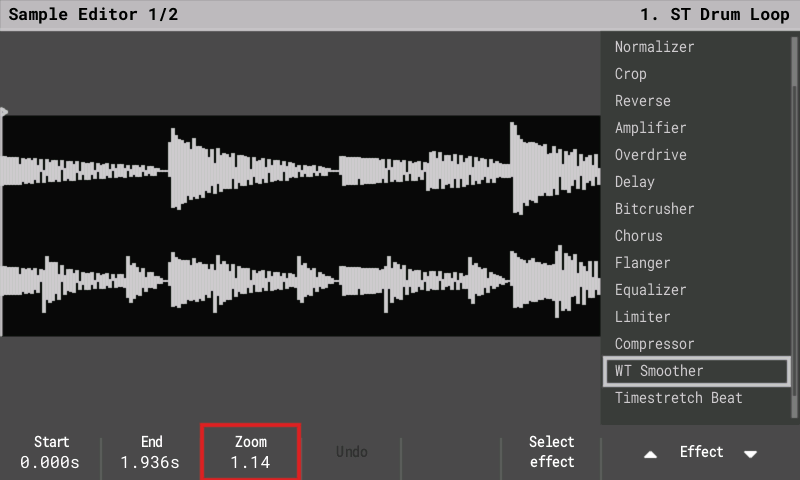
- Waveforms like the Tracker+ and Mini. The Sample Playback, Sample Editor and Sample Recorder waveforms show the sample's envelope (the loudest and quietest point under each column), so drum hits show their attack and decay; a short hit is never lost between columns. Stereo samples are drawn as two lanes, left over right, on Sample Playback and on the Sample Editor's second page too.
- Preview playhead (user request): the Sample Recorder (after a take) and the Sample Editor (both pages) show a green line at the play position while Preview or a pad plays.
- Fill tool, Instr column: the From / To values read like the pattern grid (07, M01, S1) and the popup header names the instruments ("From 07 Kick To 12 Snare"); stock shows bare numbers 1-66.
- Live resampling starts on the downbeat: a take armed while the pattern plays no longer begins ~3 ms before the bar's first sound (Line In round-trip latency is still to come).
- More free memory (contributed by @syamajala, PR #28): the file browsers share one name-list buffer and screenshots use a single row buffer, freeing 16 KB of SDRAM.
- Live recording with Recording options = Velocity records full velocity as V100 (was V79); the Instr column records no OFF on the pad release.
- Slice mode: pads play the selected slice through the pad layout (Beat Slice keeps pad = slice).
- Master + Up / Down from any page set the master volume like the Jog.
- Performance: as on stock, every track starts with the effects on; a track you turn off with its button is lit red. A queued track pattern blinks, edit mode shows red rows, and the FX names match the stock screen ("Volume/Velocity", "Sample LP cutoff" ...).
- MIDI instrument page: CC A-F are CC lists; the MIDI mapping CC list is in the stock order as "Name = CC"; instruments read "2. Guitar" / "49. MIDI Channel 1".
- Fill: Fx values in their display form (Panning -50..50), the bar on the engine range; Bit Depth starts at 4 when chosen; popups page with Left / Right.
- Song: muted tracks with steps are dimmed; Preview Track plays once; Song held from another page returns on release even after another key.
- Sample Playback: Wavetable shows one window and its position, Granular the grain span; the selected marker turns green on a zero crossing.
- Sample Editor: Timestretch Note starts at the sample length; EQ shows 0.05 dB steps; "Timestretch Beat / Note", "Fade In / Out".
- Sample Loader memory bar: red when a load adds memory, green when it frees memory.
- Labels: Track rename "Save", Recorder "Metronome / Config" and "Yes", Limiter "-inf dB", Slide help (16 = 1 semitone), FX help shows the range.
Fixes from user reports (also in 1.9.x):
- Crack in the headphones at power-on. The output now stays muted until the start-up project has loaded, and while a project opens, as on stock.
- Pads played MIDI instruments one channel low with playback stopped (M02 on channel 1, M16 on 15). Mn now plays on channel n, like the sequencer.
- Bottom bar fonts: two-line names ("New / project", "Export / Song") use one font, as on stock, and long values such as "Line in ST" fit their box.
- Live recording: releasing a key wrote the OFF step with instrument 01 whatever instrument was playing. The OFF now belongs to the note it ends, and, as on stock, OFF / CUT / FADE steps show no instrument number in the pattern.
- Live recording with Pre-roll missed the first note when it came a little early, inside the end of the count-in (more likely at faster tempos). A note in the count-in's last half step is now recorded on step 1, like a note late in a step goes to the next step (an OpenTracker rule; stock's handling is not known).
- Headphone output 1 dB louder (-6 dB instead of -7 dB on the codec's headphone amp), after a report that stock sounds louder. Stock's exact level is not known: if you can compare with stock on the same unit, please tell us by how much stock is louder now.
- The pattern cursor stays red while recording (Rec + Play, count-in included), as on stock; before it turned green.
What's Changed
- Beta 2.2.1 by @sandlbn in https://github.com/sandlbn/polyend-tracker-re/pull/33
- Browsers share one SDRAM name-list buffer; screenshot uses one row buffer by @syamajala in https://github.com/sandlbn/polyend-tracker-re/pull/28
- V221 by @sandlbn in https://github.com/sandlbn/polyend-tracker-re/pull/35
Full Changelog: https://github.com/sandlbn/polyend-tracker-re/compare/2.1.2...2.2.1
- PolyendTrackerOTv221.ptf1.9 MB60↓
- OpenTracker_manual.pdf29 MB50↓
- OpenTracker-Presets-1.2.zip46 KB48↓
- Projects.zip13 MB31↓
Show all 5 filesHide 1 files
Other files2.2.1-betaBeta4 files
What's Changed
- Beta 2.2.1 by @sandlbn in https://github.com/sandlbn/polyend-tracker-re/pull/33
Full Changelog: https://github.com/sandlbn/polyend-tracker-re/compare/2.1.2...2.2.1-beta
Show all 4 filesHide 1 files
Other files2.1.25 files
A huge thank you to @idagani, @syamajala, @AnthonyBerg1983, @Virusinstaller, @joalago and many others for coding, testing the firmware, trying all the new ideas, breaking things, finding bugs, and giving me valuable feedback along the way.
Without you, this project would not be moving forward nearly as quickly. A lot of the improvements and new ideas in the Open Tracker firmware exist because you were willing to test unfinished features and tell me what works-and what definitely doesn’t. :)
Seriously, thank you for helping make this project better!
OpenTracker 2.1.2: release notes
OpenTracker is an open-source, clean-room firmware for the original Polyend Tracker, written from behavioural specifications. It contains no Polyend code, fonts, icons or graphics, and is not affiliated with or endorsed by Polyend.
2.0 brings the newer Tracker features to the original hardware: 16 tracks, synth engines, stereo samples and etc....
New in 2.1.2
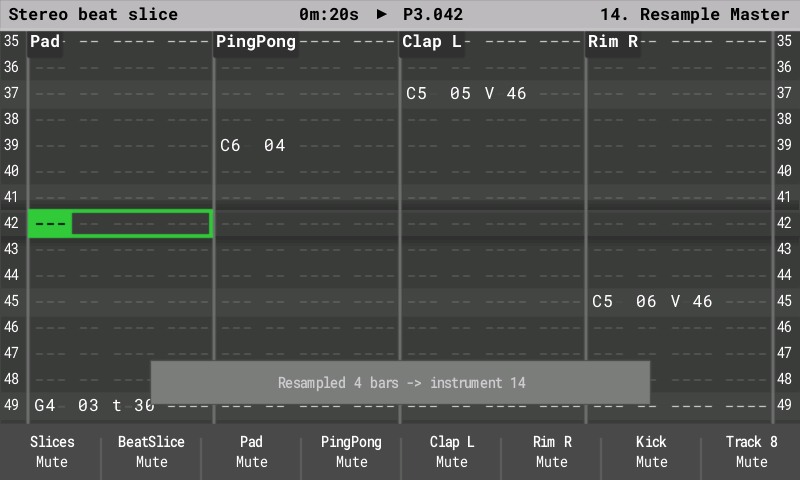
- Live resampling (an OpenTracker extra, contributed by @syamajala , PR #21): record the whole mix, one track (its sample and the synth notes it plays) or Line In into a new instrument while the pattern keeps playing. The take starts on the next bar and lasts 1-16 bars or until stopped; it can be cut into slices (per beat / step, or at the hits) and placed straight onto a track. Open it with Resample on the Sample Recorder's "This will stop the pattern" question, or arm / stop a take from any screen with Shift + Sample Rec. See the manual chapter "Live resampling".
- Synth notes: Delay Send, Reverb Send and Panning step FX. On synth tracks these FX did nothing; they now set that note's sends and position (on the note's step or a later step). The next plain note uses the synth page's settings again. Panning is an OpenTracker extra.
Fixes from @idagani reports:
- A note with Gate Length 0 was sometimes silent. Its note-off could land in the same audio block as the note itself; every note now sounds for at least one block, as on stock.
- Loading a sample into an existing instrument reset its settings. As on stock, the instrument keeps its settings and only the sample and its name change, so you can copy an instrument and load a different sample into the copy. The prompt now reads "Replace sample?".
- Changing the instrument of a selection now also moves its OFF steps, so a re-instrumented live take stays consistent (an OpenTracker change; stock keeps the OFFs' instrument).
- MIDI keyboard step entry moves the cursor by the step jump, like the pads (a chord across a selection still fills one row).
- Sample Recorder: Up/Down follow the Source list (Up = the item above).
- Title bar: "CPU nn%" no longer runs into the play time with the custom font.
Ps. Stay tuned for something new over the weekend
- PolyendTrackerOTv212.ptf1.8 MB27↓
- OpenTracker_manual.pdf28 MB22↓
- OpenTracker-Presets-1.1.zip29 KB12↓
- Projects.zip13 MB8↓
Show all 5 filesHide 1 files
Other files2.1.15 files
A huge thank you to @idagani, @syamajala, @AnthonyBerg1983, @Virusinstaller, @joalago and many others for coding, testing the firmware, trying all the new ideas, breaking things, finding bugs, and giving me valuable feedback along the way.
Without you, this project would not be moving forward nearly as quickly. A lot of the improvements and new ideas in the Open Tracker firmware exist because you were willing to test unfinished features and tell me what works-and what definitely doesn’t. :)
Seriously, thank you for helping make this project better!
OpenTracker 2.1.1: release notes
OpenTracker is an open-source, clean-room firmware for the original Polyend Tracker, written from behavioural specifications. It contains no Polyend code, fonts, icons or graphics, and is not affiliated with or endorsed by Polyend.
2.0 brings the newer Tracker features to the original hardware: 16 tracks, synth engines, stereo samples, Tracker+ compatible project files and USB Storage mode.
New in 2.1.1
- Bit depth added hiss. It rounded every sample down, so quiet sounds and release tails turned into a buzzing pulse. It now rounds to the nearest step, so quiet sounds and tails stay clean (stock rounds down and has the same hiss; this is a deliberate improvement).
- Delay: switching Ping-pong while echoes rang dropped the echo tail. It now continues seamlessly, as on stock.
- A damaged instrument file could silence its track's filter. Invalid values are now checked on load.
- Sample Loader: with Preview held, Up/Down on the SD Card list went quiet. The next file now auditions at once, as in the instrument list.
- MIDI keyboard: notes stopped recording after turning the encoder on a note. In edit mode the encoder's note audition kept the cursor track busy, so keys played on the next track and wrote nothing until a pad press or a project reload. Keys are now written at the cursor again.
- MIDI keyboard step entry did nothing with a synth instrument. In edit mode, keys played Synth 1-3 but wrote no note; they are now written at the cursor (a held chord fills the selected tracks).
- Holding Instr on a synth page did nothing. It now opens the instrument chooser, which also lists Synth 1-3 (after MIDI 1-16); releasing it opens the picked instrument's page.
- Synth macros: switching Bipolar on showed the macro at -63. Toggling Bipolar in Edit Patch now resets that macro to its neutral value (0, or the centre for a bipolar macro).
- Song: renamed tracks still showed "Track X". The Song page headers now show the track names, as on stock.
- Song: no playback progress line or playing-slot icon. During song playback a green line moves down through the playing slot's row in the track grid, showing how far its pattern has played, and a play triangle marks the playing slot (its text stays white). With Shift + Play (looping that pattern) the triangle, and the one in the title bar, turn into a loop arrow, as on stock (plain pattern play keeps the triangle).
- Pattern: Preview looped the row and looked like a hang. Preview on a cell now plays that row (or the selection) once and stops, as on stock; before, it kept looping and held the cursor until Play.
- Track Mixer: old peak-hold marks stayed after the song stopped. The meters only update while the page is shown; they now start empty each time it opens.
- Sample Recorder: the input kept playing after a take. The radio or line input now monitors only on the setup page and while recording, so it no longer plays under Preview and the pads while you trim the recording.
- Track Mixer and Global Mixer pages drawn in layers. They needed close to the display chip's per-frame limit; drawn layer by layer they look the same and need about 25 % less. Contributed by @syamajala, PR #8).
- PolyendTrackerOTv211.ptf1.8 MB32↓
- OpenTracker_manual.pdf28 MB26↓
- OpenTracker-Presets-1.1.zip29 KB18↓
- Projects.zip13 MB8↓
Show all 5 filesHide 1 files
Other files2.1.05 files
OpenTracker 2.1.0: release notes
OpenTracker is an open-source, clean-room firmware for the original Polyend Tracker, written from behavioural specifications. It contains no Polyend code, fonts, icons or graphics, and is not affiliated with or endorsed by Polyend.
2.0 brings the newer Tracker features to the original hardware: 16 tracks, synth engines, stereo samples etc..
New in 2.1.0
About the synths: ACD, VAP, PERC and FAT are inspired by the Tracker Mini's engines but are not identical. They are our own sound design on the Tracker parameters: Mini patches load and play, and sound close to the Mini, not the same.
- FAT synth engine. The Tracker Mini's "fat" analog engine now plays on Synth 1-3: a
stack of up to seven detuned saws for super-saw pads, leads, hoovers and thick basses.
- Osc: Fatness (how many saws and how wide the detune), Brightness (tone before the filter), Timbre (saw to square), LFO Amt (vibrato), Noise and Reset (phase restart on each note).
- Filter: LP MG 24, LP OB 24 and LP OB 12, with cutoff, resonance, envelope and LFO amounts; Amp and Filter envelopes, an LFO (6 waveforms, free / one-shot / note retrigger) and glide (4 modes).
- Inspired by the Mini's FAT, not identical: same parameters and ranges, so Mini FAT patches load and play (all 57 factory FAT patches render cleanly), but the sound is our own design, close to the Mini's.
- CPU: about the same as VAP per voice; four FAT voices with eight sample tracks use about 62 % of the processor.
- Preset pack 1.1 (separate download,
OpenTracker-Presets-1.1.zip): adds 8 FAT presets (OT Super Saw, Wide Pad, Hoover Lead, Trance Pluck, Thick Bass, Dark Strings, Square Stack, Detuned Keys) to the 36 ACD, VAP and PERC patches. Copy them to/Patches/FAT. - New test song "OT Test 09 - FAT Only" in
Projects/. - WTFM is still "not available" (planned for 2.2).
- Instrument Automation 2/2: Up/Down were reversed in the LFO Shape list (Rev saw, Saw, Triangle, ...). Up now moves up the list, like Destination, Type and Speed.
- Pattern: the column view (Pattern + Note / Instr / FX) could not be left. Pressing Pattern alone now returns to the 4-track view, as the manual describes.
- Pattern: after Stop the cursor jumped back to the top. It now stays on the row where playback stopped, as on stock.
- PolyendTrackerOTv210.ptf1.7 MB31↓
- OpenTracker_manual.pdf28 MB28↓
- OpenTracker-Presets-1.1.zip29 KB26↓
- Projects.zip13 MB15↓
Show all 5 filesHide 1 files
Other files- FAT synth engine. The Tracker Mini's "fat" analog engine now plays on Synth 1-3: a
stack of up to seven detuned saws for super-saw pads, leads, hoovers and thick basses.
2.0.8-betaBeta1 file
- pressing Pattern on its own now leaves the column view (Pattern + Note / Instr / FX) and returns to the 4-track view, and after Stop the cursor stays on the row where playback stopped.
- move cursor to the last played line
2.0.75 files
OpenTracker 2.0.7: release notes
OpenTracker is an open-source, clean-room firmware for the original Polyend Tracker, written from behavioural specifications. It contains no Polyend code, fonts, icons or graphics, and is not affiliated with or endorsed by Polyend.
2.0 brings the newer Tracker features to the original hardware: 16 tracks, synth engines, stereo samples, Mini-compatible project files and USB Storage mode.
Big thanks to @syamajala @idagani , @quadpunk, Ismoketobaccoinabong, and Musojon74 for reporting bugs, testing, and helping me track down and fix all the issues. Really appreciate all your help and support! 🙏
New in 2.0.7
Fixes:
- A screen could freeze when it needed more than the display chip can hold (reported on one unit when switching from Master to Track Mixer). The firmware now checks what the chip reports: a page that does not fit is drawn with slightly less detail instead of freezing.
- Track Mixer volume, mute and solo now act on tracks that play a synth. Before, the fader of a track playing Synth 1-3 changed nothing (only its sample voice was scaled).
- Track Mixer meters now move for tracks that play a synth. Before, a track playing Synth 1-3 always showed an empty meter (only sample tracks were measured).
- Global Mixer 3/3 meters did not move. The two meters of Delay, Reverb, Dry Mix and Line In now show each channel's level (left and right), with the same scale as the Track Mixer meters.
- Pattern Instr column: pads previewed each instrument a semitone higher than the last (including Synth 1-3 on pads 17-19). A pad there now auditions the instrument at C (note 60), like stock.
- File: the Open Project and Import Mod lists stopped at 64 entries. They now hold up to 200 (stock: 80).
- Sample Editor: pads now play the sample being edited. They played the instrument through the Sample Playback settings, so a crop or effect was only heard after it was applied. Pads now audition the selection with the current effect, like Preview, and stop when released.
- Sample Editor: after moving the Start marker, the audition was cut short at the end. The preview reused audio processed for the old selection. It now always plays the current selection from its Start marker.
- Sample Recorder: the waveform is white while recording, like the other sample views. It was drawn in red; the red "Recording" header stays.
- Naming keyboard: the name was unreadable on the Monochrome theme (light grey on the light name box). It is now black there; the other themes are unchanged.
- Instrument Automation 2/2: Up/Down were reversed in the Destination and Type lists. Up now moves up the list, as in the Speed list.
- Instrument Automation 2/2: the Volume LFO Speed list showed speeds it cannot use. The volume LFO runs from 24 steps down, so the list now starts at "24 steps", as on stock.
- Confirmation popups: Cancel / Confirm were drawn over "Play Mode". On Sample Playback (for example "Slices will be rewritten"), Sample Editor and Instrument Automation the page's own selector stayed in the bar under the popup's labels. It is now hidden while the popup is open.
- Undo messages now use the stock text: "No undo data :(" on the Song screen, "No undo data." and "No redo data." elsewhere. As on stock, Song Undo reverts pattern clears and pastes, not slots added or deleted in the song list.
- Vertical text was garbled with the second display font (Song track headers, Performance labels): narrow letters such as r, i and l lost their stems. Turned text is now sampled from the right pixel column.
- Fill: Left/Right now move between the fields. Before, they changed the value like Up/Down. Up/Down and the encoder still change the selected field.
Also new:
- Stereo sampling in the Sample Recorder. With the Line in source and Config > Line in channel set to Stereo, recordings are now stereo: the left and right inputs are kept, saved as a stereo WAV, and Save & Load gives a stereo instrument. The Source shows "Line in ST" ("Line in L" / "Line in R" for the mono settings), the level column shows two meters side by side, and the recording header shows "ST". The waveform shows two lanes, left on top and right below (as on the Tracker+), with one pair of Start/End markers for both. A stereo recording uses twice the memory, so the maximum recording time is halved: about 67 s instead of 134 s with an empty sample memory. The setup page shows the free time for the current mode. The radio and the microphone still record in mono. This is an OpenTracker extra; the Tracker Mini records mono. Stereo is the factory setting of Line in channel (as on stock), so after updating, Line in recordings are stereo unless you set Line in channel to Mono Left or Mono Right.
- Sample Editor: pads play the edit at their pitch. Each pad plays the selection (with the current effect) at its note, like the pads in the Sample Recorder: lower pads play it lower and slower, higher pads higher and faster. Preview and MIDI notes still play it at its own pitch.
- OpenTracker preset pack (separate download,
OpenTracker-Presets-1.0.zip): 36 synth patches of our own (12 ACD, 16 VAP, 8 PERC kits), each with six named macros. Copy the files into/Patches/ACD,/Patches/VAPand/Patches/PERCon the card, then use Load Patch on a synth page. - More free memory for future features (the synth patches moved to the external RAM).
- PolyendTrackerOTv207.ptf1.7 MB31↓
- OpenTracker_manual.pdf27 MB25↓
- OpenTracker-Presets-1.0.zip24 KB24↓
- Projects.zip13 MB11↓
Show all 5 filesHide 1 files
Other files2.0.7-betaBeta3 files
- A screen could freeze when it needed more than the display chip can hold (reported on one unit when switching from Master to Track Mixer). The firmware now checks what the chip reports: a page that does not fit is drawn with slightly less detail instead of freezing.
- Track Mixer meters now move for tracks that play a synth. Before, a track playing Synth 1-3 always showed an empty meter (only sample tracks were measured).
- Global Mixer 3/3 meters did not move. The two meters of Delay, Reverb, Dry Mix and Line In now show each channel's level (left and right), with the same scale as the Track Mixer meters.
- Pattern Instr column: pads previewed each instrument a semitone higher than the last (including Synth 1-3 on pads 17-19). A pad there now auditions the instrument at C (note 60), like stock.
- File: the Open Project and Import Mod lists stopped at 64 entries. They now hold up to 200 (stock: 80).
- Sample Editor: pads now play the sample being edited. They played the instrument through the Sample Playback settings, so a crop or effect was only heard after it was applied. Pads now audition the selection with the current effect, like Preview, and stop when released.
- Fill: Left/Right now move between the fields. Before, they changed the value like Up/Down. Up/Down and the encoder still change the selected field.
Also new:
- OpenTracker preset pack (separate download,
OpenTracker-Presets-1.0.zip): 36 synth patches of our own (12 ACD, 16 VAP, 8 PERC kits), each with six named macros. Copy the files into/Patches/ACD,/Patches/VAPand/Patches/PERCon the card, then use Load Patch on a synth page.
2.0.64 files
OpenTracker 2.0.6: release notes
This is last one for Today :)
OpenTracker is an open-source, clean-room firmware for the original Polyend Tracker, written from behavioural specifications. It contains no Polyend code, fonts, icons or graphics, and is not affiliated with or endorsed by Polyend.
2.0 brings the newer Tracker features to the original hardware: 16 tracks, synth engines, stereo samples, Mini-compatible project files and USB Storage mode.
New in 2.0.6
also in OpenTracker 1.9.8:
- Screen looked darker than stock; dividers and empty-step dashes were hard to see. The display chip drew every box and line edge half a pixel off, so thin lines came out at about a quarter of their colour. Edges are now drawn exactly on the pixels, as on stock.
- Sample Loader: Preview was silent for long files on the SD Card list. The whole file
was loaded before it played, so a long file (or one bigger than the free sample memory)
stayed silent. Preview now streams the file like stock: the sound starts at once, and a
file longer than the free memory plays the part that fits.
.ptiinstrument files now preview too. - Sample Playback: Up/Down were reversed in the Play mode list. Up now moves to the mode above and Down to the mode below, as on stock.
- Pattern: selected notes were hard to read on the Monochrome and Anniversary themes. With Shift + arrows, the text inside the selection turned black. It now keeps its colour there; the Original theme is unchanged.
- Pattern: pad lights for Beat Slice instruments now show the slices, as for Slice.
- Fill: Left/Right now move between the fields. Before, they changed the value like Up/Down. Up/Down and the encoder still change the selected field.
Show all 4 filesHide 1 files
Other files2.0.54 files
OpenTracker 2.0.5: release notes
OpenTracker is an open-source, clean-room firmware for the original Polyend Tracker, written from behavioural specifications. It contains no Polyend code, fonts, icons or graphics, and is not affiliated with or endorsed by Polyend.
2.0 brings the newer Tracker features to the original hardware: 16 tracks, synth engines, stereo samples, Mini-compatible project files and USB Storage mode. These notes cover the whole 2.x line (2.0.2 to 2.0.5).
New in 2.0.5
- Track Mixer meters did not move. On Track Mixer 2/3 the level meter next to each track's volume bar only reacted to signals near full scale, so normal track levels left it empty. It now shows the actual level, as on stock: about -72 dB at the bottom, 0 dB at 86 % of the bar. Also in OpenTracker 1.9.8.
- Performance screen could draw incompletely. With all 12 FX columns shown, the screen came close to the display chip's per-frame limit, and on the device it could go over it. The firmware then dropped part of the picture and redrew with less detail. The panels are now drawn in a few batches instead of column by column: the screen looks exactly the same, and each frame needs about 20% less of the display's memory. Contributed by a @syamajala . Also in OpenTracker 1.9.8.
- Beat Slice: sequenced notes now select the slice. Chops can be sequenced: the note picks the slice, C2 = slice 1, C#2 = slice 2 and so on (the pads enter these notes). Before, every note played the slice selected on screen. A Slice FX still overrides it.
- Beat Slice: pads audition the right slice. No more "random" or skipped slices when playing through the chops.
- Playhead in Sample Playback. It shows in every mode and while slicing.
- Song list while playing. Up/Down now browse the list during playback; the cursor only jumps when the song moves to a new slot.
- VAP synth sounds the same every time. With oscillator Reset Off, the oscillators now run freely, as on the Tracker Mini, instead of starting at random positions on each note. VAP output is 3 dB lower to keep headroom for chords, so VAP patches play about 3 dB quieter than in 2.0.3.
- Synths on MIDI tracks 9–16. The instrument popup on those tracks now lists Synth 1–3 first, then MIDI 1–16. Pads 17–19 pick Synth 1–3.
- Headphone level (for measuring). The output level is unchanged. Develop mode has an "HP level" setting under Config > Firmware for comparing loudness with stock firmware.
- Master option lists: Up/Down were reversed. This affected Saturation, Delay PingPong/Sync/Rate and Limiter Sidechain. Up now moves up the list and Down moves down, as on stock.
- Delay PingPong and Sync lists show On above Off, as on stock.
- The Master sub-pages redesign
- Power off: while you hold the power button, the "Shutting down" popup now shows a progress bar for the 1.5 s hold. Releasing early still cancels.
New Contributors
- @syamajala made their first contribution in https://github.com/sandlbn/polyend-tracker-re/pull/3
Full Changelog: https://github.com/sandlbn/polyend-tracker-re/compare/2.0.3...2.0.5
Show all 4 filesHide 2 files
Other files1.9.82 files
OpenTracker 1.9.8: release notes
OpenTracker is an open-source, clean-room reimplementation of the firmware for the original Polyend Tracker. It contains no Polyend code, fonts, icons or graphics, and is not affiliated with or endorsed by Polyend.
1.9.8 is a bug-fix update. It works like stock 1.9.2 and uses the same project files.
Fixed in 1.9.8
-
Track Mixer meters did not move. On Track Mixer 2/3 the level meter next to each track's volume bar only reacted to signals near full scale, so normal track levels left it empty. It now shows the actual level, as on stock: about -72 dB at the bottom, 0 dB at 86 % of the bar.
-
Performance screen could draw incompletely. With all 12 FX columns shown, the screen came close to the display chip's per-frame limit, and on the device it could go over it. The firmware then dropped part of the picture and redrew with less detail. The panels are now drawn in a few batches instead of column by column: the screen looks exactly the same, and each frame needs about 20% less of the display's memory. Contributed by a community user.
-
Beat Slice:
- the note picks the slice: C2 = slice 1, C#2 = slice 2 and so on (the pads enter these notes); a Slice FX still overrides it;
- pads audition their own slice.
-
Sample Playback: a playhead shows where the sample is playing.
-
Song list: Up/Down scroll it during playback.
-
Master lists: Up/Down direction fixed; the Master sub-pages match stock.
-
Shutdown: progress bar while holding the power button.
-
Sample Recorder:
- the meter follows the input at the display frame rate;
- arrow keys move between editable values.
-
Sample Editor: in the effect list, Up selects the previous effect.
-
2.0.33 files
OpenTracker 2.0.3: release notes
OpenTracker is an open-source, clean-room firmware for the original Polyend Tracker, written from behavioural specifications. It contains no Polyend code, fonts, icons or graphics, and is not affiliated with or endorsed by Polyend.
2.0 brings the newer Tracker features to the original hardware: 16 tracks, synth engines, stereo samples, Tracker+ project files and USB Storage mode. These notes cover the whole 2.x line (2.0.0 to 2.0.3).
New in 2.0.3
Fixes from checks on a stock 1.9.2 unit (also in OpenTracker 1.9.6):
- Master option lists: Up/Down were reversed. This affected Saturation, Delay
PingPong/Sync/Rate and Limiter Sidechain. Up now moves up the list and Down moves down, as
on stock. The encoder was already right:
- on lists, turning right moves down the list;
- on value bars, turning right raises the value.
- Delay PingPong and Sync lists show On above Off, as on stock.
- The Master sub-pages now match stock screenshots:
- Reverb: values show as whole numbers ("60", not "0.60").
- Reverb and Delay: "Line in" values show in dB.
- Delay: Rate is greyed while Sync is Off.
- Limiter: the threshold shows as "-6.00 dB", and the Gain Reduce meter matches stock.
- EQ: bands show "0.00 dB", with 0 dB at half height.
- Track Mixer 2/3 and Global Mixer 3/3: header colours match stock. The 2.x Synth 1–3 columns on Global Mixer 3/3 are unchanged.
- Power off: while you hold the power button, the "Shutting down" popup now shows a progress bar for the 1.5 s hold. Releasing early still cancels.
- Sample Recorder level meter was slow. It updated about 6 times per second and fell back very slowly. It now follows the input at the display frame rate (about 35+ updates per second). The time and waveform keep updating while you record.
- Sample Recorder arrow keys. Left/Right now move only between the values you can edit:
- while setting up: Source, Freq (radio), Level, Gain, Monitor;
- after recording: Start, End, Zoom.
- Sample Editor effect list. Up and Down were reversed; Up now goes to the previous effect.
- USB Storage: better diagnostics in the serial log, and two more standard replies that Linux asks for.
Show all 3 filesHide 1 files
Other files- Master option lists: Up/Down were reversed. This affected Saturation, Delay
PingPong/Sync/Rate and Limiter Sidechain. Up now moves up the list and Down moves down, as
on stock. The encoder was already right:
1.9.62 files
OpenTracker 1.9.6: release notes
OpenTracker is an open-source, clean-room reimplementation of the firmware for the original Polyend Tracker. It contains no Polyend code, fonts, icons or graphics, and is not affiliated with or endorsed by Polyend.
1.9.6 is a bug-fix update. It works like stock 1.9.2 and uses the same project files. The fixes come from checks on a stock 1.9.2 unit.
Fixed in 1.9.6
- Master option lists: Up/Down were reversed. This affected Saturation, Delay
PingPong/Sync/Rate and Limiter Sidechain. Up now moves up the list and Down moves down, as
on stock. The encoder was already right:
- on lists, turning right moves down the list;
- on value bars, turning right raises the value.
- Delay PingPong and Sync lists show On above Off, as on stock.
- The Master sub-pages now match stock screenshots:
- Reverb: values show as whole numbers ("60", not "0.60").
- Reverb and Delay: "Line in" values show in dB.
- Delay: Rate is greyed while Sync is Off.
- Limiter: the threshold shows as "-6.00 dB", and the Gain Reduce meter matches stock.
- EQ: bands show "0.00 dB", with 0 dB at half height.
- Track Mixer 2/3 and Global Mixer 3/3: header colours match stock.
- Power off: while you hold the power button, the "Shutting down" popup now shows a progress bar for the 1.5 s hold. Releasing early still cancels.
- Sample Recorder:
- the level meter now follows the input at the display frame rate;
- Left/Right move only between editable values.
- Sample Editor: in the effect list, Up selects the previous effect.
Show all 2 filesHide 1 files
Other files- Master option lists: Up/Down were reversed. This affected Saturation, Delay
PingPong/Sync/Rate and Limiter Sidechain. Up now moves up the list and Down moves down, as
on stock. The encoder was already right:
2.0.13 files
OpenTracker 2.x is based on OpenTracker 1.9.4 (a faithful reimplementation of stock firmware 1.9.2) with additional options from the newer Tracker:
- Tracker projects: 16-track patterns, three synth slots and
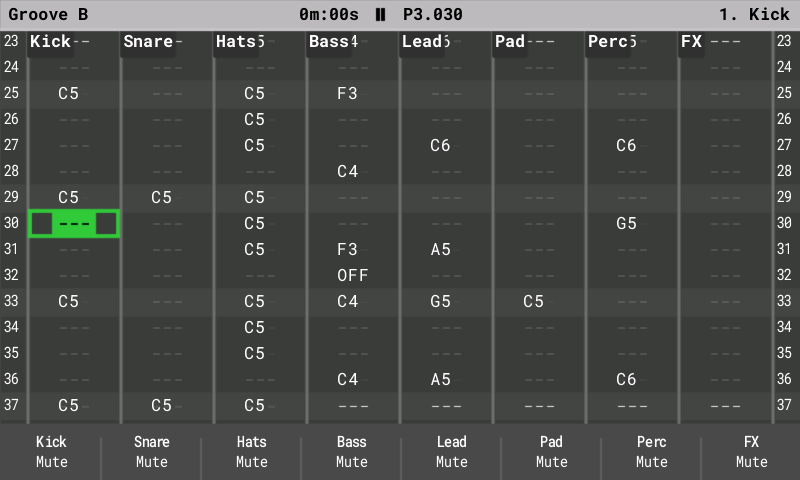
.patchfiles. Older projects open with tracks 13–16 empty. - 16 tracks: tracks 13–16 are MIDI / synth tracks, like 9–12.
- Synth engines on instruments S1–S3: ACD, VAP and PERC. These are our own engines that follow the The new parameters. Macros, a patch library is insluded
- Stereo samples.
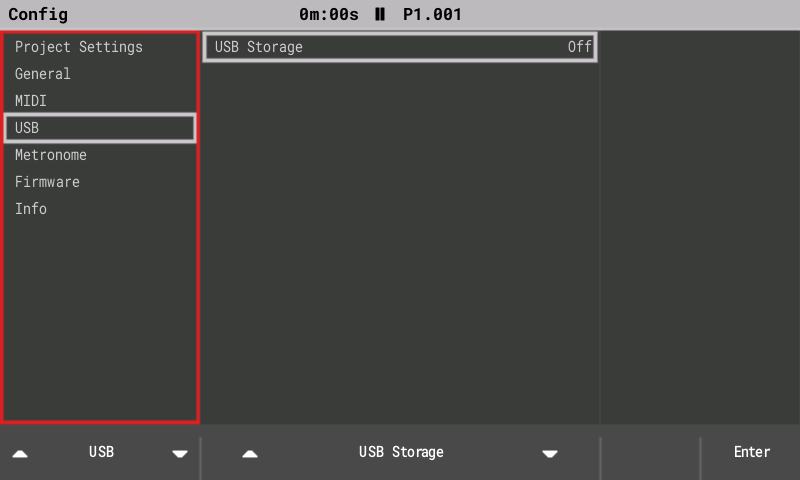
- USB Storage mode: the SD card appears as a USB drive (Config > USB > USB Storage).
- CPU meter, faster loading and a smoother display.
Show all 3 filesHide 1 files
Other files- Tracker projects: 16-track patterns, three synth slots and
1.9.42 files
OpenTracker 1.9.4: release notes
OpenTracker is an open-source, clean-room reimplementation of the firmware for the original Polyend Tracker. It is written from behavioural specifications and contains no Polyend code, fonts, icons or graphics. It is not affiliated with or endorsed by Polyend.
1.9.4 works like stock firmware 1.9.2. Projects, patterns, instruments and samples are the same files, so you can switch between OpenTracker 1.9.4 and stock 1.9.2 at any time.
Highlights
- Looks like stock 1.9.2. Every screen follows the stock layout, colours and font metrics closely, in all three themes. The fonts are open substitutes (Roboto Mono and Roboto) and the icons are OpenTracker's own.
- Responsive while playing. The screen redraws once per step, and buttons respond within about 20 ms.
- Radio recording. Tune, monitor and record from the built-in FM radio. The headphone cable on the Out jack is the antenna.
Fixes compared with stock 1.9.2
- Opening a project while a song plays asks to stop playback first.
- Keyboards, choosers and popups always appear. Frames that would not fit the display controller are reduced instead of being dropped.
- Saving replaces only the project's pattern, metadata and instrument files. Sample folders are left alone.
- Project open, save and autosave run in the background with a progress popup. A file that cannot be read is reported, never loaded as empty.
- Exports never include Performance FX that are still active.
- Short sample loops no longer click.
- MIDI CC fixes: master level CCs are saved, instrument CCs set exact values, and CCs to empty slots are ignored.
- MOD/IT import and
.itexport fix the stock defects.
The full list is in the README section "Differences from the original".
Install
- Copy
PolyendTrackerOTv194.ptfinto theFirmwarefolder on the SD card. Keep the file name as it is: the bootloader only accepts 24-character names. - On the Tracker, go to Config > Firmware update, select the file and confirm.
Back to stock: keep
PolyendTracker_1.9.2.ptf(from polyend.com) in/Firmware. Install it the same way, or write its file name into/Firmware/ot_restore.txtand power-cycle. The SD card is checked for that file before anything else at boot, so the way back always works.Keep only the image you want, plus stock, in
/Firmware. The rear reset button installs a random.ptffrom that folder.Show all 2 filesHide 1 files
Other files