polyend-tracker-re-semi
Peaking97/100Reverse engineering, documentation, and experimental firmware development for the original Polyend Tracker.
polyend-tracker-re-semi is custom firmware for the Polyend Tracker, by @semierendonmez-commits. Open source under Apache-2.0, latest release v2.2.3-semi.6 (November 2026), 13 stars on GitHub.
forPolyend Tracker·by@semierendonmez-commits
Unclaimed. Is this yours? Sign in with GitHub as @semierendonmez-commits to claim it.
OT_Plugins.zip· 18 KB· +1 file
Apache-2.0· semierendonmez-commits/polyend-tracker-re-semi·downloads come from the creator’s GitHub releases
v2.2.3-semi.62.2.3-semi.6 — Polyend Community Edition compatibility, .ptfx pluginsLatest2 files
2.2.3-semi.6 — Polyend Community Edition compatibility, .ptfx plugins
Polyend published the original firmware's source as the Tracker Community Edition (CE). This release reads what CE writes, fixes the fork's guesses that CE showed were wrong, and runs CE's Sample Editor plugins.
New
- .ptfx Sample Editor plugins: put
.ptfxfiles in theEffectsfolder at the card's root. They appear after the built-in effects, with their parameters on page 2 (Preview, Apply, Undo as usual). Effects that add a tail or silence and generators work too. - The fork's effects as plugins (
OT_Plugins.zip): OT Transcode, OT DCT Crush, OT Radio, OT Clipper, OT Paulstretch, OT Granular. The same files run on Polyend CE on the Original Tracker, Tracker+ and Tracker Mini. - CE projects open: CE's pattern files (volume and micro-move columns) load; V / m go into a free FX slot as Volume / Micro-move. CE's Chance conditions play (GL, !L, play N / skip M, skip N / play M).
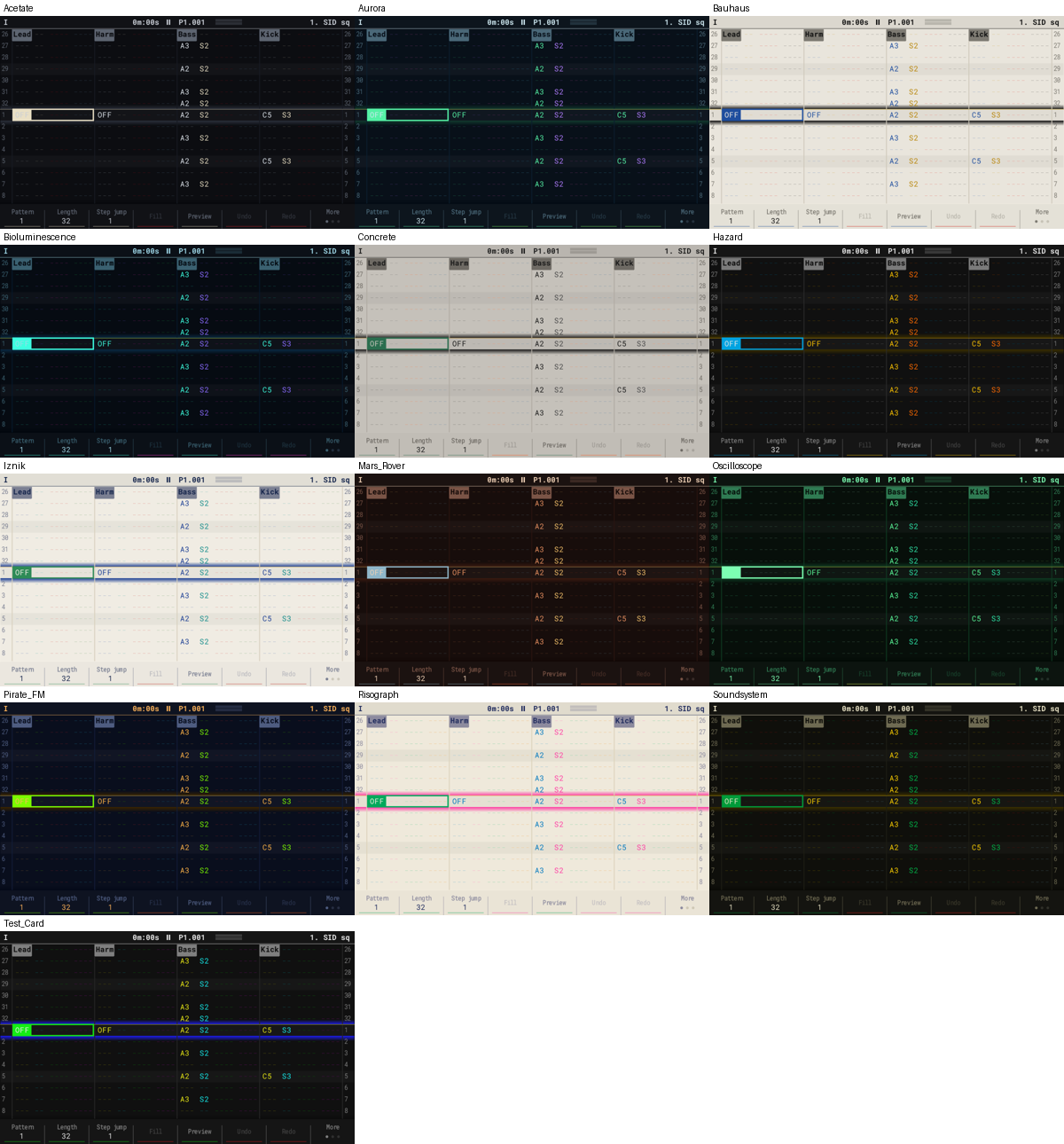
- CE themes:
.jsonthemes from Polyend's web theme editor load fromThemes.
Now as the original firmware
- Equalizer and Limiter; overdrive types named Quad / Exp / Recip.
- Config is saved in the stock layout, so stock / CE read all of it.
- Save cleans stale instrument files; line-in delay / reverb sends have their own mutes.
- An immediate pattern switch keeps the play positions; the project list is in natural order; Export Samples numbers files instead of overwriting them.
Install
Copy
PolyendTrackerOTs223.ptfto/Firmware, then Config > Firmware update. For the plugins, unzipOT_Plugins.zipso the.ptfxfiles end up inEffectson the card.Note: the plugin loader is new; please report anything odd on the device.
- .ptfx Sample Editor plugins: put
2.2.3-semi.5OpenTracker 2.2.3-semi.51 file
OpenTracker 2.2.3-semi.5
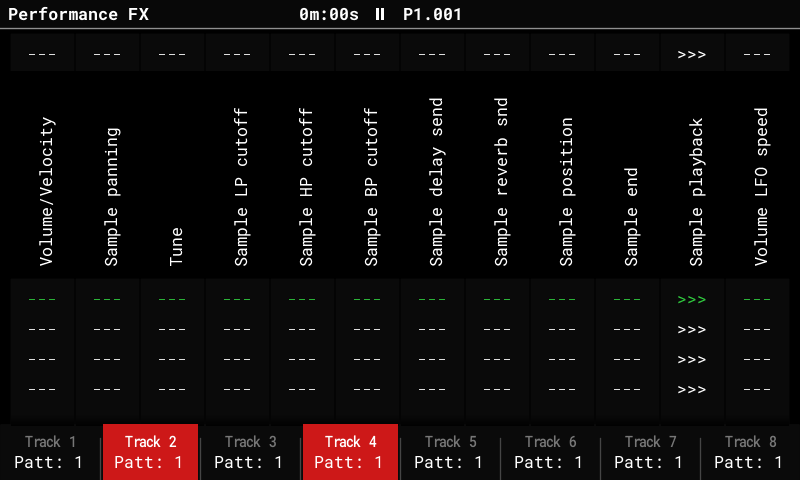
- Performance track keys now select: F1..F8 light the tracks the Perform FX play on; with none lit they play on every track. Scenes keep the selection. The stock behaviour (FX on every track, a key turns its track off) is under Config > General > Perform track keys: Exclude.
Image:
PolyendTrackerOTs223.ptf2.2.3-semi.4OpenTracker 2.2.3-semi.41 file
OpenTracker 2.2.3-semi.4
New
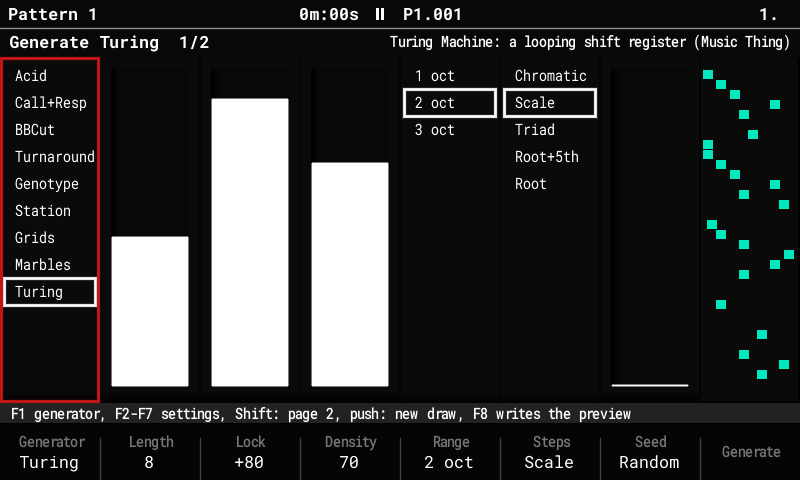
- Generate: Turing (Pattern, page 3, F3): the Music Thing Turing Machine writes the notes. Length 1..16, Lock (+100 a locked loop, 0 random, -100 twice the length inverted), Density, Range, Steps (scale quantizer), Gate, Velocity, Rate, Glide. Generated tracks stay live.
- Perform FX Turing Machine / Turing Length: their own columns now (no longer under Pattern Play Mode). On generated tracks the knob keeps the register running from loop to loop; on any other track it plays the track's own steps in Turing order. TM8 / TM16 are removed from the Play Mode list (older sets still play them).
Fixes (thanks for the reports)
- Paulstretch froze the device with the 200 / 400 ms windows: an FFT table overrun, and far too much work. About 4x lighter now, with a progress popup while it runs.
- Themes listed twice as "._name": the hidden files macOS writes on FAT cards are skipped. Copy the theme .txt files straight into the card's
Themesfolder. - Pads on an empty FX cell (edit mode) now pick the effect, same map as Fx + pad (top right = Roll).
Image:
PolyendTrackerOTs223.ptf2.2.3-semi.3OpenTracker 2.2.3-semi.3: MIDI learn, on-device theme editor, Trigger theme2 files
Three new features on top of 2.2.3-semi.2: play the Performance screen from an external MIDI controller, edit themes on the Tracker itself, and a theme that lights up the tracks as they play.
New
MIDI learn (Performance)
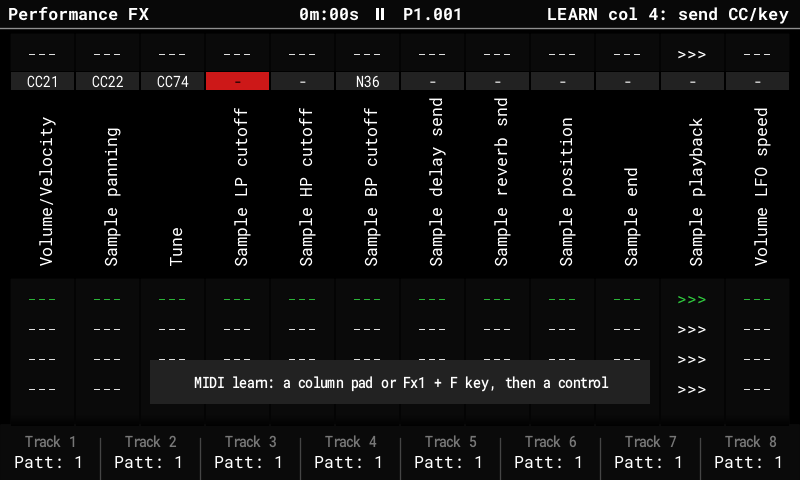
- Shift + Fx2 turns learn mode on. Press a column's pad (or Fx1 + F1..F8 for a scene), then move a knob or hit a key on your controller.
- A learned CC drives its column over the whole value range, on any MIDI channel.
- A learned key recalls its scene, and so does a learned CC crossing 64 (handy for buttons sending 127/0).
- Up to 12 column controls and 8 scene keys. Each column shows its learned control (
CC21,N36); Delete clears the picked one. - Learned controls work while the Performance screen is open. The stock CC 51–62 still work as before.
- The map is saved in the config (EEPROM and the config file on the card).
Perform CC out (Config > MIDI)
- Every learned column sends its value back out as its CC whenever it changes on the Tracker (pads, scenes, morphs), so motor faders and LED rings stay in sync.
- Values that came in from the controller are not echoed back.
Edit theme (Config > General)
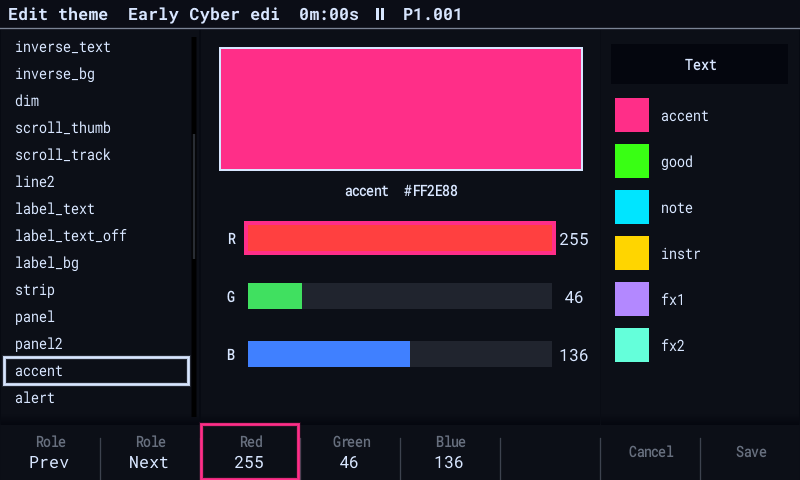
- Edit the current theme right on the device: built-in themes, fork palettes and card theme files.
- F1/F2 or Up/Down pick one of the 42 theme roles, F3/F4/F5 or Left/Right pick the Red/Green/Blue channel, and the encoder changes it (Shift: steps of 8). The whole UI previews the change instantly.
- F8 Save names the theme, writes
Themes/<name>.txtand makes it the display theme. F7 Cancel (or leaving Config) restores the previous theme.
Trigger theme (Config > General > Display theme)
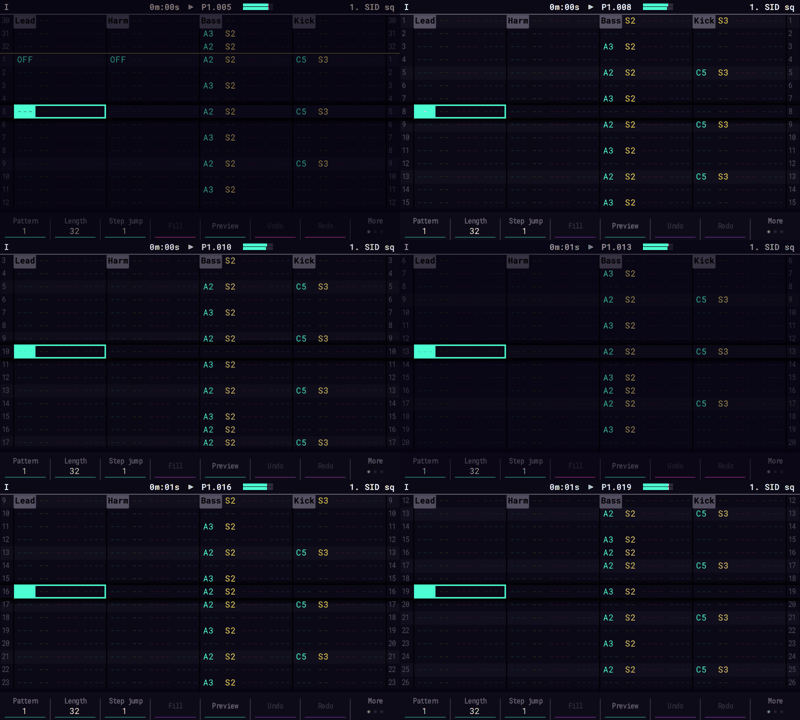
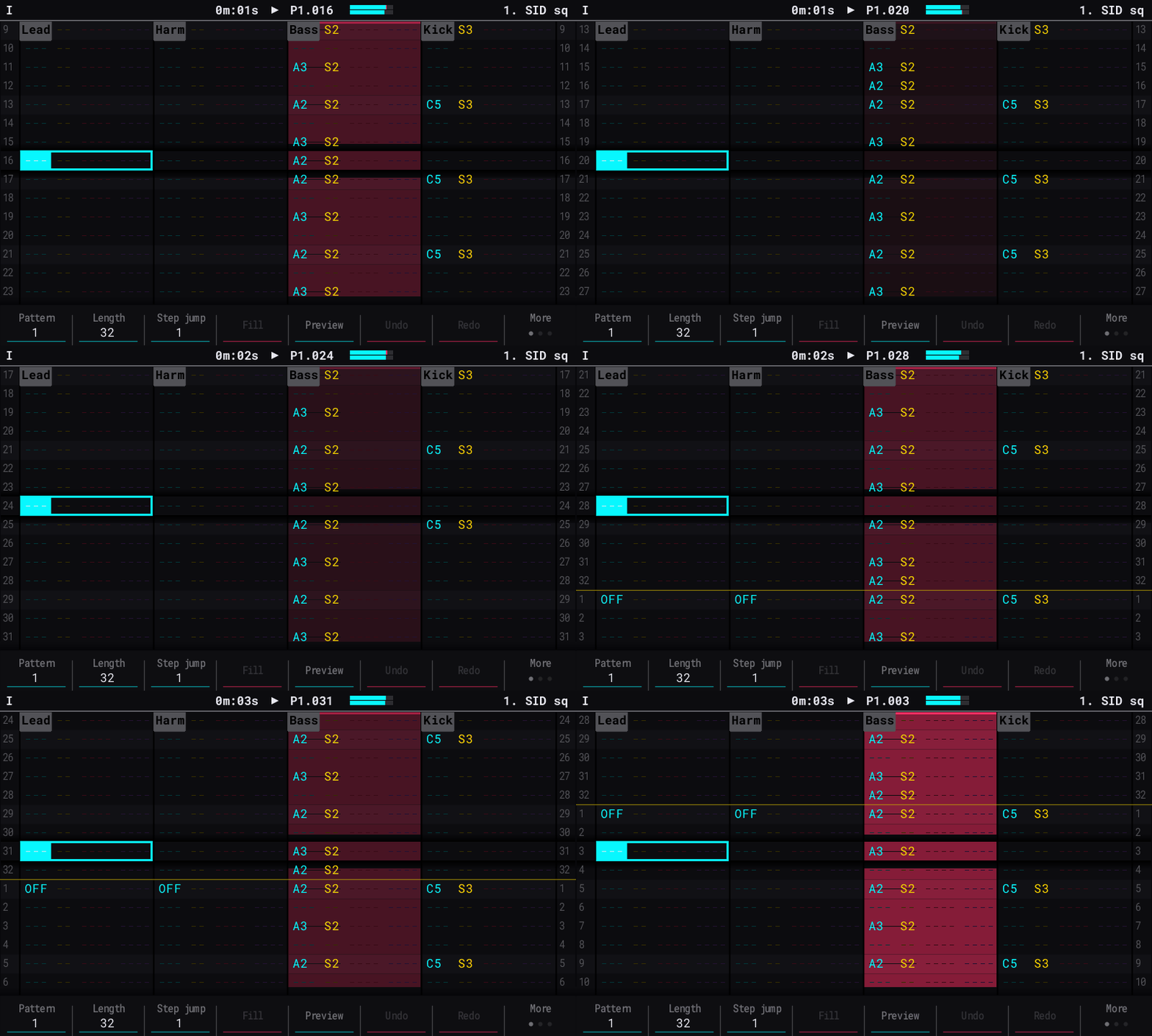
- A new built-in theme, the last one in the list. Each Pattern column flashes in the accent colour when its track starts a note, then fades out in about 0.15 s.
- It reacts to everything that plays a note: the pattern, play modes, rolls, Track Link, pads and MIDI input.
Install
Copy
PolyendTrackerOTs223.ptfto theFirmwarefolder of the SD card and update from Config > Firmware, as with earlier images. Configs from earlier semi images load with all their settings.Notes
- Image size: about 844 KB.
- Full guide: FORK.md
2.2.3-semi.1OpenTracker 2.2.3-semi.11 file
OpenTracker 2.2.3-semi.1
The semi fork, now on top of OpenTracker 2.2.3 (2.2.3-beta2).
From upstream 2.2.3
- SD streaming: long samples play from the card (Config > Stream from card: Off / Auto / All, off by default; Stream threshold 5–30 s). Only about 0.75 s of each streamed sample stays in memory; up to 16 streamed instruments.
- Samples too big for the memory can now be added: the Sample Loader imports them onto the card in the background and streams them (Delete cancels).
- Stereo synths (Width) for every engine
- Theme files on the card (/Themes), Export theme
- 44.1 kHz exports
- MIDI pitch bend on live notes
- Synthwave PERC kits
- Sample Editor effects up to 60x faster
- Stack guard and many SD / Sample Loader / display fixes
Fork
- Display theme lists the stock themes, the 26 fork themes, then the card's theme files. Export theme also saves a fork theme as a file.
- Settings and Perform scenes saved by earlier semi images load unchanged.
- Memory tuned for SD streaming: 77 KiB of stack headroom.
All semi features are included: generators, Track Link, play modes, Perform FX, reverb models and page 2, master colour, Sample Editor tools, PLT.
2.2.1-semi.8OpenTracker 2.2.1-semi.81 file
OpenTracker 2.2.1-semi.8
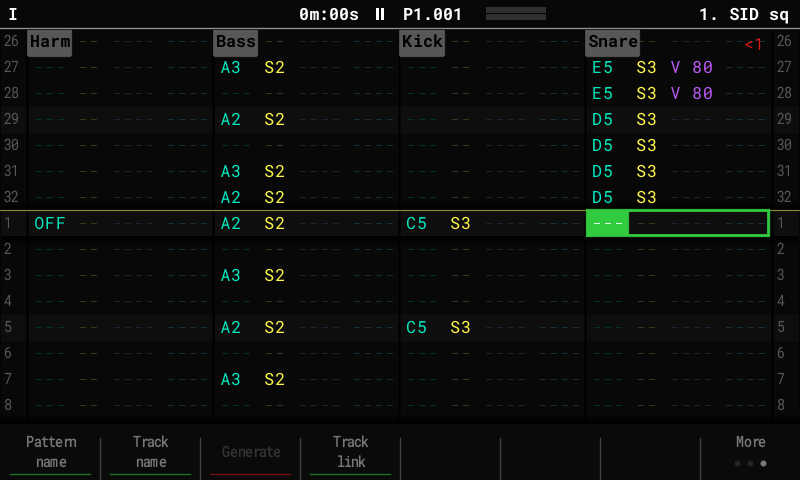
- Track Link (Pattern page 3, F4): a track plays live with another track's notes using its own instrument (note, transpose, level, chance, FX copy). Mute the source and only the layer is heard.
- Acid density as in TB-3PO:
- 0 is the sparsest; -7 and +7 play every step.
- Below 0 the line narrows to the root and repeats; above 0 it uses the whole scale.
- Octaves: Off / TB-3PO / Wide.
- The Perform FX Acid Density reaches every density.
- Turing Machine: Loop Lock is per track and works like the TM knob: +100 locks the loop, -50 is random, -100 gives a locked double-length loop.
- Master Reverb 2/2 (Shift): Low cut and Width for every model, plus two character controls per model:
- Hall: mod depth / rate
- Shimmer: amount / mod depth
- Gated: hold / release
- Texture: grain / octaves
- Plate: mod depth / bandwidth
- Room: early reflections / mod depth
- Fix: the master colours (ToTape, Console, Density, PurestDrive) now replace the stock saturation instead of running after it. They are also listed on Master 1/5.
2.2.1-semi.6OpenTracker 2.2.1-semi.61 file
OpenTracker 2.2.1-semi.6
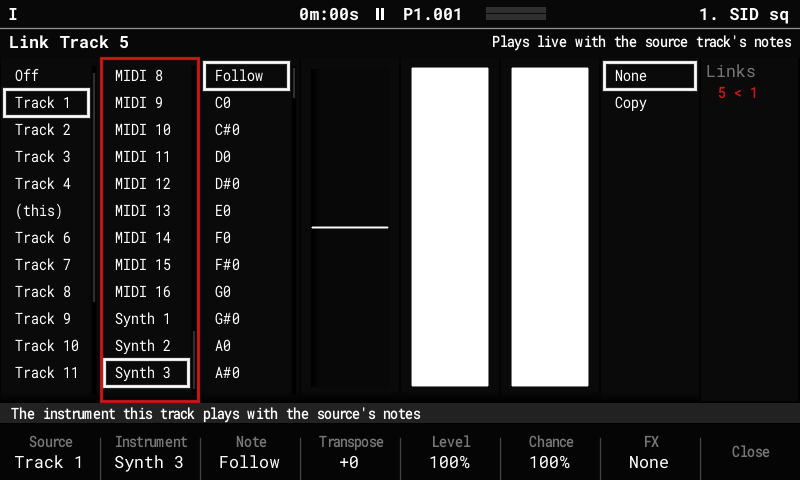
Track Link (Pattern page 3, F4)
A track can follow another track live: whenever the source plays a note, the linked track plays its own instrument at the same moment. That includes steps, rolls, arps, play modes, Acid / BBCut Mutate, the live Grids kit, the step repeater and the pads. Layer a mutating line with another sound, double a break with a kick, or send a generated part to a MIDI synth too.
- Source: the track to follow.
- Instrument: what the linked track plays.
- Note: Follow (the source's note) or a fixed note.
- Transpose: -24..+24 semitones.
- Level: % of the source note's volume.
- Chance: % of the source's notes it plays.
- FX: Copy brings the source step's FX along.
Mute the source and only the layer is heard. The linked track's own steps still play. Links are saved with the project; stock firmware ignores them.
2.2.1-semi.5OpenTracker 2.2.1-semi.51 file
OpenTracker 2.2.1-semi.5
Ideas and code from the open-source module world, brought to the original Tracker.
Generate
- Grids: Mutable Instruments Grids' drum map (GPL-3.0). Kick, snare and hats from an X / Y point between 25 patterns, with densities, Chaos, Accent, 1/16 or 1/32 and a kit on three tracks. The kit stays live: the Perform FX Grids X / Y / Density redraw it while it plays.
- Marbles: random notes with deja vu. A T generator (Coin, Clusters, Drums, 2 tracks) and an X generator (Spread, Bias, Steps, Range).
- Genotype Drummer (after Noise86's MarkovDrummer): a Markov chain over all the selected drum tracks together.
Live (Performance)
- New play modes: M1..M3 (Marbles deja vu), TM8 / TM16 (Turing Machine), R1 / R2 (randLoops after SickoCV: notes drift by scale degrees).
- Loop Lock locks or loosens all of them.
- DeRez: sample-rate reduction on the tracks' samples (after Airwindows DeRez).
Master
- Reverb models Texture (a granular cloud after Clouds / Beads), Plate (Dattorro's plate, the network of Valley's Plateau) and Room (after Dragonfly Room).
- Master colour after Airwindows: ToTape, Console, Density, PurestDrive. Find it in the Master 4/5 Saturation list or in Config > Master colour.
Sample Editor
- Tuner: YIN pitch detection. Write sets Tune / Finetune so the sample plays in tune.
- Paulstretch: x2..x32.
- Granular: after Argotlunar.
- Strand: after Leviathan's Strand, cut at zero crossings with no clicks.
Instruments
- LFO shapes Rungler, Gingerbread, Rossler, Drift (Ornstein-Uhlenbeck) and Bridge (Brownian bridge). Stock firmware plays them as Random.
- PLT synth model (Synth 1-3): 2-Op FM and Harmonic (16 partials) in the manner of Plaits. Patches live in Patches/PLT.
Credits: Emilie Gillet (Mutable Instruments), Chris Johnson (Airwindows), Valley, Dragonfly, HetrickCV / Nonlinear Circuits, ZetaCarinae, Noise86, SickoCV, Music Thing Modular, Paul Nasca, Ourednik, Leviathan. Full details in FORK.md.
OpenTracker2.2.1-semi.4OpenTracker 2.2.1-semi.41 file
OpenTracker 2.2.1-semi.4
New: Master 5/5 Sidechain
Two sidechains (SC 1 / SC 2), each with its own source: track 1–16 or line in L/R. Two modes: Trigger (notes, MIDI tracks included) or Follow (audio above a threshold). Each has its own attack / hold / release / depth. Each has its own targets: tracks 1–8, synth slots 1–3, delay and reverb returns, line in. Pads toggle the targets; Shift + pad picks the source track. Nothing is ducked unless it is a target. Saved with the project (otfork.bin, ignored by stock firmware).
Fixes
BBCut Mutate / random seeds: Every re-cut takes a fresh seed. Perform BBCut A/B steer the next cuts. The first play after boot re-cuts. Generate’s random draws no longer repeat after a reboot. Call+Resp: The form fills the whole selection, odd lengths included. Repeats swap the two answers. Auto picks 32/16/8/4/2 steps per part. The default answer is “Q + closure”.
Themes
Six new animated themes: Acid House, Plasma, Colour Wheel, Ember, Night Drive, Glitch (29 in total).
Install: copy PolyendTrackerOTs221.ptf to /Firmware on the SD card and update as usual. Full guide: FORK.md.
v2.2.1-semi.3OpenTracker 2.2.1-semi.31 file
OpenTracker 2.2.1 for the original Polyend Tracker, with generators, live play modes, sample effects and tools from the semi plug-in family. This update brings the Performance screen to life (generator controls, scenes, recording), new master dynamics, reverb and delay models, wavetable FM between tracks and a few everyday fixes.
Full guide: FORK.md · Screenshots: README
What's new
Everyday
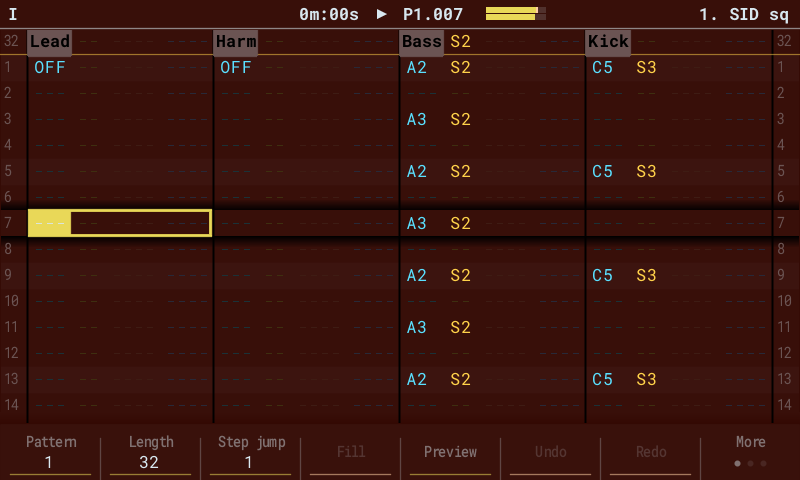
- Pattern dashes fixed: the empty-cell dashes are now drawn pixel-exact, so every row shows its column colours on the device (they looked faded on all rows but the last)
- Shift lock: tap Shift twice quickly; a SHIFT tag shows in the title until the next Shift press
- Scale lock (Config): the encoder moves notes through the project scale instead of semitones; Shift still moves octaves
- Screen saver (Config): the Data screen after 1 / 2 / 5 / 10 minutes idle; the first touch brings your page back
- Level meter (Config): a small master L / R meter in the title bar, red mark on full scale
Performance
- FX chooser: in edit mode hold Shift and turn the encoder: every Perform FX as a grid, F7 / F8 shows what it does
- Generator controls as Perform FX: Acid Accent / Slide / Mutate on live Acid tracks; BBCut A / B, Rolls (None / Dense / Fade) and Recut (Now / 1-8 loops / Locked) on the B play modes
- Genotype play modes G1..G3: the track plays its own steps in a new order every loop (low / medium / high variety)
- Wavetable FM: WT FM Depth / WT FM Source: a wavetable track frequency-modulated by another track, sample by sample (through zero); tracks can modulate each other
- Scenes: Fx2 + F1..F8 stores, Fx1 + F1..F8 recalls, with a morph of 1/4 to 4 bars (Fx1 + encoder)
- Perform recording: Insert writes the playing Perform FX into FX 2 of the pattern (one undo step)
Master
- Master 4/4 Dynamics: limiter mode (Subtle / Extreme), stereo link, ceiling and gain-reduction meter; saturation mode, drive (0..+24 dB), mix and tone
- Reverb models: Hall, Shimmer (octave rising in the tail), Gated (Master Reverb F6 or Config)
- Delay models: Tape (wow, flutter, saturating darker repeats), Lo-fi (Config > Delay model)
- Both run in the stock effects' memory; extra CPU over the stock effect in the busiest test set: Hall +1.6 %, Tape +1.8 %, Gated +2.6 %, Lo-fi +2.9 %, Shimmer +5.2 % of the audio block
Install
- Copy
PolyendTrackerOTs221.ptfto/Firmwareon the SD card. Keep the name: the bootloader only accepts 24-character names. - Go to Config > Firmware update, select it and confirm.
- Going back: keep the stock
PolyendTracker_1.9.2.ptfin/Firmwareand install it the same way, or put its file name into/Firmware/ot_restore.txtand power-cycle.
Notes
- All host tests and simulator checks pass. Not yet tested on hardware: please report how the pattern dashes look, how Shimmer sounds, and the CPU meter with the new reverb and delay models.
- Scenes and the new Config options are global (stored in the config, not in the project).
- Perform recording overwrites FX 2 on the steps it writes; Undo restores them.
- The version screen still shows "2.2.1-semi".
- Built without Games. Image size 748 KB, inside the stock 1.9.2 flash area (checked by
tools/check_image.pyon every build). - Based on sandlbn/polyend-tracker-re (OpenTracker 2.2.1).
SHA-256
88b123409d161c11d23dd5bd49a4f154b4ae7a714a508f7a433acf6f5aa266bfv2.2.1-semi.2OpenTracker 2.2.1-semi.21 file
OpenTracker 2.2.1 for the original Polyend Tracker, with generators, live play modes, sample effects and tools from the semi plug-in family. This update reworks the generators after the first hardware tests and adds the most requested ideas from that round. Patterns made with the generators are still ordinary steps and step FX, so they also play on stock 1.9.x and on the Tracker Mini.
Full guide: FORK.md · Screenshots: README
What's new
Generate popup
- Live preview: the right column shows exactly what F8 will write, with a playhead while the pattern plays
- Shift opens a second page of settings; a help strip explains the selected parameter
- Encoder push draws a new random result
Generators
- Acid: Density now runs -7..+7 (TB-3PO style) and adds or removes notes without changing the melody. The line stays live: the new Perform FX Acid Density moves it, and Mutate re-rolls it every 1 / 2 / 4 / 8 loops. Page 2: Gate, Root
- Call+Resp: Two tracks now puts the call on one track and the answer on the other, taking turns (was: the same data on both). New: Form (C R, C R C R, C C R, ...), steps per part, Ending, answer octave, Motif
- BBCut
- New Jungle procedure (amen-style edits, snare fills) replaces ChooseBlk
- Rolls now stop cleanly where they end (fixes the harsh SQPusher1 rolls)
- CageCut and Timeline now follow the seed; Permute has 8 musical permutations; ThrashCut no longer writes volume / timing FX
- Page 2: roll style (clean, fades, pitch up / down, stutter, single), per-hit pitch ±1..3, Timing and Dynamics on / off
- Mutate gives new cuts every N loops while it plays
- Turnaround: FX strength Soft / Medium / Hard, Timing Tidy (no messy micro-moves), shorter drops, cleaner stutters
- Station: the preview shows what was read from the radio and the digits it will play
Live
- B1..B10 now use the A / B set in the Generate popup and real randomness. New Config > BB play modes: new cuts at every stop, every 1 / 2 / 4 / 8 loops, or locked
- T1..T4 (TILT): pinball play modes Bounce, Flipper, Gravity, Multiball
Sample Editor
- Radio (CIPHER): shortwave band, fading, heterodyne whistle, noise and static crashes
- Clipper (NEXUSCLIP): 7 curves (Hard, Smooth, Crisp, Classic, Pro, Tube, Tape), drive, knee, ceiling, level match
Workflow
- Beat Slice thru (Config): a Beat Slice note plays on to the end of the sample (Backstage request, 37 votes)
- Global Mixer: mute (tap) and solo (Shift) for the synth slots
- FX list opens at the last effect used in that column (Backstage request)
- Song: hold Note / Instr / Fx1 / Fx2 to colour the blocks (Backstage request)
Data screen (File, F7)
- New modes: Rain and Pulse, next to Barcode, Matrix and Numbers
- Horizontal or vertical view, three colour modes (Mono, Theme, Tracks)
- Only tracks with notes are shown, over the whole screen; pads mute tracks, the encoder sets the tempo
Look
- 23 display themes (7 new: Vaporwave, Blueprint, Game Boy, Sepia, Hi Contrast and the animated Cyber Pulse and Spectrum)
- New display font Pixel (Departure Mono, OFL)
Install
- Copy
PolyendTrackerOTs221.ptfto/Firmwareon the SD card. Keep the name: the bootloader only accepts 24-character names. - Go to Config > Firmware update, select it and confirm.
- Going back: keep the stock
PolyendTracker_1.9.2.ptfin/Firmwareand install it the same way, or put its file name into/Firmware/ot_restore.txtand power-cycle.
Settings from the previous semi release are kept; the new options start at their defaults.
Notes
- The first semi release was tested on a real unit. This update has passed all host tests and simulator checks but has not yet been tested on hardware. Please report anything odd.
- Built without Games. Image size 726 KB, inside the stock 1.9.2 flash area (checked by
tools/check_image.pyon every build). - Based on sandlbn/polyend-tracker-re (OpenTracker 2.2.1).
SHA-256
be4231f6d293e1426c8e6e45f824fbb61e648cc27bcd6d412a416ba58740f8edv2.2.1-semiOpenTracker 2.2.1-semi1 file
OpenTracker 2.2.1 for the original Polyend Tracker, with generators, live play modes, sample effects and tools from the semi plug-in family. Everything a generator writes is ordinary steps and step FX, so patterns made with this fork also play on stock 1.9.x and on the Tracker Mini.
Full guide: FORK.md · Screenshots: README
What's new
Generate (Pattern, page 3, F3, edit mode on)
- Acid: 303 lines in the project scale (TB-3PO style), with live Mutate that re-rolls the line at every loop
- Call+Resp: call phrases and their answers (46 styles, 38 answer strategies)
- BBCut: Nick Collins' BBCut procedures on a sliced break (10 procedures)
- Turnaround: phrase-end rolls, stutters and drops on a budget
- Genotype: learns the selected steps and plays a variation (Markov walk / TILT ball)
- Station: a numbers-station line read from the radio (RDS name, PI code, frequency)
Live
- Performance "Pattern Play Mode" B1..B10: ten BBCut modes that cut and roll any track's own steps
Sample Editor
- Transcode: codec generation loss (G.711 u-law / A-law, G.726 40k-16k, up to 16 passes, bit errors, packet loss)
- DCT Crush: spectral block crush and freeze
Config
- Auto slice: Breaks: spectral-flux onset detection that finds every hit of a fast break (up to 48 slices)
- 16 display themes (13 new): Early Cyber, Corporate, Amber CRT, Green Phosphor, Thermal, Workstation, Datamatic, Dubplate, Rave Flyer, Jungle, Ice, Sunset, Teletext
Radio and Data screen
- RDS station name in the Sample Recorder, Shift + seek scans the band
- Data screen (File, F7): barcode, matrix and raw numbers views of what plays
Install
- Copy
PolyendTrackerOTs221.ptfto/Firmwareon the SD card. Keep the name: the bootloader only accepts 24-character names. - Go to Config > Firmware update, select it and confirm.
- Going back: keep the stock
PolyendTracker_1.9.2.ptfin/Firmwareand install it the same way, or put its file name into/Firmware/ot_restore.txtand power-cycle.
Notes
- Pre-release: not yet tested on a real unit. Please report RDS behaviour and any audio dropouts.
- Built without Games (the image would not fit the flash budget with it).
- Image size 698 KB, inside the stock 1.9.2 flash area (checked by
tools/check_image.pyon every build). - Based on sandlbn/polyend-tracker-re (OpenTracker 2.2.1).
SHA-256
f68e5416954431316dcdab28d72be75b136868ffd219d1f43e18658f32f113f5