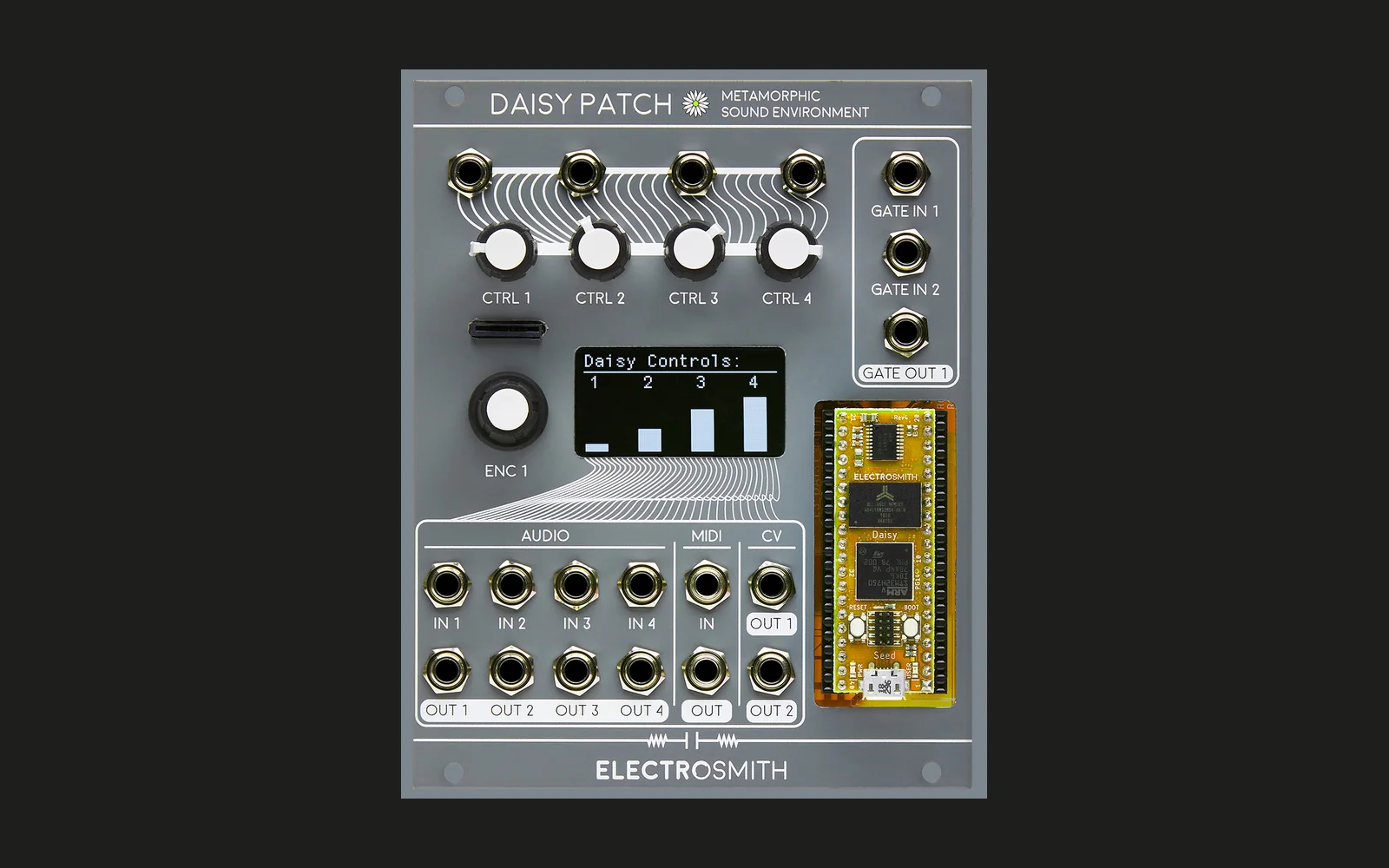
Plooper
A four-playhead looper with strange reverbs for the Electrosmith Daisy Patch.
Record a loop (up to 60 s, stereo), then play it back with four heads — A, B, C, D — each with its own level, speed (negative = reverse), start point, window length, direction, and pan. The heads feed a reverb with six modes, including reversed tails and pitch-shifted feedback.
Recording
Encoder (on the play pages — on the SETUP page every press is just a click):
| State | Press | Result |
|---|---|---|
| EMPTY | Press | Starts the first take the moment you press |
| REC | Press | Closes the loop the moment you press → PLAY (the loop length is exactly the time between presses) |
| PLAY | Press and hold | Records while held, from the instant you press (10 ms fades, no clicks). The header shows DUB. |
| PLAY | Keep holding past Latch after (default 2 loops, at least 4 s) | Latches DUB — keeps recording after you let go. A bar along the top of the waveform fills as you approach it. |
| DUB | Click | Back to PLAY |
GATE IN 1: each trigger steps EMPTY → REC → PLAY → DUB → PLAY → DUB …
The first take sets the loop length (it closes automatically at 60 s). Clear loop in SETUP empties it.
Gate punch-in: with SETUP Gate 2 set to Dub, GATE IN 2 held high while in PLAY dubs the inputs
in only while the gate is high. The INPUT page levels set how much of each input gets dubbed, so you can
also ride them while in DUB.
While overdubbing, Dub fade fades the old material a little on each pass (see Tape).
Pages
Turn the encoder to change page. On the five knob pages, each knob controls the same parameter for one head (knob 1 = A … knob 4 = D), so every head has its own knob on every page.
| Page | Knob sets | Range |
|---|---|---|
| INPUT | Level of IN 1–4 into the loop and monitor | 0–100 (IN 1 and IN 2 start full, IN 3–4 off) |
| MIX | Head level | 0–100 |
| SPEED | Head speed | CCW half reverse, CW half forward, 0.25×–2× each way |
| START | Where the head's window begins | 0–100% of the loop |
| LENGTH | How long the head's window is | 1–100% of the loop (min 20 ms), finer at the short end |
| FX | MIX, DECAY, TONE, ODD (reverb) | see Reverb |
| SETUP | Settings menu | click to enter |
Knob pickup: after you change page, a knob doesn't change its value until you turn it past the stored value (a small dot shows next to values that haven't been picked up yet). CV into a knob's jack adds to whichever parameter that knob has on the current page.
Default speeds are A +1, B −1, C +0.5, D +2. At power-up the knobs set the MIX levels.
Reversing
- Speed below centre plays a head backwards.
- Dir A–D (SETUP): Forward, Reverse (flips the speed), Pingpong (bounces between the window ends), Random (jumps to a random spot each time around the window).
- GATE IN 2 (SETUP
Gate 2): Reverse flips every head while the gate is high; Retrig sends every head to its window start; Scatter sends every head to a random spot; Dub punches in (see below). - Backwards and Ghost reverbs reverse the reverb tail.
Reverb
FX page knobs: MIX (reverb level on OUT 1/2), DECAY, TONE (dark → bright), and ODD,
which depends on the mode (SETUP Reverb):
| Mode | Sound | ODD |
|---|---|---|
| Plate | Classic reverb | Pre-delay 0–500 ms |
| Shimmer | Reverb fed back an octave up | Shimmer amount |
| Sub | Reverb fed back an octave down | Sub amount |
| Backwards | Reverb tails played in reverse (they swell in) | Reverse window 100 ms–1.5 s |
| Ghost | Backwards + shimmer | Shimmer amount (800 ms window) |
| Freeze | Holds the reverb indefinitely | How fast new sound fills it (0 = fully frozen); levels off on its own |
Outputs
| Jack | Signal |
|---|---|
| OUT 1 / 2 | Heads + reverb + input (when Monitor is on), stereo |
| OUT 3 / 4 | Reverb only |
| CV OUT 1 | Head A's position in the loop (0–5 V ramp) |
| CV OUT 2 | Loop progress (0–5 V ramp) |
| GATE OUT | Pulse at the start of each loop |
All four audio outputs have soft limiters: clean below about 80% of full level, then peaks are rounded off instead of clipping. Overdubs are limited the same way, so a source left running in DUB levels off instead of building up into distortion.
SETUP
Click on the SETUP page to enter; turn to choose an item, click to edit it, click again to finish.
Choose < Pages to go back to paging, or leave the encoder alone for 6 s and SETUP returns to the last play page by itself.
On the SETUP page, holding the encoder does nothing special (no punch-in or record) — every press is a click.
Reverb mode, Dir A–D, Pan A–D (−100…+100), Snap (Off / Octaves / Musical: octaves and fifths), Gate 2, the Tape settings below, Latch after (1 / 2 / 4 loops / Never), Input (Mono: IN 1–4 mixed to both channels / Stereo: IN 1 + IN 3 left, IN 2 + IN 4 right), Monitor (On/Off), CPU load (read-only: average, peak over the last second, and highest peak since power-up; click to reset the highest), Clear loop. SETUP settings are saved to flash; knob page values are not.
Tape (Frippertronics)
| Setting | Range | Effect |
|---|---|---|
| Dub fade | 0–50%, 1% steps | How much the loop fades each time it's rewritten |
| Decay | Dub only / Always | Always keeps fading (and aging) the loop in PLAY too, like a running tape loop |
| Age | 0–100% | Each rewritten pass gets a little darker and softly saturated, so old layers recede |
| Wow | 0–100% | Slow wobble (0.6 Hz) plus flutter (7 Hz) on all heads, up to about ±14 cents |
Frippertronics: set Dub fade to 2–5%, Decay to Always, Age to 30–50%, and Wow to 10–20%. Record a first take (its length is the tape length), switch to DUB, and keep playing: new layers build up while older ones fade and darken on every pass.
Display
Header: page name, input level meter (a solid block at its right end means the input is clipping — turn the source down), and looper state (REC/DUB highlighted) with loop length. Below: the loop's waveform with the loop position, then one lane per head showing its window (dotted when muted) and position. Bottom: the page's four values, or the SETUP item.
Shimmer, Sub, Ghost, and Freeze have automatic gain control on their feedback, and the input and reverb send are DC-blocked, so no mode can build up and swamp the output.
Testing on the Mac
sim/run.sh builds Plooper's audio code for the Mac against stub hardware, records a test tone, plays
it back, and prints input, OUT 1, and reverb levels every half second:
sim/run.sh 0 1          # no DC offset, Shimmer
sim/run.sh 0.05 4 stress  # DC offset, Ghost, four heads full, DECAY/ODD max
License
Plooper is released under the MIT License. It builds against libDaisy (MIT) and DaisySP (MIT), and uses ReverbSc from DaisySP-LGPL (LGPL-2.1).
Building
Needs libDaisy and DaisySP (with its DaisySP-LGPL submodule built) cloned next to this repository, one folder up.
make
Flash through the Daisy bootloader: tap RESET, press BOOT while the LED pulses, then
make program-dfu