managefreak
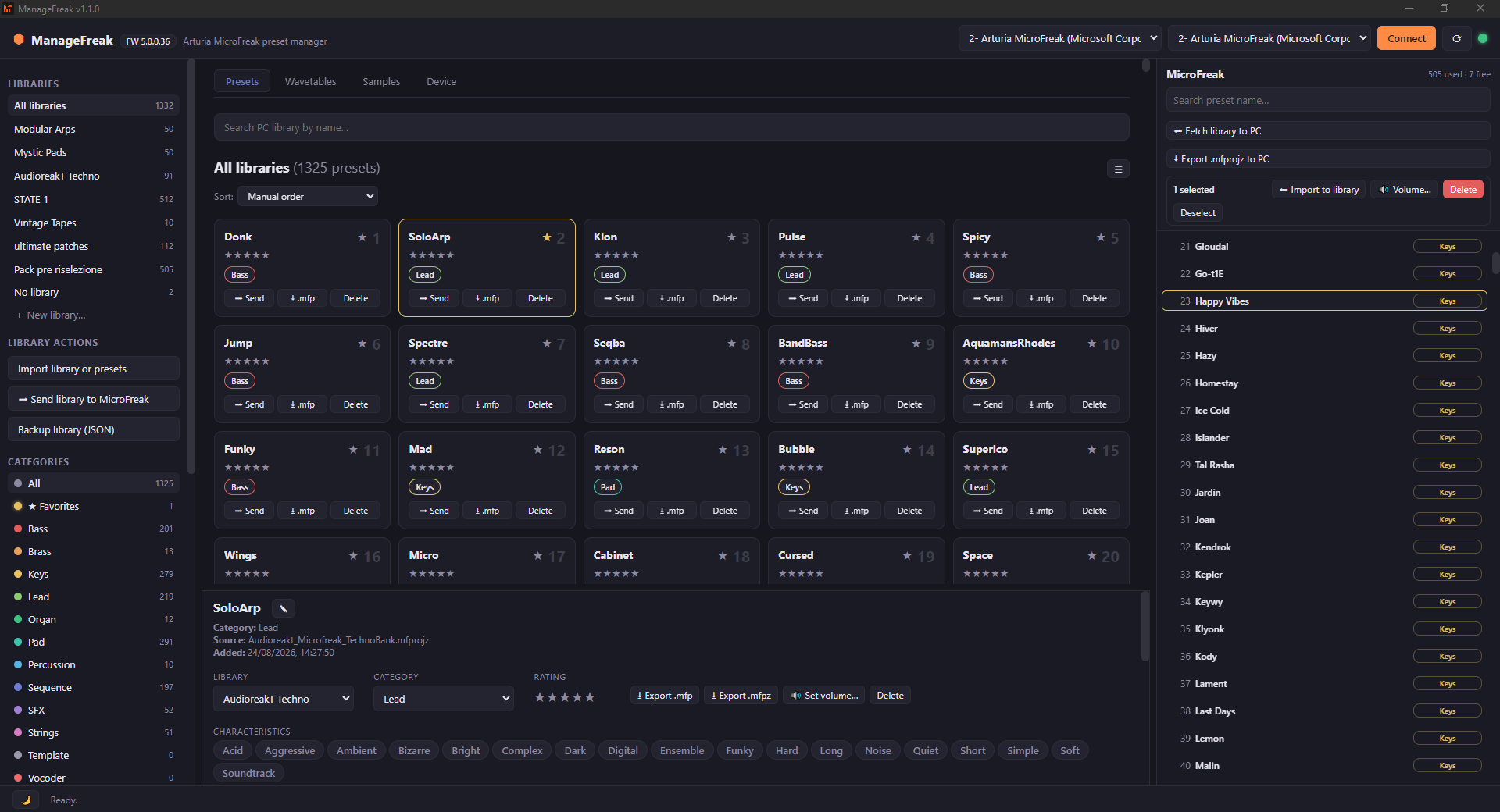
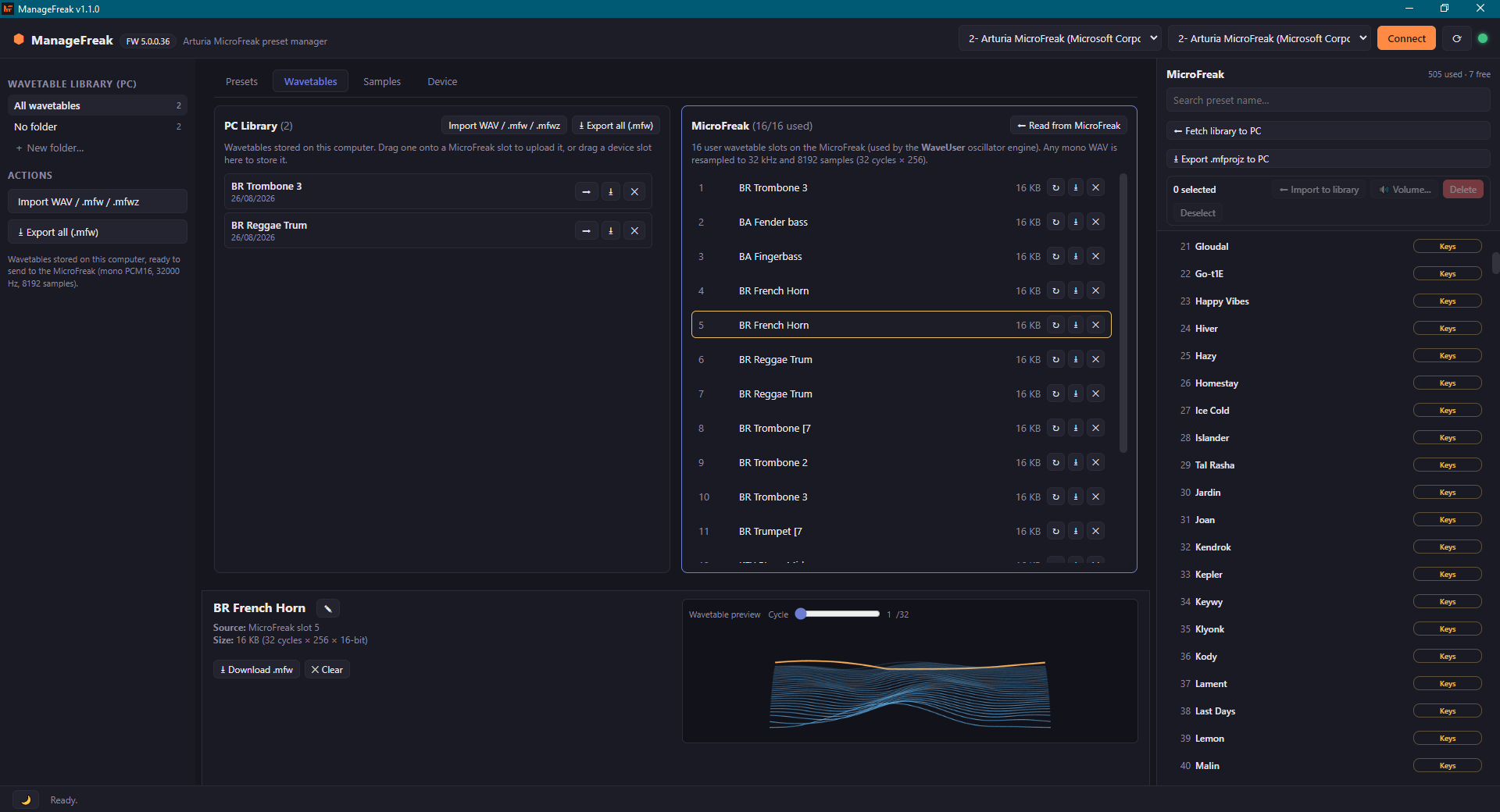
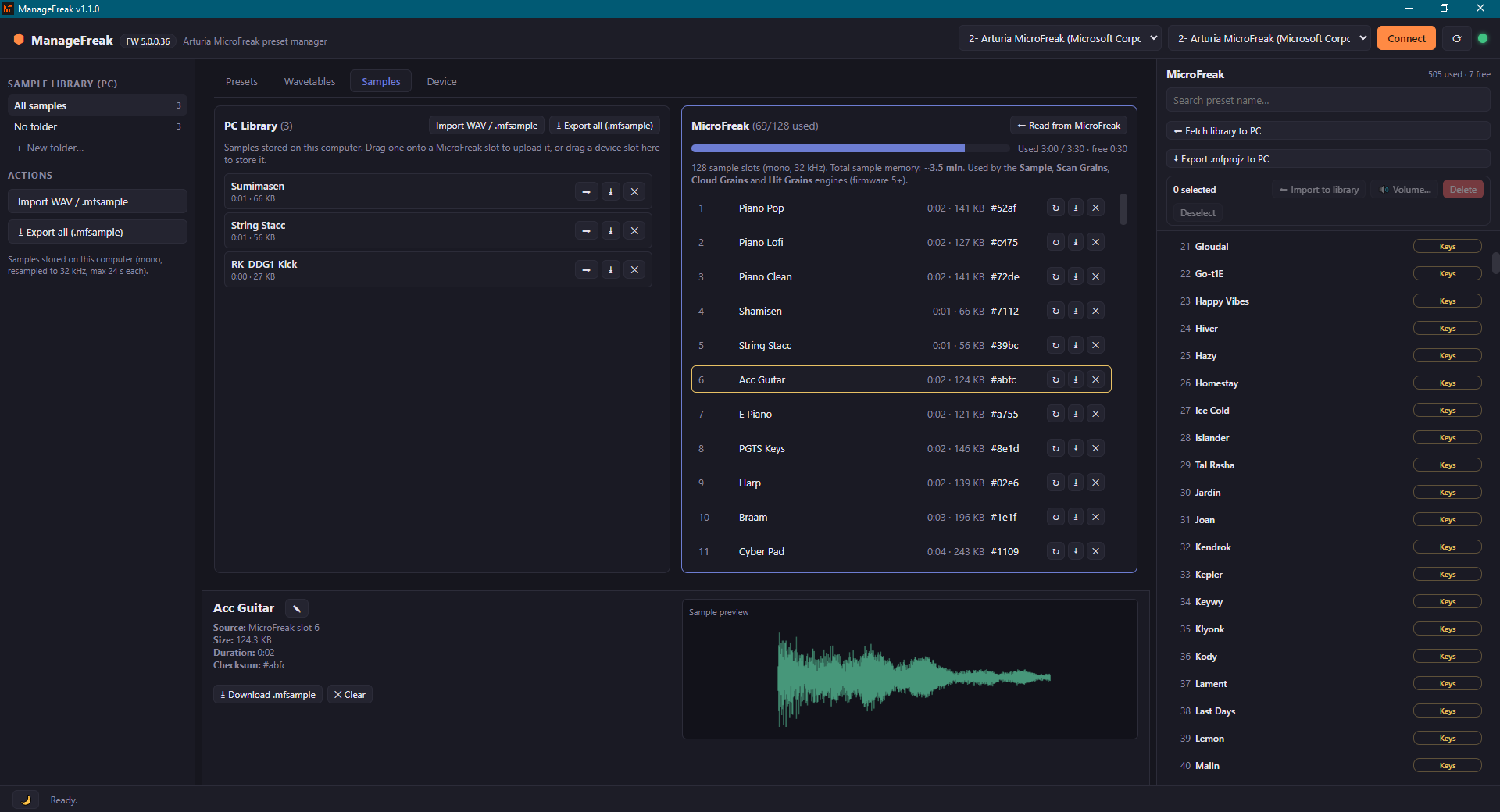
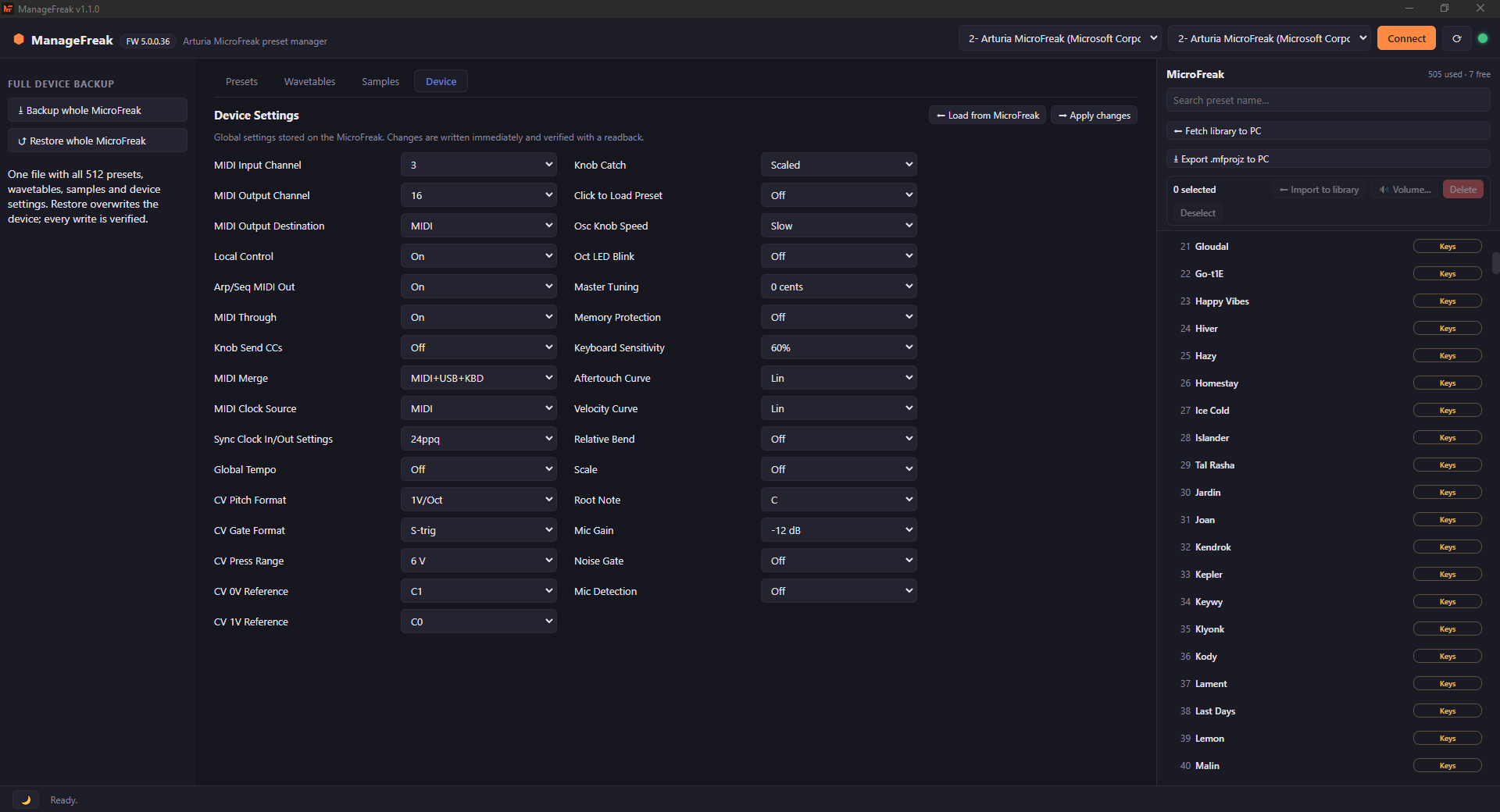
Hype10/100Feature complete open-source preset manager for the Arturia MicroFreak. It supports Windows (also portable), Linux and MacOS.
managefreak is custom firmware for the Arturia MicroFreak, by @GiovanniBitbyBit. Open source under GPL-3.0, latest release v1.2.3 (October 2026), 45 stars on GitHub.
forArturia MicroFreak·by@GiovanniBitbyBit
Unclaimed. Is this yours? Sign in with GitHub as @GiovanniBitbyBit to claim it.
latest.yml· 350 B· +15 files
GPL-3.0· GiovanniBitbyBit/managefreak·downloads come from the creator’s GitHub releases
v1.2.3Latest16 files
Which file should I download?
- Windows (normal install):
ManageFreak-Setup-1.2.3.exe - Windows (nothing to install):
ManageFreak-1.2.3-portable.exe - macOS Apple Silicon (M1/M2/M3/M4):
ManageFreak-1.2.3-arm64.dmg - macOS Intel:
ManageFreak-1.2.3.dmg - Linux:
ManageFreak-1.2.3.AppImage, ormanagefreak_1.2.3_amd64.debfor Debian/Ubuntu
If you already have 1.2.0, 1.2.1 or 1.2.2 installed, you do not need any of these: the app updates itself from its menu (top-left). The other files (
*.blockmap,latest*.yml, macOS.zip) are support files for the automatic updater.
Fixed in 1.2.3
-
macOS builds are now signed ad-hoc. Until 1.2.2 the app was shipped completely unsigned, and on macOS — especially on Apple Silicon — that is not a warning but a refusal: the app was rejected with "ManageFreak is damaged and should be moved to the Trash", a message that the documented "right-click → Open" workaround cannot get past. The build now runs
codesign --sign -(an ad-hoc signature, which needs no Apple certificate) and verifies it before the dmg and the zip are created, so the app shows the ordinary "is not from an identified developer" prompt instead, which the normal workaround resolves.Thanks to DoronV, who reported the problem and provided the manual commands that led to the root cause.
If you are still on 1.2.2 or earlier and macOS refuses to open the app, the README lists the commands that unblock it — or simply install this version.
Notes
- ManageFreak is unofficial and not affiliated with Arturia.
- Windows: the installer is not code-signed, so SmartScreen may warn you: More info → Run anyway.
- macOS: the app is signed ad-hoc but not notarized; the README explains how to open it.
- Found a problem? Please report it on GitHub or in the Reddit thread.
Full changelog: https://github.com/GiovanniBitbyBit/managefreak/compare/v1.2.2...v1.2.3
- latest.yml350 B61↓
- ManageFreak-1.2.3.AppImage104 MB51↓
- ManageFreak-Setup-1.2.3.exe76 MB20↓
- managefreak_1.2.3_amd64.deb72 MB17↓
- ManageFreak-1.2.3-arm64.dmg91 MB16↓
Show all 16 filesHide 11 files
- ManageFreak-1.2.3-arm64-mac.zip88 MB11↓
- ManageFreak-1.2.3-mac.zip96 MB9↓
- ManageFreak-1.2.3.dmg99 MB6↓
- ManageFreak-Setup-1.2.3.exe.blockmap82 KB6↓
- ManageFreak-1.2.3-portable.exe76 MB5↓
- ManageFreak-1.2.3.dmg.blockmap107 KB0↓
- ManageFreak-1.2.3-mac.zip.blockmap103 KB0↓
- ManageFreak-1.2.3-arm64.dmg.blockmap99 KB0↓
- ManageFreak-1.2.3-arm64-mac.zip.blockmap96 KB0↓
Other files- Windows (normal install):
v1.2.216 files
Which file should I download?
- Windows (normal install):
ManageFreak-Setup-1.2.2.exe - Windows (nothing to install):
ManageFreak-1.2.2-portable.exe - macOS Apple Silicon (M1/M2/M3/M4):
ManageFreak-1.2.2-arm64.dmg - macOS Intel:
ManageFreak-1.2.2.dmg - Linux:
ManageFreak-1.2.2.AppImage, ormanagefreak_1.2.2_amd64.debfor Debian/Ubuntu
If you already have 1.2.0 or 1.2.1 installed, you do not need any of these: the app updates itself from its menu (top-left). The other files (
*.blockmap,latest*.yml, macOS.zip) are support files for the automatic updater.
Fixed in 1.2.2
-
Security: updated the YAML library (
js-yamlfrom 4.3.1 to 4.3.2) to close CVE-2026-84375, a denial-of-service in YAML parsing that could make the app consume CPU for a long time. The library is used by the automatic updater to readlatest.yml, and the patched version is now pinned with anoverridesentry inpackage.json, so it cannot silently slip back to the affected release when dependencies are updated.Nothing changes for you: apart from that library, this release is identical to 1.2.1.
Notes
- ManageFreak is unofficial and not affiliated with Arturia.
- Windows: the installer is not code-signed, so SmartScreen may warn you: More info → Run anyway.
- macOS: the app is not signed or notarized; the README explains how to open it anyway.
- Found a problem? Please report it on GitHub or in the Reddit thread.
Full changelog: https://github.com/GiovanniBitbyBit/managefreak/compare/v1.2.1...v1.2.2
- latest.yml350 B45↓
- ManageFreak-Setup-1.2.2.exe76 MB30↓
- ManageFreak-1.2.2.AppImage104 MB16↓
- ManageFreak-1.2.2-arm64.dmg92 MB16↓
- managefreak_1.2.2_amd64.deb72 MB9↓
Show all 16 filesHide 11 files
- ManageFreak-1.2.2-arm64-mac.zip89 MB8↓
- ManageFreak-Setup-1.2.2.exe.blockmap82 KB8↓
- ManageFreak-1.2.2-portable.exe76 MB6↓
- ManageFreak-1.2.2-mac.zip95 MB3↓
- ManageFreak-1.2.2.dmg98 MB1↓
- ManageFreak-1.2.2-arm64-mac.zip.blockmap97 KB1↓
- ManageFreak-1.2.2.dmg.blockmap105 KB0↓
- ManageFreak-1.2.2-mac.zip.blockmap103 KB0↓
- ManageFreak-1.2.2-arm64.dmg.blockmap100 KB0↓
Other files- Windows (normal install):
v1.2.116 files
Which file should I download?
- Windows (normal install):
ManageFreak-Setup-1.2.1.exe - Windows (nothing to install):
ManageFreak-1.2.1-portable.exe - macOS Apple Silicon (M1/M2/M3/M4):
ManageFreak-1.2.1-arm64.dmg - macOS Intel:
ManageFreak-1.2.1.dmg - Linux:
ManageFreak-1.2.1.AppImage, ormanagefreak_1.2.1_amd64.debfor Debian/Ubuntu
If you already have 1.2.0 installed, you do not need any of these: the app updates itself from its menu (top-left). The other files (
*.blockmap,latest*.yml, macOS.zip) are support files for the automatic updater.
Fixed in 1.2.1
- No more "Update error: net::ERR_NAME_NOT_RESOLVED" when the app starts. If the computer has just been switched on, the automatic update check could run before the network was ready, and that transient error was shown to you. The automatic check is now silent on network errors, it is skipped entirely when the system reports no connection, and it retries by itself (after 30 seconds, then after 2 minutes) instead of leaving you to close and reopen the app to get the update.
Notes
- ManageFreak is unofficial and not affiliated with Arturia.
- Windows: the installer is not code-signed, so SmartScreen may warn you: More info → Run anyway.
- macOS: the app is not signed or notarized; the README explains how to open it anyway.
- Found a problem? Please report it on GitHub or in the Reddit thread.
Full changelog: https://github.com/GiovanniBitbyBit/managefreak/compare/v1.2.0...v1.2.1
- ManageFreak-1.2.1-arm64.dmg92 MB1↓
- ManageFreak-Setup-1.2.1.exe76 MB1↓
- ManageFreak-1.2.1-portable.exe76 MB1↓
- ManageFreak-Setup-1.2.1.exe.blockmap82 KB1↓
- ManageFreak-1.2.1.AppImage104 MB0↓
Show all 16 filesHide 11 files
- ManageFreak-1.2.1.dmg98 MB0↓
- ManageFreak-1.2.1-mac.zip95 MB0↓
- ManageFreak-1.2.1-arm64-mac.zip89 MB0↓
- managefreak_1.2.1_amd64.deb72 MB0↓
- ManageFreak-1.2.1.dmg.blockmap104 KB0↓
- ManageFreak-1.2.1-mac.zip.blockmap103 KB0↓
- ManageFreak-1.2.1-arm64.dmg.blockmap100 KB0↓
- ManageFreak-1.2.1-arm64-mac.zip.blockmap97 KB0↓
Other files- Windows (normal install):
v1.2.016 files
Which file should I download?
- Windows (normal install):
ManageFreak-Setup-1.2.0.exe - Windows (nothing to install):
ManageFreak-1.2.0-portable.exe - macOS Apple Silicon (M1/M2/M3/M4):
ManageFreak-1.2.0-arm64.dmg - macOS Intel:
ManageFreak-1.2.0.dmg - Linux:
ManageFreak-1.2.0.AppImage, ormanagefreak_1.2.0_amd64.debfor Debian/Ubuntu
If you already have 1.1.0 or 1.1.1 installed, you do not need any of these: the app updates itself from its menu (top-left). The other files (
*.blockmap,latest*.yml, macOS.zip) are support files for the automatic updater.
Added in 1.2.0
- Listen to presets from your library (audition): the ▶ button plays it on the MicroFreak: the preset is written to a scratch slot you choose in the dedicated Audition options, that slot is selected, and a note is played. Scratch slot (Init slots suggested), note (C3–C6) and note length are configurable; the slot is copied before the first listen and can be restored.
- Undo (
↩ Undo,Ctrl+Z): you can undo the last 5 operations such as presets written to slots, slots reset to Init, batch volume changes, wavetables, samples, and also everything done to the PC library (deletions, reordering, edits, imports). Confirmation lists exactly what will be touched. - Drag several presets at once, in both directions: library → synth and synth → library (all the selected slots are imported, with progress bar, Cancel, and insertion where you dropped them).
- Send the whole library to the MicroFreak: you can now send an entire library to the MicroFreak and choose the starting slot. The menu lists every slot that will be written, together with the preset currently there that will be replaced.
- Support the project: the top-left menu has a new button to donate.
Fixed in 1.2.0
- Dialogs no longer close when you release the mouse outside the window while selecting text.
- Now Send the whole library to the MicroFreak starts from the library you are looking at.
- Drag & drop indicators line up at any interface zoom, not only at 100%.
- The drop target is now highlighted on Init and empty slots.
- Long button and label texts are correctly truncated when reduced in length.
- Set volume dialog now has clearer indications.
- The toggle Select the preset on the synth after writing now also selects the slot row on the MicroFreak and scrolls it into view.
- The changelog in the top-left menu now renders the markdown syntax correctly.
- The top-left menu is now bigger and resizable by dragging the corner. Size is remembered (double-click to reset).
Notes
- ManageFreak is unofficial and not affiliated with Arturia.
- Windows: the installer is not code-signed, so SmartScreen may warn you: More info → Run anyway.
- macOS: the app is not signed or notarized; the README explains how to open it anyway.
- The macOS and Linux builds are provided but have not been tested on real hardware yet: if something is broken there, please report it.
- Found a problem? Please report it on GitHub or in the Reddit thread.
Full changelog: https://github.com/GiovanniBitbyBit/managefreak/compare/v1.1.1...v1.2.0
- ManageFreak-1.2.0.AppImage104 MB1↓
- ManageFreak-Setup-1.2.0.exe76 MB1↓
- ManageFreak-Setup-1.2.0.exe.blockmap82 KB1↓
- ManageFreak-1.2.0.dmg98 MB0↓
- ManageFreak-1.2.0-mac.zip95 MB0↓
Show all 16 filesHide 11 files
- ManageFreak-1.2.0-arm64.dmg92 MB0↓
- ManageFreak-1.2.0-arm64-mac.zip89 MB0↓
- ManageFreak-1.2.0-portable.exe76 MB0↓
- managefreak_1.2.0_amd64.deb72 MB0↓
- ManageFreak-1.2.0.dmg.blockmap104 KB0↓
- ManageFreak-1.2.0-mac.zip.blockmap103 KB0↓
- ManageFreak-1.2.0-arm64.dmg.blockmap100 KB0↓
- ManageFreak-1.2.0-arm64-mac.zip.blockmap97 KB0↓
Other files- Windows (normal install):
v1.1.116 files
Which file should I download?
- Windows (normal install):
ManageFreak-Setup-1.1.1.exe - Windows (nothing to install):
ManageFreak-1.1.1-portable.exe - macOS Apple Silicon (M1/M2/M3/M4):
ManageFreak-1.1.1-arm64.dmg - macOS Intel:
ManageFreak-1.1.1.dmg - Linux:
ManageFreak-1.1.1.AppImage, ormanagefreak_1.1.1_amd64.debfor Debian/Ubuntu
If you already have 1.1.0 installed, you do not need any of these: the app updates itself from its menu (top-left). The other files (
*.blockmap,latest*.yml, macOS.zip) are support files for the automatic updater.
⚠️ If you are on 1.0.3 or earlier
This is the first version line with the built-in updater, so 1.0.3 cannot update itself: download and install once by hand. From 1.1.0 onwards the installed Windows build updates itself from the app menu.
New in 1.1.1
- Interface zoom, for 13-14 inch laptops and high Windows scaling: controls in the
app-name menu (top-left) or
Ctrl +,Ctrl -,Ctrl 0andCtrl + mouse wheel. From 70% to 150% in 10% steps, remembered between runs; on small screens the app now starts at 85% instead of 100%.
Added in 1.1.0
- Batch volume edit: set the Volume (from −12 to +12 dB, as shown on the MicroFreak) of all selected presets at once, on the device or in the PC library.
- In-app updates (installed Windows build only): current version, changelog of the latest release and one-click update from the app-name menu.
- Samples now accept any
.wav(auto-converted to mono PCM16, resampled to 32 kHz with an anti-aliasing filter, max 24 s). - Full device backup and restore: one file with all 512 presets, wavetables, samples and device settings; choose what to restore, and samples that are already identical are skipped.
Fixed in 1.1.x
- MIDI reliability: ManageFreak now picks the correct ports by itself and connects to your MicroFreak automatically. This also fixes an intermittent bug where the app could stop seeing the MIDI ports (it was connecting to a generic Windows MIDI port and crashing), which forced restarts. MIDI is now handled natively (WinMM on Windows, CoreMIDI on macOS, ALSA on Linux) instead of relying on the browser layer.
- Clearer and more consistent interface (drag & drop indicator, light theme, dialogs).
- Various fixes for boring stuff.
Notes
- ManageFreak is unofficial and not affiliated with Arturia.
- Windows: the installer is not code-signed, so SmartScreen may warn you: More info → Run anyway.
- macOS: the app is not signed or notarized; the README explains how to open it anyway.
- Found a problem? Please report it on GitHub or in the Reddit thread.
Full changelog: https://github.com/GiovanniBitbyBit/managefreak/compare/v1.0.3...v1.1.1
- latest.yml350 B19↓
- ManageFreak-Setup-1.1.1.exe76 MB13↓
- ManageFreak-1.1.1-arm64.dmg92 MB11↓
- ManageFreak-1.1.1-portable.exe76 MB11↓
- ManageFreak-1.1.1-arm64-mac.zip89 MB5↓
Show all 16 filesHide 11 files
- ManageFreak-Setup-1.1.1.exe.blockmap82 KB5↓
- ManageFreak-1.1.1.AppImage104 MB3↓
- ManageFreak-1.1.1-mac.zip95 MB3↓
- managefreak_1.1.1_amd64.deb72 MB1↓
- ManageFreak-1.1.1-arm64.dmg.blockmap100 KB1↓
- ManageFreak-1.1.1-arm64-mac.zip.blockmap97 KB1↓
- ManageFreak-1.1.1.dmg98 MB0↓
- ManageFreak-1.1.1.dmg.blockmap105 KB0↓
- ManageFreak-1.1.1-mac.zip.blockmap103 KB0↓
Other files- Windows (normal install):
v1.1.016 files
- ManageFreak-1.1.0-mac.zip95 MB10↓
- ManageFreak-1.1.0-arm64-mac.zip89 MB10↓
- latest.yml350 B8↓
- ManageFreak-Setup-1.1.0.exe76 MB6↓
- ManageFreak-Setup-1.1.0.exe.blockmap82 KB5↓
Show all 16 filesHide 11 files
- ManageFreak-1.1.0-portable.exe76 MB4↓
- ManageFreak-1.1.0.AppImage104 MB3↓
- ManageFreak-1.1.0.dmg98 MB3↓
- ManageFreak-1.1.0-arm64.dmg92 MB3↓
- managefreak_1.1.0_amd64.deb72 MB3↓
- ManageFreak-1.1.0.dmg.blockmap106 KB3↓
- ManageFreak-1.1.0-mac.zip.blockmap103 KB3↓
- ManageFreak-1.1.0-arm64.dmg.blockmap101 KB3↓
- ManageFreak-1.1.0-arm64-mac.zip.blockmap97 KB3↓
Other filesv1.0.36 files
v1.0.26 files
v1.0.16 files
v1.0.06 files
Full Changelog: https://github.com/GiovanniBitbyBit/managefreak/commits/v1.0.0