ManageFreak
Open-source preset manager for the Arturia MicroFreak, cross-platform (Windows, macOS, Linux).
ManageFreak is a lightweight, fast alternative to Arturia MIDI Control Center for organizing
MicroFreak presets: backup of the 512 slots, a local library with Arturia categories and
characteristics, safe writes with readback verification, and import/export of Arturia MCC
files (imports .mfp, .mbp, .mfpz, .mfprojz, .syx; exports .mfp, .mfpz, .mfprojz).
⚠️ Unofficial project. ManageFreak is not affiliated with, endorsed by, or sponsored by Arturia. MicroFreak is a trademark of Arturia.
Screenshots
TLDR
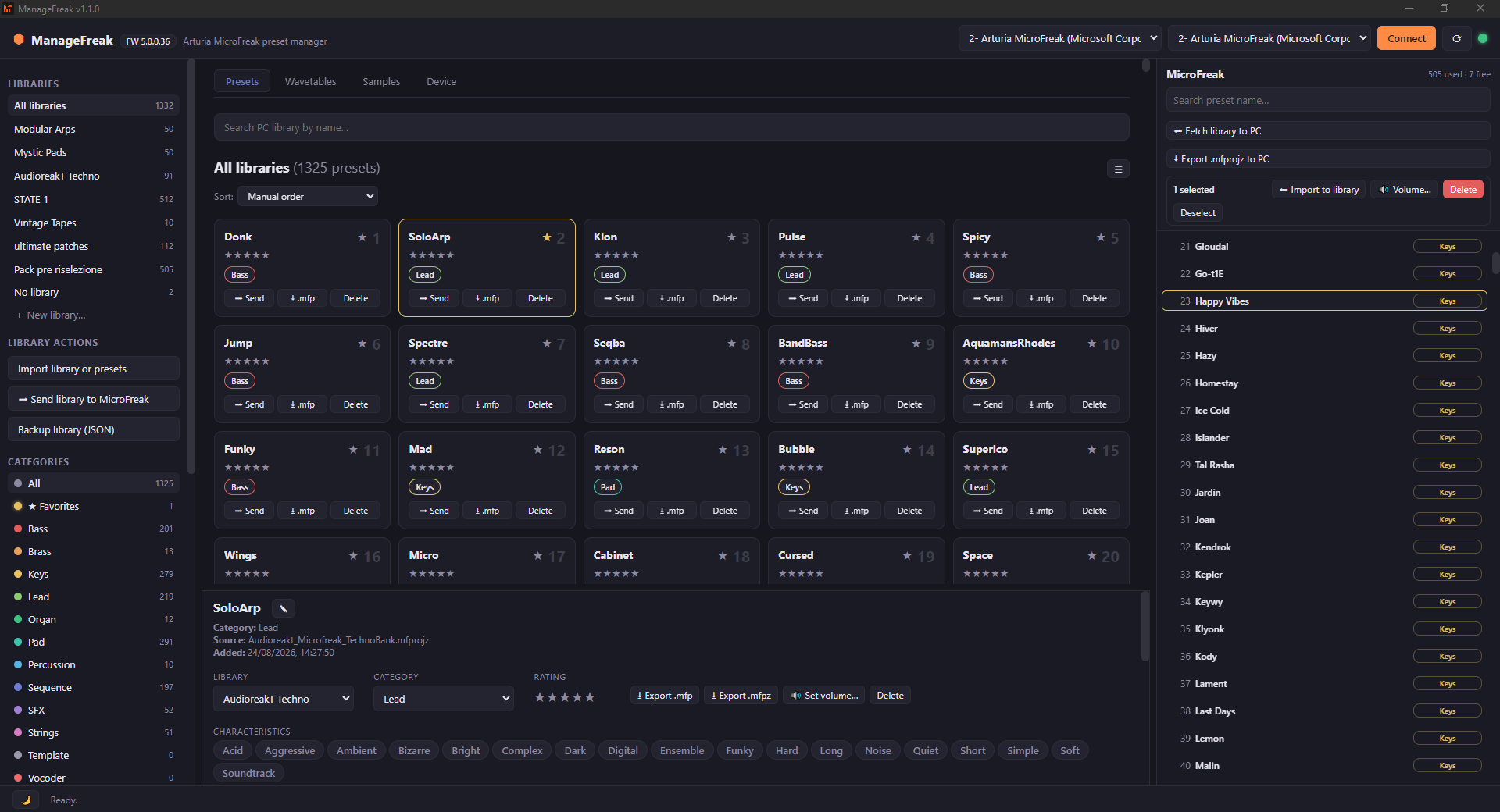
- Easy drag & drop, sorting and organizing of presets, wavetables and samples: sort the PC library by name, category, rating or characteristics, and move content on the synth by dragging presets from one slot to another;
- Easy rename of presets, wavetables and samples directly on the device;
- Fast batch and multi-selection volume editing of presets;
- Automatic sample conversion to the right format: no need to check bitrates or sampling frequencies;
- Samples and wavetables preview;
- Many backup functionalities.
Added in 1.2.0
- Listen to presets from your library (audition): the ▶ button plays it on the MicroFreak: the preset is written to a scratch slot you choose in the dedicated Audition options, that slot is selected, and a note is played. Scratch slot (Init slots suggested), note (C3–C6) and note length are configurable; the slot is copied before the first listen and can be restored.
- Undo (
↩ Undo,Ctrl+Z): you can undo the last 5 operations such as presets written to slots, slots reset to Init, batch volume changes, wavetables, samples, and also everything done to the PC library (deletions, reordering, edits, imports). Confirmation lists exactly what will be touched. - Drag several presets at once, in both directions: library → synth and synth → library (all the selected slots are imported, with progress bar, Cancel, and insertion where you dropped them).
- Send the whole library to the MicroFreak: you can now send an entire library to the MicroFreak and choose the starting slot. The menu lists every slot that will be written, together with the preset currently there that will be replaced.
- Support the project: the top-left menu has a new button to donate.
Features
Main device-wide features
- Automatic scan of all 512 presets (name, Arturia category, used/empty state) and of the wavetable and sample slots, in seconds;
- Rename a preset on the device (header only, the sound is untouched);
- Drag & drop: drop a library preset onto a device slot to write it;
- Reorder presets on the device: swap or shift, with backup + verification + rollback;
- Multi-selection with Ctrl/Shift and batch actions (move, favorites, set volume, export, delete) from the detail pane;
- Batch volume edit: set the Volume (−12…+12 dB, as shown on the MicroFreak) of all selected presets at once, on the device or in the PC library;
- Audition/select a preset on the synth from the computer: listen to it (it is written to a scratch slot, selected and played) or just select it (Bank Select + Program Change);
- Undo the last 5 operations (
↩ Undo,Ctrl+Z): presets written to slots, slots reset to Init, batch volume changes, wavetables, samples and PC-library edits; - Drag several presets at once, in both directions (library → synth and synth → library);
- Send the whole library to the MicroFreak from a chosen starting slot, with the full list of the slots that will be replaced;
- Initialize slots back to the Init preset, with smart grey visualization to easily spot them;
- Download the whole bank as a single
.mfprojzfile compatible with Arturia MCC; - Import single presets (
.mfp,.mbp,.mfpz), MCC projects (.mfprojz, many presets at once), sysex (.syx) and ManageFreak JSON backups (restores libraries too); - Export single presets (
.mfp/.mfpz) and JSON backups.
Library
- Libraries (collections): choose or create a destination library when importing, so presets don't pile up together. Move presets between libraries from the detail pane;
- Grid or list view (toggle ☰ / ▦ in the library header);
- Search by name, sort (manual / name / rating / category), star rating;
- Arturia categories (Bass, Brass, Keys, Lead, Organ, Pad, Percussion, Sequence, SFX, Strings, Template, Vocoder) with smart counts (Init presets are excluded from them);
- Arturia characteristics (Acid, Aggressive, Ambient, … 18 total): filter by them and toggle them per preset from the detail pane;
- ★ Favorites extra entry;
- Parameter view of the preset (oscillator type, cutoff, resonance, envelopes, LFO, arp, modulation matrix…), decoded from the firmware-5 tagged format.
Tabs (MCC-style)
-
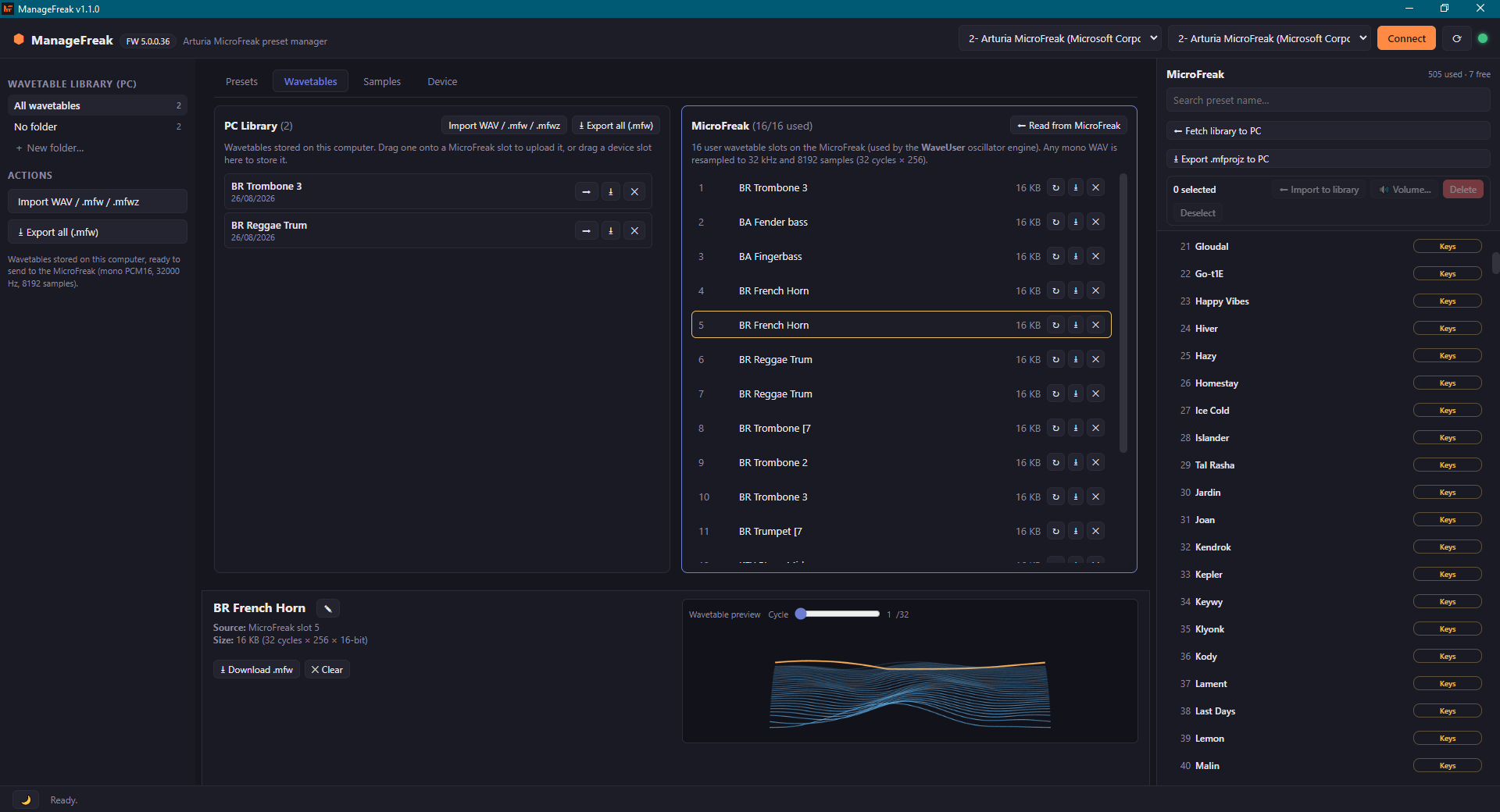
Wavetables:
- 16 user wavetable slots on the device, split view (PC library ↔ MicroFreak) with independent scrolling;
- Import
.wav(any WAV: auto-converted to mono PCM16, resampled to 32 kHz with an anti-aliasing filter, trimmed/repeated to exactly 8192 samples),.mfw,.mfwz; - Download
.mfw/.mfwz; - Clear slots;
- Drag & drop both ways;
- Visual preview of the selected wavetable (perspective ribbon of the 32 cycles, with a cycle slider).
-
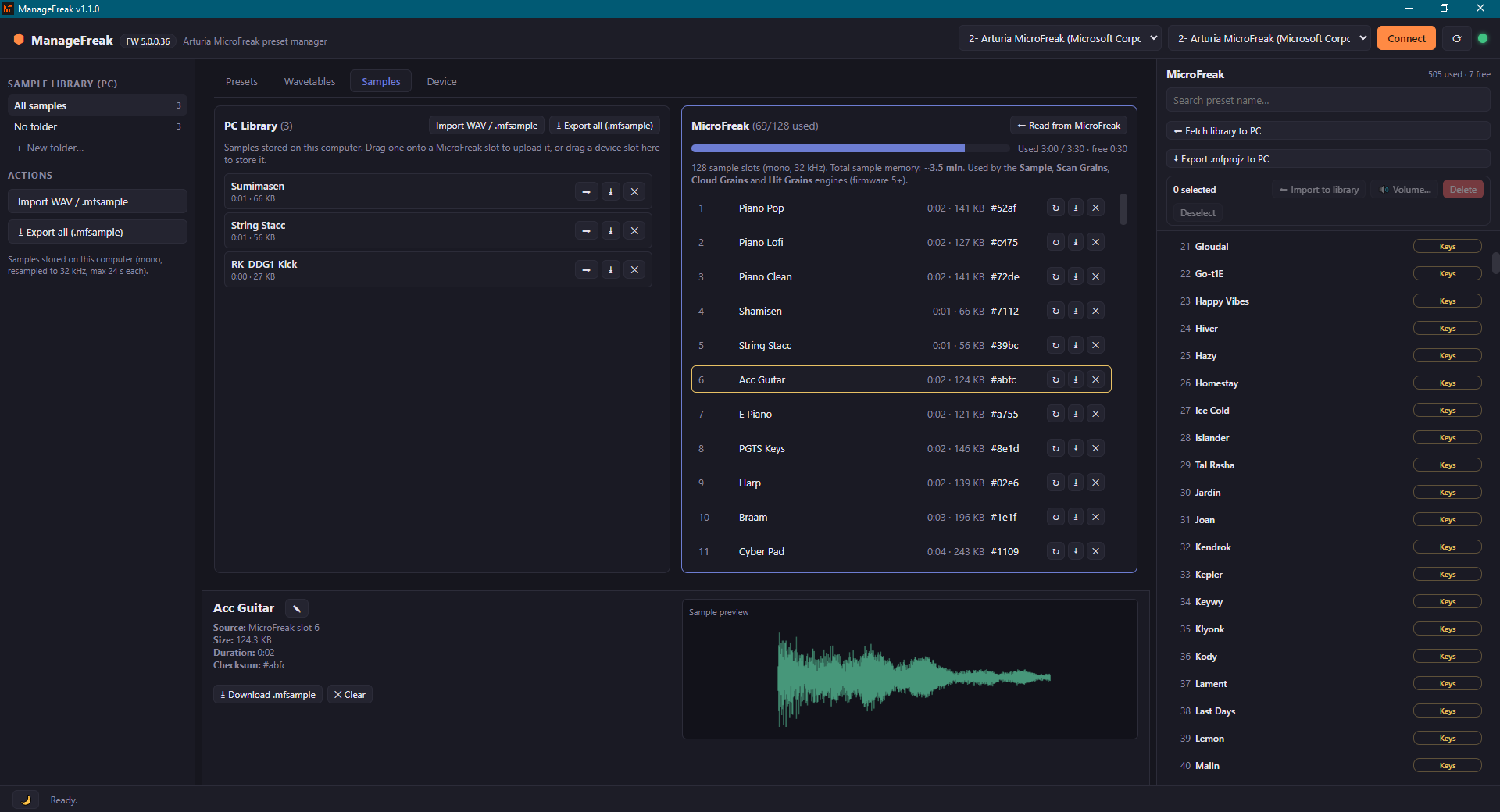
Samples:
- 128 sample slots (firmware 5+) with a memory time counter (total ~3.5 min);
- Split view (PC library ↔ MicroFreak) with independent scrolling;
- Import
.wav(any WAV: auto-converted to mono PCM16 and resampled to 32 kHz with an anti-aliasing filter, max 24 s); .mfsamplebackups;- Download;
- Clear;
- Drag & drop both ways;
- Waveform preview in the details pane.
-
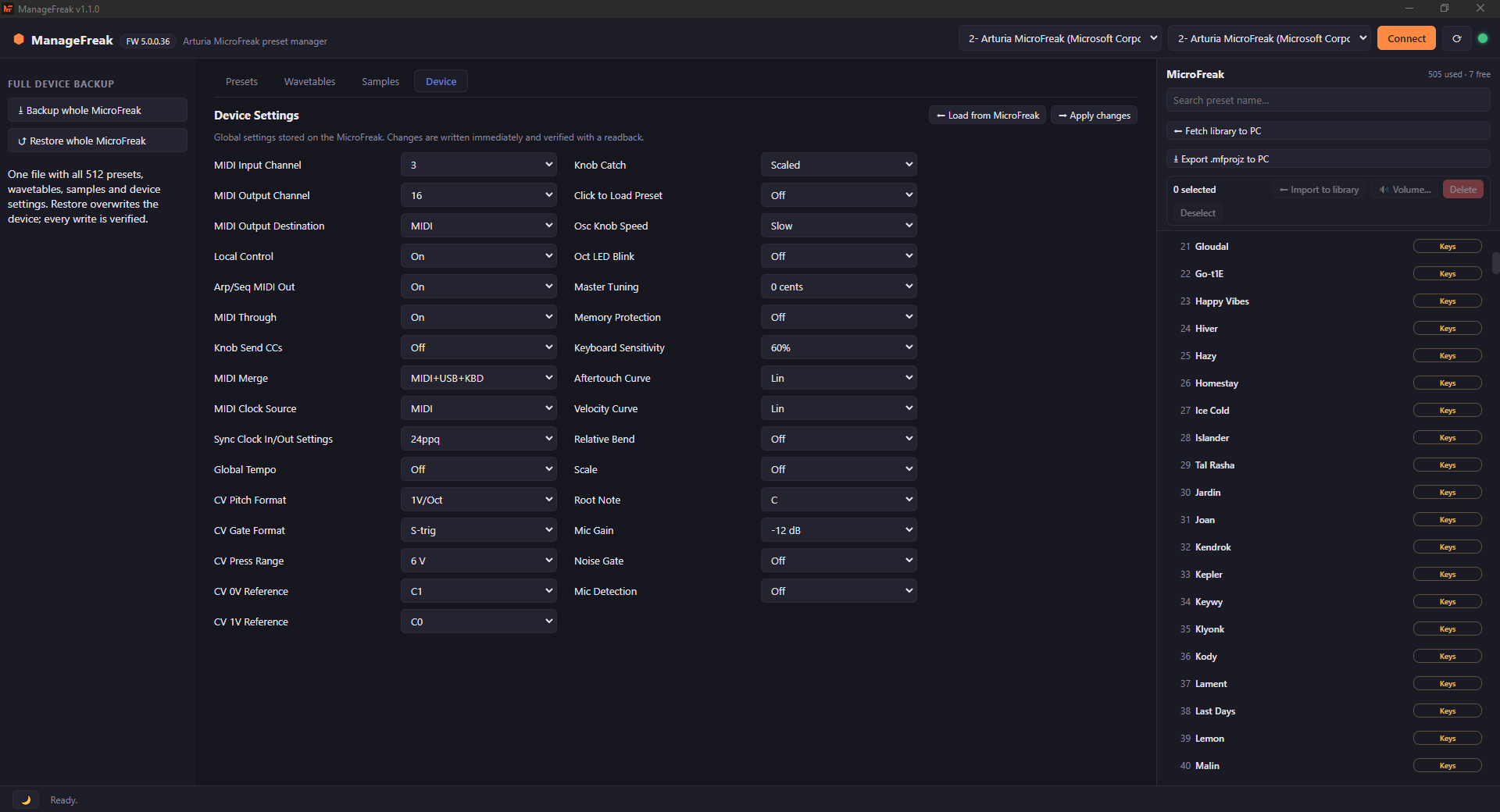
Device:
- 31 device settings in this tab (MIDI channels, clock, CV, knob behavior, tuning, keyboard, microphone…) with the audited allowed values from Arturia's device description;
- Changes are written with readback verification and automatic rollback;
- Backups and restores cover all 43 device settings, including the ones not shown in this tab.
-
A details pane at the bottom shows name/source/size for the clicked preset, wavetable or sample, with inline rename (on the device or in the PC library).
App specific features
- Safe write: before writing, the slot is read as a backup; the readback is verified byte-by-byte and, on any error, the original content is restored automatically. (Samples are the exception: there the slot is checked first, free sample memory is verified, the readback is compared byte-by-byte with a small tolerance on the last bytes, which the firmware zeroes, and a failed write leaves the slot empty, never corrupted. The previous sample is not restored, so keep a local copy of anything irreplaceable).
- In-app updates (installed Windows build): from the app-name menu (top-left) you can see the current version, the changelog of the latest release, check for updates and update with one click.
Download & install
Prebuilt packages are published on the Releases page. Download the one for your platform — no build tools needed.
| Platform | File | How to install | In app updates |
|---|---|---|---|
| Windows | ManageFreak-Setup-<version>.exe | Run the installer. It installs for the current user (no admin rights) | Yes |
| Windows, portable | ManageFreak-<version>-portable.exe | Single file, nothing to install: just run it. | No |
| macOS | ManageFreak-<version>.dmg (or the .zip) | Open the DMG and drag ManageFreak into Applications. The app is not signed — see the note below. | No |
| Linux | ManageFreak-<version>.AppImage | chmod +x ManageFreak-*.AppImage, then run it. | No |
| Linux (Debian/Ubuntu) | ManageFreak-<version>.deb | sudo apt install ./ManageFreak-<version>.deb | No |
Everything the app stores (library, sample and wavetable collections) stays in your user folder: see Where the data lives.
Windows: first launch
The Windows installer is not code-signed, so on first launch SmartScreen may show "Windows protected your PC". Click More info → Run anyway: the app is safe, and its whole source is public if you want to check it yourself.
macOS: first launch
Unfortunately I can't afford an Apple Developer Program membership (Developer ID certificate) just yet for a free and open source project, so I can't sign the app with a real certificate. Because of that macOS tends to treat it as malware even though it is not.
From 1.2.3 the app is signed ad-hoc while it is built: a signature macOS accepts without needing any certificate. The first time you open it, macOS blocks it with "ManageFreak is not from an identified developer". The application itself is fine.
Pick either workaround:
-
Right-click the app in Applications → Open → Open again (macOS remembers the choice from then on);
-
or remove the quarantine flag once, from Terminal:
xattr -dr com.apple.quarantine /Applications/ManageFreak.app
If you are on 1.2.2 or earlier, those builds were shipped completely unsigned, and macOS may refuse them with the harder message "ManageFreak is damaged and should be moved to the Trash", which the workarounds above cannot fix. In that case run this once — thanks to DoronV for reporting it and providing these commands:
find /Applications/ManageFreak.app -name "._*" -delete
find /Applications/ManageFreak.app -name ".DS_Store" -delete
sudo codesign --force --deep --sign - /Applications/ManageFreak.app
Better still: download the latest version, which already comes signed.
In-app updates are not available on the macOS and Linux builds (see Known limitations).
IMPORTANT!
- If you suspect any malware presence in the app just audit it, all of its code is open source. Nothing to hide here.
- I do not possess a Mac, so I just build the app for it without the possibility to check if there are platform specific problems. If you find any problem, please report it on the Reddit posts I made or on GitHub. Thank you for your understanding.
- I was helped by AI to build the app. I personally don't find anything wrong with it, as it is very good at coding. It obviously takes a lot of time to build it anyway. I just report it here for transparency and because for some people it might be a deal breaker. I think you have to try things out before complaining.
Requirements
To use the prebuilt binaries:
- none, just plug the MicroFreak in over USB.
To build from source:
- Node.js 18+ (20/22 recommended)
- npm
Writes are verified on MicroFreak firmware 5.x (the same protocol verified on hardware by Elektroid and freakout). Reading uses the same documented operation family that also works on earlier firmware; read presets are saved losslessly either way.
Hardware-verified on a real MicroFreak: preset read/write/rename/reorder, wavetable and sample read/write, sample and wavetable rename and reorder (swap/shift). Sample reordering rewrites only the directory entries, so it is fast even for large samples, and device settings read/write.
MIDI goes through RtMidi in the main process (WinMM on Windows, CoreMIDI on macOS, ALSA on Linux), with prebuilt binaries bundled in every package: the same MIDI stack used by DAWs and by MIDI Control Center. Web MIDI stays as a fallback if the native module cannot be loaded on an uncommon platform.
Quick start
- Connect the MicroFreak over USB and turn it on.
- Open ManageFreak: the MicroFreak MIDI ports are detected automatically (top bar). Otherwise select them from the drop down menus and press Connect.
- The 512 slots are scanned automatically; use ⬅ Fetch library to PC for a full backup of the occupied presets (it takes a few minutes).
- Organize your content in the Library: drag presets to reorder, drop device slots onto the grid to import them at a chosen position, assign categories/characteristics, search, rate, mark favorites.
- To send a preset to the synth: drag it onto a slot in the MicroFreak panel — the app asks for confirmation and tells you which preset is being replaced — or use ➡ Send on the card and type the destination slot (it starts from slot 1). The destination slot is overwritten, so send the current content somewhere else first if you want to keep it.
- Export presets as
.mfp/.mfpzto share them or reuse them in Arturia MCC.
Migrating an existing library from Arturia MCC
- In MCC: select your presets and use Export (single presets or the whole project).
- In ManageFreak: Import library or presets and pick the exported files.
- From then on, manage everything from ManageFreak, except known limitations.
Where the data lives
The app keeps three files in its data folder:
library.json— the PC library (presets, libraries/collections, categories, ratings);wavetables.json— the wavetable collection saved on the PC;samples.json— the sample collection saved on the PC.
The folder is:
%APPDATA%/ManageFreakon Windows;~/Library/Application Support/ManageFreakon macOS;~/.config/ManageFreakon Linux.
Use Backup library (JSON) to move your data to another PC.
Network access
ManageFreak works offline: presets, libraries and backups never leave your computer. The only network calls the app makes are:
- the changelog shown in the app menu (top-left), read from the public GitHub API;
- the update check, which asks GitHub whether a newer release exists (installed Windows build only).
Both are read-only and optional: with no network the app simply reports that the changelog is unavailable and keeps working.
Known limitations
- ManageFreak cannot update your MicroFreak firmware, use MCC for that.
- Init (empty) slots are read and shown, but cannot be recreated via upload with the current protocol (same limitation documented by freakout and Elektroid). To totally empty a slot, use MCC. ManageFreak's Delete action rewrites the firmware Init template preset instead.
- Sequences (Seq A/B) are transferred integrally inside the preset body (lossless backup), but are not yet editable from the UI.
- Auto-update works only on the installed Windows build (NSIS), and only from version
1.1.0 onwards: 1.0.3 and earlier have no updater and must be updated by hand once. The
portable
.exeand the macOS/Linux builds are not wired to the updater yet (on macOS a signed and notarized app is required for a smooth update experience). - The protocol was obtained by reverse engineering: always test on disposable slots before important operations, and keep a library backup.
- The Windows GS Wavetable Synth and the MIDI Mapper ports are deliberately hidden
from the port lists: they go through
wdmaud.drv, which crashes on MicroFreak SysEx (the app refuses to open them even if asked). Pick the MicroFreak ports instead.
Development
cd app
npm install        # installs Electron
npm start          # runs the app
npm test           # runs the automated tests (protocol, file formats, parameters)
Building installers
cd app
npm run dist:win     # Windows: NSIS installer + portable build
npm run dist:mac     # macOS: DMG + zip
npm run dist:linux   # Linux: AppImage + deb
Packages are generated in app/dist/. On Linux machines you need the ALSA libraries (for audio/MIDI): sudo apt install libasound2.
Technical background & credits
The SysEx protocol used by ManageFreak is documented in app/docs/PROTOCOLLO.md (Italian) and derives from the public work of:
- Elektroid (MicroFreak connector, GPL) hardware-verified read/write sequences;
- freakout (MIT) complete protocol documentation,
.mfp/.mfpz/.mfprojzformat, firmware-5 tagged parameter format; - microfreak-reader by François Georgy early studies on the read protocol and the CC parameter map.
Support
ManageFreak is free and open source. If it saves you time (or sanity) compared to MIDI Control Center, consider helping me by buying me a coffee:

License
GPL-3.0-or-later. See LICENSE.