M-Flasher
Back up, restore and reinstall the firmware of an M-VAVE FM-1 (or its rebranded twin, the Fame MiniFM) or SMK-37 Pro / Elite over USB, and install m-bootloader. It talks to the chip's built-in USB download mode, so it also works when the firmware on the unit is broken. For Windows, macOS and Linux.
Unofficial: not affiliated with M-VAVE or JieLi. It saves a backup before it writes anything and checks every write, but use it at your own risk.
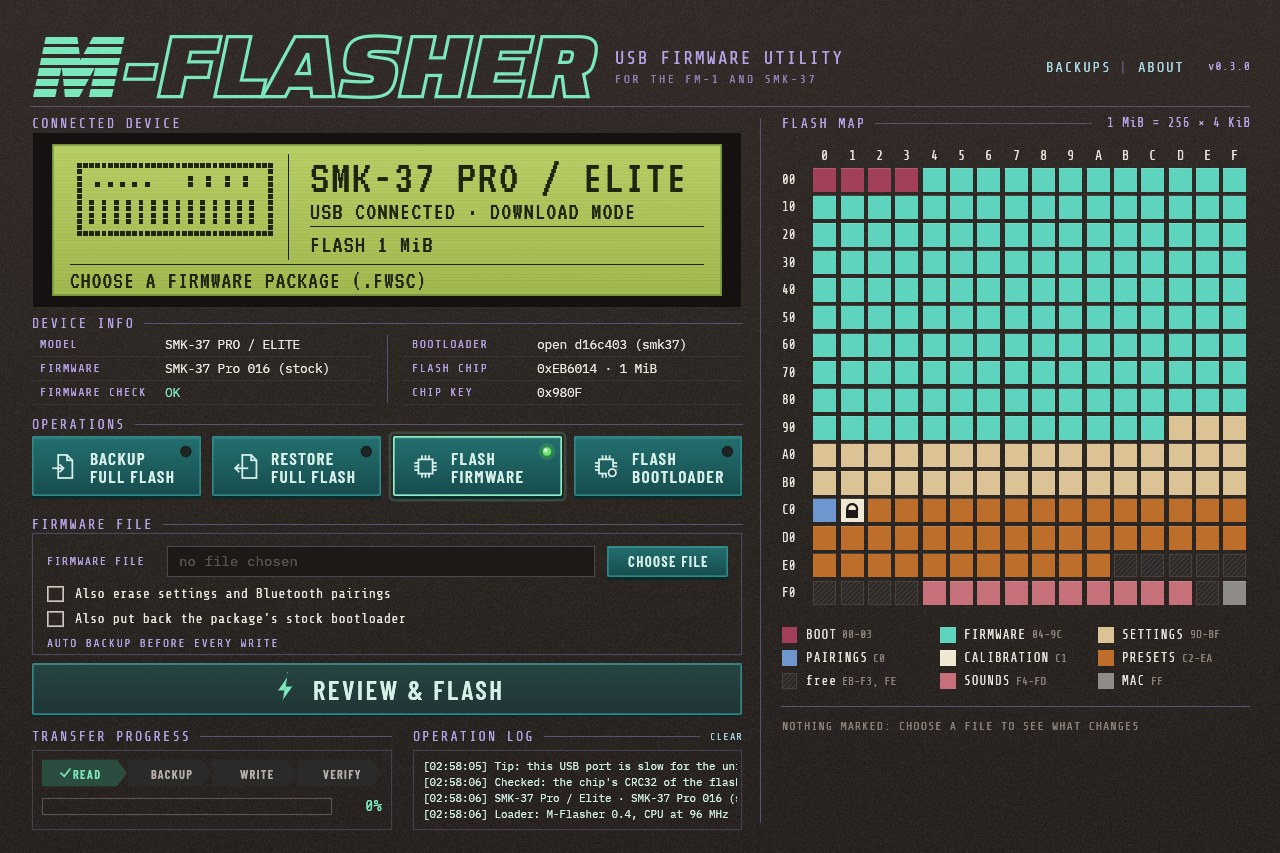
What it does
- Back up the whole flash, and restore a backup.
- Install firmware from M-VAVE's
.fwscpackages, as downloaded. - Install m-bootloader, or put the stock one back.
- A flash map shows what each part of the flash holds and, before a write, exactly what will change.
- Checks the package is for this model, writes only what changes, and verifies everything written: see Safety.
- A command line as well as the window.
Getting started
- Download the package for your system from the releases and follow its short instructions. The apps are not signed, so the first start needs one extra confirmation.
- Put the unit in download mode and connect it with a USB data cable:
- with the unit running normally (M-VAVE's firmware or Felucca), just connect it: M-Flasher finds it on USB MIDI and its DOWNLOAD MODE button switches it over;
- with m-bootloader: hold REC (SMK-37: SEQ REC) while switching it on;
- with Felucca, SLOOP or Snoop37 running: hold OCT- and OCT+ for 5 s.
- M-Flasher finds the unit and shows what is on it. Start with a backup.
A unit with the stock bootloader and stock firmware cannot enter download mode from its keys, but DOWNLOAD MODE works on it. Installing m-bootloader adds the keys and a recovery menu for when the firmware does not start.
More
- Using M-Flasher: each system, download mode, the actions, the command line
- Safety: what is checked before and after every write
- How it works: the protocol, the source, building
Credits and license
MIT (LICENSE). Bundled files and their licenses: data/NOTICE.md and assets/README.md. The protocol follows jl-uboot-tool by kagaimiq, and the safety rules those of MvaveFM1Unbricker and FM-1 Transporter.