LXRXXL v0.6.0
Tested on an Akai Force (see tested.json). Downloads: Releases.
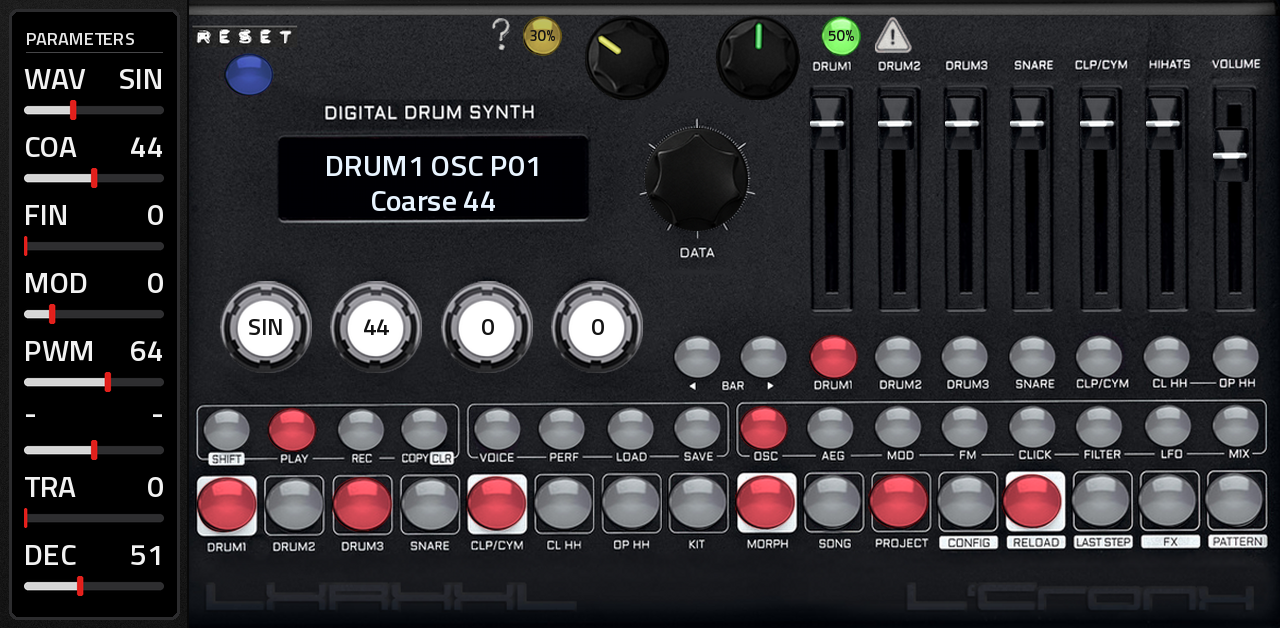
The LXR-02 drum synthesizer's open-source sound engine on the Akai Force and MPC (MPC OS 3.x, VST2 through mpc-vst-plugins), inspired by the Erica Synths LXR-02. The whole panel on one page: display, four pots, data encoder, the 7 faders, every button with its LED, and the 16 step keys, playable from the touchscreen and from the Force's pads.
Sound
Since 0.6 the sound is the LXR-02's own: the sound engine of the LXR firmware Erica Synths open-sourced in October
2026 (erica-synths/lxr-desktop-app, GPL-3.0), compiled for MPC OS
(third_party/lxr-desktop-app, the few changes in PATCHES.md). The six voices (DRUM1-3, SNARE,
CLAP/CYMBAL, HIHAT) with their oscillators (Sin Tri Saw Rec Noi PWM, with pulse width), the transient generator, the
filters, envelopes, LFOs, velocity and LFO modulation (pulse width and the FX unit included), FM, decimation, the
mixer, and the FX unit: drive (tube, fold, clip), ring modulator, compressor (1:1 to 8:1), delay and ping-pong
delay, plus the firmware's plate reverb, which is in its code but off on the hardware. Parameters go through the
firmware's own handler, at the machine's rate in its 64-sample blocks. Kits are the LXR-02's own 247-byte kits, so
kits from an LXR-02 play as they do there.
Around it, LXRXXL's own: the sequencer: 64 patterns of 7 tracks x 64 steps (4 bars), per-track length, step velocity, note, probability and two parameter locks per step, manual rolls, shuffle, songs, recording, the euclidean pattern generator, kit morphing and kit change with the pattern; per-step parameters show while a step is held. The faders keep LXRXXL's log curve (from LXR02Open, the engine LXRXXL used up to 0.5).
User manual: every key, page and function, step by step.
The page
The panel by Suns Kiefer, laid out like the LXR-02's, at MPC's full height on the right, the PARAMETERS column on the left.
| Area | What |
|---|---|
| Display | the LXR's two LCD lines, in the panel's display window |
| PARAMETERS | the values of the menu page shown on the display, named as the LXR names them, each with a bar to drag; a page with fewer values shows fewer rows |
| 4 pots | the LXR's pots: values 1-4 of the page (or 5-8, after selecting one of those). Each stands on the value it edits, full left = its minimum, full right = its maximum, and turns as the value changes; the value is printed in its white centre |
| DATA encoder | moves the selection / edits; it turns with the selection, from the first value of the page to the last (or the first slot to the last when loading/saving); a tap on the "DATA" legend under it is the encoder's push (it blinks red when there is something to confirm) |
| 7 faders | DRUM1 DRUM2 DRUM3 SNARE CLP/CYM HIHATS VOLUME (the LXR-02's fader curve) |
| Keys | SHIFT PLAY REC COPY/CLR VOICE PERF LOAD SAVE / OSC AEG MOD FM CLICK FILTER LFO MIX / BAR< BAR> and the 7 voices; lit red with their LED |
| Step keys | 1-16: grey = step off, red = step on; the SHIFT function is printed under each key |
On the touchscreen SHIFT and COPY/CLR latch: tap SHIFT, then the key (the SHIFT LED shows it is armed); the pads have real press-and-hold. LOAD / SAVE: tap LOAD or SAVE, then the data key (KIT 8, MORPH 9, SONG 10, PROJECT 11, PATTERN 16), as on the machine. Pick the slot with DATA (the touchscreen knob, the Force's data wheel or Q-Link knob 8), then confirm with a tap on the blinking DATA legend under the knob, or tap the same data key again. Example, changing kit: LOAD, KIT (step 8), turn DATA to the kit, tap DATA. Pressing the Force's data wheel in does not reach plugins (only its turns do), so it does nothing here. A pattern loads on its step key.
Q-Links: bank 1 = the 7 faders and the data encoder on knob 8; bank 2 = the 4 pots and the data encoder on knob 8.
Tempo: CONFIG (SHIFT + 12) > Tempo. "MPC" (the default) follows MPC's tempo and transport: press play on MPC and the LXR plays, its steps on MPC's grid. With MPC stopped, the LXR's own PLAY runs it at MPC's tempo. Any BPM number runs the LXR on its own clock.
The mod: presets, RESET and randomizers
Presets, old and new. The factory project, built from the Hrtl LXR-02 DLC project (presets/), has both preset
sets:
| Kits | What |
|---|---|
| 1-16 | the Hrtl kits (Lambo, Reservoir, Faders, Malware, Zipper, Nanobyte, Kronky, Boooost, Dropbar, Goondam, SpaceD, Penalty, Dialup, Express, Necro, Mist) as the LXR-02 plays them, their pulse width and FX modulation included |
| 17-32 | the same 16 as LXRXXL 0.5 shipped them ("Lambo05" ... "Mist05": those few modulations off) |
| 33 | "Init 05", LXRXXL 0.5's init kit (built from the manual's drum recipes) |
| 34 | "Initkit", the LXR-02 firmware's init kit (also what "clear kit" goes to) |
| 35-64 | the DLC's Initkits |
and the 16 demo patterns, each with its kit (kit change mode "auto", so selecting a pattern brings its kit). A new LXRXXL starts on this project, on pattern 1; an MPC project you saved opens as you saved it (also one saved with 0.5.x).
RESET (blue key, top left): back to the factory project, pattern 1 with its kit, the sequencer stopped. Anything not saved is replaced.
Two keys and two knobs for randomizing, along the top of the panel (each key shows its knob's amount):
- RANDOM (green key with the warning sign, green knob 0-100 % in steps of 10): every sound parameter of the six voices moves up or down by a random amount of up to the knob's share of its range, each on its own draw, so the voices change differently. A parameter never lands where it is, nor back where it was before the last press. Whatever would silence a voice keeps at least 30 %: the voice volumes, the amp envelope decays, the oscillator pitch and a filter's cutoff (a high-pass cutoff at most 70 %, an attack at most 70 %). The outputs and the modulation routings stay as they are. The key lights up brighter for a moment. With SHIFT only the selected voice changes.
- SEQ RND (yellow key with the question mark, yellow knob): a new beat on the pattern, a euclidean rhythm per voice. At n % each voice gets about n % of its track's steps (between half and all of that, drawn per voice), spread evenly, turned by a random rotation, with random accents. Every press is a new beat; it replaces the voices' steps. With SHIFT only the selected voice gets a new beat, at the knob's density.
The two knobs are on Q-Link bank 2 (knobs 5 and 6), and MPC's project keeps their settings.
Force pads
Sequencing from MPC / the Force step sequencer: the drum pads play the LXR's voices in the order of its voice keys: pad 1 (bottom left) = DRUM1, pad 2 = DRUM2, pad 3 = DRUM3, pad 4 = SNARE, pad 5 = CLP/CYM, pad 6 = CL HH, pad 7 = OP HH. The voices answer the notes the Force's pads send in their default layout, the C major scale from C1 (pads 1-7 = notes 36, 38, 40, 41, 43, 45, 47), and the drum-pad patch's (pad n sends note n - 1). With the Force's pads in another layout or key, set each voice's note on its MIX page. Pads 8-16 are silent. With MPC stopped, the display shows what each pad hit played ("note 36 > DRUM1"). MPC's play also plays the LXR's pattern: to sequence only from the Force, clear the pattern (SHIFT + COPY/CLR, choose "pattern", COPY/CLR) or pick an empty one (patterns 17-64).
Any other note on the global channel plays the selected voice at that pitch. After pad learn (below) the pads are the LXR's panel instead, row by row from the bottom:
| Row | Pads 1-8 |
|---|---|
| 6 | - - - - - - - OP HH |
| 5 | BAR< BAR> DRUM1 DRUM2 DRUM3 SNARE CLP/CYM CL HH |
| 4 | OSC AEG MOD FM CLICK FILTER LFO MIX |
| 3 | SHIFT PLAY REC COPY/CLR VOICE PERF LOAD SAVE |
| 2 | steps 9-16 |
| 1 | steps 1-8 |
Pad learn, once per device: CONFIG > lrn, then hit three pads: the bottom-left pad, the pad right of it, the pad above it. The display shows the notes they sent, then "Pads learned". The pads need a layout where no two send the same note (a chromatic layout whose rows don't repeat each other's notes); with rows that overlap the display says "Pads overlap" and the pads keep playing the drums. CONFIG > pad "nte" switches the panel off again (the pads play the drums), "pnl" back on. A plugin can't light the Force's pads, so the LEDs are on the screen.
MIDI
Each voice listens on its own MIDI channel and note (MIX page; by default channel 1, notes 36-42); the global channel (CONFIG) plays the selected voice tonally. While the pads are the panel, the notes they send work the panel, not the voices. CC n sets sound parameter n-1 and NRPN the parameters from 128 (the LXR's CC/NRPN list), NRPN 100-105 the PWM of voices 1-6 and 106-117 the FX unit (reverb and delay type included), CC1 morphs, program change selects the pattern.
Artwork
Artwork by Suns Kiefer.
Presets from an LXR-02
tools/import_lxr02.py <LXR-02 project folder> turns an LXR-02 project (its SD card's NN-NAME.SND kits and NN-.PAT
patterns) into the factory content (src/factory_data.c); the file layouts are described at its top. The kits are
taken as they are, all 247 bytes. Songs and the global settings file are not imported.
Data
Projects (64 kits, 64 patterns, 64 songs and the settings each) are saved in /sdcard/LXRXXL/Projects, outside the
plugin folder so they survive updates. MPC's own project also keeps each instance's whole state.
Installing
Needs root SSH access to the device (for example MockbaMod) and MPC OS 3.x. Unzip the release, then:
scp -r LXRXXL-<version> root@<device-ip>:/tmp/
ssh -t root@<device-ip> sh /tmp/LXRXXL-<version>/install.sh
The installer stops MPC (save first), copies the plugin to /sdcard/Synths/L'Cronx - VST - LXRXXL/, adds it to
MPC's plugin list and starts MPC again. Load LXRXXL (L'Cronx) as a plugin instrument. uninstall.sh removes
it. INSTALL.md in the zip has the manual steps.
Building
Python 3 with Pillow, numpy and scipy, a host gcc and clang, Zig (pip install ziglang); valgrind and qemu-user for the tests. No Docker.
git clone https://github.com/sunskiefer/LXR02XXL
cd LXR02XXL
./build.sh             # build/arm/lxrxxl.so + the skin -> build/package/
test/run_tests.sh      # the wrapper's host test and the engine tests, under valgrind
test/arm_sim.sh        # the MPC simulation built for ARM, run under qemu-arm
tools/gen_params.py is the parameter list (appended only: MPC stores automation by index), tools/panel.py the
page geometry (it writes layout.conf), tools/panel_art.py the artwork, tools/preview.py a picture of the built
page. The LXR engine's globals are swapped per instance (src/lxr_state.c), so several LXRXXLs can play at once.
Changes to the vendored LXR code are listed in PATCHES.md.
License and credits
- Sound engine: the Erica Synths LXR firmware, Copyright (C) 2012-2026 Erica Synths (DSP by Julian Schmidt, Sonic
Potions), GPL-3.0-only (
third_party/lxr-desktop-app/LICENSEandNOTICE.md). LXRXXL is a modified version of it and is under the same licence (LICENSE); every release includes its complete source. - LXRXXL 0.1-0.5 were built on LXR02Open by Brendan Clarke; its fader curve and CC1 morph idea live on here, its code does not.
- VST2 wrapper, skin builder and installer: sd88me, mpc-vst-plugins (MIT).
- Presets: the Hrtl LXR-02 DLC project.
- Interface font: Titillium Web, SIL Open Font License 1.1.
LXRXXL is not official Erica Synths software and is not affiliated with or endorsed by Erica Synths, Sonic Potions or Akai Professional. "Erica Synths", "LXR" and "LXR-02" are trademarks of Erica Synths.