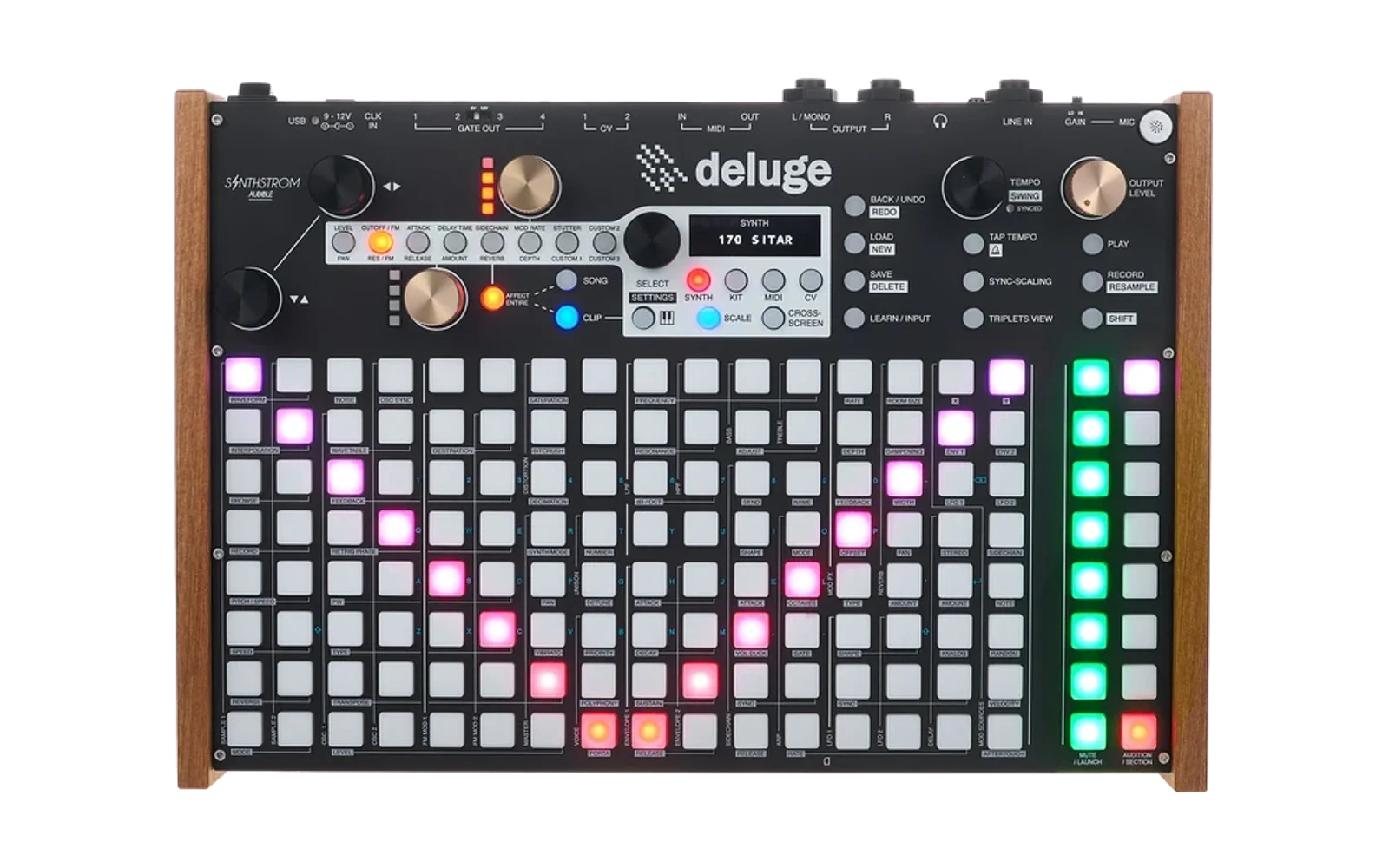
Lama - custom Deluge firmware based on Owlet 1.3
Lama is an unofficial custom build: the Owlet firmware 1.3 plus the Vowel filter, custom LFO shapes with a shape editor (40 presets) and 8-bar LFO sync, a Saturation editor, a Wavefold editor, Bass Mono, an EQ Mid band and Table Shaper Tone. The DX7 engine, Ringmod, the Kick synth mode and four PHI oscillators were removed. How to use it: Lama manual. It is not supported by the Owlet or community firmware teams - please report problems with Lama here. Everything below is the Owlet firmware README.
Deluge Owlet Firmware (1.3 Port)
This is owlet-firmware, a personal fork of the Deluge Community Firmware maintained at owlet-labs/DelugeFirmware. It serves as a playground for experimental sound design features that may be too specialized or CPU-intensive for the main community branch.
This branch is based on main for stability.
Rationale/use case
Most of the features in this branch are built to support my personal use case for the deluge:
- A portable inspiration station/sound design machine and companion for external gear (useful effects added and lookback sampler make sampling external gear into loops and resampling very easy.)
- Inspiring moreso than granular control over complex effects.
- Less focus on raw voice count more focus on inspiring sound design and related workflow
- This being said effects are designed to have minimal footprint when disabled except for binary size. i.e. dont allocate memory dont consume cpu when switched off. With everything "off" the baseline perf/voice count etc. should be ideally close to that of the normal deluge firmware.
Status
Highly experimental and for most users, not a replacement for the main community firmware. Folks interested are encouraged to experiment, but we recommend backing up sd cards just in case.
- owlet-firmware-1.3 is the default branch and has a stable baseline.
- dev branch is where new work happens. https://github.com/owlet-labs/DelugeFirmware/blob/dev/README.md
Known limitations
- Horizontal menus must be enabled - the UI for these effects requires horizontal menus to function properly. Future work will seek to decouple this requirement.
- Disperser (OWLPASS) has high CPU usage with >8 stages
- Sine shaper (HOOT) is moderately CPU hungry
- Other effects are fairly light
Features (vs Main)
Lama: how to use the features of this build (Vowel filter, custom LFO shapes, saturation / wavefold editors, Bass Mono, EQ Mid...) is explained step by step in the Lama manual.
Workflow
| Feature | Description |
|---|---|
| Bounce in Place | Render a synth/kit/audio clip (or a whole track) through its current FX chain into a new AudioClip on a new adjacent AudioOutput. Source clip and output remain intact. Menu: clip context menu → "Bounce Clip" (single) or "Bounce Track" (every clip on the source output). Synth/audio sources record pre-reverb (MIX channel) so reverb is recreated live on the bounced clip; kits bake per-drum reverb into the WAV but preserve the kit-wide send as a live send (a single clip send can't model per-drum variation). Reverb-send automation is cloned onto the new clip via AutoParam::cloneFrom, preserving curves. Sample clusters are pre-primed before the render so audio-clip and sample-based kit-drum sources don't record leading silence while SD loads. Playback window is trimmed to exactly clipLength-in-samples so AudioClip's timestretch engine runs at ratio 1.0 (no mid-clip artifacts). Gain stage set to unity (overriding the AudioClip 25% default) so the bounced clip plays at source level. |
| Retrospective Sampler | Lookback buffer for capturing audio after the fact. Sources: Input, Master mix, or Focused Track. Duration modes: time-based (5/15/30/60 sec) or bar-synced (1/2/4 bars). Bar modes tag filenames with BPM. See testing guide. |
| Sound Cloning (Grid/Kit) | Clone sounds via pad gestures. Grid view: hold a clip pad + press an empty column to clone the synth track (sound + notes). Kit view: hold an occupied audition pad + press an empty row to clone the drum sound. Cloned sounds are independent copies with unique names for reliable save/reload. |
| Record Source Selection | Choose the recording source for Record to Sample via Sound Editor → Actions → Record source. Options: Left input (auto-detect, default), Stereo input, Balanced input, Deluge mix (no fx), Deluge output (fx). Enables resampling the Deluge's own output directly into a sample slot. Setting persists across power cycles. |
Effects
| Feature | Description |
|---|---|
| Scatter (Bird Brain) | Beat-repeat, slice manipulation effect and granular looper. Rate knob controls slice length. Grain mode with dual-voice crossfade. pWrite and density are patchable params. See testing guide. |
| Featherverb | Lightweight 4-tap FDN/allpass cascade reverb. 77 KB buffer vs Mutable's 128 KB. See testing guide. |
| Multiband OTT Compressor (DOTT) | 3-band upward/downward compressor with CHARACTER, RATIO, VIBE, and SKEW controls. 8 vibe zones for dynamic character. Can function as full downward, full upward, or anywhere in between. Aggressively optimized. Includes band-level metering. See testing guide. |
| Sine Shaper (HOOT) | Harmonic waveshaping with drive, harmonic content, symmetry, and mix controls. Adds musical saturation and overtones. See testing guide. |
| Table Shaper (PELLET) | XY wavetable-based waveshaper with smooth interpolation between shapes. See testing guide. |
| Disperser (OWLPASS) | Allpass cascade effect with zone-based topology. Available per-voice and in GlobalEffectable chain. High CPU usage with >8 stages. |
| Automodulator | Automodulation effect with phi triangle routing and 4-point XY LFO wavetable. Available per-voice and in GlobalEffectable chain. |
| Eroder | Noise-modulated delay line comb filter with IIR feedback. SVF-filtered noise (bandpass) + zero-crossing sample-and-hold + pitched triangle modulator drive a short delay line. Phi triangle banks on freq (delay, feedback, soft clip, fold, HPF cutoff, pitched mod depth) and character (depth, resonance, S&H blend, width, pitched mod offset). Pitch tracking on comb, SVF, HPF, and triangle. Q31 integer waveshaping (soft clip + triangle fold). Available per-voice and in GlobalEffectable chain. |
| Utility Effect | Channel-strip utility with four controls: Volume (−∞ to +12dB gain staging), Pan L and Pan R (independent per-channel panning, 0=hard left, 127=hard right), and Stereo Width (0%=mono, 100%=normal, 200%=exaggerated). Placed before DOTT in the signal chain. Available on synth tracks, kit rows, audio clips, and master. All params at default = zero CPU (bypass). |
| Harm Effect | Harmonic rebuild tool: note-tracking notch filter (pre-reverb) strips a frequency, sine oscillator (post-reverb) adds it back clean. 102 harmonic ratios (denominators 1/2/3/4/8, numerators to 32) for precise interval selection. Notch filter is a biquad with width control (surgical to wide). Oscillator has AR envelope, portamento, phase catchup (click-free retrigger over ~24 cycles), and pink noise output scaling (−3dB/oct, calibrated at 40Hz). Level and Fine Tune are mod matrix targets (hybrid patched params). Pitch bend tracking. Last-note-priority pitch with fallback to held voices. Sound-only (synth tracks and kit rows). ~3200 cycles/buffer (0.28% CPU). |
| Vowel Filter | Formant filter as an LPF mode (Vowel, after Drive): a cascade of six Klatt resonators (F1–F4 from a vowel table plus F5/F6 above them for presence; unity gain at DC so basses keep their low end, and with Raw at 0 nothing of the source passes unshaped) turns any source into a vowel - detuned saws, FM growls, wavetables, samples. The cutoff walks eight vowels A, Ä, E, I, Ü, Ö, O, U (shown as A AE E I UE OE O U; the order glides naturally between neighbours), resonance narrows the formants, morph (Formant shift) moves them up to an octave higher, and its modulation adds on both ways around the knob (an LFO sweeps the formants up and down even at 0). Raw (0-50, the LPF menu's fifth item in Vowel mode, also CV pressed again on Formant shift) mixes the source's own highs back in, unshaped - the buzzy character of the filter's first version; saved with the sound or track. Levels are calibrated so every vowel comes out about as loud as it went in; coefficients ramp per sample from buffer to buffer, so vowel LFOs and envelopes never zipper. The horizontal filter menu draws the actual frequency response. Works on synths, kit rows and audio tracks. No noise, no randomness. Replaces the old PHI VOX oscillator. |
Synthesis
| Feature | Description |
|---|---|
| Pulse Width Triangle | New oscillator type (TrianglePW / TRPW). Triangle wave with dead-zone pulse width control — PW knob compresses the triangle into a narrower region with silence in the dead zone. Waveform visualization in pulse width menu. |
| Phi Morph Oscillator | Procedural oscillator generating waveforms from phi-triangle banks. Two zone knobs (A/B) each produce a distinct 8-segment waveform shape. Crossfade (Wave Position) morphs between them with morph excitation effects (amplitude overshoot, curvature boost, phase distortion). Waveform shaping via sine blend, odd symmetry, windowing, and slope matching. Per-sample modifiers: phase jitter, amplitude-dependent noise, asymmetric gain for even harmonics. Supports pulse width modulation. |
| Phi Swarm Oscillator | Injection-locking / synchronization oscillator (Adler 1946, Kuramoto 1975): the note's master phase drives two Adler-coupled slave oscillators whose behavior traces the Arnold-tongue map — locked to exact rational ratios inside a tongue (self-tuning consonance), injection-pulling "sirens" at the edges, never-repeating quasiperiodic beating outside, with Langevin temperature melting the network from crystalline through analog drift into noise. The wave-index crossfade ANNEALS: knob motion heats the swarm out of lock, parking it lets you hear it re-crystallize. Zones Still…Chaos; pitch-invariant locking; per-voice state is two phase words in an otherwise-unused field. See sync physics and testing guide. |
| Removed: DX7 engine and Ringmod | Both are gone to free up firmware memory (36 files for DX7 alone: the engine, its tables, menus and the cartridge browser). Sounds saved with a DX7 oscillator load it as a sine, sounds saved in Ringmod mode load in Subtractive mode. |
| Unison Index Modulation Source | New per-voice modulation source (UNISON_INDEX) that assigns a unique value to each unison voice. Patch it to any oscillator-level parameter (pitch, volume, phase width, wave index, phase, carrier/modulator feedback, start offset) for per-voice timbral variation from a single note. Three knobs in the Unison menu control the distribution: Shape (8 zones: Linear, Power, S-Curve, Step, Triangle, Sine, Random, Drift), Mapping (8 zones: Symmetric, Anti-sym, Pitch+, Pitch−, Center-out, Rotate, Pairs, Shuffle), and Curve (bipolar warp from center-heavy to edge-heavy). Drift shape provides per-block bounded random walk for evolving textures. All zone knobs have intra-zone meta parameters for fine control. |
Sampling
| Feature | Description |
|---|---|
| Gate Sample Mode | New sample repeat mode for drum kit rows. Notes act as mute/unmute gates — the sample loops for the duration of the note. If BPM is detected in the filename (e.g. _120BPM or bare _120_), the sample is tempo-synced and phase-locked so triggering mid-bar starts at the position it would have reached if playing since the downbeat. Without BPM in the filename the sample still gates normally, just without time-stretching or phase-lock. Gate View Editor: Press SCALE in kit mode to enter gate view (SCALE LED lights, "GATE" popup). Green pads = audible, red pads = muted. Tap to toggle. Hold first + tap second on same row to span-fill. Hold a green pad + twist vertical encoder to set per-segment attack (fade-in, 0-127), horizontal encoder for release (fade-out). Hold multiple green pads simultaneously to adjust all at once. Exponential time scaling: 0 = instant, ~64 = 50ms, ~96 = 400ms, 127 = ~2.4s. Values are saved per gate segment and serialized with the song. Also available for audio clips. |
| Loop Crossfade | True dual-read crossfade at loop boundaries. Configurable duration (0–1000 ms) per source in the sample menu. When approaching the loop end, a second read from the loop start fades in while the main read fades out — seamless blending with no volume dip. Works from the first loop iteration by reading the fade-in from the sample cache while the uncached path fades out. For split-loop offset wrapping, time-stretch mode, and pingpong loops, falls back to fade-out/fade-in envelopes (still smoother than no crossfade). |
| Loop Pingpong | New PINGPONG sample repeat mode. Playback bounces between loop start and end points instead of jumping back. Each unison voice tracks its own direction independently. After note-off while going backward, playback continues to loop start then stops. |
| Plockable Sample Start Offset | Patchable (plockable) sample start offset — varies per-step via parameter locks. Offset applied as a fraction of the sample-start-to-loop-end region. Split-loop architecture: when offset crosses the loop start, the voice plays offset→loop-end first, then loops normally from loop start. Works with timestretch, reverse, and pingpong. offsetWraps toggle wraps past loop-end back to sample start for full-range modulation. Live offset updates during playback for looping modes (repitched and time-stretch). |
Modulation
| Feature | Description |
|---|---|
| Macros (MACRO 1–4) | Four global modulation sources that are also patchable parameters. Assign any mod source to a Macro, then patch the Macro to multiple destinations — enables modulation-of-modulation (e.g. LFO→Macro→Filter+Pitch). One-frame evaluation delay prevents feedback. Self-routing is blocked. Available in the mod matrix as both sources and destinations. Default value 50% (bipolar center). |
| 8-Bar LFO Sync | Synced LFOs reach 8 bars (the slowest setting, below 4 bars). Saved as a separate flag, so older firmware just reads 4 bars. |
| Custom LFO Shapes | New LFO type Custom with a shape editor (Draw in the LFO menu): Serum-style points joined by bendable segments, up to 64 per cycle. Pads set points (the row is the height, shift + pad removes); the X encoder moves the selected point (pressed: zoom x1-x8, with the page shown as 2/4), the Y encoder selects points (pressed: split the visible part into 2/4/8/16 equal parts, or back), the upper gold knob sets the height (press deletes the point), the lower one bends the segment after it (pressed: before it). Synth/Kit and MIDI/CV step through the points, Scale/Cross Screen through the pages. A Y encoder press adds a point halfway to the next one, on the shape; the fourth pad of the second sidebar column (magenta) plays the visible page backwards. Undo / redo (24 steps): the two bottom pads of the second sidebar column (lit bright while there's a step to take), or shift + select encoder (left / right). While editing, the title line shows the change for a moment instead of a popup over the shape. Back or a select press leaves, as in every menu; the undo history stays for when the editor opens again on the same LFO. 40 presets - shift + Y press loads the next, shift + Y turn browses both ways (zoomed in, into the visible page only): triangle, sine, saw up/down, square, pulse 25%, trapezoid, stairs, exp decay/rise, swell, shark fin, bumps, S-curve, polyrhythms (fin x3, decay x3, tresillo, 3 over 2, decay x5, euclid 7/16, euclid 7/12), drum & bass grooves (two-step, 3-3-3-3-2-2, ratchet, wobble 3-3-2, ramps 3-3-2), each spiky rhythm also as a round version, bounce, swing, heartbeat, zigzag, chaos. Saved with the sound. |
MIDI
| Feature | Description |
|---|---|
| MIDI Follow: Mod Knob CC | Map 16 consecutive MIDI CCs to the Deluge's 16 mod knob slots (8 pages × 2 knobs). Menu: MIDI → MIDI Follow → Mod Knob CC. Set a base CC number (1–112); CCs from base to base+15 control mod knobs in order. Supports CC learn. Value 0 = OFF. Persisted in flash storage. |
| MIDI Follow: CC Presets | Switchable CC mapping presets. Drop .XML mapping files into SETTINGS/MIDIFollow/ on the SD card. Menu: MIDI → MIDI Follow → CC Preset — scroll through available presets and select to load. A Standard.XML preset is auto-created from firmware defaults on first boot. Selected preset is persisted to SETTINGS/MIDIFollow.XML for reboot survival. Community can share controller-specific mapping files. |
Developer
| Feature | Description |
|---|---|
| FX Benchmarking Framework | Performance profiling tools for DSP development. |
For Developers
DSP Documentation:
- Phi Triangle Parameter Evolution - Design pattern for multi-parameter control evolution using golden ratio frequencies
- Phi Swarm Sync Physics - Injection locking, Arnold tongues measured from the firmware's own update rule, and the annealing morph, with figures and original literature
This fork is open source under the same GPL-3.0 license as the community firmware. Feel free to:
- Fork this repo for your own experiments
- Cherry-pick individual features into your own builds
- Submit PRs to the main community repo if you refine something worth sharing
No guarantees of stability or compatibility. Use at your own risk.
Dear Deluge owners
If you want to start using the community firmware please visit https://delugecommunity.com/ for all relevant details.
About
The Deluge from Synthstrom Audible is a portable sequencer, synthesizer and sampler. Synthstrom Audible decided to open source the firmware application that runs on the Deluge to allow the community to customize and extend the capabilities of the device.
The hardware is built around a Renesas RZ/A1L processor with an Arm® Cortex®-A9 core running at 400MHz and 3MB of on-chip SRAM. Connected to that is a 64MB SDRAM chip, a PIC for button handling and either a 7-Segment array or an OLED screen. The application is written in C and C++ and some occasional assembly in bare metal style without an operating system.
Important links
- For acquiring and using the firmware visit the community firmware website
- Once you have the firmware, consult our detailed update guide for instructions on how to install it
- To contribute to the project with code, bug reports, suggestions, and feedback see: How to contribute to Deluge Firmware
- To learn about the toolchain, application, and to start working on the code continue with: Getting Started with Deluge Development
- Please also visit the Synthstrom Forum and the community Discord to interact with other users and the developers
- You can donate to the project using the Synthstrom Patreon