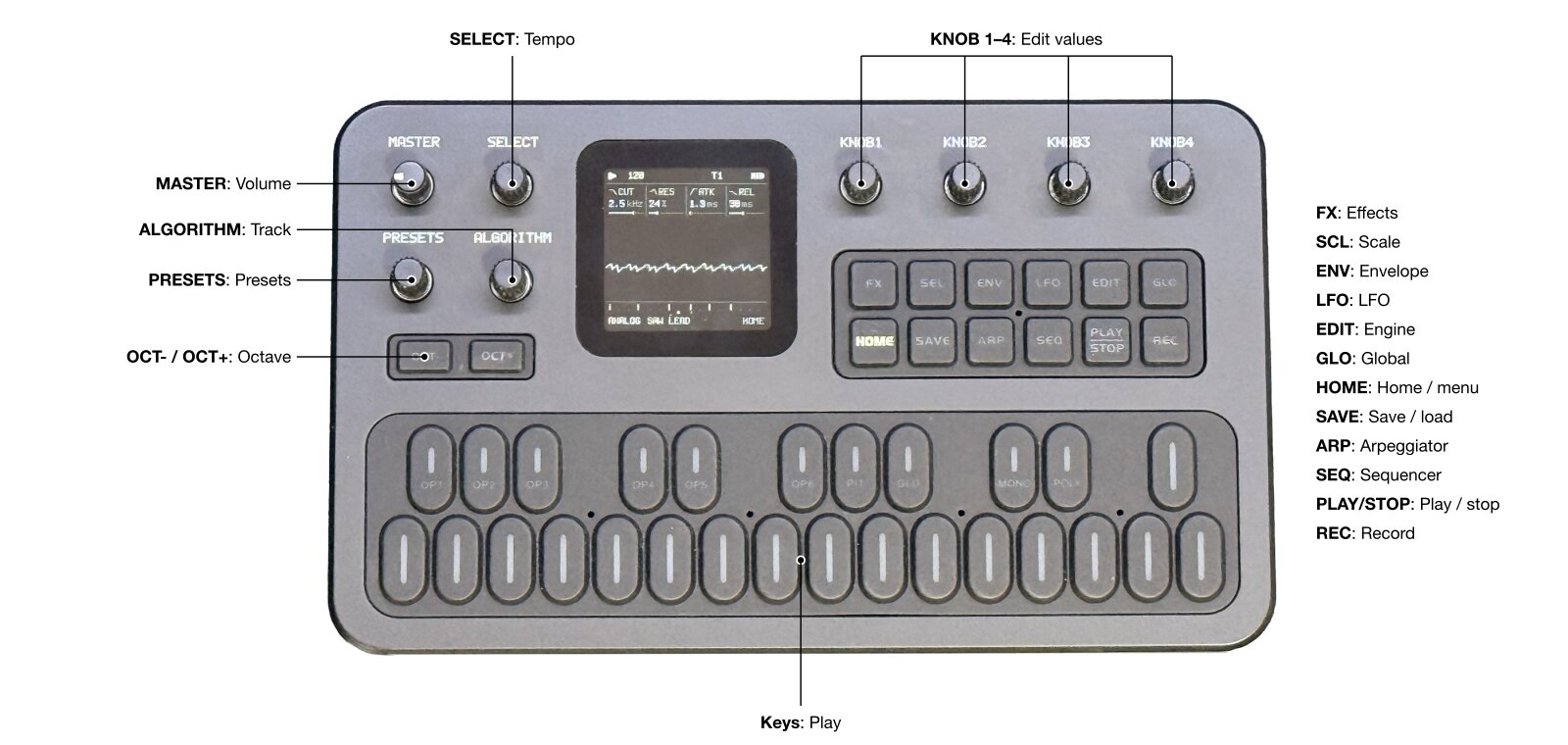
Hortator
Loud92/100Drum-focused groovebox firmware based on Felucca, with a Bluetooth build as well.
forM-VAVE FM-1·by@DeadActive
Unclaimed. Is this yours? Sign in with GitHub as @DeadActive to claim it.
hortator-0.26.0.fwsc· 595 KB· +4 files
GPL-3.0· DeadActive/hortator·downloads come from the creator’s GitHub releases
drum-v0.26.0Hortator 0.26.0Latest5 files
- Steadier key backlight: the glow of BACKLIGHT DIM LO and DIM HI (the unlit keys and idle buttons) is now a very short flash about 900 times a second instead of a longer one 45 times a second. It no longer flickers, and in the Bluetooth version it no longer jumps brighter for an instant while Bluetooth is on.
- MIDI clock out: GLO SYSTEM 2/3 SYNC sends the MIDI clock to USB (OFF / USB; in the Bluetooth version also BLE and BOTH). On the FM-1's own clock PLAY sends Start, then 24 clocks a quarter note on the sequencer's grid (steady through tempo changes, never swung), and STOP sends Stop, so a DAW, AUM or another instrument can follow it. Following a clock (CLK USB, TRS or BLE), the incoming clock and Start / Stop / Continue go on to the SYNC outputs as they arrive, never back to where they came from. Nothing is sent during a firmware update. The FM-1's TRS jack is an input only, so there is no TRS out.
- MIDI in routing: GLO SYSTEM 2/3 ROUT chooses how incoming notes play: NOTE (as before: on the drum channel, the tracks whose NOTE it is), SEL (on the drum channel, the selected track, pitched from C4) or TRACK (channels 1–8 play tracks 1–8, pitched from C4). Pitched notes into an armed track are recorded with their pitch. With TRACK the white keys send on their track's channel at C4.
- MIDI THRU: GLOBAL 3/3 THRU ON passes notes and CCs from each MIDI input to the other outputs (the TRS jack to USB; Bluetooth and USB to each other in the Bluetooth version), never back to the input. It is a setting of the FM-1, kept over power-off.
- SYNC and ROUT are saved with each project; projects saved before load SYNC OFF and ROUT NOTE, and THRU starts OFF.
- Live cue and variations: while a pattern plays, queue the next project slot (A–D) or another variation and it
comes in exactly where the pattern ends (its longest track's), every track from its first step, in time. On HOME
and the SEQ pages the first 8 black keys (F#3 to A#4) queue variations 1–8 of the playing slot: the playing one's
key lit, a queued one blinking (not with KEYS on; elsewhere the black keys work as before). Hold SAVE (0.4 s, or
press a key with it) for the cue map: white keys 1–4 queue slots A–D, the black keys variations 1–8 (lit: used,
winking: playing, blinking: queued, breathing: unsaved edits); a slot key then a variation key queues both
(
CUE>B3on top). The same key again switches at the next step; the playing slot's key cancels; stopped, a cue switches at once; STOP drops a queued cue. The keys pressed with SAVE play no note, send no MIDI and record nothing. A SAVE tap still opens the projects page, now when it is let go.- A slot switch brings the slot's sounds, steps, timing and locks; the tempo, swing, clock, MIDI, the master effects, Grids, the mutes and the selected track stay. The old sounds fade out over the last 5 ms before the switch (no click). A variation switch changes the steps and the timing only; the sounds ring on.
- Each slot has 8 variations, in both the plain and the Bluetooth version: variation 1 is its own steps; 2–8 hold
their own steps and timing and share the slot's sounds and locks. A variation never used before starts as a copy
of the one playing when it is first cued. When a slot's variations are full the cue says
VARIATIONS FULLand the playing one plays on. A slot comes back on the variation it played last. A SONG row plays its slot's variation 1; while SONG plays a cue saysSTOP SONG TO CUE. Following an external clock (USB or TRS) the switch comes on the pulse that ends the pattern.
- Edits stay in RAM until SAVE: a reset or a power cut brings every slot back as it was last saved. Leaving a
slot by LOAD or by a cue keeps its edits in RAM, so going back finds them; a slot with unsaved edits shows
*in the PROJECTS list. LOAD of a slot with unsaved edits (a tempo change counts) asksDISCARD EDITS?; SAVE onto a slot that is not loaded but has unsaved edits asksOVERWRITE B*?. SAVE to another slot moves the edits there (the slot you came from is its saved version again). RENAME of a slot with unsaved edits renames it in RAM only (RENAMED (SAVE TO KEEP)). Unsaved variations of one slot can wait in RAM while another plays: until they are saved, a cue of a third slot (or a LOAD, when the slot you leave has unsaved variations too) saysSAVE C FIRST. - FILL: a step's PROB goes on past 8/8 with
FILL(plays only during a fill) and!FILL(only outside one). Hold REC (0.4 s) on any page but SEQ's to play a fill while you hold it (FILLon top). A shorter REC press arms as before, when it is let go; REC held on STEP, PATTERN, MOTION and SONG does what it did. A learned REC and the SMC-Mixer's REC are always taps. (A long REC hold off the SEQ pages used to toggle REC ALL.) - COPY / PASTE a slot: SAVE's third page, COPY: KNOB 2 COPY remembers SLOT's slot (
COPIED A,#in the list), KNOB 3 PASTE (turn twice) makes SLOT's slot a copy of it: kit, steps, locks, variations and song, named... COPY, unsaved until SAVE. PASTE again on the same slot before saving it undoes it (PASTE UNDONE). Not while playing (STOP TO PASTE). - User sample slot 2 (USR2) now holds up to 48 KiB, as USR3 does: the rest of its flash holds the projects'
variations. A longer USR2 (uploaded under upstream Felucca) is shortened to its first 48 KiB once, at the next
power-on (
USR2 SHORTENED TO 48K). If that ever fails (USR2 CLAMP FAILEDat power-on), SAVE saysUSR2 ERROR: NO SAVEuntil the next power-on. - Projects: a project saved now loads on 0.25.0 and 0.24.0 without its variations. If a project's variations can't
be read, it loads without them and the FM-1 says
VARIATIONS LOSTonce. A power cut during SAVE keeps the previous save whole. - Bluetooth version: a new Bluetooth page, in Hortator's own look. ROLE (HOST / DEVICE), MODE (now also
FM-LINK) and RECONNECT (AUTO / FAST / SLOW), and up to 8 saved devices, controllers and FM-1s, each on its own line
(connected or not, CTRL or FM-1, ON / NEAR / AWAY), with + ADD A DEVICE (an 8 s scan, then the list stays), FORGET
and "use now". Two links at once (a controller and another FM-1), reconnected by themselves in the order you picked;
scanning never drops a link. The top bar shows a Bluetooth rune (struck through while nothing is linked).
- ROLE DEVICE: the FM-1 is a BLE-MIDI device for a computer, a tablet or another FM-1.
- FM-Link: two FM-1s in time (CLK LINK follows the leader), with Felucca's Bluetooth version too. The leader runs on its own clock (CLK INT) or follows a MIDI clock (CLK USB, TRS or BLE). Following a clock, the leader passes its Start, Stop and tempo on: the other FM-1 starts from beat 1 with it, within a few milliseconds, and keeps in time. In MODE FM-LINK the link carries FM-Link only: no MIDI either way, so no MIDI clock either.
- MIDI to the device: in MIDI mode the key hits go to the linked device too, and GLO SYNC BLE or BOTH sends it the MIDI clock (one clock, the same as USB's).
- The SMC-Mixer's knobs 5-8 are MIDI LEARN's.
- The device the old page remembered becomes the first saved device; MODE and AUTOSTART carry over. The saved devices, ROLE, RECONNECT and this FM-1's Bluetooth address are kept over power-off, in a place older versions ignore. The standard version is unchanged.
- What the Bluetooth version leaves out: USB AUDIO 10 CH MIX and 10 CH FX (USB audio is always 2 CH there). The manual has a new Bluetooth section: what it adds, what it leaves out, and step-by-step connecting of a MIDI controller, the SMC-Mixer, a computer or tablet, and two FM-1s with FM-Link.
- Known issue: while Bluetooth is on, a saved device that is not connected can make the sound stutter now and then, as the FM-1 keeps looking for it. If you no longer use a device, FORGET it on the Bluetooth page (KNOB 1 left on its line, OCT+); or switch Bluetooth off when you don't need it.
Install: https://deadactive.github.io/hortator/webapp/installer/ (Chrome or Edge, over USB). The package holds JieLi SDK files under Apache-2.0: see LICENSING.md and LICENSES.zip below.
Two versions: hortator-0.26.0.fwsc, and hortator-0.26.0-bluetooth.fwsc, the same Hortator with Bluetooth MIDI (experimental; off at every power-on). The web installer offers both.
- hortator-0.26.0.fwsc595 KB215↓
- hortator-0.26.0-bluetooth.fwsc595 KB203↓
- LICENSES.zip8.3 KB2↓
- LICENSING.md6.9 KB2↓
Show all 5 filesHide 1 files
Other filesdrum-v0.25.0Hortator 0.25.05 files
USB audio
- USB audio, 2 or 10 channels: the FM-1 records into a computer over its USB cable (16-bit, 44.1 kHz), and MENU (hold HOME) > USB AUDIO now picks what it sends. 2 CH, the default, is the stereo master, exactly as before. 10 CH MIX sends the master on channels 1-2 and the eight tracks T1..T8 on channels 3-10, one mono channel each (each track before its PAN, the effect sends and the master effects). 10 CH FX sends the same eight tracks, with the chorus, delay and reverb returns on channels 1-2 instead of the master: pan the tracks in your DAW and add the effects pair to get the whole mix back, each part on its own fader.
- Switching: 2 CH <-> 10 CH takes effect when the menu closes: the FM-1 leaves USB for about a second and comes back as the other device, "Hortator 8ch" in 10 CH (its channels named Main L, Main R, T1..T8). The sequencer and the sound play on; when following CLK USB the steps wait up to 2 s for the clock to come back. MIX <-> FX switches at once with a short cross-fade, no reconnect.
- Saved: USB AUDIO is a device setting, saved and not part of projects; older settings start in 2 CH. A safe start (SEQ held at power-on) is always 2 CH.
- Computers: the 10 channels work on macOS and iPadOS (class-compliant USB audio) and on Linux. Windows may not accept 10 CH: use 2 CH there.
- Bluetooth version: 10 CH needs the standard build. The Bluetooth build is unchanged from 0.24.0: it has no USB AUDIO row, is always 2 CH and ignores a 10 CH setting saved by the standard build.
Web site
- Manual: the landing page has a manual before the engines: a map of the panel (point at a control on a small FM-1, or at its line, to see what it does) and ten short guides (find your way, make a beat, shape a sound, play and record live, mute, perform, lock a step, save and chain, MIDI and LEARN, settings). Manual is in the top bar and the footer, and "More below" leads to it.
Install: https://deadactive.github.io/hortator/webapp/installer/ (Chrome or Edge, over USB). The package holds JieLi SDK files under Apache-2.0: see LICENSING.md and LICENSES.zip below.
Two versions: hortator-0.25.0.fwsc, and hortator-0.25.0-bluetooth.fwsc, the same Hortator with Bluetooth MIDI (experimental; off at every power-on). The web installer offers both.
- hortator-0.25.0-bluetooth.fwsc595 KB58↓
- hortator-0.25.0.fwsc595 KB37↓
- LICENSES.zip8.3 KB3↓
- LICENSING.md6.9 KB3↓
Show all 5 filesHide 1 files
Other filesdrum-v0.24.0Hortator 0.24.05 files
Parameter locks
- Parameter locks, Elektron style: any step can have its own value for a knob.
- ENV: STEPS / TRACKS: ENV (unused before) switches the white keys between the selected track's steps (STEPS) and the tracks (TRACKS), on its release. In STEPS its LED is lit and a padlock shows in the top bar (left of the battery) on every page. The mode is not saved: TRACKS at power-on.
- STEPS mode: the keys tap and hold steps as on SEQ, on HOME, TRACKS (armed too), SOUND, LAYER, FX, LFO and COMP, and play no drum (REC ALL records no hits then). ENV held + OCT+ / OCT- changes the bank; OCT+ held + a step sets its accent; OCT+ alone and OCT- keep their page's job. ENV turns KEYS and SCL STEPS off. In TRACKS the keys work exactly as before.
- Locking a step: in STEPS, hold a step and turn any knob that MOTION can record (on HOME, TRACKS' LEVEL and PAN,
SOUND, LAYER, FX, SLICER, RESON, FILTER, LFO and LFO DEST): that step gets its own value for that knob. The top line
says
LOCK STEP 5(LOCK 5on HOME), the knob boxes show the step's values with a locked one inverted, and the knob's own value stays as it was. A turn right after the press works; the release then doesn't toggle the step. Knobs that MOTION can't record do nothing while a step is held. - Clearing locks: step held + an OCT- tap clears that step's locks on the knobs of the page shown
(
STEP 5 LOCKS CLEARED); OCT- held 0.6 s clears all its locks (STEP 5 ALL CLEARED). OCT- with no step held keeps its job.LOCKS FULLat 1024 events. SEQ STEP still sets PROB / RATCH / ACC on a held step; a song's rows are not edited. - Playback: a lock sets its knob for its own step only, and the knob goes back on the next step. An LFO on that knob modulates around the locked value. A step that is off keeps its locks without playing them. Locks play whatever MOTION's PLAY says; MOTION CLEAR leaves them; CLEAR TRACK, TOOLS CLR* and INIT* remove them. A SONG row plays its own project's locks and none carry into the next row. STOP, a model change, a MIDI LEARN CC and a preset SAVE use the knob's own value, never a lock's.
- On screen: in STEPS the footer's step strip underlines each locked step of the bank shown (in a song, the row's); SEQ > MOTION shows the selected track's MOTION (recorded events) and LOCKS counts on KNOB 2 / 3.
Projects and samples
- 1024 events: MOTION and the locks share 1024 events per project (MOTION had 128). A save cut by a power loss keeps the last complete project.
- Compatibility: older projects load with their motion as before. 0.23.x sees a project saved by 0.24.0 as an
empty slot (
LOAD FAILEDat power-on): going back is safe but not supported. If a project's locks can't be read, it loads without them and the FM-1 saysLOCKS LOST. - USR3 now holds up to 48 KiB (USR1 and USR2 stay at 80 KiB): the locks are stored in the last 32 KiB of its
space. A longer USR3 sample is shortened once at power-on (
USR3 SHORTENED TO 48K: zones past 48 KiB are dropped, one that crosses it is cut); a power cut during that one rewrite empties USR3 and nothing else. If the rewrite fails, the FM-1 saysUSR3 CLAMP FAILEDand SAVE and RENAME keep the project in memory only, saying so, so an older Hortator never plays the locks as USR3's sound.
Install: https://deadactive.github.io/hortator/webapp/installer/ (Chrome or Edge, over USB). The package holds JieLi SDK files under Apache-2.0: see LICENSING.md and LICENSES.zip below.
Two versions: hortator-0.24.0.fwsc, and hortator-0.24.0-bluetooth.fwsc, the same Hortator with Bluetooth MIDI (experimental; off at every power-on). The web installer offers both.
- hortator-0.24.0-bluetooth.fwsc595 KB73↓
- hortator-0.24.0.fwsc595 KB34↓
- LICENSES.zip8.3 KB7↓
- LICENSING.md6.9 KB5↓
Show all 5 filesHide 1 files
Other filesdrum-v0.23.3Hortator 0.23.35 files
Controls
- Faster knobs: with MENU > ACCEL ON (the default) a turn now speeds up from about 12 clicks a second, in fractions of a step: x2 at 20 clicks a second, x4 at 40, up to x8 on a wide value (the same limits as Felucca 1.1.5). A 0..127 value takes about 65 clicks at 20 a second and about 24 at 60 (before: 127 and 64). A slow turn and single clicks stay one step a click, and the first click after changing direction is one step. Lists of names (MODEL, TYPE ...) never speed up, the PRESETS list at most x4. ACCEL OFF stays one step a click.
- Quick turns no longer skip clicks: before, a knob turned fast lost clicks from about 40 a second (a flick counted next to nothing). The knobs now use Felucca 1.1.5's knob decoder: every click counts up to about 300 a second, still one step a click, and bounce and a still knob's chatter are ignored.
- Step keys: holding a step no longer turns it off. A step toggles only on a short tap (released within 0.3 s
with no knob turned), on the release. Held 0.3 s, an OFF step turns on at once, ready to edit; an ON step stays as
it was. While a step is held on STEP, KNOB 1 / 2 / 3 set its PROB / RATCH / ACCENT (KNOB 3: right on, left off),
shown in the knob boxes and the
STEP n PROB RATCH n ACCline. OCT+ held + a step key still flips the accent at the press. This works on every page whose white keys are the steps (STEP, PATTERN, MOTION, SONG, TRACKS).
Sounds and sequencer
- RESON KEYF (KEYFOLLOW, RESON 2/2 KNOB 4, 0..100 %, 0 % = off, the default): the resonator's pitch follows the
note of each hit from C4 (C4 = TUNE): a step's NOTE, a KEYS note, a ratchet's. At 100 % a step at C5 rings an octave
above TUNE, at 50 % half an octave; MIDI notes play their track at C4. Works on every model (STRNG, PIPE, CHORD,
MODAL). A new note while the ring sounds glides there without a click. An amount rather than on / off: partial
tracking keeps a ring in a narrower range under a wide melody. KEYF 0 sounds exactly as before. MIDI LEARN
(
R.KEYF) and MOTION take it. Older projects load with KEYF off, and a project with KEYF loads on 0.23.2 without it. - MUTE NEXT BAR with an external clock: NEXT BAR now works while following a clock (CLK USB, TRS or BLE): the waiting mutes flip on the bar line instead of never. A muted COMP source (GHOST KEEP / HIDE) fades out just before the bar's first hit. CLK INT is unchanged.
Look and USB
- USB name: the FM-1 now shows up as Hortator (USB MIDI and audio: in a DAW, AUM, the MIDI port list) instead of Felucca. While an update is written it still shows up as Felucca Update. The web installer, the editor and the install and sample upload tools find it under either name, so updating from any earlier build works as before.
- COLOR: every colour now comes in both polarities: BLUE INV (blue on white) and GREEN INV (green on black) join RED INV (red on black). The row shows the theme's name (RED, RED INV, BLUE, BLUE INV, GREEN, GREEN INV, in that order) instead of boxes. A stored colour loads as the same theme as before; an older Hortator shows the new inverses as RED.
Install: https://deadactive.github.io/hortator/webapp/installer/ (Chrome or Edge, over USB). The package holds JieLi SDK files under Apache-2.0: see LICENSING.md and LICENSES.zip below.
Two versions: hortator-0.23.3.fwsc, and hortator-0.23.3-bluetooth.fwsc, the same Hortator with Bluetooth MIDI (experimental; off at every power-on). The web installer offers both.
- hortator-0.23.3-bluetooth.fwsc595 KB216↓
- hortator-0.23.3.fwsc595 KB103↓
- LICENSING.md6.9 KB5↓
- LICENSES.zip8.3 KB4↓
Show all 5 filesHide 1 files
Other filesdrum-v0.23.2Hortator 0.23.25 files
- REC ALL: on TRACKS a REC tap arms / disarms the selected track, saying so (
T3 REC ARMED/T3 REC OFF). On every other page a REC tap is REC ALL: every track armed (REC ALL, the REC LED and the SMC-Mixer's REC 1-8 lit), so each white track key plays and records its own track wherever the keys play tracks (HOME, SOUND, FX, TRACKS ...): finger-drum a whole kit live. KEYS, step record and knob motion stay the selected track's. - Ending REC ALL: a REC tap off TRACKS ends it and arms again the tracks that were armed before (
T3 REC ARMED/REC OFF); on TRACKS it ends it with the selected track armed. The SMC-Mixer's REC n during REC ALL ends it and disarms track n (the others stay armed). A learned REC and the SMC-Mixer's REC act as the button on the page shown. Step record on STEP, REC held andSTOP TO EDITwhile a song plays are unchanged. Not saved in projects, like the arm state. - REC no longer starts play: a REC tap (and REC ALL, a learned REC, the SMC-Mixer's REC and REC 1-8) only arms / disarms; PLAY starts the transport, and an armed track records once playing. Step record is unchanged.
Install: https://deadactive.github.io/hortator/webapp/installer/ (Chrome or Edge, over USB). The package holds JieLi SDK files under Apache-2.0: see LICENSING.md and LICENSES.zip below.
Two versions: hortator-0.23.2.fwsc, and hortator-0.23.2-bluetooth.fwsc, the same Hortator with Bluetooth MIDI (experimental; off at every power-on). The web installer offers both.
- hortator-0.23.2-bluetooth.fwsc595 KB114↓
- hortator-0.23.2.fwsc595 KB101↓
- LICENSES.zip8.3 KB3↓
- LICENSING.md6.9 KB3↓
Show all 5 filesHide 1 files
Other files- REC ALL: on TRACKS a REC tap arms / disarms the selected track, saying so (
drum-v0.23.1Hortator 0.23.15 files
- Web site only (the firmware is the same as 0.23.0): the landing page and the installer count visits and installs anonymously with GoatCounter (no cookies, no personal data); the hero shows "Installed N times" under the install button. An install is counted once, after the installer says Done, and never holds it up.
Install: https://deadactive.github.io/hortator/webapp/installer/ (Chrome or Edge, over USB). The package holds JieLi SDK files under Apache-2.0: see LICENSING.md and LICENSES.zip below.
Two versions: hortator-0.23.1.fwsc, and hortator-0.23.1-bluetooth.fwsc, the same Hortator with Bluetooth MIDI (experimental; off at every power-on). The web installer offers both.
- hortator-0.23.1-bluetooth.fwsc595 KB102↓
- hortator-0.23.1.fwsc595 KB97↓
- LICENSES.zip8.3 KB4↓
- LICENSING.md6.9 KB3↓
Show all 5 filesHide 1 files
Other filesdrum-v0.23.0Hortator 0.23.05 files
The first published release since 0.16.0: it also brings everything in 0.17.0 .. 0.22.0: the MD bank's 21 voices (13 TRX, 8 EFM), 151 factory presets and 128 user preset slots, the default TRX kit, the 4-slot LFO routing, accents on OCT+ and a step, the Machinedrum-style screen and its faster redraws. Projects saved by 0.23.0 don't load in older versions.
Sounds
- SOUND pages: every engine as FM, ACID and BDTRX: the name on the left, its number "#NN/45" under it, VOICES, CHOKE and "+ LAYER" under that, a graph on the right. The engines with no graph of their own show their hit: the voice's real sound (one hit at velocity 100, played silently in the background, never touching what you hear) as a waveform, its length labelled ("HIT / 300 MS", 100 .. 1000 ms, following the sound). It redraws when MODEL or a SOUND knob changes, over a few frames; SAMPL shows its sample.
- Engines renamed (only the names shown: projects, presets and MIDI unchanged). MD bank: KTRX -> BDTRX, XTTRX -> TMTRX, XCTRX -> CGTRX, MATRX -> SHTRX, XTEFM -> TMEFM. MODERN bank: KBOOM -> BOOM, KPUNC -> PUNCH, SSNAP -> SNAP, SCRAK -> CRACK, HMETL -> METAL, HNOIS -> HISS, MEMB -> SKIN, SMPL -> SAMPL. User preset slots saved from them are named after the new names ("BOOM 07").
- The power-on kit (also TOOLS INIT ALL and a new project) is the TRX classic kit: KTRX, SDTRX, CPTRX, CHTRX, OHTRX, XTTRX, RSTRX, CYTRX, each on its default preset, with the same roles and MIDI notes as before (kick 36, snare 38, clap 39, closed hat 42, open hat 46, tom 45, rim 37, cymbal 49) and no choke. Saved projects load unchanged.
- MODEL list: MD, MODERN, CLASSIC (KTRX .. CYEFM, KBOOM .. SMPL, K808 .. CLAVE), and the preset banks MACHINEDRUM, MODERN, CLASSIC, USER. Older projects load with the same voices and presets. The SOUND pages show the engine's place in that list under its name, "#01/45" (KTRX) .. "#45/45" (CLAVE).
- LFO: the OCT- switch between LFO 1 and LFO 2 is gone. The LFO pages show both LFOs side by side (LFO 1 on KNOB 1-2, LFO 2 on KNOB 3-4): WAVE RATE, MORPH PHASE, TRIG MODE (the RATE MODE now has a knob; OCT+ still switches the one of the LFO turned last), and a last page, DEST: 4 slots per track, each a source (LFO 1 / LFO 2), a destination (any knob an LFO can target) and its own depth (KNOB 1 the slot, 2 SRC, 3 DEST, 4 DEPTH). Older projects load with their LFO 1 / LFO 2 routing as slots 1 / 2 (the sound, motion and MIDI LEARN unchanged); projects saved now can't be loaded by 0.22.0.
Sequencer and keys
- Accent: hold OCT+ and tap a step key (STEP, PATTERN, MOTION, SONG, TRACKS): the step is accented (an off step
turns on accented), or plain again. Holding a step key no longer sets the accent, so a held step is only PROB (KNOB
- and RATCH (KNOB 2). OCT+ on its own changes the bank when it is let go; while it is held the keys show the bank's
accents. The STEP hint reads
[OCT+] +TAP ACCENT.
- and RATCH (KNOB 2). OCT+ on its own changes the bank when it is let go; while it is held the keys show the bank's
accents. The STEP hint reads
- HOME: the 4 boxes above PROJ show the bar of a 4-bar cycle: the current bar solid, moving with the playhead, back to the first at every PLAY (stopped: the first). They used to show the selected track's banks.
- The selected track on the keys: on HOME and every EDIT (SOUND, LAYER), FX and LFO page its white key (F3..F4) is lit, as the keys select tracks there (held keys lit too). KEYS, COMP, the step pages and GLOBAL / SAVE / GRIDS keep their own.
- Breathing OCT- / OCT+ (after Felucca's breathing LED): they fade in and out, about 1.1 s, where pressing them would do something (the next / previous bank on the steps, LAYER from SOUND, the LFO pages' RATE MODE (OCT+), YES in a dialog, OK in the menu, NAME's RENAME, MIDI LEARN's DONE, the PRESETS list's LOAD and DELETE); a way back (NO, CANCEL, BACK) is lit.
- PERFORM keeps its knobs: while its screen is up (FX held, the PAGE, a layer key held) KNOB 1-4 are its macros only, for every knob click (some used to reach the page under it), and SELECT turns no page under it (a page button, HOME or an FX tap still close the PAGE).
- MENU BACKLIGHT has Felucca's LED levels: OFF, DIM LO (the old ON: unlit keys and now the idle buttons at about 5 %, the step beats about 25 %), DIM HI (about 10 %, beats about 30 %), INV (idle lit, active dark), INV LO / INV HI (idle at about 10 % / 25 %). KNOB 1 steps, OCT+ steps and wraps. An older Hortator reads any level but OFF as ON, and an older ON loads as DIM LO.
Credits
- MENU > ABOUT credits everyone whose work is in the firmware, its research and its pages (Felucca, Mutable Instruments, DaisySP, the samples, the recovery tool, the web fonts and icons, the emulator the MD voices were measured from, with a disclaimer). The credits scroll under the logo with SELECT, a row a detent, with a scroll bar at the right; ABOUT opens at the top. The licensing notes list DaisySP (MIT) and the research; the project page and the site's footer carry the same credits.
Install: https://deadactive.github.io/hortator/webapp/installer/ (Chrome or Edge, over USB). The package holds JieLi SDK files under Apache-2.0: see LICENSING.md and LICENSES.zip below.
Two versions: hortator-0.23.0.fwsc, and hortator-0.23.0-bluetooth.fwsc, the same Hortator with Bluetooth MIDI (experimental; off at every power-on). The web installer offers both.
- hortator-0.23.0-bluetooth.fwsc595 KB90↓
- hortator-0.23.0.fwsc595 KB87↓
- LICENSES.zip8.3 KB3↓
- LICENSING.md6.5 KB3↓
Show all 5 filesHide 1 files
Other filesdrum-v0.16.0Hortator 0.16.05 files
- ACID: every step holds a note, SLIDE and TIE (format FDRB; older projects load and play as before, but projects saved by this build can't be read by 0.15.0); drum tracks play their steps transposed; ACID, a 303-style bass voice (TUNE DECAY CUTOF RESO ENVMD ACCNT WAVE GATE), plays them with accent, slide and tie on up to two tracks ("ACID: 2 TRACKS MAX"). KEYS (an SCL tap): the keys play the selected track chromatically, OCT- / OCT+ the octave (-2 to +2; LAYER from EDIT and the LFO pages' OCT buttons need KEYS off, the STEP bank stays on KNOB 1, TRACKS keeps OCT as its bank); KEYS notes send no MIDI out; an ACID note (or a tied chain) over 5.5 s is cut. Live record (a REC tap on TRACKS arms the track, and starts the transport when stopped): a key writes the nearest step, a held key TIEs the later steps, a legato overlap SLIDEs (TIE / SLIDE on ACID tracks only). Step record: KEYS on, STEP page, stopped, a REC tap (KNOB 1..4 STEP NOTE TIME FLAG, EDIT a rest; REC, PLAY or leaving the page ends it). A loaded project keeps ACID on its first two ACID tracks, the others return as their power-on kit drum. A step the white keys turn on takes the last KEYS note on an ACID track, C4 on a drum (the last note resets on LOAD and on clearing the pattern). An ACID track's STEP page is a piano roll, the note shows in the footer; ACID's SOUND page shows its filter and the note's shape.
- A new start screen, CRT COLLAPSE: the HortatoR logo squashed through five dithered frames into one white scan line
that bursts sideways, in the chosen COLOR (
assets/boot.png, made bytools/boot_variants.py --ship; the study's other screens:tools/boot_variants.py OUTDIR). The logo, there and on ABOUT, is now UnifrakturMaguntia (SIL OFL). - Releases can carry two versions: the plain firmware and the same build with Bluetooth MIDI. The web installer
offers a choice (the plain one by default), the release a second file
hortator-X.Y.Z-bluetooth.fwsc(BLE=1 tools/publish.sh; first used for the Bluetooth version with parts 2, 3 and 5). - Bluetooth MIDI (the Bluetooth version only): MENU (HOME held) > BLUETOOTH turns Bluetooth on (off at every
power-on), scans, lists the devices found (BLE-MIDI ones first) and connects to the one picked. It remembers it
(saved) and reconnects whenever it is in range, also after a power-on once BLUETOOTH is ON; KNOB 1 left on DEVICE
forgets it. MODE (saved): AUTO (SMC DAW for a device named
SMC…, else MIDI), SMC DAW, MIDI.BT CONNECTED/BT LOSTin the top bar. The console'sblestays for testing. - The M-VAVE SMC-Mixer in its DAW mode: faders 1–8 = the track levels (pickup: a fader acts once it reaches the level; the mixer blinks it until then), knobs 1–4 = the selected track's first four knobs, MUTE / SOLO / REC / SELECT per track, PLAY / STOP / REC, BANK / CHANNEL ◀ ▶ the track; its LEDs show the mutes, solos, armed tracks, the selected track and the transport. Fader and knob moves record as motion on the selected track while armed.
- MIDI mode: the device's notes on the drum channel play the tracks, as USB and TRS; GLO CLK BLE follows its clock (a project saved with CLK BLE loads with CLK INT in the plain version).
- SOLO (from the SMC-Mixer): while any track is soloed only the soloed ones are heard; not saved, cleared by INIT, and cleared (nothing cut) when the SMC-Mixer disconnects or MODE leaves SMC DAW, as the FM-1 has no unsolo. Leaving SMC DAW while connected turns the mixer's LEDs off.
- MODE and the remembered device are kept in spare bits of the device settings, in both versions. Going back to an older Hortator after picking a device: its SPEAKER EQ reads FLAT.
Install: https://deadactive.github.io/hortator/webapp/installer/ (Chrome or Edge, USB), or tools/fm1_install.py with the .fwsc below. The package holds JieLi SDK files under Apache-2.0: LICENSING.md, LICENSES.zip.
Two versions: hortator-0.16.0.fwsc, and hortator-0.16.0-bluetooth.fwsc, the same Hortator with Bluetooth MIDI (experimental; off at every power-on). The web installer offers both.
- hortator-0.16.0-bluetooth.fwsc595 KB524↓
- hortator-0.16.0.fwsc595 KB186↓
- LICENSES.zip7.3 KB9↓
- LICENSING.md5.3 KB8↓
Show all 5 filesHide 1 files
Other filesdrum-v0.14.0Hortator 0.14.04 files
- FM: a 2-operator FM percussion model (TUNE DECAY INDEX RATIO, MDEC SWEEP FBK VEL): bells, metallic toms, woodblocks, zaps, FM kicks; 2 voices; the SOUND graph shows the ratio's sidebands.
- SEQ: the white keys are the selected track's steps on every SEQ page (STEP, PATTERN, MOTION, SONG) and on TRACKS (tap on / off, hold accent, OCT+ / OCT- the bank); ALGO or TRACKS' KNOB 1 picks the track. TRACKS mutes: REC held + a key (+ top C# / D#: now / next bar), was OCT- held.
- PERFORM: the knobs are the macros whenever the PERFORM screen shows (a held layer key no longer let them edit the page under it).
- FILTER: a filter on every track (FX > FILTER: TYPE OFF LP BP HP NOT, CUT, RESO, ENV, DECAY), after RESON, before DIST; each hit sweeps it by ENV (accents further); LFO DEST F.CUT / F.RES. Projects: format FDRA (older ones load with the filter OFF). BENCH: filter, compressor and sidechain cases.
- COWB: TUNE now moves its pitch (its own 540 / 800 Hz oscillators, the band-pass follows); before, it only moved the filter over fixed partials. At TUNE 0 it sounds as before.
Install: https://deadactive.github.io/hortator/webapp/installer/ (Chrome or Edge, USB), or tools/fm1_install.py with the .fwsc below. The package holds JieLi SDK files under Apache-2.0: LICENSING.md, LICENSES.zip.
drum-v0.13.0Hortator 0.13.04 files
- PHYS (upstream Felucca 1.0's physical models, MIT DaisySP): MEMB, a struck drum head as a drum model (TUNE DECAY TONE HEAD on HOME; POS, BEND, STICK; toms, timpani, tabla), and MODAL, a bell / bar / plate body as a RESON model (STRCT from harmonic to bell, DECAY its ring time as STRNG's; 2 tracks at most). The RESON MODEL knob now skips a model that is full. No project format change.
- BENCH: the console's
bench yesplays the performance cases on the FM-1;tools/fm1_bench.pycompares them with the host's (render time, CPU %, per case: every model, RESON model, the heavy kits and their FX). - The start screen and ABOUT show the HortatoR logo (UnifrakturCook Bold, SIL OFL); the "untested" labels are gone.
Install: https://deadactive.github.io/hortator/webapp/installer/ (Chrome or Edge, USB), or tools/fm1_install.py with the .fwsc below. The package holds JieLi SDK files under Apache-2.0: LICENSING.md, LICENSES.zip.
Show all 4 filesHide 1 files
Other filesdrum-v0.12.0Hortator 0.12.04 files
- SONG + NAME (upstream Felucca 1.0's song chain and naming): SEQ > SONG plays up to 16 rows of {project A..D, repeat x1..x16} with the sounds loaded now (each row: that project's steps, LEN / DIV / SWING / SRC and motion; a row lasts its longest track; LOOP ON / OFF; STOP brings the current pattern back). Projects get names (the PROJECT page's NAME knob opens the NAME screen: keys type phone-style, KNOB 1 / 2 cursor and character; SAVE saves as before); slots shown as A..D. Saved with the project (format FDR9; older projects load with no song and no name).
Install: https://deadactive.github.io/hortator/webapp/installer/ (Chrome or Edge, USB), or tools/fm1_install.py with the .fwsc below. The package holds JieLi SDK files under Apache-2.0: LICENSING.md, LICENSES.zip.