Hortator

Drum-machine firmware for the M-VAVE FM-1. Eight tracks of drums, a step sequencer, Grids, a pumping compressor, LFOs, resonators and live effects, all on the FM-1's own keys, knobs and screen. By DEADACTIVE, built on Felucca by Leo Kuroshita.
On a Roman galley, the hortator beat the drum that kept the rowers in time. Felucca is a Nile sailing boat; this is its drummer.
- Play it in your browser: https://deadactive.github.io/hortator/. The page runs the real firmware, compiled to WebAssembly, on a 3D FM-1 you can play with the mouse, a touch screen or the computer keyboard.
- Install it on your FM-1: https://deadactive.github.io/hortator/webapp/installer/, in Chrome or Edge, over the FM-1's USB cable.
Beta. Hortator is untested on most hardware and may be unstable. You install it at your own risk: the author accepts no responsibility if your FM-1 is damaged or misbehaves. M-VAVE's own updater takes you back to the official firmware (below).
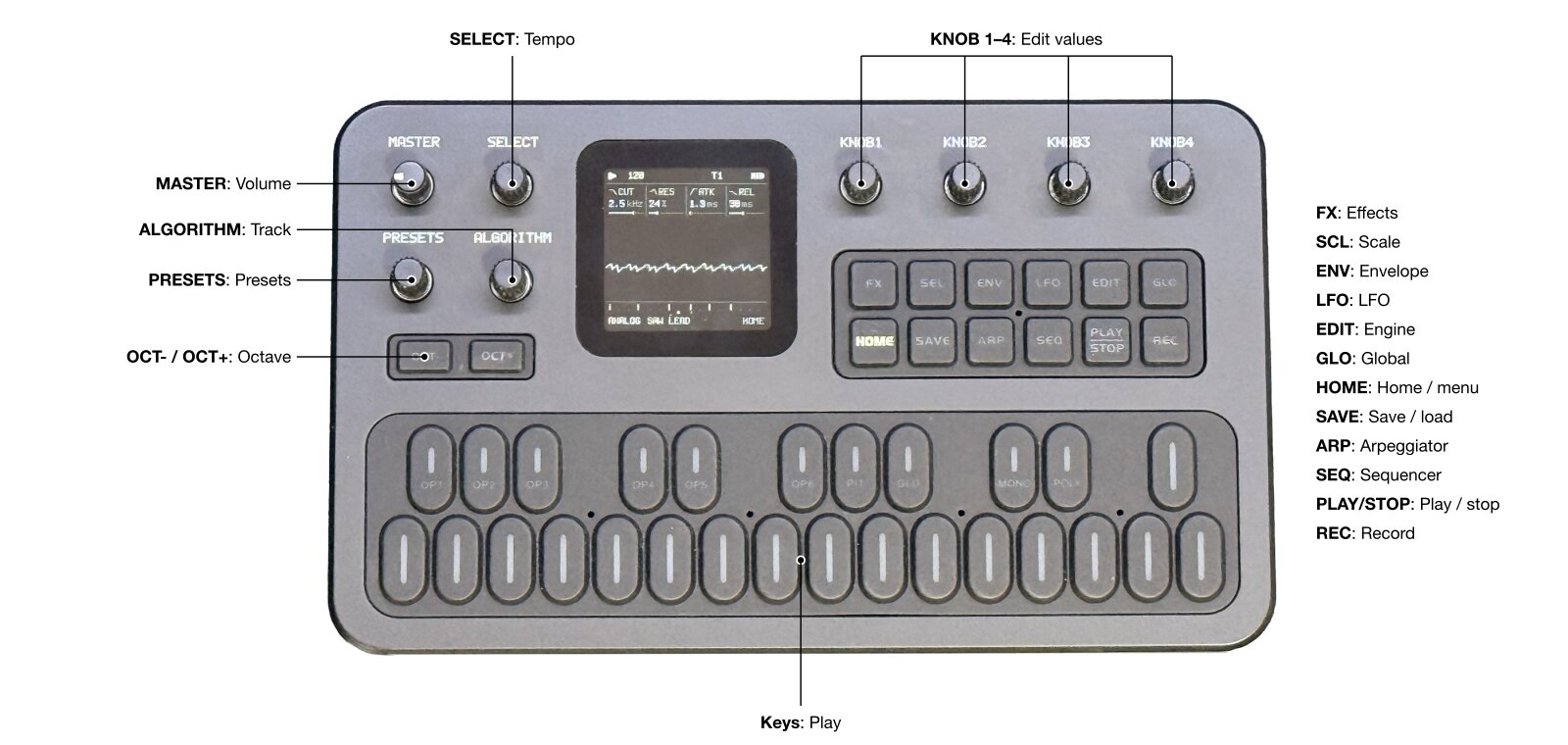
What it does
- Eight drum tracks. Each plays a drum model: 808 and 909 kicks, snares and claps, hats, toms, cowbell, cymbal, rim, clave, conga, ports of Plaits' drum algorithms, and samples. Every model has TUNE, DECAY, TONE and a fourth knob of its own.
- Step sequencer. Up to 64 steps per track on the 16 white keys, each track with its own length, division and swing. Accents, PROB and RATCH per step, fills that play every other bar, live recording, mutes that wait for the next bar (the MUTE screen: hold GLO).
- Notes and ACID. Every step holds a note. Drum tracks play their steps transposed (C4 plays as tuned); ACID, a
303-style bass voice (TUNE DECAY CUTOF RESO ENVMD ACCNT WAVE GATE: saw or square into a resonant 24 dB filter, with
accent, slide and tie), plays them as a bass line on up to two tracks ("ACID: 2 TRACKS MAX"). SCL turns the keys
into a keyboard for the selected track (KEYS): play it, record it live, or enter a line step by step. Live record:
on TRACKS a REC tap arms / disarms the selected track (
T3 REC ARMED/T3 REC OFF); on every other screen a REC tap is REC ALL, to finger-drum a whole kit live: every track armed (REC ALL), each white track key plays and records its own track wherever the keys play tracks (HOME, SOUND, FX, TRACKS ...), while KEYS, step record and knob motion stay the selected track's; a REC tap there again ends it, the tracks armed before it armed again (T3 REC ARMED, orREC OFFwhen none was). REC never starts the transport: PLAY does, and an armed track records once playing. A key writes the nearest step, a key held into later steps writes TIEs, a legato overlap writes a SLIDE (TIE and SLIDE on ACID tracks only). An ACID track's STEP page is a piano roll; a step the white keys turn on takes the last KEYS note on an ACID track, C4 on a drum. KEYS notes send no MIDI out, and an ACID note (or a tied chain) longer than 5.5 s is cut (a safety limit). A loaded project keeps ACID on its first two ACID tracks; the others come back as their power-on kit drum. - MOTION. Knob turns recorded per step while a track plays, and played back with the pattern: up to 1024 events per project (shared by the 8 tracks).
- SONG and names. Chain up to 16 rows of projects with repeats; name projects on the device.
- Grids. Mutable Instruments' pattern generator: a map of drum patterns, chaos, or Euclidean rhythms. Any track can follow one of its three channels.
- Compressor. The Streams compressor keyed by any track, for ducking and pumping; GHOST keeps the pump with the key track muted.
- Movement. Two LFOs per track, ten waves with a morph between them, synced to the tempo.
- Effects. DIST, the SLICER and RESON (string, pipe or chord resonator) per track; delay, ROOM or SPRING reverb and chorus sends; a master limiter; SPEAKER EQ with BASS+ for the small speaker. RESON is tuned in semitones (TUNE); its KEYF (KEYFOLLOW, RESON 2/2 KNOB 4, 0 % = off) makes the ring follow the note of each hit from C4: at 100 % a step at C5 (or a KEYS note, a ratchet's note) rings an octave above TUNE, at 50 % half an octave; MIDI notes play their track at C4, so they ring at TUNE. A new note under a ringing tail glides to it in a few ms, without a click.
- PERFORM. Hold FX: the black keys play live master effects (repeat, reverse, tape stop, filters, freeze, octave), the white keys mute tracks while held, the knobs become FILTER / CRUSH / THROW / DEPTH, which stay on until you turn them back.
- Metronome. GLOBAL 3/3 METRO: a click on every quarter note while playing, the bar's first higher.
- Key backlight. MENU BACKLIGHT DIM LO / DIM HI: the keys and buttons glow dimly while unlit, the steps 1, 5, 9 and 13 a little brighter; INV turns the LEDs around. OCT- / OCT+ breathe when pressing them would do something.
- MIDI LEARN. Up to 32 controls of any controller: a CC moves one knob of one track, a CC or a note presses PLAY, REC, next / previous track, or holds a PERFORM effect (below).
- Connections. MIDI in over USB and the TRS jack, MIDI clock in (USB or TRS) and out (USB), MIDI THRU (below), and USB audio: the FM-1 records into a DAW over its USB cable, the master or, with MENU USB AUDIO 10 CH, the eight tracks on their own too (below). On a computer or an iPad it shows up as Hortator (USB MIDI and audio, in a DAW or AUM; earlier versions: Felucca); while an update is being written it shows up as Felucca Update (the update loader, upstream Felucca's). The Bluetooth version adds Bluetooth MIDI (below): a BLE-MIDI keyboard or clock, or the M-VAVE SMC-Mixer as a mixer for the eight tracks.
- Projects. Four slots, A to D, saved in the FM-1's flash; the last one saved loads at power-on.
On the panel
| Button | Opens |
|---|---|
| HOME | two modes: TRACKS (levels, lengths, pans; the selected track's steps on the keys) and HOME (the scope, the selected track's first four knobs, the keys play the tracks; SELECT on to the compressor's pages). A HOME tap on HOME switches between them; from any other screen it opens the one last shown. Power-on: TRACKS. Hold HOME for the menu |
| EDIT | the selected track's sound: its model and knobs (on HOME, EDIT, FX and LFO the selected track's key is lit; a white key F3..F4 selects its track) |
| SEQ | the steps on the white keys (a short tap: on / off, on the release; hold a step 0.3 s: an off step turns on at once, an on step stays as it is; while held KNOB 1 / 2 / 3: PROB / RATCH / ACCENT (right on, left off); hold OCT+ and tap a step: its accent; OCT+ alone / OCT-: the bank), then PATTERN, MOTION and SONG |
| FX | FX, SLICER, RESON, delay, reverb and chorus; hold it for PERFORM |
| ARP | Grids |
| LFO | the track's two LFOs, side by side on every page (LFO 1 on KNOB 1-2, LFO 2 on KNOB 3-4), then DEST: 4 slots, each a source (LFO 1 / LFO 2), a destination knob and its own depth |
| REC | on TRACKS: arms / disarms the selected track for recording (T3 REC ARMED / T3 REC OFF; during REC ALL: REC ALL ends, the selected track armed). On every other screen: REC ALL on / off (every track armed, each white key records its own track; off: the arm state from before back). It never starts play: PLAY does. On STEP with KEYS on and stopped: step record. Held on a SEQ page: CLEAR TRACK; on SONG: DELETE ROW / CLEAR SONG |
| GLO | a tap: global and system settings; held: the MUTE screen (mutes; G4: MIDI LEARN) |
| SAVE | tap (on the release): projects (save, load, name) and tools; held: the cue map (live cue) |
| SCL (labelled SEL in the web simulator) | KEYS: the keys play the selected track; OCT- / OCT+ set the octave (-2 to +2); on STEP, stopped, REC starts step record |
| ENV | STEPS / TRACKS (and parameter locks) (a tap, on its release; its LED lit and a padlock in the top bar, left of the battery, in STEPS). STEPS: the white keys are the selected track's steps on every page (HOME, EDIT, FX, LFO, COMP, TRACKS armed ...), tapped and held as on SEQ; hold ENV and press OCT+ / OCT- for the next / previous bank; OCT+ held + a step: its accent; OCT+ alone and OCT- keep their page's job (LAYER, back to SOUND, the LFO's RATE MODE). Finger drumming needs TRACKS (ENV off: the keys as before). ENV turns KEYS off, SCL turns STEPS off. Off at power-on |
With KEYS on, OCT- / OCT+ are the octave: LAYER (from EDIT) and the LFO pages' OCT+ (the RATE MODE of the LFO turned
last) need KEYS off; the STEP
bank stays on KNOB 1; TRACKS keeps OCT as its bank. TRACKS, COMP, NAME, the menu, PERFORM (FX held) and the MUTE
screen (GLO held) keep their keys.
Step record starts in KEYS mode, on the STEP page, with the transport stopped, by a REC tap: the cursor starts at the
bank's first step and the top bar shows STEP REC nn. KNOB 1 to 4 are STEP, NOTE, TIME (NOTE / TIE / REST) and FLAG
(- / ACC / SLD / A+S); EDIT writes a rest. A REC tap, PLAY or leaving the page ends it.
ALGORITHM picks the track anywhere. SELECT turns the pages of a section and moves the menu's cursor; on HOME's
TRACKS mode it sets the tempo instead (CLK USB / CLK TRS when following a clock; GLOBAL 1/3 KNOB 1 sets it on any
page). KNOB 1 to 4 edit what the screen shows. PRESETS loads the next / previous preset onto the selected track at
each detent (a popup shows the bank and the presets around it); EDIT held opens the PRESETS list (LOAD, SAVE into the
USER bank, DELETE). The SOUND pages show the track's preset, with * once a SOUND knob moved.
Mutes
Hold GLO: the MUTE screen, up while GLO is held (a quick GLO tap opens GLOBAL instead; a key pressed while GLO
is down opens the screen at once). The eight tracks are boxes, filled = heard, outline = muted, each with its
number and model, and under it the key that toggles it (F3 to F4, the white keys; their LEDs lit for the heard
tracks). The top C# sets MUTE: NOW, the top D# MUTE: NEXT BAR (the same setting as GLOBAL 3/3 MUTE): with NEXT
BAR, a mute made while playing blinks, then lands on the next downbeat. G4 (the next white key up) turns
MIDI LEARN on and off. While the screen is up the keys play nothing and the knobs and the other
buttons rest, PLAY aside. Let go of GLO: back to the page you were on.
MIDI LEARN
A controller's knobs, faders, buttons and pads can each be learned: up to 32 of them.
| Learn | How to pick it (LEARN on) | What it takes | What it does |
|---|---|---|---|
| a knob of a track | turn the knob (it edits as usual) | a CC | moves that knob of that track, 0..127 over its range |
| PLAY | press PLAY (nothing plays) | a CC or a note | a press = a PLAY tap: play / stop (on SONG: the song) |
| REC | press REC (nothing arms) | a CC or a note | a press = a REC tap, as the button: TRACKS the selected track, elsewhere REC ALL (step record as the button) |
| NEXT TRACK / PREV TRACK | turn ALGORITHM right / left (the track stays) | a CC or a note | a press selects the next / previous track |
| a PERFORM effect | hold FX, press its black key (nothing plays) | a CC or a note | held while the controller's button is held, as the key (FX need not be held) |
| a track's PERFORM mute | hold FX, press its white key F3..F4 | a CC or a note | the track silent while held |
| a PERFORM macro | on the PERFORM screen, turn KNOB 1..4 (it turns as usual) | a CC | FILTER (0 at 64: left LPF, right HPF), CRUSH, THROW, DEPTH; stays on, as the knob |
- Turn it on: hold GLO (the MUTE screen) and press G4:
G4 LEARN: ON, andMIDI LEARN ONin the top bar. Let go of GLO: the footer's first row (where the steps are) showsLEARN: TURN OR PRESS. - Pick a knob: turn a knob of the selected track on any page: HOME, EDIT (SOUND, LAYER), FX (FILTER, the sends,
SLICER, RESON), LFO, PATTERN, or LEVEL / LEN / PAN on HOME's TRACKS mode. It edits as usual and the footer says
T3 DECAY: SEND A CC. - Or pick an action: while LEARN is on, PLAY, REC, ALGORITHM and the PERFORM keys pick their action instead of
doing their job (they work again after OCT+): the footer says
PLAY: SEND CC/NOTE,FX R1/16: SEND CC/NOTE,FX MUTE T3: SEND CC/NOTE; a PERFORM knobFX FILTER: SEND A CC. - Move the controller's knob, or press its button or pad: the first CC (or, for an action, note) that arrives
(any channel; over USB, the TRS jack, or Bluetooth in MIDI mode) is learned:
CC74 -> T3 DECAY,NOTE36 -> PLAY,CC20 -> FX FILTER. Then pick the next one. One already learned showsT3 DECAY = CC74orPLAY = NOTE36; sending another replaces it. - The binding is to that track: CC74 moves track 3's DECAY whichever track is selected later.
- One control, one thing: learning a CC or note again moves it to the new pick; learning a pick again replaces
its CC or note.
LEARN FULLafter 32. CC 0 and 32 (bank select) and 120 to 127 (channel mode) are never learned (CC NOT LEARNABLE). MODEL and RESON's MODEL can't be learned (NOT LEARNABLE). - While LEARN is on, OCT- and OCT+ are its own: OCT- clears the pick's CC or note (
T3 DECAY CC CLEARED,PLAY CLEARED); with nothing picked it asksCLEAR ALL LEARNED?(OCT+ yes, OCT- no). OCT+ ends LEARN (LEARN DONE), as GLO + G4 does. So pick the page first (LAYER, the step bank, a DEST slot), then turn LEARN on. The menu, a confirm, or NAME also end it; it is always off at power-on. - What a CC does on a knob: 0 to 127 spans the knob's whole range; a centred knob (PAN, an LFO's DEPTH, FILTER ENV) is 0 at 64; a list (FILTER TYPE, DIV, WAVE) steps through it in its order. A model's knob follows the track's model (a model without that knob ignores it). An LFO on the same knob keeps moving it around the new value. During a song, PATTERN's knobs stay as they are. CC moves are not recorded as motion.
- A button: a CC of 64 or more is a press, under 64 a release (only the change counts: a knob swept past 64 presses once); a note on is a press, its note off (or velocity 0) the release. A learned note plays no drum. A PERFORM effect held this way follows the keys' rules (the last pressed buffer effect plays) and ends with the release, or when the menu, a confirm, NAME or the MUTE screen comes up (press again after).
- Learned CCs and notes act whether LEARN is on or off, on every input but Bluetooth in SMC DAW mode (the SMC-Mixer's layout keeps its own controls, but for its knobs 5-8, which are LEARN's: a click steps the learned parameter). PLAY, REC and the track buttons act where the FM-1's own would (not in the menu or a confirm). They are saved in the FM-1's flash (not in projects) after each change, when stopped; the 16 CCs of the first MIDI LEARN load as they were.
PERFORM
Hold FX for the PERFORM screen. The black keys are buffer effects while held (REPEAT 1/8 1/16 1/32, REVERSE, TAPE
STOP, LPF and HPF sweeps, FREEZE, OCT UP / DN), the white keys silence their tracks while held, and KNOB 1 to 4 are
FILTER (left LPF, right HPF), CRUSH, THROW and DEPTH: while the PERFORM screen is up the knobs are only these, and
SELECT turns no page under it. The knob effects stay on after FX is let go (or the PERFORM
page closes) and keep working on every page; the top bar shows an amber FX in place of the tempo icon while any
is on. To switch one off, turn it back to 0 on the PERFORM screen; TOOLS INIT* switches them all off. The
buffer effects stop when their key is let go.
Projects
SAVE > PROJECT: four slots, A to D. The last project saved loads at power-on (LOADED in the top bar, stopped;
PROJECT's SLOT points at it). If it can't be loaded (the slot is empty or unreadable), the FM-1 asks
LOAD FAILED: SLOT B / START NEW PROJECT?: OCT+ (YES) forgets it, OCT- (NO) tries it again at the next power-on;
both carry on with the power-on kit. A safe start (SEQ held at power-on) loads nothing.
Edits live in RAM until SAVE. A reset or a power cut brings every slot back as it was last saved. Loading (or
cueing) another slot keeps the loaded one's edits in RAM, so going back finds them; a slot with unsaved edits shows
* after its letter in the PROJECTS list. LOAD of a slot with unsaved edits asks DISCARD EDITS? (OCT+ YES: its
saved version loads; OCT- NO: nothing changes); for the loaded slot a changed tempo or other global counts as an
edit too, and loading another slot keeps them with the slot you leave. SAVE to another slot ("save as") stores the
live state there; the slot it came from goes back to its saved version. SAVE onto a slot that is not loaded but has
unsaved edits (a PASTE, or edits kept when you left it) asks OVERWRITE B*? first (OCT+ YES, OCT- NO). RENAME of a slot with unsaved edits renames it in RAM only
(RENAMED (SAVE TO KEEP)): SAVE keeps both.
COPY / PASTE a slot: SAVE's third page, COPY (SAVE tapped three times): KNOB 1 SLOT, KNOB 2 COPY (remembers
that slot: COPIED A, # after its letter), KNOB 3 PASTE (two detents: AGAIN: PASTE) onto SLOT's slot: its kit,
steps, locks, variations and song become the copied slot's (the name gets COPY), in RAM until SAVE (B*),
including the copied slot's unsaved edits. PASTE again on the same slot before saving it undoes it (PASTE UNDONE).
PASTE needs the transport stopped (STOP TO PASTE); onto the loaded slot the tempo and the other globals stay.
Live cue and variations
Each project slot has 8 variations: variation 1 is the slot's own steps; variations 2–8 each hold their own steps
and timing (LEN, DIV, SWG, SRC per track) and share the slot's sounds and its locks (a lock plays on its step in every
variation where that step plays). While a slot plays, the next slot (A–D) or another variation can be queued: it
comes in exactly where the pattern ends (the longest track's LEN × DIV, as a SONG row ends), every track then from its
step 0 on the same grid as before (swing and odd lengths keep their place). The same key again while queued switches
at the next step; stopped, a cue switches at once. A slot switch changes everything of the slot (sounds, steps,
timing, locks) but keeps the tempo, SWING, clock / MIDI / sync, the master FX, Grids, the mutes and the selected
track; the old slot's voices fade out over the last 5 ms before the boundary. A variation switch changes only the
steps and the timing; the voices ring on. A variation never used before starts as a copy of the variation playing
(steps and timing) the first time it is cued, and is a used variation from then on; when the slot's variations are
full (about 7 typical ones fit; a dense one takes 1.6 KB) the cue says VARIATIONS FULL and the playing one plays
on. A slot comes back on the variation it played last (after power-on: variation 1). Edits go to the playing
variation and are kept when you cue away and back. While SONG plays a cue is refused (STOP SONG TO CUE); a SONG row
plays its slot's variation 1. Following an external clock (CLK USB / TRS) the switch comes on the pulse that ends
the pattern.
Both versions, plain and Bluetooth, have the live cue and the variations, and read each other's saved projects with
their variations.
The black keys are the variations. The first 8 black keys from the left (F#3 G#3 A#3 C#4 D#4 F#4 G#4 A#4) queue variations 1–8 of the playing slot on HOME (both modes) and the SEQ pages (STEP, PATTERN, MOTION, SONG), with STEPS on or off. There the playing variation's black key is lit, a queued one blinks and the rest are dark. With KEYS on, on the other pages, on the MUTE screen, under PERFORM, in the menu and in a dialog the black keys do what they did before.
The cue map: hold SAVE (0.4 s, or press a key with it), on any page. White keys 1–4 queue slots A–D (lit: used,
winking: playing, blinking: queued, breathing: unsaved edits); the black keys queue variations 1–8 of the playing
slot, or of the queued one (lit: used, winking: playing, blinking: queued). A slot key then a variation key (white
key 2, then black key 3) queues both. The top line reads CUE A3 (CUE A3* with unsaved edits) or what is queued
(CUE>B, CUE>B3, CUE>A5). The keys pressed with SAVE play no note, send no MIDI and record nothing.
FILL. A step's PROB goes on past 8/8 to FILL and !FILL: a FILL step plays only while a fill is held, a !FILL
step only when none is. Hold REC (0.4 s) on any page but SEQ's (STEP, PATTERN, MOTION, SONG: there REC held is
their CLEAR / DELETE ROW as before) to play a fill for as long as you hold it (FILL in the top bar). A shorter REC
press is the tap as before (TRACKS: arm the track; elsewhere REC ALL), on the release. A learned REC and the
SMC-Mixer's REC are always taps. (An older firmware plays FILL / !FILL steps as 8/8.) A SAVE tap still opens the
projects page, now on its release; SAVE does nothing in the menu, a dialog, NAME, the PRESETS list or the MUTE
screen. Unsaved variations of a slot you leave wait in RAM, one slot's at a time: while C's wait there, cueing
any slot but C says SAVE C FIRST (stop, load C or cue it, and SAVE it).
Projects saved by this build can't be read by 0.16.0 or older; older projects load (every track with PRIO HIGH).
Since the parameter locks, a project's motion lives in its own lock bank beside it: projects saved now show
an empty slot on 0.23.x and older (LOAD FAILED at power-on; downgrading is safe, not supported: nothing breaks, the projects stay for this
build); every older project loads with its motion. If a project's lock bank can't be read (an upload to USR3 under
upstream Felucca overwrote it), the project still loads, without its motion, and the FM-1 says LOCKS LOST once.
A project's variations 2–8 are saved with SAVE too, in their own flash object beside it (the record links it, as its
lock bank): a project saved now still loads on 0.24.0, without its variations. If they can't be read (an upload to
USR2 under upstream Felucca overwrote them), the project loads without them and the FM-1 says VARIATIONS LOST once.
User sample slots 2 and 3 (USR2, USR3) hold up to 48 KiB each (USR1: 80 KiB, as before): the rest of USR3's
flash holds the projects' lock banks, the rest of USR2's the projects' variations. A longer USR2 or USR3 (uploaded
under upstream Felucca) is shortened to its first 48 KiB once, at the next power-on (USR2 SHORTENED TO 48K,
USR3 SHORTENED TO 48K); it keeps playing, minus what was past 48 KiB. Hortator has no sample upload: an 80 KiB
upload to USR2 or USR3 under upstream Felucca afterwards overwrites the variations or the lock banks. (If shortening
USR2 ever fails, USR2 CLAMP FAILED shows at power-on and SAVE says USR2 ERROR: NO SAVE until the next power-on.)
Parameter locks
In STEPS (ENV lit), on any page whose knobs MOTION can record (HOME's macros, TRACKS' LEVEL and PAN, SOUND, LAYER,
FX, SLICER, RESON, FILTER, the LFOs' RATE MORPH DEPTH, the DEST slots' DEPTH), hold a step and turn a knob: that
step plays with its own value for that knob, and the next step plays the knob's value again (the LFO, if any,
modulates round the locked value). The top bar says LOCK STEP 5 while a step is held, and the knob cells show that
step's values (a locked one inverted). Knobs MOTION can't record (MODEL, FILTER TYPE, RESON MODEL, an LFO's WAVE,
DEST, SRC) do nothing while a step is held. Hold the step and tap OCT- to clear its locks on this page's knobs
(STEP 5 LOCKS CLEARED); hold OCT- 0.6 s to clear all of that step's locks (STEP 5 ALL CLEARED). A step turned off
keeps its locks for when it is on again. Locks and recorded MOTION share 1024 events per project (LOCKS FULL); locks
always play (MOTION's PLAY and CLEAR are for recorded motion only). On SEQ STEP a held step keeps PROB / RATCH / ACC.
In STEPS the footer's step strip underlines each locked step of the bank; SEQ > MOTION shows the selected track's
MOTION (recorded events) and LOCKS counts.
Metronome
GLOBAL 3/3 METRO: OFF, LOW, MID, HIGH. While playing, on the FM-1's own clock or following one, a click on every quarter note, higher on the bar's first. It comes after the PERFORM effects (they leave it alone) and follows the MASTER volume, on the speaker, the headphones and USB audio. A device setting: saved, not part of projects.
Screen colours
MENU (hold HOME) COLOR: the screen's two colours. The row shows the theme's name: RED (the default, red ground and dark ink, the Machinedrum's look), RED INV (red on black), BLUE (white on blue), BLUE INV (blue on white), GREEN (dark on green), GREEN INV (green on black): each colour, then its inverse. KNOB 1 on the row steps back and on, OCT+ steps on; both wrap. A device setting: saved when the menu closes, not part of projects; a colour chosen on an older Hortator stays the same.
Knob acceleration
MENU (hold HOME) ACCEL (ON by default): a knob turned on in one direction over a wide value (more than 32 steps) speeds up with how fast it turns. A click at a time, or a turn of up to about 12 clicks a second, is one step a click (fine control); faster, the steps grow with the speed, in fractions of a step: about x2 at 20 clicks a second, x4 at 40, up to x8 (x4 on a value of 64 steps or less). A 0..127 value takes about 65 clicks at 20 a second, 34 at 40, 24 at 60 (upstream Felucca's: 127, 65, 64). The first clicks of a turn and the first click back after a reversal are one step. Lists of names (MODEL, TYPE, WAVE ..) are one entry a click at any speed; the PRESETS list at most x4. ACCEL OFF: one step a click at any speed.
Key backlight
MENU (hold HOME) BACKLIGHT (the LED levels of upstream Felucca's MENU > LEDS): OFF (lit or dark, as before), DIM LO, DIM HI, INV, INV LO, INV HI. DIM LO (an older Hortator's BACKLIGHT ON): every key LED that is not lit and every idle button glows at about 3 % (a very short flash in every scan, about 900 a second: steady, also with Bluetooth on), so the panel can be found in the dark; on every screen where the white keys are the selected track's steps (STEP, PATTERN, MOTION and SONG while KEYS is off; HOME's TRACKS mode while no track is armed), the unlit steps 1, 5, 9 and 13 of the bank shown glow at about 25 % (bank 2: 17, 21, 25, 29), marking the beats. DIM HI: the same, brighter (about 6 %, the beats about 30 %). INV turns it around as the stock firmware does: the idle LEDs lit, the active ones (steps that are on, the playhead, held keys, the page's button) dark; INV LO / INV HI the same with the idle ones at about 10 % / 25 %. In every mode OCT- / OCT+ breathe (fade in and out, upstream Felucca's) where pressing them would do something: the next / previous bank on the steps, LAYER from SOUND, the LFO pages' RATE MODE (OCT+), YES in a dialog, OK in the menu, NAME's RENAME, MIDI LEARN's DONE, the PRESETS list's LOAD (and DELETE on a used user slot); a way back (NO, CANCEL, BACK, LAYER's OCT-) is lit; KEYS' octave shift lit as before. KNOB 1 on the row steps through the levels, OCT+ steps on and wraps. A device setting: saved when the menu closes, not part of projects; OFF until it is set. A safe start keeps every LED dark, as before.
MIDI
GLO's pages hold the MIDI settings: GLOBAL 1/3 CH (the drum channel, 10 by default) and CLK, SYSTEM 2/3 SYNC and ROUT, GLOBAL 3/3 THRU. SYNC and ROUT are saved with the project (a project saved before them loads SYNC OFF, ROUT NOTE); THRU is a setting of the FM-1 itself, kept over power-off (OFF until you turn it on).
ROUT: how MIDI notes in play the tracks (from USB, the TRS jack and, in MIDI mode, Bluetooth):
| ROUT | Notes |
|---|---|
| NOTE (default) | on the drum channel, each note plays the tracks whose NOTE it is, at their tuning |
| SEL | on the drum channel, every note plays the selected track, pitched: C4 (note 60) is its tuning, a semitone a note |
| TRACK | MIDI channel 1 to 8 play tracks 1 to 8, pitched from C4 as SEL (CH plays no part; channels 9 to 16 nothing) |
Note-offs are ignored (a hit is a hit; an ACID note ends after its GATE). A note into an armed track while playing is recorded, with its pitch on SEL and TRACK. The white keys send their notes to USB as before: on the drum channel with the track's NOTE, with ROUT TRACK on the track's own channel at C4 (so a recording in a DAW plays back the same tracks). SEL and TRACK are upstream Felucca's ROUT SEL and CH1-4, for eight tracks.
CLK follows a MIDI clock: INT (its own tempo), USB, TRS (or BLE in the Bluetooth version).
SYNC: MIDI clock out, to OFF or USB (and BLE or BOTH in the Bluetooth version; the FM-1's TRS jack is an input only, so there is no TRS out):
- On its own clock (CLK INT): PLAY sends Start and then 24 clocks a quarter note, STOP sends Stop. PLAY always starts from the top, so it never sends Continue (or a song position). The clocks keep to the sequencer's grid through tempo changes and never swing, whatever SWING says. Each clock is sent when the step it goes with is heard; if the receiving DAW still plays a little early, give its sync a few ms of delay.
- Following a clock (CLK USB / TRS / BLE): the incoming Clock, Start, Continue and Stop go on to the SYNC outputs as they arrive (nothing regenerated), never back out of the port they came in on.
- Timing: within a quarter of a millisecond with a light kit; a busy kit adds up to half the render time (about 1.5 ms when the CPU shows 50 %), as USB is served between the audio renders. Bluetooth MIDI is much looser (the radio's own timing): use it for tempo, not tight sync.
- If the computer does not read the FM-1's MIDI port, the clock waits no more than 8 messages deep (no burst of old clocks later). During a firmware update (and for 3 s after its last message) nothing is sent.
THRU ON: notes, CCs and the other channel messages from each input go on to the other outputs: TRS in to USB (and Bluetooth), Bluetooth in to USB, USB in to Bluetooth; never back to the input they came from. Realtime messages (the clock) follow SYNC instead.
USB audio: 2 or 10 channels
The FM-1 is a USB audio input as well as a MIDI port: a DAW, AUM or Audio MIDI Setup records it over the cable, 16-bit, 44.1 kHz. MENU (hold HOME) USB AUDIO picks what it sends:
- 2 CH (the default): the master, stereo, exactly as before. The device is Hortator.
- 10 CH MIX: channels 1-2 the master L R (with every effect, as in 2 CH), channels 3-10 the tracks T1..T8, one mono channel each: the track as the mix gets it (its RESON, FILTER, DIST, SLICER, mute, COMP duck and LEVEL), before PAN, the CHOR / DLY / REV sends and the master's effects and limiter, at the MASTER level (or full level with USB LEVEL FIXED). The device is Hortator 8ch; hosts that read channel names show Main L, Main R, T1 .. T8.
- 10 CH FX: the same, but channels 1-2 carry only the send effects: what the chorus, delay and reverb return (THROW's share too), at the MASTER level. The FM-1's effect buses are mono, so L = R. T1 .. T8 panned in the DAW plus this pair make the whole mix, each part on its own fader.
What T1 .. T8 + FX cannot give back: the master chain, which only channels 1-2 in MIX (and 2 CH) carry: PERFORM's master effects (REPEAT, REVERSE, TAPE STOP, FREEZE, OCT, LPF, HPF, CRUSH; its track mutes and THROW are in the channels), METRO, SPEAKER EQ (LOWCUT, BASS+), the DC blocker, the limiter and the soft clip. COMP's ducking is a gain on each ducked track, so the T channels and their sends are already ducked. The FM-1 pans with full level on both sides at the centre: set the DAW's pan law to 0 dB to match it. Each channel is 16-bit: a single track or the sum may reach full scale where the FM-1's limiter would have held the master down (the test: T1 .. T8 panned + FX equal the master bus before its chain within 18 LSB).
KNOB 1 on the row steps 2 CH, 10 CH MIX, 10 CH FX; OCT+ steps on and wraps. MIX <-> FX changes channels 1-2 at once
(a 6 ms cross-fade, no reconnect: the same device). 2 CH <-> 10 CH reaches the computer when the menu closes: the
FM-1 leaves USB for a second (USB RECONNECT: 10 CH in the top bar) and comes back as the other device. The
sequencer and the sound play on; MIDI in and out work again once the computer has found the device (a DAW may list
Hortator and Hortator 8ch as two devices: choose the one shown). Following CLK USB, the clock pauses with the
cable (CLK USB PAUSED): the steps wait up to 2 s after the reconnect for the clock to come back, then stop as when
the cable is pulled. A device setting: saved, not part of projects. A safe start (SEQ held at power-on) is always
2 CH, and the installers and the editor find the FM-1 under both names.
10 CH needs the standard, non-Bluetooth build: the Bluetooth version has no USB AUDIO row and is always 2 CH (its memory is full; a 10 CH setting saved by the standard build is not read there, and a settings save there clears it).
Computers: macOS and iPadOS take the 10 channels (class-compliant USB audio 1.0). Linux takes them. Windows may not accept 10 CH (its USB audio 1.0 driver and the channel layout): use 2 CH there. 10 CH uses about 920 bytes of every 1 ms USB frame (2 CH: 184): plug the FM-1 straight into the computer or a hub with little else on it.
CPU and PRIO
When an audio block takes more than 95 % of its time, the FM-1 stops one sounding voice to catch up, and the top bar shows a red CPU icon for 2 s. A track with PRIO LOW loses its voices before a PRIO HIGH one, the oldest first; a held ACID note goes last. The same order picks the voice to stop when too many play at once. PRIO is on the track's last EDIT (SOUND) page, after CHOKE: HIGH by default, saved in the project.
Bluetooth MIDI
A second version of each release, Hortator + Bluetooth MIDI (experimental): the installer offers it next to the
plain one, and the release has it as hortator-X.Y.Z-bluetooth.fwsc. Everything above works the same in it, except
what is listed under What it leaves out.
Bluetooth is off at every power-on, unless you set AUTOSTART ON (below); it runs only after you turn it on, until
the FM-1 is switched off.
Please credit me if you using bluetooth code in your firmware🙏🏻
What Bluetooth adds
| What you get | |
|---|---|
| MIDI over Bluetooth | A BLE-MIDI controller (keyboard, pads, knobs) plays and controls the FM-1 as USB MIDI does: notes play the tracks (GLO CH and ROUT), MIDI LEARN learns its CCs and notes, CLK BLE follows its clock. The FM-1's key hits go back to it, SYNC BLE / BOTH sends it the FM-1's MIDI clock, THRU passes notes between it and USB. |
| ROLE HOST | The FM-1 finds and connects the devices itself: up to 8 saved, a controller and another FM-1 linked at once, reconnected by themselves. |
| ROLE DEVICE | The FM-1 is itself a Bluetooth MIDI device, Felucca FM-1, for a computer, a tablet or another FM-1 to connect to: wireless MIDI to and from a DAW or AUM. |
| SMC-Mixer | The M-VAVE SMC-Mixer becomes the FM-1's mixer: faders = track levels, MUTE / SOLO / REC / SELECT per track, transport, knobs for the selected track's sound (below). |
| FM-Link | Two FM-1s in time over Bluetooth, without MIDI clock: PLAY on one starts both, the tempo follows, STOP stops both. The leader can itself follow a DAW's clock. |
What it leaves out
The Bluetooth stack needs memory and CPU of its own, so the Bluetooth version has less than the plain one:
- USB AUDIO 10 CH MIX and 10 CH FX are not in it: USB audio is always 2 CH (the stereo master), and the menu has no USB AUDIO row. For 10 channels into a DAW use the plain version.
- The simulator on the website runs the plain version: it has no Bluetooth page.
- It is experimental: the audio has less headroom while Bluetooth is on (see the known issue below).
Known issue: a saved device that is not connected can make the sound stutter. While BLUETOOTH is ON the FM-1 keeps
looking for every saved device it is not linked to, and those tries can interrupt the audio for a moment. If you no
longer use a device, remove it: on the Bluetooth page turn KNOB 1 left on its line, FORGET <name>?, OCT+. Keep only
the devices you use (or switch BLUETOOTH OFF when you don't need it).
Connecting, step by step
Bluetooth is on the menu: hold HOME, SELECT to BLUETOOTH, OCT+. On the Bluetooth page SELECT moves the cursor, KNOB 1 changes a row, OCT+ acts, OCT- goes back.
A Bluetooth MIDI controller (keyboard, pads, knobs)
- Switch the controller on and make it discoverable (most BLE-MIDI controllers are, as soon as they are on).
- On the FM-1: ROLE HOST, MODE AUTO (or MIDI), BLUETOOTH ON.
- SELECT to + ADD A DEVICE, OCT+. After the 8 s scan, SELECT to the controller (it says
MIDI), OCT+. It is saved and connects; the top bar showsBT CONNECTED. - Play: notes on the drum channel (GLO CH, 10 at first) play the tracks whose NOTE matches; GLO ROUT SEL plays the selected track pitched, ROUT TRACK plays tracks 1–8 from channels 1–8. To map its knobs: MIDI LEARN (hold GLO, press G4).
- To play in time with it: GLO CLK BLE follows its clock; GLO SYNC BLE (or BOTH, USB too) sends it the FM-1's.
- Next time it connects by itself once BLUETOOTH is ON (or set AUTOSTART ON).
The SMC-Mixer
- Switch the SMC-Mixer on in its DAW (Mackie Control) mode.
- On the FM-1: ROLE HOST, MODE AUTO (it is recognised by its name) or SMC DAW, BLUETOOTH ON.
-
- ADD A DEVICE, OCT+, pick the
SMCdevice, OCT+. Its LEDs light with the FM-1's state.
- ADD A DEVICE, OCT+, pick the
- Move each fader to its track's level to pick it up (its LED blinks until then), then mix. SELECT picks the track whose sound knobs 1–4 change; knobs 5–8 are MIDI LEARN's.
A computer or a tablet (the FM-1 as a Bluetooth MIDI device)
- On the FM-1: ROLE DEVICE, BLUETOOTH ON. The page says
WAITING FOR A HOST. - Connect from the computer or tablet; no pairing is needed:
- macOS: Audio MIDI Setup > Window > Show MIDI Studio > the Bluetooth icon, then Connect next to
Felucca FM-1. - iPad / iPhone: in the app's Bluetooth MIDI screen (AUM, GarageBand, Logic Remote and others), tap
Felucca FM-1. - Android / Windows: an app that connects BLE-MIDI devices.
- macOS: Audio MIDI Setup > Window > Show MIDI Studio > the Bluetooth icon, then Connect next to
- The page says
CONNECTEDand the host's name.Felucca FM-1is now a MIDI port in the DAW or app. - From the DAW: send notes to it on the drum channel (or use ROUT SEL / TRACK); to have the FM-1 follow the DAW's
tempo and transport set GLO CLK BLE and turn on the DAW's MIDI clock out to
Felucca FM-1. - To the DAW: the FM-1's key hits come in as notes (record them); with GLO SYNC BLE the DAW can follow the FM-1's clock instead (one clock direction at a time).
Two FM-1s with FM-Link
- On FM-1 B: ROLE DEVICE, BLUETOOTH ON.
- On FM-1 A: ROLE HOST, BLUETOOTH ON, + ADD A DEVICE, pick
Felucca FM-1(shown asFM-1and the last four digits of its address), OCT+. - Choose the leader and the follower: the leader's GLO CLK is INT (or USB / TRS / BLE to follow a DAW); the
follower's GLO CLK is LINK (after BLE). Either FM-1 can lead. The screens say
FM-LINK: LEADINGandFM-LINK: FOLLOWING. - PLAY on the leader: both start together. The follower takes the leader's tempo; STOP on the leader stops both. With the leader following a DAW, the DAW's Start and Stop drive both.
- MODE FM-LINK keeps the link for FM-Link only (no MIDI on it either way); in MIDI or AUTO the same FM-1 can still have a MIDI controller linked as well.
The Bluetooth page
MENU (hold HOME), SELECT to BLUETOOTH, OCT+. SELECT moves the cursor, KNOB 1 changes the row, OCT+ acts on it, OCT- goes back to the menu.
| Row | What it does |
|---|---|
| BLUETOOTH | ON starts Bluetooth and connects to the saved devices; OFF drops the links and stops connecting. KNOB 1 right / left, or OCT+. Not saved: off at every power-on (unless AUTOSTART is ON). |
| AUTOSTART | ON: Bluetooth starts by itself 5 s after every power-on, as if you chose BLUETOOTH ON. KNOB 1 right / left, or OCT+. Saved when the menu closes; OFF by default. Not in a safe start (SEQ held), nor while OCT- + OCT+ are held. After a boot that was not clean (a crash in the first 30 s of the last one, or a hang) it is skipped and the top bar says BT AUTOSTART SKIPPED; BLUETOOTH ON by hand still works. |
| ROLE | HOST: the FM-1 connects to its saved devices. DEVICE: the FM-1 is itself a Bluetooth MIDI device that a computer, a tablet or another FM-1 connects to (below). Saved. |
| MODE | What a controller's MIDI does: AUTO (SMC DAW for a device whose name starts with SMC, else MIDI), SMC DAW, MIDI, or FM-LINK (no MIDI either way, FM-Link only). KNOB 1 steps, OCT+ wraps. Saved (FM-LINK at once; the others when the menu closes). |
| RECONNECT | How long a link rests after a drop or a refused connect: FAST 2 s, doubling to 16 s; SLOW 8 s, then 16 s (each refused try holds the audio off for a moment); AUTO SLOW while playing, FAST while stopped. Saved. |
| a saved device | (ROLE HOST) A filled square when connected, an empty one when not; its name (an FM-1: FM-1 and the last four digits of its address, since every FM-1 is called Felucca FM-1); CTRL or FM-1; ON (connected), NEAR (switched on, seen lately) or AWAY. KNOB 1 left: FORGET <name>? on the state line, OCT+ yes, OCT- no. OCT+ on a NEAR one: use it now. |
| + ADD A DEVICE | (ROLE HOST) OCT+: an 8 s scan (SCANNING 8 S) lists the devices nearby that are not saved, BLE-MIDI ones (MIDI) first, then by signal; after it the list stays still. OCT+ saves one and connects it; OCT- goes back; NOTHING FOUND: OCT+ scans again. |
Above the rows, the state: OFF, STARTING, ON, NO DEVICE SAVED, ON, SEARCHING, ON, 2 CONNECTED, the ADD list's
scan, WAITING FOR A HOST / CONNECTED and the host (ROLE DEVICE), or FAILED and the reason (NO RF TRIM IN FLASH:
this FM-1 cannot run Bluetooth; BT START TIMEOUT: switch off and on to retry). Under it, the last error.
BT CONNECTED and BT LOST show in the top bar on any page; the top bar's Bluetooth rune is whole while a link is up,
struck through while Bluetooth is on and nothing is linked, and gone while it is off.
Saved devices. Up to 8, controllers and FM-1s, kept over power-off with their names. The FM-1 holds two links at once: a controller and an FM-1. For each kind it connects the first saved device that is around, in the order you picked them (ADD, or OCT+ "use now", puts one first); connecting by itself never changes the order. After a lost link it reconnects by itself, as long as BLUETOOTH is ON; a device that dropped keeps its link for 30 s (no other of its kind takes its place meanwhile). Scanning never drops a link. The device the earlier Bluetooth page remembered becomes the first saved device (its name appears once it is seen). Each FM-1 has one Bluetooth address for good (made the first time Bluetooth starts), so a saved FM-1 is found again. A saved device that is not connected is looked for again and again, which can make the sound stutter: FORGET the devices you don't use (known issue).
MIDI mode. Notes play the tracks as over USB and TRS (GLO: CH and ROUT); MIDI LEARN learns the device's
CCs and notes. GLO: CLK BLE follows the device's MIDI clock (Start, Stop and the tempo), as CLK USB / TRS do; the
tempo knobs then say CLK BLE. The FM-1's key hits go to the device (note on / off, as to USB). GLO SYNC BLE /
BOTH sends the MIDI clock to the device (the same clock as USB's: Start on PLAY, 24 pulses a beat, Stop; while
following a clock, the clock it follows), and THRU passes notes between it and USB (MIDI). When the link
drops, what the device held is released. A project saved with CLK BLE or CLK LINK loads with CLK INT in the plain
version; SYNC BLE loads SYNC OFF there, BOTH loads USB. In SMC DAW mode nothing but the mixer's LEDs is sent; in
FM-LINK mode no MIDI at all (no notes, no clock, no THRU).
ROLE DEVICE. With BLUETOOTH ON the FM-1 advertises the standard BLE-MIDI service as Felucca FM-1: macOS (Audio MIDI Setup > MIDI Studio > Bluetooth, Connect), iOS apps' Bluetooth MIDI screens, Android / Windows apps that connect BLE-MIDI devices. Then it is MIDI mode both ways with that host. No pairing is needed.
FM-Link: two FM-1s in time. No clock pulses: the two measure the difference between their clocks and share a
timeline. One FM-1 in ROLE DEVICE with BLUETOOTH ON; on the other (ROLE HOST) + ADD A DEVICE and pick
Felucca FM-1. The leader runs CLK INT, the follower CLK LINK (GLO: CLK, after BLE). The screen says
FM-LINK: LEADING / FM-LINK: FOLLOWING. PLAY on the leader starts both together, about 80 ms after the press; the
leader's BPM is the follower's; STOP on the leader stops both; PLAY / STOP on a linked follower say FOLLOWING LINK.
The leader can follow a MIDI clock too (CLK USB, TRS or BLE): the clock's Start starts both from beat 1
(the follower within a few milliseconds of the first pulse, catching up at once), its tempo is the follower's, its
Stop stops both. A follower that joins while the leader plays starts on its next bar. If the link drops the follower plays on at the
last BPM; CLK LINK with no other FM-1 plays as INT. It works with FM-1s running Felucca's Bluetooth build too.
The SMC-Mixer (DAW mode)
The M-VAVE SMC-Mixer in its DAW (Mackie Control) mode, MODE AUTO or SMC DAW. Only presses act.
| Control | Hortator |
|---|---|
| Fader 1–8 | track 1–8 LEVEL, with pickup (below); recorded as motion for the selected track while it is armed and playing |
| Master fader | nothing |
| Knob 1–4 | the selected track's first four knobs (TUNE DECAY TONE and the model's fourth; ACID: TUNE DECAY CUTOF RESO), one step a click; the top bar shows e.g. T3 DECAY 64; recorded as motion while the track is armed and playing |
| Knob 5–8 | MIDI LEARN's (CC 20–23): learned to a parameter, a click steps it by one value from where it is; while LEARN waits for a CC, turning one learns it; not learned: nothing |
| MUTE 1–8 | mute / unmute the track, as its key on the MUTE screen (MUTE: NEXT BAR applies) |
| SOLO 1–8 | solo / unsolo the track (below) |
| REC 1–8 | arm / disarm the track for recording (as a REC tap: no play started). During REC ALL: REC ALL ends and that track is disarmed, the others stay armed |
| SELECT 1–8 | select the track |
| PLAY | stopped: play; playing: nothing |
| STOP | stop |
| REC | as the FM-1's REC tap: on TRACKS arm / disarm the selected track, elsewhere REC ALL on / off |
| BANK ◀ / CHANNEL ◀, BANK ▶ / CHANNEL ▶ | the previous / next track (stops at 1 and 8) |
| REW, FF, the arrows | nothing |
While a song plays or is armed, REC 1–8 and REC say STOP TO EDIT, as the FM-1's REC does. An armed track records the
FM-1's keys as live record does. While a dialog or NAME is on the screen, the mixer's buttons and knobs do nothing.
- LEDs: MUTE n lit = track n muted (or a mute waiting for the next bar), SOLO n = soloed, REC n = armed, SELECT n = the selected track, PLAY = playing, STOP = stopped, REC = any track armed. They are sent again on every connection.
- Fader pickup: a fader does nothing until it reaches its track's level (within 2, or passing it); until then the mixer blinks its LED. Then it follows. On every connection, and whenever a track's LEVEL changes some other way (the FM-1's knob, LOAD, INIT, LEVEL motion), that fader has to be picked up again.
- Solo: while any track is soloed, only the soloed tracks are heard; several can be soloed. A silenced track is dimmed on HOME and TRACKS, as a muted one; the mutes are unchanged. The FM-1 has no SOLO control, so solo clears by itself when the SMC-Mixer disconnects and when MODE leaves SMC DAW (every track audible again; nothing is cut). Solo is not saved: INIT and a power-on clear it too.
- Leaving SMC DAW (MODE MIDI or FM-LINK while connected): Hortator turns the mixer's LEDs off once and sends it nothing more.
Install
- Open the installer in Chrome or Edge on a computer.
- Connect the FM-1 straight to the computer with a USB data cable. No probe or Transporter is needed.
- Press Install and keep the cable in until it says Done. The FM-1 restarts with Hortator.
Releases are also on GitHub as hortator-<version>.fwsc, with
what changed in each (CHANGELOG.md). tools/fm1_install.py installs a package from a terminal.
The site counts visits and finished installs with GoatCounter (site code
deadactive, GC_CODE in web/sim/counter.js; empty turns it off): its count.js on the landing page, the installer
and the editor, and one anonymous event ("install", titled with the version) after the installer says Done. No
cookies, no personal data; the landing page shows the install total. Nothing is counted on a local copy or a preview,
and tools/fm1_install.py sends nothing.
Back to the official firmware
Use M-VAVE's updater, M-UPGRADE, from https://www.m-vave.com/download (Downloads → PC Software → M-UPGRADE), with the official firmware (PC Firmware → FM-1 V15). If the FM-1 stops answering both the installer and M-UPGRADE, a Mac can put the official firmware back through the chip's boot mode, with no extra hardware: docs/RECOVERY.md. If it does not start at all and never reaches boot mode, recovering it needs a Transporter.
Build
- The firmware and its package: BUILDING.md (
./build.sh;DRUM_PACKAGE=1 ./build.shfor an installable package and the site). - The web simulator and the landing page: docs/SIMULATOR.md (
tools/build_sim.sh; build it before the package, so the site carries both). - Tests:
tests/run_tests.shandtests/run_drum_tests.sh(firmware),tools/build_sim.sh(simulator and site). - Versions and publishing: docs/VERSIONING.md,
tools/publish.sh.
Layout
| Path | What |
|---|---|
firmware/ | firmware sources: src/ app, hal/ hardware layer, loader/ update loader |
tools/ | build scripts, generators, package maker, installer, publishing |
assets/ | icon atlas, font, CC0 samples |
web/ | web installer and editor; web/sim/ the landing page and simulator |
tests/ | tests that run on the build machine; tests/sim_* the simulator's |
docs/ | device install notes, versioning, the simulator, design specs and plans |
Credits
- Hortator by DEADACTIVE. BLE MIDI: 2026 DEADACTIVE.
- Felucca by Leo Kuroshita (@kurogedelic), Hügelton Instruments: the firmware Hortator is built on, its hardware layer, update loader, installer, UI and engines.
- Grids by Emilie Gillet, Mutable Instruments: the GRIDS pattern engine is a C port (GPL-3.0-or-later).
- Streams by Emilie Gillet, Mutable Instruments: the compressor is a C port (MIT).
- Plaits by Emilie Gillet, Mutable Instruments: integer ports of its drum algorithms and stmlib (MIT).
- DaisySP by Electrosmith and Emilie Gillet: the modal resonator and membrane of the SKIN engine and the RESON effect are fixed-point ports (MIT).
- Pixel font and VU logo: drawn by DEADACTIVE.
- Font: Terminus by Dimitar Toshkov Zhekov, SIL OFL 1.1.
- Samples: Versilian Studios VSCO-2 Community Edition and VCSL, CC0 1.0 (attribution); the Hügelton Sample Pack (© Hügelton Instruments, not CC0).
- Web editor icons: Fukiai by Hügelton Instruments, MIT.
- Package format and boot files: JieLi AC79 SDK (Apache-2.0, not included).
- Recovery tool: jl-uboot-tool by Andrey Grigoryev (kagaimiq), MIT.
- Boot screen study: UnifrakturMaguntia and UnifrakturCook by j. 'mach' wust and Peter Wiegel, SIL OFL 1.1.
- Research: the MD voices were measured from Joe Landers' Machinedrum emulator, a fork of Gearmulator by The Usual Suspects (the DSP56300 project); measurements only, no code or data from it. Machinedrum is a trademark of Elektron. Hortator is not affiliated with Elektron, Joe Landers or The Usual Suspects.
Licence
Code: GPL-3.0-only. Assets and third-party material: LICENSING.md.
M-VAVE and FM-1 are trademarks of their respective owners. Hortator is independent firmware that runs on FM-1 hardware; it is not affiliated with, endorsed by or supported by them. The plain version never enables the hardware's Bluetooth / Wi-Fi radio; the Bluetooth version turns on Bluetooth only when you set BLUETOOTH ON (or AUTOSTART ON: then 5 s after each power-on).
Copyright (C) 2026 Leo Kuroshita (@kurogedelic), Hügelton Instruments; drum machine fork: 2026 DEADACTIVE; BLE MIDI: 2026 DEADACTIVE.