FMER
Loud87/100FM and Virtual Analog synthesis, four-track sequencing and an offline Companion for the M-VAVE FM-1.
FMER is custom firmware for the M-VAVE FM-1, by @Nacsez. Open source under GPL-3.0, latest release build-736-r2 (November 2026), 7 stars on GitHub.
forM-VAVE FM-1·by@Nacsez
Unclaimed. Is this yours? Sign in with GitHub as @Nacsez to claim it.
FMER-736-Screen-Sheet.pdf· 191 KB· +14 files
GPL-3.0· Nacsez/FMER·github.com/Nacsez/FMER/releases·downloads come from the creator’s GitHub releases
build-736-r2FMER 736 - Bluetooth MIDI, QOL Bug Fixes, UI/UX UpdateLatest15 files
FMER 736
FMER release build 736. Feature addition: Bluetooth MIDI between FM-1 units.
FMER turns the M-VAVE FM-1 into a synth first instrument for sound design, pattern recording and live performance! This release adds a two-unit Bluetooth MIDI workflow, working-state recall and a more capable offline Companion.
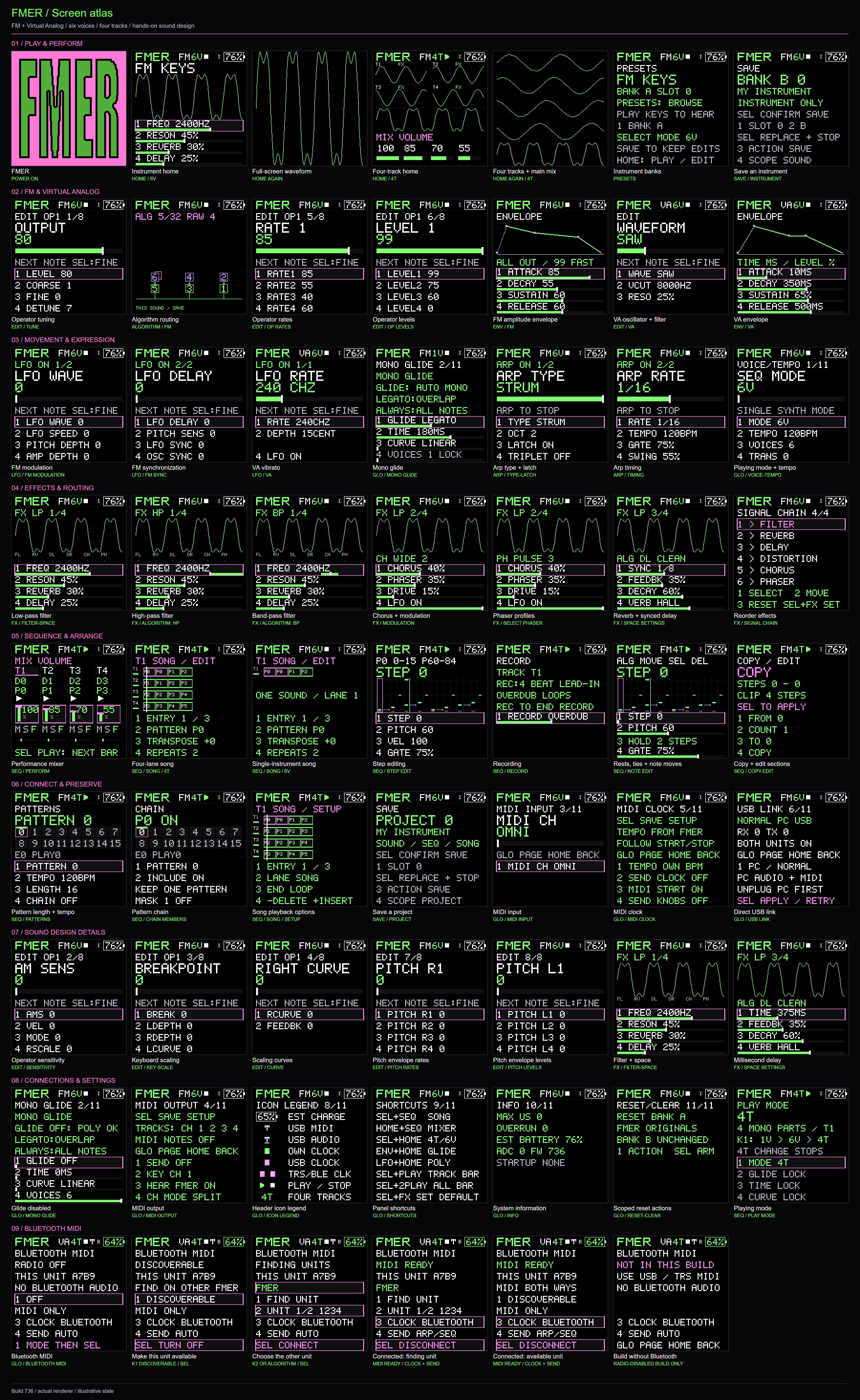
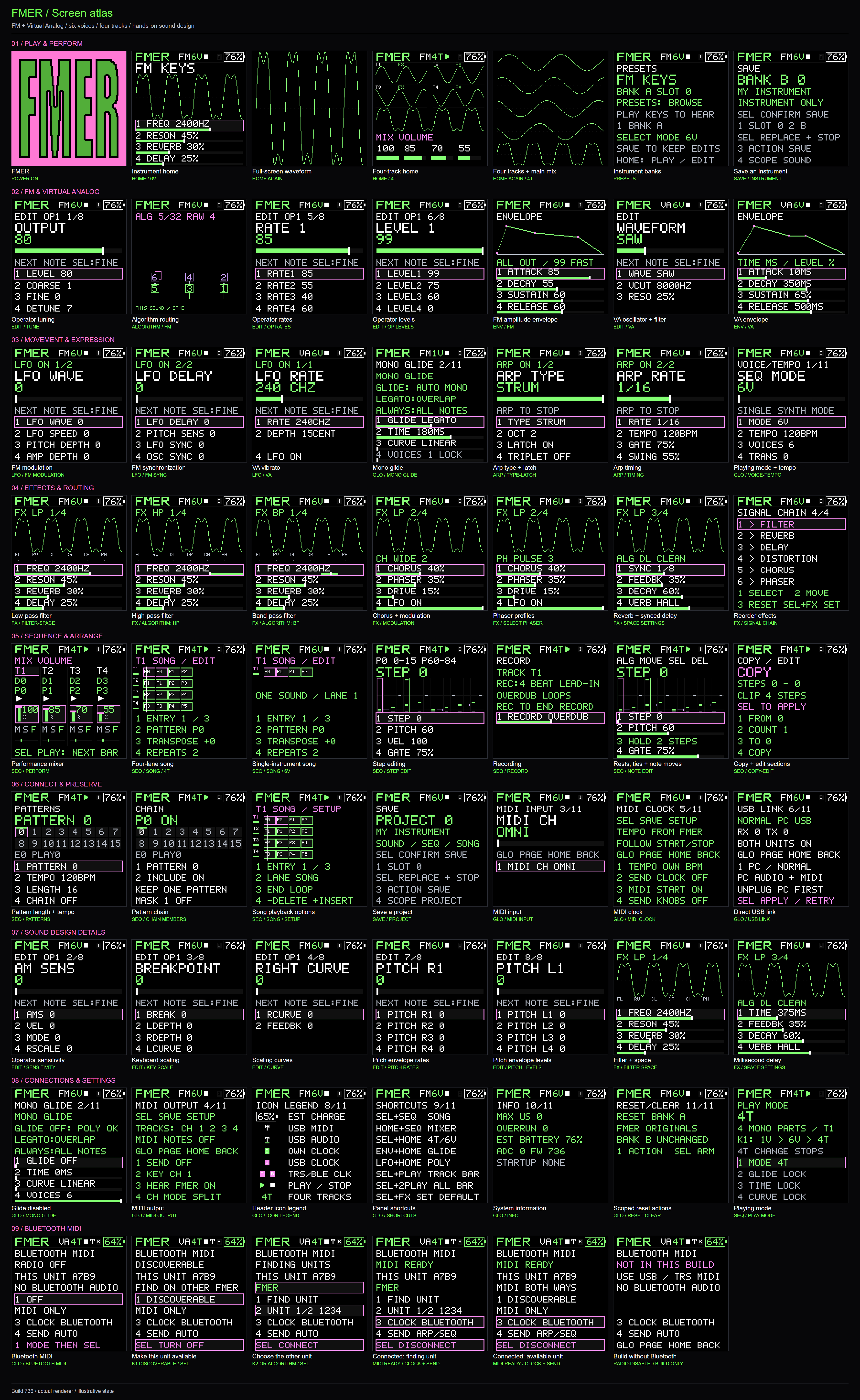
The image uses captures from the FMER renderer. The release includes the individual screen images, annotated feature guide, shortcuts and press pack.
Choose your download
Download Use it for FMER-Companion-736-Windows-x64.zip Extract the whole folder and open FMER Companion.exe on Windows 10/11 x64. Includes firmware, runtime dependencies, libraries and offline Help. fmer736-compatible-r2.fwsc Firmware alone for an installer that supports this package and the connected unit's layout. FMER-736-Instrument-Library.zip The original Expressions sounds and loadout profiles, plus separately labeled OEM V15 patches and their notices. FMER-736-Source.zip Matching source, build instructions, dependency provenance and licenses. FMER-736-Press-Pack.zip Logo, screenshots, annotated diagrams and reusable feature copy. The screen atlas, screen-sheet PDF, visual guide and one-sheet shortcuts are also separate downloads. SHA256SUMS.txt identifies the files in this release.
Play, build and perform
- Six-operator FM and Virtual Analog engines; six-voice polyphony, mono glide or four independent mono tracks.
- Two editable 64-slot instrument banks. Choose from 224 original Expressions sounds and five profiles: Balanced, Leads and Bass, Pads and Ambient, Drums and Percussion, and Arps and Textures. Create your own profiles in Companion.
- Reorderable filter, drive, chorus, phaser, delay and reverb. Choose effect characters, beat-synced or millisecond delay, and save your preferred routing.
- Eleven arpeggiator types, including Strum, with latch, octave range, swing and gate. Record generated arp notes into patterns.
- Sixteen projects, sixteen patterns per project and up to 64 steps per pattern. Four song lanes provide repeats, transposition and up to 32 entries per lane.
- Live mixer controls, queued pattern changes, reactive scopes, a high-contrast display, keyboard lighting and an estimated battery percentage.
Two-unit Bluetooth MIDI
On GLO → BLUETOOTH MIDI, make one FMER unit Discoverable, use Find on the other, select its peer and press SEL. Set clock and note routing for your workflow. Clock-only operation synchronizes local arrangements without doubling their notes.
Initial connection can make up to three attempts to the same selected peer within twelve seconds; SEL cancels immediately. A lost link after MIDI READY does not reconnect automatically. Power-up starts with radio Off.
Bluetooth carries MIDI, not audio. This release supports the two-FMER peer workflow. Three-or-more-unit groups and general computer/other-firmware Bluetooth compatibility are not yet included.
Recall your setup and manage it locally
FMER can retain the current instrument, playing mode, effects, patterns and MIDI settings in a separate startup checkpoint. Automatic saving waits for stopped, quiet operation with radio Off and no USB audio stream. Check the save status before switching off; named projects remain available for deliberate saves.
Companion organizes and renames instruments and projects, manages Bank A/B loadouts, keeps backups for named units and guides firmware installation. It works locally without a hosted service or Python installation. Use Quit to close its background service.
Original V16 uses a separate guided full-ROM backup and migration workflow. It preserves the protected boot and identity regions while initializing FMER musical storage after explicit review. V16 musical data is archived, not converted. A verified firmware write and a healthy startup are checked separately. Qualification combines physical V16 migration to an earlier image, subsequent normal updates, exact final-image writer simulation and final hardware checks. Read the installation guide before proceeding.
Before installing
Read INSTALLATION.md, connect only the intended unit, close other MIDI applications and keep your backup and operation record. The Companion is unsigned. Verify the release checksums and follow the displayed progress and restart instructions.
USB audio carries the main mono mix in two channels, not four isolated stems. Effects are shared between tracks, and the TRS MIDI connector is input-only. Measured CPU, radio and recovery boundaries are recorded in the qualification report; current draw, battery endurance and precise Bluetooth clock jitter still need broader measurement.
Full release notes · Installation guide · Feedback and support
Tell us which build you used, what you tried and what happened. Companion can export diagnostics for you to review before sharing. Feedback is welcome; unsolicited code contributions are not being accepted.
Original FMER code, sounds and artwork are GPL-3.0-only. Incorporated components and OEM V15 data retain their own notices. V16 patches are not bundled. FMER is independently maintained and is not endorsed by M-VAVE or its upstream projects.
- FMER-736-Screen-Sheet.pdf191 KB6↓
- fmer736-compatible-r2.fwsc599 KB3↓
- SHA256SUMS.txt1.3 KB3↓
- FMER-Companion-736-Windows-x64.zip40 MB2↓
- FMER-736-Source.zip10 MB2↓
Show all 15 filesHide 10 files
- FMER-736-Press-Pack.zip5.8 MB2↓
- FMER-736-Screen-Atlas.zip1.3 MB2↓
- FMER-736-Visual-Guide.pdf655 KB2↓
- FMER-736-Screen-Sheet.png462 KB2↓
- FMER-736-Default-Sounds.fmer-catalog.json361 KB2↓
- FMER-736-Instrument-Library.zip304 KB2↓
- FMER-736-Shortcuts.pdf47 KB2↓
- INSTALLATION.md9.2 KB2↓
- RELEASE_NOTES.md8.0 KB2↓
- release-manifest.json3.0 KB2↓
build-735-r11FMER 735 - Six voices, expanded instruments and FMER Companion10 files
FMER 735 and updated FMER Companion!
Thank you everyone who provided feedback on the last test build. This is another test build with bug fixes and new features!
Added:
Six-voice playing Reworked sound library More reliable Companion startup and linking.
If you try it out, please provide some feedback!
Downloads
- FMER-Companion-735-Windows-x64.zip: extract the entire ZIP and launch
FMER Companion.exe. Windows 10/11 Intel/AMD x64; no separate Python install. Includes firmware, libraries, profile management and offline Help. - fmer735-compatible-r9.fwsc: firmware alone, in the self-describing FWSC format. Use a compatible installer; file-format compatibility does not qualify every third-party flashing procedure.
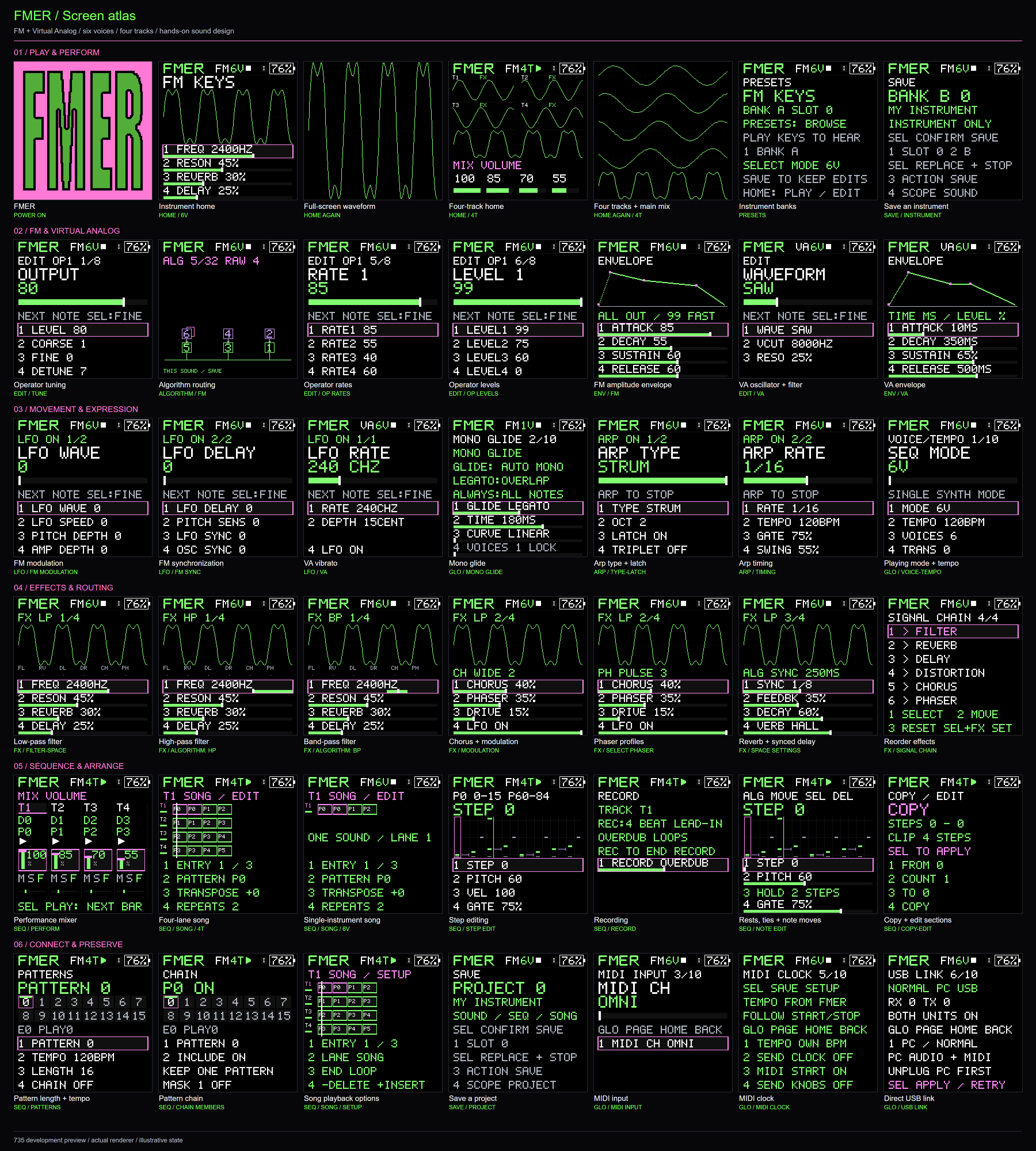
- FMER-735-Screen-Atlas.zip: all 56 captured views, six social cards, and the 42-view overview in PNG/PDF. Screens use the production renderer with illustrative state, rather than photographs of the LCD.
- FMER-735-Source.zip: corresponding source, build instructions and notices.
- Separate screen-sheet PNG/PDF, default-sound catalog and SHA256 checksums.
Instrument and performance improvements
- 6V polyphony replaces 4V for single-instrument playing. 1V glide and four independent mono tracks in 4T remain available.
- 192 original Expressions instruments, organized into four 64-instrument profiles: Spectrum, Rhythm, Voltage (leads/arps), and Atmosphere. Spectrum incorporates the owner's listening-survey favorites. Classic sounds and the separately attributed OEM V15 catalog remain available in Companion.
- Two editable banks, A and B, each holding 64 FM or VA instruments. Choose separate loadouts for each bank during installation or later library work. Custom profiles and named instrument setups support managing several units.
- Preset browsing follows bank order; curated instruments are grouped by sound family. The first octave shift now has a visible LED indication.
- Active-voice replacement and VA note-start changes address reported clicks. CPU optimizations retain the sample rate, synthesis arithmetic and effects. The qualified heavy four-track comparison used about 16.9% less processing than the earlier development baseline; dense workloads still need care.
- Self-describing packaging supports the unmodified FM1 emulator preview at 60 MHz while preserving the protected boot region during FMER installation.
Companion improvements
- Startup no longer lets an idle browser connection block delivery of the interface scripts. Application operations remain serialized.
- Clear loading/failure feedback and browser diagnostics replace a silent shell when initialization fails. The optional editor loads when opened.
- Missing-device messages explicitly describe the USB MIDI connection, rather than suggesting the sound library is missing. Discovery history is retained for troubleshooting.
- The owner's separate-computer retest initialized successfully, installed735, and verified all128 instrument writes with Rhythm in Bank A and Atmosphere in Bank B. A later probe found no FM-1 MIDI port; that was separate from the completed installation. See returned-session QA.
Installation and limits
Read 735 installation notes. Back up instruments and projects before updating. Choose deliberately whether to retain or replace each bank. The735 save format supports six voices; an automatic downgrade to733/734 is blocked until a separate migration is provided.
Bluetooth remains deferred. Windows x64 is the packaged Companion target. USB audio is the combined mix, effects are shared across tracks, direct USB links support one peer, TRS MIDI is input-only, and battery percentage is an estimate. Unknown device layouts are rejected; stock V16 migration is not qualified by this release. No universal flashing or dead-device recovery claim is made. The full sound library and long-duration performance still benefit from real-world testing.
FMER code, Companion, original instruments and artwork are GPL-3.0-only, with included third-party notices. No private device dumps or vendor firmware executables are distributed. Feedback is welcome through GitHub issues; outside pull requests require prior maintainer permission.
- FMER-Companion-735-Windows-x64.zip: extract the entire ZIP and launch
build-734-r5FMER 734 - FMER Companion - FM/VA synth firmware for the FM-111 files
FMER 734

FMER brings six-operator FM, Virtual Analog sound design and four-track performance to the M-VAVE FM-1, with an offline Companion for your sounds and projects.
FMER Companion offers an easy and local way to manage your firmware and instruments. It runs as a stand-alone EXE and allows you to manage your library of instruments and projects including direct patch manipulation, renaming/reordering, and backup/restore functions. It also can query GitHub for updates and includes the 128 original V15 presets from the stock firmware as provided library options.
To get started, download the companion, hook up your FM-1 and install the firmware through the guided wizard. If you would like to install through another method, download the firmware image on it own.
Build 734 is a pre-1.0 release for public testing and feedback.
Choose your download
Asset What it contains FMER-Companion-734-Windows-x64.zip Extract-and-run Windows app, embedded runtime, firmware installer, 64 FMER defaults and 128 OEM V15 voices, library tools, offline Help and corresponding source. fmer734-compatible-r2.fwsc Firmware alone, in FM-1 FWSC update format. Same bytes as Companion. Third-party installer caveats are in the installation guide. FMER-734-Default-Sounds.fmer-catalog.json The same 64 original sounds as Companion; import to merge independent Library copies. FMER-734-Source.zip Reviewed source tree, original splash, original patch recipes, build scripts and dependency notices. FMER-734-Press-Pack.zip Original logo, exact screen captures, 37 annotated sheets/workflows, PDFs, feature descriptions, copy and video drafts. FMER-734-Feature-Overview.pdf Two-page introduction and feature summary. FMER-734-Visual-Guide.pdf The complete 37-page annotated screen and workflow guide. FMER-734-Shortcuts.pdf One-page shortcut sheet. INSTALLATION.md, SHA256SUMS.txt, release-manifest.json Installation instructions, exact download hashes and source/binary correspondence. Installation and compatibility · Complete feature tour · Feedback
Two engines, three playing modes
- Six-operator FM with 32 algorithm diagrams, operator envelopes and standard DX7 voice/bank interchange. Exact DX7 emulation is not claimed.
- Virtual Analog with sine, saw, square, triangle and noise.
- 1V glide, 4V polyphony, or four independent mono parts in 4T.
- 64 editable DEFAULT instruments plus 64 USER slots; either engine in either bank.

Sound shaping and performance
Reorder six shared effects: low/high/band-pass filter with resonance, Room/Plate/ Hall/Cloud reverb, beat-synced or millisecond delay, four chorus profiles, four phaser profiles and drive. Store your preferred chain. Keep LFO settings with each sound and toggle modulation directly.

Patterns, songs and live control
- 11 arp types, including Strum; latch, octave range, gate, swing and triplets.
- Record played notes or generated arpeggios with a four-beat count-in, Overdub/Replace, rests and held notes.
- 16 patterns per project, up to 64 steps each; 16 onboard project destinations.
- Four-track mixer with volume, mute, solo, FX routing, pattern, patch and run state.
- Song mode: 32 entries per lane with repeats and transposition. Single-instrument sequencing remains available alongside live playing within the four-voice budget.
- Next-bar launches, expanded waveforms and direct performance shortcuts.

Wired MIDI and local library management
Send and receive USB MIDI, control patches and documented parameters, follow an external clock, split generated tracks across MIDI channels, or directly link two powered FMER units over USB. TRS MIDI is input-only. Bluetooth not yet implemented.
Companion organizes local sounds/projects, imports and exports DX7 FM voices, backs up supported FMER units and installs compatible firmware. Everything runs on your computer; no cloud account or hosted page is required.

Testing and feedback
Feedback is welcome on installation, Companion, navigation, sounds, effects, arpeggios, sequencing, playing modes and MIDI. Test only the areas that interest you. Use Beta feedback in Companion to export an optional diagnostic summary, review it, and attach it to an issue with your observations. Nothing uploads automatically. Outside code pull requests require prior maintainer permission.
Some caveats:
Four voices are shared across the instrument; effects are shared across tracks. Battery percentage is an estimate. Unknown firmware layouts cannot be forced through the installer. Loaded-audio reserve, USB-audio endurance and the wider recovery matrix remain qualification limits.
Original FMER software, defaults and splash are GPL-3.0-only. Felucca supplies incorporated board support; MSFA supplies the FM foundation; the updater derives from SLOOP. Their notices remain included. See LICENSE, LICENSING.md and NOTICE.
OEM V15 voice data comes from the publisher's Apache-2.0 public resource, with source and notices included. It is separate from the 128 onboard destinations; FM conversion does not promise identical stock audio or FX. Community FM6 capture is a protocol-tested preview, not hardware-qualified support.
Read the release status and test scope. The earlier linked-runtime licensing issue was addressed in 734-r2; third-party notices and corresponding source are included.

