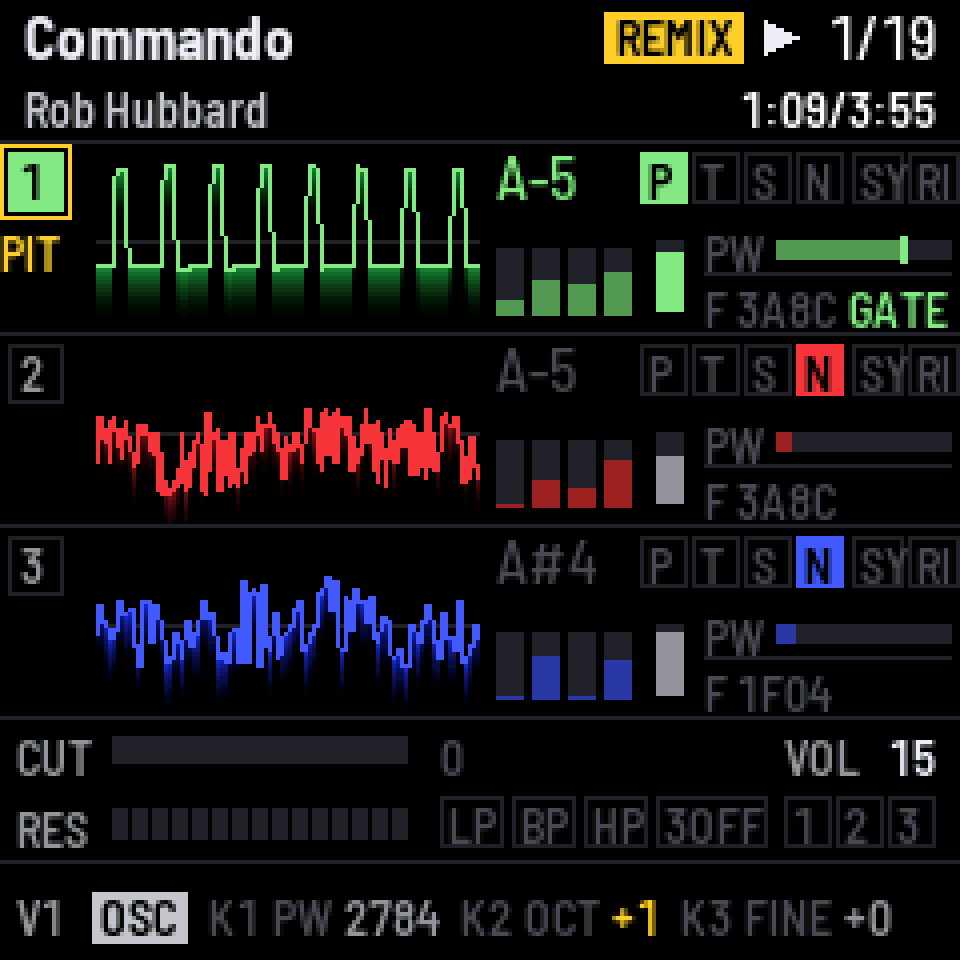
fm1-sidj
Loud94/100SiDJ: SID player and live remixer firmware for the M-VAVE FM-1
fm1-sidj is custom firmware for the M-VAVE FM-1, by @thomasj. Open source under GPL-3.0, latest release v1.3.0 (November 2026), 3 stars on GitHub.
forM-VAVE FM-1·by@thomasj
Unclaimed. Is this yours? Sign in with GitHub as @thomasj to claim it.
sidj-1.3.0.fwsc· 596 KB
GPL-3.0· thomasj/fm1-sidj·thomasj.github.io/fm1-sidj/·downloads come from the creator’s GitHub releases
v1.3.0SiDJ 1.3.0Latest1 file
MIDI clock, both ways.
- SID+CLK (KNOB 2 in SONGS): a MIDI clock over USB, its beat found in the tune. On GLO, KNOB 4 puts the tempo right or sets one, KNOB 3 moves the clock, GLO & PLAY clicks on the beats. Songs keep their clock.
- A clock coming in over USB or MIDI IN starts, stops and continues the song; with SID+CLK the tune follows it.
- Full speed on an FM-1 that last had M-VAVE's V16, which made SiDJ 12 % slower.
- tools/fm1_rescue.sh takes V15 as well as V16.
Install from https://thomasj.github.io/fm1-sidj/ in Chrome or Edge.
v1.2.0SiDJ 1.2.01 file
Setlists: your songs survive a trip to another firmware.
- Another firmware does not keep SiDJ's songs, so coming back meant building the song list again. The web page's step 2 now has Save setlist: every song on the FM-1 in one .zip, with their order and song lengths (a plain .zip of the .sid files, so the tunes play elsewhere too). Load setlist puts them back in one go, skipping any the FM-1 already has.
- The page also keeps a copy of your songs in the browser. When it finds the FM-1 empty, it offers to put them back with one click.
- The browser emulator can take a song from another web page (opened as emu/#import) and open it straight in the player, ready to remix. Its keys are now dark grey, white while pressed, like the FM-1's.
Nothing changes on the FM-1 itself: reload the web page to get it.
Install from https://thomasj.github.io/fm1-sidj/ in Chrome or Edge.
v1.1.2SiDJ 1.1.21 file
An empty song list says where songs come from.
- Installed from somewhere other than SiDJ's own web page (The FM-1 Firmware Hub, the command line), SiDJ starts with no songs. The song list, PLAY and the player now point to thomasj.github.io/fm1-sidj, where step 2 adds songs, instead of to a command-line tool.
Install from https://thomasj.github.io/fm1-sidj/ in Chrome or Edge.
v1.1.1SiDJ 1.1.11 file
No old songs coming back after a trip to the official firmware.
- M-VAVE's firmware writes over the start of SiDJ's song area and leaves the rest. Back on SiDJ the list is empty, as it should be, but adding songs could bring some of the old ones back: duplicates in the list, and the song store full before its time. New songs now clear what is left behind them.
If your FM-1 already shows such duplicates: on the web page, delete them and press Tidy up, or start afresh with tools/fm1_sid.py wipe.
Install from https://thomasj.github.io/fm1-sidj/ in Chrome or Edge.
v1.1.0SiDJ 1.1.01 file
The whole remix from a MIDI controller, and M-VAVE's new official firmware.
- MIDI CCs: every remix control now has a controller number, from CC 70 up, over USB or the MIDI IN jack. A voice's CC on channel 1, 2 or 3 sets that voice, on any other channel the selected one; the filter, the tempo and the vinyl fader take any channel, and CC 108 puts everything back. The map is in docs/midi.md. SiDJ sends no MIDI back.
- M-VAVE's FM-1 V16: the web page's "Go back to the official firmware" and tools/fm1_rescue.sh take V16 as well as V15. V16 is larger than V15 and has another boot head, which the update entry refused before. Installing SiDJ from V16 works as from V15.
- The README's MIDI details moved to their own page, docs/midi.md, and the README says where SiDJ keeps its songs: where Felucca-based firmwares keep their samples, so back those up first.
- fmhub.json describes SiDJ for The FM-1 Firmware Hub.
Tested on an FM-1: installed from V16, V15 and SLOOP 2.8.4, left again for each, and an install interrupted by pulling the cable resumed.
Install from https://thomasj.github.io/fm1-sidj/ in Chrome or Edge.
v1.0.2SiDJ 1.0.21 file
The web page's song store finds the FM-1 the installer finds.
- Connect (step 2), "Add both" and the tunes added right after an install now also try the MIDI ports named after other firmwares (Felucca, SLOOP, Clipper, ETCH, JIANT). macOS keeps the port name it first saw, so since 1.0.1 an FM-1 could install fine and then never connect for songs.
- "No FM-1 running SiDJ found" now lists the MIDI ports the browser sees.
The firmware itself is unchanged from 1.0.1 apart from its version.
Install from https://thomasj.github.io/fm1-sidj/ in Chrome or Edge.
v1.0.1SiDJ 1.0.11 file
The web installer finds more FM-1s.
- It now also tries the MIDI ports of firmwares that name the FM-1 after themselves (SLOOP, Clipper, ETCH, JIANT) and of their update loaders. macOS keeps the port name it first saw, so an FM-1 could stay hidden under another firmware's name and give "FM-1 not found".
- On Windows, an FM-1 whose input and output are numbered apart (MIDIIN2 / MIDIOUT2) is found.
- "FM-1 not found" now lists the MIDI ports the browser sees, to show what went wrong.
The firmware itself is unchanged from 1.0.0 apart from its version.
Install from https://thomasj.github.io/fm1-sidj/ in Chrome or Edge.
v1.0.0SiDJ 1.0.01 file
The first release of SiDJ, free firmware that turns the M-VAVE FM-1 into a player and live remixer for Commodore 64 music.
- Plays PSID and RSID tunes for one SID from the High Voltage SID Collection, on a cycle-exact emulated C64 with an emulated 6581 or 8580.
- Remix every voice live from the panel or a MIDI keyboard: transpose, mute and solo, swap waveforms, bend envelopes and the filter, add LFOs, ride the tempo and a vinyl fader.
- Sound from the audio jack, as USB audio (the mix, or each voice on its own channel), and over ASID to real SID hardware, remix included.
- Install it and add songs from https://thomasj.github.io/fm1-sidj/ in Chrome or Edge, or try it first in the browser emulator. The same page puts the official firmware back.
Demo video: https://youtu.be/bY161B9_Evk
Installing custom firmware is at your own risk.