SiDJ
A C64 music deck for the M-VAVE FM-1.
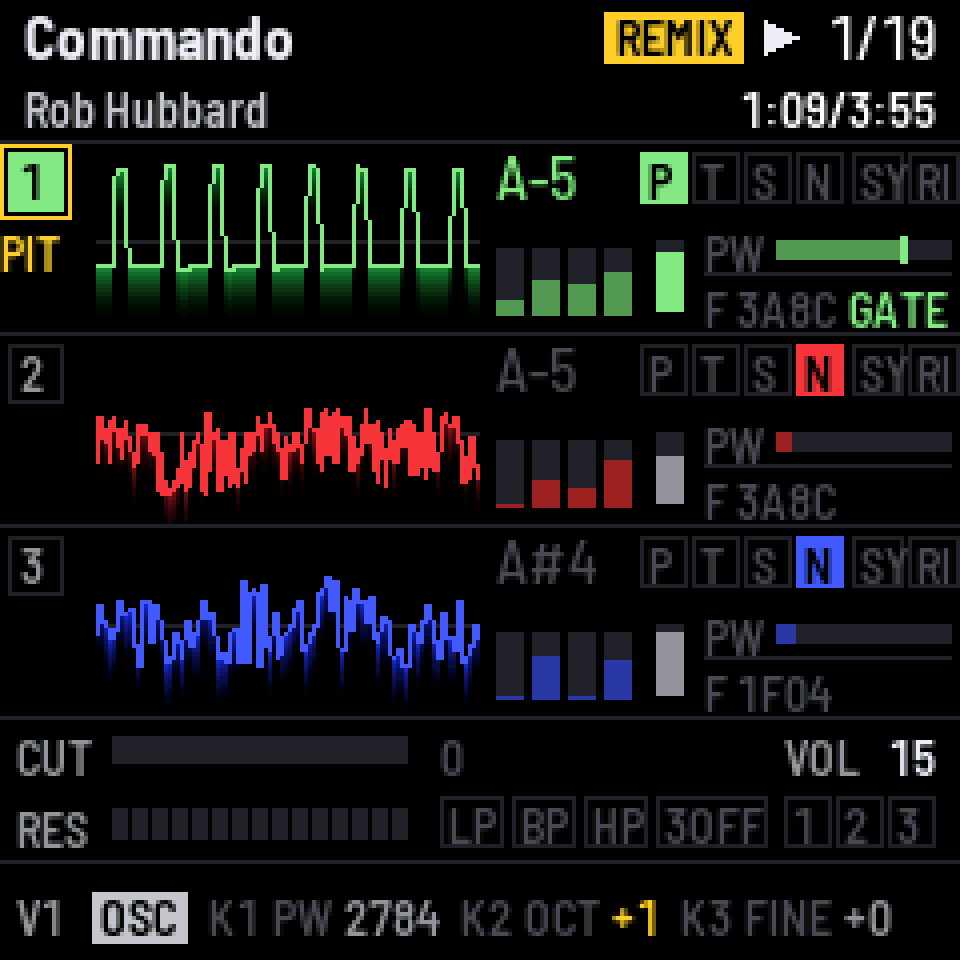
SiDJ is free firmware that turns the FM-1 into a player and live remixer for Commodore 64 music. It plays the tunes of the High Voltage SID Collection on a cycle-exact emulated C64, and every voice is yours to remix from the panel or a MIDI keyboard: transpose, mute and solo, swap waveforms, bend envelopes and the filter, add LFOs, ride the tempo and a vinyl fader. The remix builds on the one I made for the TherapSID.
The sound comes out three ways, alone or together:
- The FM-1's audio jack, from an emulated 6581 or 8580 SID chip.
- USB audio: the FM-1 is a driverless audio interface for your computer, with the mix or each voice on its own channel, ready to record.
- Real SID hardware over ASID: a SidStation, TherapSID, TeensyROM, USBSID-Pico or any other ASID receiver, with the remix included.
And a MIDI clock in time with the tune, found from the tune itself, to sync a drum machine or sequencer.
▶ Watch SiDJ in action, a demo video on YouTube.
Get started
- Open https://thomasj.github.io/fm1-sidj/ in Chrome or Edge, connect the FM-1 by USB and press Install.
- On the same page, add songs: two of mine in one click, or search your copy of HVSC.
- Play. The browser emulator runs the same firmware if you want to try it first.
Installing custom firmware is at your own risk. The same page puts M-VAVE's official firmware back whenever you like.
User manual
SiDJ has two screens: SONGS, the list of tunes on the FM-1, and the PLAYER. SEQ
switches between them. At power-on a short intro plays; any button skips it.
Below, A & B means: hold A, then press B. A voice button is HOME, SAVE or ARP,
for voice 1, 2 or 3.
Songs
| Control | Function |
|---|---|
SELECT | move through the list |
OCT- | eight songs up the list |
OCT+ | eight songs down the list |
PLAY | play the song and go to the player |
PRESETS | the subsong |
KNOB 1 | the chip: AUTO (the one the tune was written for), 6581 or 8580 |
KNOB 2 | the output: the emulated SID, ASID, both, or the emulated SID with a MIDI clock |
KNOB 3 | USB audio: the mix, or the mix and the three voices |
SAVE | keep these settings, and this song as the one selected at power-on |
The list is grouped by composer, with each song's length from HVSC. The FM-1 holds a few
dozen tunes at a time (240 KB). Add and remove them from the
web page, or with tools/fm1_sid.py (below).
SiDJ plays PSID and RSID tunes for one SID, multi-speed tunes up to at least 38x included. Tunes for two or three SIDs, and BASIC tunes, are not played.
Player
The screen shows the song, its time and length, and the three voices, each with a scope, its note, waveform, envelope and pulse width; the filter is beneath them.
| Control | Function |
|---|---|
PLAY | play / pause |
REC & PLAY | play from the start |
SELECT | the next / previous song |
PRESETS | the subsong |
ALGORITHM | the output: the emulated SID, ASID, both, or the emulated SID with a MIDI clock |
MASTER | the level at the audio jack |
SEQ | back to the song list |
A song or subsong picked with SELECT or PRESETS stops the one playing and waits for PLAY.
A song stops at its end and waits: SELECT for the next, PLAY to hear it again.
Remix
The remix changes what reaches the chip, never the tune itself. Whatever you change turns
gold on screen, with REMIX in the top bar. OCT- and OCT+ pressed together put
everything back. Loading a song starts clean.
Voices and keys
| Control | Function |
|---|---|
HOME | select voice 1 |
SAVE | select voice 2 |
ARP | select voice 3 |
| The keys | play the selected voice: in set mode (the default) it holds the key's note while the key is down; in transpose mode the tune's melody moves by the key's distance from F#4 |
OCT- | the keys an octave down, three at most; the screen shows their range |
OCT+ | the keys an octave up, three at most |
FX & OCT- | the keys transpose |
FX & OCT+ | the keys set the pitch |
| A MIDI keyboard | plays like the keys, over USB or the MIDI IN jack: channels 1 to 3 play voices 1 to 3, any other channel the selected voice |
REC | mute / unmute the selected voice |
voice button & REC | solo that voice; again for all three |
Waveforms (the same button again gives the tune's waveform back)
| Control | Function |
|---|---|
voice button & FX | pulse |
voice button & SEL | triangle |
voice button & ENV | sawtooth |
voice button & LFO | noise |
voice button & EDIT | sync on / off |
voice button & GLO | ring modulation on / off |
Drums keep sounding like drums: a voice playing pure noise keeps its waveform and its pitch.
Filter
| Control | Function |
|---|---|
SEL & HOME | voice 1 through the filter or around it |
SEL & SAVE | voice 2 through the filter or around it |
SEL & ARP | voice 3 through the filter or around it |
SEL & LFO | low-pass on / off |
SEL & EDIT | band-pass on / off |
SEL & GLO | high-pass on / off |
SEL & OCT+ | the cutoff knob scales the tune's cutoff (the default) |
SEL & OCT- | the cutoff knob adds to the tune's cutoff |
Knob pages (press the page button, then turn KNOB 1 to KNOB 4)
| Page | KNOB 1 | KNOB 2 | KNOB 3 | KNOB 4 |
|---|---|---|---|---|
FX (OSC) | pulse width | octave | fine tune | |
ENV | attack | decay | sustain | release |
SEL (FLT) | cutoff | resonance | ||
LFO | rate | depth | target: pulse width, pitch or cutoff | shape |
GLO | tempo, 25 to 150 % | vinyl fader, ±8 % | SID+CLK: the clock's offset | SID+CLK: the clock's tempo put right, or set by hand |
Each voice has its own LFO. The tempo speeds the tune up without changing its pitch; the vinyl fader moves both, like a turntable. A new song or subsong starts at 100 % with the fader at 0, as the rest of the remix starts clean. RSID tunes, which drive the whole C64 themselves, play as written: no tempo, fader or LFOs.
MIDI. A MIDI controller can play the whole remix too, with a CC for every control above. The map is in the addendum SiDJ over MIDI.
Outputs
The audio jack plays the emulated SID; MASTER sets its level.
USB audio. Connected to a computer, the FM-1 shows up as an audio input, SiDJ FM-1:
44.1 kHz, no driver needed on macOS, Windows, Linux or iOS. KNOB 3 in SONGS picks what it
carries:
- USB:MIX (the default): the mix, in stereo.
- USB:5CH: the mix plus each voice on its own channel (3 to 5). The voices are stems, with the filter and volume in them, and add up to the mix. The tempo stops at 100 % in this mode.
USB audio comes at the chip's own level, whatever MASTER is set to.
ASID sends the tune to real SID hardware: a SidStation, TherapSID, TeensyROM, USBSID-Pico or any other ASID receiver. The remix plays on the real chip too, and with BOTH the FM-1 plays along. The FM-1 is a USB device, so the receiver connects through a USB-MIDI host box or a computer. ASID sends one update per frame, so sampled sounds (drums, speech) only sound right on the emulation, and RSID tunes are never sent: they play on the emulated SID.
SID+CLK plays the emulated SID and sends a MIDI clock over USB, its beat found in the tune
itself. On the GLO page, KNOB 4 puts a wrong tempo right (or sets one when none is found) and
KNOB 3 moves the clock; GLO & PLAY clicks on the beats. A clock coming in over USB or the
MIDI IN jack starts, stops and continues the song, and with SID+CLK the tune follows it. More in
SiDJ over MIDI.
Installing
The web page, https://thomasj.github.io/fm1-sidj/, installs SiDJ and puts the official
firmware back (with the FM-1.fwsc you download from M-VAVE). From the command line:
.venv/bin/python3 tools/fm1_install.py --info            # what the FM-1 runs
.venv/bin/python3 tools/fm1_install.py build/sidj.fwsc   # install a package
Both work from M-VAVE's firmware (V15 or V16), Felucca, X0X and SiDJ itself. SiDJ runs at full
speed whichever official firmware the FM-1 had before: M-VAVE's V16 leaves the chip at 320 MHz
instead of V15's 360, and SiDJ sets 360 back up as it starts. If something goes wrong:
two failed starts give a safe mode (PLAY tries again), four give the chip's own update mode,
and holding OCT- and OCT+ together for 5 seconds gets there too. From the chip's update mode,
tools/fm1_rescue.sh puts the official firmware back, and Leo Kuroshita's
FM-1 Transporter is the last resort.
Other firmwares' data. SiDJ keeps its songs in the flash area where Felucca and the firmwares built on it keep their user samples (0xA0000 to 0xDBFFF). Adding songs erases what another firmware saved there, and other firmwares cannot read SiDJ's songs. SiDJ ignores anything in the area that is not a SiDJ song. Back up your samples and projects before you install SiDJ. Going the other way, save a setlist on the web page (step 2) before you install another firmware: it keeps every song, its order and song lengths in one .zip, and Load setlist puts them back. The page also keeps a copy in the browser and offers it back when it finds the FM-1 empty.
Songs from the command line
tools/fm1_sid.py manages the songs over USB, with song lengths from your HVSC copy
(~/Music/C64Music, or --hvsc DIR):
.venv/bin/python3 tools/fm1_sid.py list
.venv/bin/python3 tools/fm1_sid.py put ~/Music/C64Music/MUSICIANS/H/Hubbard_Rob/Commando.sid
.venv/bin/python3 tools/fm1_sid.py put ~/Music/C64Music/MUSICIANS/G/Galway_Martin/    # a whole folder
.venv/bin/python3 tools/fm1_sid.py play 3 2                                            # song 3, subsong 2
.venv/bin/python3 tools/fm1_sid.py delete 3
.venv/bin/python3 tools/fm1_sid.py compact      # reclaim the space deleted songs leave
.venv/bin/python3 tools/fm1_sid.py stats 10     # the audio load, once a second
For developers
Building
Everything builds on a Mac. The host side (tests, simulator, players) needs only Xcode's
command-line tools (xcode-select --install) and Python 3. Optional, from
Homebrew: brew install emscripten node to build and test the browser
emulator and the web page, and brew install gh for releases. Docker Desktop can come from
there too (brew install --cask docker). The firmware needs:
- Docker Desktop, running (the JieLi toolchain is Linux x86-64 only)
- the toolchain:
tools/get_toolchain.shinstalls it to~/.jieli/toolchain - the JieLi AC79 SDK (Apache-2.0; three of its files go into every package):
git clone --depth 1 --branch AC79NN_SDK_V1.2.1_2023-12-13 https://gitee.com/Jieli-Tech/fw-AC79_AIoT_SDK.git ~/fw-AC79_AIoT_SDK - Python packages:
python3 -m venv .venv && .venv/bin/pip install -r requirements.txt(Pillow 11 to 13 tested; its raqm, for the screen's tabular digits, needsbrew install fribidi, without which the build warns and draws proportional digits)
./build.sh                  # build/sidj.fwsc, a development build
./build.sh --release 1.0.0  # build/sidj-1.0.0.fwsc, a release
tests/run_tests.sh          # all tests: SID, 6510, the C64, the remix, storage, the app in the simulator
make test                   # the SID engine against the original reSID 0.16, sample by sample
make sidplay                # build/host/sidplay FILE.sid: a tune through the same C64 and SID, to WAV
web/emu/build.sh            # the browser emulator (needs Emscripten)
JIELI_TOOLCHAIN and AC79_SDK override the default locations; SIDJ_TRS=0 turns the MIDI IN
jack off, SIDJ_CDC=1 adds a USB serial console.
tools/make_site.py build/sidj-1.0.0.fwsc builds the web site around a package, in
build/site. The browser emulator also takes a song from another page: opened as emu/#import,
it tells the page that opened it that it is ready, takes one .sid from it, adds it to its songs
and plays it when switched on. SID Factory II Pocket's page uses it to open a song composed on the
FM-1 in SiDJ, ready to play and remix. tools/release.sh X.Y.Z makes a public release: the package, the tests, one
commit on the public repository, the GitHub release and the site.
How it works
The design and its reasoning are in docs/design.md. In short:
- The C64 (
firmware/src/c64/) runs the tune cycle by cycle: a 6510 with IRQ and NMI, both CIAs, the VIC's raster and bad lines, and a small KERNAL replacement. Every SID write is logged with its cycle. - The SID (
sid/) is a fixed-point port of reSID 0.16, bit-exact with the original. On the FM-1 the pulse, sawtooth and combined waveforms are averaged over each sample against aliasing, and the 8580's floating waveform DAC plays the samples some tunes make with the test bit. - The engine (
firmware/src/app/engine.c) runs in the audio interrupt: each write goes through the remix and reaches the chip at its exact cycle. - The remix (
firmware/src/app/remix.c) keeps the tune's register image and the chip's, and derives one from the other. - ASID (
firmware/src/app/asid.c) sends each frame's changes as one message, cut exactly at the raster wrap. - The MIDI clock (
firmware/src/app/beat.c,engine.c) finds the tune's beat from when its voices start to sound, schedules the pulses at their cycles, and follows a clock coming in by steering the tune's speed;clkstore.ckeeps each song's clock.
Verification
The C64 was checked against libsidplayfp's own C64 on random HVSC tunes: the SID register writes match at a median of 99.99 % for PSID tunes and 99.92 % for RSID tunes. The audio load was measured on the FM-1 with the heaviest tunes found, and SiDJ's limits keep the worst case inside the budget: one SID, the tempo up to 150 %, and no tempo, fader or LFOs for RSID tunes. Why reSID 0.16: docs/engine-choice.md.
Layout
| Path | What |
|---|---|
sid/ | the SID engine |
firmware/src/c64/ | the 6510, the SID file format, the C64 and its driver |
firmware/src/app/ | the engine, the remix, the UI, the song store, ASID, the beat and kept clocks, settings, the boot and main loop |
firmware/src/, firmware/hal/, firmware/loader/ | the platform, the hardware layer and the update loader, from Felucca by way of X0X |
host/ | the simulator and the WAV player |
web/site/, web/emu/ | the web page (installer, song manager) and the browser emulator |
tests/ | the host tests and the simulator's scenarios |
tools/ | build, package, install, songs, site, release |
docs/ | MIDI control (docs/midi.md), the design, the FM-1 platform (docs/platform.md), the engine choice |
third_party/ | reSID 0.16 unmodified, the 6502 functional test, licence texts |
Licence
SiDJ is free software: GPL-3.0-only for the firmware, GPL-2.0-or-later for the SID engine. It is built on Felucca by Leo Kuroshita (the platform, the update loader and the installer), by way of X0X by charlesvestal, and the SID engine is a port of reSID 0.16 by Dag Lem. File-by-file origins and the licence reasoning are in LICENSING.md. It contains no vendor material, no Commodore ROMs and nothing from my employer. M-VAVE and FM-1 are trademarks of their owners; SiDJ is independent of them.
Author
I'm Thomas Jansson (github.com/thomasj), and I make chiptune and synth music as tubesockor: YouTube, TikTok, Instagram, Facebook, X and tubesockor.com. Bug reports and ideas are welcome as GitHub issues.
SiDJ is developed with the help of AI coding tools: I direct the work, review it and test it on the FM-1.