
Mocky for the M-VAVE FM-1
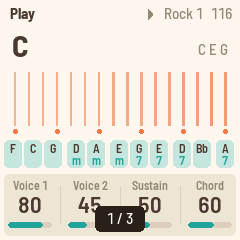
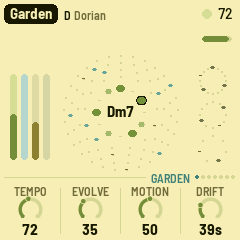
Mocky shows pictures on the FM-1's 240 × 240 screen, sent from a web page over the USB cable. It is for checking screen mockups on the real hardware: the colours, the sizes, how text reads at arm's length.
-
Send pictures (Chrome or Edge): https://charlesvestal.github.io/fm1-mocky/app/
-
Install it (Chrome or Edge, with the FM-1 plugged in): https://charlesvestal.github.io/fm1-mocky/install/
-
Download the firmware file: releases
-
Send a picture: open the page in Chrome or Edge, click Connect, drop a picture. Fit, Fill, Stretch or 1:1; an optional dither for photos and gradients. The page shows exactly what the screen will show (RGB565).
-
Watch a file: pick a file on disk and the page sends it again each time it changes (not kept): export from your design tool over the same file and the FM-1 follows.
-
The gallery: pictures sent with "Keep" stay in the FM-1's flash (276 KB; flat mockups take a few KB each, a photo ~116 KB; up to 64), and the FM-1 starts on the last one shown.
On the FM-1:
| white keys | pictures 1–16 (their lights: the kept ones; the one shown blinks) |
| OCT− / OCT+, SELECT, ALGORITHM, PRESETS, KNOB 1–3 | previous / next |
| PLAY | slideshow on / off; KNOB 4 sets the pace (1–30 s) |
| SAVE | keep the picture just sent without "Keep" (it blinks while there is one) |
| HOME | which picture this is, and the room left |
Screen reader
Mocky tells the FM-1 Screen Reader what it shows, over USB:
which picture is on the screen ("picture 3 of 7"), a picture arriving from the page and whether it was kept,
the slideshow, the room left, and what each button did. A picture itself can't be put in words, so the
reader says what Mocky knows about it. Open the reader page in Chrome with the FM-1 plugged in; it speaks
with its own voice, or hands the text to your computer's screen reader. (Its SysEx, F0 7D 53 52, shares
the cable with the pictures' F0 7D 4D.)
Felucca's safety stays: OCT− + OCT+ held 5 s for update mode, safe mode after two failed starts, the web installers can put any firmware (or M-VAVE's) back.
Build, test, run
./build.sh                                   # build/mocky.fwsc (identity FM-1_100; --release X.Y)
sh tests/run_tests.sh                        # host tests, web coder, the whole app in the simulator (and the reader)
python3 tools/fm1_install.py build/mocky.fwsc --yes   # flash the attached FM-1
cd web && python3 -m http.server 8000        # then http://localhost:8000/ in Chrome
How it works: web/mocky.js scales the picture to 240 × 240, reduces it to RGB565 and run-length
codes it, then sends it in SysEx messages (F0 7D 4D ...), one reply each, resuming where the FM-1
says it is. firmware/src/app/mock.c takes them, checks the CRC, decodes into a framebuffer and,
if asked, appends it to the gallery in flash (0x97000–0xDBFFF, Felucca's data area). Both files
document the format and the protocol.
Built on Felucca by Leo Kuroshita (@kurogedelic), Hügelton Instruments, by way of FoMni-1. GPL-3.0-only. M-VAVE and FM-1 are trademarks of their respective owners.