Felucca SMK
Current release: 0.9.30 Beta, integrating Felucca 1.6.1, corrected USB device names and version-independent original-firmware restore. The SMK Pro install/audio/editor/return-to-original checks passed. Validation and limitations.
Custom synthesizer firmware, browser Studio and interactive simulator for M-VAVE SMK-37 Pro & Elite.
By Chance Roth (@ChanceTheMaker), based on Felucca by Leo Kuroshita and Hügelton Instruments. Felucca SMK brings Felucca's synthesis and sequencing to the SMK's 37-key keyboard, pads, eight knobs, four faders, pitch/mod wheels and display.


Source | Issues | Development guide | Known issues
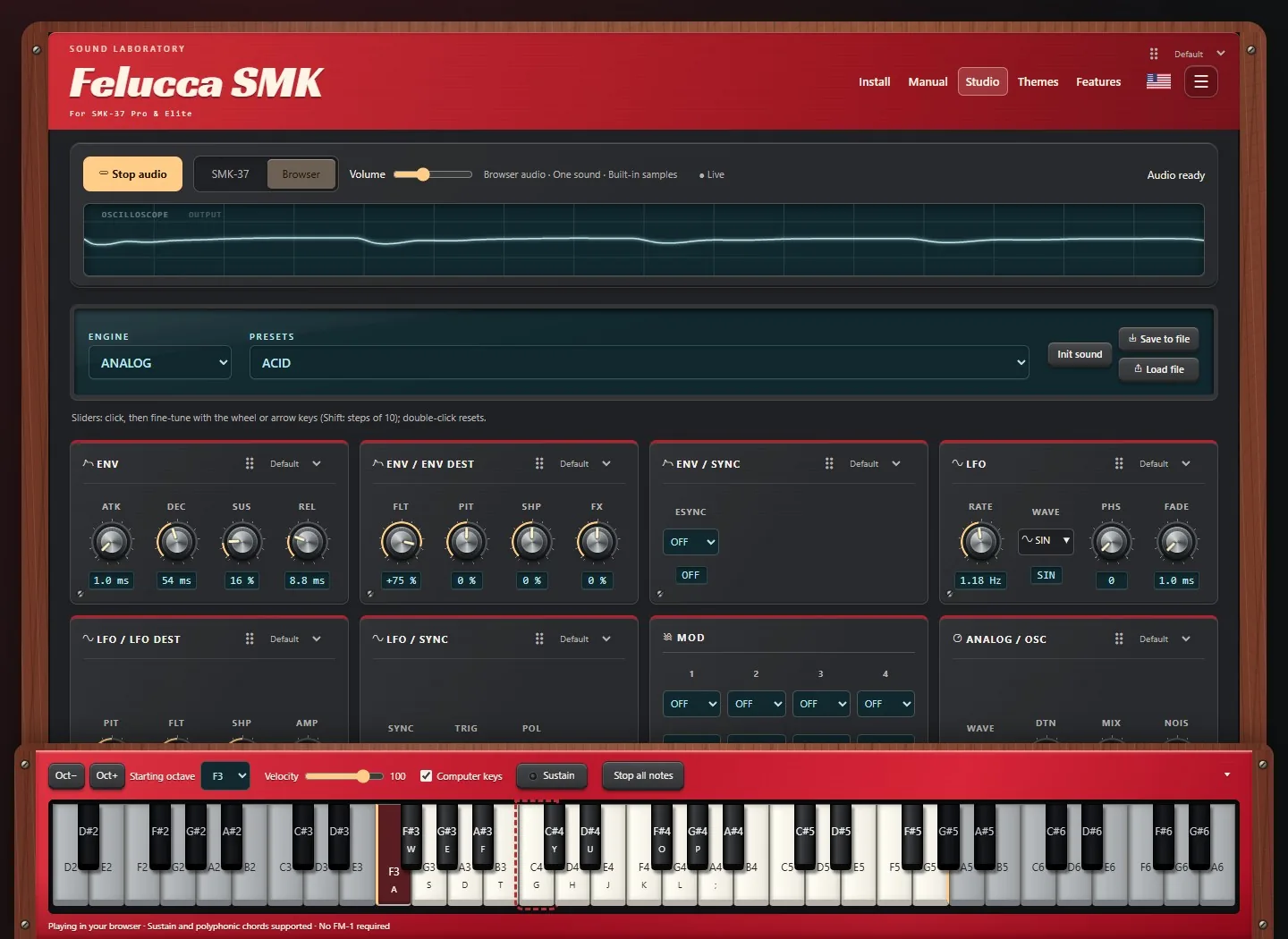
Studio screenshot in Browser mode; no physical keyboard is required to try it.
Project status
The product version is 0.9.30 Beta, integrating upstream Felucca 1.6.1
at a53ecf428c29c780108fd70a31b71a32a6b5c313. This is the standalone SMK
repository. The FM-1 Salt project
is separate; its firmware images are not interchangeable with SMK images.
| Component | Current state |
|---|---|
| Studio and Simulator | Included, with a prebuilt native WebAssembly audio/display runtime; usable locally without a device or vendor firmware. |
| Hardware firmware | Pro install, version/name, USB audio, saved-project load and OG restore passed. Foundation controls and cold-restart persistence were owner-tested on 0.9.29; Elite remains unverified. |
| Pro & Elite support | Both models are project targets. Stock-package comparisons cover both; the recorded physical tests are on Pro hardware. |
| Normal USB updates | Public model-gated packages support compatible custom firmware and official 016 entry paths. Pro USB updater repair was tested; the factory-restore option remains available. |
| General public installation | 0.9.30 public beta installer for official Pro/Elite 016; package and transport tests pass. |
| Website deployment | Studio, Simulator and the homepage deploy through GitHub Pages; hardware firmware publication remains separate. |
The website destination is Felucca SMK, with Studio and Simulator pages. The local instructions below also let you run the site offline after cloning.
Historical Test19-Test21 identities remain in their existing packages. Changing a website version label does not rebuild those packages. A successful compilation or website deployment does not establish that a new firmware image is ready to install.
What you can do
Synthesis and performance
- 13 engines, with factory sounds and engine-specific editing.
- Four tracks and an eight-voice shared synthesis pool.
- Velocity-sensitive keys and pads, sustain pedal, pitch bend and modulation.
- Scales, chord playing, arpeggiation, glide and voice allocation controls.
- Envelopes, LFOs and a four-slot modulation matrix per track.
- Track distortion and slicer, chorus/delay/reverb sends and a master limiter.
- Detailed FM6 operator/envelope editing and sample slicing.
| Engine | Sound |
|---|---|
| ANALOG | Two oscillators, noise, drive and a resonant low-pass filter |
| FM6 | Six-operator FM, 32 algorithms and full patch editing; Dexed-derived DSP |
| PHASE | Phase-distortion synthesis |
| LOFI | Chiptune oscillators, noise and low-resolution wave RAM |
| SAMPLE | Built-in instruments, percussion and three user sample slots after initialization |
| VOICE | Formant/vowel synthesis |
| TRIO | Three oscillators with sync, ring modulation and multimode filtering |
| WHEEL | Tonewheel organ, percussion, key click and rotary effects |
| GRAIN | Granular synthesis from built-in or user material |
| PHYS | Physical models of strings, membranes and resonators |
| NOISE | Analog-style and digital noise textures |
| SLICE | Playable slices of a break or user sample, with manual markers |
| DRUM | Eight synthesized drum lanes on a General MIDI note map |
Sequencing and sound management
- Up to 64 steps per track, including chords, ties, accents, slides and probability.
- Motion/parameter automation, live recording, step preview and factory phrases.
- Song chains with up to 16 sections and per-track sources from saved projects A-D.
- Sequence tools including reverse, shift, randomize and drum-lane operations.
- One-level sound and pattern undo/redo; this is not an unlimited editing history.
- Four device projects, up to 32 device user presets, preset naming and favorites.
- Browser Library import/export, plus browser session saving and export/import.
Display and navigation
The SMK adapts Felucca's workflow to its own controls. It includes grouped navigation, settings, FM6 editing, presets/favorites, a waveform display and upstream-style rolling value digits, including master volume.
Device preferences include palettes, high contrast, bold text, line/flat style, large parameter layout, animation, screen timeout, knob acceleration, hold time and lighting. The MIDI monitor offers OFF / EVENTS / NOTES; NOTES includes sustained notes, while EVENTS displays incoming USB MIDI. Notes are displayed chromatically, not classified into named chords.
Studio and Simulator
| Mode | What it does |
|---|---|
| Live Panel | Mirrors and controls the connected SMK screen, keys, pads, knobs and lights. The device is authoritative. Requires panel-capable firmware such as 0.9.30. |
| Device Studio | Edits the connected SMK using grouped controls, Library, Samples, Projects and Settings. Available functions follow device capabilities. |
| Browser Studio | Runs the native SMK synthesis/sequencing code in WebAssembly, with browser audio and virtual storage. |
| Simulator | Presents the native display and musical engine inside an interactive SMK-style panel, on its own page or in Studio. |
In Live Panel, use the screen icon for a generously sized Screen only view; click it again to return to Full panel. Fullscreen is also available. Mode buttons have distinct icons and explanatory tooltips. The browser reflects the device's screen and light states instead of inventing local values.
Screen updates send only changed areas, with compact rectangle batches for sequencer movement. Page changes restart from the top. The display is a progressively updated 240 x 240 device image, not a high-frame-rate video stream. Software tests compare transmitted pixels with the firmware rendering and verify input ordering and older-firmware fallback.
The Studio provides grouped, movable Sound cards, per-card knob/slider choices, an oscilloscope, sequencer, track mixer, Library, Samples, Projects and Settings. A docked keyboard can collapse to a tray and supports mouse/touch glissando. Browser mode uses browser storage rather than the connected keyboard's flash. Export sessions to keep a separate copy; clearing browser data can remove local saves.
Both Browser Studio and Simulator accept external USB MIDI controllers. Click Enable USB MIDI input, allow access, then select your keyboard. Notes, velocity, sustain, pitch bend and modulation feed the browser synth; no MIDI output port is opened. Switching away or unplugging releases controller-owned notes.
The Simulator includes 37 piano keys, pads, knobs, faders, pitch/mod wheels, buttons and lighting. It offers finish swatches, compact/expanded views, fullscreen and a dismissible tutorial that can be replayed from the question-mark button. It runs the ported musical/display code, not a cycle-accurate emulation of the JieLi processor or every hardware peripheral.
The website has 12 themes with light and dark variants: Stage Red, DX, Model D, Matrix, Chocolate, Vaporwave, Space, Ocean, Midnight, Bauhaus, Arcade and High Contrast. Hardware-inspired treatments include textured panels, knobs, wheels, screws, wood accents and speaker grilles where appropriate. The editor has eight language catalogs; some newer simulator labels remain English.
Audio starts when the browser permits it. If autoplay is blocked, use the audio control or interact with the simulator. Chrome or Edge is recommended for connected-device editing and Web MIDI; localhost is supported for development.
SMK control quick reference
Knob banks
| Physical knob | Bank 1: KNOB BANK off | Bank 2: KNOB BANK on |
|---|---|---|
| K1 | Master volume | Track |
| K2 | SELECT: tempo | Synth engine |
| K3 | PRESETS: factory sound | Factory sound |
| K4 | ALGORITHM: track 1-4 | Page |
| K5-K8 | Current page's four parameters | Current page's four parameters |
The fourth knob in bank 1 selects the track, not an FM6 synthesis algorithm. Knob-bank selection changes the mapping.
Navigation
| Button or gesture | Action |
|---|---|
| Tap PATCH | Home/Mix |
| Hold PATCH | Preset browser |
| Tap PARA | Projects/Save page; opening the page does not write a project |
| Hold PARA | Undo/Redo |
| Tap BT | Cycle sound-editing pages, including engine-specific pages |
| Hold BT | Settings; this does not enable Bluetooth |
| Hold GLO | Grouped navigation: K5 selects family, K6 selects page, > opens, < returns |
| OCT- / OCT+ | Shift keyboard octave |
In the preset browser, K5 selects the engine/USER bank, K6 selects a preset,
K7 chooses ALL/FAV and K8 changes its favorite status. > loads the selection.
Settings use K5 to select, K6 to change and > to save. Actions depend on the
current page; follow its displayed labels and confirmation prompts.
See panel mapping, navigation and editing, and settings/recording additions for details.
Connections and storage
- USB MIDI: connected editing and performance, including expressive controls.
- USB audio: stereo recording of the synth output into the computer as
Line (Felucca). Test19 captured signal at requested Windows rates of 44.1 and 48 kHz, including 90 seconds at each rate. Windows may resample; these results do not prove native-rate switching or an extended soak test. - TRS MIDI OUT: optional physical output for local performance events. Chords, sustain and pitch bend were reported working into an FM-1. It is MIDI data, not audio; an uploaded SMK sample does not travel over TRS.
- Bluetooth: excluded from this firmware line. The BT button currently provides editing/settings navigation.
The device has four project slots and up to 32 user preset slots. Version 0.9.23 automatically migrates the existing eight-slot bank in memory, retaining the original flash copy. Expansion is enabled only when its reserved region is blank or contains a recognized preset bank; otherwise the original eight slots remain available. The first successful save commits the expanded bank. Test21 adds three 80 KiB user sample slots, subject to format/metadata overhead and validated storage initialization. Initializing them replaces stock sample data and requires explicit confirmation. Sample uploading and USR1 playback were reported working; the after-restart check still needs completion.
Manual slice markers need reserved space at the end of a sample slot. Full archive backup/restore and an independent writable FM6 voice bank are not currently integrated. Browser exports are not full flash backups. See sample storage and MIDI details.
Installation status
This is beta firmware. Hardware tests have been performed, but installation can fail and firmware/storage changes can lose data. Preserve your sounds and settings and use only a package intended for your exact device and supported installation path. The software is supplied without warranty; see LICENSE.
The public installer prepares the firmware in your browser from your model's
unmodified official Pro 016 or Elite 016 .fwsc file and the published
Felucca application. It downloads the required official file automatically from
a pinned third-party mirror and verifies its SHA-256; nothing is uploaded.
An optional file selector is available if that download is unavailable.
- Back up sounds/settings and confirm your keyboard is running official 016.
- Open the installer in Chrome or Edge. Close Studio and other MIDI apps.
- Choose your Pro or Elite model and wait for the package to say ready.
- Choose First installation, acknowledge the beta notice, then Install.
- Keep USB and power connected until the normal device identity returns.
For subsequent public releases choose Update, starting from 0.9.22 or later.
Earlier private Test11–Test21 builds use a unit-bound updater and are refused
before entering update mode. Their local preview remains at /?private=1 when
an explicit private candidate is staged; they need a separate migration. A reviewed
Test21-to-0.9.22 migration can be staged with tools/serve_smk37.py --candidate;
its migration: true metadata automatically selects that package on localhost,
without a stock file or a return to stock. Private packages remain local.
The first-install flow uses the official model-specific package and vendor loader. Packaging changes only app bytes/checksums and keeps other payloads identical. The Felucca RAM updater additionally validates model boot data and each device's own calibration, limits writes to the application region, and verifies protected regions after updating.
Validation: package round trips pass with both official 016 files; host loader tests cover different calibration records, corrupt input, interruption, retry and protected ranges. Transport tests cover wrong models/versions and failed stages. Development firmware has been exercised on a Pro through Test21; this new public first-install path still needs confirmation on stock hardware. A failed installation can require hardware recovery. Do not flash the raw app binary directly: it is a component for the installer, not a complete image.
Vendor firmware, private device backups and calibration dumps are not distributed in this repository. Do not install an FM-1 image on an SMK, or an SMK image on an FM-1. Trying the Browser Studio or Simulator does not flash a device.
Run locally
Python 3 is enough to preview the included website and prebuilt browser runtime:
git clone https://github.com/ChanceTheMaker/felucca-smk.git
cd felucca-smk
python tools/serve_smk37.py --port 8773
Open:
- Homepage: http://localhost:8773/
- Studio: http://localhost:8773/editor.html
- Simulator: http://localhost:8773/simulator.html
The server binds to loopback. Without an explicitly staged candidate, it serves no hardware update package. Website assets and the browser runtime are included; no sibling checkout, Git submodule or vendor firmware is needed to try them.
Build and test
See DEVELOPMENT.md for complete dependency setup. Rebuilding the browser runtime requires Python 3.10+, Pillow with libraqm, Zig 0.13.0 and Node.js 22. Run these build commands in Linux or WSL:
python3 -m venv build/browser-env
build/browser-env/bin/python -m pip install -r tools/smk-browser-requirements.txt
build/browser-env/bin/python tools/build_smk37_browser.py
node web/audio/test_smk_engine.mjs
node web/audio/test_smk_worklet.mjs
node web/test_keyboard_glide.mjs
node web/test_analytics.mjs
node web/test_web.mjs
The builder generates both web/audio/smk-engine.wasm and its matching
smk-build.json; keep them together. Runtime revisions have separate browser
session storage, so export a session before replacing the runtime.
Hardware builds use tools/build_smk37.py, the JieLi pi32v2 toolchain and the
SMK-specific loader/package tools. Inspect python tools/build_smk37.py --help
and the development guide before building. BUILDING.md includes
shared toolchain/SDK information; its FM-1 release procedure is not the SMK procedure.
With the native build dependencies and a host C compiler installed, run the SMK application regression suite in Linux/WSL:
sh tools/test_smk37_application.sh
Tests cover synthesis, controls, expression, protocol parsing, storage failures, rendering and updates. Passing host tests does not replace device testing.
Website publishing
python tools/make_smk_site.py build/smk-site
Use an output directory that does not already exist. The builder stages the
website, runtime and licenses without copying private build directories or
stock packages. Relative links support the /felucca-smk/ Pages path.
The Pages workflow runs browser/analytics tests
and deploys on pushes to main or manual dispatch in ChanceTheMaker/felucca-smk.
Website publishing and hardware firmware release are separate operations.
Analytics and privacy
The website retains Google Analytics 4, measurement ID G-JVF09MZEGD. Analytics is allowed on the project's GitHub Pages path and the related FM-1 Salt site, and is disabled for local previews and other forks.
The consent notice and hamburger-menu Analytics preferences let visitors opt out without losing functionality. Advertising consent and Google signals are disabled. Instrumented events cover page views, themes, browser audio, download clicks and installation stages where those flows are available. A download click is not proof of a completed download or installation.
Custom analytics fields exclude MIDI messages, device identifiers, preset names and raw error text. See the analytics reference for consent behavior, event definitions and reporting limits.
Known issues and remaining work
- 0.9.23 device checks: the new 32-slot migration, TRS preference persistence, and held-note cleanup passed host tests; physical-device checks remain.
- TRS shutdown: now sends sustain-off, channel panic and explicit Note Off messages for transmitted notes before stopping the UART. A disconnected cable cannot carry this cleanup; stop notes before unplugging.
- TRS persistence: TRS OUT is saved when controls are idle and restored on restart. New/legacy settings default to OFF. Release keys and pedal and stop playback before expecting the save to complete.
- Modulation over TRS: the audible result was inconclusive in the device test.
- Samples: repeat the persistence check through the SMK's own audio output and inspect the slot in Studio after restart.
- USB audio: extended load testing and native-rate verification remain.
- FM-1 parity: some performance hold layers, chord-entry preferences and display details still differ. FM-1 key lighting has no matching hardware beneath the SMK piano keys.
- Storage: full archives and an independent FM6 bank remain separate work.
- Public installer: complete broader-unit validation and the stock-first-install workflow before publishing general firmware packages.
The work queue and Test21 hardware results record deferred checks. Older test notes are historical snapshots; their local ports and "not yet implemented" statements describe that test, not every later build.
Repository guide
| Path | Contents |
|---|---|
firmware/src/ | Synth, sequencer, UI and SMK application code |
firmware/hal/ | Board interfaces, scanning, storage and hardware definitions |
firmware/loader/ | Firmware-update loader sources |
web/ | Homepage, Studio, Simulator, themes, translations and browser runtime |
tools/ | Builders, local server, packaging, diagnostics and test runners |
tests/ | Host-side firmware and protocol regressions |
assets/ | Fonts, icons and sound assets |
docs/smk37/ | Hardware evidence, porting notes, test history and development setup |
LICENSES/ | Component license texts |
For processor, RAM and flash details, read the FM-1/SMK hardware comparison. Shared processor family and boot configuration do not make the boards interchangeable.
Contributing and support
Report SMK problems and requests in felucca-smk Issues. Include the model, firmware identity, browser/OS, reproduction steps and whether the problem occurs on hardware, Browser Studio or Simulator. Do not attach private flash backups or calibration data to public issues.
Contributions should preserve upstream protocol IDs, storage compatibility, licenses and credits. Keep feature changes focused and validate them with the relevant host and hardware checks. Follow UPSTREAM_WORKFLOW.md and the upstream status ledger; this port is not a wholesale replacement of upstream Felucca.
To support original Felucca development, visit Hügelton's GitHub Sponsors or itch.io.
Credits
- Hügelton Instruments (Leo Kuroshita, @kurogedelic): Felucca itself; the PHASE engine's waveforms (a C port of the oscillator of CrispyZebra, GPL-3.0); the DRUM voices; the Hügelton Sample Pack (the drum samples, GPL-3.0-only, not CC0); the Fukiai icon font (MIT)
- Font: Inter Tight by The Inter Project Authors, SIL OFL 1.1
- Samples: Versilian Studios VSCO-2 Community Edition and VCSL, CC0 1.0 (attribution)
- VOICE engine: after klattsch by Tony Gies (MIT); formant data from Klatt (1980) and Hillenbrand et al. (1995)
- PHYS engine: models ported from DaisySP by Electrosmith and Emilie Gillet (MIT) and from Emilie Gillet's eurorack code (MIT)
- FM6 engine: msfa from Dexed by Google Inc. and Pascal Gauthier (Apache-2.0)
- Package format and boot files: JieLi AC79 SDK (Apache-2.0; three of its files are in every package, none in this tree)
- Contributions: keremimo (white-key scales, #2), ChanceTheMaker (TRS MIDI, bend, sustain and clock, palettes, favourites, editor display settings: #8, #10, #11, #12), andreahaku (sample recording and trim, #29; SLICE manual slices and tests, #27, #22)
- Felucca SMK port, Salt fork, browser Studio and SMK Simulator: Chance Roth (@ChanceTheMaker); content-driven TRS receive-buffer fix: keremimo
Licence
Free software: GPL-3.0-only, the Hügelton Sample Pack included. The bundled font and the ported DSP keep their own licences (LICENSES/); details in LICENSING.md.
M-VAVE, FM-1 and SMK-37 product names are trademarks of their respective owners. Felucca is not affiliated with or endorsed by them.
Copyright (C) 2026 Leo Kuroshita (@kurogedelic), Hügelton Instruments
Reproduce the 0.9.30 flash compatibility release
Build with python3 tools/build_smk37.py --public-release --panel-mirror --usb-test-number 30 using the toolchain described in the development guide. The package identity is SMK-37_930. The public manifest records the application size and SHA-256; the browser combines it with the selected official model package. Build outputs and private device backups are not published.
Windows USB installation
SMK-37 Pro installation and original-firmware restore use a local USB helper on Windows, so Chrome does not own MIDI during the device restart. The same Install and Restore buttons remain on the website. Other platforms and Elite retain their existing browser installer; the native path is Pro-only.
Use the current 0.9.30 checkout; update older helper copies before installing. With Python 3 and Node.js 22+ installed, run from this checkout:
python tools/setup_native_smk.py
python tools/serve_native_smk.py --allow-hosted
Then use the Felucca website, or http://localhost:8893/. Allow local-network
access when prompted. The setup command verifies the official Pro 016 package
and the published Felucca app; it never accesses MIDI or installs firmware.
Close connected Studio/Simulator tabs and other MIDI apps before installing.
If Chrome is already frozen, restart it first to release its previous session.
Keep the helper running until the installer confirms the returned identity.
No browser flags or alternative browser profile are required.