Felucca [Salt]
Felucca [Salt] by Chance Roth (@ChanceTheMaker), based on Felucca by Leo Kuroshita and Hügelton Instruments. Current Salt release: 0.9-salt14.


Open Studio · Install Felucca [Salt] Beta
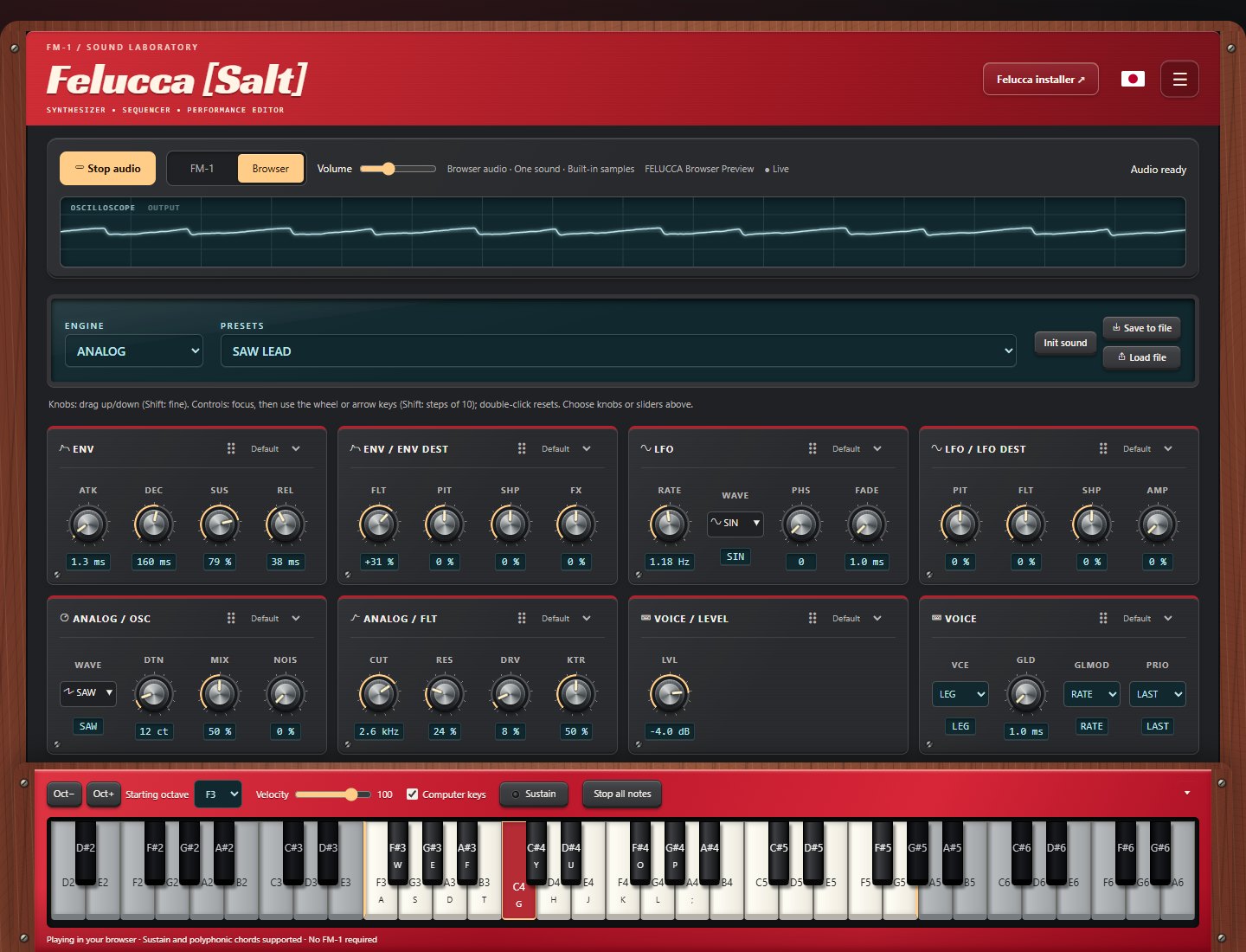
A multi-engine synthesizer for the M-VAVE FM-1 and a hardware-inspired browser Studio. Select Browser in the Studio to start playing without an FM-1 or a firmware installation. Select FM-1 to edit your connected instrument.
Current device firmware is 0.9-salt14 beta. Website updates do not require reflashing the device.
Install on an FM-1
Connect the FM-1 directly to your computer with a USB data cable, open the installer in Chrome or Edge, and select Install Felucca [Salt] Beta. Close other MIDI apps and do not unplug the cable while writing. Normal installation needs no extra hardware.
Although tested on device, this firmware is a beta. The author accepts no responsibility if your FM-1 is damaged or misbehaves because of this custom firmware. Use it at your own risk. A failed installation can leave the device unable to boot; recovery may require an FM-1 Transporter. Returning to official firmware requires M-VAVE's M-UPGRADE updater and official FM-1 firmware from M-VAVE downloads.
Studio highlights
- FM-1 / Browser switch: Browser starts audio on selection; FM-1 mode provides the connected device editor. Switching back stops browser audio.
- Browser synth: nine engines, 54 factory presets, built-in samples, expressive controls, chords, sustain, and independent browser volume.
- Live oscilloscope: a full-width waveform of the browser's actual audio output.
- Twelve themes: Stage Red, Matrix, Vintage DX, Model D, Chocolate, Vaporwave, and more, with light/dark modes and a dedicated high-contrast theme.
- Hardware styling: wood accents where appropriate, molded surfaces, screws, speaker grilles, and locally hosted display fonts.
- Custom layout: choose knobs or sliders for each Sound card, drag cards into your preferred order, and select full width from the upper-right menu.
- Docked keyboard: mouse, touch, and computer-key playing; octave controls, sustain, and a collapsible tray. Starts with the FM-1's 27-key F3–G5 range and adds shaded keys outside that range when space permits.
Browser mode currently plays one sound. Sequencing, track mixing, sample uploads, and projects are not connected to browser playback yet. Use Save to file to keep sound edits. The full device workflow remains available in FM-1 mode. See browser engine details and build instructions.
Salt firmware additions
- TRS MIDI input alongside USB, with sustain, pitch bend, mod wheel, and MIDI reset handling.
- Internal, USB, or TRS clock and MIDI Start/Stop/Continue, including keremimo's contribution.
- Twenty screen palettes, including eight light palettes and light/dark high contrast.
- Regular/bold text, track colors, and clearer playback, recording, and MIDI status colors.
- Persistent preset favorites with All/Favorites browsing and no repeated entries in short lists.
- MIDI event or note/chord monitor, including pedal-sustained notes.
- Compatible Studio controls for device display settings, clock source, and favorite presets.
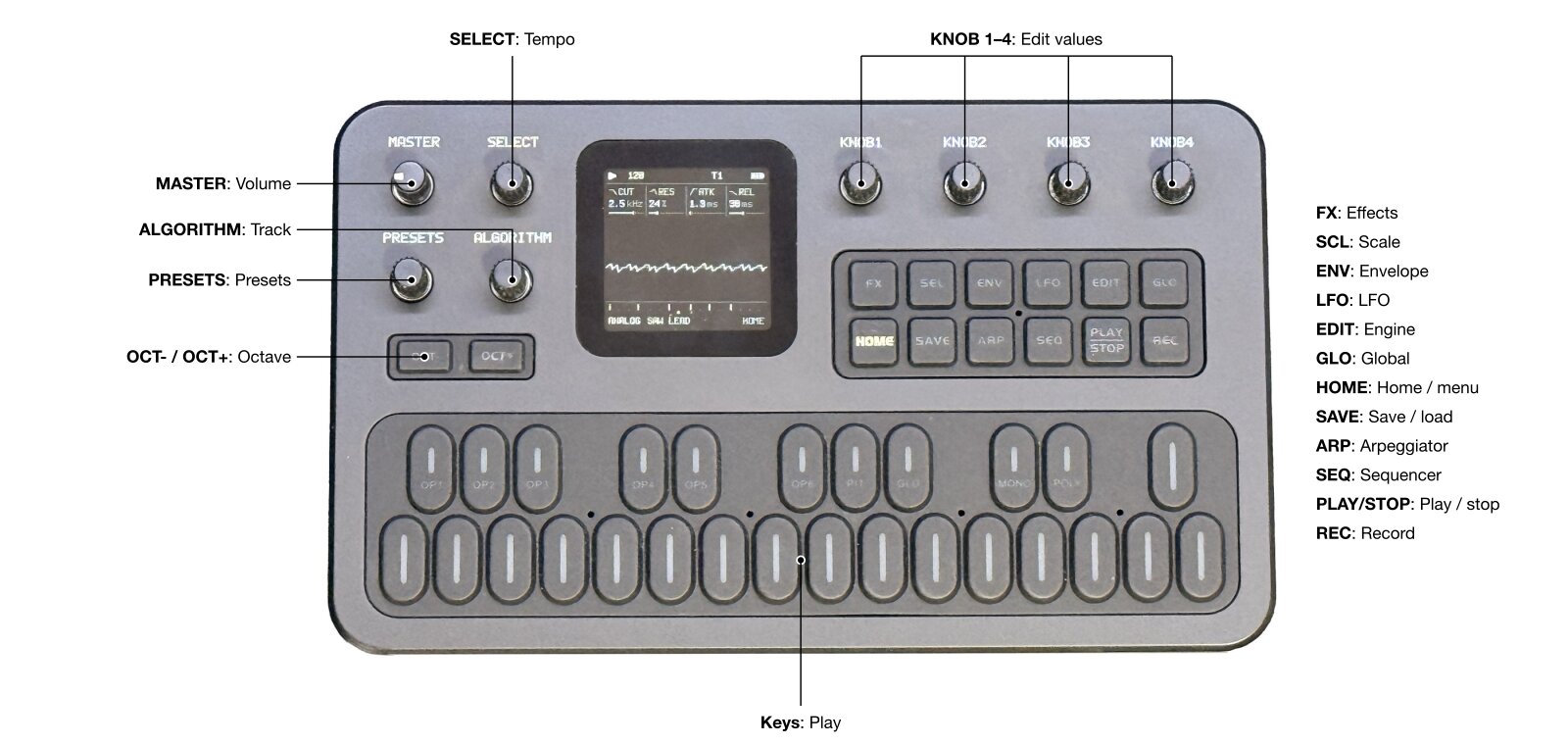
Core firmware features
- Nine engines (below), each with its own factory presets
- Four tracks: three synth parts, each with its own engine and sound, plus a GM drum track; 8 voices shared between the parts. ALGORITHM selects the track on every page
- Sequencer: 64 steps per track with chords, ties, accent and slide; live loop recording with overdub and held notes; each track loops on its own length
- Arpeggiator, scales and quantize, glide, MONO / LEGATO / UNISON voice modes
- Effects: distortion and the SLICER per track; chorus, delay and reverb sends; master limiter
- Presets: factory presets with their own patterns, 32 user preset slots, 4 project slots
- Web editor: every parameter of every track, step grid, track mixer, preset library, sample upload
- USB: class-compliant MIDI in and out (channels 1–3 for the parts, 10 for drums); updates over the same USB cable
- TRS MIDI input: shares USB's track routing and supports pitch bend, mod-wheel vibrato, sustain and MIDI panic; controls and limits
- MIDI status: GLO > SYSTEM knob 1 switches the first column between USB status and TRS status/activity; both inputs remain active
Engines
- ANALOG: virtual analog; two oscillators (saw, square, triangle, sine, PWM), noise, drive, resonant low-pass filter
- DIGITAL: 4-operator FM, 8 algorithms, feedback
- PHASE: phase distortion (ported from CrispyZebra)
- LOFI: chiptune; pulse, triangle, saw, noise and a 4-bit wave RAM, stepped envelope, sweep, arpeggio
- SAMPLE: multisampled instruments and 3 user sample slots
- VOICE: formant oscillator, sung vowels
- TRIO: 3 oscillators with ring modulation and sync, multimode filter (LP / BP / HP / notch)
- WHEEL: tonewheel-style organ; drawbar registrations, percussion, key click, drive, rotary speaker
- GRAIN: granular textures from the built-in samples or a user slot
SLICER (FX page, every track including drums): a tempo-synced 16-step gate or stutter, with 16 patterns.
- Install: web installer (Chrome or Edge, USB), or
tools/fm1_install.pyfrom a terminal - Editor: web editor
- Build: BUILDING.md
Screen colors
Hold HOME and choose COLOR. Turn knob 1 or press OCT+ to preview a theme; leave the menu to save it. The original five palettes are joined by VIOLET, PINK, ICE, WARM, two-color OCEAN (cyan/amber) and DUSK (violet/gold), HI-CON, and light-background LIGHT, PAPER, SKY, MINT, LILAC, ROSE, and SAND themes. L-HICON adds a white background with black values, dark labels and inactive controls, and stronger separators for high contrast in light mode.
The FONT row directly below COLOR selects REGULAR or BOLD Terminus. Turn knob 1 left/right or press OCT+ to switch, with an immediate preview; exit the menu to save. Both weights use the same character spacing. Existing settings migrate with REGULAR selected and retain panel calibration.
LOWCUT reduces deep bass in the final stereo output (two high-pass stages, approximately 110 Hz each, 12 dB/octave combined roll-off), intended for the small built-in speaker. Leave it OFF to retain full bass in the output.
MIDI MON below FONT selects OFF, EVENTS, or NOTES. A single line appears at the lower-right inside the HOME waveform area. EVENTS shows incoming USB/TRS messages; clock is summarized without hiding each note/controller immediately. NOTES shows the selected track's held or pedal-sustained notes, including onboard keys, MIDI, sequencer, and arp playback. Up to four pitches are shown, with +N for additional pitches. Notes stay visible until released; MIDI sustain keeps released keys visible until pedal-up. The mode defaults to OFF and saves when leaving the menu.
Track numbers and the selected track's footer use blue, orange, violet, and green for tracks 1 through 4. Play and TRS receive activity are green; recording is red, armed tracks and low battery are amber, and USB connection is blue. Labels, shapes, and the selected-track underline remain available alongside color. Light themes use darker accents for readability.
Scale keyboard
On the SCL page, set QNT to WHITE to play the selected scale using only the white keys (SNAP keeps every key and rounds it down to the scale). C4 plays ROOT; consecutive white keys play consecutive scale notes above and below it. Black keys are silent, including during live recording and step entry. TRN transposes the resulting notes; the octave buttons shift them by full octaves. Set QNT to OFF for the normal chromatic keyboard.
Available scales: chromatic (CHR), major (MAJ), natural minor (MIN), Dorian (DOR), Mixolydian (MIX), major pentatonic (PEN), minor pentatonic (MPEN), harmonic minor (HARM), Phrygian (PHRY), Lydian (LYD), Locrian (LOC), ascending melodic minor (MEL), minor blues (BLUES), whole tone (WHOLE), half-whole diminished (DIMHW), and whole-half diminished (DIMWH). Scales with other than seven notes continue across the white keys without repeating notes; their roots need not fall on every C key. The drum track, GM sample kit and incoming MIDI retain their existing note mapping.
Favorite presets
On SAVE > PRESETS, knob 3 (FAV) marks the current sound: clockwise ON, counterclockwise OFF. Stars identify favorites in the browser. Knob 4 (LIST) selects ALL to the left or FAV to the right. PRESETS and knob 1 browse that list; the PRESETS knob also follows the filter on HOME and TRACKS.
Favorites and the filter are saved automatically. They refer to factory engine/preset pairs or user slots, without copying sounds. Overwriting or renaming a user slot keeps its star; erasing it removes the star. Favorites do not save sound edits: use SAVE > USER to store an edited sound first. With an empty favorites list, the current sound stays loaded; select LIST ALL to find sounds to add. The single drum kit is not part of this browser.
MIDI clock and transport
In GLO > GLOBAL > CLK, select INT, USB, or TRS. USB and TRS follow
MIDI Clock (24 pulses per quarter note) and Start, Stop, and Continue from the
selected input; the other input can still play notes and expressive controls.
Start resets the patterns to step 1, while Continue resumes their current steps.
The sequencer stops and releases its notes if clock disappears for 500 ms. The
displayed BPM, arpeggiator, delay, and SLICER follow the measured tempo. TRS MIDI
IN is enabled by default (FELUCCA_UART=1).
Layout
| Path | What |
|---|---|
firmware/ | firmware sources: src/ app, hal/ hardware layer, loader/ update loader |
tools/ | build script, generators, package maker, installer and sample uploader |
assets/ | icon atlas, font, CC0 instrument samples |
web/ | web installer and editor sources |
tests/ | tests that run on the build machine |
Support
If Felucca is useful to you, sponsoring on GitHub or a donation on itch.io helps keep its development going.
For Salt or Studio issues and contributions, use ChanceTheMaker/Felucca.
Credits
- Felucca [Salt] and Studio enhancements: Chance Roth (@ChanceTheMaker)
- Felucca by Leo Kuroshita (@kurogedelic), Hügelton Instruments
- Font: Terminus by Dimitar Toshkov Zhekov, SIL OFL 1.1
- Samples: Versilian Studios VSCO-2 Community Edition and VCSL, CC0 1.0 (attribution)
- PHASE engine: oscillator ported from CrispyZebra by Leo Kuroshita (GPL-3.0)
- VOICE engine: after klattsch by Tony Gies (MIT); formant data from Klatt (1980) and Hillenbrand et al. (1995)
- Web editor icons: Fukiai by Hügelton Instruments, MIT
- Package format and boot files: JieLi AC79 SDK (Apache-2.0, not included)
Licence
Code: GPL-3.0-only. Third-party material: LICENSING.md.
M-VAVE and FM-1 are trademarks of their respective owners. Felucca is not affiliated with or endorsed by them.
Copyright (C) 2026 Leo Kuroshita (@kurogedelic), Hügelton Instruments
Web editor
Browser keyboard
The keyboard at the bottom of the Studio plays the connected FM-1 through Web MIDI
in FM-1 mode, or the local synth in Browser mode. Click or touch keys (including chords), or enable Computer keys and
use A W S E D F T G Y H U J K O L P ;. It has octave, MIDI channel and velocity
controls, a sustain toggle and Stop all notes. Channels 1–3 play parts 1–3;
drums normally use channel 10. In FM-1 mode, sound comes from the FM-1 audio output;
in Browser mode it comes from your computer. Mock mode previews the controls without sound. No firmware update is
needed for the keyboard.
Notes are released on key/pointer release, pointer cancellation, focus loss,
page hiding, channel/octave changes and disconnect. Typing in text fields does
not play notes. MIDI cleanup is best effort if the device is physically unplugged.
Run node web/test_keyboard.mjs for the keyboard's MIDI behavior checks.
Device preferences
With compatible firmware, Settings > Device display selects the FM-1 screen palette, font weight, and MIDI monitor mode. Only supported controls appear. Changes apply immediately and save on the device.
Library > Device presets provides favorite stars and an All/Favorites filter shared with the FM-1. Factory sounds and used user slots can be bookmarked; computer-library patches must first be saved to a device user slot. Panel-side changes and slot replacements/deletions update while this view is open. Older firmware keeps the existing editor without unsupported controls.
Optional analytics
The published Salt installer and Studio send cookieless Google Analytics measurements by default. Analytics preferences in the hamburger menu opens a modal that offers Without cookies, Allow analytics cookies, and Turn analytics off. Previous declines remain full opt-outs. Every choice leaves all features available; localhost and other forks are excluded. Cookieless pings support aggregate measurement and eligible modeling, rather than full visitor/session tracking.
Measurements include visits, download clicks, installation attempts and outcomes, and browser audio starts. A completed recovery write is reported separately from an installation with a verified reboot. No MIDI notes, audio, preset names, or device identifiers are sent by our custom events. See analytics details.