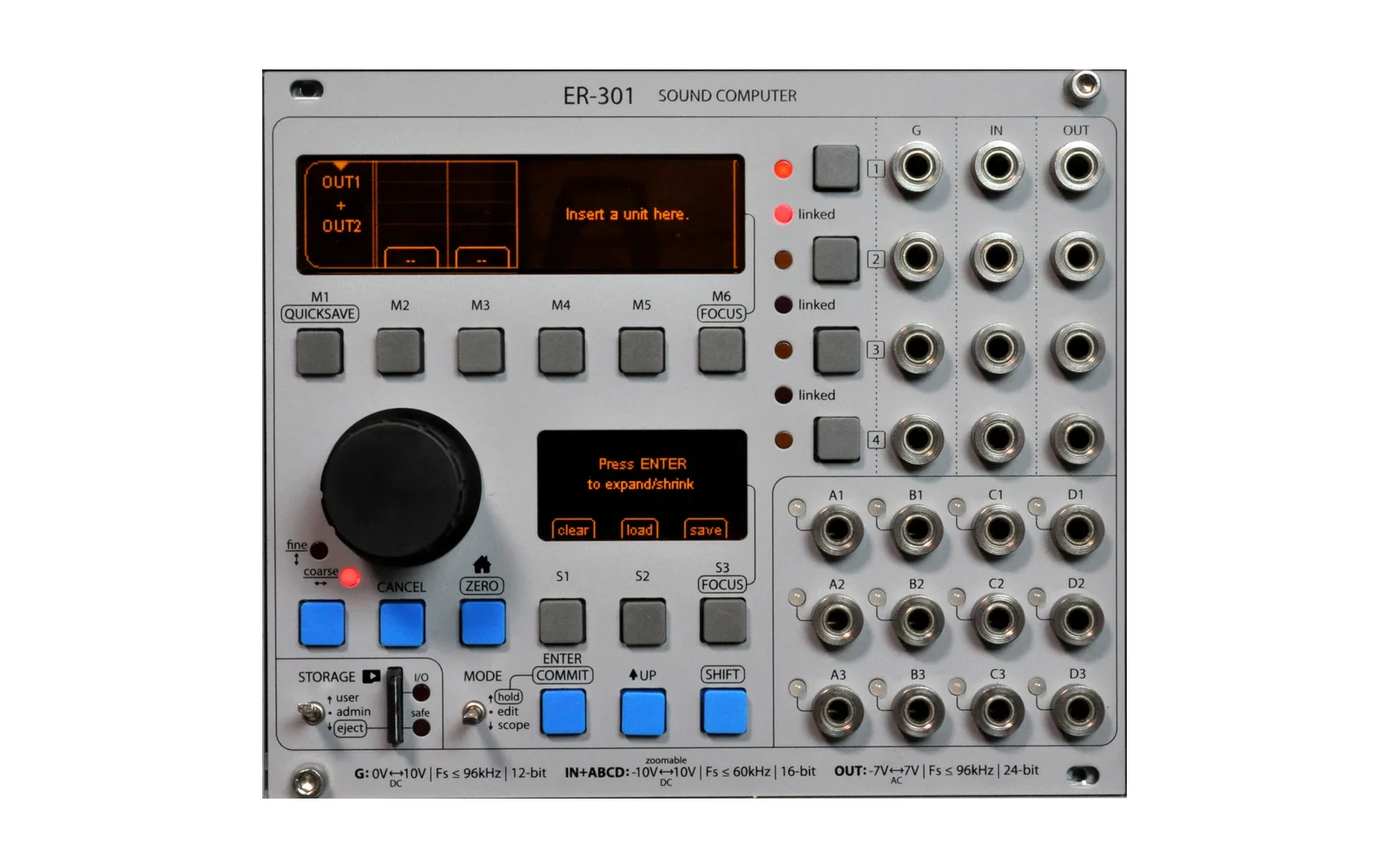
er-301-stolmine
Hype15/100Firmware and SDK for the ER-301
er-301-stolmine is a mod for the Orthogonal Devices ER-301, by @stolmine. Open source under MIT, latest release v0.7.0-stolmine.9.7.0 (August 2026), 24 stars on GitHub.
forOrthogonal Devices ER-301·by@stolmine
Unclaimed. Is this yours? Sign in with GitHub as @stolmine to claim it.
er-301-v0.7.0-stolmine.9.7.0.zip· 2.4 MB
MIT· stolmine/er-301-stolmine·downloads come from the creator’s GitHub releases
v0.7.0-stolmine.9.7.09.7.0 - control promotionLatest1 file
Promote a control out of a nested unit onto any unit that contains it, in one gesture. Plus optional marks for controls that hide a second sub display under SHIFT.
Control promotion
Hold a control inside a nested unit and pick promote from the fan-out menu. Choose a destination from a picker showing only that control's ancestors, then choose where it sits on the destination's strip. You get a macro that is already wired.
The macro takes the control's value, its gain and its whole modulation branch, so the patch sounds the same at the moment of promotion. The original becomes a pass-through at zero and stays usable as a per-instance trim on top of the macro.
It works on standard faders, V/oct offsets, gates, and the specialised controls in packages. Where it is safe to do so the macro is built as the same kind of control as the original, so promoting a mode selector gives you a mode selector showing mode names rather than a numeric fader.
Nothing is created until you confirm. Backing out of either screen leaves the patch untouched.
Promotion is refused where transparency cannot be promised: a control with no modulation branch, a mixer-style input level, or a control wired through an intervening stage rather than into the parameter it edits. It is also refused while a scene is being authored or engaged, and it clears the promoted control's own scene deltas on commit, leaving every other control's scene data alone.
SHIFT sub-display marks
Admin > Settings > Unitsgains Show SHIFT sub-display marks?, off by default. It marks every control that has a second sub display under SHIFT. Detection is structural, so packages are covered without declaring anything.Fixes
- A control whose customisations changed its own value lost that value on every patch load. This affects customised V/oct controls in existing patches, which will now load with the offset they were saved with.
- Deleting a custom control left its modulation branch running on the audio thread. Affects the existing
Edit Controls > Delete Controlpath as well as promotion.
Install
Copy the
.ziptoER-301/firmware/on the front card, delete any oldercore-,teletype-andtxo-packages fromER-301/packages/, then boot. The installer skips a package whose version already matches, so stale packages would leave old package code running against the new kernel.v0.7.0-stolmine.9.6.09.6.0 - crash diagnostics1 file
First feature-bearing release since 9.5.0 closed the AM335x line. The line stays closed for DSP and sequencer work: there are no DSP or sequencer changes here. What this adds is a crash-diagnostics facility, plus the developer tooling built alongside it.
New: crash diagnostics
Admin > Crash Reportslists and displays past reports, and a notice screen appears on boot when a report is waiting.Two toggles in
Admin > Settings > General, both OFF by default:- Enable crash diagnostics? arms trap capture, the hang monitor and the flight recorder.
- Enable UI hang detection? is a separate opt-in, because a legitimately long main-thread operation (preset load, package install, graph recompile) can trip it.
Recording is zero-cost while disarmed, so leaving these off costs you nothing.
What a report contains:
- Fault kind, pc / lr / registers, and the faulting thread, plus a module map bounded by the loaded packages, so an address inside a package symbolizes instead of reading as
kernel + offset. - Hangs, not just traps. An audio-thread heartbeat backed by the am335x watchdog catches freezes, which an exception hook alone never sees. The report names the spinning PC rather than whichever scheduler frame happened to be on top of the stack.
- Per-task and ISR stack high-water marks with canaries, plus heap pressure and allocation-failure counters. Between them, a crash can usually be attributed to a blown stack or a stray heap write without a bisect.
- A flight-recorder ring of recent events leading up to the fault.
This is aimed squarely at the hardware-only C-side crashes that leave no evidence today and cost multi-day bisects. If you hit one, arming diagnostics and reproducing it now produces something actionable.
Developer-facing
- Headless emulator harness and a deterministic UI model:
emu.uiState()introspection, a static UI manifest gate, a typed operator library, an empirical UI crawler, and an A* goal solver that turns a target state into real gestures. Written up indocs/AGENT_EMU_GUIDE.md. - 38 new emulator regression tests.
- Planning ledger regime:
planning/ledger.tomlis the source of truth,planning/TODO.mdis generated from it, andscripts/devis the entry point for build / test / commit / push with the gate running on every commit. CHANGELOG.mdhas been backfilled for 9.4.0 through 9.5.2, which were never written up at the time.
Install
Install the attached
er-301-v0.7.0-stolmine.9.6.0.zipthe usual way, then reboot and follow the on-screen installer.v0.7.0-stolmine.9.5.29.5.2 - sequencer CANCEL reverts cell edit1 file
Patch release.
Fix: In the sequencer L1 cell editor, CANCEL now reverts the focused cell to its value before editing began, instead of keeping the edited value. This brings the single-cell editor in line with the bulk-edit and mark modals, whose CANCEL already rolls back.
- UP remains the commit gesture (keeps the edited value).
- ENTER's commit-and-advance and column/layer switches still commit, so multi-row edits are unchanged: each advance commits the row left behind, and CANCEL reverts only the cell currently under the cursor.
Install the attached
er-301-v0.7.0-stolmine.9.5.2.zipvia the rear SD card as usual.v0.7.0-stolmine.9.5.11 file
Patch release fixing a critical regression in 9.5.0's external clock subsystem.
Bug
External clock advanced every column one row per surviving pulse, ignoring the
stL(step-length) column. Sequences with mixedstLplayed as if every row had the same length.Fix
Slotnow maintains an atomic external-tick counter. Each surviving pulse (after master + per-slot dividers) increments the counter; the slot advances the playhead only when the count satisfies the current row'sstL. The flow stays as designed:ext_source -> master_div -> per_slot_div -> slot tickA tick is always a tick. The per-slot divider continues to compose naturally with
stL:divider=2 + stL=1anddivider=1 + stL=2both produce one row per two pulses.Follow-on fixes from first bench
- First-pulse-after-start fires
fireTickunconditionally so row 0 loads its S&H values immediately, regardless ofstL[0]. - The accumulator gates against
currentRow'sstL(the row emitting + visible), notplayhead'sstL(the next row). Transitions match the highlighted row. stLminimum is 1 tick everywhere.normalizeL1Valueenforces it engine-side acrosssetL1and every L2 arithmetic action + mute. LuaclampForColumnmirrors it for encoder edits + paste.
Install
- Copy
er-301-v0.7.0-stolmine.9.5.1.zipto/ER-301/firmware/on the unit's SD card. - Admin > Install Firmware > Update > navigate to file > Enter > Reboot
Compatibility
- Internal clock mode is unaffected.
- Quicksaves from 9.5.0 (and older) load forward. Any sub-tick
stLvalues they hold snap to 1 tick on the next write.
Source
developat commite75334f. Plan doc atdocs/planning/seq-stl-integer-ticks.md.- First-pulse-after-start fires
v0.7.0-stolmine.9.5.01 file
Closing-feature release of the AM335x stolmine fork.
From this point forward, AM335x firmware development is closed to new features. The fork remains supported for bug fixes and polish on
.9.5.xpatch level.What landed since 9.4.0
Sequencer external clock (phase 6)
Comparator-backed engine on
SequencerTask(source select, edge detection, global + per-slot dividers, derived BPM). 6-plySequencerClockViewunder Admin (clock source picker, reset picker, threshold, manual fire, per-slot div faders). Adaptive BPM readout inGridView(switches between internal sBpm and externally-derived ext BPM). Settings-driven int/ext toggle under "Sequencer". Quicksave persistence (schema v3 withclocksubtable + v2->v3 migration).Modal sweep + follow-ups
Single encoder owner enforced at every entry point via
_commitOtherModalsBeforehelper; eight long-standing collisions resolved (mark vs. BPM-latch vs. selection vs. edit vs. layer). Follow-up batch: selection same-col M-tap navs to selectionEnd (F4); layer toggle dropseditingL1(D1); chevron caret on BPM latch (H6); bulk edit respects coarse/fine encoder state (H8).Terminal edit mode + encoder LEDs
editingL1is now a terminal modal: bare S-keys rebound todupe^/step/rand. Mark, BPM-latch, layer-toggle entries are blocked while editing; shifted paste / clr preserved. ENTER / UP / CANCEL / column-switch exits unchanged.Encoder coarse/fine LEDs (
LED_DIAL1/LED_DIAL2) now reflect the active modal's step mode viaEncoder.set(). Lights up during BPM latch, L1 edit, and bulk-edit; turns off everywhere else.Scene mode default + CV fix
Scene mode (replaces hold mode) now defaults to on for fresh installs.
Scene-select CV on the M2/M3 A/B faders now uses pure GainBias semantics matching builtin Offset / Adder / GainBias units:
out = bias + gain * cvIn. Unipolar positive CV rides at or above bias; bipolar CV swings symmetrically. The pre-release "CV ignored bias entirely" behavior is fixed..9.2.1 polish round
- BPM latch UP+onHide release (sticky-modal cleanup on scope-mode exit).
- Replace picker
shiftPressedhandler (no longer lands in favorites-tagging mode). - TXo TR/CV top-level passthrough gate toggle (Comparator-backed; defaults on for compat).
Other
- M-tap on the active sequencer column = edit gesture (intuitive "tap column, tap again to edit" muscle memory).
Install
- Copy
er-301-v0.7.0-stolmine.9.5.0.zipto/ER-301/xroot/on the unit's SD card (or use the firmware-update workflow if you've upgraded a prior stolmine release). - Boot. Storage switch over, hit ENTER on the update prompt.
Compatibility
- Quicksaves from 9.4.x load forward. Sequencer clock config (schema v3) is back-migrated.
- Vanilla packages (lojik, strike, sloop, polygon, plaits, marbles, etc.) load and run; ABI is upstream-stable.
Source
developat commit0f36ac7.v0.7.0-stolmine.9.4.0v0.7.0-stolmine.9.4.0 - Scene Mode1 file
v1.1 Hold mode becomes Scene mode
The headline of 9.4.0 is v1.1 of the scene mode feature. v1.0 featured manual switching only and was never released; v1.1 adds CV-controllable A and B selection via two new M2 / M3 controls, each backed by their own CV-input subchain.
Performance view layout
M1     M2  M3  M4    M5    M6    ...
morph  A   B   scene scene scene  (scroll for scenes 4..16)
                1     2     3
M1 morph fader unchanged. M2 selects scene A, M3 selects scene B. Both have a normalized
[0, 1]Bias fader, a per-role CV input subchain (dive on S1), and a Gain knob.State machine per A / B selector
Three writers compete for the integer scene index per role:
- CV input (when patched, exceeds Schmitt threshold)
- Encoder on the M2 / M3 Bias fader
- Chip tap (
asgn A/asgn Bon a bank tile)
Whichever wrote most recently "wins" until either (a) another writer fires or (b) CV moves past a 0.5-step Schmitt threshold while the arbiter is in Tracking-Manual. Cold-start state is Tracking-Manual; Gain defaults to 0 so CV is inert until the user explicitly raises it.
CV mapping
output_index = round(Gain × cvIn × N)clipped to[0, N], whereNis the live bank size. Same input always selects the same fractional position of the bank regardless of bank size; add / delete a scene and the encoder feel + CV mapping don't shift.Visualization
- Box on M2 / M3 fader = Bias (manual home)
- Line = effective output (snaps to scene tick on output change)
- Range bar right of fader = CV input swing in normalized space
- Label = current scene's name at the rounded output position (habitat
ModeSelectorpattern; works under CV, encoder, and chip-tap) - Bank chips: A / B / AB combined when both arbiters land on the same scene; fully filled indicator when AB
Audio thread autonomy
The morpher reads each arbiter's
OutOutlet directly via two newIndexA/IndexBInlets onParamSetMorphand selects from a pre-built per-scene Parameter table per item (newkVeeIndexedItem kind). Switching latency is 1 audio frame regardless of UI load — under DSP saturation, scene switching stays clean even when the UI animates slowly.Persistence
Multi-role serialize schema (
sceneCVBrancheskeyed by role) preserves Bias / Gain / CV subchain contents across reboot. Legacy v1.0 saves migrate transparently. On deserialize the arbiter state machine baseline is relatched, and on engage a kickstart pass forces the first frame of output so quicksave reload doesn't require a manual nudge.Other improvements in 9.4.0
- Settings menu reorganization: picker prefs moved out of "Units" catchall into a new "Unit Picker" category; new "Scenes" category for scene mode toggles.
- Admin → Reset Scene Mode: button under Maintenance. Drops all scenes, clears CV subchains, resets selectors. Confirmation-gated via
confirmSceneModeResetsetting (default yes). - Link / unlink resets scene state: scene data on the affected chain pair is wiped on stereo link / unlink since unit instance keys aren't stable across the topology rebuild. Audio chain content still survives (this is the
keeppath). - Scene-slot AB visual + chip grows leftward so the right margin stays put when text changes from "A" / "B" to "AB".
Bench coverage
29 automated tests pass (17 sequencer + 6 arbiter + 6 morph-indexed). Hardware bench shakedown across the v1.1 work.
Install
Copy
er-301-v0.7.0-stolmine.9.4.0.zipto the front card'sER-301/firmware/and reboot.v0.7.0-stolmine.9.3.0v0.7.0-stolmine.9.3.0 - dense unit picker1 file
Highlights
A new dense unit picker, available alongside the classic Mondrian view. Selectable from
Admin > Settings > Units > Unit picker style:(denseis the new default;originalpreserves the classic view).What's in the dense picker
- 2-column layout, 8-10 visible units per screen + alphabet jump ribbon
(
*no-filter + A-Z +#numerics). Hold shift and use the encoder to move along the ribbon. - Per-row type glyph derived from a category-first / keyword-fallback
cascade:
~ source / > effect / $ modulate / * timing / . utility / ? unknown. - 6 sort modes via M2: recents / alpha / type / package / keyword / favs-first. Section dividers in type / package / keyword / alpha.
- M3 cycles a type filter (strict glyph match). Sort and type cycles also reachable by hold-M2/M3 + encoder for live scrubbing.
- M1/S1 = pick left, M4/S3 = pick right. Sub display chip headers make the dual binding explicit.
- M5 / M6 toggle hide-edit / fav-edit modes; M1/M4 then tag instead of picking.
- HOME = cursor to top. Shift+HOME = full reset to your configured default sort + clear all filters.
- Persistent right-edge
+marker on favorited units, visible in every mode.
Admin settings
- Default sort, section dividers on/off, pin favorites to top, pin recents to top (recents pin = 6 most recent units in a dedicated pinned section).
Other in this release
- L2 cell editor: tap-S3 cycles cell-ref column, 2-line target readout above S3 (column-aware formatter shared with the L1 grid).
- Picker per-frame refresh skips when nothing is animating, so the encoder stays responsive on an idle picker.
Install
Copy
er-301-v0.7.0-stolmine.9.3.0.zipto the root of the rear SD card and boot. The installer will pick it up automatically.Full changelog: CHANGELOG.md
- 2-column layout, 8-10 visible units per screen + alphabet jump ribbon
(
v0.7.0-stolmine.9.2.0v0.7.0-stolmine.9.2.0 - sequencer + multi-output unit framework1 file
This release introduces advanced, built-in sequencing to the ER-301. 4 concurrent sequencers, each carrying 2 channels of CV and gate, independent step length column, and transposition. Each sequencer also includes a second layer, which exposes a simple IF > THEN framework where rules can be called on individual cells as the playhead passes over them. You can find this by entering scope mode and hitting
shift+ENTER.Controls reference: SEQUENCER.md at the repo root. One-page guide to takeover entry, the column layout, L1 + L2 authoring, the L2 grammar, selection / clipboard / mark / BPM / persistence, and per-column random distributions.
Sequencer
A polymetric step sequencing suite with a two-layer authoring model. Each of 4 sequencers exposes 4 patchable outputs to the chain picker. Columns are authored from a takeover grid that lives behind the standard scope display; press
shift+ENTERfrom the scope view to enter, again to exit.Slot layout
Each slot has 6 columns. Four are routed to the chain picker; two are internal to the engine.
col symbol role picker output 0 cv1 V/oct (transpose pre-applied) seqN.cv11 cv2 raw modulator seqN.cv22 g1L gate 1 length seqN.gate13 g2L gate 2 length seqN.gate24 stL step length (internal) -- 5 tr transpose semitones (internal) -- Each column has its own loop region (markers), playhead, and step-length, so cross-column polymeter is just per-column length manipulation. Step length and transpose are sequencer-internal, authored in the grid but not patched as separate outputs.
Authoring
- Two layers per slot: L1 is the cell-value layer (CVs, gate lengths, etc.); L2 is a predicate-action grammar that runs once per tick per cell present.
- L2 predicates: modulo, equals / greater / less / approx / probability against any column (own playhead or pinned row), plus per-gate fire detectors (
!,!1,!2) and a value-changed detector. - L2 actions: arithmetic (
+-=*/), per-gate retrigger (!1,!2), randomize, mute, and three jump scopes (host, all-columns, self). - TIE on gate length: dial the gate-len cell to the top of its range to hold the gate across the full step.
- Cell-edit modal opens with ENTER. Inline edit nudges values with fine / coarse / super stepping per column type.
- Selection, copy / cut / paste / randomize, mark mode with
Unifyto fan markers across all six columns, per-cell clear viashift+S3. - In-takeover BPM control via
shift+S2latched fader. - Quicksave round-trips per-slot column state (length, markers, L1 values, L2 rules) using the firmware's standard preset path. An opt-in System Setting (
quickSaveRestoresSequencerTransport) restores the running/stopped state across quicksave loads.
See SEQUENCER.md for the full reference.
Multi-output unit framework
Per-unit fan-out of multiple sample-aligned outputs into the chain picker. Units that opt in expose each sub-output as a separate connection target (
unit.out1,unit.out2, ...) instead of the single-output convention. Wiring is sample-aligned (same frame, same tick) so downstream chains stay in lockstep, and inactive sub-outs short-circuit to avoid paying CPU for an unconsumed output.The framework lays the groundwork for upcoming units that benefit from simultaneous related signals: multi-mode filters exposing LP / BP / HP at once, envelopes with EOC companions, dividers with multiple ratios surfaced as separate outs, multi-phase LFOs, stereo samplers carrying L / R / sum, and similar shapes where one DSP unit naturally produces several related streams. Existing single-output units are unaffected; multi-out is opt-in per unit. Cross-firmware compatibility: presets built against a multi-out unit on stolmine load on vanilla firmware with sub-outs >= 3 silently dropping.
Install
Drop
er-301-v0.7.0-stolmine.9.2.0.zipinto the SD's/ER-301/firmware/folder, eject, install via the firmware-install screen.For full sequencer control reference, see SEQUENCER.md.
v0.7.0-stolmine.9.1.01 file
Release date: 2026-04-17
Summary
Expanded FileRecorder sourcing plus LocalChooser UX polish across AdminMode. Resolves the long-standing Tomograph visualization regression, which was traced to a package-side libm issue. ABI-compatible with v9.0.0 — no package rebuild required.
What's new
- FileRecorder: Locals tab enabled. The source picker's Locals tab now
works from the FileRecorder, letting tracks be sourced from unit outputs,
branch outputs, or patch monitoring outputs inside any chain — the same
sources
LocalChooseralready exposed elsewhere in the app. Previously the FileRecorder was limited to Jacks + Globals because it constructedSourceChooserwithout a chain. - LocalChooser: chain-select LEDs. Chain buttons light to indicate which root chain the picker is currently browsing. LED state persists across AdminMode user/scope switches and is re-asserted when the picker is re-shown.
- LocalChooser: empty-overview warning. Chains with no patchable sources
now display a
[chain]: No units.placeholder instead of a blank view.
Enhancements
- LocalChooser: live refresh on re-show. The picker re-resolves the
selected channel's root chain on
onShowand reseeds itsChainOverviewwhen the selection has changed, so backing out of the picker and changing channels no longer leaves a stale overview. - AdminMode + LocalChooser: persistent LED across user/scope. The chain-select LED follows the active user and scope changes in AdminMode rather than snapping back after every re-entry.
Fixes
- Tomograph visualization regression resolved. Traced to package
.solibmsinf/cosfmiscompute on am335x when called from dynamically loaded packages. The firmware side is clean; the fix lives in the Tomograph package (precomputed LUT). Investigation archived indocs/HABITAT_TOMOGRAPH_VIZ_REGRESSION.md.
Known issues
- LocalChooser may display stale state after stereo link/unlink in user
mode. If the Locals picker is reopened on the same channel after the
user links or unlinks a stereo pair, it can paint against a destroyed
chain reference. The main channel view and
OUTX: No unitsreadouts are unaffected, they rebuild correctly viaChannels.show(). Workaround: fully exit the picker before changing stereo link state. Fix planned for the next release; design is recorded indocs/planning/chain_invalidation_on_link_unlink.md.
Internal / docs
- Habitat Tomograph viz regression investigation note added and marked resolved.
- Planning doc for the chain-reference invalidation bug
(
docs/planning/chain_invalidation_on_link_unlink.md). - Multitrack recorder Locals feasibility note archived in
docs/planning/multitrack_recorder_locals_feasibility.md.
Upgrade notes
- Install the firmware zip normally via the front SD card's
ER-301/firmware/directory. - Delete any prior
core-*,teletype-*,txo-*packages on the SD card before installing to avoid the version-match skip on first boot. - ABI-compatible with v9.0.0 — third-party packages built for v9.0.0 load unchanged.
Commits included
bd6a3d6 docs: plan chain-ref invalidation fix for stereo link/unlink eef29f2 AdminMode + LocalChooser: chain LED persists and follows user/scope 749577e LocalChooser: live-refresh chain state when picker re-shown 14e1421 LocalChooser: chain-select LEDs and empty-overview warning 849b791 FileRecorder: enable Locals tab in source picker 75dc940 docs: mark Tomograph viz regression resolved — package libm sinf/cosf 9a8d580 docs: habitat Tomograph viz regression investigation note- FileRecorder: Locals tab enabled. The source picker's Locals tab now
works from the FileRecorder, letting tracks be sourced from unit outputs,
branch outputs, or patch monitoring outputs inside any chain — the same
sources
v0.7.0-stolmine.9.0.01 file
What's new
- Doom screensaver — doomgeneric with terrible AI implementation that auto-plays, 102x64 viewport, manual selection only (will not be chosen by cycle) MAY FREEZE UNATTENDED
- Threshold labels —
addThresholdLabel()on Readout and Fader for float-range text mapping - Slot machine text input — alternate 6-column keyboard via M1-M6 (deeply in progress, you can try out the WIP by changing setting in admin)
- Maze screensaver — marching ants border, pipes screensaver removed
- Favorites — fixed scroll jumps, deferred disk writes
- Quicksave — confirmation guard when saving over occupied slots
Version scheme change
Renamed from
txo.x.x.xtostolmine.x.x.xto reflect the fork's broader scope.v0.7.0-txo.8.6.31 file
Changes since v0.7.0-txo.8.6.2
New
- 48 quicksave slots -- doubled from 24. Slots 25-48 are safely ignored by vanilla firmware if you reflash.
- Abbreviated version labels -- quicksave slots show fork suffix (
txo.8.6) for stolmine saves and major.minor (0.7) for vanilla, instead of the full version string that overflowed the display.
Fixes
- Perlin screensaver drift acceleration -- drift was computed as
time * velocity, causing the noise field to scroll faster and faster over time. Now integrates velocity per frame so speed stays constant.
Install
Copy
er-301-v0.7.0-txo.8.6.3.ziptoER-301/firmware/on the front SD card. Install via Admin > Install Firmware. Reboot after installation.v0.7.0-txo.8.6.21 file
New features
- Favorites system — shift-toggle edit mode in the unit picker to tag/untag favorites. Favorites appear as their own category above Recents.
- Screensaver cycle mode — screensavers rotate automatically when enabled.
- Perlin noise screensaver — domain-warped noise field with contour lines, absorption-driven fill-to-contour transition, and stippled sub display.
- Voronoi screensaver — drifting seeds with progressive subdivision, anti-aliased edges via bilinear interpolation, and perlin-driven lighting.
- Readout name table — mapped display text for Readout widgets via
addName()/clearNames()API.
Screensaver improvements
- Forest — godrays, birds, wind sway, grass lifecycle, per-tree lifecycle with z-scaled depth and rim lighting.
- Snow — rewritten with fixed preview timeout.
Fixes
- FrameBuffer vtable ABI fix —
readPixelmoved to end of class so packages compiled against vanilla headers render correctly. This was causing garbled graphics in third-party packages. - Screensaver encoder capture — encoder is now polled around screensaver
draw()so turning the knob exits immediately, even on heavy screensavers. - Package/ELF load diagnostics —
dlerror()now returns the actual failure cause (unresolved symbol names, header mismatches, corrupt archives) instead of the generic "Failed to load ELF file."ZipArchiveReaderreports whether the path is missing, is a directory, or is an invalid zip. - SWIG vector bloat —
std::vector<std::string>hidden from SWIG via#ifndef SWIGLUAguards to prevent STL template bloat in package.sofiles.
Install
Copy
er-301-v0.7.0-txo.8.6.2.ziptoER-301/firmware/on the front SD card. Install via Admin > Install Firmware. Reboot after installation.Note: Packages must be rebuilt against this firmware version due to the FrameBuffer vtable fix.
v0.7.0-txo.8.51 file
Unit picker: coarse/fine encoder scroll
Hold the dial button while turning the encoder to jump between categories in the unit chooser. Release to return to single-row scrolling. Works in both Category and A-to-Z browsing modes.
Emulator fixes
- Fixed window scaling on Wayland with fractional display scaling (sdl2-compat compatibility)
- Fixed mouse input misalignment with rendered controls
- Fixed missing
cstdintinclude for emulator builds - Default window scale bumped to 3x
Build system
make cleannow removes staleinstall.lua, preventing version mismatch between installer and bundled packages
Documentation
- Added I2C hardware requirement notice to README: the ER-301 and TXo cannot run in isolation — a bus leader (Teletype, Crow, Faderbank) or a module with pull-up resistors (TXb, tt-busboard-jr) is required
v0.7.0-txo.81 file
New Features
- Snow, rain, and forest screensavers — three new particle/generative screensavers replace the bonsai screensaver
- Output scale control — percentage-based master output level (100% / 75% / 50% / 25% / 10%) in admin settings, replacing the previous named presets
- Screensaver preview — trigger the selected screensaver immediately from interface settings without waiting for the idle timer
Fixes
- SWIG runtime version bridge restored — re-applied the runtime v4 compatibility bridge that was accidentally dropped in e9870e5, ensuring community packages compiled against upstream firmware continue to load correctly
Changes since v0.7.0-txo.7
b805029Add snow, rain, and forest screensavers; replace bonsai874d224Restore SWIG runtime version bridge lost in e9870e56fd897bUpdate README for txo.8 features4049eadAdd output scale control and screensaver preview action
v0.7.0-txo.7v0.7.0-txo.61 file
stolmine firmware v0.7.0-txo.7
New: Screensavers
Three new screensaver options available in Admin > Settings > Screen Saver:
- Pipes — 2D animated pipe system that grows across the display with random turns, junctions, and per-pipe coloring. Resets and regrows when the screen fills up.
- Maze — Watches a maze generate in real time using depth-first search, then animates the solution path from corner to corner before starting over.
- Bonsai — Procedurally grows a bonsai tree from a pot at the bottom of the screen. Trunk and branches fork with randomized angles, topped with leaves and blossoms. Fades out and regrows.
All three render on both the main and sub displays.
Fixes
- Fixed
cstdintinclude inFileWriter.hfor SWIG 4.2.1 compatibility - Fixed version string not updating in firmware (kernel now correctly
reports
0.7.0-txo.7)
Install
Copy
er-301-v0.7.0-txo.7.zipto the root of the rear SD card, then select it from Admin > Install Firmware. Reboot after installation.v0.7.0-txo.61 file
v0.7.0-txo.6
Vanilla community package compatibility
Packages compiled against upstream ER-301 firmware (using SWIG 4.0–4.2) now load correctly on stolmine firmware. Previously, the SWIG runtime version mismatch (v4 vs v5) caused type check failures like:
expected 'od::Parameter *' got 'od::Parameter *'
- Pin SWIG to 4.2.1 so firmware and all packages use runtime version 4, matching existing community packages
- Fix missing
<cstdint>include inod/extras/FileWriter.hexposed by the SWIG downgrade
Other changes
- Remove CI/CD workflows (TI SDK installer incompatible with GitHub Actions)
- Update README for stolmine fork
- Add
TODO.md
v0.7.0-txoInit Release: TXo I2C output mod for the ER-3012 files
Full Changelog: https://github.com/stolmine/er-301-stolmine/commits/v0.7.0-txo DISCLAIMER: built using Claude Code MORE DISCLAIMER: be smart, this is a firmware hack (though working quite well on my rev10 at the moment). Back your card up, etc. I am not responsible for any issues you may face, though I will do my best to help out with support.
Features
- Interrupt-driven I2C master TX (read: CPU efficient and stable)
- 4 CV + 4 TR outputs to TELEXo modules
- Simultaneous teletype/crow/faderbank follower compatibility (read: you can still control your 301 with the classic I2C devices while outputting to TXo!)
- ISR chain limiting for feedback loop stability (read: you can create feedback loops involving TXo units without hanging your devices)
Install
- Copy `er-301-v0.7.0-txo.3.zip` to front SD `ER-301/firmware/`
- Copy `txo-0.7.0-txo.3.pkg` to front SD `ER-301/packages/`
- Boot, run firmware update from admin menu
- Install TXo package from Package Manager
- Enable I2C master in TXo library config
Usage
- Create a signal chain in the 301
- Place a TXo CV or TR unit wherever you want to capture signal
- Set your port (0 indexed) and gain (default is 5vpp, max is 10vpp, output is bipolar and follows 301 with as little BS as possible, max will generally be the best)
- Look upon thine TXo as it outputs a copy of your CV from inside the 301!
Limitations
- 1000hz rate limit on signals moving from 301 to TXo (read: not great for audio!)
- Built against v0.7.0 301 firmware, package compatibility not guaranteed
- Do not target the same TXo port with two leaders, you may Experience Consequences
- Latency at the TXo's outputs will match that at the 301's audio outputs
Requirements
- ER-301 hardware with I2C header
- TELEXo module connected via I2C (SCL/SDA/GND)
- Based on v0.7.0-dev firmware (not compatible with stock v0.6.x packages)"