dn2-cfw
Loud90/100Custom firmware research for the Elektron Digitone II (OS 1.12): notes, tools and new effects. No Elektron firmware included.
dn2-cfw is custom firmware for the Elektron Digitone II, by @naturarum. Open source under GPL-2.0, latest release v0.3.0 (November 2026), 16 stars on GitHub.
forElektron Digitone II·by@naturarum
Unclaimed. Is this yours? Sign in with GitHub as @naturarum to claim it.
Digiwerk-Patcher-0.3.0.zip· 8.6 MB
GPL-2.0· naturarum/dn2-cfw·downloads come from the creator’s GitHub releases
v0.3.0Digiwerk 0.3.0Latest1 file
Digiwerk is custom firmware for the Elektron Digitone II on OS 1.12. 0.3.0 adds multitrack USB audio to every build. Not made or supported by Elektron.
New: make your build in the browser. Digiwerk Patcher on the web does what the app does, with nothing to install, and nothing is uploaded. The Mac app is below.
Digiwerk is part of the Modwerk effort, the community hub for Elektron firmware mods.
You make your Digiwerk build yourself, from Elektron's own OS 1.12 file, with Digiwerk Patcher. No Elektron firmware is in this release.
What's new
-
Multitrack USB audio, in every build: a fourth USB CONFIG choice, USB MULTI/MIDI (SETTINGS > SYSTEM > USB CONFIG). With it the Digitone shows up as a class-compliant USB audio device (USB Audio Class 2.0) with 42 inputs at 48 kHz and 24 bits, no driver needed. We've used it with a Mac and with AUM on an iPhone. USB AUDIO/MIDI stays Elektron's stereo mode, and OVERBRIDGE and USB MIDI are unchanged.
inputs what 1-32 the 16 tracks as stereo pairs: track 1 on 1-2, track 2 on 3-4, and so on to track 16 on 31-32 33-34 the main mix 35-36 the delay slot's return 37-38 the reverb slot's return 39-40 the chorus slot's return 41-42 the Digitone's audio inputs
The base, in every build
- Multitrack USB audio (above).
- KEY, the LFO in the track's key. A Déjà vu wave snapped to the scale and root of the track's KEYBOARD SETUP: whatever note the trig plays, the melody stays in the key over the whole range of DEP. On an LFO's WAVE, past OCTA, with DEST on the machine's tuning.
- LFO ONE and HALF run one whole cycle, or half of one, from where SPH starts them, then hold. Elektron's OS 1.12 cuts them short.
- Arp SHUF, RAND and TM, after CYCL. SHUF plays every held note in every octave of RANGE once per cycle, in a new order each time; RAND a random one at each step. TM is a Turing Machine loop: hold one note and the arp plays a melody from it in the track's scale, one note per step of ARP LENGTH, and LOOP CHANGE sets how often a step takes a new note.
- The arp on MIDI tracks. The ARP key and menu work on MIDI-machine tracks: trigs and the keys you play go through the arp, out on the track's MIDI channel, with SHUF, RAND and TM too.
- The Digiwerk intro at power-on.
- DJVU, the Déjà vu LFO.
The effects, one per FX slot
- TAPE: a tape echo in the delay slot, with three playback heads at one, two and three times head 1's time, a band filter in the feedback loop and tape wear (AGE).
- CMP3, the 3-band master compressor, and FLNG, the flanger.
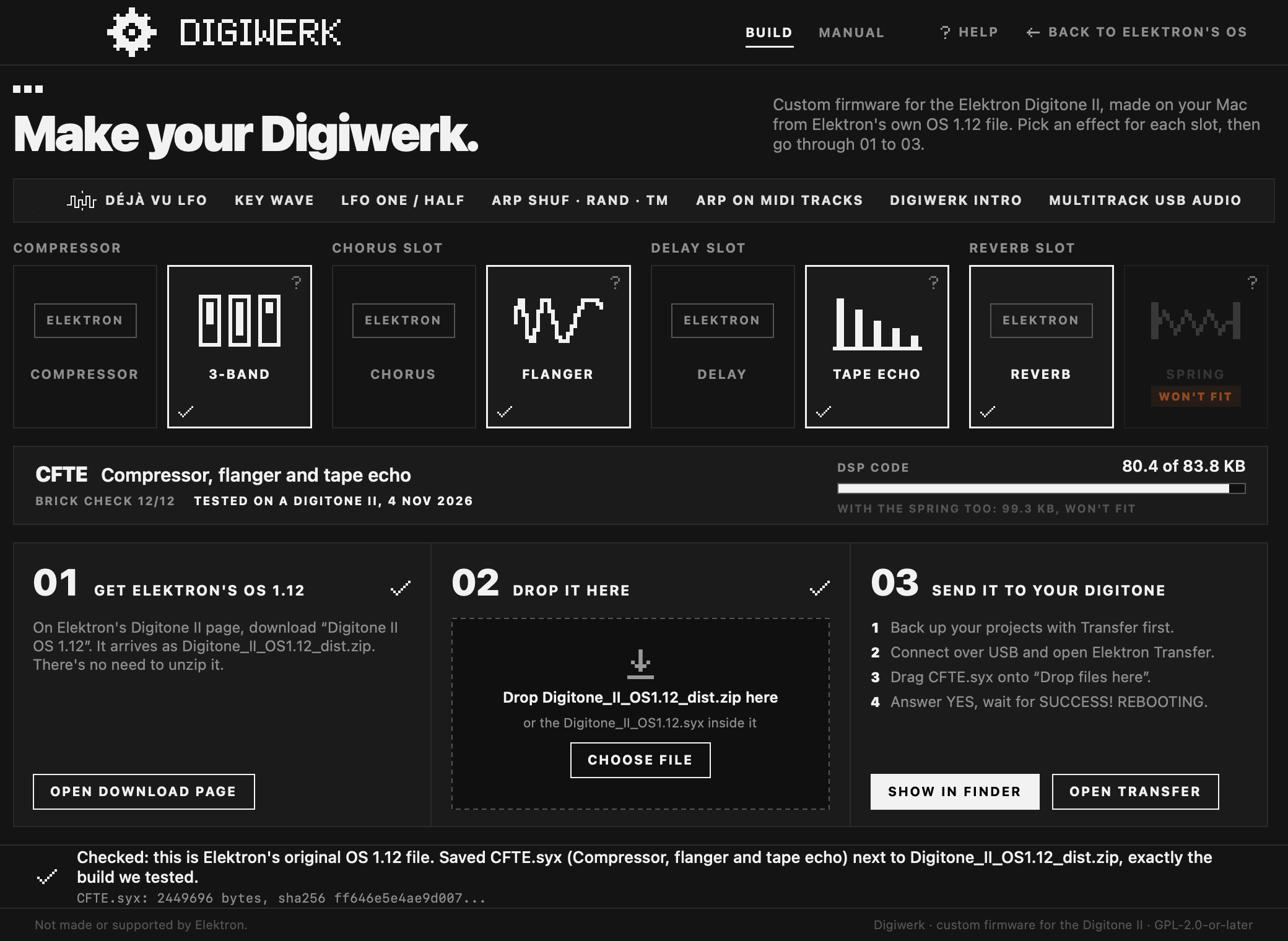
Digiwerk Patcher has a slot for each effect: keep Elektron's or take ours, and the patcher makes the build for that combination. Its MANUAL page explains every effect and base feature.
The builds
build compressor chorus slot delay slot reverb slot brick check played on a Digitone II sha256 of the build EEEE Elektron's Elektron's Elektron's Elektron's 12 of 12 4 Nov 2026 95378fa9ed2d51cb8adf0d4075f80c3bd708e58626ec71452909858a210ec4d1CEEE 3-band compressor Elektron's Elektron's Elektron's 12 of 12 4 Nov 2026 95550dc47df88d72b9d8a4e031d39323f0b74a0cb51940ae3e7b5df5dc8f5afeEFEE Elektron's flanger Elektron's Elektron's 12 of 12 4 Nov 2026 4a8db3692b0ecdc30148e91c5daed1e5079ce10b3b6fa2e51f05dd201e017c66EETE Elektron's Elektron's tape echo Elektron's 12 of 12 4 Nov 2026 3c8803758c633e15a6e7600f453738b370c97fe13299ffca7b616043fd69428bCFEE 3-band compressor flanger Elektron's Elektron's 12 of 12 4 Nov 2026 6c7d6dba3cdb5253b312c5116c0ee847f0f879dc4f8678373782493b9b13e19bCETE 3-band compressor Elektron's tape echo Elektron's 12 of 12 4 Nov 2026 79b22add2b3014bd25601d2ed810f9f76b44e45cb8c30dc96bdd32559b0e78a8EFTE Elektron's flanger tape echo Elektron's 12 of 12 4 Nov 2026 334675bd05ec96a6656313143a4e2a0bab67d4fb7ecf985964d2819c158a3b26CFTE 3-band compressor flanger tape echo Elektron's 12 of 12 4 Nov 2026 ff646e5e4ae9d007747a484cde20a6eabce8f42b700c6d1ba11388902953376dEach build is named after its four slots, compressor, chorus, delay, reverb: C, F or T where ours runs, E where Elektron's does. The six builds with the spring reverb stay withdrawn, as in 0.2.1. The patcher checks both hashes itself: Elektron's
Digitone_II_OS1.12.syx(insideDigitone_II_OS1.12_dist.zip) must be7e5b8a733d4ab1fdf7e5d22757f7d8eddaa3cbf71d0858874a791844c02ceb35before it starts, and the build must be the one above before it saves it.Downloads
file what sha256 Digiwerk-Patcher-0.3.0.zipDigiwerk Patcher, the app. macOS 13 or later, Apple silicon and Intel. Notarized 79a28f4a7601ef51c8eed2045c37b3fc5cf4a06b30f39cd972fa2ac13428a864To check a download, open Terminal, type
shasum -a 256with a space at the end, drag the file onto the window and press Return. It must print the sha256 above.How to install
- Back up your projects and the +Drive with Elektron Transfer.
- Download Digiwerk Patcher (above), double-click the .zip and open the app.
- On Elektron's download page, download Digitone II OS 1.12
(
Digitone_II_OS1.12_dist.zip). Keep it: Elektron's page lists only the current OS, and you need it to go back. - Pick your effects in the patcher's four slots.
- Drop the .zip on the patcher's window. It saves the build next to the .zip, named after its slots, for example
CFTE.syx. - Connect the Digitone over USB, drag the build onto Transfer's Drop files here, answer YES on the Digitone and wait for SUCCESS! REBOOTING.
Keep the volume down the first time a new build plays. The full guide: tools/patcher/README.md.
Going back: send Elektron's
Digitone_II_OS1.12.syxwith Transfer the same way. If USB CONFIG is on USB MULTI/MIDI, pick one of Elektron's three choices first: Elektron's OS reads a saved USB MULTI/MIDI as USB MIDI. If the Digitone doesn't start, hold FUNC while you switch it on, press TRIG 4 (OS UPGRADE) and send Elektron's file with Transfer's LEGACY OS UPGRADE mode over a DIN MIDI cable (about 13 minutes).Known issues
- USB MULTI/MIDI: 48 kHz and 24 bits only; all 42 inputs are always sent, whatever USB OUT is set to; the inputs have numbers, not names.
- The Overbridge plugin knows only Elektron's names and ranges: it offers LFO WAVE only up to RAND, so don't automate WAVE from the plugin on a track that uses a new wave.
- The tape echo's MODE and AGE can't be p-locked, and AGE has no MIDI CC.
- While a MIDI track's arp is on, its trigs' MIDI p-locks aren't sent.
- The shuffle order, TM's loop and the Déjà vu loops aren't saved: each power-on makes new ones from the same settings.
- The compressor's band knobs can't be p-locked and have no MIDI CC.
- On Elektron's OS, a kit saved on Digiwerk plays Elektron's own effects with our values, Déjà vu waves as RAND (shown as "ERR"), and opens a track whose arp is SHUF, RAND or TM with its arp off.
- After a transfer the Digitone can stay on SUCCESS! REBOOTING (once in our tests). Switch it off and on: the new OS is already written by then.
- macOS only for now.
The full list: README, "Compatibility" and "Known limitations".
Credits
Digiwerk builds on elekloader (irpina), digikit (Em D, now ElekLabs), selache (Jakob Kastelic), elektron-firmware-tool (Marcel Bierling), octabam (Sam Banks), and the findings of dn2_firmware_explore (angellinares). The Déjà vu LFO follows Kári Garðarsson's design for the Digitakt II, after Bezronczek's Syntakt Firmware Workbench and the déjà vu of Émilie Gillet's Marbles. The arp's TM takes its idea from Tom Whitwell's Turing Machine. Everyone, with licences: CREDITS.md.
Made by naturarum with Claude, Anthropic's AI model, in Claude Code. GPL-2.0-or-later.
Elektron and Digitone are trademarks of Elektron Music Machines. Digiwerk is not made or supported by Elektron.
-
v0.2.1Digiwerk 0.2.11 file
Digiwerk is custom firmware for the Elektron Digitone II on OS 1.12. Not made or supported by Elektron.
0.2.1 withdraws the six builds with the spring reverb, EEES, CEES, EFES, EETS, CFES and EFTS. On a Digitone II, CFES and EFTS stop the sound within a second of starting: the screen keeps working, the audio goes silent or buzzes. The four others run the same spring code. Digiwerk Patcher 0.2.1 doesn't make them: its spring tile says "Not built yet". The eight other builds are byte for byte 0.2.0's.
If you sent a spring build to your Digitone, send another build or Elektron's
Digitone_II_OS1.12.syxwith Transfer, as usual.Digiwerk is part of the Modwerk effort, the community hub for Elektron firmware mods.
You make your Digiwerk build yourself, from Elektron's own OS 1.12 file, with Digiwerk Patcher. No Elektron firmware is in this release.
What's in it
The base, in every build
- KEY, the LFO in the track's key. A Déjà vu wave snapped to the scale and root of the track's KEYBOARD SETUP: whatever note the trig plays, the melody stays in the key over the whole range of DEP. On an LFO's WAVE, past OCTA, with DEST on the machine's tuning.
- LFO ONE and HALF run one whole cycle, or half of one, from where SPH starts them, then hold. Elektron's OS 1.12 cuts them short.
- Arp SHUF, RAND and TM, after CYCL. SHUF plays every held note in every octave of RANGE once per cycle, in a new order each time; RAND a random one at each step. TM is a Turing Machine loop: hold one note and the arp plays a melody from it in the track's scale, one note per step of ARP LENGTH, and LOOP CHANGE sets how often a step takes a new note.
- The arp on MIDI tracks. The ARP key and menu work on MIDI-machine tracks: trigs and the keys you play go through the arp, out on the track's MIDI channel, with SHUF, RAND and TM too.
- The Digiwerk intro at power-on.
- DJVU, the Déjà vu LFO, as in 0.1.0.
The effects, one per FX slot
- TAPE: a tape echo in the delay slot, with three playback heads at one, two and three times head 1's time, a band filter in the feedback loop and tape wear (AGE).
- CMP3, the 3-band master compressor, and FLNG, the flanger, as in 0.1.0.
Digiwerk Patcher has a slot for each effect: keep Elektron's or take ours, and the patcher makes the build for that combination. Its MANUAL page explains every effect and base feature.
What's new since 0.1.0: the 0.2.0 release.
The builds
build compressor chorus slot delay slot reverb slot brick check played on a Digitone II sha256 of the build EEEE Elektron's Elektron's Elektron's Elektron's 12 of 12 not yet 06e2e6a18c64cf9eefcf68509b618298550ed3ffd7bd65181e8eae4b406674daCEEE 3-band compressor Elektron's Elektron's Elektron's 12 of 12 not yet 925e82ae5d935cd0a1fdb6894dfd5a4b408ec47ea1609a0d47c1d7a54b6bd261EFEE Elektron's flanger Elektron's Elektron's 12 of 12 not yet 355bee2cd58a61bfb564e406d1e8f72b50e0b973d0f693d32afb757ff1021e36EETE Elektron's Elektron's tape echo Elektron's 12 of 12 not yet 5caa78166a014cb233e86756f400a0729fd4851dd4c8dcbec59153ada738abf2CFEE 3-band compressor flanger Elektron's Elektron's 12 of 12 29 Oct 2026 cdd04164165bb8001412b29e7b320fde638e0ec5971b2a31235b7f21370e92cfCETE 3-band compressor Elektron's tape echo Elektron's 12 of 12 not yet 65eab76547211b8df18f094cf61c94348ca86f050cca1b4efc16d4dfc5a46615EFTE Elektron's flanger tape echo Elektron's 12 of 12 not yet db91033a37ceddbc852dcc789766a8afe55bcd8052bc195afccadcf84eac854cCFTE 3-band compressor flanger tape echo Elektron's 12 of 12 29 Oct 2026 eafa99b3f73fdd7635c86dbd61f81db73b65c8181bd068e00125196950c84f63Each build is named after its four slots, compressor, chorus, delay, reverb: C, F or T where ours runs, E where Elektron's does. The patcher checks both hashes itself: Elektron's
Digitone_II_OS1.12.syx(insideDigitone_II_OS1.12_dist.zip) must be7e5b8a733d4ab1fdf7e5d22757f7d8eddaa3cbf71d0858874a791844c02ceb35before it starts, and the build must be the one above before it saves it.Downloads
file what sha256 Digiwerk-Patcher-0.2.1.zipDigiwerk Patcher, the app. macOS 13 or later, Apple silicon and Intel. Notarized 2d6ae183955c8dd1ecc1d3b8f36ad6e5e4c7d8fb56f7f8d37e47fbe16758f416To check a download, open Terminal, type
shasum -a 256with a space at the end, drag the file onto the window and press Return. It must print the sha256 above.How to install
- Back up your projects and the +Drive with Elektron Transfer.
- Download Digiwerk Patcher (above), double-click the .zip and open the app.
- On Elektron's download page, download Digitone II OS 1.12
(
Digitone_II_OS1.12_dist.zip). Keep it: Elektron's page lists only the current OS, and you need it to go back. - Pick your effects in the patcher's four slots.
- Drop the .zip on the patcher's window. It saves the build next to the .zip, named after its slots, for example
CFTE.syx. - Connect the Digitone over USB, drag the build onto Transfer's Drop files here, answer YES on the Digitone and wait for SUCCESS! REBOOTING.
Keep the volume down the first time a new build plays. The full guide: tools/patcher/README.md.
Going back: send Elektron's
Digitone_II_OS1.12.syxwith Transfer the same way. If the Digitone doesn't start, hold FUNC while you switch it on, press TRIG 4 (OS UPGRADE) and send Elektron's file with Transfer's LEGACY OS UPGRADE mode over a DIN MIDI cable (about 13 minutes).Known issues
- The Overbridge plugin knows only Elektron's names and ranges: it offers LFO WAVE only up to RAND, so don't automate WAVE from the plugin on a track that uses a new wave.
- The tape echo's MODE and AGE can't be p-locked, and AGE has no MIDI CC.
- While a MIDI track's arp is on, its trigs' MIDI p-locks aren't sent.
- The shuffle order, TM's loop and the Déjà vu loops aren't saved: each power-on makes new ones from the same settings.
- The compressor's band knobs can't be p-locked and have no MIDI CC.
- On Elektron's OS, a kit saved on Digiwerk plays Elektron's own effects with our values, Déjà vu waves as RAND (shown as "ERR"), and opens a track whose arp is SHUF, RAND or TM with its arp off.
- macOS only for now.
The full list: README, "Compatibility" and "Known limitations".
Credits
Digiwerk builds on elekloader (irpina), digikit (Em D, now ElekLabs), selache (Jakob Kastelic), elektron-firmware-tool (Marcel Bierling), octabam (Sam Banks), and the findings of dn2_firmware_explore (angellinares). The Déjà vu LFO follows Kári Garðarsson's design for the Digitakt II, after Bezronczek's Syntakt Firmware Workbench and the déjà vu of Émilie Gillet's Marbles. The arp's TM takes its idea from Tom Whitwell's Turing Machine. Everyone, with licences: CREDITS.md.
Made by naturarum with Claude, Anthropic's AI model, in Claude Code. GPL-2.0-or-later.
Elektron and Digitone are trademarks of Elektron Music Machines. Digiwerk is not made or supported by Elektron.
v0.2.0Digiwerk 0.2.00 files
[!WARNING] Withdrawn on 30 Oct 2026: the six builds with the spring reverb, EEES, CEES, EFES, EETS, CFES and EFTS. On a Digitone II, CFES and EFTS stop the sound within a second of starting: the screen keeps working, the audio goes silent or buzzes. The four others run the same spring code. Don't use them. If you sent one to your Digitone, send another build or Elektron's
Digitone_II_OS1.12.syxwith Transfer, as usual.Use Digiwerk 0.2.1: its patcher has the eight other builds, byte for byte these. The 0.2.0 app's download was removed on 31 Oct 2026.
Digiwerk is custom firmware for the Elektron Digitone II on OS 1.12. 0.2.0 brings a new base and two new effects, a tape echo and a spring reverb, and you now pick the effects one FX slot at a time. Not made or supported by Elektron.
Digiwerk is part of the Modwerk effort, the community hub for Elektron firmware mods.
You make your Digiwerk build yourself, from Elektron's own OS 1.12 file, with Digiwerk Patcher. No Elektron firmware is in this release.
What's new
The base, in every build
- KEY, the LFO in the track's key. A Déjà vu wave snapped to the scale and root of the track's KEYBOARD SETUP: whatever note the trig plays, the melody stays in the key over the whole range of DEP. On an LFO's WAVE, past OCTA, with DEST on the machine's tuning.
- LFO ONE and HALF run one whole cycle, or half of one, from where SPH starts them, then hold. Elektron's OS 1.12 cuts them short.
- Arp SHUF, RAND and TM, after CYCL. SHUF plays every held note in every octave of RANGE once per cycle, in a new order each time; RAND a random one at each step. TM is a Turing Machine loop: hold one note and the arp plays a melody from it in the track's scale, one note per step of ARP LENGTH, and LOOP CHANGE sets how often a step takes a new note.
- The arp on MIDI tracks. The ARP key and menu work on MIDI-machine tracks: trigs and the keys you play go through the arp, out on the track's MIDI channel, with SHUF, RAND and TM too.
- The Digiwerk intro at power-on.
- DJVU, the Déjà vu LFO, as in 0.1.0.
The effects, one per FX slot
- TAPE, new: a tape echo in the delay slot, with three playback heads at one, two and three times head 1's time, a band filter in the feedback loop and tape wear (AGE).
- SPNG, new: a spring reverb in the reverb slot, three springs that drip and boing; MODE sets their character and DIRT breaks up the tail. Withdrawn: see the top of this page.
- CMP3, the 3-band master compressor, and FLNG, the flanger, as in 0.1.0.
Digiwerk Patcher has a slot for each effect: keep Elektron's or take ours, and the patcher makes the build for that combination. Its MANUAL page explains every effect and base feature.
The builds
build compressor chorus slot delay slot reverb slot brick check played on a Digitone II sha256 of the build EEEE Elektron's Elektron's Elektron's Elektron's 12 of 12 not yet 06e2e6a18c64cf9eefcf68509b618298550ed3ffd7bd65181e8eae4b406674daCEEE 3-band compressor Elektron's Elektron's Elektron's 12 of 12 not yet 925e82ae5d935cd0a1fdb6894dfd5a4b408ec47ea1609a0d47c1d7a54b6bd261EFEE Elektron's flanger Elektron's Elektron's 12 of 12 not yet 355bee2cd58a61bfb564e406d1e8f72b50e0b973d0f693d32afb757ff1021e36EETE Elektron's Elektron's tape echo Elektron's 12 of 12 not yet 5caa78166a014cb233e86756f400a0729fd4851dd4c8dcbec59153ada738abf2EEES Elektron's Elektron's Elektron's spring reverb 12 of 12 withdrawn 1b0f5bc2bd8656a4a4e12266f1de912e55a77a632b44ec5dee2884558f548ef5CFEE 3-band compressor flanger Elektron's Elektron's 12 of 12 29 Oct 2026 cdd04164165bb8001412b29e7b320fde638e0ec5971b2a31235b7f21370e92cfCETE 3-band compressor Elektron's tape echo Elektron's 12 of 12 not yet 65eab76547211b8df18f094cf61c94348ca86f050cca1b4efc16d4dfc5a46615CEES 3-band compressor Elektron's Elektron's spring reverb 12 of 12 withdrawn 13d77c5d9706286da7e050ffd78746c5222ba7891b0004634ef678aed16593baEFTE Elektron's flanger tape echo Elektron's 12 of 12 not yet db91033a37ceddbc852dcc789766a8afe55bcd8052bc195afccadcf84eac854cEFES Elektron's flanger Elektron's spring reverb 12 of 12 withdrawn 5c8042e51b77c19a8f75d638c2817ac82e67efd31e083770bb5389f8f6279161EETS Elektron's Elektron's tape echo spring reverb 12 of 12 withdrawn 6123d911c75e34136df1f1435096f00a3ec44558d9a0b1b249176e6e27e046e5CFTE 3-band compressor flanger tape echo Elektron's 12 of 12 29 Oct 2026 eafa99b3f73fdd7635c86dbd61f81db73b65c8181bd068e00125196950c84f63CFES 3-band compressor flanger Elektron's spring reverb 12 of 12 stops the sound, 30 Oct 2026 854e24b624f3cf58c5a45e4618b9a5f933a98d9041894ce7af8df5474a9543feEFTS Elektron's flanger tape echo spring reverb 12 of 12 stops the sound, 30 Oct 2026 b28c9958a34e88d22d6d98562104ce1d65efefc0c910f791ce02119e2278f35bEach build is named after its four slots, compressor, chorus, delay, reverb: C, F, T or S where ours runs, E where Elektron's does. CMP3 with TAPE and SPNG doesn't fit in the DSP's memory, with or without FLNG. The patcher checks both hashes itself: Elektron's
Digitone_II_OS1.12.syx(insideDigitone_II_OS1.12_dist.zip) must be7e5b8a733d4ab1fdf7e5d22757f7d8eddaa3cbf71d0858874a791844c02ceb35before it starts, and the build must be the one above before it saves it.Downloads
file what sha256 Digiwerk-Patcher-0.2.0.zipDigiwerk Patcher, the app. macOS 13 or later, Apple silicon and Intel. Notarized. Removed on 31 Oct 2026: use 0.2.1 31f555955bda2e5c8e588dbe5aa2759b1cb218500b34dfb4abfd052b8cd264beTo check a download, open Terminal, type
shasum -a 256with a space at the end, drag the file onto the window and press Return. It must print the sha256 above.How to install
- Back up your projects and the +Drive with Elektron Transfer.
- Download Digiwerk Patcher (above), double-click the .zip and open the app.
- On Elektron's download page, download Digitone II OS 1.12
(
Digitone_II_OS1.12_dist.zip). Keep it: Elektron's page lists only the current OS, and you need it to go back. - Pick your effects in the patcher's four slots.
- Drop the .zip on the patcher's window. It saves the build next to the .zip, named after its slots, for example
CFTE.syx. - Connect the Digitone over USB, drag the build onto Transfer's Drop files here, answer YES on the Digitone and wait for SUCCESS! REBOOTING.
Keep the volume down the first time a new build plays. The full guide: tools/patcher/README.md.
Going back: send Elektron's
Digitone_II_OS1.12.syxwith Transfer the same way. If the Digitone doesn't start, hold FUNC while you switch it on, press TRIG 4 (OS UPGRADE) and send Elektron's file with Transfer's LEGACY OS UPGRADE mode over a DIN MIDI cable (about 13 minutes).Known issues
- The Overbridge plugin knows only Elektron's names and ranges: it offers LFO WAVE only up to RAND, so don't automate WAVE from the plugin on a track that uses a new wave.
- The tape echo's MODE and AGE can't be p-locked, and AGE has no MIDI CC.
- While a MIDI track's arp is on, its trigs' MIDI p-locks aren't sent.
- The shuffle order, TM's loop and the Déjà vu loops aren't saved: each power-on makes new ones from the same settings.
- The compressor's band knobs can't be p-locked and have no MIDI CC.
- On Elektron's OS, a kit saved on Digiwerk plays Elektron's own effects with our values, Déjà vu waves as RAND (shown as "ERR"), and opens a track whose arp is SHUF, RAND or TM with its arp off.
- macOS only for now.
The full list: README, "Compatibility" and "Known limitations".
Credits
Digiwerk builds on elekloader (irpina), digikit (Em D, now ElekLabs), selache (Jakob Kastelic), elektron-firmware-tool (Marcel Bierling), octabam (Sam Banks), and the findings of dn2_firmware_explore (angellinares). The Déjà vu LFO follows Kári Garðarsson's design for the Digitakt II, after Bezronczek's Syntakt Firmware Workbench and the déjà vu of Émilie Gillet's Marbles. The arp's TM takes its idea from Tom Whitwell's Turing Machine. Everyone, with licences: CREDITS.md.
Made by naturarum with Claude, Anthropic's AI model, in Claude Code. GPL-2.0-or-later.
Elektron and Digitone are trademarks of Elektron Music Machines. Digiwerk is not made or supported by Elektron.
v0.1.0Digiwerk 0.1.02 files
The first release of Digiwerk, custom firmware for the Elektron Digitone II on OS 1.12. Not made or supported by Elektron.
Digiwerk is part of the Modwerk effort, the community hub for Elektron firmware mods.
You make your Digiwerk build yourself, from Elektron's own OS 1.12 file, with Digiwerk Patcher. No Elektron firmware is in this release.
What's new
Everything: this is the first release. The build is the base plus one pack.
The base, in every build
- DJVU, the Déjà vu LFO. Nine new LFO waves after RAND: DV-F (a loop of random values), DV-T (the same loop, restarted by each trig), and seven that snap the loop to a scale when DEST is the machine's tuning (PMAJ PMIN HIRA WTON DORI LYDI OCTA). On these waves MODE sets the loop's length and SPH how much it changes. This is Kári Garðarsson's Déjà vu LFO from the Digitakt II (digitakt-ii-research), written anew for the Digitone II. Kári's DV-F and DV-T follow the original, Bezronczek's on the Syntakt (Syntakt Firmware Workbench).
The pack
pack build effects brick check played on a Digitone II Compressor + Flanger DJ01 CMP3, the 3-band master compressor; FLNG, the flanger; Elektron's delay and reverb 12 of 12 24 Oct 2026 - CMP3 splits Elektron's master compressor into three bands, each following the stock compressor's design. Each band has its own page in the MIXER, with THR, ATK, REL, MUP, RAT (1.00 turns it off), a crossover, its own MIX and a gain-reduction meter. The settings are saved with the kit.
- FLNG sits in the chorus slot. Its TIME knob goes from a phaser-like sweep through the classic flanger to a chorus, and FUNC + turn on SPD sets the speed in time with the tempo, from 16/1 to 1/32.
What every knob does: README, "What's in it".
Downloads
file what sha256 Digiwerk-Patcher-0.1.0.zipDigiwerk Patcher, the app. macOS 13 or later, Apple silicon and Intel. Notarized bfd2c85113e2fb4314b5e3adf39fe9b81bc2773c1f8e5ec02de9bd143f6c8305digiwerk-patch-0.1.0.zipdigiwerk-patch, the same in Terminal. Notarizedc128b5a7746b5aa4e8a586bac493c26ad45ef72fa10acae8bad52b3719d7f37cTo check a download, open Terminal, type
shasum -a 256with a space at the end, drag the file onto the window and press Return. It must print the sha256 above.What the patcher makes. The patcher checks both of these itself; they're here if you want to check by hand.
file sha256 Elektron's Digitone_II_OS1.12.syx(the input, insideDigitone_II_OS1.12_dist.zip)7e5b8a733d4ab1fdf7e5d22757f7d8eddaa3cbf71d0858874a791844c02ceb35DJ01.syx(Compressor + Flanger)7edf7c59e2aeabd61ebca132a9f031f776475794e04ea37f1635ec8e5a17aed8How to install
- Back up your projects and the +Drive with Elektron Transfer.
- Download Digiwerk Patcher (above), double-click the .zip and open the app.
- On Elektron's download page, download Digitone II OS 1.12
(
Digitone_II_OS1.12_dist.zip). Keep it: Elektron's page lists only the current OS, and you need it to go back. - Drop the .zip on the patcher's window. It saves the build next to the .zip, for
example
DJ01.syx. - Connect the Digitone over USB, drag the build onto Transfer's Drop files here, answer YES on the Digitone and wait for SUCCESS! REBOOTING.
Keep the volume down the first time a new build plays. The full guide: tools/patcher/README.md.
Going back: send Elektron's
Digitone_II_OS1.12.syxwith Transfer the same way. If the Digitone doesn't start, hold FUNC while you switch it on, press TRIG 4 (OS UPGRADE) and send Elektron's file with Transfer's LEGACY OS UPGRADE mode over a DIN MIDI cable (about 13 minutes).Known issues
- The Overbridge plugin knows only Elektron's names and ranges: it offers LFO WAVE only up to RAND, so don't automate WAVE from the plugin on a track that uses a new wave. It most likely calls the flanger's TIME "HPF".
- The flanger's sweep follows the tempo when synced, but doesn't restart at the bar.
- Déjà vu loops aren't saved: each power-on makes a new melody from the same settings.
- On FM TONE's PITCH and WAVETONE's MAST, the scale snapping assumes semitones; not checked on a unit yet.
- The compressor's band knobs can't be p-locked and have no MIDI CC.
- On Elektron's OS, a kit saved on Digiwerk plays Déjà vu waves as RAND (shown as "ERR"), plays the stock one-band compressor, and plays the flanger's TIME as the chorus's HPF. A Save Kit, +Drive library save or export there drops the compressor's band settings.
- macOS only for now.
The full list: README, "Compatibility" and "Known limitations".
Credits
Digiwerk builds on elekloader (irpina), digikit (Em D, now ElekLabs), selache (Jakob Kastelic), elektron-firmware-tool (Marcel Bierling), octabam (Sam Banks), and the findings of dn2_firmware_explore (angellinares). The Déjà vu LFO follows Kári Garðarsson's design for the Digitakt II, after Bezronczek's Syntakt Firmware Workbench and the déjà vu of Émilie Gillet's Marbles. Everyone, with licences: CREDITS.md.
Made by naturarum with Claude, Anthropic's AI model, in Claude Code. GPL-2.0-or-later.
Elektron and Digitone are trademarks of Elektron Music Machines. Digiwerk is not made or supported by Elektron.