
Digiwerk is custom firmware for the Elektron Digitone II, for OS 1.12. It adds a 3-band master compressor, a flanger that reaches from a phaser-like sweep to a chorus, a tape echo with three heads, LFO waves that play looping random melodies (one of them in the track's key), three arpeggiator modes, among them a Turing Machine loop, the arpeggiator on MIDI tracks, and multitrack USB audio: every track on its own pair of inputs, with no driver. You make it yourself: Digiwerk Patcher turns Elektron's own OS 1.12 file into a Digiwerk build, in your browser or on your Mac, and you send that build to the Digitone with Elektron Transfer. No Elektron firmware is shared here.
Make your Digiwerk in the browser →
Nothing to install, and nothing is uploaded. Or get the Mac app:
Digiwerk Patcher 0.3.0, for macOS 13 or later.
Then follow the install steps.
Digiwerk is part of the Modwerk effort, the community hub for Elektron firmware mods.
Not made or supported by Elektron.
- What's in it
- Install
- Going back, and recovery
- Safety
- Compatibility
- Known limitations
- Credits and licence
- For developers: docs/DEVELOPERS.md
What's in it
Every Digiwerk build is the base plus the effects you pick. The base is a set of changes to the main OS, the same in every build. The effects run in the sound engine (the DSP), one per FX slot: in each of the four slots, compressor, chorus, delay and reverb, you keep Elektron's effect or take ours. Effects take DSP memory, so not every combination fits: of the sixteen, fourteen fit and eight are built, and you pick one in the patcher. The six with the spring reverb are withdrawn (below).
The base, in every build
 | DJVU Déjà vu LFO | Nine new LFO waves after RAND. DV-F is a loop of random values. DV-T is the same loop, started again from its first value by every trig with LFO.T on. PMAJ PMIN HIRA WTON DORI LYDI OCTA play the DV-F loop, and when DEST is the machine's tuning they snap it to a scale: major and minor pentatonic, hirajoshi, whole-tone, dorian, lydian, octatonic. On these waves MODE (G) sets the loop's length (FREE 2, TRIG 4, HOLD 8, ONE 16, HALF 32 values) and SPH (F) how much it changes: 0 gives a new value at every step, 64 repeats the loop exactly, above 64 values swap places, and 127 swaps at every step. SPD, MULT, FADE and DEP work as always. Credit: this is Kári Garðarsson's Déjà vu LFO from the Digitakt II (digitakt-ii-research), brought to the Digitone II. The waves, their names and how they behave are Kári's design; Digiwerk's code is written anew for the Digitone II's LFOs. Kári's DV-F and DV-T follow the original Déjà vu LFO, Bezronczek's on the Syntakt (Syntakt Firmware Workbench). |
- KEY, the LFO in the track's key. A Déjà vu wave in the track's own key: the DV-F loop, snapped to the scale and root of the track's KEYBOARD SETUP. Whatever note the trig plays, the note you hear stays in the key, over the whole range of DEP. It's on an LFO's WAVE, past OCTA, with DEST on the machine's tuning (TUNE, TUN1, TUN2, MAST or PITCH); MODE and SPH work as on the other Déjà vu waves, and DEP sets how far the melody reaches.
- LFO ONE and HALF. An LFO in MODE ONE runs one whole cycle from where SPH starts it, then holds where it ended; HALF runs half a cycle. Elektron's OS 1.12 cuts them short. On synth and MIDI tracks.
- Arp SHUF, RAND and TM. Three more arpeggiator modes after CYCL. SHUF plays every held note, in every octave of RANGE, once per cycle, in a new order each time. RAND plays a random one at each step. TM is a Turing Machine loop: hold one note and the arp plays a melody from it, one note per step of ARP LENGTH (1 to 16), from the notes of the track's scale (KEYBOARD SETUP) over the octaves of RANGE. LOOP CHANGE (E) sets how often a step takes a new note when the loop comes round to it: 0 locks the melody, 100 changes every step every time. In TM the step graph shows the loop's notes.
- The arp on MIDI tracks. The ARP key and menu work on MIDI-machine tracks. A MIDI track whose arp is on plays its trigs and the keys you play through the arp, out on the track's MIDI channel; SHUF, RAND and TM work there too.
- The Digiwerk intro. At power-on, after Elektron's logo screen, the start-up animation shows DIGI over WERK.
- Multitrack USB audio. A fourth USB CONFIG choice, USB MULTI/MIDI (SETTINGS > SYSTEM > USB CONFIG). With it the Digitone shows up as a class-compliant USB audio device (USB Audio Class 2.0) with 42 inputs at 48 kHz and 24 bits, no driver needed: every track arrives on its own stereo pair (table below). We've used it with a Mac and with AUM on an iPhone. USB AUDIO/MIDI stays Elektron's stereo mode, and OVERBRIDGE and USB MIDI are unchanged.
| USB MULTI/MIDI's inputs | what |
|---|---|
| 1-32 | the 16 tracks as stereo pairs: track 1 on 1-2, track 2 on 3-4, and so on to track 16 on 31-32 |
| 33-34 | the main mix |
| 35-36 | the delay slot's return |
| 37-38 | the reverb slot's return |
| 39-40 | the chorus slot's return |
| 41-42 | the Digitone's audio inputs |
The effects
 | CMP3 3-band master compressor | Elektron's master compressor, split into three bands at two crossovers. Each band follows the stock compressor's design (its detector, curve, attack and release, makeup). The MIXER has a page per band, Compressor Low, Mid and High: A THR, B ATK, C REL, D MUP, E RAT (1.00 turns the band off, then the stock ratios 1.50 to 20.00), F the crossover (Low/Mid 30 Hz to 1 kHz on the LOW page, Mid/High 1 to 16 kHz on the MID page), G SCS, the sidechain source shared by the bands, and H the band's own MIX (dry/wet). Each page has a meter for its band's gain reduction. The knobs use the stock compressor's pictures (the crossovers a plain dial). The settings are saved with the kit. A new kit starts with every MIX at 0, so you hear no compression until you raise one. |
 | FLNG flanger | In the chorus slot, on the Flanger page. A DPTH sweep depth, B SPD sweep speed, C TIME the delay the sweep moves around, D WDTH the angle between the left and right sweeps (0 to 180 degrees). TIME sets the character: near 0 a subtle, phaser-like sweep, around 32 the classic flanger (a new kit's default), and from 64 up the feedback fades out and the sweep narrows until, by 100 to 127, FLNG is a chorus. For a flanger, keep TIME in the lower half. FUNC + turn on SPD steps through speeds in time with the tempo, from one sweep in 16 bars (16/1) to 1/32, as FUNC + turn does on the delay's TIME. Turning SPD without FUNC gives a free speed again. |
 | TAPE tape echo | In the delay slot, on the Echo page: one tape, three playback heads at one, two and three times head 1's time, a band filter in the feedback loop, and tape wear to dial in. A TIME, head 1's time on the stock delay's TIME scale, B MODE, the heads that play, shown under the knob as 1, 2, 3, 12, 23, 13 or 123 (23 is heads 2 and 3; the box shows the mode's number, 1 to 7), C WID, below 0 the repeats alternate left and right, 0 is mono, above 0 each repeat lands at a new random place, D FDBK, the repeats: at 64 they go on forever in every MODE, above it they grow until the tape saturates, E CNTR, the centre of the loop's band filter (50 Hz to 12.8 kHz), F BW, its width (narrow resonates, 127 is no filter), G AGE, tape wear: wow and flutter, hiss, soft crackle and a duller top (0 or 1 is clean), H REV, the send to the reverb. |
 | SPNG spring reverb | Withdrawn in 0.2.1: on a Digitone II it stops the sound within a second, so no build carries it. In the reverb slot, on the Spring page: three springs that drip and boing. A PRE pre-delay (0 to 250 ms), B DEC the size, a decay of 0.3 s to 16 s, C MODE the springs' character (0 taut and bright, 64 the classic tank, 127 slack, deep drip, surf), D DIRT breaks up the tail (0 clean, heavy at 127), E HPF thins what goes into the tank (40 Hz to 1 kHz), F TONE (127 open, lower is darker), G WDTH (0 mono, like a real tank; up to 127, wide stereo). A new kit starts clean: PRE 0, DEC 64, MODE 64, DIRT 0, HPF 0, TONE 127, WDTH 96. |
Starting points for the flanger
| sound | DPTH | SPD | TIME | WDTH |
|---|---|---|---|---|
| phaser-like | 45 | 50 | 8 | 64 |
| jet | 100 | 30 | 20 | 48 |
| flanger | 96 | 30 | 32 | 48 |
| long flanger | 70 | 40 | 56 | 90 |
| flange-chorus | 60 | 60 | 82 | 100 |
| chorus | 50 | 70 | 110 | 127 |
| wide chorus | 100 | 80 | 127 | 127 |
The builds
Each build is named after its four slots, in the order compressor, chorus, delay, reverb: C, F, T or S where ours runs, E where Elektron's does. The name shows at the top right of the power-on screen.
| build | compressor | chorus slot | delay slot | reverb slot | played on a Digitone II |
|---|---|---|---|---|---|
| EEEE | Elektron's | Elektron's | Elektron's | Elektron's | 4 Nov 2026 |
| CEEE | 3-band compressor | Elektron's | Elektron's | Elektron's | 4 Nov 2026 |
| EFEE | Elektron's | flanger | Elektron's | Elektron's | 4 Nov 2026 |
| EETE | Elektron's | Elektron's | tape echo | Elektron's | 4 Nov 2026 |
| CFEE | 3-band compressor | flanger | Elektron's | Elektron's | 4 Nov 2026 |
| CETE | 3-band compressor | Elektron's | tape echo | Elektron's | 4 Nov 2026 |
| EFTE | Elektron's | flanger | tape echo | Elektron's | 4 Nov 2026 |
| CFTE | 3-band compressor | flanger | tape echo | Elektron's | 4 Nov 2026 |
The six builds with the spring reverb, EEES, CEES, EFES, EETS, CFES and EFTS, were in 0.2.0 and are withdrawn: on a
Digitone II, CFES and EFTS stop the sound within a second of starting (the screen keeps working, the audio goes
silent or buzzes), and the four others run the same spring code. If you sent one to your Digitone, send another
build or Elektron's Digitone_II_OS1.12.syx with Transfer, as usual.
Install
You need a Digitone II, a USB cable, Elektron Transfer, and a web browser or a Mac with macOS 13 or later (Apple silicon or Intel).
- Back up your projects and the +Drive with Elektron Transfer.
- Open Digiwerk Patcher. In your browser: Digiwerk Patcher on the web, nothing to install. Or the Mac app: Digiwerk-Patcher-0.3.0.zip. It's also on the release page, where the "Source code" files aren't the app. Double-click the .zip and open Digiwerk Patcher. Apple has checked it (it's notarized). The first time, macOS asks whether to open an app from the internet: click Open.
- Get Elektron's OS 1.12. On Elektron's download page
(the patcher's OPEN DOWNLOAD PAGE button opens it), download Digitone II OS 1.12. It arrives as
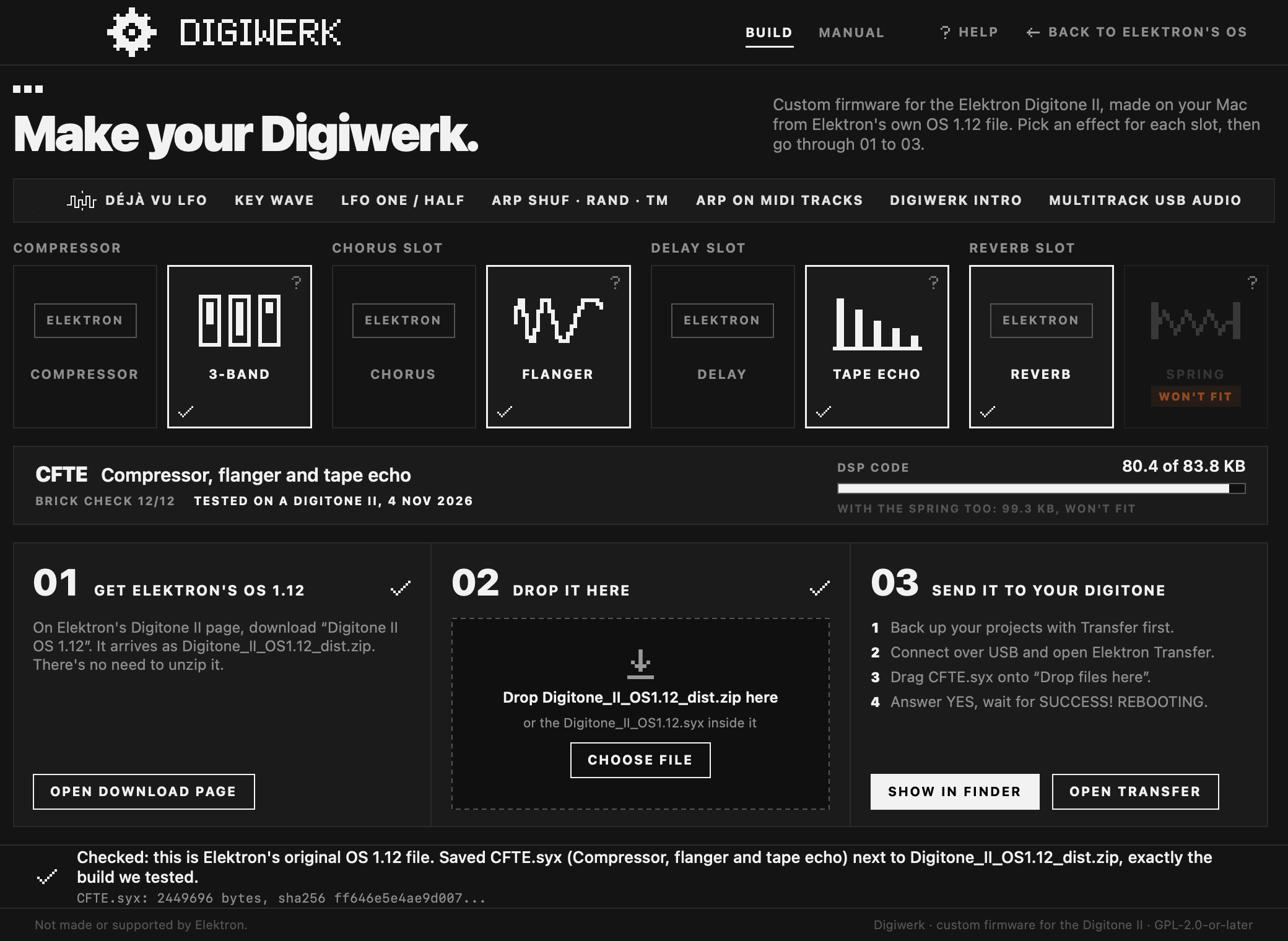
Digitone_II_OS1.12_dist.zip. You don't need to unzip it. Keep this .zip: Elektron's page lists only the current OS, and you need this file to go back or to make another build. - Pick your effects in the patcher's four slots: in each one, Elektron's effect or ours. The patcher shows the build that makes and whether we've played it on a Digitone II. MANUAL explains every effect and base feature.
- Drop the file on the patcher (or click CHOOSE FILE). The patcher checks that it's Elektron's original file
and makes the build, named after its slots, for example
CFTE.syx. The app saves it next to the .zip; the web patcher gives you a DOWNLOAD button. - Send it to the Digitone. Connect it over USB and open Transfer. Drag the build onto Drop files here, answer YES on the Digitone and wait for SUCCESS! REBOOTING. The power-on screen shows the build's name at the top right.
Keep the volume down the first time a new build plays.
The full guide, with what every message means: tools/patcher/README.md.
Going back, and recovery
- Back to Elektron's OS: send Elektron's
Digitone_II_OS1.12.syx(it's inside the .zip) with Transfer, the same way. If USB CONFIG is on USB MULTI/MIDI, pick one of Elektron's three choices first: Elektron's OS reads a saved USB MULTI/MIDI as USB MIDI. - If the Digitone doesn't start: hold FUNC while you switch it on. The STARTUP menu appears. Press TRIG 4
(OS UPGRADE). In Transfer, use LEGACY OS UPGRADE mode and send Elektron's
Digitone_II_OS1.12.syxover a DIN MIDI cable (you need a MIDI interface with a DIN out). USB doesn't work in the STARTUP menu. It takes about 13 minutes. We tested this on our own unit. - If it stays on SUCCESS! REBOOTING after a transfer and nothing responds, wait ten seconds, then switch it off and on: by then the new OS is already written.
- The STARTUP menu lives in the bootstrap, a part of the Digitone that Digiwerk never changes.
Safety
Custom firmware is at your own risk. This is what we do to keep that risk low:
- A brick checker with 12 checks. Every build must pass all twelve before it goes into the patcher. Among other things: only the main OS and the DSP program differ from Elektron's file, and everything else, including the bootstrap that holds the STARTUP menu, is Elektron's, byte for byte; the Digitone's own code accepts the build's seal and unpacks exactly the intended OS; the build starts up to the main screen in an emulator without writing to the flash; the STARTUP menu is still reachable; the DSP program runs in a simulator without a fault; the OS's updater writes only where it should. The details: tools/brickcheck/README.md.
- Played on a real Digitone II, or marked. The patcher shows, for each build, whether we played it on our unit and when. A build we haven't played yet has passed the brick checker, and the patcher says so.
- The patcher writes only tested builds. It checks that your file is Elektron's original OS 1.12, by its sha256. It saves a build only if the result is, byte for byte, the build we tested. Otherwise it saves nothing.
- No Elektron firmware is distributed. The patcher holds our changes and instructions like "copy these bytes from your file". A check makes sure no 16-byte run from Elektron's file is in it.
Compatibility
- Digitone II on OS 1.12 only. The patcher refuses any other file.
- Projects and kits stay in Elektron's format. Digiwerk's settings live in the kit's existing values and in spare bytes the stock OS doesn't use.
- A kit saved on Digiwerk, opened on Elektron's OS 1.12:
- Déjà vu waves play as RAND and show "ERR". The value stays in the kit, so back on Digiwerk the wave comes back.
- The stock OS ignores the compressor's band settings and plays Elektron's one-band compressor with the kit's hidden stock compressor settings, which Digiwerk leaves as they were. A project save on the stock OS keeps the band settings. A Save Kit, a +Drive library save or an export on the stock OS drops them, and back on Digiwerk that kit opens as an older kit does (below).
- The stock OS plays Elektron's chorus with the flanger's four values: TIME is the chorus's HPF again. The same goes for the tape echo and the spring: their values are the delay's and the reverb's own.
- A track whose arp is set to SHUF, RAND or TM opens with its arp off.
- A kit from Elektron's OS, opened on Digiwerk:
- The compressor opens as one full-band compressor with the kit's old settings (crossovers at 30 Hz and 16 kHz). In our tests that sounds within about a dB of the stock compressor.
- The chorus values drive the flanger. HPF at its default 0 becomes TIME 0, the shortest, phaser-like end: set TIME to 32 for the classic flanger. WDTH 127, the default, sweeps the two sides 180 degrees apart.
- The delay values drive the tape echo: MODE from Pingpong (1 or 2), CNTR and BW from HPF and LPF, AGE clean.
- The reverb values drive the spring; DIRT starts at the old GAIN's value.
- Overbridge connects as with OS 1.12. Transfer works as usual.
- USB CONFIG: OVERBRIDGE, USB MIDI and USB AUDIO/MIDI work as on OS 1.12. USB MULTI/MIDI is saved as a fourth value, which Elektron's OS reads as USB MIDI.
- MIDI: CC 106 (LFO 1 WAVE) values 7 to 16 pick the new waves (16 is KEY), and higher values give KEY (on stock they give RAND).
- dn2_firmware_explore's lfowaves mod (OS 1.11) uses the same WAVE values for other waves, so a project made with one doesn't carry over to the other.
Known limitations
- The Overbridge plugin knows only Elektron's names and ranges. It offers LFO WAVE only up to RAND (don't automate WAVE from the plugin on a track that uses a new wave). It most likely calls the flanger's TIME "HPF", gives the tape echo's and the spring's knobs the delay's and the reverb's names, and shows a synced flanger speed as a plain number. The compressor's band knobs haven't been tried with the plugin.
- Flanger: in sync, the sweep follows the tempo but doesn't restart at the bar. The picture above TIME is still the stock HPF curve.
- Déjà vu: the loops aren't saved. WAVE, MODE and SPH are, and p-locks on WAVE work, but each power-on makes a new melody. On FM TONE's PITCH and WAVETONE's MAST, the scale snapping assumes semitones; that isn't checked on a unit yet.
- Compressor: the band knobs can't be p-locked (the stock compressor's can't either) and have no MIDI CC. The stock compressor's CCs for THR, ATK, REL, MUP, RAT and MIX (111 to 115, 118) now change only its hidden settings. The meters show the band's gain reduction before its MIX and makeup.
- Tape echo: MODE and AGE can't be p-locked, and AGE has no MIDI CC.
- USB MULTI/MIDI: 48 kHz and 24 bits only. All 42 inputs are always sent, whatever USB OUT is set to. The inputs have numbers, not names.
- Arp: TM plays from the lowest note held. The shuffle order and TM's loop aren't saved: each power-on makes new ones. While a MIDI track's arp is on, its trigs' MIDI p-locks (CC, pitch bend, aftertouch, program change) aren't sent.
- The patcher runs on macOS only for now.
Credits
Digiwerk builds on other people's work: elekloader (irpina), digikit (Em D, now ElekLabs), selache (Jakob Kastelic), elektron-firmware-tool (Marcel Bierling), octabam (Sam Banks), and the findings of dn2_firmware_explore (angellinares). The Déjà vu LFO follows Kári Garðarsson's design for the Digitakt II, after Bezronczek's Syntakt Firmware Workbench and the déjà vu of Émilie Gillet's Marbles. The arpeggiator's TM takes its idea from Tom Whitwell's Turing Machine. Everyone, with licences and what we use: CREDITS.md. Code adapted from other projects is listed in NOTICE.
Digiwerk is made by naturarum with Claude, Anthropic's AI model, in Claude Code. How we work: docs/DEVELOPERS.md.
Licence
GPL-2.0-or-later, Copyright (C) 2026 naturarum and contributors. See LICENSE and NOTICE.
Elektron and Digitone are trademarks of Elektron Music Machines. Digiwerk is not made or supported by Elektron, and not affiliated with or endorsed by it.