DigiSwarm
An effects engine for the Digitone mk1's two audio inputs: eleven engines with four variations each, a 60-second looper, Hold, Reverse, a resonant filter, pitch modulation and a reverb with four rooms, all in time with the Digitone's tempo, and MIDI CCs for its controls and looper. DigiSwarm is an elekloader mod on fxkit (core-dn1 4.1).
Its MIDI CCs follow the Hologram Electronics Microcosm's published CC chart, so a controller set up for that pedal works with it too. DigiSwarm is not affiliated with Hologram Electronics and uses none of its code.
DIGISWARM is an entry in core-dn1's Mod Menu (hold a track key). While it is the
active effect, DigiSwarm owns the audio engine (fxkit's core_audio owner):
the synths are silent, the Digitone's own effects are off, and everything
you hear is the inputs through DigiSwarm. NO turns it off and gives the audio and the screen back. The sequencer keeps running, so DigiSwarm follows its tempo and PLAY,
STOP and TEMPO still work.
DigiSwarm 0.2 is a beta (a pre-release). It is an effect on fxkit: a MIXER on AMP (the inputs' levels and pans, as loud as the Digitone's own input), two LFOs on the stock LFO page aimed at its controls, p-locks kept in the pattern (RECORD, then hold a trig and turn a control), and MIDI hands the screen to the stock UI for the MIDI tracks while it keeps playing. Presets are gone: the project keeps its controls, mixer and LFOs, and a project saved with 0.1 opens it at its defaults. 0.2 was tested on a Digitone mk1 by its author (built before the effects' rename, which changed only names); it was also checked in digikit's emulator (digiemu) on OS 1.43 and 1.44. Not yet run on a Digitone Keys. Its source is also in elekloader, as mods/digiswarm-dn1.
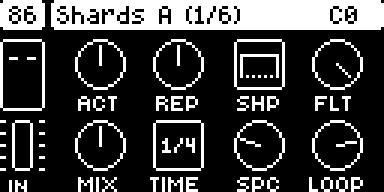
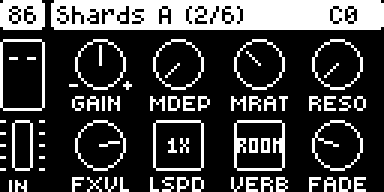
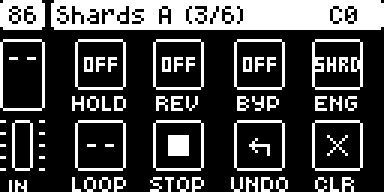
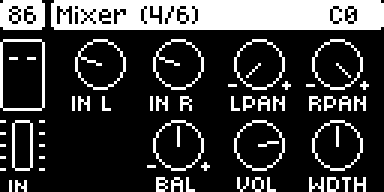
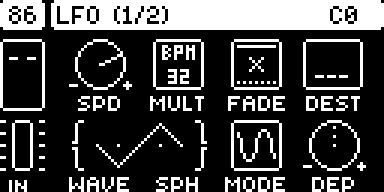
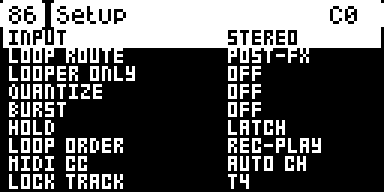
The screenshots are from the emulator, which has no DMA timer 0, so the C
at the top right (the render's share of each block) does not read true
there.
Install
The easiest way is elekloader's web page: tick DigiSwarm and the + beside its Needs fxkit; the page takes the core it needs. To build it yourself you need:
- elekloader from its main branch, with Python 3.9 or newer (see
its README). DigiSwarm keeps 26 MB of buffers in the
Digitone profile's
bulkarea, which the 0.4.0 app does not know: it refuses DigiSwarm. - This mod, fxkit and their core, from
this repository's releases:
digiswarm-0.2.elemod,fxkit-0.1.elemodandcore-dn1-4.1.elemodfor OS 1.43, or the three-os1.44files for 1.44. DigiSwarm needs core-dn1 4.1 or newer and fxkit; every effect on fxkit (DigiSwarm, DigiPrism, DigiTide, DigiTriad, DigiReel, DigiHoard, DigiHalo) fits in one build with them. - The stock OS file:
Digitone_and_Digitone_Keys_OS1.44.syxor..._OS1.43.syx, from Elektron's Digitone downloads. elekloader recognises the file by its hash.
Build your OS on the command line (or in elekloader's window, run from source: + Install from file... the three files and tick digiswarm):
python -m elekloader.patch --stock Digitone_and_Digitone_Keys_OS1.44.syx \
    --mod core-dn1-4.1-os1.44.elemod --mod fxkit-0.1-os1.44.elemod \
    --mod digiswarm-0.2-os1.44.elemod \
    --out Digitone_OS1.44-digiswarm.syx --version SW02
--version is the 4 characters the unit will show. Flash the .syx with
Elektron Transfer, as for any OS update: connect the unit over USB, select
it in Transfer and Connect, drag the .syx onto Drop files here,
and press YES on the unit. Don't turn it off until the upgrade is done.
Recovery: elekloader never changes the bootloader, so the stock OS
file always restores the unit. Hold FUNC while powering on for the
startup menu, and press TRIG 4 for OS UPGRADE. Then send the stock
.syx with Transfer.
Opening it: hold a track key on its own for the Mod Menu, then pick DIGISWARM with its trig key (or YES). NO turns it off and gives the synths back.
0.2: on fxkit
From 0.2 DigiSwarm is an effect on fxkit (../fxkit-dn1), as every effect in the build is: one at a time is active. Its Mod Menu entry makes it the active effect and opens its page; while it is active it owns the audio, page or no page, and opening another effect's entry hands that one the audio.
| key | on DigiSwarm's page |
|---|---|
| SYN1, SYN2, FLTR | its three pages (EFFECT, SHIFT and LOOPER) |
| AMP | the MIXER: IN L, IN R (the inputs' levels, as the stock mixer's: 32 unity, up to +24 dB), L PAN, R PAN (where each input sits), BAL, VOL, WDTH (the output's width) |
| LFO | LFO 1, pressed again LFO 2: the stock LFO page (its knobs, WAVE and SPH as one wave, a turned knob's value under it), at the stock rates; turning DEST opens its list (DigiSwarm's controls and the mixer's), YES picks, NO closes |
| RECORD | LOCK mode: hold a trig and turn a control, and that step has a p-lock of it (the title bar shows the 16 steps, filled where DigiSwarm has a lock); FUNC + a trig clears the step; PAGE the next 16 steps. RECORD again (or NO) leaves it |
| MIDI | the stock UI, for the MIDI tracks and the rest, with DigiSwarm playing on; its Mod Menu entry brings the page back |
| NO | DigiSwarm off: the synths again |
The p-locks are the pattern's: they are kept in one synth track's lock table
(SETUP's LOCK TRACK, T4 unless you pick another), saved and copied with the
pattern, and play on their steps; that track should play nothing of its own
(no notes, no arpeggiator) in a pattern with DigiSwarm's locks, or its trigs go astray. 0.1's presets are gone: the
project keeps DigiSwarm's controls, mixer and LFOs (tag DCSM, 44 bytes).
The page
DigiSwarm's page is drawn like the Digitone's own parameter pages, in their fonts: the tempo in the box at the top left, the engine and variation in the title bar with the page number (1/3), the looper's state (and the H, R and B of Hold, Reverse and Bypass when they are on) and the input's meter on the left, and eight controls, one per knob: a knob, a value box or a switch. While you turn a knob, the title bar shows its value. LEFT and RIGHT, or PAGE, move between the three pages; holding FUNC shows page 2.
| Page | Knobs A-D | Knobs E-H |
|---|---|---|
| 1 Effect | ACT, REP, SHP (its contour), FLT | MIX, TIME, SPC, LOOP |
| 2 Shift (also FUNC + a knob on page 1) | GAIN (input, 64 is 0 dB; the - and + knob), MDEP, MRAT (pitch modulation), RESO | FXVL (effect volume), LSPD (loop speed), VERB (room), FADE (loop fade) |
| 3 Looper | HOLD, REV, BYP: turn right for on, left for off, or push | LOOP (record, play, overdub), STOP, UNDO, CLR: push |
Pushing a knob on pages 1 and 2 sets it back to its default. Time picks a bar, 1/2, 1/4, 1/8, 1/16 or 1/32 of the Digitone's tempo, and when the sequencer plays the engines' grid is its timeline.
| Function | On DigiSwarm |
|---|---|
| Engine and variation | trig keys 1-11 pick the engine, 13-16 the variation (A-D) |
| Hold | HOLD on page 3, or trig key 12 (latching, or momentary in SETUP) |
| Looper: record / play / overdub, hold for undo; stop, hold to erase | page 3, or T1 and T2 as two footswitches (hold T1 to undo, T2 to erase) |
| Reverse, Bypass (with trails) | REV and BYP on page 3 |
| Presets | none from 0.2: the project keeps the controls, and p-locks (RECORD) follow the pattern |
| Settings | YES opens SETUP (input mono/stereo, loop route, looper only, quantize, burst, hold mode, loop order, MIDI channel); UP and DOWN pick a row, LEFT or RIGHT changes it |
| MIDI CCs | on the Digitone's auto channel (see MIDI below) |
| Tempo | the Digitone's own tempo (TEMPO) |
MIDI
While DigiSwarm's page is open, it takes its CCs (the chart below) that come on the
Digitone's auto channel (MIDI CONFIG > CHANNELS > AUTO CHANNEL), through
core-dn1 3.2's ev_midi_cc; with SETUP's MIDI CC on ANY CH it takes them on
a track's channel too. The Digitone does not apply a CC DigiSwarm takes; every
other CC, and every CC while the page is closed, goes on to the Digitone.
MIDI CONFIG > PORT CONFIG > INPUT FROM has to let them in (MIDI, USB or
both).
| CC | CC | ||
|---|---|---|---|
| 5 | Subdivision (Time), in steps: 0-5 | 18 | Loop Speed in steps: 0-5 |
| 6 | Activity (A) | 19 | Mod Depth (FUNC + B) |
| 7 | Shape (C) | 20 | Space type (FUNC + G) |
| 8 | Filter (D) | 21 | Loop Fade (FUNC + H) |
| 9 | Mix (E) | 23, 47 | Reverse: on from 64 |
| 10 | Time (F) | 24-27 | SETUP's loop route (PRE-FX), looper only, burst, quantize: on from 64 |
| 11 | Repeats (B) | 28 | Record: starts a loop, closes it, or starts a new take |
| 12 | Space (G) | 29 | Play: closes a recording, restarts a stopped loop, ends an overdub |
| 13 | Loop Level (H) | 30 | Overdub, on and off |
| 14 | Mod Rate (FUNC + C) | 31 | Stop |
| 15 | Resonance (FUNC + D) | 34, 35 | Erase, undo |
| 16 | Effect Volume (FUNC + E) | 48 | Hold: on from 64 |
| 17 | Loop Speed (FUNC + F) | 102 | Bypass below 64, on from 64 |
CC 5 and CC 18 take steps, 0 to 5: 1/4, 1/2, TAP, 2x, 4x and 8x (anything above 5 as 8x). The six subdivisions are DigiSwarm's six Time steps, a bar down to 1/32; the loop speeds are its five, 1/4X to 4X, with 8x as 4X. The looper's CCs act on a value of 64 or more.
CC 22 (looper on/off), 45 and 46 (copy and save preset) and 93 (tap tempo) have nothing to do here: the looper is always on, there are no presets and the tempo is the Digitone's. DigiSwarm takes them anyway while it is open, so they don't change the active track's sound. Program changes (preset recall) are not mapped: core-dn1 passes DigiSwarm the CCs only.
Engines
| Engine | A | B | C | D | |
|---|---|---|---|---|---|
| 1 | SHARDS: loops at several speeds | 1x and 2x | 1x and 0.5x | all 2x | 0.5x, 1x, 2x, 4x |
| 2 | SEQ: slices shuffled into rhythms | filtered | 1x and 0.5x (a pad at full Activity) | layers with filter sweeps | layers, crushed |
| 3 | GLIDE: loops whose speed glides | 0.5x-1x | 2x-0.5x | 1x-2x | up and down at once |
| 4 | MIST: grain clouds | stretched | random | 1x and 2x | 1x and 0.5x |
| 5 | DRONE: drones from short loops | the loop breathes | an octave down, swept | resonant band-passes | the input moves the loop |
| 6 | RAKE: repeats of note onsets | the last onset | copies phasing | a cascade of onsets | a cascade and 2x grains |
| 7 | CHOPS: rearranged blocks | with bursts | pitched | filtered, soft | pitched and crushed |
| 8 | STUTTER: bursts in place of the dry | rearranged | pitched | filter sweeps | crushed |
| 9 | ARP: onsets as arpeggios | 1x | thirds, fifths, octaves | a filter a step | crushed |
| 10 | PATTERN: taps of a delay | straight | syncopated | clusters | triplets |
| 11 | WARP: taps, processed | envelope filters | resonant band-passes | pitched | 2x grains |
Activity is density (loopers, grains, taps, steps), Repeats how long or how often (a loop's life, a drone's decay, a delay's feedback), and Shape the contour of each loop or grain: FLAT, SWEL(l), PERC, ARCH. What these controls move in each variation is DigiSwarm's own.
How it works
Every engine is a scheduler that starts heads: readers of a 10.9-second
history of the input, interpolated and windowed, as one-shot grains or as
loops. PATTERN reads taps off a delay line of its own. After the engine come
the looper (60 s stereo, with one overdub layer for undo), pitch modulation,
the filter, Space (an eight-line feedback delay network) and Mix against the
dry input. Everything is fixed point in C (dsp.c), at interrupt level in
core-dn1's render; the UI (ui.c) runs in the Digitone's UI task.
- Memory: the buffers (26 MB) are a region in the Digitone profile's
bulkarea (resources.regionsinmod.json), cleared when DigiSwarm first opens. The code and its state take 30 KB of the 128 KB mods share. - CPU: DigiSwarm times its own render with DMA timer 0 and shows its share
of a block in the corner (
C). Over 45% it starts fewer new grains; under 30% it allows more again, up to sixteen heads. - Project data: DigiSwarm's controls, its latches and SETUP, with fxkit's mixer and LFOs
(
fx_pack), are saved with the project (tagDCSM, 44 bytes; mods share 480 there, and the seven effects, GAIN and fxkit take about 470). The p-locks are the pattern's. Loops are not saved.
Build
With the SDK and a stock OS file:
python -m elekloader.sdk.build . --stock Digitone_and_Digitone_Keys_OS1.43.syx   # out/digiswarm-0.2.elemod
python -m elekloader.sdk.build . --stock Digitone_and_Digitone_Keys_OS1.44.syx   # out/digiswarm-0.2-os1.44.elemod
It names no firmware address, so its 1.44 port is empty. It needs fxkit and core-dn1
4.1 ("requires": ["core", "fxkit"], "resources": {"core": "4.1"}; its page uses 3.2's fw_font_label and
fw_font_title) and an elekloader with the profile's
bulk area. gentables.py makes tables.h.
Checked
It runs on a Digitone mk1, with core-dn1 3.2. In digikit's emulator, OS 1.43 and 1.44, in detail:
- Owning the audio. With the factory pattern playing, its FM is silent while DigiSwarm is open and back at once after NO, also when PLAY was pressed while DigiSwarm was open. After DigiSwarm has used its buffers, the FM plays as before.
- The page. Its three pages, laid out pixel for pixel as the stock FLTR, AMP and LFO pages (their labels on the same rows, in the same font); a knob turn and its value in the title bar; FUNC's view; page 3's switches, turned and pushed, and its looper boxes (record, play, stop, clear); the engine and variation keys; SETUP and NO; as screenshots and as the state DigiSwarm keeps. T3 and T4 do nothing now.
- The engines. Every engine at every variation, with plucked notes on the inputs, on the emulator's cycle clock (MCF5441x tables at 250 MHz): each makes sound, at the octaves its variation names (SHARDS C an octave up, SHARDS D down, at and up; MIST C and D; GLIDE's ranges; WARP C's pitched taps), and the whole render, the stock part included, takes 30-55% of a block, never more than stock's 56.6%. DigiSwarm's own reading agrees with the cycle clock (MIST at full Activity: 39%, sixteen heads).
- The looper. Record, play, overdub (a fifth over the loop), undo (the fifth gone), reverse, stop with its fade, and erase.
- Hold. SHARDS and MIST keep sounding with the input silent while Hold is on, and fall silent once it is off.
- Mono input (0.1.1). With SETUP's INPUT on MONO and white noise on the left input only, the dry and the bypassed signal come out of both sides at the same level (in 0.1 they stayed on the left), and every engine's effect is centred: over 5 s, right against left between 0.87 and 1.07, except CHOPS and STUTTER, whose random placements average out over longer. SHARDS, DRONE, PATTERN and WARP used to lean to one side (down to 0.62) and now spread their voices evenly.
- Presets. A page saved as preset 5 from SETUP comes back exactly with FUNC + trig 5 after the engine, variation and knobs have changed; an empty preset changes nothing. The page and its presets fit in the project beside digitables' tables.
- MIDI. CCs sent into the emulator's MIDI input on 1.43 and 1.44: while the page is open, the mapped ones on the auto channel set DigiSwarm (the knobs, CC 5 and 18 in steps, FUNC's knobs, Reverse, Hold, Bypass, SETUP's rows, and the looper through record, play, overdub, stop and erase) and do not reach the Digitone's own CC handling, nor do CC 22, 45, 46 and 93; an unmapped CC, a CC on a track's channel (with AUTO CH) and every CC while the page is closed go on to it. With ANY CH a track's channel works too.
- The Digitone Keys. With the Keys bit set in the emulator, core-dn1 3.2 hands the inputs left first as on a Keys and keeps the Keys' own output buffer silent. Nothing has run on a Keys.
Not yet
- Saving loops. The Digitone's +Drive is not a file system but a fixed store of slots (a project slot is 4 MB, the 128 of them from 256 MB on, with other regions below and above), so a mod has no file to write, and no part of the card is known to be free. Loops stay in memory and are lost at power-off.
- Program changes for presets: core-dn1 has no event for them.
- An expression pedal (the Digitone Keys has an input for one).
- A run on a Digitone Keys: only the code path was checked, in the emulator.
Licence
GPL-2.0-or-later, as the rest of elekloader (LICENSE).