digihealth
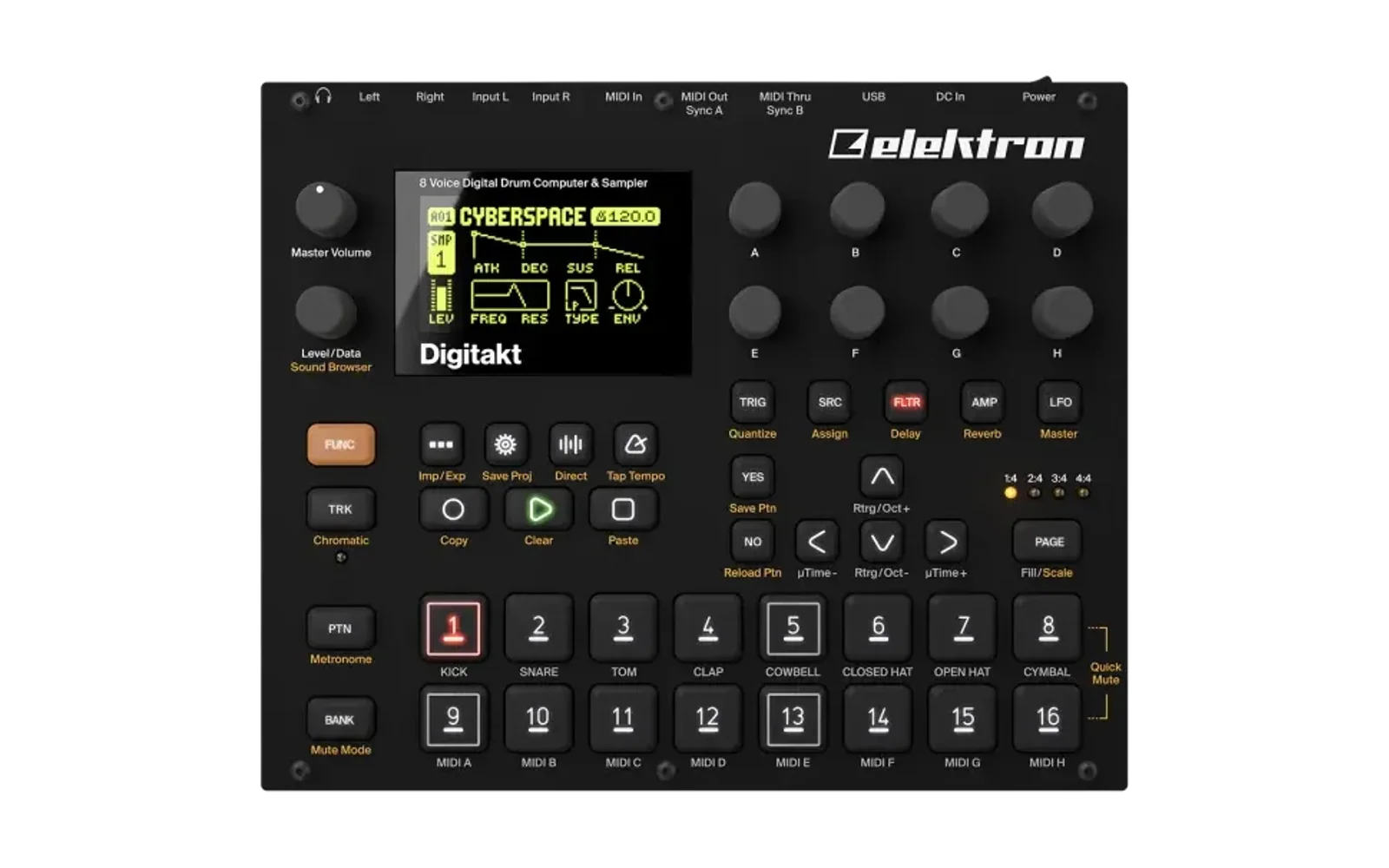
A performance and diagnostics mod for the Digitakt (mk1), OS 1.53 and 1.54. It adds three rows to SETTINGS:
- FAST AUDIO (on by default) runs the audio render's hot code from the
processor's free on-chip SRAM instead of DDR. It is the same code, so the
audio is identical, and the DSP load is lower. Measured on a unit, with
the same song before and after:
- the render went from 537 to 480 µs a block;
- DSP load went from 80.5 to 72.0 %.
- SYSTEM INFO shows CPU, DSP, RAM and free sample memory in the top bar.
A read-only USB diagnostics channel lets
tools/digiusb.pyread the same figures, and more, from a computer. - REMOTE KEYS (on at every power-on; Digitakt only for now) lets
tools/digiusb.py keyspress the panel's buttons over USB: see Remote keys. Off, the unit refuses key commands and lets go of any key the computer holds; the diagnostics still answer.
On the Digitone (mk1) and Digitone Keys, OS 1.43 and 1.44, it is SYSTEM INFO alone (digihealth 1.1): see The Digitone.
It is an elekloader mod. elekloader builds a custom OS file on your own machine, from your stock OS file and the mods you pick; nothing from Elektron is distributed.
FAST AUDIO
The render's hot code, 0x400716c0-0x4007629a (about 19 KB), is copied into the SRAM, which the OS clears at boot and never uses. The copy's references to itself are pointed at the copy, and the render's calls go through stubs that pick the copy or the original.
- When it switches on: two seconds after the unit's screen comes up, once. Untick it in SETTINGS and it stays off until the next power-on; unticking isn't saved.
- Safety nets:
- It refuses to start if that SRAM isn't empty.
- Once a second it checks the copy against its checksum. If anything has written over it, it goes back to the original code for good.
- FUNC at power-on and the stock OS file always recover the unit.
Why it is faster: the render runs about 17 KB of code for every block through an 8 KB instruction cache, which costs about a thousand cache misses a block. The SRAM answers without wait states.
SYSTEM INFO
- The top bar shows two pages, two seconds each:
- CPU and DSP load (DSP now and its peak in the last second);
- free RAM (the heap) and free sample memory.
- The USB channel is SysEx with Elektron's manufacturer header and a device byte (0x7D) that no Elektron machine uses, so a stock OS ignores it. Its diagnostics commands are read-only: HELLO, STATS (the once-a-second snapshot: render and idle time, the heap by block size, free sample memory, FAST AUDIO's state) and PEEK (DDR and the SRAM only).
python tools/digiusb.py cfw          # which mod answers, and its uptime
python tools/digiusb.py stats 10     # ten readings, one a second
python tools/digiusb.py peek 0x4020bb14 64
digiusb.py runs on Windows (winmm, through ctypes; no packages) and on
macOS/Linux (Mido + python-rtmidi). Close Elektron Transfer first on Windows,
which lets one program at a time open a MIDI port. The client expects one
Digitakt or Digitone MIDI input and output; it refuses ambiguous matches.
On macOS and Linux, install the two packages first:
pip install mido python-rtmidi
Remote keys
digihealth 1.2 presses all 48 Digitakt mk1 buttons on OS 1.53/1.54 and all
54 desktop Digitone mk1 buttons on OS 1.44, including encoder pushes.
Shared names such as YES, SETTINGS, 1 and LEVEL_PUSH use a device-specific
map. Device-only names such as SRC, SYN1 and T1 are refused on devices
that lack them. See the complete button map.
Releases before 1.2 answer the diagnostics only. The SETTINGS row REMOTE
KEYS turns the commands off: the unit then answers them with status 6 and
digiusb.py says so. The row is on at every power-on, for now: no core
yet keeps a mod's setting across power-off. The Digitone has no row yet,
so its keys are always on: with core-dn1 4.1, a second SETTINGS row (any
row, even a second SYSTEM INFO) stalls the first boot at FACTORY PROJECT
+DRIVE in digikit's emulator. Key protocol revision 2 is required; older clients/helpers refuse the capability mismatch before acting. Digitone OS 1.43 retains diagnostics only until its input bridge can be verified against that stock file. Digitone Keys extra controls are outside this map; the helper refuses that panel variant.
For example, on Digitakt hold FUNC while tapping SRC:
python tools/digiusb.py keys 'FUNC(SRC)'
Use a bare name such as keys YES to tap alone. --tap-ms defaults to 100
(maximum 250), and --hold-ms defaults to 2000 (maximum 2000).
The client checks capabilities,
opens a session, presses the held key, taps the other, releases and cancels.
Firmware knows individual keys; the computer composes the gesture. A hold
and tap may span different panel groups. To tap Settings on either device,
use keys SETTINGS; keys 'FUNC(LEVEL_PUSH)' opens its Sound Browser.
Numbered keys use the strings 1 through 16. Encoder pushes use A_PUSH
through H_PUSH; rotations are outside the button helper.
Run multiple steps in one session with a comma-separated input:
python tools/digiusb.py keys 'FUNC(SRC),DOWN,DOWN,DOWN,YES'
Commas separate steps. A bare name taps that button; FUNC(SRC) holds FUNC,
taps SRC, then releases FUNC before the next step. Quote the sequence so the
shell preserves parentheses. Spaces around steps and parentheses are allowed.
All names and device support are checked before any key action. Each step
waits for completion; an error stops the sequence and triggers cleanup.
--tap-ms and --hold-ms apply to each step, with the same defaults and limits
as a single gesture. The hold limit is a safety lease, not an extra delay.
The required input accepts KEY, HOLD(TAP), or a comma-separated list of
either. Nested holds and multiple taps inside parentheses are unsupported.
Completion confirms button-driver transitions; the script does not check
that the expected menu is open.
Python callers can reuse any port implementing send, receive and close:
from digiusb import Diag, RemoteKeys  # tools/ on the import path

with RemoteKeys(Diag(port)) as keys:
    keys.press('FUNC')
    keys.tap('LEVEL_PUSH')
    keys.release('FUNC')
One client and one action at a time are supported. Lost action replies are resolved with status queries, never automatic replay. Use the context manager to cancel on exceptions. A disconnected client's holds expire, and cleanup preserves physical keys. Releases can wait for room in the firmware queue; deadlines are serviced by the UI task, so a stalled UI delays cleanup. A UI stall longer than the counter's roughly 32-second wrap can delay it further. Completion means the stock driver accepted the transition, not that a menu opened. See the protocol reference.
The Digitone
digihealth 1.1 is SYSTEM INFO for the Digitone mk1 and Digitone Keys, OS
1.43 and 1.44: the same row, readout and USB channel, built from the same
source with the Digitone's addresses (dn1/; 1.44's are dn1/dn144.inc).
- CPU is the main CPU's load, as on the Digitakt.
- DSP is the main CPU's audio render: the effects and the mix. The FM voices run on the Digitone's second CPU, which no mod changes, so their load is not shown.
- The second page is free RAM alone: the Digitone has no sample memory.
- FAST AUDIO is not ported yet. The Digitone's render is different code, and less of the SRAM is free.
It needs the Digitone's core (core-dn1-2.0a.elemod), which elekloader 0.4.0
builds in.
Install
You need three things:
- elekloader:
- Windows: download
elekloader-<version>-windows.exefrom elekloader's releases and run it. The core mod, which every linkable mod needs, is built in (the Digitone's from elekloader 0.4.0). - Other systems: run elekloader from source with Python 3.9 or newer
(see its README). There
you also need the core for your device and OS (
core-2.0a.elemodorcore-2.1.elemodfor the Digitakt on 1.53,core-2.1-os1.54.elemodon 1.54,core-dn1-2.0a.elemodfor the Digitone), attached to this repository's releases too.
- Windows: download
- This mod, from
this repository's releases:
digihealth-1.0.elemodfor the Digitakt mk1 on OS 1.53,digihealth-1.0-os1.54.elemodon OS 1.54 (the same mod), ordigihealth-1.1.elemodfor the Digitone mk1 on OS 1.43,digihealth-1.1-os1.44.elemodon OS 1.44. - The stock OS file:
Digitakt_OS1.54.syxorDigitakt_OS1.53.syx, from Elektron's Digitakt downloads, orDigitone_and_Digitone_Keys_OS1.44.syx(or 1.43), from Elektron's Digitone downloads (the.zipworks as it is). elekloader recognises the file by its hash.
Then build your OS in elekloader's window:
- Your stock OS file: elekloader asks for it the first time; Change stock firmware... (top right) picks another.
- + Install from file...: choose the digihealth for your device and OS. From source, install its core the same way.
- Tick digihealth. core is ticked with it. The check below the list should say "No conflicts ... Ready to build". To add other mods, such as digislicer, install and tick them as well.
- OS version shown: the 4 characters the unit will show, for example
DH10. - BUILD FIRMWARE, and save the
.syx. elekloader verifies it before writing it.
Flash it with Elektron Transfer, as for any OS update (Elektron's instructions):
- Connect the unit over USB.
- In Transfer, select the unit and Connect.
- Drag the
.syxonto Drop files here. - Press YES on the unit.
Don't turn it off until the upgrade is done.
Or on the command line (elekloader from source):
python -m elekloader.patch --stock Digitakt_OS1.54.syx \
    --mod core-2.1-os1.54.elemod --mod digihealth-1.0-os1.54.elemod \
    --out Digitakt_OS1.54-health.syx --version DH10
Recovery: elekloader never changes the bootloader, so the stock OS
file always restores the unit. Hold FUNC while powering on for the
startup menu, and press TRIG 4 for OS UPGRADE. Then send the stock
.syx with Transfer's legacy OS upgrade mode.
Build it from source
The Digitakt mk1 cross toolchain (m68k binutils and gcc; on Debian or
Ubuntu, apt install binutils-m68k-linux-gnu gcc-m68k-linux-gnu; on
Windows, inside WSL) and elekloader, importable (installed, or on
PYTHONPATH):
python build.py --stock Digitakt_OS1.53.syx      # -> out/digihealth-1.0.elemod
python build.py --stock Digitakt_OS1.54.syx      # -> out/digihealth-1.0-os1.54.elemod
python build.py --stock Digitone_and_Digitone_Keys_OS1.43.syx   # -> out/digihealth-1.1.elemod
python build.py --stock Digitone_and_Digitone_Keys_OS1.44.syx   # -> out/digihealth-1.1-os1.44.elemod
python -m elekloader.lint out/digihealth-1.0.elemod --stock Digitakt_OS1.53.syx --with core-2.0a.elemod
Use build.py, not elekloader.sdk.build alone, with an elekloader that
knows mod.json's ports (0.4.0 or later). FAST AUDIO needs parts
worked out from your stock file:
- the checks that the code block can run from the SRAM;
- its fix-ups;
- the render's call-site stubs.
build.py computes them with elekloader's ColdFire decoder, then hands
them to elekloader's SDK.
| file | |
|---|---|
mod.json | the mod: its sites, handlers, tables and resources; fast_audio is build.py's input; under ports, 1.54's sites |
build.py | FAST AUDIO's plan from the stock file, then the SDK |
fastaudio.s | the FAST AUDIO row, the copy, the stubs' switch and the watchdog |
sysinfo.s | the SYSTEM INFO row and readout, the render and idle timing, the USB channel |
os153.inc, os154.inc | the stock routines it calls, for each OS (1.54's port defines OS154) |
dn1/mod.json, dn1/dn143.inc, dn1/dn144.inc | the Digitone mk1's mod (SYSTEM INFO; sysinfo.s with DN143, and DN144 in its 1.44 port) and its stock routines for each OS |
core_candidate.c, core_candidate.s, core_candidate.h | physical/synthetic input bridge, private to this mod |
remote_keys.c, remote_keys.s, remote_keys.h | bounded key mailbox, UI tick and clock |
keys.def, tools/keymap.py | shared logical names and device-specific button maps |
tools/digiusb.py, tools/winmidi.py, tools/midimido.py | diagnostics/key client and MIDI transports |
How it was checked
For the key helper, run the host checks without a MIDI device:
python tests/test_usb_keys.py
python tests/test_all_keys.py
python tools/digiusb.py selftest
tests/test_remote_keys.py checks the input bridge, and
tests/test_usb_firmware.py checks the complete compiled mod on OS 1.53
and 1.54, plus Digitone 1.44. Their module docstrings list the stock-file,
Elekloader and emulator environment variables. Missing firmware prerequisites
are reported as skipped.
The full helper tests cover every mapped firmware key ID, cross-group
ownership, machine-list/Sound Browser screens, unchanged diagnostic
replies, USB/DIN source gating, physical ownership, malformed requests,
lost action replies and deadline cleanup. The emulator calls the router hook
and captures the stock sender; it does not model USB endpoints. On a
Digitakt running OS 1.54, keys 'FUNC(SRC),DOWN,DOWN,DOWN,YES' worked, and
a remote keys YES confirmed a firmware update (#6).
The original performance and diagnostics checks below ran in digikit's emulator, which runs the stock OS and the mods through the real bootloader.
- Bit-exact audio: with FAST AUDIO on, every output sample and the audio engine's whole state after every render are identical to stock's. Four scenarios: a sample-heavy pattern, a trig-heavy pattern, all eight tracks busy, and parameter changes while playing (6,000-7,500 renders each). This holds for digihealth alone and combined with digislicer.
- A cold boot against stock (35.6 s): FAST AUDIO comes on by itself,
then the row is unticked and ticked again, with playing in between.
- Every sample of the audio is identical to stock's. The recording stops
one 1 ms block earlier: the hook bus changes the UI task's timing by a
few instructions, and
corealone does the same. - The screens are those of the custom build the mod comes from, to the pixel.
- Every sample of the audio is identical to stock's. The recording stops
one 1 ms block earlier: the hook bus changes the UI task's timing by a
few instructions, and
- On a unit: FAST AUDIO and SYSTEM INFO ran on a Digitakt mk1 in the custom builds this mod comes from, where the figures above were measured.
- The Digitone (digihealth 1.1 with its core): every stage of digikit's
firmware check passes, from the file's own bootstrap and updater to a
scripted session, against stock.
- With SYSTEM INFO off, every screen is identical to stock.
- Switched on in SETTINGS, the readout shows "CPU 58% DSP 54%/54%" and "RAM 13.8M" in the top bar. The emulator's own measurement of stock is 58 % CPU.
- The audio is identical to stock until PLAY, then the same sound, shifted by when the key press lands. Stock against itself with PLAY 0.3 ms later differs in the same way.
- Its routines and sites are the Digitakt 1.53's found again in 1.43: the same code, instruction for instruction, but for its addresses.
- OS 1.44 (the same mod, with 1.44's addresses,
dn1/dn144.inc): each routine found again in 1.44 by its code (most 0x274 further on), each piece of data through the code that reads it. With core-dn1 3.2, every stage of the firmware check passes against stock 1.44 and every screen is identical; the 1.43 build's code is unchanged. In a timed session SYSTEM INFO on reads the same on 1.44 as on 1.43 (CPU 13% and 14%, DSP 11% and 12% with a 59% peak, RAM 13.8M), its hooks run as often, and a diagnostics request (HELLO, marked as from USB) reaches the SysEx hook and is answered through the stock sender. - Not yet on a unit, and the USB channel not yet tried.
- The Digitakt mk1 on OS 1.54 (the same mod, with 1.54's
addresses), in the emulator:
- core + digihealth against stock 1.54: every stage passes, and the check's nine screens are identical, FAST AUDIO on.
- With digislicer and digineighbor too, against the same four for 1.53: the FAST AUDIO script (on, playing, off, playing) is identical screen for screen. With SYSTEM INFO on, its RAM page reads the same on both; its two pages alternate at different moments. 1.54's CPU page read "CPU 10% DSP 3%/45%" while playing. The emulator's cold boot has no samples, so these runs play silence: they check the screens and that nothing sounds, not the audio of a playing sample.
- FAST AUDIO copies the same render block in 1.54, at the same addresses; build.py plans its fix-ups and stubs from the 1.54 file (10 and 14, as for 1.53). Bit-exact audio has not been measured on 1.54, nor tried on a unit.
Licence
GPL-2.0-or-later. digihealth is free software: you can redistribute it and/or modify it under the terms of the GNU General Public License as published by the Free Software Foundation, either version 2 of the License, or (at your option) any later version. It is distributed in the hope that it will be useful, but WITHOUT ANY WARRANTY; without even the implied warranty of MERCHANTABILITY or FITNESS FOR A PARTICULAR PURPOSE. See the GNU General Public License for more details: LICENSE holds version 2.
Not affiliated with Elektron. Digitakt and Digitone are trademarks of Elektron. Custom firmware is at your own risk.