CoralFlower
Chord instrument firmware derived from ChoralRoot and Felucca.
forM-VAVE FM-1·by@FicusFicusov
Unclaimed. Is this yours? Sign in with GitHub as @FicusFicusov to claim it.
coralflower-0.6.1.fwsc· 596 KB· +5 files
GPL-3.0· FicusFicusov/CoralFlower·downloads come from the creator’s GitHub releases
v0.6.1CoralFlower 0.6.1Latest6 files
CoralFlower 0.6.1: every chord in the take
In this update a chord you play right after REC always makes it into the take, and REC on the rhythm machine counts you in first.
What's new
- A count-in on the rhythm machine. When a rhythm plays and you press REC on its page, the rhythm stops and one bar counts in (4-3-2-1 in 4/4). Then your take starts, and the rhythm starts again from its first bar with it. REC during the count-in calls it off. On HOME, REC under a playing rhythm still starts the take at once.
Fixed
- The chord you press with REC is in the take. A chord you start after REC goes into the take, even when you press it almost together with REC, or let it go before the take starts. It used to get lost, often the first chord of a take. A chord you were already holding before REC stays out. This works on every page, for chords, bass and Layer notes.
Install
Open https://ficusficusov.github.io/CoralFlower/ in Chrome or Edge on a computer. Connect the FM-1 with a USB cable that carries data, without a hub, and press "Install on your FM-1". If the FM-1 runs CoralFlower, ChoralRoot or Felucca, the installer saves your sounds to a file first; since 0.3.1 that file also holds your patterns. Updating from 0.3.1 or later keeps your settings, sounds and patterns. Installing firmware is at your own risk.
You can try 0.6.1 in the browser first: https://ficusficusov.github.io/CoralFlower/play/
Feedback
Tell me what works, what doesn't and what you'd like next. Open a GitHub issue or email iambemoli@gmail.com. News goes to the Telegram channel https://t.me/ficusficusov.
CoralFlower 0.6.1 for the M-VAVE FM-1 (package identity FM-1_930).
Install it from your browser at https://ficusficusov.github.io/CoralFlower/ (Chrome or Edge on a computer, with the FM-1 connected by USB). You can also try CoralFlower in the browser first, with no install: https://ficusficusov.github.io/CoralFlower/play/
SHA256SUMSlists the package and the app. The package holds three JieLi AC79 SDK files (Apache-2.0);LICENSE,LICENSING.mdandLICENSES.zipcarry every licence. Installing firmware is at your own risk; the official M-VAVE firmware can always be reinstalled.- coralflower-0.6.1.fwsc596 KB24↓
- SHA256SUMS181 B4↓
- coralflower-0.6.1-app.bin358 KB2↓
- LICENSES.zip17 KB1↓
Show all 6 filesHide 2 files
Other filesv0.6CoralFlower 0.66 files
CoralFlower 0.6: 23 rhythms and six new kits
In this update the FM-1 gets 23 ready-made drum rhythms that play under your chords, six new drum kits, and a channel setting for MIDI keyboards.
What's new
- A rhythm machine. 23 ready-made rhythms, from Pop and HipHop to Jungle, Amapiano and Breakcore. Press HOME, then SEQ, turn SELECT to the Rhythm machine card and press SEQ. Turn SELECT to pick a rhythm and press PLAY. Press HOME, and the rhythm plays on while your keys play chords. PLAY on HOME stops it, and PLAY again starts it. On the rhythm machine page, turn SELECT while a rhythm plays, and the next one comes in at the bar line.
- One list for all time signatures. Twenty rhythms are in 4/4, then come Tamborzao in 2/4 and two MathRock rhythms, one in 5/4 and one in 7/4. Pick one, and the METRONOME's TIME SIG follows it. Under each name you see the usual tempo of its style, such as "~110 BPM"; your TEMPO stays as you set it.
- Each rhythm keeps your KIT and SWING. Change KIT or SWING on the rhythm machine page, and that rhythm keeps them after you switch off. A dot next to its name means you changed them. SEL brings back the rhythm's own.
- A rhythm becomes a pattern. On the rhythm machine, EDIT puts the rhythm into the first empty pattern, A to H, and opens its drums, so you can change any hit. REC records your chords over the rhythm into the first empty pattern; while the rhythm plays, the take starts at once. If all eight patterns are used, the screen asks you to clear one in the SEQUENCER. To put a rhythm into a pattern you already have, open that pattern's drums, hold EDIT, turn PRESETS and let go: the rhythm replaces the drums. Hold REC for a second to undo it.
- Six new drum kits. X Lo-Fi, X Club, X Deep, X Live, X Tech and X Break play on a new drum engine of CoralFlower's own. Five of them play each hit a little differently, the way a live drummer does; X Tech plays every hit the same, like a drum machine. They come first in every kit list, and an empty pattern's drums start on X Lo-Fi. The old kits and the patterns you recorded sound as before.
- Pick your MIDI keyboard's channel. GLO > MIDI > IN CH sets the channel the FM-1 takes keyboard notes from in the NOTES IN modes "FM-1 keys" and "Roots": All (the default) or 1 to 16. If another device also sends notes into the FM-1, set IN CH to your keyboard's channel, and only your keyboard plays the chords.
- BASS Off mutes the chords' bass in every pattern. With BASS Off, the bass the FM-1 plays under a pattern's chords stops at once. A Bass row you recorded yourself plays on, and the BASS page shows how to mute it.
- Icons for the sequencer and the rhythm machine. SEQUENCER and the song page show notes, the rhythm machine shows a drum. The tag at the top right of HOME shows the same picture next to SEQ, SONG or the rhythm's name. On the METRONOME, the Sequencer and Rhythm machine cards show which page SEQ opens next.
- Shorter help. On the SEQUENCER and the rhythm machine, GLO's help is shorter: the lines for what the screen already shows are gone.
Fixed
- After a long jam with no stop, a setting you changed could go back to its old value when you switched off. Now the FM-1 saves about 200 changes in a row while the music plays.
- REC during the count-in calls the take off and takes you back to where you pressed REC.
- When you move a chord with the frame on the thin line after its flower (hold EDIT, turn SELECT), it moves one step, and the next chord stays in place.
- A note held on a MIDI keyboard no longer sticks when you change NOTES IN.
- The source code builds from a fresh copy (GitHub #4).
Install
Open https://ficusficusov.github.io/CoralFlower/ in Chrome or Edge on a computer. Connect the FM-1 with a USB cable that carries data, without a hub, and press "Install on your FM-1". If the FM-1 runs CoralFlower, ChoralRoot or Felucca, the installer saves your sounds to a file first; since 0.3.1 that file also holds your patterns. Updating from 0.3.1 or later keeps your settings, sounds and patterns. Installing firmware is at your own risk.
You can try 0.6 in the browser first: https://ficusficusov.github.io/CoralFlower/play/
Feedback
Tell me what works, what doesn't and what you'd like next. Open a GitHub issue or email iambemoli@gmail.com. News goes to the Telegram channel https://t.me/ficusficusov.
CoralFlower 0.6 for the M-VAVE FM-1 (package identity FM-1_930).
Install it from your browser at https://ficusficusov.github.io/CoralFlower/ (Chrome or Edge on a computer, with the FM-1 connected by USB). You can also try CoralFlower in the browser first, with no install: https://ficusficusov.github.io/CoralFlower/play/
SHA256SUMSlists the package and the app. The package holds three JieLi AC79 SDK files (Apache-2.0);LICENSE,LICENSING.mdandLICENSES.zipcarry every licence. Installing firmware is at your own risk; the official M-VAVE firmware can always be reinstalled.Show all 6 filesHide 2 files
Other filesv0.5CoralFlower 0.56 files
CoralFlower 0.5: a sound for every pattern
In this update each pattern can have its own sounds, a HOLD key keeps your chords playing, and a MIDI keyboard can play the FM-1's keys.
What's new
- A sound for every pattern. On the SEQUENCER page, turn SOUND on the Chords, Bass or Layer row, or PRESETS, to give that pattern its own sound for the track; a row left on HOME plays the HOME sound. Patterns switch sounds at the bar line, the song plays each block with its pattern's sounds, and a copied pattern takes its sounds along. HOME shows a pattern's sound with its letter, such as "·C".
- Sound edits stay in the pattern. A change in EDIT or ENV to a pattern's sound stays in that pattern, no SAVE needed, for up to eight pattern sounds. SAVE turns the edit into a new sound.
- Smooth sound changes. When the next pattern brings a new sound, the last notes of the old one ring out while the new one starts. A chord you hold goes on in the new sound.
- HOLD. In the Top layouts, the last upper key is HOLD. Tap it, and your chord keeps playing after you let go. A new root replaces the held chord, a chord type key changes it on the same root, and a second tap on HOLD lets it go. The arpeggiator plays what HOLD holds. With no chord type lit, the keys play single notes.
- Play from a MIDI keyboard. GLO > MIDI > NOTES IN sets how a keyboard plays the FM-1, over USB or the 3.5 mm MIDI IN. "FM-1 keys" (the default) makes it play like the FM-1's own keys. "Roots" plays a root on every key while you pick chord types on the FM-1. "Direct" plays the chord sound and the bass note by note on their MIDI channels, as before.
- GLIDE in the sequencer. Each sound keeps its own GLIDE, and the sequencer's chords glide too, with the bass from the chords following them.
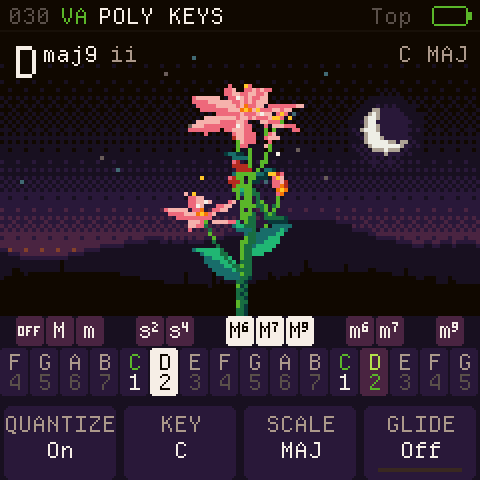
- The flower plays along. On HOME, the flower and the chord name follow the sequencer's chords. Hold some keys, and they show your chord instead.
- ARP remembers. The arpeggiator stays on or off after you switch off.
- Move a chord right after a take. Hold EDIT and turn SELECT works while the pattern plays, straight after you record.
- Fuller pads. A pad takes as many voices as the FM-1 has room for next to the other tracks: the less that plays, the more voices it gets. When room runs short, the tails of earlier chords go first.
Fixed
- Playing right after you switch on, the boot sound steps aside at once and your first chord plays whole.
- On HOME, a long sound name no longer runs under the SEQ and ARP tags: it is shortened to fit, and the pattern's letter stays.
Install
Open https://ficusficusov.github.io/CoralFlower/ in Chrome or Edge on a computer. Connect the FM-1 with a USB cable that carries data, without a hub, and press "Install on your FM-1". If the FM-1 runs CoralFlower, ChoralRoot or Felucca, the installer saves your sounds to a file first; since 0.3.1 that file also holds your patterns. Updating from 0.3.1 or later keeps your settings, sounds and patterns. If you had GLIDE set, your HOME sound takes it over as an edit; SAVE the sound to keep it when you change PRESETS. Installing firmware is at your own risk.
You can try 0.5 in the browser first: https://ficusficusov.github.io/CoralFlower/play/
Feedback
Tell me what works, what doesn't and what you'd like next. Open a GitHub issue or email iambemoli@gmail.com. News goes to the Telegram channel https://t.me/ficusficusov.
CoralFlower 0.5 for the M-VAVE FM-1 (package identity FM-1_930).
Install it from your browser at https://ficusficusov.github.io/CoralFlower/ (Chrome or Edge on a computer, with the FM-1 connected by USB). You can also try CoralFlower in the browser first, with no install: https://ficusficusov.github.io/CoralFlower/play/
SHA256SUMSlists the package and the app. The package holds three JieLi AC79 SDK files (Apache-2.0);LICENSE,LICENSING.mdandLICENSES.zipcarry every licence. Installing firmware is at your own risk; the official M-VAVE firmware can always be reinstalled.Show all 6 filesHide 3 files
v0.4.2CoralFlower 0.4.26 files
CoralFlower 0.4.2: everything as you left it
Switch the FM-1 off and on, and it's as you left it: your sounds with their edits, your settings, and PLAY ready with the pattern or song you picked last. Chords also stay whole on heavy sounds, from the very first one.
What's new
- Everything as you left it. Every setting is saved half a second after you stop changing it, even while a pattern plays or you hold a chord. That includes the bass you stop on in BASS SOUND and the boot sound switch. Patterns are saved as before, a moment after you stop PLAY.
- Sound edits are kept too. Changes to the chord, bass and Layer sounds in EDIT and ENV stay after you switch off, even if you didn't press SAVE.
- PLAY picks up where you were. After you switch on, the FM-1 starts on HOME, stopped. PLAY plays the pattern you picked last, or the song from the block under the frame.
- Backups hold your sound edits. A backup made on the site now saves your unsaved sound edits as well, and Restore brings them back.
- QUANTIZE starts on Basic on a new FM-1 and after a settings reset. Your own setting stays as it is.
Fixed
- Fast chords on heavy FM sounds, such as CLAVINET, no longer drop to a single note.
- Right after you switch on, with the boot sound on, chords play whole from the first one. The boot sound is the same, only lighter on the FM-1, and it steps aside when your chords need the room.
- A very short tap on a chord type key is no longer missed.
Install
Open https://ficusficusov.github.io/CoralFlower/ in Chrome or Edge on a computer. Connect the FM-1 with a USB cable that carries data, without a hub, and press "Install on your FM-1". If the FM-1 runs CoralFlower, ChoralRoot or Felucca, the installer saves your sounds to a file first; since 0.3.1 that file also holds your patterns. Updating from 0.3.1 or later keeps your settings, sounds and patterns. Installing firmware is at your own risk.
You can try 0.4.2 in the browser first: https://ficusficusov.github.io/CoralFlower/play/
Feedback
Tell me what works, what doesn't and what you'd like next. Open a GitHub issue or email iambemoli@gmail.com. News goes to the Telegram channel https://t.me/ficusficusov.
CoralFlower 0.4.2 for the M-VAVE FM-1 (package identity FM-1_930).
Install it from your browser at https://ficusficusov.github.io/CoralFlower/ (Chrome or Edge on a computer, with the FM-1 connected by USB). You can also try CoralFlower in the browser first, with no install: https://ficusficusov.github.io/CoralFlower/play/
SHA256SUMSlists the package and the app. The package holds three JieLi AC79 SDK files (Apache-2.0);LICENSE,LICENSING.mdandLICENSES.zipcarry every licence. Installing firmware is at your own risk; the official M-VAVE firmware can always be reinstalled.Show all 6 filesHide 3 files
v0.4.1CoralFlower 0.4.16 files
CoralFlower 0.4.1: write while it plays
In this update you can write and move chords while a pattern plays, mute tracks in one pattern only, and switch to the song on the fly.
What's new
- Write while it plays. In a Chords, Bass or Layer track, the keys write into the step under the frame while the pattern plays, as they do when it's stopped. After a take, the frame hides, so you can play along with your loop without changing it. Turn SELECT or stop with PLAY, and the frame is back.
- Move a chord. Put the frame on a chord, hold EDIT and turn SELECT: the chord moves with the frame, and the top of the screen says "Moving". Let go of EDIT to drop it there. Hold REC for a second to put it back where it was. Works in the Chords, Bass and Layer tracks.
- Hear the track you're on. On the SEQUENCER page and in a track, the keys play the sound of the track under the frame: the Layer's own sound on Layer, a single bass note on Bass, and drums on the upper keys on the Drums track. PRESETS changes that track's sound, so you can pick a Layer sound by ear.
- Mutes per pattern. MUTE now belongs to each pattern: mute the drums in A, and they still play in B. A copied pattern keeps its mutes. A track you muted before the update stays muted in every pattern; from there, change them one pattern at a time.
- Switch to the song while it plays. With a pattern playing, turn ALGORITHM past H to SONG: the song starts from its first block at the next bar and loops. Turn back to a pattern, and it plays from the next bar.
- PLAY on HOME plays the song when the song was the last thing you picked, from the block under the frame. Open a pattern or record a take, and PLAY plays that pattern again.
- Triplets are your call. A take writes 16 steps a bar in 4/4 (12 in 3/4, 24 in 6/8). A bar whose STEPS you set keeps your grid, so for triplets in 4/4, set STEPS to 12 or 24 before you record.
- A metal crash. The crash cymbal rings like metal, with a long tail that softens at the end, in every kit.
- A hint for KEY and SCALE. When QUANTIZE is Off, KEY and SCALE are dimmed; turning one now says "QUANTIZE is Off: turn it on".
Fixed
- Playing chords over a recorded loop no longer changes the take.
- The crash no longer stops when a closed hat plays.
- The drums no longer cut a note out of a chord you hold.
- In a busy mix, a Layer sound in unison gives way before the crash.
Install
Open https://ficusficusov.github.io/CoralFlower/ in Chrome or Edge on a computer. Connect the FM-1 with a USB cable that carries data, without a hub, and press "Install on your FM-1". If the FM-1 runs CoralFlower, ChoralRoot or Felucca, the installer saves your sounds to a file first; since 0.3.1 that file also holds your patterns. Installing firmware is at your own risk.
You can try 0.4.1 in the browser first: https://ficusficusov.github.io/CoralFlower/play/
Feedback
Tell me what works, what doesn't and what you'd like next. Open a GitHub issue or email iambemoli@gmail.com. News goes to the Telegram channel https://t.me/ficusficusov.
CoralFlower 0.4.1 for the M-VAVE FM-1 (package identity FM-1_930).
Install it from your browser at https://ficusficusov.github.io/CoralFlower/ (Chrome or Edge on a computer, with the FM-1 connected by USB). You can also try CoralFlower in the browser first, with no install: https://ficusficusov.github.io/CoralFlower/play/
SHA256SUMSlists the package and the app. The package holds three JieLi AC79 SDK files (Apache-2.0);LICENSE,LICENSING.mdandLICENSES.zipcarry every licence. Installing firmware is at your own risk; the official M-VAVE firmware can always be reinstalled.- coralflower-0.4.1.fwsc596 KB123↓
- coralflower-0.4.1-app.bin321 KB7↓
- SHA256SUMS181 B7↓
- LICENSES.zip17 KB5↓
Show all 6 filesHide 2 files
Other filesv0.4CoralFlower 0.46 files
CoralFlower 0.4: REC records straight into the sequencer
The looper is gone. REC on the main screen now records into a new sequencer pattern, so what you play is saved as chords, ready to build a song from.
What's new
- REC records a new pattern. On HOME, REC opens the first empty pattern's Chords track, counts in one bar, then records what you play. Press REC again to stop: the take is rounded to whole bars, and it stops by itself at 8 bars. The pattern then plays in a loop. Hold REC to undo the take. If you play nothing, or press REC during the count-in, no pattern is made. When all 8 patterns are used, REC asks you to clear one in the SEQUENCER.
- Chords stay chords. A take keeps the chords and the bass as you heard them, even when you latched a chord type before REC in a Lock layout. The looper played back only the root notes in that case.
- Steps for a take. A take uses twice the default steps of the time signature: 16 per bar in 4/4, 12 in 3/4, 24 in 6/8. A bar where you set STEPS yourself keeps your grid. Each chord lands on the step nearest to where you played it; the take makes up for the short delay caused by the FM-1 redrawing its screen.
- Triplets. A bar you play in triplets, or in swung eighths, gets the triplet grid when the take ends (24 per bar in 4/4), unless you set its STEPS yourself. Not in 6/8, and not on Drums.
- PLAY on HOME plays or stops the last pattern you recorded or opened. After a power-on, it plays the first pattern that has steps; if none has steps, the beat alone.
- Your saved loop becomes a pattern. At the next power-on, a loop saved by 0.3.1 or earlier, or restored from an old backup, becomes the Chords track of the first free pattern, up to 8 bars, and plays as the looper played it. The screen says "Your saved loop is now Pattern A in the SEQUENCER". If all 8 patterns are used, the screen asks you to clear one, and the loop moves over at a later power-on.
- Keys write only while stopped. In a Chords, Bass or Layer track, the keys write into the frame while the pattern is stopped. While it plays, they only sound, and REC records live. In 0.3 and 0.3.1 they also wrote while playing. The Drums track works as before.
- The Song page. The upper keys A to H add a pattern at the end of the song, and K2 MOVE moves a block. A long song scrolls as one row of blocks, with arrows at the ends and a thin strip under it that shows the whole song and the part on screen.
- Pattern tabs. On the SEQUENCER page, A to H and SONG are tabs: the open one is underlined, patterns in use show their color, and empty ones are dim.
- K4 POSITION. In the track editors, K4 is renamed from PLAYS to POSITION. It works the same.
- The metronome click follows MASTER volume and is silent when MASTER is at zero. If you never set the metronome's LEVEL, it clicks a little louder than a chord during a count-in and a take. A level you set is kept.
- Read your beat on the keys. Your drum hits, the beats and the playing step light up on the keys. You can build a beat by eye, the way you would on a classic step drum machine.
- Three one-time hints after your first take show where it went and how to get back to it.
- Shorter help. The Chords, Bass and Layer help sheets no longer list the erase gesture or PRESETS. The Drums sheet drops the erase gesture and keeps PRESETS for the kit. The gestures still work.
Removed
- The looper. The LOOPER screen and SAVE > Loop are gone; REC into the sequencer does their job.
Fixed
- A pattern you cleared no longer shows as used in the tabs and on the Song page.
- After you undo a take, the screen shows the last pattern that has steps.
Install
Open https://ficusficusov.github.io/CoralFlower/ in Chrome or Edge on a computer. Connect the FM-1 with a USB cable that carries data, without a hub, and press "Install on your FM-1". If the FM-1 runs CoralFlower, ChoralRoot or Felucca, the installer saves your sounds to a file first; since 0.3.1 that file also holds your patterns. Installing firmware is at your own risk.
You can try 0.4 in the browser first: https://ficusficusov.github.io/CoralFlower/play/
Feedback
Tell me what works, what doesn't and what you'd like next. Open a GitHub issue or email iambemoli@gmail.com. News goes to the Telegram channel https://t.me/ficusficusov.
CoralFlower 0.4 for the M-VAVE FM-1 (package identity FM-1_930).
Install it from your browser at https://ficusficusov.github.io/CoralFlower/ (Chrome or Edge on a computer, with the FM-1 connected by USB). You can also try CoralFlower in the browser first, with no install: https://ficusficusov.github.io/CoralFlower/play/
SHA256SUMSlists the package and the app. The package holds three JieLi AC79 SDK files (Apache-2.0);LICENSE,LICENSING.mdandLICENSES.zipcarry every licence. Installing firmware is at your own risk; the official M-VAVE firmware can always be reinstalled.Show all 6 filesHide 3 files
v0.3.1CoralFlower 0.3.16 files
CoralFlower 0.3.1: patterns in the backup
This update adds the sequencer's patterns and song to the backup.
What's new
- Patterns and song in the backup. A backup now holds the sequencer's eight patterns and its song, along with your sounds, settings and loop. Restore brings them back. Backups made with 0.3 don't have them.
- Update first, then back up. Updating to 0.3.1 doesn't touch the patterns saved on your FM-1. Before it installs, the page saves a backup by itself, but that backup comes from 0.3, so it has no patterns. To save your patterns, make a new backup after the update: open "Back up and restore" at the bottom of the page and press "Back up".
- A reminder after installing. When an install ends, the page says where to make a backup.
Install
Open https://ficusficusov.github.io/CoralFlower/ in Chrome or Edge on a computer. Connect the FM-1 with a USB cable that carries data, without a hub, and press "Install on your FM-1". If the FM-1 runs CoralFlower, ChoralRoot or Felucca, the installer saves your sounds to a file first. Installing firmware is at your own risk.
You can try 0.3.1 in the browser first: https://ficusficusov.github.io/CoralFlower/play/
Feedback
Tell me what works, what doesn't and what you'd like next. Open a GitHub issue or email iambemoli@gmail.com. News goes to the Telegram channel https://t.me/ficusficusov.
CoralFlower 0.3.1 for the M-VAVE FM-1 (package identity FM-1_930).
Install it from your browser at https://ficusficusov.github.io/CoralFlower/ (Chrome or Edge on a computer, with the FM-1 connected by USB). You can also try CoralFlower in the browser first, with no install: https://ficusficusov.github.io/CoralFlower/play/
SHA256SUMSlists the package and the app. The package holds three JieLi AC79 SDK files (Apache-2.0);LICENSE,LICENSING.mdandLICENSES.zipcarry every licence. Installing firmware is at your own risk; the official M-VAVE firmware can always be reinstalled.- coralflower-0.3.1.fwsc596 KB161↓
- coralflower-0.3.1-app.bin324 KB5↓
- SHA256SUMS181 B5↓
- LICENSES.zip17 KB4↓
Show all 6 filesHide 2 files
Other filesv0.3CoralFlower 0.36 files
CoralFlower 0.3: a sequencer for chords, bass and drums
This update adds a sequencer. Write or record chords, a bass line, drums and a third part called Layer, then play them as a song.
What's new
- The sequencer. The first press of SEQ opens the METRONOME, the second opens the SEQUENCER, and a third returns to HOME. The sequencer holds eight patterns (A to H) and a song: a row of up to 32 patterns. Each pattern has four tracks: Chords, Bass, Layer and Drums. A pattern you pick while another plays starts at the next bar line. PLAY stops playback.
- The SEQUENCER screen. SELECT picks a track, ALGORITHM picks a pattern or the song, and EDIT opens the track. The knobs belong to the picked track: K1 VOLUME, K2 the sound (KIT for Drums), K3 KEY and K4 MUTE. KEY decides whether the track follows HOME's KEY and SCALE or stays as you wrote it. On Drums, K3 is SWING instead. GLO shows a help sheet.
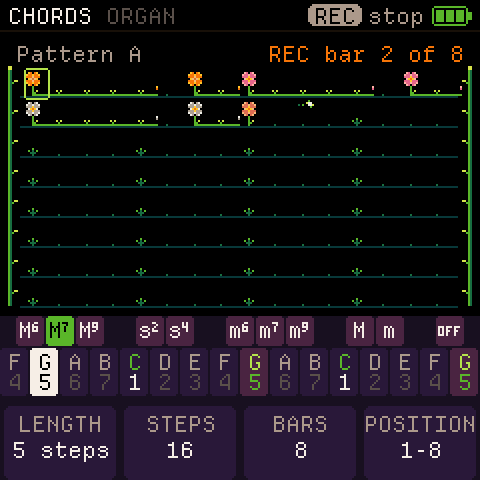
- Write or record. In a track, the frame (the box that marks a step on the screen) shows where you write. Press the keys to write a chord or a note there. REC counts in one bar, then records what you play with its timing, even short notes. Hold REC for 1 second to undo the last change. Hold it again to redo. Your patterns stay when you switch the FM-1 off.
- A length for each track. In the Chords, Bass or Layer editor, K3 BARS sets how many bars it has (1 to 8, four by default) and K2 STEPS sets the grid (1, 2, 3, 4, 6 or 8 steps a beat). K4 PLAYS picks which bars play. A shorter track starts again by itself while a longer one plays: a 3-bar track plays 1 2 3 1 2 3 while a 4-bar track plays 1 2 3 4. An empty bar stays silent. Nothing is copied automatically.
- Drums. Eleven drums sit on the upper keys: kick, snare, clap, closed hat, open hat, three toms, rim, cowbell and crash. The 16 lower keys are the steps of a 4/4 bar. PRESETS picks one of eight kits (Std, 808, 909, Tight, Boom, Lo-fi, Hand, Crush). K1 gives the picked drum a different kit, so kits can be mixed, and K2 sets its level. SWING (0 to 100 %) makes every second step come late. While you record, the upper keys work like the pads of a drum machine.
- Layer. The Layer track plays one more sound, picked from the chord sounds, alongside the chords and the bass. Edit it with EDIT > LAY, shape it on ENV's Layer page and save it with SAVE > Layer. Its last EDIT page, Glide, sets the voice mode (Poly, Mono, Legato or Unison), a glide time and the note priority.
- Copy and clear. Hold OCT+ and turn SELECT to copy a bar to where the frame stops. On the SEQUENCER screen, hold OCT+ and turn ALGORITHM to copy the pattern to another letter. SEL clears the step in the frame. Hold SEL and turn SELECT to clear every step the frame passes. To clear a whole track, hold SEL for 3 seconds on the SEQUENCER screen. Let go before the countdown ends, and the track stays.
- Arpeggio on a track. In the Chords or Layer track, ARP turns on the arpeggiator for that track. It follows the settings on the ARP page, including Strum. The steps still store whole chords.
- Odd time signatures. The sequencer plays in the METRONOME's TIME SIG: 2/4, 3/4, 4/4, 5/4, 6/8 and 7/4.
- MIDI channels for Layer and Drums. The two new parts send MIDI on separate channels, set in GLO > Channels: LAYER CH (3 by default) and DRUMS CH (10 by default, General MIDI drums).
Other changes
- Single notes glide. With a GLIDE time set on HOME, a single note now slides from the previous one, as chords do.
- Quantize: Off, Basic, Full. The middle setting, On, is now called Basic and works as before. A new FM-1, or one after a reset, starts on Full, so chord notes also fit the scale. If you saved settings before, your Quantize choice stays.
- GLIDE on FM sounds. A chord change with GLIDE on an FM sound now takes the time you set. Before, it lasted longer.
- Reset everything. A new Reset page in GLO erases everything you made: sounds, patterns, the loop and settings. It takes three steps, so it doesn't happen by accident: turn K4 to Reset, hold SAVE for 3 seconds, then press SAVE again within 6 seconds.
- A new crash cymbal. The old crash rang like a gong. The new one is made from noise.
- Long values on two lines. A long value in a knob cell, such as a sound name, goes on two lines instead of running into the next cell.
- Saving waits for silence. A save now waits until all four tracks are silent, so it doesn't cut off a ringing crash or Layer note.
- Chord glide downwards. When a chord slides to a lower one, its top note now slides down with the rest. Before, it stayed behind at the old pitch while it faded, so the glide down sounded weaker than the glide up.
- Fixed: the VA oscillator picture wrote past the end of its text at COARSE 10 and higher (a memory error). The bug was also in 0.2.
Install
Open https://ficusficusov.github.io/CoralFlower/ in Chrome or Edge on a computer. Connect the FM-1 with a USB cable that carries data, without a hub, and press "Install on your FM-1". If the FM-1 runs CoralFlower, ChoralRoot or Felucca, the installer saves your sounds to a file first. Installing firmware is at your own risk.
You can try 0.3 in the browser first: https://ficusficusov.github.io/CoralFlower/play/
Feedback
Tell me what works, what doesn't and what you'd like next. Open a GitHub issue or email iambemoli@gmail.com. News goes to the Telegram channel https://t.me/ficusficusov.
CoralFlower 0.3 for the M-VAVE FM-1 (package identity FM-1_930).
Install it from your browser at https://ficusficusov.github.io/CoralFlower/ (Chrome or Edge on a computer, with the FM-1 connected by USB). You can also try CoralFlower in the browser first, with no install: https://ficusficusov.github.io/CoralFlower/play/
SHA256SUMSlists the package and the app. The package holds three JieLi AC79 SDK files (Apache-2.0);LICENSE,LICENSING.mdandLICENSES.zipcarry every licence. Installing firmware is at your own risk; the official M-VAVE firmware can always be reinstalled.Show all 6 filesHide 2 files
Other filesv0.2CoralFlower 0.26 files
CoralFlower 0.2: whole chords strike again
This update adds a new way to change chords and fixes glide on VA sounds.
What's new
- RETRIG: Chord. A new setting in GLO > Play > RETRIG. When you change the chord while the last one still sounds, the whole new chord starts again with its attack, the notes the two chords share too. With a Glide time set, each note slides from the last chord's note.
- Clearer RETRIG names. The settings are now Wait, Slide (was Move), Notes (was Strike) and Chord. A choice you saved stays the same. With a Glide time set, Notes now slides the notes that change, as Chord does.
- Glide on VA sounds. Glide on virtual analogue sounds now takes the time you set. Before, it was much faster than the setting, so it was hard to hear.
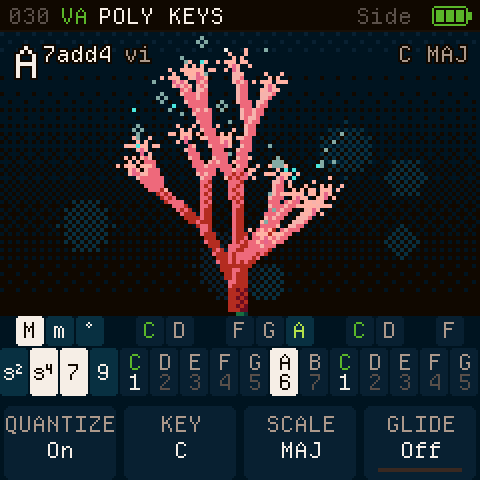
- A padlock in the top bar. The Lock layouts show "Top" or "Side" with a padlock, so a long sound name has more room.
Install
Open https://ficusficusov.github.io/CoralFlower/ in Chrome or Edge on a computer. Connect the FM-1 with a USB cable that carries data, without a hub, and press "Install on your FM-1". If the FM-1 runs CoralFlower, ChoralRoot or Felucca, the installer saves your sounds to a file first. Installing firmware is at your own risk.
You can try 0.2 in the browser first: https://ficusficusov.github.io/CoralFlower/play/
Feedback
Tell me what works, what doesn't and what you'd like next. Open a GitHub issue or email iambemoli@gmail.com. News goes to the Telegram channel https://t.me/ficusficusov.
CoralFlower 0.2 for the M-VAVE FM-1 (package identity FM-1_930).
Install it from your browser at https://ficusficusov.github.io/CoralFlower/ (Chrome or Edge on a computer, with the FM-1 connected by USB). You can also try CoralFlower in the browser first, with no install: https://ficusficusov.github.io/CoralFlower/play/
SHA256SUMSlists the package and the app. The package holds three JieLi AC79 SDK files (Apache-2.0);LICENSE,LICENSING.mdandLICENSES.zipcarry every licence. Installing firmware is at your own risk; the official M-VAVE firmware can always be reinstalled.Show all 6 filesHide 3 files
v0.1CoralFlower 0.16 files
CoralFlower 0.1: the first release
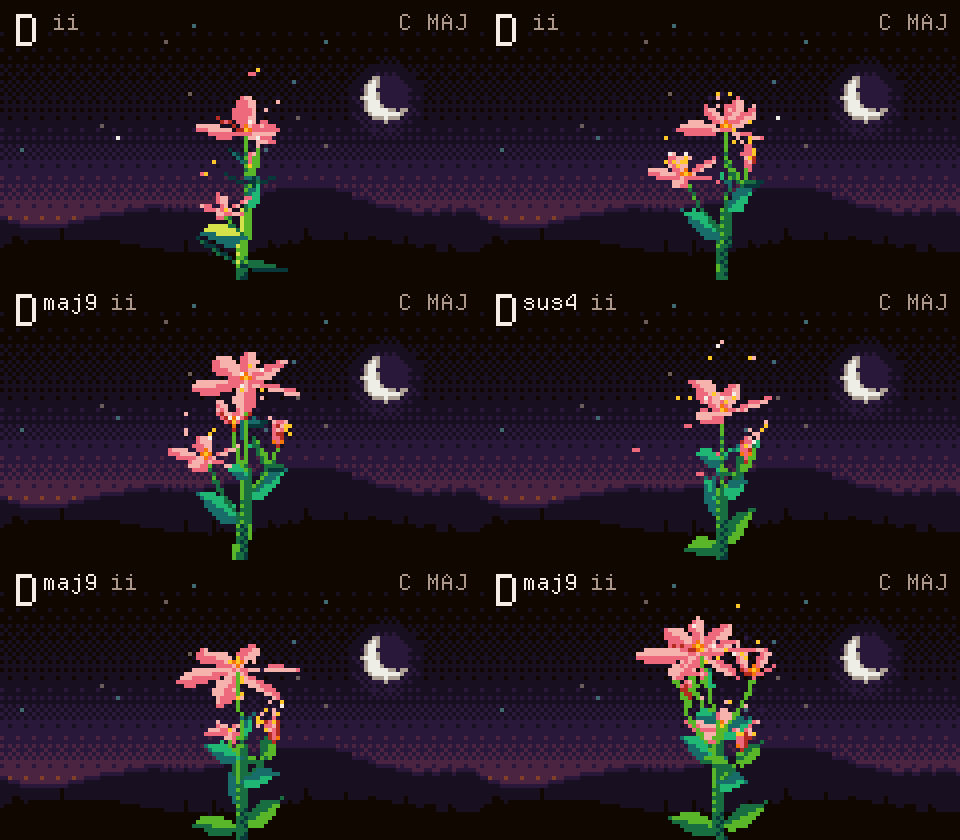
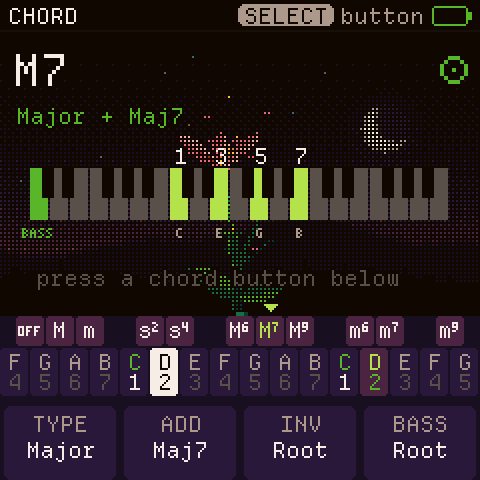
CoralFlower is free firmware that makes your M-VAVE FM-1 an instrument for chords. Hold a chord key, and every note you play becomes a whole chord, with a bass underneath. While you play, a pixel flower grows from your chords. It is inspired by the Telepathic Instruments Orchid, with controls redesigned for the FM-1's keys and buttons.
What's in it
- The lower keys play the notes of your scale (26 scales, any starting note); hold an upper key, and each note becomes a chord. With no upper key held, single notes, several at once. Two key layouts, Top and Side, each with a Lock mode. Chord glide (off by default) slides each note into the next chord.
- A bass part under your chords (you can turn it off), with its own sound and range, plus an octaver that doubles each bass note.
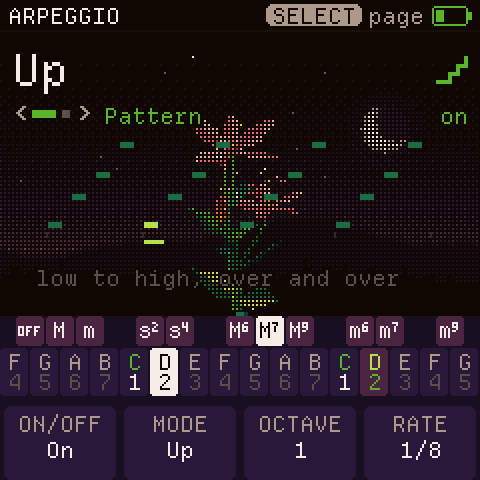
- An arpeggiator with nine patterns, including a strum like the one on the Orchid chord synth. It locks to the metronome or to a MIDI clock.
- A looper for chord progressions, with count-in, overdub, undo and timing correction. Save the loop, and it stays after you switch off.
- Six effects in an order you choose: filter, drive, chorus, phaser, delay and reverb.
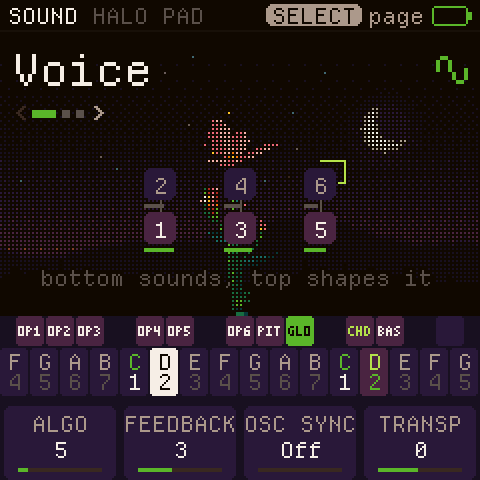
- About 60 virtual-analogue and FM sounds, with separate lists for chords and basses. Every sound has an editor, and you can save your own.
- A flower (Top layout) or a coral (Side layout) that grows from every chord.
- A short chime when the FM-1 starts. You can turn it off in the global settings (GLO > Display).
Try it, then install it
The browser emulator runs this same firmware: https://ficusficusov.github.io/CoralFlower/play/
To install, open https://ficusficusov.github.io/CoralFlower/ in Chrome or Edge on a computer. Connect the FM-1 with a USB cable that carries data, without a hub, and press Install. It takes about a minute. If the FM-1 runs ChoralRoot or Felucca, the installer saves your sounds to a file first. The official firmware's sounds can't be backed up. Installing firmware is at your own risk.
Feedback
Tell me what works, what doesn't and what you'd like next. Open a GitHub issue or email iambemoli@gmail.com. News goes to the Telegram channel https://t.me/ficusficusov.
CoralFlower 0.1 for the M-VAVE FM-1 (package identity FM-1_930).
Install it from your browser at https://ficusficusov.github.io/CoralFlower/ (Chrome or Edge on a computer, with the FM-1 connected by USB). You can also try CoralFlower in the browser first, with no install: https://ficusficusov.github.io/CoralFlower/play/
SHA256SUMSlists the package and the app. The package holds three JieLi AC79 SDK files (Apache-2.0);LICENSE,LICENSING.mdandLICENSES.zipcarry every licence. Installing firmware is at your own risk; the official M-VAVE firmware can always be reinstalled.Show all 6 filesHide 2 files
Other files