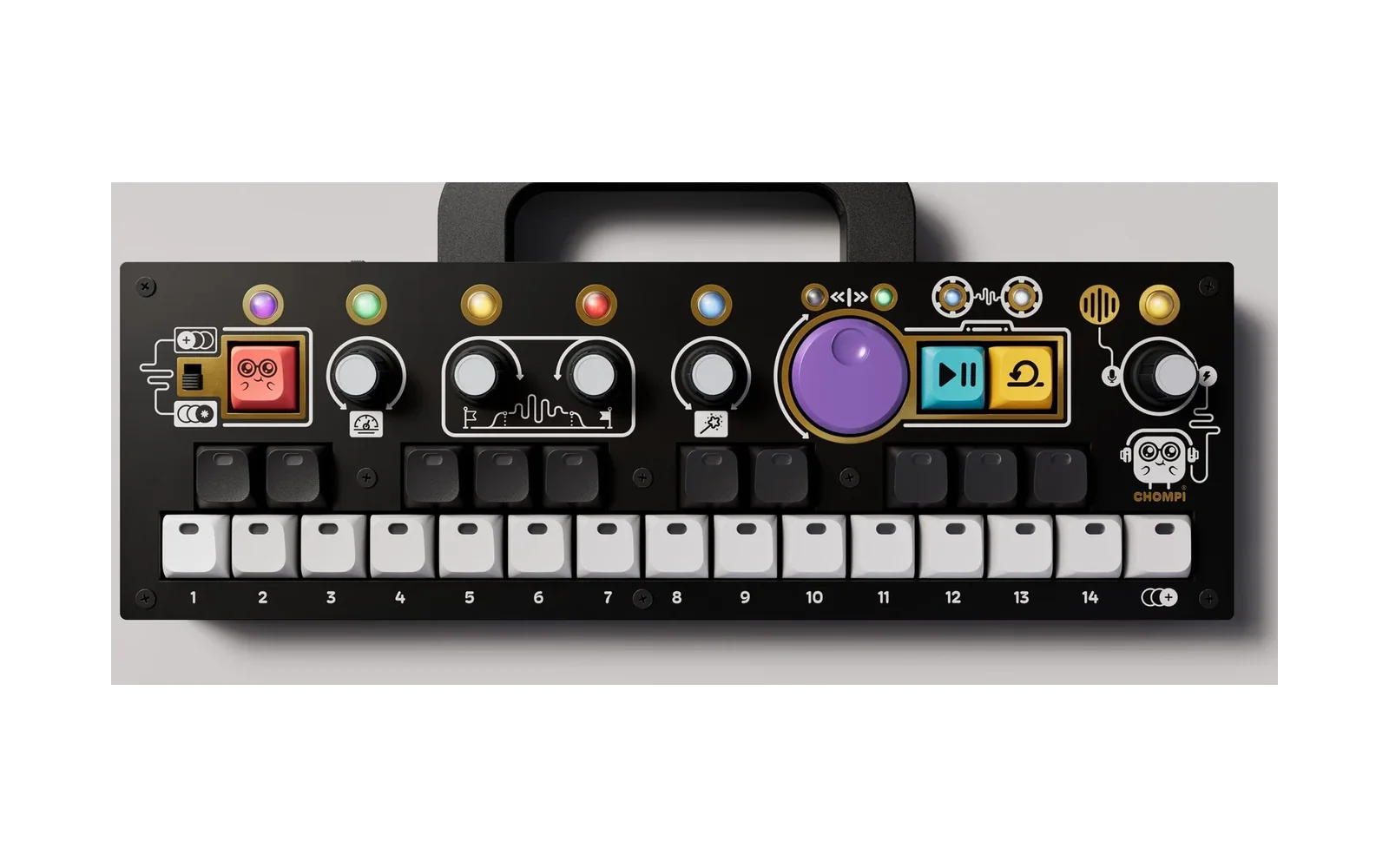
chompi-x0x
Loud90/100TB-303-style acid bass firmware for the CHOMPI (Daisy Seed), with a diode-ladder filter fitted to a real TB-303
chompi-x0x is custom firmware for the CHOMPI Club CHOMPI, by @theotherson. Open source under MIT, latest release v1.3.2 (October 2026).
forCHOMPI Club CHOMPI·by@theotherson
Unclaimed. Is this yours? Sign in with GitHub as @theotherson to claim it.
chompi-x0x-v1_3_2.bin· 241 KB· +3 files
MIT· theotherson/chompi-x0x·downloads come from the creator’s GitHub releases
v1.3.2Latest4 files
chompi-x0x v1.3.2
The step scale moves to D#4, with a marker showing where a shifted pattern started.
This is a community firmware, not an official CHOMPI Club release.
Changed
-
Choose the step scale with D#4 (SEQ PAGE) and the purple knob. In step mode, hold D#4 and the purple knob lights in that side's scale:
- green: 1/16
- magenta: 1/16T
- orange: 1/8T
Press the purple knob while holding D#4 to go to the next scale. The length still follows (16 ↔ 12), each side still has its own scale, and a change still waits for the top of that side's loop.
-
Knob 1 push and turn no longer sets the step scale. On its length page it's just the length now.
New
- First-step marker. While D#4 is held, the key where the part's first step is now lights in the scale's colour.
- Shifting the pattern (D#4 + turn the purple knob) moves the marker with it, so you can see where the pattern started.
- D#4 + a step key puts the marker on that step.
- It's only a visual marker and changes nothing in what plays. The bassline and the drum part each have their own, and both are saved with the pattern.
A tap of D#4 still switches between steps 1–8 and 9–16. Holding it to shift, change the scale or move the marker doesn't.
Known issues
- An early hit on a drum part's first step plays on the grid the first time round after PLAY.
- On an external MIDI clock, ratchet hits land on whole clock ticks, so 4 in a sixteenth comes out slightly uneven.
- With Ableton following the CHOMPI over USB, Ableton still occasionally misses a restart (see v1.2.0).
Downloads
chompi-x0x-v1_3_2.bin: the firmwarecheatsheet.pdf: every control on two pages, to printcheatsheet-bass.png,cheatsheet-drums.png: one page each
Installing
With the Multi Firmware Launcher: add
chompi-x0x-v1_3_2.binto theFIRMWAREfolder in the root of the SD card. A number in front of the name puts it on that key (04_X0X.bingoes on key 4); without one, it takes a free key. x0x keeps its patterns and settings in its own/X0Xfolder, so it shares the card with your other firmwares.With the standard bootloader:
- Copy
chompi-x0x-v1_3_2.binto the root of the SD card. It must be the only.binfile there. - Power on. The rainbow shows while the bootloader installs it, then a red sweep across the keys.
A CHOMPI that has never had the bootloader needs
bin/install_bootloader.shonce first (see the README).Upgrading
Your patterns and settings carry over from any earlier version. See the v1.0.0 notes for upgrading from v0.x.
Credits
Built on CHOMPI Club's open-source TEMPO firmware (MIT), with libDaisy and DaisySP from Electrosmith (MIT), SD card and LED fixes from hiwatts' POLY firmware (MIT), and the startup fix from sfaber02's CHOMPI-MULTI-FIRMWARE (MIT). The code was edited primarily by Claude's coding agent, and I provided direction over the sound quality and user interface/behaviour. The filter follows Tim Stinchcombe's analysis of the TB-303's diode ladder. CHOMPI is a trademark of CHOMPI Club.
Show all 4 filesHide 3 files
-
v1.3.14 files
chompi-x0x v1.3.1
Triplets that cross, microtiming, pattern shift and a metronome.
This is a community firmware, not an official CHOMPI Club release.
New
- Bass and drums each have their own step scale. Push and turn knob 1 on its page 2 to set the scale for the side you're on: 1/16, 1/16T or 1/8T.
- The two sides can cross: bass in 1/16 against drums in 1/8T is 4 against 3, three drum steps to a quarter note.
- Each side changes at the top of its own loop. A pattern played on both sides (PATTERN held + a key) starts both together.
- Triplets line up with the bar. Switching a 16-step part to a triplet scale makes it 12 steps: a bar of 1/8T, or half a bar of 1/16T. Switching back makes it 16 again.
- Lengths you've set yourself are left alone.
- Steps past the length are kept, just not played.
- Triplet keys. On a triplet scale the white keys are the steps one for one, so 12 steps sit on keys 1–12 and the halves split between keys 6 and 7. There's no shared middle C and no page switching.
- Microtiming per step. In step mode, hold a step and turn the purple knob to move it earlier (left) or later (right), a tick a click. A tick is 1/24 of a beat, and the limit is 5 ticks either way at 1/16.
- While a step is held, the white keys show its timing, with middle C as the grid. Hold the step again later and it shows what it has.
- Hold a step and press the purple knob to put that step back on the grid.
- Timing set this way plays as set even with quantize on, and is saved and exported to MIDI.
- On the drums it moves the selected voice's hit on that step.
- Pattern shift. In step mode, hold D#4 and turn the purple knob to shift the whole part a step each way, round its length. Turn back to where you started to undo it; let go and it stays where you left it. A tap of D#4 still switches between viewing steps 1–8 and 9–16.
- Metronome. CHOMPI + pressing the volume knob turns it on or off. The knob flashes green for on and red for off.
- While the pattern runs it clicks each beat, higher on the first beat of each bar.
- It's about 12 dB under the bassline and follows the volume knob.
- It isn't recorded or sent over MIDI, and is off again at power-on.
- This replaces CHOMPI + press resetting the volume knob's page.
Changed
- In step mode, a step key's toggle now happens when you let go, so holding a step to set its timing never also toggles it, or its accent on a flag page. Selecting a step still happens on the press.
Fixed
- An exported MIDI file cut short the note of a first step timed early.
Known issues
- An early hit on a drum part's first step plays on the grid the first time round after PLAY. There's no step before it to play it from yet.
- On an external MIDI clock, ratchet hits land on whole clock ticks, so 4 in a sixteenth comes out slightly uneven.
- With Ableton following the CHOMPI over USB, Ableton still occasionally misses a restart (see v1.2.0).
Downloads
chompi-x0x-v1_3_1.bin: the firmwarecheatsheet.pdf: every control on two pages, to printcheatsheet-bass.png,cheatsheet-drums.png: one page each
Installing
With the Multi Firmware Launcher: add
chompi-x0x-v1_3_1.binto theFIRMWAREfolder in the root of the SD card. A number in front of the name puts it on that key (04_X0X.bingoes on key 4); without one, it takes a free key. x0x keeps its patterns and settings in its own/X0Xfolder, so it shares the card with your other firmwares.With the standard bootloader:
- Copy
chompi-x0x-v1_3_1.binto the root of the SD card. It must be the only.binfile there. - Power on. The rainbow shows while the bootloader installs it, then a red sweep across the keys.
A CHOMPI that has never had the bootloader needs
bin/install_bootloader.shonce first (see the README).Upgrading
Your patterns and settings carry over. Patterns from v1.3.0, which had one step scale for both sides, load with both sides on it, so they sound the same. See the v1.0.0 notes for upgrading from v0.x.
Credits
Built on CHOMPI Club's open-source TEMPO firmware (MIT), with libDaisy and DaisySP from Electrosmith (MIT), SD card and LED fixes from hiwatts' POLY firmware (MIT), and the startup fix from sfaber02's CHOMPI-MULTI-FIRMWARE (MIT). The code was edited primarily by Claude's coding agent, and I provided direction over the sound quality and user interface/behaviour. The filter follows Tim Stinchcombe's analysis of the TB-303's diode ladder. CHOMPI is a trademark of CHOMPI Club.
Show all 4 filesHide 3 files
- Bass and drums each have their own step scale. Push and turn knob 1 on its page 2 to set the scale for the side you're on: 1/16, 1/16T or 1/8T.
v1.3.04 files
chompi-x0x v1.3.0
Triplets, ratchets, and copying a step to another step.
This is a community firmware, not an official CHOMPI Club release.
New
- Triplets (step scale). Push and turn knob 1 on its length page, on either side, to pick what a step is: 1/16 (the default), 1/16 triplets or 1/8 triplets (white keys 1-3 show it, lavender).
- It's saved with each pattern and covers its bassline and drums.
- A change takes over at the top of the next loop, so nothing lurches mid-bar.
- Triplets aren't swung. Exported MIDI files keep the triplet timing.
- Ratchets: 1-4 hits in a step.
- Bass, step mode: press TIE a second time for the RATCHET page (pink). Step keys cycle 1 → 2 → 3 → 4 hits, brighter for more. A third press of TIE goes back to the notes.
- Drums, step mode: press ACCENT a second time for the selected voice's RATCHET page, and once more to go back to its hits. CLEAR tapped there clears that voice's ratchets only.
- Bass, live: CHOMPI + white key 13 / 14 / 15 makes held notes repeat 2 / 3 / 4 times a step. Press the same key again to turn it off. While recording, notes go in ratcheted, and a key held across steps repeats there instead of tying.
- Drums, live: a roll faster than a step (1/32 on the 1/16 scale) now records its extra hits as a ratchet.
- The hits spread evenly through the step. A slide or tie out of a ratcheted step holds its last hit.
- Ratchets follow the step scale, and are saved and exported to MIDI.
- Copy a step to another step. In step mode, tap COPY: COPY and the selected step blink, and the next step key you press gets a copy of it (note, flags, timing, ratchet). Tap COPY again to cancel, and COPY + CLEAR undoes a paste.
- On the drums, the first step key after COPY picks the step and the second gets it, every voice included.
- Holding COPY with a step key still copies the whole pattern, as before.
Known issues
- On an external MIDI clock, ratchet hits land on whole clock ticks, so 4 in a sixteenth comes out slightly uneven.
- With Ableton following the CHOMPI over USB, Ableton still occasionally misses a restart (see v1.2.0).
Downloads
chompi-x0x-v1_3_0.bin: the firmwarecheatsheet.pdf: every control on two pages, to printcheatsheet-bass.png,cheatsheet-drums.png: one page each
Installing
With the Multi Firmware Launcher: add
chompi-x0x-v1_3_0.binto theFIRMWAREfolder in the root of the SD card. A number in front of the name puts it on that key (04_X0X.bingoes on key 4); without one, it takes a free key. x0x keeps its patterns and settings in its own/X0Xfolder, so it shares the card with your other firmwares.With the standard bootloader:
- Copy
chompi-x0x-v1_3_0.binto the root of the SD card. It must be the only.binfile there. - Power on. The rainbow shows while the bootloader installs it, then a red sweep across the keys.
A CHOMPI that has never had the bootloader needs
bin/install_bootloader.shonce first (see the README).Upgrading
Your patterns and settings carry over from any earlier version. Patterns saved by this version add a ratchet number to each step; an older version still reads them, and plays every step once. See the v1.0.0 notes for upgrading from v0.x.
Credits
Built on CHOMPI Club's open-source TEMPO firmware (MIT), with libDaisy and DaisySP from Electrosmith (MIT), SD card and LED fixes from hiwatts' POLY firmware (MIT), and the startup fix from sfaber02's CHOMPI-MULTI-FIRMWARE (MIT). The code was edited primarily by Claude's coding agent, and I provided direction over the sound quality and user interface/behaviour. The filter follows Tim Stinchcombe's analysis of the TB-303's diode ladder. CHOMPI is a trademark of CHOMPI Club.
Show all 4 filesHide 3 files
- Triplets (step scale). Push and turn knob 1 on its length page, on either side, to pick what a step is: 1/16 (the default), 1/16 triplets or 1/8 triplets (white keys 1-3 show it, lavender).
v1.2.04 files
chompi-x0x v1.2.0
Better MIDI sync with a DAW, steadier knobs, and no more pop when switching the bass's waveform.
This is a community firmware, not an official CHOMPI Club release.
New
- The CHOMPI can lead a DAW. Set Ableton (or another DAW) to follow the CHOMPI's clock, and PLAY on the CHOMPI starts and stops it:
- Clock keeps going while the CHOMPI is stopped, so the DAW stays locked to its tempo.
- Every PLAY starts the DAW from the top (Song Position 0, then Start).
- PLAY waits for the clock's next tick (at most ~17 ms), so the clock stays perfectly even.
- A DAW that sends the clock back can no longer take over: once PLAY has started the CHOMPI on its own clock, it ignores clock coming in until another device sends Start.
- Stepped controls take two clicks a step: the waveform, the bass and drum lengths, and the synced delay time. A nudge no longer changes them; turning back starts the count again.
Fixed
- Knobs flicking back and forth. A bouncing contact inside a knob could count as a click, sometimes the wrong way, so stepped controls jumped back and forth even when turned one way. The knobs are now read so that a bounce never counts either way.
- A pop when switching saw / square. The switch now fades over 5 ms.
- Ableton running far too fast, and not stopping, when following the CHOMPI. This was the clock echoed back by the DAW taking over (see above).
- Song Position sent twice over USB, the second time as a broken message (a bug in the libDaisy library).
Known issue
With Ableton following the CHOMPI over USB, Ableton still occasionally misses a restart, and toggling Ext gets it going again. The CHOMPI's MIDI checks out correctly each time, so this seems to be down to how Ableton follows an external clock. DIN MIDI may be steadier.
Downloads
chompi-x0x-v1_2_0.bin: the firmwarecheatsheet.pdf: every control on two pages, to printcheatsheet-bass.png,cheatsheet-drums.png: one page each
Installing
With the Multi Firmware Launcher: add
chompi-x0x-v1_2_0.binto theFIRMWAREfolder in the root of the SD card. A number in front of the name puts it on that key (04_X0X.bingoes on key 4); without one, it takes a free key. x0x keeps its patterns and settings in its own/X0Xfolder, so it shares the card with your other firmwares.With the standard bootloader:
- Copy
chompi-x0x-v1_2_0.binto the root of the SD card. It must be the only.binfile there. - Power on. The rainbow shows while the bootloader installs it, then a red sweep across the keys.
A CHOMPI that has never had the bootloader needs
bin/install_bootloader.shonce first (see the README).Upgrading
Your patterns and settings carry over from any earlier version. See the v1.0.0 notes for upgrading from v0.x.
Credits
Built on CHOMPI Club's open-source TEMPO firmware (MIT), with libDaisy and DaisySP from Electrosmith (MIT), SD card and LED fixes from hiwatts' POLY firmware (MIT), and the startup fix from sfaber02's CHOMPI-MULTI-FIRMWARE (MIT). The code was edited primarily by Claude's coding agent, and I provided direction over the sound quality and user interface/behaviour. The filter follows Tim Stinchcombe's analysis of the TB-303's diode ladder. CHOMPI is a trademark of CHOMPI Club.
Show all 4 filesHide 3 files
- The CHOMPI can lead a DAW. Set Ableton (or another DAW) to follow the CHOMPI's clock, and PLAY on the CHOMPI starts and stops it:
v1.1.14 files
chompi-x0x v1.1.1
Undo for an accidental CLEAR, and a reworked cheat sheet.
This is a community firmware, not an official CHOMPI Club release.
New
- Undo a clear. In step mode, hold COPY and press CLEAR to bring back what you last cleared; press it again to redo the clear. It covers every clear: a bass step or the whole pattern, a drum voice or the whole drum part, and the live-mode LOOP-hold clear. The bass and drums each keep their own undo, and it still works after you've moved to another pattern. The keys flash in that side's colour when it works.
- A reworked cheat sheet. Clearer wording throughout, the pattern controls listed in full on the drums page too, and the new undo on both pages.
Downloads
chompi-x0x-v1_1_1.bin: the firmwarecheatsheet.pdf: every control on two pages, to printcheatsheet-bass.png,cheatsheet-drums.png: one page each
Installing
With the Multi Firmware Launcher: add
chompi-x0x-v1_1_1.binto theFIRMWAREfolder in the root of the SD card. A number in front of the name puts it on that key (04_X0X.bingoes on key 4); without one, it takes a free key. x0x keeps its patterns and settings in its own/X0Xfolder, so it shares the card with your other firmwares.With the standard bootloader:
- Copy
chompi-x0x-v1_1_1.binto the root of the SD card. It must be the only.binfile there. - Power on. The rainbow shows while the bootloader installs it, then a red sweep across the keys.
A CHOMPI that has never had the bootloader needs
bin/install_bootloader.shonce first (see the README).Upgrading
Your patterns and settings carry over from any earlier version. See the v1.0.0 notes for upgrading from v0.x.
Credits
Built on CHOMPI Club's open-source TEMPO firmware (MIT), with libDaisy and DaisySP from Electrosmith (MIT), SD card and LED fixes from hiwatts' POLY firmware (MIT), and the startup fix from sfaber02's CHOMPI-MULTI-FIRMWARE (MIT). The code was edited primarily by Claude's coding agent, and I provided direction over the sound quality and user interface/behaviour. The filter follows Tim Stinchcombe's analysis of the TB-303's diode ladder. CHOMPI is a trademark of CHOMPI Club.
Show all 4 filesHide 3 files
v1.0.2x0x v1.0.24 files
chompi-x0x v1.0.2
Play the drums from MIDI, better-sounding toms and closed hat, a fix for knob clicks that didn't register, and a fix for a rare startup problem. Works with the Multi Firmware Launcher.
This is a community firmware, not an official CHOMPI Club release.
New
- Play the drums from MIDI. GM drum notes on channel 10, over DIN or USB, play the 606 voices, and record into the pattern while recording. Velocity 112 and up is an accented hit. The channel is set in
/X0X/options.txt(midi_drum_channel), anddrums_in 0turns it off. Drum MIDI out follows the same channel. - Toms and closed hat closer to a real 606. Both were refitted to the clean hits of five TR-606 kits. The toms gained the body of noise the real ones have.
- LFO pages reordered (drum side, knob 1). Page 3 is now the LFO's speed (CHOMPI: shape), and page 4 the voice's LFO depth, in pink (CHOMPI: what it moves). Shape and target now take two clicks per step, so a nudge won't change them.
Fixed
- Knob clicks that didn't register. Pressing a knob can jog it by one click of rotation, which was cancelling the press and nudging the value. That jog is now ignored, so one press is always enough.
- A rare startup at a fraction of full speed. Depending on what was left in memory, the firmware could start the processor at 64 MHz instead of 480, with blinding white LEDs, SD card errors and no sound. It now always reads the bootloader's information from the right place. Thanks to sfaber02 for finding and fixing this in CHOMPI's firmwares.
Downloads
chompi-x0x-v1_0_2.bin: the firmwarecheatsheet.pdf: every control on two pages, to printcheatsheet-bass.png,cheatsheet-drums.png: one page each
Installing
With the Multi Firmware Launcher: add
chompi-x0x-v1_0_2.binto theFIRMWAREfolder in the root of the SD card. A number in front of the name puts it on that key (04_X0X.bingoes on key 4); without one, it takes a free key. x0x keeps its patterns and settings in its own/X0Xfolder, so it shares the card with your other firmwares.With the standard bootloader:
- Copy
chompi-x0x-v1_0_2.binto the root of the SD card. It must be the only.binfile there. - Power on. The rainbow shows while the bootloader installs it, then a red sweep across the keys.
A CHOMPI that has never had the bootloader needs
bin/install_bootloader.shonce first (see the README).Upgrading
Your patterns and settings carry over from any earlier version. If you had the drum LFO set up, it works as before; only which page and which layer each control sits on has changed. See the v1.0.0 notes for upgrading from v0.x.
Credits
Built on CHOMPI Club's open-source TEMPO firmware (MIT), with libDaisy and DaisySP from Electrosmith (MIT), SD card and LED fixes from hiwatts' POLY firmware (MIT), and the startup fix from sfaber02's CHOMPI-MULTI-FIRMWARE (MIT). The code was edited primarily by Claude's coding agent, and I provided direction over the sound quality and user interface/behaviour. The filter follows Tim Stinchcombe's analysis of the TB-303's diode ladder. CHOMPI is a trademark of CHOMPI Club.
Show all 4 filesHide 3 files
- Play the drums from MIDI. GM drum notes on channel 10, over DIN or USB, play the 606 voices, and record into the pattern while recording. Velocity 112 and up is an accented hit. The channel is set in
v1.0.1x0x v1.0.14 files
chompi-x0x v1.0.1
A cheat sheet: every control on two pages, one for the bass and one for the drums, in the style of CHOMPI's own mini guide. Download the PNGs to keep on your phone, or the PDF to print.
The firmware is the same as v1.0.0. If you're already on v1.0.0, there's nothing to reinstall.
This is a community firmware, not an official CHOMPI Club release.
Downloads
chompi-x0x-v1_0_1.bin: the firmware (identical to v1.0.0)cheatsheet.pdf: both pages, to printcheatsheet-bass.png,cheatsheet-drums.png: one page each
Installing
- Download
chompi-x0x-v1_0_1.binbelow. - Copy it to the root of the CHOMPI's SD card. It must be the only
.binfile there. - Power on. The rainbow shows while the bootloader installs it, then a red sweep across the keys.
A CHOMPI running any stock firmware already has the bootloader. One that has never had it needs
bin/install_bootloader.shonce first (see the README).See the v1.0.0 notes for everything in the firmware, and for upgrading from earlier versions.
Credits
Built on CHOMPI Club's open-source TEMPO firmware (MIT), with libDaisy and DaisySP from Electrosmith (MIT), and SD card and LED fixes from hiwatts' POLY firmware (MIT). The code was edited primarily by Claude's coding agent, and I provided direction over the sound quality and user interface/behaviour. The filter follows Tim Stinchcombe's analysis of the TB-303's diode ladder. CHOMPI is a trademark of CHOMPI Club.
Show all 4 filesHide 3 files
v1.0.0x0x v1.0.01 file
chompi-x0x v1.0.0
An acid bass and a TR-606-style drum machine for the CHOMPI. Every pattern holds a bassline and a drum part, both always play, and you switch the panel between them with LOOP (step mode) or a CHOMPI double tap.
This is a community firmware, not an official CHOMPI Club release.
New since v0.2.0
- An LFO per drum voice. One tempo-synced LFO for the kit (knob 1, page 3: shape, CHOMPI for rate), and each voice picks what it moves and how far (knob 1, page 4: target, CHOMPI for depth): level, pan, tuning, its own filter, feedback FM or decay. The kick can pump while the hats drift left and right and a tom's pitch wobbles, all in time
- A filter on every voice, swept by the LFO, so you can close just the hats while the kick stays untouched
- Record pitched drums live. In live mode, the white keys play the last voice you hit across C major, and now record at that pitch too: tom melodies, tuned kick lines
- Knob 4 on the drum side is back to three pages (reverb, delay, crush), since the LFO moved to knob 1
- More room for future features (the panel, MIDI and card code are now built for size, the sound code still for speed)
Everything in it
The bass (TB-303)
- A diode ladder filter fitted to recordings of a real TB-303, with accent, slide and the 303's envelopes
- 16 patterns with A and B sides, step and live modes, real-time recording, quantize, swing, an arpeggiator and transpose
- Drive, bit crush, chorus/flanger and a tape-style ping-pong delay
The drums (TR-606)
- Seven voices (bass drum, snare, low and high tom, cymbal, open and closed hat) synthesised from the 606's block diagram and fitted to samples of six real 606s, with accent and the closed hat choking the open one
- A drum part in every pattern, with its own length for polymeters
- Step programming, or play and record them live, with quantize on or off (off keeps your timing to 1/24 of a beat)
- Live mode extras: roll (hold G#4 and voice keys, 1/8 to 1/32 with triplets) and erase (hold A#4 and voice keys while it runs)
- Per voice: level, pan, attack, decay, tuning (±24 semitones), feedback FM, and its LFO target
- Mute (CHOMPI + voice) and solo (hold a voice 2 s: everything else muted, bring voices back one at a time)
Drum effects
- A plate reverb, a send into the bass's tape delay (shared, so the echoes line up), bit crush and their own distortion
- A kit filter with resonance and an envelope that sweeps it on every hit
- Take single voices out of the reverb and delay (hold knob 4 and press a voice key)
Both together
- Each side can play a different pattern: the bass on 1A while the drums play 3B. Hold PATTERN and press a pattern key to send both to the same one at the bar
- A bass/drums mix, an effects balance (what feeds the delay and reverb), a master compressor and a kick sidechain, all on the volume knob
- In step mode, LOOP switches between bass and drums and CHOMPI + LOOP mutes the side you're on
- MIDI: the drums are on channel 10 (GM notes) in and out, and in exported and imported MIDI files
Installing
- Download
chompi-x0x-v1_0_0.binbelow. - Copy it to the root of the CHOMPI's SD card. It must be the only
.binfile there. - Power on. The rainbow shows while the bootloader installs it, then a red sweep across the keys.
A CHOMPI running any stock firmware already has the bootloader. One that has never had it needs
bin/install_bootloader.shonce first (see the README).To go back to a stock firmware or an earlier version, put its
.binon the card instead.Upgrading
- From v0.2.0: your patterns and settings carry over. If you had the LFO running, it starts with every voice's target off, so nothing moves until you pick targets on knob 1, page 4. The LFO no longer sweeps the kit filter (knob 2, page 2); set each voice's target to filter instead.
- From v0.1.0: your patterns carry over with empty drum parts, ready to fill. Your knob settings carry over, except a mute set on the old mix page, which starts unmuted. Tap tempo has moved from LOOP to the purple knob's click in step mode; LOOP now switches between bass and drums.
- Going back to an earlier version: it skips what it doesn't know, but the next time it saves your patterns those parts are dropped (the drum parts in v0.1.0; recorded pitches in v0.2.0). Back up
/X0X/patterns.txtfirst, or turn on write protect (hold PATTERN 2 s while stopped) before you go back.
Good to know
- The controls are listed in full in the README.
- The drums are the newest part: tested on the desktop, but they've had less time on the hardware than the bass. Please open an issue if anything misbehaves.
- A small diagnostic file,
/X0X/load.txt, records the processor load. If you hit crackles, it helps to attach it to an issue.
Credits
Built on CHOMPI Club's open-source TEMPO firmware (MIT), with libDaisy and DaisySP from Electrosmith (MIT), and SD card and LED fixes from hiwatts' POLY firmware (MIT). The code was edited primarily by Claude's coding agent, and I provided direction over the sound quality and user interface/behaviour. The filter follows Tim Stinchcombe's analysis of the TB-303's diode ladder. CHOMPI is a trademark of CHOMPI Club.
v0.2.0x0x v0.2.01 file
chompi-x0x v0.2.0
The big one: a TR-606-style drum machine now runs alongside the acid bass. Every pattern holds a bassline and a drum part, both always play, and you switch the panel between them with LOOP (step mode) or a CHOMPI double tap.
This is a community firmware, not an official CHOMPI Club release.
Highlights
The drums (TR-606)
- Seven voices (bass drum, snare, low and high tom, cymbal, open and closed hat) synthesised from the 606's block diagram and fitted to samples of six real 606s, with accent and the closed hat choking the open one
- A drum part in every pattern, with its own length for polymeters
- Step programming, or play and record them live, with quantize on or off (off keeps your timing to 1/24 of a beat)
- Live mode extras: roll (hold G#4 and voice keys, 1/8 to 1/32 with triplets) and erase (hold A#4 and voice keys while it runs)
- Per voice: level, pan, attack, decay, tuning (±24 semitones) and feedback FM for glitchier sounds
- Mute (CHOMPI + voice) and solo (hold a voice 2 s: everything else muted, bring voices back one at a time)
Drum effects
- A plate reverb, a send into the bass's tape delay (shared, so the echoes line up), bit crush and their own distortion
- A filter with resonance, an envelope that sweeps it on every hit, and a tempo-synced LFO (triangle, ramps, sample and hold)
- Take single voices out of the reverb and delay (hold knob 4 and press a voice key)
Both together
- Each side can play a different pattern: the bass on 1A while the drums play 3B. Hold PATTERN and press a pattern key to send both to the same one at the bar
- A bass/drums mix, an effects balance (what feeds the delay and reverb), a master compressor and a kick sidechain, all on the volume knob
- In step mode, LOOP switches between bass and drums and CHOMPI + LOOP mutes the side you're on
- MIDI: the drums are on channel 10 (GM notes) in and out, and in exported and imported MIDI files
Other changes
- Tempo range is now 40–240 BPM, and the lights above the purple knob flash the eighth notes on both sides
- Hold CHOMPI and push knob 1, 2 or 3 for 2 s to reset every page of that knob
- The bass side's colour is now purple (red is kept for recording and clearing)
- Write protect only toggles while stopped, so holding PATTERN during playback can't flip it
- Fixed: a late first bass note made every loop slightly longer, so the pattern drifted against the tempo
- Cheaper effects maths and protection against invalid audio values
Installing
- Download
chompi-x0x-v0_2_0.binbelow. - Copy it to the root of the CHOMPI's SD card. It must be the only
.binfile there. - Power on. The rainbow shows while the bootloader installs it, then a red sweep across the keys.
A CHOMPI running any stock firmware already has the bootloader. One that has never had it needs
bin/install_bootloader.shonce first (see the README).To go back to a stock firmware, or to v0.1.0, put its
.binon the card instead.Upgrading from v0.1.0
- Your patterns carry over. They start with empty drum parts, ready to fill.
- Your knob settings carry over. The one exception: a mute set on the old mix page starts unmuted.
- Tap tempo has moved from LOOP to the purple knob's click in step mode. LOOP now switches between bass and drums.
- If you go back to v0.1.0, it ignores the drum parts in your pattern file without losing them.
Good to know
- The controls are listed in full in the README.
- The drums are the newest part: tested on the desktop, but they've had the least time on the hardware. Please open an issue if anything misbehaves.
- A small diagnostic file,
/X0X/load.txt, records the processor load. If you hit crackles, it helps to attach it to an issue.
Credits
Built on CHOMPI Club's open-source TEMPO firmware (MIT), with libDaisy and DaisySP from Electrosmith (MIT), and SD card and LED fixes from hiwatts' POLY firmware (MIT). The code was edited primarily by Claude's coding agent, and I provided direction over the sound quality and user interface/behaviour. The filter follows Tim Stinchcombe's analysis of the TB-303's diode ladder. CHOMPI is a trademark of CHOMPI Club.
v0.1.0x0x v0.1.0Beta1 file
chompi-x0x v0.1.0
An acid bass firmware for the CHOMPI, in the spirit of the Roland TB-303: a single saw/square voice through a diode ladder filter, a 16-step x0x sequencer with accent, slide and tie, and an effects chain. This is my first "complete" iteration of an acid bass synthesizer modelled off of my RE-303 (a handmade replica of the TB-303 using NOS components). It is far from authentic but gives a decent starting point for developing a quality acid bass sound.
This is a community firmware, not an official CHOMPI Club release.
Highlights
The sound
- TB-303-style diode ladder filter (after Tim Stinchcombe's analysis), fitted to recordings of a real TB-303: cutoff and env mod curves, resonance strength, envelope decay and the 303's bass loss
- Accent "capacitor" that builds up over accents in a row, and legato slides
- Saw or square (pulse width adjustable)
The sequencer
- 16 steps with accent, slide, tie and octave up/down per step
- 16 patterns, each with an A and a B side (32 in all)
- Step mode and live mode (toggle switch), with real-time recording, note entry and swing
- Quantize to 1/16, 1/8 or 1/4: applied as you record, as a live switch on what's already recorded, or permanently (hold CHOMPI + D#4)
- Arpeggiator with latch, five patterns and octave range
- Transpose mode
Effects
- Drive, bit crusher, chorus/flanger and a tape-style ping-pong delay
- Delay time synced (nine settings including triplets and dotted, crossfaded so changes don't zap) or free (push knob 4 and turn) with a tape-style pitch swoop
Patterns and files
- Write protect: hold PATTERN (F#4) for 2 s to play freely without overwriting your saved patterns
- MIDI export: hold a pattern key for 2 s on the pattern page to write every pattern as a .mid file to
/X0X/MIDI/ - MIDI import: drop
3B.mid(etc.) into/X0X/IMPORT/and power on. Unreadable files are set aside as.badand change nothing - MIDI clock, notes and CCs in and out over DIN and USB
- A demo set of patterns on a new card
Installing
- Download
chompi-x0x-v0_1_0.binbelow. - Copy it to the root of the CHOMPI's SD card. It must be the only
.binfile there. - Power on. The rainbow shows while the bootloader installs it, then a red sweep across the keys.
A CHOMPI running any stock firmware already has the bootloader. One that has never had it needs
bin/install_bootloader.shonce first (see the README).To go back to a stock firmware, put its
.binon the card instead.Your patterns and settings live in
/X0Xon the card, separate from the firmware, so swapping firmware doesn't touch them. If you tried an earlier development build of this firmware, back up/X0X/patterns.txtfirst: the pattern file format changed when A/B patterns arrived.Good to know
- The controls are listed in full in the README.
- The newest features (A/B patterns, MIDI import and export, write protect, the delay's free time) are tested on the desktop but have had less time on the hardware. Please open an issue if anything misbehaves.
- Double-tapping CHOMPI switches to a drum side that's only a placeholder for now: a TR-606-style drum machine is planned.
Credits
Built on CHOMPI Club's open-source TEMPO firmware (MIT), with libDaisy and DaisySP from Electrosmith (MIT), and SD card and LED fixes from hiwatts' POLY firmware (MIT). The code was edited primarily by Claude's coding agent, and I provided direction over the sound quality and user interface/behaviour. The filter follows Tim Stinchcombe's analysis of the TB-303's diode ladder. CHOMPI is a trademark of CHOMPI Club.


