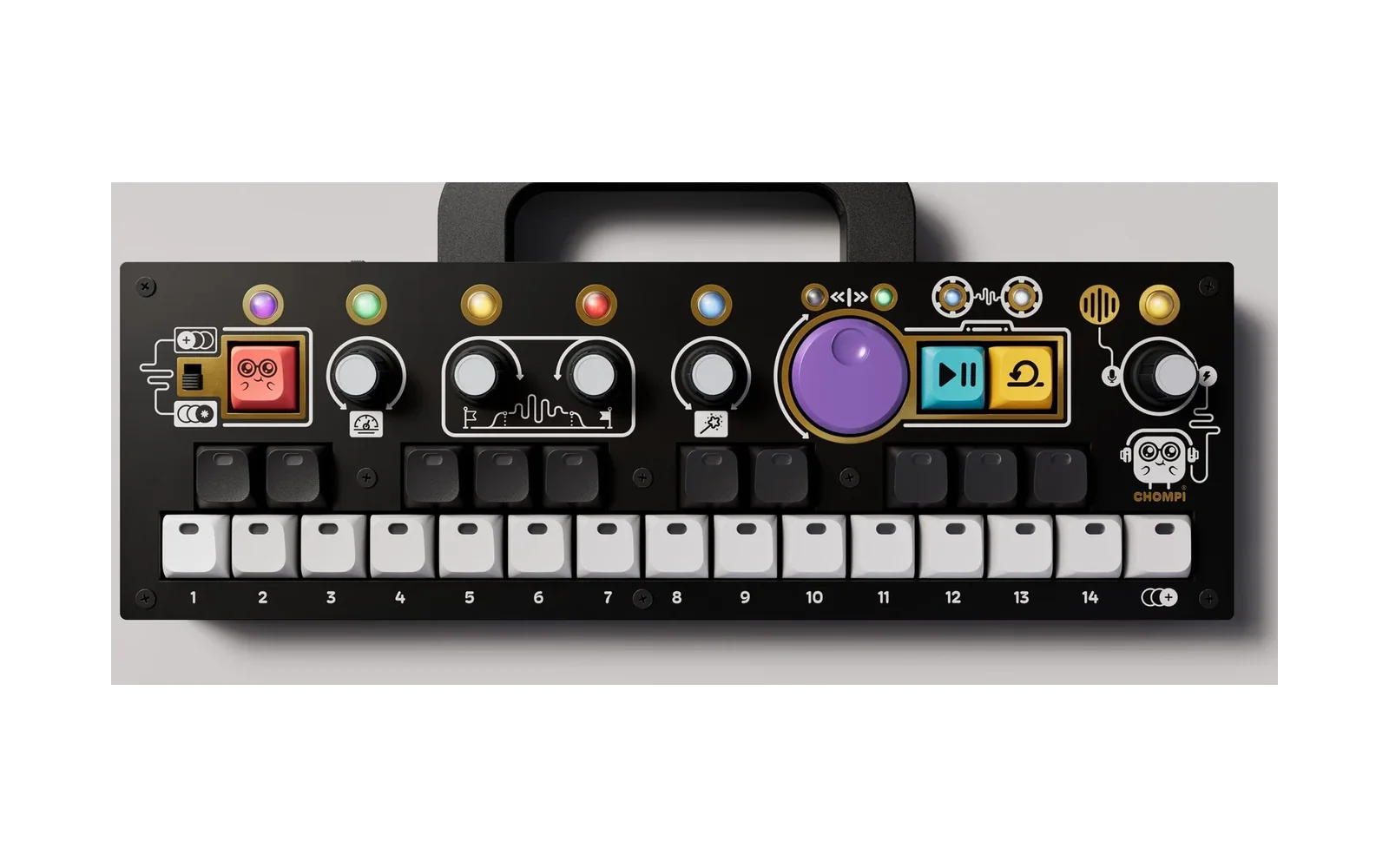
CHOMPI x0x
A TB-303 / x0xb0x-style bass line machine for the CHOMPI, with a TR-606-style drum machine alongside: a 303-style voice and seven 606 voices, each with a 16-step sequencer you program a step at a time or record into live. No menus: every control is a key, a knob or the toggle.
Download: get the latest .bin from the Releases page. With the Multi Firmware Launcher, add it to the FIRMWARE folder in the root of the SD card; with the standard bootloader, copy it to the root of the card as the only .bin there. See Flashing below for more.
Cheat sheet: every control on two pages, bass and drums (or both as a PDF to print).
Built from scratch on top of CHOMPI Club's TEMPO firmware, whose hardware layer, libraries and startup it keeps.
Status: in use on a CHOMPI. The filter and envelopes are fitted to recordings of authentic TB-303 circuitry (from an RE-303 I built a few months ago). The voice, sequencer and every panel behaviour are tested on the desktop (
host/), and the firmware builds without warnings. Recently added features (A/B patterns, MIDI import and export, write protect, the delay's free time) are tested on the desktop but have had less time on the hardware. The drums' side (a TR-606: LOOP in step mode, or a CHOMPI double tap) is the newest part and has had the least time on the hardware.
The toggle switch: two modes
Up: STEP mode. Program the pattern step by step. Down: PITCH mode. Play live, record in real time while it runs, or enter steps one note at a time while it's stopped.
PLAY runs and stops the pattern in both.
Bass and drums: LOOP in step mode, or double-tap CHOMPI
In step mode, LOOP swaps the panel between the bass and the drums, and CHOMPI + LOOP mutes or unmutes the side you're on (the bass or the drums, effects and all). LOOP lights dim in that side's colour (purple for the bass, amber for the drums), and blinks slowly while it's muted. Both sides can be muted at once. The mutes are saved with your settings. Tap tempo is on the purple knob's click.
In either mode, tap CHOMPI twice quickly (each tap short, nothing else touched in between) to swap the panel between the bass and the drums. Both always play; the swap only picks which one the keys and knobs edit. The keybed flashes the new side's colour (purple for the bass, amber for the drums), and the CHOMPI light stays amber while you're on the drums. A shift combination never counts, however fast: a press only counts as a tap if no key, knob or button was used during it.
Patterns for each side, or both
Every pattern slot holds a bassline and a drum part, and each side plays its own slot: the bass might play 1A while the drums play 3B. Each side's pattern page shows and picks its own (on the drums' side, the slots with drum parts are lit); a change waits for the end of that side's loop (the drum part's own length for the drums), and the queued key again switches at once. To send both to a pattern, hold PATTERN (F#4) on the pattern page and press the pattern key (with CHOMPI too for a B): they switch together at the end of the bar, the drums from their top. Write protect (PATTERN held 2 s) only works while stopped, so holding PATTERN while playing never toggles it. The settings remember both sides' patterns (a settings file from before this starts the drums on the bass's).
The drums (TR-606)
Seven voices synthesised the way a TR-606 makes them (from Roland's block diagram), fitted to samples of real 606s: bass drum, snare, low and high tom, cymbal, open and closed hi-hat, plus accent. Every pattern holds a drum part alongside its bassline, so picking 3A changes both; the drum part has its own length, for polymeters. Accent is per step, as on the 606, and makes hits up to 3x as loud (the accent level sets how much). A closed hat chokes an open one.
Voices on the black keys. Step mode: C#3 BD · D#3 SD · F#3 LT / HT · G#3 CY · A#3 CH / OH; the toms' and hats' keys alternate press by press (the key again gives the other voice's page). Live mode: every voice its own key, C#3 BD · D#3 SD · F#3 LT · G#3 HT · A#3 CY · C#4 CH · D#4 OH. Each lights in its own colour (BD red, SD orange, LT yellow, HT lime, CY cyan, OH violet, CH magenta), the selected one bright, and flashes when it plays.
Mute and solo (both modes): CHOMPI + a voice key mutes that voice (it blinks slowly); again unmutes it. Holding a voice key 2 s solos it: every other voice is muted, so you can bring them back one at a time with CHOMPI + their keys. Holding a voice 2 s when it's already the only one playing brings the whole kit back, and so does holding the accent key (C#4) 2 s in step mode; every voice key flashes white. Mutes act on the drum part's playback: voices you play by hand always sound. They aren't saved.
| Step mode (toggle up) | Live mode (toggle down) | |
|---|---|---|
| Voice keys | That voice's page | Play it |
| C#4 / D#4 | The ACCENT page (blue); again: the RATCHET page for the selected voice (pink), again: back to its hits; held 2 s: unmute every voice / view 1-8 / 9-16; held + the purple knob: shift the drum part a step a click, round its own length; held, the step scale and the first-step marker, as on the bass side | Closed / open hat. CHOMPI + LOOP: live hits accented on / off (LOOP blue while CHOMPI is held) |
| White keys | The page's steps on / off: the voice's hits in its colour (accented ones tinted blue), other voices' dim (or the accents, blue). On the RATCHET page a step key cycles that voice's hit through 1-4 hits in the step (pink, brighter for more). The toggle comes when you let go. Hold a step key and turn the purple knob for the selected voice's hit's timing, early or late, shown and reset (press the knob) as on the bass side. An early hit plays from the step before; a pattern's first step plays on the grid at PLAY | The last voice played, pitched in C major from middle C, an octave either way; recorded at that pitch when recording (the voice's black key records it at its own pitch) |
| F#4 | PATTERN: as on the bass side, but for the drums' own pattern (see below) | Quantize (blue when on): a tap turns it on / off. Hold F#4 and press white key 1 / 2 / 3 for the grid: 1/16, 1/8, 1/4 (this turns quantize on) |
| G#4 | COPY: as on the bass side, but the drum part alone (the other slot's bassline is kept). Tap it to paste a step: COPY blinks, the first step key picks the step (every voice, with its accent, timing, pitch and ratchets) and blinks, the next gets it; COPY again cancels | Roll (green): hold G#4 and hold voice keys, and they repeat in time. Hold G#4 and press white keys 1-5 for the rate: 1/8, 1/8T, 1/16, 1/16T, 1/32 |
| A#4 | CLEAR: tap clears this voice's hits (or the accents, or its ratchets); hold 1 s: the whole drum part. COPY + CLEAR undoes the last clear (press again to redo) | Erase (red): hold A#4 and hold voice keys while it runs, and their hits are wiped as the playhead passes them (the keys light red) |
| LOOP | Swap to the bass; CHOMPI + LOOP: mute / unmute the drums | Record on/off; hold 2 s: clear the drum part |
Recording drums live. With quantize on (the default), each hit goes to the nearest point of the grid. With it off, each hit keeps its timing within the step, to 1/24 of a beat (a hit just before a step goes on that step, on time). Turning quantize on plays hits recorded off the grid on their steps instead; the timing is kept for when it's off again. A hit you record into the step about to play isn't played twice. Rolls are recorded too, one hit per voice per step (the first); a roll faster than a step (1/32 on the 1/16 scale) records its extra hits as that hit's ratchet. The pattern, copy and clear keys are in step mode only.
The drums keep to the grid: a bass note recorded late doesn't move the drums on its step.
| Knob | Turn | With CHOMPI |
|---|---|---|
| Knob 1 | The selected voice's level (its colour) | Pan: the voice left / right (white, brighter off centre; the white keys show where it sits for a moment, the middle key being centre) |
| Knob 1, page 2 | Accent level (blue): accented hits up to 3x as loud | The drum part's length, a step every two clicks (shown on the white keys) |
| Knob 1, page 3 | LFO speed (green, moving with it): synced, 4 bars, 2 bars, 1 bar, 1/2, 1/4, 1/4T, 1/8, 1/8T, 1/16, 1/16T, 1/32 (white keys 1-11 show it). One LFO for the kit, in time with the tempo, from the top of the bar when you press PLAY | Shape, a step every two clicks: off / triangle / ramp up / ramp down / sample and hold (white keys 1-5 show it) |
| Knob 1, page 4 | LFO depth on this voice (pink) | What the LFO moves on this voice, a step every two clicks (white keys 1-7 show it, in the voice's colour): off, level (dips it, as far as silent), pan (swings it either side of its own), tuning (up to an octave either way), its own filter (a low-pass of its own, swept down from open by up to 9 octaves), feedback FM (adds it), decay (longer or shorter, hit by hit). Each voice its own |
| Knob 2 | Attack: the voice's click / snap | Tuning of the selected voice: +-24 semitones, the 606's own in the middle (white, brighter away from it). The hats and cymbal share their oscillators, so the last one played sets their pitch |
| Knob 2, page 2 | Filter on the whole drum bus: low-pass turned left, high-pass turned right, off in the middle (white) | Resonance: from none to a ringing peak at the cutoff (pink) |
| Knob 3 | Decay | Feedback FM of the selected voice: its pitch pushed by its own output, from clean to gritty, glitchy and chaotic (its colour, whitening as it goes up) |
| Knob 3, page 2 | Filter envelope (pink): each drum hit sweeps the filter open, by up to 6 octaves (the low-pass up, the high-pass down), then it falls back to where the filter is set. Accented hits sweep further | Envelope decay (violet): from a 10 ms blip to a 1 s sweep |
| Knob 4, page 1 | Reverb send (blue) | Reverb size: a small room, quick, to a big hall, long (lavender) |
| Knob 4, page 2 | Delay send (cyan): into the delay the bass uses too | The delay's synced time (shared with the bass side; white keys 1-9 show it) |
| Knob 4, page 3 | Bit crush (green) | Sample-rate reduction (red) |
| Purple | Tempo: its two lights flash the eighth notes, alternating left and right (from the pattern while it runs, from the tempo when stopped) | Swing (both lights show it) |
| Volume | Volume (shared) | The drums' own distortion, as the bass's drive but separate from it (orange to red) |
| Volume, pages | Click: volume, the mix, the compressor (shared). No tempo / swing page here: the purple knob has them on this side |
Knob 2's and knob 3's clicks switch between the selected voice's attack / decay and the filter / its envelope; on the filter pages, CHOMPI + click resets the filter (and resonance) or the envelope (and decay); on the first pages, attack and tuning (knob 2) or decay and FM (knob 3). The filter and its envelope do nothing while the filter is in the middle (off). Knob 4's click steps through its pages; CHOMPI + click resets its effects (not the shared delay time). Hold knob 4 and press a voice key to take that voice out of the reverb and delay, or put it back in. While knob 4 is held, the voice keys show which voices are in (lit) and out (nearly off). A voice taken out still plays, and still goes through the filter, crush and distortion; only its reverb and delay sends are cut. Every voice starts in, and the choice is saved with your settings. In step mode the toms and hats keys toggle whichever of the pair they currently show (press the key again first to switch); in live mode every voice has its own key. Pushing knob 4 to do this doesn't change its page. The delay is shared: the bass reaches it through its own delay knob, the drums through their send, so their echoes always line up; its feedback and tone (the bass's knob 4, page 2) set it for both. The mix knob (volume, page 3) acts before the effects, so muting a side mutes its echoes too. MIDI out sends them on channel 10 (GM notes: BD 36, SD 38, LT 45, HT 50, CY 49, OH 46, CH 42), and MIDI files export and import the drum part on channel 10. CHOMPI + a knob pushed for 2 s resets every page of it at once (knobs 1-3): on knob 2, the voice's attack and tuning and the filter and resonance; on knob 3, its decay and FM and the filter envelope; on knob 1, its level and pan, the accent, the drum part's length, the LFO, and its LFO target and depth. The knob flashes white.
The 16 steps on 15 white keys
White keys 1-7 are steps 1-7 and white keys 9-15 are steps 10-16. Middle C (white key 8) is step 8 or step 9. The half in view (steps 1-8 or 9-16) is lit normally and the other half dimmed. The view follows the half you last pressed a key in, and while the pattern runs it follows the playhead once the second half has notes in it. D#4 flips it by hand (CHOMPI + D#4 in pitch mode's note entry).
Step lights: on = red, accent = bright red, tie = dim red; steps past the pattern's length dimmer still.
Step mode
| Do | Does |
|---|---|
| White key | Select that step. Hold it and turn the purple knob: its timing (microtiming), a tick a click, early to the left and late to the right, up to 5 ticks either way at 1/16 (a tick is 1/24 of a beat, about 21 ms at 120 BPM; 3 at 1/16T, 7 at 1/8T). While a step is held, the white keys show its timing: middle C is the grid (white when it's on it), the keys out to its setting lit in warm white with the setting bright, and the keys within reach glowing faintly; it shows whatever the step has, so you can see it again later. Press the purple knob while holding a step to put that step back on the grid. Timing set this way plays as set even with quantize on (quantize only moves notes recorded live), and is saved and exported; an early first step plays at PLAY, then early every time round. A step that's off or a tie has none. While a step is held the knob doesn't change the cutoff, and the key let go doesn't toggle the step |
| The selected step again | Turn it on or off when you let go (its note is kept) |
| Hold CHOMPI | The keybed becomes a two-octave keyboard (C3-C5): the key you press is the selected step's note, and the step turns on. The selected step flashes |
| Black C#3 / D#3 (keys 1-2) | Octave DOWN / UP page |
| Black F#3 / G#3 / A#3 (keys 3-5) | ACCENT / SLIDE / TIE page (TIE again: RATCHET) |
| Black C#4 (key 6) | Transpose mode: every key sets the transpose (middle C = none; C#4 itself = +1), its key lit yellow; the white keys show only the playhead. Tap any key twice quickly to set that transpose and leave; or hold C#4 for 2 s to leave (the hold doesn't change the transpose) |
| Black D#4 (key 7) | Tap: view steps 1-8 / 9-16. Hold and turn the purple knob: shift the pattern, a step a click, later to the right and earlier to the left, round the pattern's length (notes keep their flags, timing and ratchets). Turning back to where you started puts it back; let go and it stays where you left it. D#4 lights white while held, and the knob doesn't change the cutoff meanwhile. Held, it also shows the step scale on the purple knob (green 1/16, magenta 1/16T, orange 1/8T; press the knob for the next, see Step scale) and the first step's marker: the key where the part's first step is now lights in the scale's colour. The marker moves with a shift, so you can see where the pattern started; D#4 + a step key puts the marker on that step instead. It's only a marker (nothing plays differently), saved with the pattern |
| Black F#4 (key 8) | PATTERN. Tap: the pattern page on / off. Each pattern number 1-16 has an A and a B side, as on a TB-303. The page shows the A patterns (light blue); hold CHOMPI and it shows the B patterns (yellow). A step key picks that number on the side shown, when you let go: 2 is 2A, CHOMPI + 2 is 2B, so you can go from 1A straight to 2B. Used patterns are dim and empty ones off. The current pattern flashes slowly in its own side's colour, in either view: bright and dim if it has notes, bright and off if it's empty. A queued one blinks fast. Running, a change waits for the bar, and the queued key again (on the same side) switches at once. No playhead or dimmed half there, even while running; middle C is pattern 8 or 9 by the half you last chose. Hold a pattern key 2 s on the page to export every pattern as a MIDI file (see below); the key fills white, then all keys flash white (red if the card failed). Hold PATTERN 2 s: write protect on/off. While it's on you can edit freely, but nothing is saved to the card, so the next power-on loads your patterns as they were. Every light flashes magenta when it goes on (light blue when it goes off), and the pattern colours turn magenta (A) and orange (B). Turning it off keeps what you have now, which then saves as usual. It stays on across restarts |
| Black G#4 (key 9) | COPY: hold it and press a step key to copy this pattern to that number (on the pattern page, to the side that number shows; elsewhere, to this pattern's side). COPY + PATTERN copies it to its own other side, A to B or B to A: the quick way to start a variation. Tap COPY to paste a step: the selected step and COPY blink, and the next step key gets a copy of it (note, flags, timing, ratchet) and is selected; tap COPY again to cancel. COPY + CLEAR undoes a paste |
| Black A#4 (key 10) | CLEAR (red): tap clears the selected step; hold 1 s clears the whole pattern (the key fills red as you hold). COPY + CLEAR undoes the last clear, including a live-mode clear (press again to redo) |
| LOOP | Swap to the drums; CHOMPI + LOOP: mute / unmute the bass |
Pages. On a parameter page the step keys toggle that setting for each step, lit in the page's colour (DOWN purple, UP cyan, ACCENT orange, SLIDE blue, TIE green). The page's key again goes back to the notes page; TIE's again opens the RATCHET page (its key pink), and once more goes back.
Ratchets. On the RATCHET page a step key cycles the step through 1-4 hits: the note plays that many times, evenly through the step, each gate half its share (pink, brighter for more; dimmer on a step that's off). A slide or tie out of the step holds its last hit. Ratchets follow the step scale and are saved and exported; on an external clock they land on its ticks, so 4 in a sixteenth comes out a little uneven.
Lights. The selected step is whitened (a selected empty step is dim white). The playing step flashes white.
Patterns. While the pattern runs, a new one waits for the end of the bar (it blinks); press it again to switch at once.
Pitch mode
| Do | Does |
|---|---|
| Keys | Play the voice live. Overlapping notes slide |
| LOOP (tap) | Record on/off (LOOP red) |
| LOOP (hold 2 s) | Clear the pattern (LOOP fills red as you hold) |
| CHOMPI + C#3 / D#3 | Live keyboard an octave down / up (one each way) |
| CHOMPI + F#3 / G#3 / A#3 | Accent / slide / tie (see below) |
| CHOMPI + white key 13 / 14 / 15 | Ratchet: held notes repeat 2 / 3 / 4 times a step, in time; the same key again turns it off. Those keys light pink while CHOMPI is held (the one on bright) and the one on stays dimly lit. Recording, notes go in with that ratchet, and a key held across steps repeats there instead of tying; in note entry, entered notes get it |
| CHOMPI + C#4 | Transpose mode on/off: while on, keys set the transpose instead of playing (middle C = none). C#4 dims and the amount's key lights yellow. A key tapped twice quickly also sets that transpose and leaves |
| CHOMPI + D#4 | Tap: quantize on/off (lit blue when on). Hold 2 s: quantize the pattern for good to the current grid: recorded notes move onto it and their timing is dropped (the key fills light blue as you hold, then all keys flash light blue). There's no undo. While it's on, white keys 1-3 show the grid and CHOMPI + white key 1 / 2 / 3 picks it: 1/16, 1/8, 1/4. In note entry (record on, stopped) it views steps 1-8 / 9-16 instead |
| CHOMPI + PLAY | Arpeggiator on/off. While CHOMPI is held, PLAY shows it: cyan on, dim cyan off (and CHOMPI is lit teal while it's on) |
| CHOMPI + LOOP | Arpeggiator latch (LOOP orange while CHOMPI is held and it's latched): keeps going after you let go; a fresh chord replaces it |
| CHOMPI + F#4 / A#4 | Arpeggiator octaves below / above the chord, 0-2 each, cycling. The keys are purple (down) and cyan (up) like the keyboard octave keys, brighter for more. White keys 1-5 show them for a moment (octaves -2 to +2: the chord's own white, those below purple, those above cyan) |
| CHOMPI + G#4 | Arpeggiator pattern: up, down, up-down, random, as played, cycling (white keys 1-5 show which) |
The step lights only show while the pattern plays or you're recording; otherwise the keybed is just a keyboard.
Recording while running. A played note goes into the pattern; a note held across steps ties through them. With quantize on (CHOMPI + D#4) notes land on the grid: every step (1/16), every other (1/8) or every fourth (1/4). With quantize off they keep their timing within the step, to 1/24 of a beat. Turning quantize on also plays notes already recorded that way on the grid (each to its nearest grid point, so a note played just early lands on the beat it was aiming for); turn it off and their timing comes back, as nothing in the pattern changes (until you hold CHOMPI + D#4 for 2 s, which makes it permanent). Only notes with recorded timing move: notes right on their step, like everything entered in step mode, stay put. If two land on one step the nearer plays, and a note already there wins. CHOMPI + F#3 / G#3 / A#3 toggle accent, slide or tie on the step playing now. For octave jumps, shift the keyboard with CHOMPI + C#3 / D#3 and play.
Note entry (record on, stopped). Arming LOOP while stopped starts at step 1. Each note you play fills the next step (in the keyboard's octave), its white key lights up, and the pattern grows to it. CHOMPI + F#3 / G#3 put an accent / slide on the last step, CHOMPI + A#3 adds a tie step, CHOMPI + the blinking next step's white key a rest (rests you've entered show dim grey, the one just entered brighter). Press PLAY with record still on to carry on recording in real time.
Arpeggiator. With it on, the keys you hold are played one at a time in sixteenths at the tempo: up, down, up-down, random or as played, from up to two octaves below the chord to two above (CHOMPI + F#4 / A#4), in the pattern set with CHOMPI + G#4. While the pattern runs it locks to the pattern's steps (and swing), and the pattern is silent while it plays; with record on, the arpeggio is written into the steps. In note entry the keys go into the steps as usual.
Knobs
Turning the pattern length (knob 1, page 2), in either mode, shows it on the white keys for a moment: every step within the length dim white, the last one bright: white for steps 1-8, cyan from step 9 (middle C shows step 8 or 9, so the colour tells them apart).
Step scale (triplets). In step mode, hold D#4: the purple knob lights in that side's step scale, green 1/16 (the default), magenta 1/16 triplets or orange 1/8 triplets. Press the purple knob while holding D#4 to go to the next. The bassline and the drum part each have their own, so they can cross: the bass in sixteenths against the drums in eighth triplets is four against three, three drum steps to a quarter note. Twelve steps of 1/8 triplets make a bar (12/8), twelve of 1/16 triplets half a bar, so the length follows: a 16-step part becomes 12 steps when you switch it to a triplet scale, and a 12-step one 16 again when you switch back (other lengths you've set stay; steps past the length are kept, just not played). On a triplet scale that side's white keys are its steps one for one, keys 1-15 for steps 1-15, so a 12-step part sits on keys 1-12, its halves split between keys 6 and 7, with no middle C shared and no half to switch to (step 16, if a part is that long, isn't on a key until you go back to 1/16). The pattern page and COPY + a key still count pattern numbers 1-16 as usual. Both scales are saved with the pattern (patterns from v1.3.0, which had one for both, load with both sides on it). A new scale takes over at the top of that side's next loop, so it never lurches mid-bar; a pattern played on both sides (PATTERN held + a key) starts both together. Triplets aren't swung. Exported MIDI files keep each side's timing; importing reads every file as sixteenths.
Stepped controls (the wave, the lengths, the synced delay time, the LFO's shape and target) move a step every two clicks, so a nudge doesn't change them; turning back starts the count again. The knobs are read so that a bouncing contact never counts as a click either way.
Click knob 1, knob 4 or the volume knob to step through their pages (knob 4 has four). The click comes when you let go, and not at all if you turned the knob while it was pushed (a single detent while pushed, as pressing an encoder can jog it, doesn't count, and doesn't change anything); each page has its own colour, and so does each CHOMPI function (the light changes colour while CHOMPI is held). A knob never goes darker than a fifth, so you can always see which page it's on. The knobs accelerate: clicked slowly, each click moves a setting about 1 % (fine control); turned at a normal pace, the whole range takes a turn or two; spun, under a turn. Env mod, decay, accent and slide time go a quarter faster still. Stepped settings move one position a click, and tempo 1 BPM a click turned slowly, up to 5 spun. CHOMPI + click sets both functions of that knob's page back to their defaults (pattern length back to 16); on knob 4 it resets all the effects, every page. On the volume knob it's the metronome instead: CHOMPI + click turns it on or off (the knob flashes green for on, red for off). While the pattern runs it clicks each beat, higher on the first beat of each bar, about 12 dB under the bassline and following the volume knob; it keeps to the beat on the triplet scales too, isn't recorded or sent over MIDI, and is off again at power-on. Hold CHOMPI and push knob 1, 2 or 3 for 2 s to reset every page of that knob at once (the knob flashes white).
| Knob | Page 1 | Page 1 + CHOMPI | Page 2 | Page 2 + CHOMPI |
|---|---|---|---|---|
| Knob 1 | Saw / square (amber / cyan) | Pulse width (magenta) | Pattern length (white) | Tuning, +/- 1 semitone (sky blue) |
| Knob 2 | Env mod (green) | Accent (orange) | ||
| Knob 3 | Decay (violet) | Slide time (blue) | ||
| Knob 4 | Delay dry/wet (cyan); push and turn: free delay time, 30 ms to 1.9 s, gliding like tape | Synced delay time: 1/16T, 1/16, 1/8T, 1/8, 1/4T, 3/16, 1/4, 3/8, 1/2 (white; white keys 1-9 show it as you turn) | Tape feedback (amber) | Tape tone: dark to bright (lavender) |
| Knob 4, page 3 | Chorus into flanger (pink) | Stereo width / depth (teal) | ||
| Knob 4, page 4 | Bit depth (green) | Sample-rate reduction (red) | ||
| Big purple | Cutoff (purple) | Resonance (red) | ||
| Volume | Volume (white) | Drive (light orange to red) | Tempo, 40-240 (1 BPM a click turned slowly; yellow, flashing the beat) | Swing (pink) |
| Volume, page 3 | Mix: centre both at full; left fades the bass out (full left: drums only), right fades the drums out (full right: bass only). Lit amber (drums) through pink to purple (bass) | Effects balance: what feeds the delay and the reverb. Centre: both, as their own send knobs set; left fades the bass's out (full left: only the drums are echoed); right fades the drums' out (full right: only the bass). Each side's own effects (the bass's drive, mod and crush, the drums' filter, crush and distortion) aren't affected. Same colours as the mix | ||
| Volume, page 4 | Compressor on the whole mix, after every effect: off to heavy (threshold down and ratio up together, about 1.5:1 to 8:1, soft knee, automatic make-up gain; about 8 ms attack, 120 ms release). Teal, dimming as it compresses | Sidechain from the kick: each BD hit ducks the bass, the delay echoes and the reverb (not the drums) by up to about 20 dB, recovering by the next beat. Red, pulsing with each duck |
The two lights above the big purple knob show cutoff (resonance with CHOMPI held). While the pattern plays they flash yellow instead, on the eighth notes, alternating sides: left on step 1, right on step 3, left on step 5, and so on; the side of the current eighth flashes red when a note is recorded. For a moment after you turn the knob they show its value again. PLAY is steady green while running, and the CHOMPI button's light flashes brighter on each step that plays a note (brightest on the beat); the transpose mode key (C#4) is dim yellow, the transpose amount bright yellow.
Big purple knob click: tap tempo. Volume knob click: steps through volume / drive, tempo / swing, the bass / drums mix and the compressor, and stops any stuck live notes.
The voice
One oscillator (saw, or square with pulse width) into the TB-303's 4-pole diode ladder low-pass, after Tim Stinchcombe's analysis of the 303 filter: four one-pole stages at 0.128, 1.04, 2.33 and 3.24 times the cutoff inside one resonance loop. The spread stages give the 303's slope (around 18 dB/octave above the cutoff, 24 only far above) and its broad resonance, which stops well short of self-oscillation; a high-pass in the loop and saturation at its input, run at twice the sample rate. A high-pass at 120 Hz after the filter stands in for the 303's coupling capacitors, which thin out its lowest notes. Then a decay-only filter envelope and a gated amp envelope. As on a 303, the cutoff knob moves about an octave in its bottom half and nearly 2.5 in its top. Env mod does little until 12 o'clock and a lot after it: even at its minimum the envelope sweeps about half an octave, and at full it sweeps over 5. Turning env mod up raises the top of the sweep and lowers where it rests, about 70/30. So the lower the cutoff, the sooner a long note's resonance sinks into the bass and dies away. The cutoff and env mod curves, the decay and the bass loss were fitted to recordings of a real TB-303. Accent makes a step louder, gives the filter envelope its shortest decay, and charges an accent "capacitor" that drains slowly, so accents in a row build up. Slide holds the gate into the next step and glides there. Gates are half a step; ties and slides hold them.
The resonance amount, cutoff range and envelope times are first estimates, to be fitted to recordings of a real TB-303.
The effects
In this order after the voice, each off at zero:
- Shared delay. The delay is one effect, shared with the drums. The bass's delay knob sends the bass into it (the lower half brings the echoes in, the upper half also fades the dry bass out); turned down, the echoes already in it ring out rather than stopping.
- Delay time. Synced (CHOMPI + knob 4) or free (push knob 4 and turn). A new synced time crossfades to it over 80 ms, so it changes without a pitch bend; a free time glides there like a tape machine's rate control, bending the repeats' pitch up to a third (a swoop, never backwards). Push and turn starts the free time from the synced one, so nothing jumps; CHOMPI + turn goes back to synced, crossfading to the setting it had.
- Drive (CHOMPI + volume): a pedal-style hard clipper in the spirit of a DS-1: a high-pass tightens the low end and a treble lift puts the highs in front, up to ~60x gain hits a nearly hard, slightly asymmetric clip, and a tone low-pass (8 to 6 kHz) takes only the harshest fizz off. The level is evened out as it turns up.
- Bit crusher (knob 4, page 4): bit depth 16 down to 4, and sample rate down to 1/32, separately.
- Chorus / flanger (knob 4, page 3): the first half of the turn is chorus, the second half flanger with rising feedback; width spreads the sides apart and deepens it.
- Tape delay (knob 4, pages 1-2): tempo-synced ping-pong. Dry/wet: the middle is 50/50, the top all echoes. Every repeat goes through tape EQ (a low-pass set by tone, a high-pass) and saturation, so repeats darken as they fade, with a little wow and flutter. Feedback goes just past self-oscillation at the top, where the saturation holds it.
A soft limiter keeps the output in range however hard they're pushed.
MIDI (DIN and USB)
| In | Out | |
|---|---|---|
| Clock | Followed when it arrives (the pattern then runs on it), unless PLAY started it on its own clock: then it leads, and clock coming in is ignored (running or stopped) until another device sends Start, so a DAW that follows it and echoes its clock back can't take over | Sent on the internal clock, running or stopped (a DAW following it stays locked) |
| Start / Stop / Continue | Run, stop, resume | Sent with PLAY (Start after Song Position 0, so a DAW starts from the top) |
| Notes | Play the voice live (and record in pitch mode); velocity 112+ = accent | The pattern's and your notes, slides as overlapping notes |
| Drum notes (channel 10) | GM drum notes play the drums (and record, when recording): kicks 35-36 BD, snares / rim / clap 37-40 SD, toms 41-47 LT, 48 / 50 HT, cymbals 49-59 CY, 46 OH, 42 / 44 CH; velocity 112+ = accent | The drum part and your hits, on GM notes (BD 36, SD 38, LT 45, HT 50, CY 49, OH 46, CH 42) |
| CC | 74 cutoff, 71 resonance, 12 env mod, 13 decay, 14 accent, 5 slide time, 70 wave, 77 pulse width, 15 tuning, 16 swing, 91 delay mix, 92 delay time, 94 delay feedback, 95 delay tone, 93 chorus/flanger, 18 bit crush, 19 sample-rate crush, 7 volume, 17 drive | The same CCs when knobs move (off by default) |
Channels and on/off switches are in /X0X/options.txt: midi_drum_channel (default 10) sets the drums' channel, in and out, and drums_in 0 stops incoming notes playing them.
On the card (/X0X)
| File | Holds |
|---|---|
patterns.txt | The 32 patterns (1A-16B), plain text: one step line per step (note, octave, on, accent, slide, tie, nudge, ratchet), a drums line for the drum part and, if any hits were recorded off the grid or on the keys, or ratcheted, drum_nudge, drum_pitch and drum_ratchet lines with their timing, pitch and hits. Files from before A/B load as the A sides |
MIDI/01A.mid ... 16B.mid | Each pattern as a Standard MIDI File, written when you export (hold a pattern key 2 s on the pattern page). One pass of the pattern at the current tempo, 96 ticks a beat: recorded timing kept (on the grid if quantize is on), accents at velocity 120 and others 90, ties as longer notes, slides overlapping the next note, ratchets as repeated notes. Swing and transpose are left out. Empty patterns have no file |
IMPORT/ | MIDI files to load into patterns at power-on. Name a file for its pattern, 3B.mid (or 03B.mid), put it here, and power on: pattern 3B is replaced and saved (even with write protect on), the file is renamed 3B.done, and the keys flash green. A file it can't read is renamed 3B.bad, changes nothing, and the keys blink red. Files it exported come back exactly; others are fitted: format 0 or 1, every track and channel together, the first 16 sixteenths, one note a step (the earliest, then the highest), up to 5 MIDI clock ticks late kept as timing, pitches brought into range by octaves, velocity 112 and up an accent, notes held across steps tied, and notes held into the next one slid. Other names are left alone |
current.txt | Every knob setting, the selected pattern and write protect, restored at power-on. Knob settings save even while the patterns are protected |
options.txt | MIDI channels (1-16) and which MIDI in/out is on; written with the defaults the first time |
Patterns save 2 s after the last edit and settings 3 s after the last change. A new card (no patterns.txt or current.txt yet) starts with a demo set: patterns 14A-16A and knob settings to go with them, written to the card at once. They live in defaults/ (edit those, then run python3 defaults/make_header.py). Existing files are never replaced. CHOMPI blinking red three times at power-on means the card didn't mount; it then runs without saving.
CHOMPI + PLAY + LOOP held at power-on puts the battery in shipping mode, as in the stock firmwares.
Building
Toolchain: Arm GNU Embedded Toolchain 10.3-2021.10, on your PATH. Build the libraries once, then the firmware:
make -C code/libs/libDaisy
make -C code/libs/DaisySP
cd code/src && make
The output is code/src/build/CHOMPI.bin.
Testing on the desktop
code/src/x0x/ is the whole instrument without the hardware: plain C++ that also builds on a computer. host/ tests it and renders it to WAV:
make -C host
host/tests
mkdir -p host/out && host/render host/out
tests checks sequencer timing to the sample, slides, ties, nudged steps, swing, the external clock, pattern queueing, the shared middle C, every step-mode and pitch-mode panel behaviour, real-time recording with each quantize setting, note entry, the knob pages, tap tempo and the file formats. render writes demo patterns (saw, square, pulse width, accents building up, slides, each effect, swing) and checks they stay finite and in range.
Flashing
The .bin is a release download (chompi-x0x-v1_0_1.bin and so on) or, if you built it yourself, code/src/build/CHOMPI.bin; the name doesn't matter.
With the Multi Firmware Launcher: add the .bin to the FIRMWARE folder in the root of the SD card, alongside your other firmwares, and pick it at power-on. A number in front of the name puts it on that key (04_X0X.bin: key 4); without one it takes a free key. x0x keeps its files in its own /X0X folder, so it shares the card with the others.
With the standard bootloader:
- Copy the
.binto the root of the SD card. It must be the only.binthere. - Power on. The rainbow shows while the bootloader installs it, then a red sweep across the keys.
A CHOMPI that has never had the bootloader needs bin/install_bootloader.sh once first. One running any stock firmware already has it. To go back, use a card with a stock firmware's .bin.
Either way, your patterns and settings live in /X0X on the card, apart from the firmware.
Layout of this repo
| Path | What |
|---|---|
code/src/x0x/voice.h | The 303-style voice and its diode ladder filter |
code/src/x0x/fx.h | Bit crusher, doubler / chorus / flanger, delay |
code/src/x0x/arp.h | The arpeggiator |
code/src/x0x/sequencer.h | Step timing, gates, slides, ties, swing, clock |
code/src/x0x/pattern.h | Patterns and their text format |
code/src/x0x/params.h | Knob parameters and pages, settings and MIDI options |
code/src/x0x/machine.h | The instrument: patterns, voice, sequencer, live play, recording, MIDI out queue |
code/src/x0x/ui.h | What every control does and every LED shows |
code/src/panel.h | CHOMPI switches and LEDs to x0x/ui.h |
code/src/midi_io.h | MIDI in and out, DIN and USB |
code/src/storage.h | The card |
code/src/chompi_main.cpp | Startup, audio interrupt, main loop |
code/src/hardware.h, encoder.*, temp_led_stuff.h, chompi_sram.lds | TEMPO's hardware layer, unchanged |
code/libs/ | libDaisy, DaisySP, coreJSON as TEMPO vendors them |
host/ | Desktop tests and renders |
bin/ | TEMPO's bootloader binary and install script |
The first commit is TEMPO v1.0 as released, so git diff against it shows everything this firmware changes.
Credits
- Built on CHOMPI Club's open-source TEMPO firmware (MIT); see
LICENSE,THIRD_PARTY.mdandTRADEMARKS.md. The CHOMPI name belongs to CHOMPI Club, and this is a community firmware, not an official release. - The fix that keeps the firmware from occasionally starting at 64 MHz (libDaisy's
boot_infoplaced in backup SRAM) is from sfaber02/CHOMPI-MULTI-FIRMWARE. - Key, LED and knob tables, and fixes for SD card cache alignment, codec start-up and button edges, from hiwatts' POLY (sfaber02/chompi-poly, MIT). TEMPO's MidiManager is the model for the DMA MIDI out.
- This was a total "vibe" job and majority of credit goes to Claude for doing the actual coding allowing me to put this together in three days. I may have given considerable direction when shaping UI/UX behaviour and mechanics and modelling the filter behaviour off my RE-303 (also consulting Tim Stinchcombe's page (https://www.timstinchcombe.co.uk/index.php?pge=diode2) about building a 303 diode filter) but translating this into useable and bug-free code was 100% done by Claude.