chompi-poly
Hype17/100POLY: a Mono/Poly-style analog synth firmware for the CHOMPI
chompi-poly is custom firmware for the CHOMPI Club CHOMPI, by @sfaber02. 2 stars on GitHub.
forCHOMPI Club CHOMPI·by@sfaber02
Unclaimed. Is this yours? Sign in with GitHub as @sfaber02 to claim it.

Betacheatsheet.png· 390 KB· +1 file
Custom license· sfaber02/chompi-poly·downloads come from the creator’s GitHub releases
betaPOLY betaBeta2 files
Beta. Tested on one CHOMPI so far, so back up your card first.
POLY is a four-oscillator analog-style synth for the CHOMPI, inspired by the Korg Mono/Poly:
- four oscillators per voice (saw / pulse / triangle) with sync and cross-mod;
- a resonant 24 dB filter, two envelopes and an LFO;
- chorus, delay, reverb and an arpeggiator;
- mono (switch up) or 6-voice poly (switch down).
Runs on its own like any stock CHOMPI firmware, or on the multi-firmware launcher v1.1 card next to TAPE, TEMPO and WAVE.
Cheat sheet

Click for full size. It's also in the zip and attached below, and there's a printable page at
docs/cheatsheet.html.Install
Download
chompi-poly-beta.zipbelow. Install is just the one firmware file: the factory patches are built in.On its own (like a stock firmware):
- Copy
POLY.binto the root of the card. It must be the only.binthere, so remove any other (a stock firmware's is usuallyCHOMPI.bin). - Power on. The rainbow shows while the bootloader installs it, and from then on the CHOMPI boots straight into the synth.
To switch back to TAPE or anything else, use a card with that firmware's
.binin the root, as usual.On the multi-firmware launcher:
- Copy
POLY.bininto/FIRMWARE. It goes on the first free key: key 4 on a stock launcher card. To put it on a particular key, put that number in front, e.g.09_POLY.binfor key 9. - Power on and press the key.
Or send
POLY.binover USB MIDI from the launcher (web uploader).POLY creates a
/POLYfolder on the card for your saved patches and the sound you leave it on. A new card starts on patch 2 (brass).Quick start
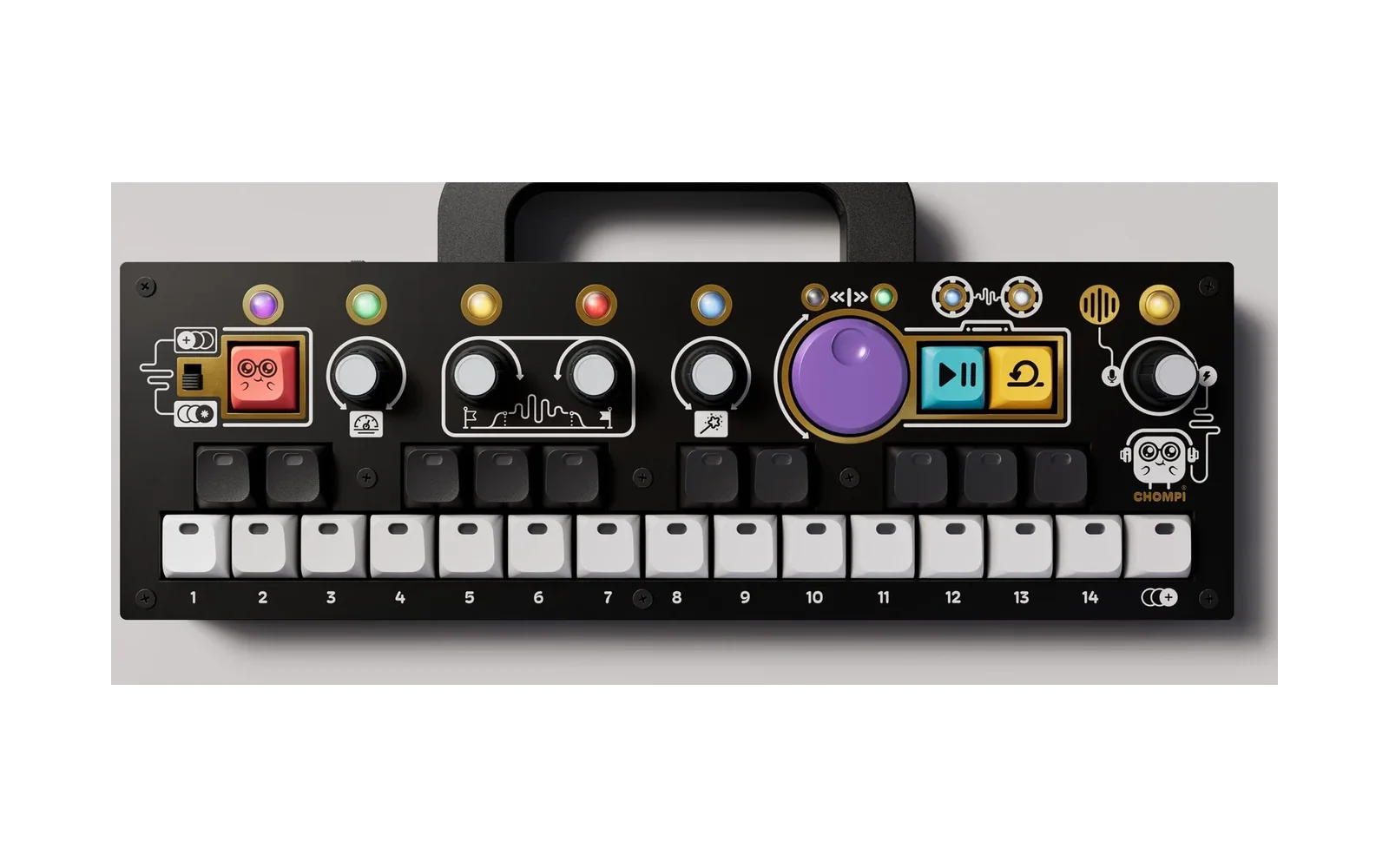
The one rule: the CHOMPI key (red, top left) is SHIFT. Hold it to get to everything else.
- Play. A new card starts on patch 2 (brass), on the FILTER page: knob 1 is cutoff and knob 2 is resonance. The big purple dial is also cutoff, on every page.
- Load a patch: hold CHOMPI and tap a white key: 1 sync lead, 2 brass, 3 unison bass, 4 strings, 5 bell, 6 arp, 7 acid, 15 init.
- Mono or poly: toggle switch up for mono (leads and basses), down for poly (chords).
- Change page: hold CHOMPI and the black keys light up, one colour per page. Tap one. The keybed flashes that colour, and the knob LEDs keep it so you know where you are.
- Turn knobs 1–4. The white keys show the value. Hold CHOMPI while turning to reach each knob's second control.
- On the OSC page, click knob 1–4 to pick which of the four oscillators you're editing. White keys 1–4 show which one. Oscillators 3 and 4 start silent, so turn up their level (knob 3).
- PLAY starts the arpeggiator, and pressing it again stops it. LOOP latches it, and pressing it again unlatches. CHOMPI + volume sets the arp tempo.
- Save: hold CHOMPI, then hold a white key for 1 second until it blinks red. Your current sound also comes back by itself at power-on.
- Another key or octave: the TUNE page (last black key) has octave, transpose and fine tune. They stay put when you change patches, and that black key glows amber while you're shifted.
Lost? Load patch 15 (init) and start over. CHOMPI + click resets a knob. Clicking the volume knob stops all notes.
Knobs (left to right)
Knob Turn CHOMPI + turn Click 1–4 (speedometer, flag, flag, wand) The page's four controls (below) Each knob's second control OSC page: pick oscillator 1–4. CHOMPI + click: reset 5 (big purple dial) Filter cutoff, on every page Resonance 6 (volume) Master volume Arp tempo while the arp runs, saturation otherwise All notes off Reading the white keys when you turn a knob:
- Bar from the left: a normal knob.
- Bar from the middle: a ± knob such as detune or env amount. The middle is zero.
- One lit key: a stepped choice such as wave, octave or LFO shape.
Pages: CHOMPI + black key
Black keys left to right. Keys 1–7 follow the sound from oscillators to reverb; 8–10 are the controllers. Italics = CHOMPI + turn.
# Page Knob 1 Knob 2 Knob 3 Knob 4 1 OSC (orange)
click knob 1–4 = choose oscillator 1–4wave: saw / pulse / tri
pulse widthoctave: 16′ 8′ 4′ 2′ level
noisedetune 2 MOD (pink) sync on/off cross-mod sync sweep glide
unison3 FILTER (blue) cutoff resonance
driveenv amount ± key tracking 4 F-ENV (indigo) attack
velocity → filterdecay sustain release 5 A-ENV (green) attack
velocity → ampdecay sustain release 6 FX (teal) delay mix
middle = 50/50, top = all echoesdelay time feedback
top = infinitechorus
stereo spread7 REVERB (warm white) mix
middle = 50/50, top = all reverbsize tone saturation 8 LFO (purple) rate shape: tri / sine / saw / square / S&H → pitch
→ pulse width→ cutoff 9 ARP (yellow) mode: off / up / down / up-down / random / as played range 1–3 octaves tempo gate
full = legato10 TUNE (white) octave −2…+2 transpose ±12 semitones fine tune ±50 cents MIDI bend range 1–12 🎛️ The OSC page edits one oscillator at a time. Each voice has four oscillators. On the OSC page, click knob 1, 2, 3 or 4 to choose which oscillator the knobs are editing. White keys 1–4 show which one is selected. Every patch starts with oscillators 3 and 4 silent: select one and turn up its level (knob 3) to bring it in.
A patch is the sound; the TUNE page is the instrument.
- In the patch: everything on pages 1–9, including each oscillator's octave and detune, and the arp.
- TUNE: sets where the whole instrument sits: your octave, your key, and matching other gear. It isn't saved in patches, stays put when you load one, and is remembered at power-on.
- While you're shifted, the TUNE black key glows amber. CHOMPI + click a TUNE knob to go back to zero.
- Loading a patch also releases LOOP hold.
Sound-design tips:
- Sync lead: MOD page, sync on, turn up sync sweep. Put osc 2 loud and osc 1 quiet.
- Bells and clangs: cross-mod.
- Huge mono bass: switch up, then turn up unison (MOD page, CHOMPI + knob 4).
- Dub throws: FX page, delay mix past the middle, feedback near the top.
Other keys
Do Does PLAY Arpeggiator on/off LOOP Latch the arp, or sustain when the arp is off CHOMPI + PLAY / LOOP Octave down / up (the same as TUNE knob 1) CHOMPI + white key Load patch 1–15. Hold 1 s to save CHOMPI + PLAY + LOOP at power-on Shipping mode (battery off), as in the stock firmwares MIDI in (DIN and USB): untested
MIDI hasn't been tested on hardware yet. It's built in, but expect rough edges, and please report what you find.
- Notes with velocity.
- Pitch bend: range set on the TUNE page, default ±2 semitones.
- Mod wheel (CC 1) adds vibrato.
- Sustain (CC 64), volume (CC 7), all notes off (CC 120/123).
- Most parameters have a CC, e.g. cutoff 74, resonance 71, amp attack/release 73/72, reverb mix 91, chorus 93. The full table is in the README.
- Input channel: set in
/POLY/options.json.
sha256 5caa8c0c2ace0c15b65079104f9482f9192a1bded1b5967d0fdec523c053169e POLY.binBy hiwatts (@sfaber02). Built on CHOMPI Club's open-source firmware (MIT). A community firmware, not an official CHOMPI Club release.