
POLY
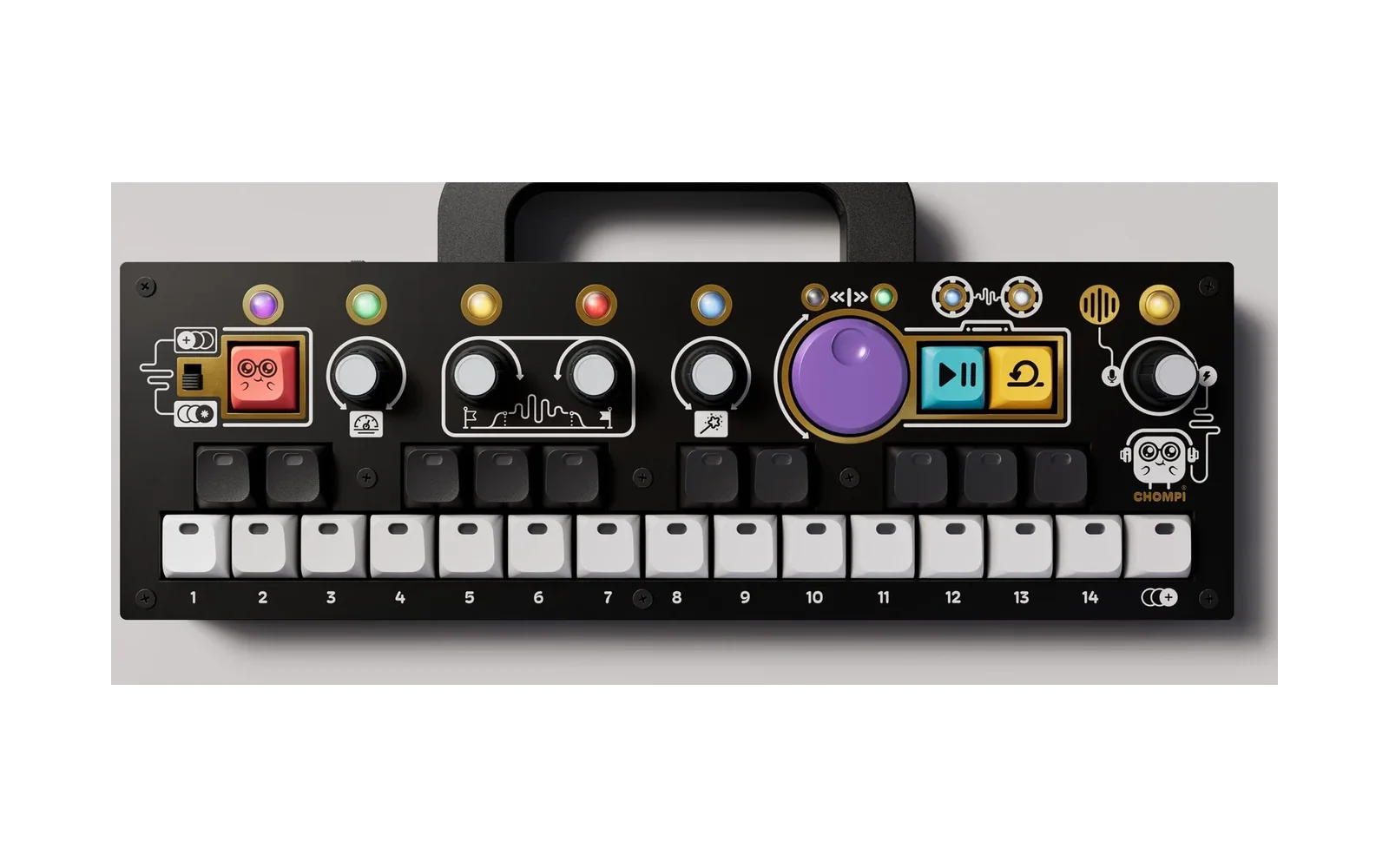
An analog-style synth for the CHOMPI, after the Korg Mono/Poly. Each voice has four oscillators (saw, pulse with PWM, triangle) with hard sync and cross-mod. They feed a resonant 24 dB ladder filter, a filter envelope, an amp envelope and an LFO. After the voices come chorus, a ping-pong delay, reverb and saturation. There's also an arpeggiator. The toggle switch picks mono (with unison and glide) or 6-voice poly.
It runs on its own like any stock CHOMPI firmware, or as one firmware on the multi-firmware launcher card alongside TAPE, TEMPO and WAVE.
Status: beta. Download the latest from Releases.
Install
Download the latest from Releases. Install is one file: the factory patches are built in.
On its own (like a stock firmware)
- Copy
POLY.binto the root of the card. It must be the only.binthere, so remove any other (a stock firmware's is usuallyCHOMPI.bin). - Power on. The rainbow shows while the bootloader installs it, and from then on the CHOMPI boots straight into the synth.
To switch back to TAPE or anything else, use a card with that firmware's .bin in the root, as usual.
On the multi-firmware launcher
- Copy
POLY.bininto/FIRMWARE. It goes on the first free key: key 4 on a stock launcher card. To put it on a particular key, put that number in front, e.g.09_POLY.binfor key 9. - Power on and press the key.
Or send POLY.bin over USB MIDI from the launcher (web uploader).
POLY creates a /POLY folder on the card for your saved patches, the sound you left it on, and options.json. A patch you save to a factory slot replaces that slot's built-in patch. A brand-new card starts on patch 2 (brass).
Playing it
It follows the stock CHOMPI idiom: CHOMPI is shift.
| Do | Does |
|---|---|
| Keys | Play (two octaves from C3) |
| Knobs 1–4 | The current page's four main controls |
| CHOMPI + turn knob 1–4 | That knob's second control on this page (knobs without one go dark while CHOMPI is held) |
| CHOMPI + click knob | Reset it to default |
| Click knob 1–4 on the OSC page | Pick which oscillator the knobs edit. White keys 1–4 always show it: the selected one is bright, oscillators that are switched off are darkest |
| Big purple knob | Filter cutoff, on every page. CHOMPI + turn: resonance |
| Volume knob (right) | Master volume. CHOMPI + turn: arp tempo while the arp is on, saturation otherwise. Click: all notes off |
| CHOMPI + black key | Choose a page (below). The keybed flashes the page colour |
| CHOMPI + white key | Load patch 1–15. Hold 1 s to save to that slot |
| PLAY | Arpeggiator on/off |
| LOOP | Hold: latches the arp, or works as a sustain pedal when the arp is off |
| CHOMPI + PLAY / LOOP | Octave down / up (a shortcut for the TUNE page's octave) |
| Toggle switch | Up = mono, down = poly |
| CHOMPI + PLAY + LOOP at power-on | Shipping mode (battery off), as in the stock firmwares |
When you turn a knob, the white keys briefly show its value as a bar. A centred bar means the knob is bipolar, and stepped settings light one key. Hold CHOMPI to see the page map on the black keys and your patch slots on the white keys: the patch you are on is blue, saved slots glow dim, empty slots are dark. Holding CHOMPI also turns the volume knob's LED into a CPU meter. The sound you leave is saved to /POLY/current.txt and comes back at power-on.
Pages (black keys, left to right)
| Key | Page | Knob 1 | Knob 2 | Knob 3 | Knob 4 |
|---|---|---|---|---|---|
| 1 | OSC (orange) click knob 1–4 = choose oscillator 1–4 | wave: saw/pulse/tri CHOMPI: pulse width | octave: 16′ 8′ 4′ 2′ | level CHOMPI: noise | detune |
| 2 | MOD (pink) | sync | cross-mod | sync sweep | glide CHOMPI: unison |
| 3 | FILTER (blue) | cutoff | resonance CHOMPI: drive | env amount ± | key track |
| 4 | F-ENV (indigo) | attack CHOMPI: velocity → filter | decay | sustain | release |
| 5 | A-ENV (green) | attack CHOMPI: velocity → amp | decay | sustain | release |
| 6 | FX (teal) | delay mix (middle = 50/50, top = all echoes) | delay time | feedback (top = infinite) | chorus CHOMPI: stereo spread |
| 7 | REVERB (warm) | mix (middle = 50/50, top = all reverb) | size | tone | saturation |
| 8 | LFO (purple) | rate | shape: tri/sine/saw/square/S&H | → pitch CHOMPI: → PWM | → cutoff |
| 9 | ARP (yellow) | mode: off/up/down/up-down/random/as played | range 1–3 oct | tempo (also CHOMPI + volume while the arp runs) | gate (full = legato) |
| 10 | TUNE (white) | octave −2…+2 | transpose ±12 semitones | fine tune ±50 cents (1-cent steps) | MIDI bend range 1–12 |
🎛️ The OSC page edits one oscillator at a time. Each voice has four oscillators. On the OSC page, click knob 1, 2, 3 or 4 to choose which oscillator the knobs are editing. White keys 1–4 show which one is selected. Every patch starts with oscillators 3 and 4 silent: select one and turn up its level (knob 3) to bring it in.
A patch is the sound; the TUNE page is the instrument. Everything on pages 1–9 is saved in the patch, including each oscillator's octave and detune, and the arp. TUNE sets where the whole instrument sits: your octave, your key, and matching other gear. It isn't saved in patches, doesn't change when you load one, and is remembered at power-on. While you're shifted (octave, transpose or fine tune off centre), the TUNE black key glows amber. CHOMPI + click resets a TUNE knob to zero. Loading a patch also releases LOOP hold, so a new patch never starts with stuck notes.
- Sync locks oscillators 2–4 to oscillator 1.
- Sync sweep lets the filter envelope push their pitch, which gives the classic sync scream. Turn up osc 2's level and lower osc 1's to hear it on its own.
- Cross-mod frequency-modulates 2–4 from oscillator 1, for bells and clangs.
- Unison (mono mode) stacks all six voices on one note, detuned and spread.
Factory patches
-
sync lead (mono)
-
brass (poly)
-
unison bass (mono)
-
PWM strings (poly)
-
X-mod bell
-
arp pluck
-
acid (mono, up an octave with CHOMPI+LOOP if you like)
-
init: one plain oscillator, as close to a sine as it gets, with every effect and modulation off. Start here to build a sound from scratch.
MIDI (untested)
MIDI is implemented but hasn't been tested on hardware yet.
- Input: DIN and USB.
- Channel: set in
/POLY/options.json. - Notes: with velocity.
- Other messages: pitch bend (range set on the TUNE page, default ±2), mod wheel (CC 1, adds vibrato), sustain (CC 64), volume (CC 7), all notes off (CC 120/123).
- Parameter CCs:
| CC | CC | CC | CC | ||||
|---|---|---|---|---|---|---|---|
| 5 | glide | 76 | amp sustain | 84 | delay mix | 104 | sync sweep |
| 10 | spread | 77 | LFO rate | 85 | reverb size | 105 | unison |
| 71 | resonance | 78 | LFO shape | 86 | reverb tone | 106 | filter env amount |
| 72 | amp release | 79 | LFO → pitch | 87 | saturation | 107 | key track |
| 73 | amp attack | 80 | LFO → PWM | 88 | noise | 108 | drive |
| 74 | cutoff | 81 | LFO → cutoff | 89 | arp mode | 109–112 | filter A D S R |
| 75 | amp decay | 82 | delay time | 90 | arp range | 113 / 114 | velocity → filter / amp |
| 83 | feedback | 91 | reverb mix | 115 / 116 | arp tempo / gate | ||
| 93 | chorus | 117 | fine tune (global) | ||||
| 102 / 103 | sync / cross-mod |
Building
cd code/src
PATH=/path/to/gcc-arm-none-eabi-10.3-2021.10/bin:$PATH make
This produces code/src/build/CHOMPI.bin. The libraries in code/libs are CHOMPI Club's adapted libDaisy and DaisySP, vendored with their prebuilt .a files. Don't swap in stock versions.
Listening without hardware
host/ builds the same engine on your computer and renders test patches and the factory patches to WAV:
make -C host
host/render host/out                                   # test sounds
host/render --factory docs/factory-patches host/out/factory   # factory patches as text + demos
python3 host/alias.py host/out/saw_sweep.wav           # aliasing check
Layout
| Path | What |
|---|---|
code/src/synth/ | The instrument, pure C++ with no hardware dependency: osc.h (band-limited oscillators with polyBLEP), ladder.h (ZDF ladder filter), env.h, lfo.h, voice.h, arp.h, chorus.h, delay.h, engine.h, params.h (every parameter, page and CC), factory.h (the built-in factory patches) |
code/src/ui.h | Keys, knobs, LEDs |
code/src/presets.h | Patch files on the SD card |
code/src/chompi_main.cpp | Startup, audio interrupt, main loop |
hardware.h, encoder.*, temp_led_stuff.h, reverb.h, fx_engine.h, OptionsManager.h, chompi_sram.lds | Taken from CHOMPI Club's WAVE firmware |
Credits
- Synth by hiwatts (@sfaber02).
- Built on CHOMPI Club's open-source CHOMPI firmware (MIT). The hardware layer is from WAVE, with Electrosmith's libDaisy.
- The reverb is Mutable Instruments' Rings reverb by Emilie Gillet (MIT).
- The oscillator anti-aliasing follows the polyBLEP approach in Mutable Instruments' Plaits. The filter follows Vadim Zavalishin's The Art of VA Filter Design.
This is a community firmware, not an official CHOMPI Club release. The CHOMPI name belongs to CHOMPI Club.