Algoradix firmware
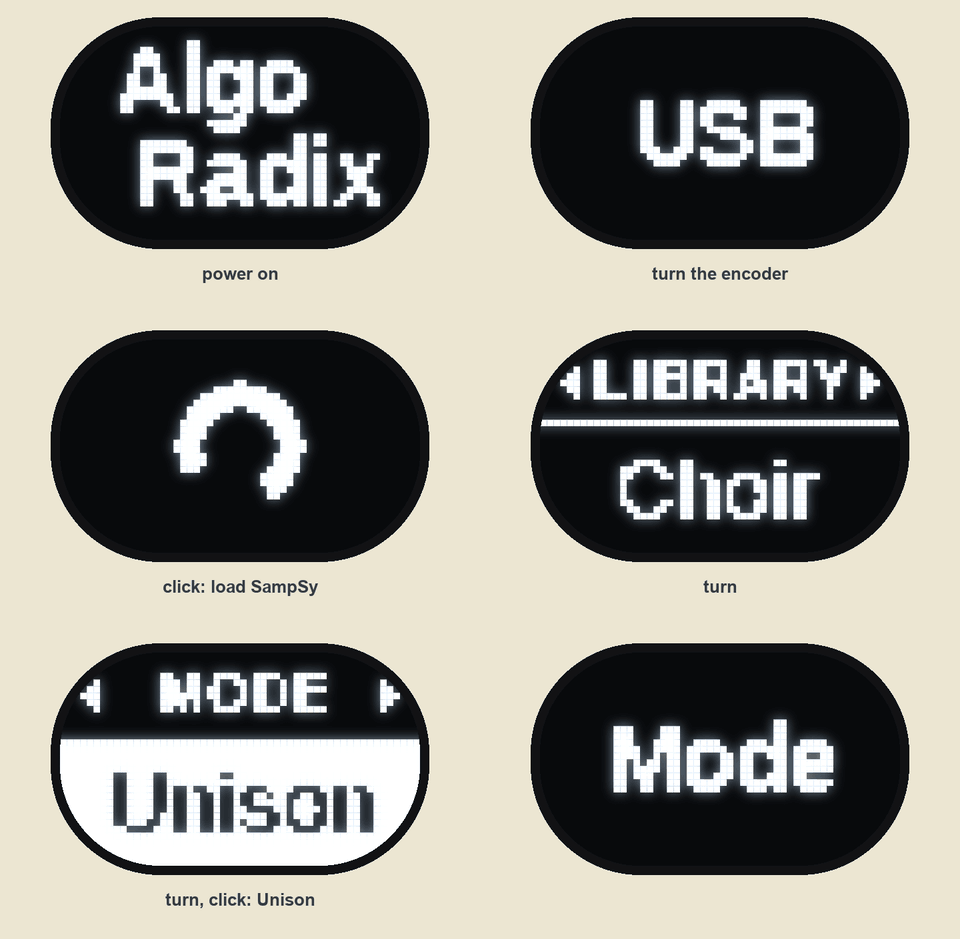
The menu, drawn by the firmware's own screen code and slide timing in the simulator (make -C sim ui-video).
MP4
Open firmware for Algoradix, a 12 HP Eurorack synth voice by Roffa Logics built around an Axoloti Core v1.2 (STM32F427 at 168 MHz, ADAU1961 codec, 8 MB SDRAM, micro-SD, USB device and USB host, MIDI). The hardware (interface board, connector board, panels) is in the companion repository algoradix-hardware.
This is a from-scratch, bare-metal C firmware. It uses no Axoloti code and no RTOS. The only third-party code is ARM CMSIS, ST's device header, FatFs and TinyUSB.
Why a new firmware
The Axoloti Core has always been powerful hardware held back by its software. Algoradix keeps the hardware and replaces everything else.
Algoradix uses the Axoloti Core only as a board. The Axoloti firmware, its runtime and the Java patcher are gone, and nothing has to be connected to a computer. What's left is the bare chip: a 168 MHz Cortex-M4 with an FPU, a 24-bit codec, 8 MB of SDRAM, an SD card and two USB ports, running code written directly for it. The interface board adds the rest: Eurorack-level CV and audio, eight pots, an encoder, a display and TRS MIDI.
- All of the processor goes to the sound. There's no generic object runtime or RTOS between the audio interrupt and the DSP. The voice code is compiled with whole-program optimisation, so oscillators, filters and envelopes are inlined into one loop per voice.
- Patches are plain C. A patch is a small C file built against a shared DSP library (oscillators, ladder and state-variable filters, envelopes, a polyphonic allocator, effects). Patches load from the SD card in a moment, with no reflash. They can be written by hand or with an AI coding agent, using PATCH-GUIDE.md.
- It's a self-contained instrument. Knob names, two effect slots, a menu, per-patch presets, MIDI from DIN and USB host, and a USB drive for the card, all on the module.
- Recreating other instruments is realistic. What makes a sound recognisable (oscillator types, filter settings, envelopes, LFOs and their modulation routings) can be rebuilt as a patch. Large banks of existing synth presets have been rebuilt this way on our own units.
The firmware is a patch host. It runs the hardware: panel, menu, MIDI over DIN and USB host with merge and thru,
two effect slots, master volume, SD card and USB. The sound engine is a patch file on the SD card (.APX). It is
loaded into RAM and swapped without a reboot. Each patch declares its own knob names, its two effects and its menu
pages. So the same module can be a bass synth, a poly synth, a sample player, a vocoder or an effect. From the
module's USB page, the card shows up as a USB drive on your computer. Patches and samples are copied over the same
cable that flashes the module.
What's included: the host firmware, the patch SDK with three demo patches and two templates, a desktop simulator that renders patches to WAV through the same DSP code, and the tools to build card content. The large patch library we run on our own units isn't part of this release.
Contents
- Why a new firmware
- Quick start
- What the panel does
- MIDI CC map
- The SD card
- Writing your own patch
- Building from source
- Simulator
- Repository layout
- Licence
Quick start: flash the release
You need dfu-util (brew install dfu-util, apt install dfu-util, or the
Windows build) and a mini-USB cable. The STM32 has a ROM bootloader that no firmware can erase, so you can always
recover. The full procedure, including how to back up the original Axoloti flash first, is in
docs/flashing.md.
- Unplug USB. Hold S1 on the Axoloti Core, plug in the mini-USB, then release S1.
dfu-util -lshould list0483:df11.- Flash:
The module restarts into the new firmware right away.dfu-util -d 0483:df11 -a 0 -s 0x08000000:leave -D releases/algoradix-v1.0.0.bin - Card: unzip
algoradix-card-v1.0.0.zipfrom the release onto a FAT32 micro-SD, so that the card holds/ALGORADIX/PATCHES/and/ALGORADIX/SAMPSY/. You can also build that folder yourself, see the SD card.
Without a card, the module boots into the built-in engine and is fully playable.
What the panel does
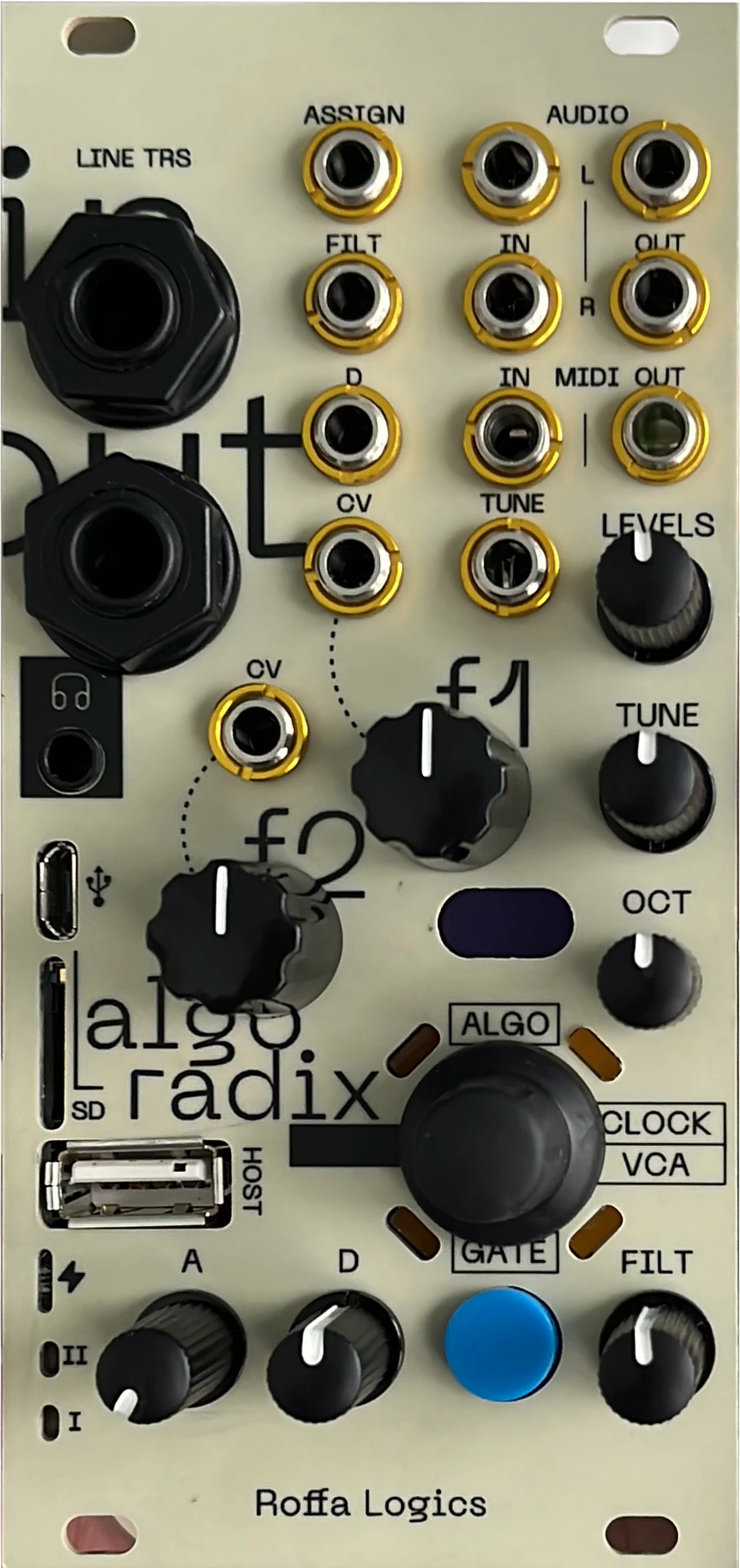
The printed labels are positions, not fixed meanings. When you move a knob, the display shows its name for the current patch with a bar for 1.5 s. For example, f1 and f2 show the patch's own macro names, such as Shape and Sub.
Knobs and jacks
| Control | Function |
|---|---|
| LEVELS | master volume |
| TUNE (+ jack) | fine tune ±1 semitone for MIDI notes (centre = in tune; held notes bend smoothly). For the CV voice it sets the pitch, and the jack is 1 V/oct |
| OCT | octave −2…+2, all voices |
| f1 / f2 (+ CV) | the two macros of the current patch |
| FILT (+ CV) | filter cutoff |
| A, D (+ D CV) | amp envelope attack; decay and release (always the same time) |
| ASSIGN jack | set on the Assign page: GATE (plays a note at the TUNE pitch), ATTACK or OCTAVE (1 V/oct, quantised) |
| AUDIO IN | set on the Inputs page: off, mixed into the output, or ring-modulated with the synth |
| MIDI IN + USB HOST | notes, velocity, pitch bend, sustain pedal, mod wheel (vibrato), clock, CCs. Both inputs are merged. Everything goes out of MIDI OUT (thru, always on) as whole messages |
FUNC layer: hold the GATE button and turn a knob
FUNC changes are relative, with pick-up. While FUNC is held, the knob's normal value is frozen until you move the knob back to it. A big overlay names what you're changing. TUNE is never layered.
| FUNC + | Function |
|---|---|
| f1 | FX1 amount. The display shows the patch's effect: DELAY, REVERB, CHORUS, DRIVE or CRUSH |
| OCT | FX1 parameter: DLY TIME, REV SIZE, CH DEPTH, TONE or BITS. With MIDI clock, delay time snaps to 1/16, 1/8, 1/8D, 1/4 or 1/2 |
| f2 | FX2 amount |
| LEVELS | FX2 parameter |
| FILT | resonance |
| A / D | filter envelope attack / decay (one-shot per note; 0 / 0 = off) |
Menu: one word per screen, sliding horizontally
- Main menu: one big word. Turn the encoder for the next or previous page, click to open it.
- Option list: a small caption with the option shown big below. Turn to move between options, click to select (the selected option is shown inverted). Hold for 0.6 s to go back.
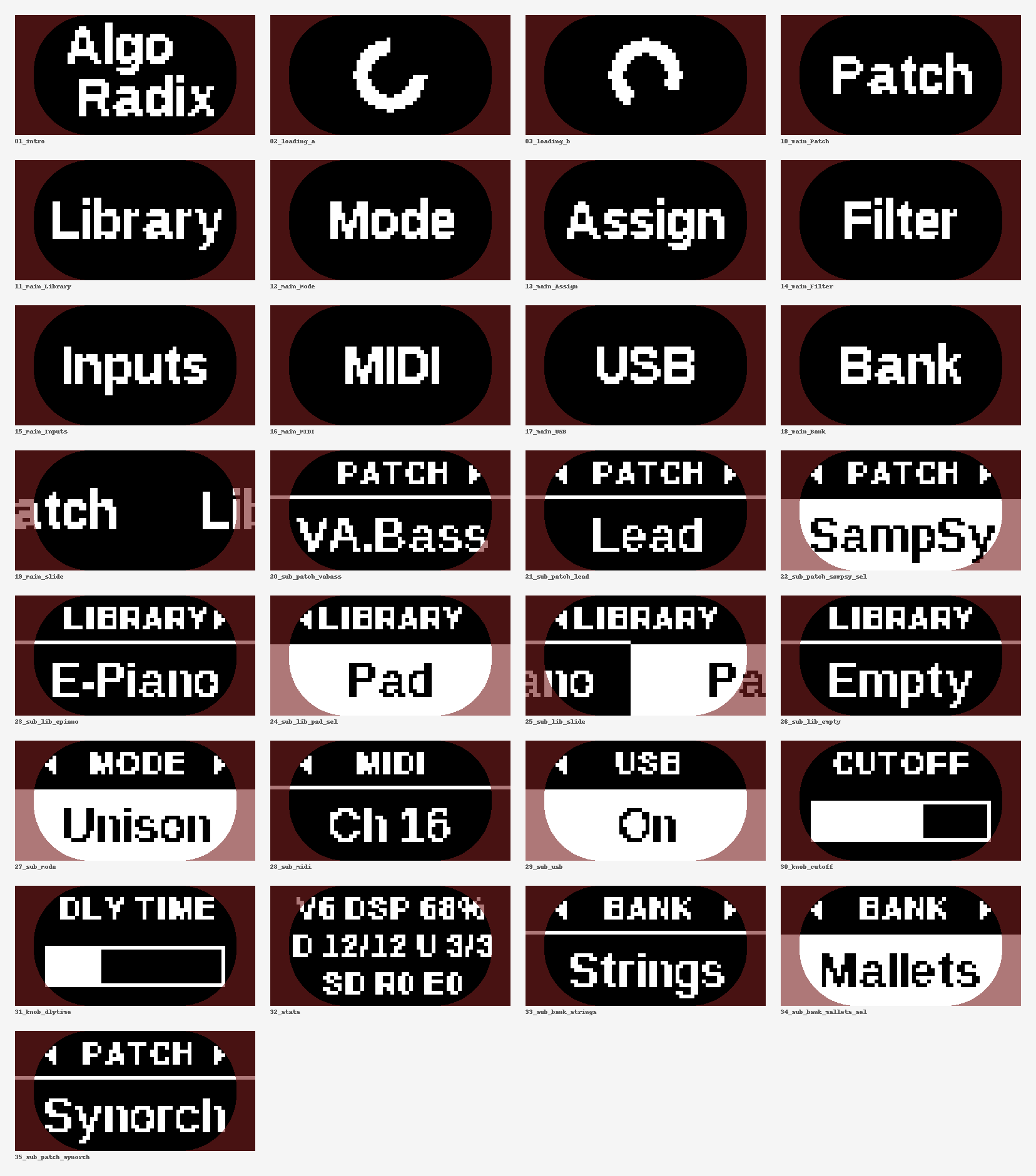
Every screen, rendered pixel-exact by the simulator (make -C sim ui). The tinted edges are hidden by the faceplate.
| Page | Options |
|---|---|
| Bank | one bank per folder on the card (shown only when there's more than one) |
| Patch | every patch in the bank, then Built-in (the fallback engine in the firmware) |
| Library | the content that belongs to the running patch: its sounds, kits or variants |
| Mode | Poly, Unison, Mono (with glide) |
| Assign | Gate, Attack, Octave |
| Filter | HP, BP, LP |
| Inputs | Off, Mix, Ring |
| MIDI | Omni, Ch 1…16 |
| USB | Off, On (the SD card becomes a USB drive on the computer while the patch keeps playing) |
Mode, Assign, Filter and Inputs only appear when the patch asks for them. A patch can also add one page of its own.
Shortcuts:
- FUNC + click jumps to Library.
- FUNC + turn steps through the library from anywhere.
- FUNC + hold the encoder for 1.5 s opens a statistics screen (voices, DSP %, MIDI counters, SD retries).
Every patch keeps its own settings. The FUNC-layer values, Mode, Assign, Filter, Inputs and the Library item are stored per patch in flash and come back when you select that patch again. Saving is automatic, 3 s after a change once no note is sounding.
MIDI CC map
The map is fixed and works with every patch.
| CC | Function | CC | Function | |
|---|---|---|---|---|
| 1 | mod wheel: vibrato depth (or the patch's own LFO target) | 71 | resonance | |
| 5 | glide time | 72 / 73 | decay = release / attack | |
| 7 | master volume | 74 | cutoff | |
| 12 / 13 / 14 | FX1 parameter / parameter 2 / amount | 75 | sustain level | |
| 15 / 16 / 17 | key tracking / analog drift / drive | 76 / 77 | LFO rate / LFO target (off, pitch, cutoff, PWM) | |
| 20 / 21 | f1 / f2 macros | 91 / 92 / 95 | FX2 amount / parameter / parameter 2 | |
| 22 / 23 | filter envelope attack / decay | 93 / 94 | chorus mix / unison detune | |
| 64 | sustain pedal | 120, 123 | all notes off | |
| 102–115 | free for the patch's own parameters | |||
| Program Change, 116 | recall a Patch by position in the bank (0 = first) | 117 | recall a Library item of the running patch | |
| 0 (Bank Select) | choose the bank for the next Program Changes (0 = Core) |
A CC on a knob's parameter (7, 20, 21, 72, 73, 74) takes it over until you move the knob again. The MIDI channel filter applies to CCs too.
The SD card
/ALGORADIX/PATCHES/*.APX            bank "Core": patch files directly in PATCHES, in file-name order
/ALGORADIX/PATCHES/<n-Name>/*.APX   one more bank per folder ("3-Pad" is shown as "Pad")
/ALGORADIX/SAMPSY/<Sound>/*.wav     the library of the SampSy patch: one folder = one sound
Build the card content and copy it over:
make -C firmware/patchsdk                              # -> firmware/patchsdk/build/card/ALGORADIX
# on the module: USB page -> On. The card mounts on the computer.
make -C firmware/patchsdk install CARD=/Volumes/<card>   # then eject on the computer
| Patch | f1 / f2 | FX1 / FX2 | What |
|---|---|---|---|
| VA.Bass | Shape / Sub | DIST / CRUSH | saw + PWM pulse + square sub an octave down, driven ladder filter. Mode = Mono for a glide bass |
| Lead | Detune / Octave | DELAY / REVERB | polyphonic lead: two detuned saws + an upper-octave pulse |
| SampSy | Bright / Wide | DELAY / REVERB | polyphonic sample player for plain .wav files, with 21 synthetic demo sounds |
SampSy sounds: put 16- or 24-bit WAVs (mono or stereo, any sample rate, about 7 MB per sound) in a folder under
/ALGORADIX/SAMPSY/. Each file's root note comes from its smpl chunk, or from a note name in the file name
(PIANO_C3.wav, where C4 = 60). Loops stored in the file are played.
Safety: before the running patch is touched, the host checks the patch file (ABI, sizes, addresses, CRC-32). If a patch crashes the processor, the module restarts on the built-in engine, shows "Patch err" and won't auto-load that patch again. A patch that overloads the CPU is silenced and the screen shows "Overload".
Writing your own patch
A synth engine is one C file written against the DSP library (oscillators, filters, envelopes, a polyphonic allocator and a shared "voice frame"), plus one line that declares the patch:
APX_INSTRUMENT(apx_header, APX_HEADER_ATTR, my_engine, "MySynth", "Shape", "Sub",
               APX_FX_DELAY, APX_FX_REVERB, APX_PAGES_INSTRUMENT)
Start with firmware/patchsdk/demo/bass.c (about 40 lines) or the templates in
firmware/patchsdk/templates/. The full guide is
PATCH-GUIDE.md. It covers the CPU and memory budgets measured on the module,
the rules that keep a patch from crashing it, and a check-list. It's written for people and for AI coding agents,
and it works well when you hand it to one as context.
Add your patch to firmware/patchsdk/Makefile (PATCHES += NAME, SRC_NAME := my/file.c), run make, listen to
it in the simulator, then copy it to the card.
Building from source
You need arm-none-eabi-gcc (tested with 10.3 and 16.2; no C library needed), GNU make, Python 3 with NumPy (card
build: demo sounds) and Pillow (font and UI preview tools), dfu-util, and a host C compiler for the simulator.
cd firmware
make            # the patch host (STAGE=5) -> build/stage5/algoradix.bin
make flash      # board in DFU mode (hold S1 while plugging in USB)
make backup     # one-time: dump the full 1 MB flash to ../backup/ before your first flash
make STAGE=0…4 build the bring-up tests (heartbeat, panel test, audio test, the older all-in-one synth, SD test),
described in docs/flashing.md.
Reproducible: building this tree with GCC 10.3.1 (arm-none-eabi-gcc 10.3-2021.07) gives a file that is
byte-for-byte the same as releases/algoradix-v1.0.0.bin (SHA-256 in releases/SHA256SUMS).
Simulator
The same DSP sources, compiled for your computer, render a patch to a WAV. Use it to hear a patch before you flash anything:
cd sim
make apx PATCH=demo/bass.c && ./build/apxsim out.wav      # a card patch through the real ABI and effect slots
make ui                                                   # the firmware's screens -> build/ui/sheet.png
make ui-video                                             # a scripted menu session -> build/ui/ui-navigation.mp4 / .gif (ffmpeg)
make && ./build/sim out.wav 0                             # the built-in engines (index 0..19)
You can script the render with environment variables: SEQ="t:note:vel:dur,…", SECS, F1 F2 FILT DEC,
FX, MODE (0 poly, 1 unison, 2 mono), BPM (MIDI clock), INWAV=<wav> (audio input from a file), COST=1
(time spent per block).
Repository layout
| Path | What |
|---|---|
firmware/ | the host firmware: drivers (hal/), panel and display (panel/), DSP library (dsp/), built-in engines (patches/), menu (ui/), the host (app/), sampler, linker scripts |
firmware/board/board_algoradix.h | every pin and every measured hardware constant, in one file |
firmware/patchsdk/ | the patch SDK: ABI (apx.h), instrument adapter, linker script, demo patches, templates, PATCH-GUIDE.md |
sim/ | desktop build of the DSP and UI code |
tools/ | apx_pack.py (finishes a patch file), make_demo_wavs.py (SampSy demo sounds), make_ui_font.py + fonts/, ui_preview.py, ui_video.py, axb_convert.py (sample bank converter for the STAGE 3 synth) |
docs/ | flashing and recovery, measured hardware facts |
releases/ | release binaries and checksums |
Licence
Copyright © 2026 Roffa Logics.
The firmware is free software under the GNU General Public License v3.0. See LICENSE. The vendored libraries keep their own permissive licences, listed in THIRD_PARTY.md.
A patch built with the SDK statically links the DSP library and the instrument adapter (dsp/, apx_inst.c). So
if you distribute a patch .APX, that binary falls under the GPL too: share its source under GPL-3.0.
Algoradix runs on Axoloti Core hardware but is independent of the Axoloti project, which hasn't endorsed it.