English · Русский
🧟 Zombie Groovebox for the M-VAVE FM-1
An alternative firmware: six tracks, 249 presets, a melody and rhythm generator, a drum machine, your own samples and a screen that moves with the music.
Install from the browser · Emulator · Web editor · ZMB sounds
Features
| 🎛 Sound | 5 synth tracks + a drum kit. 8 engines: analog, FM, phase, wavetable, noise, percussion and SAMPLE (your WAVs). Filter, envelope, LFO, drive, delay, reverb, arpeggiator. |
| 🎹 249 presets | 14 banks: factory, IDM, ZMB and 11 new ones — chiptune, glitch, ambient, breakcore, acid, FM bells, industrial, sci-fi, generative, lo-fi, basses and leads. |
| 🌀 Motion | Glide, vibrato, 6 LFO shapes onto filter / pitch / FM / amp / pan, FM envelope, drift, crush, humanize, roll, tremolo, random. |
| 🎲 Generator | 8 algorithms (motif, Markov, Euclid, random walk, probability, arpeggio, Turing machine, chaos) in 7 styles, in key; mutate, evolve over loops, jam the whole project. |
| 🎼 Sequencer | Up to 64 steps per track, chords, scale and root, edit a held step with the knobs, Euclid and beat generator, 8-step undo. |
| 🥁 Drum machine | 16 sounds; chance, velocity and roll on every step; its own loop length for every sound. |
| ⏺ Recording | Count-in and a live overdub loop, step entry. |
| 🔌 MIDI | USB MIDI in and out, MIDI clock out, DAW modes, omni input, TRS → USB. |
| 🌙 Living screen | The zombie moves to the beat, notes fly off as sparks, 4 screensavers, an About screen. |
Screen
Home, piano roll and drum grid. These are real firmware frames, captured in the simulator that runs the same C code.
Generator
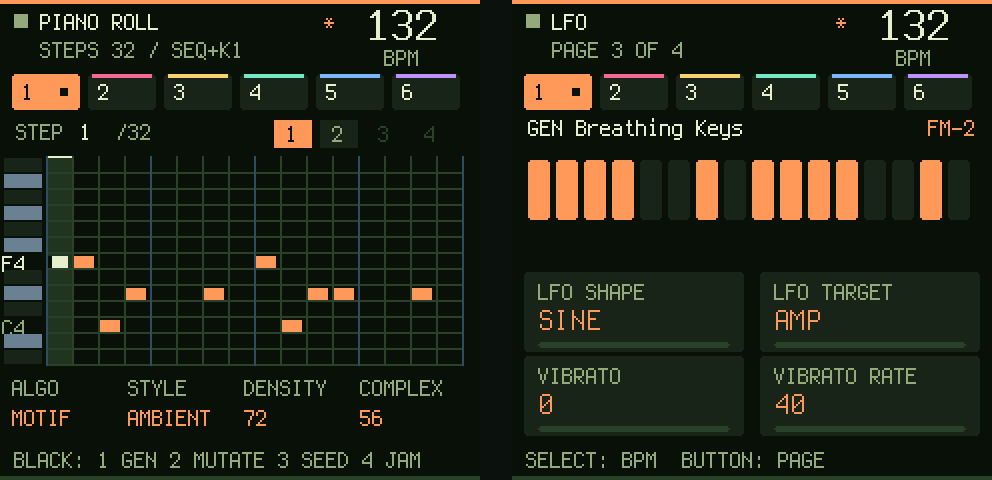
Hold SEQ and turn PRESET to page 5–6. Knobs: algorithm, style, density, complexity / mutation, octaves, seed, evolve. Black keys:
- Gen — a new part for the selected track, in key (scale and root from GLO page 2; with the scale off, the style's own);
- Mutate — changes a few steps, keeps the shape;
- Seed — a new seed and a new part at once;
- Jam — the whole project in the style: tempo, sounds from the style's bank, lead, bass, pad, arpeggio, texture and drums.
EDIT + OCT− undoes any of them. Evolve mutates the part a little every 1–8 loops while the song plays. On the drum track it writes a beat in the style (breakcore: an Amen-style break).
Motion: LFO pages 3–4 and ENV page 3. MIDI: CC5 glide, CC76/77 vibrato, CC0 = 1 before a Program Change reaches presets 129–249.
Screensavers
After a minute untouched the screen turns into Night, Synthwave, Matrix or Bounce, all moving with the music.
- On a screensaver, hold HOME for the next one.
- Any button wakes the screen and still does its job.
- Pick or switch off: GLO → page 5 → K4.
SYSTEM tab
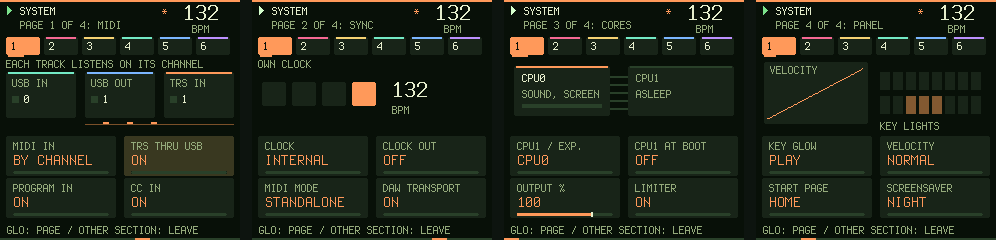
GLO three times quickly opens it:
- MIDI: by channel or omni, TRS → USB, program change and CC in;
- Sync: clock source and clock out;
- Cores: the second core (CPU1);
- Panel: key lights and the velocity curve.
Web editor
Everything works from a computer over USB in Chrome or Edge, with nothing to install. Without an FM-1 the editor plays as a synth right in the browser.
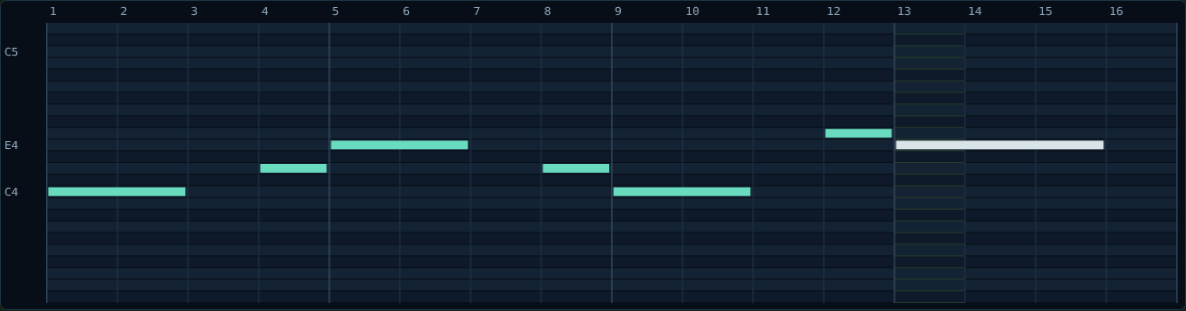
Mouse piano roll:
- click to place a note;
- drag right to set its length;
- right-click to delete;
- Shift to add a note to the chord.
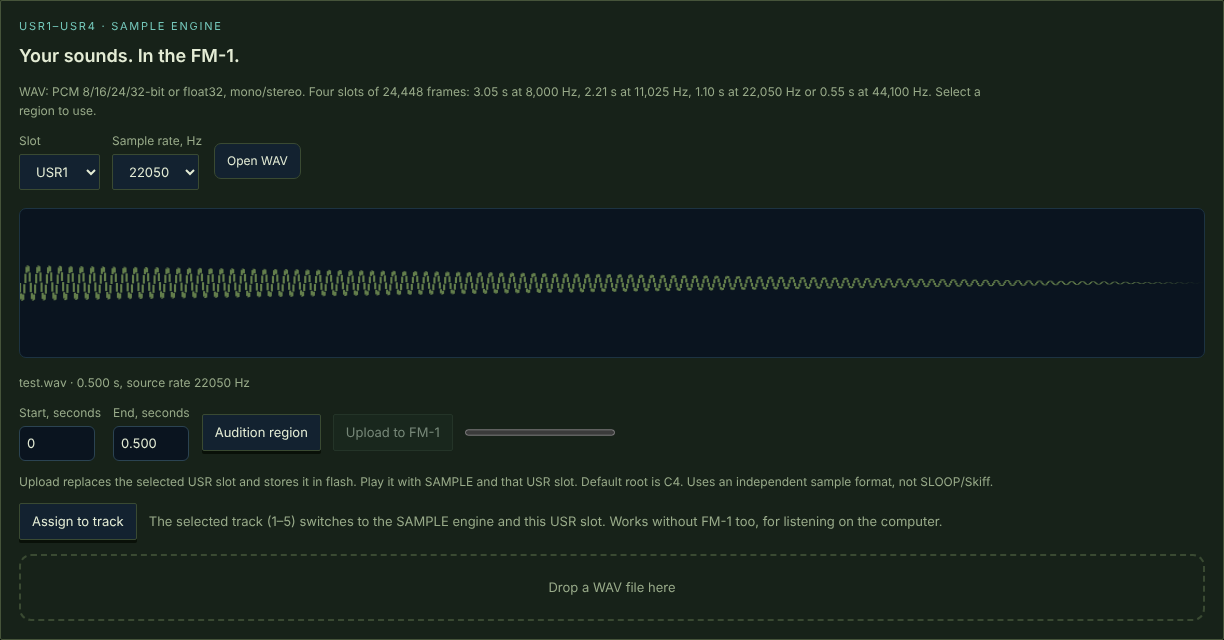
Your own samples:
- Drop a WAV on the page.
- Trim it and listen.
- Send it to slot USR1–USR4.
Tracks 1–5 play it by note.
Key controls
| Action | How |
|---|---|
| Track / tempo | ALGO / SELECT |
| Place steps | SEQ, then the 16 white keys |
| Step count | hold SEQ, turn K1 |
| Edit a step | hold the step, turn K1–K4 |
| Live recording | REC from home: count-in, then a recording loop |
| Clear the track's pattern | on the SEQ page, hold REC for a second |
| Undo / redo | EDIT + OCT− / EDIT + OCT+ |
| Save the project | SAVE |
| About | HOME twice |
| SYSTEM tab | GLO three times quickly |
| Language | HOME + GLO |
Install
- Open the site in Chrome or Edge on a computer.
- Connect the FM-1 with a USB data cable.
- Click Find FM-1, then Install. Keep the tab open while it writes.
Before installing: save your projects with Export JSON in the editor.
If writing stopped and the FM-1 screen is black: the FM-1 is not broken, it is waiting in loader mode. Reload the page and install again.
The firmware is tested in the emulator, which runs the same C code, and by the automated test suite. Releases are not tried on a physical FM-1 before publishing, so try a new version in the emulator first.
For developers
python -X utf8 source/build-groovebox-180.py                     # firmware .fwsc, simulator, WASM
python -X utf8 tests/run_groovebox_audit.py --build --fuzz 200   # every check + panel fuzzing under ASan/UBSan
- Firmware code:
source/editions/shared/. - FM-1 platform:
source/platform-081/. - Building needs the JieLi toolchain (
JIELI_TOOLCHAIN), the AC79 SDK (AC79_SDK) andzig. - Release notes (in Russian):
source/GROOVEBOX-*-RU.md.
License
- App, DSP, interface and profiles: MIT.
- Platform: MPL-2.0.
Details in licenses/THIRD-PARTY.txt.