WaveLoop FM-1
Rising78/100Felucca mod adding standalone control from an external MIDI keyboard, track mixing and a DJ filter.
forM-VAVE FM-1·by@ELI7VH
Unclaimed. Is this yours? Sign in with GitHub as @ELI7VH to claim it.
felucca-1.0.5.2-midi23.fwsc· 596 KB· +2 files
GPL-3.0· ELI7VH/Felucca·downloads come from the creator’s GitHub releases
1.0.5.2-midi23WaveLoop Kit midi23 · Alt LFO shapeLatest3 files
Alt + top knob 3 now selects LFO shape: sine, triangle, saw, square or sample-and-hold.
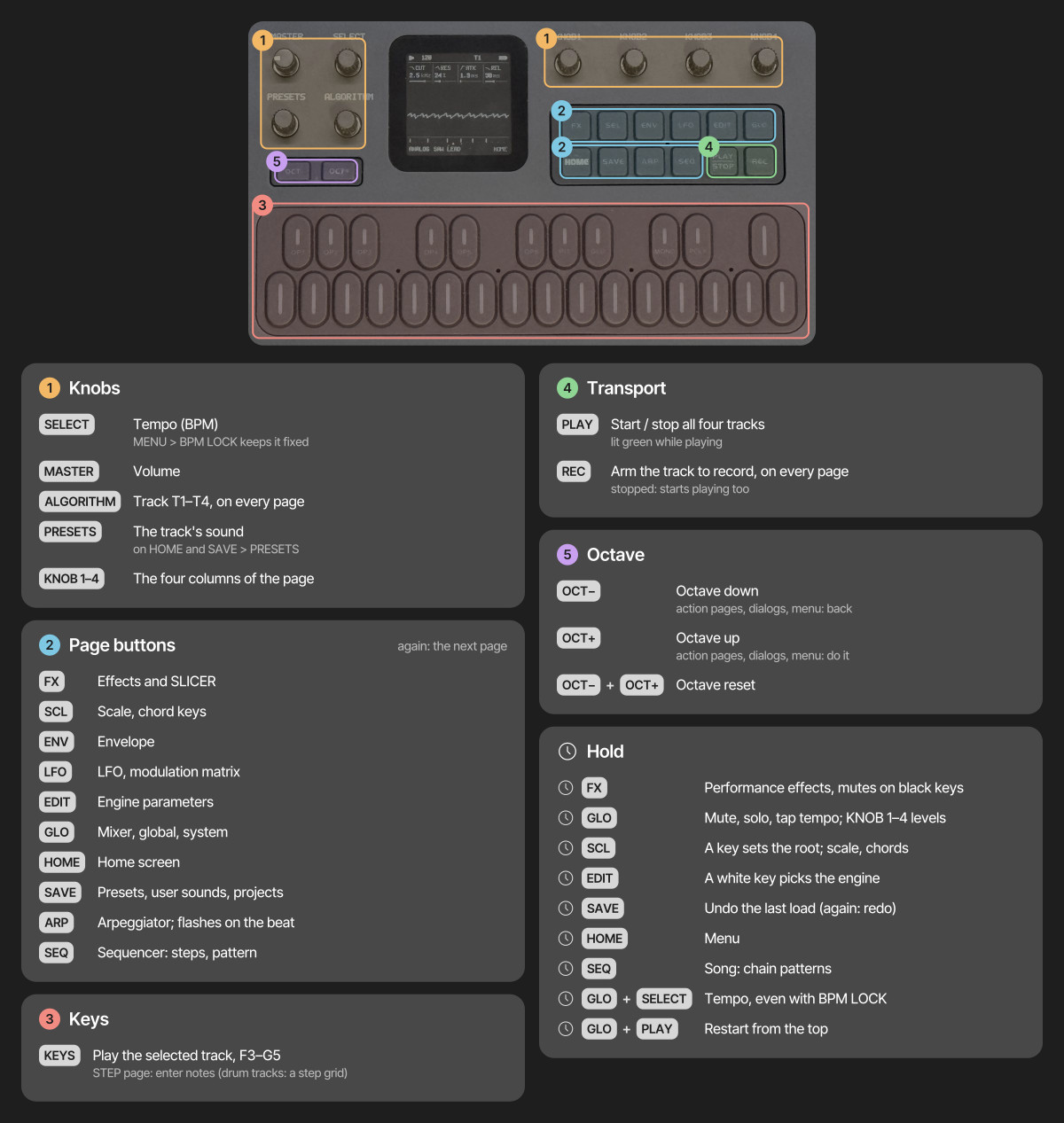
Hold the Alt button (cyan A-bank pad 1) for:
- Top 1: filter LFO rate.
- Top 2: filter LFO amount; centre is off.
- Top 3: LFO shape.
These follow the keyboard MIDI channel. Rate and shape are shared with vibrato and other track LFO destinations. FM6 modulates brightness; other destinations vary by engine. DRUM Alt knobs remain unassigned, and WHEEL ignores filter depth.
Release Alt for the usual master DJ filter and sound controls. The existing MiniLab preset works unchanged. This update includes midi22's rate and amount controls.
Install
felucca-1.0.5.2-midi23.fwsc, or use the WaveLoop Kit installer. The ZIP includes the controller preset, updated guides and licenses.Validation: firmware build, MIDI integration, editor web checks, 369 unchanged sound regression renders and target instruction budgets pass. Shape tests cover all five waveforms, routing, popup labels, normal-layer restoration, saved state and motion recording. Physical-device installation is pending.
Show all 3 filesHide 1 files
Other files1.0.5.2-midi22WaveLoop Kit midi22 · Alt filter LFO controls3 files
Hold the Alt button (cyan A-bank pad 1) for two new controls:
- Top knob 1: cutoff LFO rate.
- Top knob 2: cutoff LFO amount; centre is off, left reverses the modulation.
Both follow the keyboard MIDI channel. Rate is shared with vibrato and other track LFO destinations. FM6 uses brightness modulation; other destinations vary by engine. WHEEL ignores the amount, and DRUM Alt knobs remain unassigned.
Normal top knob 1 still controls the master DJ filter. The existing MiniLab preset works unchanged.
Install
felucca-1.0.5.2-midi22.fwsc, or use the WaveLoop Kit installer. The ZIP includes the controller preset, updated guides and licenses.Validation: firmware build and all available host tests passed, including channel isolation, signed depth, parameter popups, normal-layer restoration, motion recording and project persistence. All 369 sound regression renders remain unchanged. Optional DaisySP and browser-emulator checks were unavailable. Hardware installation and hands-on controller checks are separate from these host results.
Show all 3 filesHide 1 files
Other files1.0.5.2-midi21WaveLoop Kit midi21 · Patch position line3 files
A one-pixel theme-colored line at the very bottom of the FM-1 screen now shows your patch's position in its bank. It grows left to right, without moving the existing UI.
- Follows the selected track and engine, including saved user sounds.
- Skips retired preset slots and remains visible over menus and parameter popups.
- Includes midi20's Voice cleanup: 26 sounds, with all six bass factory presets removed.
Install
felucca-1.0.5.2-midi21.fwsc, or use the WaveLoop Kit installer. The ZIP includes the MiniLab preset, controls guide and licenses.Validation: firmware build, full UI suite, eight focused pixel checks, and 120 screens across ten palettes plus the page/value sweep. No layout, grayscale or alignment failures. Physical-screen verification follows installation.
Show all 3 filesHide 1 files
Other files1.0.5.2-midi20WaveLoop Kit midi20 · Voice without bass patches3 files
VOICE now offers 26 factory patches, with all six bass sounds removed: WOW BASS, ROUND BASS, RUBBER BASS, DEEP BASS, REED BASS and LOW PULSE.
- Device, MiniLab encoder and editor browsing skip those sounds.
- Other banks and remaining preset numbers stay unchanged.
- Existing saved songs retain their sound parameters and sequences.
Install
felucca-1.0.5.2-midi20.fwsc, or use the WaveLoop Kit installer. The ZIP includes the MiniLab preset, controls guide and licenses.Validation: firmware build; preset-bank, UI, MIDI control, C editor and web tests; 369 audio regression renders. The six retired IDs remain hidden CHOIR AAH aliases for numbering compatibility.
Show all 3 filesHide 1 files
Other files1.0.5.2-midi19WaveLoop FM-1 midi19 · Yama-bruh drums3 files
Eight Yama-bruh FM drum kits are now in the DRUM bank: YB STANDARD, ELECTRO, POWER, BRUSH, ORCH, SYNTH, LATIN and LOFI.
- Synthesized on the FM-1; both user sample slots stay available.
- Existing per-drum pitch, tone, decay, volume, pan and sends work with the new kits.
- Existing presets, saved kit IDs and MiniLab mappings are retained. No MiniLab preset update is needed.
Select DRUM → YB STANDARD to start. The nine core sounds share eight lanes; cymbal and cowbell share BELL controls.
Install / update · Controls · Build details
The zip includes firmware, controller mapping, documentation, licenses and a short rendered demo beat. This release adds the drums; Yama-bruh's algorithmic sequencer is not included.
Validation: 72 voices compared with the pinned original Yama-bruh JavaScript worklet; all 353 prior golden renders unchanged, plus 16 new renders. Host checks, signed-overflow/division sanitizer and target budgets pass; Emscripten/DaisySP checks were unavailable. Installed on FM-1 and stressed across all eight kits: maximum sampled CPU 46%, eight voices, zero new audio overruns. USB telemetry verified; no DIN or recorded-audio test. Firmware image 450288/581564 bytes; static RAM and pool unchanged.
Original Yama-bruh by Lucian Labs (MIT). Source attribution and licenses are included.
Show all 3 filesHide 1 files
Other files1.0.5.2-midi18WaveLoop FM-1 midi18 · Settings branding3 files
WaveLoop branding now appears in the FM-1 settings menu and About page, and in web Settings. The device QR opens this mod’s installer and guide.
- Settings help and mapping links are available offline.
- Original Felucca and third-party credits are retained.
- Sounds, MIDI mappings and saved songs are unchanged.
Install with the web installer. The MiniLab preset is unchanged; no controller re-import is needed.
Validation: device UI tests and render/layout checks, web tests, QR decoding, and firmware build/target-budget checks passed.
Show all 3 filesHide 1 files
Other files1.0.5.2-midi17WaveLoop FM-1 midi17 — Shift ADSR and FM6 macros4 files
Hold cyan A-bank pad 1, then use bottom knobs 5–8:
Knob Synths FM6 5 Attack Algorithm 6 Decay Feedback 7 Sustain Modulator ratio 8 Release Modulator envelope time Controls follow the keyboard MIDI channel. Higher FM6 envelope-time values lengthen the envelopes. Release pad 1 to return to normal HOME/LFO controls. DRUM shifted knobs remain unassigned.
The MiniLab mappings page documents both layers. The stored controller preset is unchanged—no reprogramming needed. Parameters use existing popups, motion recording and persistence.
Validation: full host suite, USB/DIN channel and selected-track routing, parameter isolation, endpoints and signed FM6 ranges, popup identity, normal-layer restoration and project roundtrip. All 353 sound renders remain unchanged.
1.0.5.2-midi16WaveLoop FM-1 midi16 — Revoiced 808 and CR786 files
Revoiced the two classic drum kits for WaveLoop FM-1.
- 808: longer deep kick, fuller snare and clap, smoother metallic hats and a rounder tom.
- CR78: short dry kick/snare, softer maracas, woody conga, short claves and a distinct rounded bell.
Choose either in the DRUM preset bank. Existing songs using these kits receive the new voices, preserving their per-drum edits. No MiniLab reprogramming is needed.
These are original synthesized eight-lane approximations, with no external samples.
Validation: full host suite; all parameter corners, level/DC/retrigger/choke checks; independent kit-identity checks. Four intended drum render hashes updated; 349 unrelated renders unchanged. Signed-overflow checks cover both updated kits; extreme rimshot/cowbell arithmetic was repaired. No added RAM or sample storage.
The two WAV attachments are firmware-engine beat renders at the same settings for comparison.
1.0.5.2-midi15WaveLoop FM-1 midi15 — MiniLab Shift layer4 files
Hold cyan A-bank pad 1 for a second controller layer. Shift + faders 1–4 adjust the corresponding track’s delay and reverb sends together; Shift + pad 8 taps tempo. Other shifted knobs and pads are reserved. Normal pad 1 repeat is replaced by Shift.
The editor has a MiniLab mappings tab, available offline. The controller preset changes only pad 1 color. Existing songs, storage formats and per-drum overrides are retained.
Validation: full host suite passed; all 353 sound renders unchanged; modifier release order, panic/overflow recovery, combined-send routing and editor navigation tested.
1.0.5.2-midi14WaveLoop FM-1 midi14 — 808 and CR78-style drums4 files
Adds DRUM bank presets 808 and CR78. 808 exposes the existing KIT 80 synthesized voices; CR78 adds an original eight-lane synthesized approximation with maracas, conga, claves and cowbell. Per-drum sound, volume, pan and effect sends continue to work. No samples or extra RAM buffers are required.
Original DRUM preset 0 and stored KIT values 0–8 remain unchanged. All 350 existing golden renders are retained; three new renders cover the appended presets and kit. CR78 adapts the original eleven-instrument layout to eight lanes, including a longer hat variant; it is not a sample-exact replica.
MiniLab mapping is unchanged. GPL-3.0 Felucca mod, original credits and licensing retained.
1.0.5.2-midi13WaveLoop FM-1 midi13 — developer readouts4 files
Adds a Dev tab with live CPU, memory allocation, flash/sample capacity, audio overruns, MIDI/USB counters and autosave status. Readouts refresh while the tab is open and can be exported locally.
Firmware telemetry is read-only; controls, sounds and storage layout are unchanged. RAM bars describe fixed linker allocations, not heap usage. Full host and web checks plus device verification are recorded in the source documentation.
GPL-3.0 Felucca mod; original credits and licensing retained. MiniLab mapping is unchanged.
1.0.5.2-midi12WaveLoop FM-1 midi12 — expanded sound banks4 files
WaveLoop FM-1: expanded mixed sound banks.
- 32 presets each in ANALOG, PHASE, LOFI, VOICE, TRIO, WHEEL, GRAIN, PHYS, NOISE and FM6.
- 258 added voicings: basses, pads, keys, leads, plucks and textures.
- Original preset IDs and all 92 original audio renders retained. Existing songs and controller mapping remain compatible.
- All host and web tests passed; 350 audio renders checked for clipping, DC, tails and voice limits.
FM6 adds macro voicings of its eight existing operator patches. SAMPLE, SLICE and DRUM retain their existing entries. The existing midi11 MiniLab preset can be kept.
Back up before installing; leave the FM-1 stopped and silent.
A GPL-3.0 mod of Felucca by Leo Kuroshita / Hügelton Instruments. Original credits retained.
Show all 4 filesHide 1 files
Other files1.0.5.2-midi11Felucca Mod midi11 — 12 evolving songs + web editor4 files
Felucca Mod — 12 evolving songs
The four original project slots could not hold a full performance setlist, and autosave only restored one recovery session. This mod adds 12 complete songs in order, and updates the current song as you play and tweak it.
- Current song and setlist order autosave after five seconds of silence.
- Each song keeps tempo, sounds, sequences, automation and per-drum settings.
- Song switches save the previous song first and keep transport stopped.
- B-bank pads 1/2: previous/next song. Import the updated MiniLab preset.
- Two sample slots remain; slot 3 supplies the additional song storage.
- Existing A–C projects and Project 4 recovery are preserved.
Web installer · Setlist editor · Brief controls and problem/solution guide
The web installer serves this exact firmware, exports a complete backup when supported and blocks upgrades with a populated third sample slot. New backups cover all 12 songs, order, recovery, settings, sound banks and two sample slots.
Full host suite and processor/memory budgets passed; all 92 reference sound renders stayed unchanged. Installed midi11 on FM-1; current musical bytes and autosaved Song 1 matched the pre-update session. MiniLab USB was absent, so its new song pads still need preset import. Physical DIN gestures remain hands-on checks.
Back up before installing. Stop and leave five seconds of silence before turning off. Original credits and GPL-3.0 licensing retained; the ZIP includes all bundled licences.
1.0.5.2-midi10Felucca Mod midi10: per-drum controls and mixing4 files
Per-drum editing and mixing for the standalone MiniLab 3 + FM-1.
- Play a drum to select its sound controls and sequencer lane.
- Each of eight lanes keeps pitch, tone, decay, snap, accent, drive, volume, pan and effect sends.
- DRUM bottom knobs 5–8: pitch, tone, decay, volume.
- DRUM top knobs 2–4: pan, reverb, delay. Top 1 remains the master DJ filter.
- Four faders still control whole tracks.
- Drum settings persist in projects, autosave, user presets and sound undo/redo.
- Patterns already support 64 steps: SEQ → PATTERN → LEN; drum-grid black keys 10/11 page backward/forward.
Kit selection remains shared. GM notes sharing a drum lane share controls; independent lane automation is not added. Chorus, distortion and the remaining sound controls are available on FM-1 pages or additional CCs.
MiniLab preset is stored to User 5 and all 319 hardware parameters matched readback. Firmware midi10 is installed. Final full host suite, target processor budgets and 92 unchanged golden renders passed. Live USB verified drum isolation and selection; latest-session autosave passed CRC/musical-payload checks, and four full track parameter dumps matched on restart. Direct DIN gestures, physical popup appearance and quiet screen-selection stability need hands-on checks.
Includes firmware, controller preset, brief problem/solution guide, setup documentation and original licensing. Back up existing music before installing; Project 4 remains reserved for autosave.
1.0.5.2-midi9Felucca Mod midi9 — transport and tap tempo4 files
Standalone MiniLab 3 transport and tap tempo for FM-1.
- B-bank pad 5: Stop.
- B-bank pad 6: Play (starts; does not toggle off).
- B-bank pad 7: Record on the displayed FM-1 track; starts when arming from stopped.
- B-bank pad 8: Tap tempo; three or more taps.
- A-bank momentary effects, knob/fader mapping and silent autosave remain available.
Import the updated Felucca.minilab3 and Store To your User slot. Switch to B with Shift + Pad 2, then press pads 5–8 without Shift. Firmware accepts CC106–109 on any channel. Shift transport direct-DIN output depends on MiniLab firmware and is not verified; B-bank mapping supplies an explicit standalone path.
Validation: installed version verified, session restored unchanged, live USB Play/Stop/selected-track Record/Tap verified. Firmware tests and 92 unchanged golden renders passed; web tests passed on rerun after one timing failure. Controller hardware store and direct DIN gestures require verification.
Includes firmware, controller preset, brief problem/solution documentation and original licensing.
1.0.5.2-midi8Felucca Mod: silent autosave and session resume4 files
Automatic last-session resume for the FM-1 instrument setup.
- Save automatically after five seconds of rendered silence and five seconds without session edits, with the sequencer stopped.
- Effect tails, held notes and queued MIDI prevent saving. Unchanged sessions cause no flash writes.
- Restore sounds, parameters, faders, patterns, automation, tempo/global settings, song chain configuration, selected track, view and master FX macros at startup. Playback starts stopped.
- Project 4 is the resume slot. An ordinary project already occupying it is protected and blocks autosave; keep this slot for recovery.
- AUTOSAVED confirms the write. A/B flash copies retain the last valid session if power cuts during writing. A cut before saving finishes can lose changes since the previous commit.
The rendered-master detector runs before DAC attenuation and requires all stereo samples within ±2 Q15 counts (about −84 dBFS). It observes actual output, including release/reverb/delay tails. USB archive transfers temporarily reserve shared staging; normal standalone DIN use has no archive delay.
The MiniLab controller preset is unchanged from midi6/midi7. Existing DJ filter, momentary pads, fine fader mixing, parameter popup, track click, preset/engine browsing and vibrato controls remain.
Validation: full host suite passed, including 92 unchanged golden renders. Focused persistence/backup tests passed for silence timing, edit debounce, unchanged-write suppression, held notes, transport/PLAY races, write interruptions, loss of retained RAM, backup metadata/staging and ordinary-slot protection. Target build budgets pass. On an FM-1, the original pre-update session was restored from backup, autosaved, and verified byte-for-byte for all four track dumps and selection after firmware restart.
Physical power removal is not automated; cold-RAM and interrupted-write behavior are covered by host tests. Momentary pads, held notes, pitch bend and mod-strip position do not resume. The physical master knob continues to set hardware output level. Original samples/presets/settings retain their existing persistent storage.
Brief Felucca Mod summary · Setup guide
Unofficial fork; upstream credits, licensing and attribution retained. Back up music before flashing.
1.0.5.2-midi7Felucca Mod: fix parameter popup flicker4 files
Fix the MIDI parameter popup fighting with the current view on the FM-1 LCD.
The LCD applies each transfer immediately: midi6 painted the changing page and then the popup, so both became visible each frame. Midi7 pauses page drawing while the popup is visible. The header stays live, and only changed popup content is transferred. The current page restores in the same frame when the popup expires.
The controller preset is unchanged from midi6: no new MiniLab import is needed if that preset is already stored.
MIDI integration and the full standalone UI test executable pass. New tests inspect actual LCD transfer regions, proving that graph changes and forced redraws cannot overwrite the popup, idle popups do not redraw, changed values update only the card, and expiry restores the exact page. Target build budgets pass.
Firmware midi7 was installed and the reported version verified. Physical screen smoothness still needs user confirmation; host transfer tests cover the cause and fix.
Brief Felucca Mod summary · Setup guide
All previous fader taper, track-click, DJ filter, momentary pads, preset/engine browsing and vibrato controls retained. Unofficial fork; original licensing and attribution retained.
1.0.5.2-midi6MiniLab 3: fine fader mixing, control popup and track click4 files
Standalone MiniLab 3 firmware for M-VAVE FM-1.
- Faders: smooth taper gives more physical travel for fine mixing at upper levels, with exact silence/full endpoints.
- Knob/fader popup: addressed track, actual parameter name and formatted value for 1.2 seconds. The master filter shows LPF/HPF amount or bypass. Current page stays in place and restores cleanly.
- Main encoder click: displayed track 1 → 2 → 3 → 4 → 1. One step per press; release does not advance. Notes/knobs retain their existing keyboard MIDI channel routing.
- All midi5 DJ filter, momentary A-bank effects, preset/engine browsing and mod-wheel controls retained.
Import the updated Felucca.minilab3 in Arturia MIDI Control Center and Store To your enabled User slot (User 5 in this setup). The encoder click now sends Gate CC115. Set FM-1 ROUT to CH1-4.
Firmware midi6 was installed and its version verified on an FM-1. Live USB checks verified fader taper and track cycling/release; original parameters and selection were restored. MIDI integration tests verify popup data, expiry, pixel-perfect page restoration, fader endpoints/monotonicity and click edge behavior. Every formatted parameter value across all engines fits the popup. Target build memory/code budgets pass. Host checks passed, including 92 unchanged golden renders and UI behavior/layout. The font-spacing reference needed a rerun with the project RAQM runtime after system Python lacked RAQM; that rerun passed. Optional browser/DaisySP checks remain unavailable.
The MiniLab was not connected over USB during this update, so the new controller preset needs importing/storing. Physical DIN/audio play and the popup on the hardware screen still need hands-on verification.
Mapping guide · Problem and implementation
Unofficial fork; original licensing and attribution retained. Back up music before flashing. The upstream web installer installs upstream firmware, not this fork.
1.0.5.2-midi5Standalone MiniLab 3: DJ filter and momentary effect pads4 files
Standalone MiniLab 3 control for M-VAVE FM-1, with a master DJ filter and momentary A-bank effects.
- Top knob 1: left low-pass, centre bypass, right high-pass across the whole mix.
- A-bank pads 1–8: repeat 1/8, repeat 1/16, repeat 1/32, reverse, tape stop, freeze, octave up, octave down.
- Hold a pad to engage; lift to release. Independent of FX LATCH. Last held buffer effect wins.
- Other knobs, faders, preset/engine browsing and mod-wheel vibrato retain the previous mapping.
The upstream MIDI mapping lacks direct engine editing/browsing and master performance-effect control from this controller. This fork supplies the firmware and controller preset for direct DIN use with no Mac during performance.
Import Felucca.minilab3 in Arturia MIDI Control Center and Store To an enabled User slot. Set FM-1 ROUT to CH1-4. Pads use Gate notes 36–43 on dedicated channel 16; B-bank retains normal notes.
Firmware midi5 was installed and its reported version verified. MIDI integration and performance DSP tests pass, including real pad activation/release, latch independence, overlap and panic. Target build budgets pass. Live USB filter/pad messages leave all four track dumps unchanged. The previous full host suite passed, including 92 unchanged golden renders.
The updated controller preset still needs hardware store/readback because editor UI automation times out. Physical MiniLab-to-FM-1 DIN/audio play still needs hands-on verification.
Mapping guide · Problem and implementation
Unofficial fork; upstream licensing and attribution retained. Back up music before flashing. Use this release firmware; upstream web installer installs upstream firmware.
1.0.5.2-midi4Standalone MiniLab 3 MIDI — 1.0.5.2-midi44 files
Felucca 1.0.5.2 custom firmware for standalone Arturia MiniLab 3 control of the M-VAVE FM-1.
The problem: upstream MIDI input handles performance messages, while engine parameters and preset browsing require the computer-based editor. This fork adds direct USB/TRS CC control so the MiniLab can connect over DIN MIDI during performance.
- Four faders: fixed volumes of tracks 1–4.
- Top knobs 1–4: engine EDIT parameters 1–4 on the keyboard channel.
- Bottom knobs 5–7: the engine's actual FM-1 HOME knobs 1–3.
- Bottom knob 8: LFO/vibrato speed.
- Main encoder: presets within the current engine. Shift + turn: sound engines.
- Mod strip: vibrato depth; pitch strip: existing pitch bend.
Download the ZIP for firmware, preset, setup instructions and licenses, or download the firmware and preset individually. Import the preset in Arturia MIDI Control Center and Store To an enabled User slot. Set FM-1 ROUT to CH1-4 and use the correct DIN-to-TRS adapter. Back up music before flashing.
The custom firmware was installed and live USB controls verified on an FM-1. The final full host suite passed, including 92 unchanged golden audio renders. Integration tests cover all engines, controller ranges, channel isolation, automation and browsing. Target memory/code budgets passed. The final MiniLab bottom-row/LFO preset still needs hardware store/readback; direct DIN/audio use needs hands-on verification.
See the problem and implementation and mapping guide. This is an unofficial fork; upstream licensing and attribution are retained.