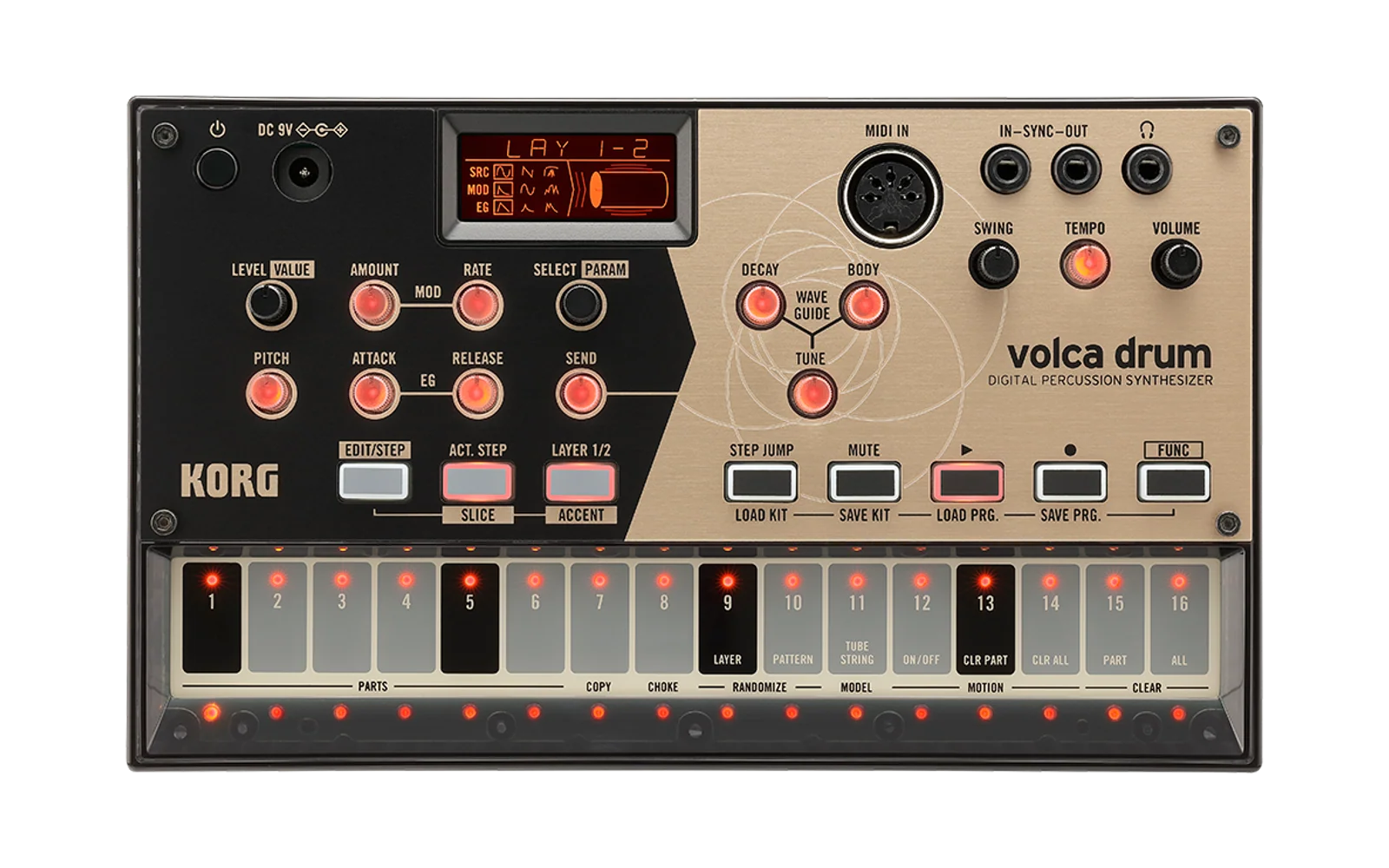
hj Firmware — A custom firmware for volca drum
An unofficial firmware modification for the volca drum, based on the official firmware v1.14. It adds performance features and fixes a handful of bugs.
Contents
- Disclaimer
- Control reference
- New features and changed behavior
- MIDI CC additions
- Bug fixes
- Installing
- Acknowledgements
Disclaimer
This firmware is an unofficial project created independently of KORG and is not endorsed by, affiliated with, or supported by KORG. Installing it is a modification to the hardware and may void any warranty or support coverage.
The flashing path used for updates is handled by a separate bootloader area that this firmware does not overwrite, so a failed write can usually be recovered by re-entering update-receive mode and flashing again.
I accept no responsibility for any damage, malfunction, or unexpected results that may arise from installing or using this firmware. Use it at your own risk. If you run into trouble, please report it by opening a GitHub issue.
Control reference
| Control | Function |
|---|---|
| Hold MUTE + turn a sound knob | Soft-takeover editing |
| Hold MUTE + LAYER, then STEP 1–6 | Toggle GLD for Parts 1–6 |
| Hold MUTE + ACT. STEP, then STEP 1–6 | Toggle WRP for Parts 1–6 |
| Hold MUTE + STEP JUMP, then STEP 1–6 | Cycle SPD for Parts 1–6 |
| Hold FUNC + move a sound knob | Preview its stored value without editing |
| Hold FUNC + turn SELECT on the normal screen | Cycle SRC only |
| Hold MUTE + STEP 8–16 | Clear/undo one MOTION lane |
| Hold STEP 9–16 on the normal screen | Apply TOUCH FX |
New features and changed behavior
Sound design
In EDIT/STEP, the parameter order is BIT / FLD / DRV / CLP / FLT / PAN / GAN / QPI.
FLT — a bipolar filter for every Part
Each Part now has its own filter:
-100...-1: 2-pole low-pass filter0: bypass+1...+100: 2-pole high-pass filter
In EDIT/STEP, use PARAM to select FLT, then turn LEVEL/VALUE to edit it. FLT is stored in the KIT.
CLP — soft or hard DRV clipping
CLP is stored separately for each Part in the KIT. Select CLP, then use LEVEL/VALUE to choose:
SFT(default): the original KORG DRV response.HRD: a pure hard-clipping path.
Performance and per-Part sequencing
GLD PART — per-Part MOTION interpolation control
Hold MUTE + LAYER to open GLD PART. While both buttons are held, STEP 1–6 represent Parts 1–6. A lit STEP means GLD is ON for that Part; press a STEP to toggle it. Releasing LAYER returns to the normal MUT PART view if MUTE is still held. The six settings are stored in the PROGRAM.
- ON: the Part's MOTION values are interpolated as normal.
- OFF: the Part's MOTION values, including PITCH, change in discrete steps.
WRP PART — stretch Active Step patterns across the bar
Hold MUTE + ACT. STEP to open WRP PART. While both buttons are held, STEP 1–6 represent Parts 1–6. Press a STEP to toggle that Part; a lit STEP means WRP is ON. When fewer than 16 Active Steps are enabled, WRP distributes those enabled steps across the full bar instead of running the shortened pattern at the normal STEP interval. Releasing ACT. STEP returns to MUT PART if MUTE remains held. The six settings are stored in the PROGRAM.
SPD PART — independent sequence speed per Part
Hold MUTE + STEP JUMP to open SPD PART. While both buttons are held, STEP 1–6 represent Parts 1–6. Each press cycles that Part through three speeds:
| Speed | LED |
|---|---|
1/1 | Off |
1/2 | On |
1/4 | Blinking |
Releasing STEP JUMP returns to MUT PART if MUTE is still held. SPD slows the Part's complete timeline—STEP advance, triggers, PRB, SLICE and MOTION—without changing the selected SLICE count. A 1/2 pattern takes two physical bars to complete and a 1/4 pattern takes four. WRP is applied first and the resulting cycle is then slowed by SPD. Recording length follows the selected Part's speed. The six settings are stored in the PROGRAM.
CPY PART copies the new Part settings
Use CPY PART in the normal KORG way: select the source Part, then choose the destination Part with the corresponding FUNC + STEP operation. CPY PART copies the standard Part data together with FLT, CLP, GLD, WRP and SPD from that physical source Part to that physical destination Part. MUTE is deliberately not copied.
Editing and step parameters
FUNC + knob shows the stored value
Holding FUNC while moving a physical parameter knob previews its stored value without changing the parameter.
This applies to the ten sound knobs: LEVEL, PITCH, MOD AMOUNT, MOD RATE, ATTACK, RELEASE, SEND, WG DECAY, WG BODY and WG TUNE.
FUNC + SWING and FUNC + TEMPO retain their normal KORG functions rather than acting as value previews.
MUTE + parameter knob soft takeover
Holding MUTE while turning a parameter knob now edits from the current parameter value instead of immediately jumping to the knob's physical position. The full knob travel is scaled around that starting point, making controlled changes much easier during performance.
This applies to the ten sound knobs: LEVEL, PITCH, MOD AMOUNT, MOD RATE, ATTACK, RELEASE, SEND, WG DECAY, WG BODY and WG TUNE. TEMPO, SWING, SELECT and PARAM keep their normal functions. Releasing MUTE clears the takeover anchor; the next MUTE + knob operation starts again from that parameter's then-current value.
QPI LAY 1-2 PITCH editing preserves the interval
With QPI enabled and LAY 1-2 selected, turning PITCH now transposes both layers while preserving their original semitone interval. Editing stops cleanly when either layer reaches its limit instead of collapsing the interval.
QPI PITCH values are shown as note names using the LAY 1 pitch.
ACCENT extended to negative values — ghost notes
ACCENT covers -15...+16 instead of the stock 0...16. Negative values make a step quieter than the LEVEL setting, allowing ghost notes and wider dynamics.
MIDI velocity uses the whole 32-value range: velocity 63 plays at the LEVEL setting, lower velocities reduce it, and higher velocities increase it.
SLICE extended — and corrected
Positive SLICE values 1...16 now produce the requested number of evenly spaced hits; 1 is the unsliced single hit. The negative side adds the following 17 sub-step patterns. Read each pattern from left to right within one STEP: o plays and _ rests.
| SLICE | Pattern | SLICE | Pattern | SLICE | Pattern |
|---|---|---|---|---|---|
-1 | _o | -7 | oo__ | -13 | _oo_ |
-2 | oo_ | -8 | o__o | -14 | _o_o |
-3 | o_o | -9 | ooo_ | -15 | _ooo |
-4 | _o_ | -10 | oo_o | -16 | __oo |
-5 | _oo | -11 | o_oo | -17 | ___o |
-6 | __o | -12 | _o__ |
PROBABILITY with trigger conditions
Positive probabilistic PRB values are now spaced in 5% increments: 5, 10, ... 100%.
The negative side provides these conditions:
| Display | Meaning |
|---|---|
A-B | Fires on bar A of each B-bar cycle, where B is 2...8 |
1St | Fires only on the first bar after PLAY |
_1St | Fires on every bar except the first |
FILL | Fires while the FILL touch effect is held |
_FIL | Fires while FILL is not held |
Bar counters are independent for each Part and reset when PLAY starts.
Per-knob MOTION clear and undo
Hold MUTE and press the corresponding STEP to clear only that MOTION lane on the selected Part and layer. Repeat the operation to undo it.
| STEP | 8 | 9 | 10 | 11 | 12 | 13 | 14 | 15 | 16 |
|---|---|---|---|---|---|---|---|---|---|
| Target | PITCH | MOD AMT | MOD RATE | ATTACK | RELEASE | SEND | WG DECAY | WG BODY | WG TUNE |
| Display | MPIt | MAMt | MrAt | MAtk | MrEL | MSNd | MdEC | MbdY | MtUN |
STEP 7 is unused.
Performance effects and system behavior
TOUCH FX on STEP 9–16
On the normal performance screen, the effects are active only while their STEP keys are held.
| STEP | 9 | 10 | 11 | 12 | 13 | 14 | 15 | 16 |
|---|---|---|---|---|---|---|---|---|
| Display | OCuP | OCdn | Stut | rev | bit | SEnd | WEt | FILL |
| Effect | Octave up | Octave down | Stutter gate | Reverse | Bit crush | WG full send | WG wet only | FILL condition |
Several effects can be held together. OCuP/OCdn, SEnd/WEt and Stut/rev remain mutually exclusive within each pair.
Other behavior changes
- Full TEMPO Range uses more knob travel in the most useful ranges: roughly 30% for 10–60 BPM, 50% for 60–240 BPM and 20% for 240–600 BPM.
- FUNC + SELECT cycles only the SRC waveform, while normal SELECT cycles the SRC/MOD/EG combinations.
- At the low-battery warning level,
Lo Battis displayed for 1.5 seconds approximately every 15 seconds instead of the stock four-second interval. After a parameter value is displayed, the warning is held back for three seconds. The voltage thresholds and shutdown condition are unchanged.
Saving custom settings
What is saved where
| Scope | Custom settings |
|---|---|
| Per Part in the KIT | FLT, CLP |
| Per Part in the PROGRAM | GLD PART, WRP PART, SPD PART |
MIDI CC additions
hj Firmware adds MIDI CC control for FLT and CLP in split-channel (multi-channel) mode. Send each CC on the channel of the Part you want to edit: channels 1–6 address Parts 1–6. MIDI RX ShortMessage must be enabled.
| Parameter | CC number (decimal) | Value |
|---|---|---|
| FLT | 54 | 0 = -100 (low-pass), 64 = 0 (bypass), 127 = +100 (high-pass) |
| CLP | 55 | 0–63 = SFT; 64–127 = HRD |
FLT values below 64 select the low-pass range; values above 64 select the high-pass range. The 7-bit range is scaled to the filter's range, so some intermediate filter settings are skipped. Both CCs set absolute values: sending the same value again does not toggle the setting.
These are independent 7-bit CCs, not the low bytes of 14-bit controls. Configure your controller or DAW accordingly. For example, send CC54 value 64 on MIDI channel 3 to bypass Part 3's filter, or CC55 value 127 on channel 3 to select its hard clipping.
Bug fixes
The following issues were present in KORG's official v1.14 firmware.
An unsupported display character could corrupt Part 1 / LAY 2 / STEP 9 PITCH MOTION. The stock display code used an invalid glyph index before checking it. Its out-of-range write happened to overlap the second PITCH MOTION value of that STEP. Invalid glyphs are now rejected before any table write.
Clock/phase correction could drop a STEP trigger or play one PROGRAM twice. The stock sequencer depended on exact phase positions for STEP 1 and the pattern-chain boundary. A small forward correction now processes every crossed boundary once and in order.
Part activity LEDs could remain on forever. The stock timed-LED counter and bitmap could end in contradictory states when interrupted. Updates are now atomic and terminal states are repaired, while the original multi-blink sequence used by CPY PART remains intact.
Positive SLICE was uneven in the official firmware.
All values now produce the requested number of evenly spaced hits.
Undoing a Part MOTION clear displayed UND PART.
It now displays UND MPRT, matching CLR MPRT.
MOD AMOUNT behaved incorrectly with LAY 1-2 selected.
Common editing now uses the same bipolar rule as single-layer editing.
Default markers failed on some signed values. The stock comparison did not handle signed parameter values correctly. The marker now compares the saved and current values in the parameter's native format.
Installing
The update ships as an audio file, using the same update method as KORG's official firmware.
- Connect your computer or audio player's headphone output to the volca drum's
SYNC INjack with a 3.5 mm stereo cable. - Hold FUNC and REC together and turn the power on. The unit is now in update-receive mode.
- Play
Volca_Drum_0121.wavall the way through. Disable EQ, effects, fades, loudness normalization and notification sounds. - If the display shows
UPD End, turn off the volca drum.
If the display shows Dcd Err or Sum Err, the audio did not transfer cleanly. Check the cable and playback volume, make sure no audio processing is active, then retry from update-receive mode. A failed firmware transfer leaves the existing firmware intact.
To check which firmware is installed, hold PLAY while turning the power on. After a successful update it reads 1.21.
Returning to the official firmware
KORG's updater normally refuses to install a version older than the one already on the unit. That version-downgrade check has been removed here, so you can play KORG's own volca_drum_sys_0114.wav and return to stock firmware v1.14.
The firmware downgrade is supported, but KORG v1.14 does not understand negative SLICE or ACCENT values stored in a PROGRAM. Such steps can sound very different after returning to stock. Note any important settings first, and replace negative values before relying on the same PROGRAM under v1.14.
Acknowledgements
Many thanks to KORG for developing such a great product!