TouchMIDI
USB-MIDI firmware for Synthux Simple Touch (Daisy Seed), with continuous pad pressure, and host templates.
Quick Install
Download the binary and flash it with the Daisy Seed web programmer.
Build from Source
git clone https://github.com/francesco-di-maggio/TouchMIDI.git
cd TouchMIDI
git submodule update --init --recursive
make libs -j4
make -j4
make program-dfu   # hold BOOT, press RESET, release BOOT
In VS Code, the same steps are available as tasks (build, build_all, program-dfu).
MIDI Map
Default map. Device name, MIDI channel, notes and CC numbers are set in config.h.
| Control | Direction | MIDI | Notes |
|---|---|---|---|
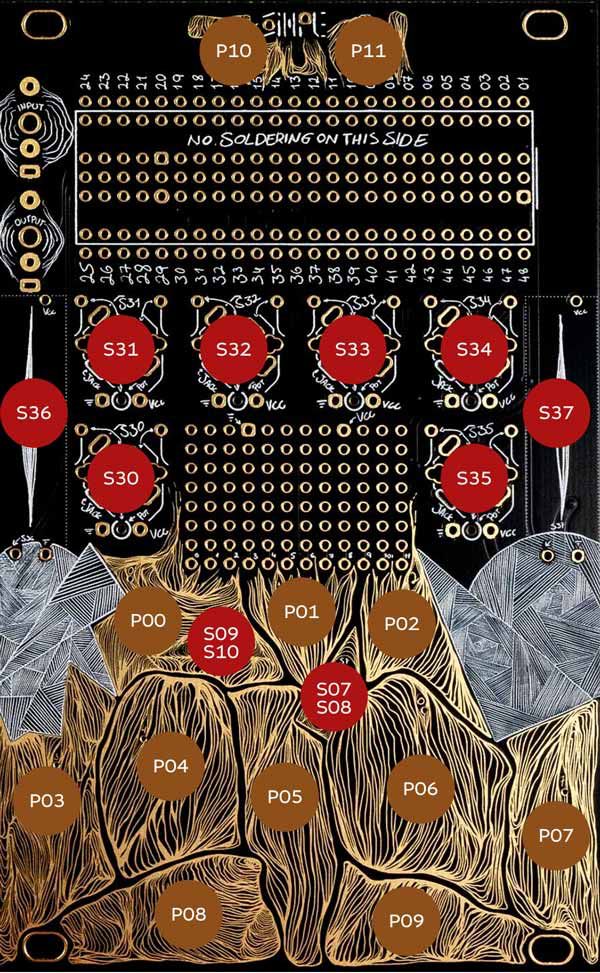
| Pads P00-P09 | out | Note 48-64 | C major, velocity from strike peak |
| Pads P10, P11 | out | Note 36, 38 | Velocity from strike peak |
| Pads P00-P11 | out | Poly Aftertouch | Continuous pressure while held |
| Pads P00-P11 | out | CC30-41 | Per-pad pressure (P00 -> CC30 ... P11 -> CC41) |
| All pads | out | Channel Aftertouch | Max pressure across all held pads |
| Knobs S30-S35 | out | CC14-19 | |
| Left Fader S36 | out | CC20 | |
| Right Fader S37 | out | CC21 | |
| Switch A (Left) | out | CC80 | Down=0, Center=64, Up=127 |
| Switch B (Right) | out | CC81 | Down=0, Center=64, Up=127 |
| LED | in | CC111 | >=64 = on |
| Recalibrate | in | CC112 | Any value, resets the touch baseline |
| State dump | in | CC113 | Any value, sends all knob, fader and switch values |
Templates
Each template finds the TouchMIDI port, requests the current state, shows every control, and forwards its values for your own patches. If you rename the device in config.h, update the port name in the template too.
| Host | Template |
|---|---|
| Max | templates/max |
License
MIT