Tessera
Generative firmware with multiple generators and song forms.
forM-VAVE FM-1·by@Rastapopolix
Unclaimed. Is this yours? Sign in with GitHub as @Rastapopolix to claim it.
tessera-3.0.1.fwsc· 596 KB· +2 files
GPL-3.0· Rastapopolix/tessera·rastapopolix.github.io/tessera/·downloads come from the creator’s GitHub releases
v3.0.1Tessera 3.0.1Latest3 files
Tessera 3.0.1 follows Tessera 3.0: a new colour, the tempo under SELECT, and fixes to the new look and to TURING played from a STEP pattern. Projects, presets and settings from 2.x and 3.0 carry over as they are.
🖥️ The look
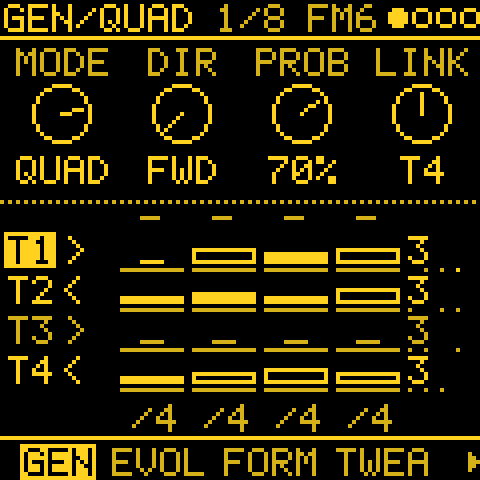
- MOSAIC, a tenth MENU > COLOR: each track has a colour of its own (T1 yellow, T2 blue, T3 hot pink, T4 green), the screen takes the selected track's colour, and the value you turn and the picked row show in white. Wherever the four tracks show together (HOME, MIXER, PATTERNS, SONG, QUAD, MATRIX, MIDI OUT, the cords, the GLO layer, the header's track dots) each is drawn in its own colour. The nine single inks look as before.
- The page's place on every page. The header's place (e.g. 4/10) now runs through the button's whole cycle: SEQ counts its GEN pages and the sequencer's pages together (it used to restart halfway, at 3/5), and ENV, LFO and SEQ number every page they visit, on every engine. FM6's and ORACLE's own ENV and LFO pages no longer count EDIT's pages (FM LFO showed 13/15), and MODS, the list pages and SONG now show the place too. A section whose tabs all fit the footer shows no number.
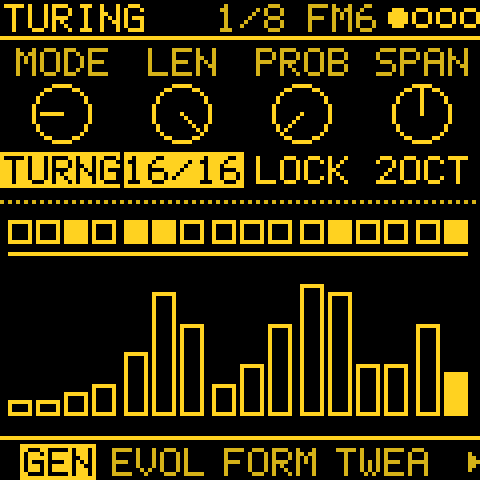
- Knob values look the same at any length. A dial value is plain text and a list value is boxed, however many
letters it has; neighbouring values keep a clear gap, so
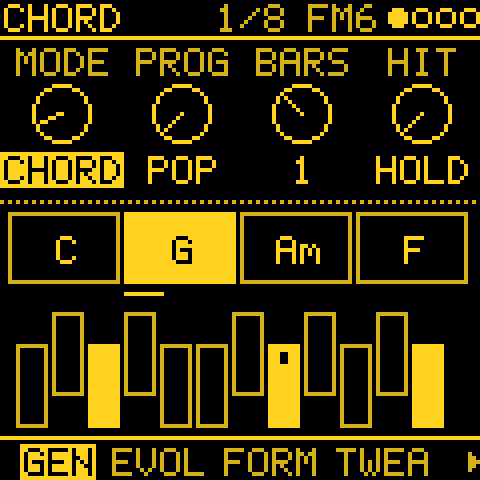
TURNGand16/16, orCHORDandDRONE, no longer run into one block.
🎹 Playing
- SELECT on HOME sets the tempo, and so does SELECT with GLO held on any page, with SEQ > TEMPO's range and the BPM overlay. With CLK on USB or TRS it says the tempo is the clock's. (Issue #296.)
- NOTES, KNOB 2 moves by scale notes while QNT is on: a note off the scale goes to the next scale note in the direction of the turn, and with QNT CHRD and a CHORD track playing it steps through the chord's notes. Hold ENV for a semitone, for passing notes. With QNT OFF it moves a semitone, as before.
🐛 Fixes
- TURING from a STEP pattern (SOURCE): with PROB turned up, the changed steps piled up on one or two notes, often an octave above the root, because a changed step copied another note of the loop and a rest that became a hit took the note before it. A changed step now gets a new pitch: half the time another of your notes as written, otherwise a note of the track's scale within SPAN octaves of your lowest note. KEEP PITCH, PROB 0 and GRAVITY work as before. MORPH's B, which drifts the same way, spreads the same way.
- The filter picture follows TRIO's MODE: TONE drew a low-pass whatever the MODE; it now draws the band-pass, the high-pass and the notch too, on the page and on Stage's overlay. (Issue #299.)
- The LFO picture's dot crosses the whole wave: it stopped in the middle. With POL UNI it now sits on the curve, and S&H draws the value it holds.
🔧 Under the hood
./build.shbuilds the Mono look by default, as the releases do.MELODEE_LOOK=0builds the detailed look, which no longer fits the device's flash.
📦 Installation
Open rastapopolix.github.io/tessera in Chrome or Edge, connect the FM-1 by USB and press Install, then keep the tab open and the FM-1 connected until the install window says Done. The installer can also put the official M-VAVE firmware back. Or take
tessera-3.0.1.fwsc(dual core) ortessera-3.0.1-1core.fwscfrom this release.⚠️ Good to know
- Projects from 2.x and 3.0 load and play as before, except that a TURING or MORPH playing from a STEP pattern with PROB above 0 now draws its changed notes as above.
- With COLOR on MOSAIC, going back to 3.0 shows the default YELLOW.
Show all 3 filesHide 1 files
Other filesv3.0Tessera 3.03 files
Tessera 3.0 follows Tessera 2.1.1. The whole screen is new: every page is drawn in one ink on black, in Tessera's own 5 x 7 font, and you pick the ink. A voice is back (ORACLE, a classic polyphonic analogue voice), and the generators and STEP tracks have grown a lot: STEP patterns as seeds for the generators, GRAVITY, conditional steps, a pitch accumulator, FORM sections that develop, a FILTER effect and effects as cord destinations. Projects, presets and settings from 2.x carry over.
🖥️ A new look
- One ink on black, one font. Every screen, from the boot mark to the help card, is drawn in a single ink with a 5 x 7 pixel font: the selected item is inverted, quieter things are dimmer. Each page has its own picture of what it does (the generator, the envelope, the filter curve, the arp, the cords).
- MENU > COLOR picks the ink: YELLOW (the default), WHITE, GREEN, BLUE, RED, and ORANGE, PINK, HOT PINK and LILAC to match the FM-1's shells.
- Where you are among the pages. When a section has more pages than the footer's tabs show (a generator track's SEQ pages), the header shows the page's place, e.g. 4/10, and arrows at the footer's ends say more pages lie that way.
- The boot mark dissolves into grains and sweeps away.
🎹 ORACLE
- ORACLE is a two-oscillator polyphonic analogue voice with a resonant four-pole low-pass filter: oscillator A (saw, pulse) and B (saw, triangle, pulse) and noise, POLY MOD (the filter envelope and oscillator B bend A's pitch, pulse width or the cutoff, note by note), sync, two envelopes, an LFO, and EARLY / LATE filter models. Warm pads, brass, sync leads, basses, plucks: 24 sounds of its own, and each track's sound is kept in the project. Its pages are on EDIT. ORACLE costs about one and a half FM6 voices: one busy ORACLE track is fine; with two, keep BUDGET in mind.
🌱 Generators
- STEP as seed. TURING, EUCLID, MARKOV and MORPH can play from a STEP pattern you wrote (SOURCE, OCT+ held on GEN): Turing drifts it, Euclid gives it a new rhythm, Markov learns what follows what, Morph plays it against a variation. KEEP holds its rhythm or its pitches, GRAVITY pulls it back to as written.
- GRAVITY on EVOLVE (OCT+ held on EVOLVE): a phrase drifts, then comes home to the generator as you set it.
- FORM DEVELOP (OCT+ held on FORM): a section that comes back varies a little each time, but the section itself is kept, so the form never drifts away, even over hours. 0 (the default) returns it exactly, as before.
- STEP EVOLVE HOW: besides DRIFT, ADORN (ornaments that only add: ratchets, octave jumps, passing notes) and SERIAL (the whole phrase backwards, upside down, rotated or at half speed for a round).
- CHORD HIT OFFBEAT: short stabs on the off-beats.
- ATLAS starts somewhere new: a random X / Y and DENSITY 30–50 % the first time it is used.
🥁 STEP tracks
- Conditions. A step's sheet (OCT+ on a note or a hit) has a Condition: which passes it plays in (1:2, 3:4, 1:8, FIRST, !FIRST …), or FILL / !FILL, played while GLO + E4 is held (on MIXER, E4 alone).
- Accumulate: a step's notes climb or fall a few scale degrees each time the pattern comes round, within the track's limit, so a short loop moves on its own.
🎛️ Sound and modulation
- FILTER effect: a resonant low-pass as an insert or a send (CUT, RES), on any track. FM6 has none of its own, so this is FM6's filter.
- Effects as cord destinations: the insert and send effects' knobs (ECHO TIME, the FILTER's cutoff …) can be moved by cords.
- ENERGY part 2: LEVEL sets the energy by hand and the tide swings round it, through both halves (busier and louder, sparser and softer); DEPTH (OCT+ held) says how much each track follows, 0 an anchor that plays as set.
- FM6 AEG (EDIT 2, KNOB 4): one knob for the amp envelope, all the carriers' envelopes slower or faster at once.
- The FM6 ENV pages stay ENV's when you turn SELECT; ANSWER's FADE moves a count a click.
- PRESETS has a LIST knob: ALL, the favourites, RECENT or a category.
- Power-on track 2 is TRIO's STRING MACH (in place of FM6 STRINGS), so generators on both pads stay within what the FM-1 can play.
- The metronome follows MASTER.
🎵 Demos
Three demo projects in demos/: STILL TIDE and KOTO GARDEN remade with the new options, and LOW HARBOUR, a slow ambient dub.
tools/demo_backup.pyputs them into slots B, C and D of your own backup. And a new demo video on the project page.🐛 Fixes
- SWING turned while playing stays in time. Turning a track's SWING (or the global one) during a late step used to leave the track off the beat until the next PLAY, even after turning it back to 0. It now goes straight back onto the grid, as it already did for DIV and tempo.
- The boot screen no longer flashes yellow before your COLOR: it starts black and the logo comes in your ink.
- NOTES shows Accumulate: a small caret over a note, pointing up when it climbs, down when it falls.
🔧 Under the hood
- More audio memory: the stacks were cut to what they really use (about 14 KB more for the audio), and the boot images are compressed (7 KB less flash).
- Steadier under load: the voices are shed sooner when the FM-1 runs out of time, so it stays clean instead of crackling.
- Safer updates: an interrupted update resumes only in the package's own loader.
- Flash room for the new features: help texts and readouts packed smaller, and DRUM's SID KIT left out (below).
- Each release package is attested by GitHub, so you can check where it was built.
📦 Installation
Open rastapopolix.github.io/tessera in Chrome or Edge, connect the FM-1 by USB and press Install, then keep the tab open and the FM-1 connected until the install window says Done. The installer can also put the official M-VAVE firmware back. Or take
tessera-3.0.fwsc(dual core) ortessera-3.0-1core.fwscfrom this release.⚠️ Good to know
- Projects from 2.x load. The new settings start off, so an older project plays as it did. A track saved with DRUM's SID KIT (or SID DIGI) loads as the 909: they are out of the device build to make room.
- 3.0 has only the new look. The old detailed look stays in the source on branch
detailed-look. - A project saved with 3.0 may not play the same in 2.x, which does not know the new settings.
Show all 3 filesHide 1 files
Other filesv2.1.1Tessera 2.1.13 files
Tessera 2.1.1 is a small fix to Tessera 2.1: chord names fit their boxes on CHORD's CIRCLE progression. Projects, presets and settings carry over from 2.1 as they are.
🔧 Fixes
- CHORD on CIRCLE: with 7th chords (CHRD DIA7), names like "Fmaj7" and "Bm7b5" ran out of their boxes into the neighbouring chords, because CIRCLE's seven chords leave narrow boxes. The chord's quality under its root now takes the largest size the box holds, so every name fits. In an even narrower box, "maj7" is written "M7".
📦 Installation
Open rastapopolix.github.io/tessera in Chrome or Edge, connect the FM-1 by USB and press Install, then keep the tab open and the FM-1 connected until the install window says Done. The installer can also put the official M-VAVE firmware back. Or take
tessera-2.1.1.fwsc(dual core) ortessera-2.1.1-1core.fwscfrom this release.Show all 3 filesHide 1 files
Other filesv2.1Tessera 2.13 files
Tessera 2.1 follows Tessera 2.0.2: a mixer you can play, humanized timing with its own knob, easier-to-read screens and steadier MIDI clock sync. Projects, presets and settings from 2.0, 2.0.1 and 2.0.2 carry over.
✨ New
- MIXER is one 4-channel mixer. KNOB 1–4 set the levels of tracks 1–4, and with OCT+ held they set the four pans. The keys work as in the GLO layer without holding anything: the black keys F#3 G#3 A#3 C#4 mute and unmute tracks 1–4, the white keys F3 G3 A3 B3 solo a track while held, C4 unmutes all and F4 taps the tempo. On MIXER the keys play no notes. The strips show SOLO or MUTE, and a track silenced by another's solo dims.
- HUMAN TIME on TIMING (KNOB 4, 0–60 ms). Each step plays up to that many milliseconds late: a new amount each step, never early, at most a quarter of a step, and replayed the same from the SEED. It works on every track, STEP tracks included, and cords can move it (destination H TIME). TWEAK HUMAN now shapes velocity and length only, and TWEAK opens on STEP tracks for HUMAN.
👀 Easier to read
- The small text is a weight heavier and secondary text is brighter, on every screen.
- A setting stays readable when it is zero, OFF or stopped (QUAD, POLY, AWAKE, ANSWER, CHORD, TWEAK); only what is really inactive is dimmed. CHORD writes diminished chords as ° (B°, C°7).
- The page footer is the same everywhere: the engine name, then the sound's name.
- PANEL GAMMA now defaults to the panel's own G2.2. A unit that was left on the old default (TUNED+VCOM) comes up in G2.2; one that picked another curve keeps it. TUNED+VCOM is still in MENU > PANEL GAMMA.
🔧 Fixes and improvements (some from Melodee 1.5)
- MIDI clock sync survives a busy input. If a burst of MIDI overflows the input queue, the clock pulses lost with it are recovered, so the sequencer and the beat stay in phase instead of falling behind. The arpeggiator catches up on the steps it missed.
- FM6 imports the DX7 voice of a 231-byte MainStage-style file (
F0 43 0n 7D 04 08 …), over USB and in the web editor. It saves and sends back as a standard DX7 voice. - Smaller audio job slots (about 1 KB more audio memory) and a more compact FM6 pitch table (1.7 KB less flash). The sound is unchanged.
📦 Installation
Open rastapopolix.github.io/tessera in Chrome or Edge, connect the FM-1 by USB and press Install. The installer now shows the install in a window with its stages and a progress bar: keep the tab open and the FM-1 connected until it says Done. It can also put the official M-VAVE firmware back. Or take
tessera-2.1.fwsc(dual core) ortessera-2.1-1core.fwscfrom this release.⚠️ Good to know
- Projects saved with 2.1 still open in 2.0.x, which ignores their HUMAN TIME setting.
Show all 3 filesHide 1 files
Other filesv2.0.2Tessera 2.0.23 files
Tessera 2.0.2 is a small fix to Tessera 2.0.1: starting a new project while something plays now works, on the FM-1 and in the simulator. Projects, presets and settings carry over from 2.0 and 2.0.1 as they are.
🔧 Fixes
- New song stops playback. SAVE > PROJECT > New song, then OCT+, used to show only a small "STOP FIRST" while a project played, and did nothing else: in the simulator the demo just kept playing. It now stops playback itself, as SAVE + REC already does, and goes on to "Start a new song?" (when there are unsaved changes) and the NEW SONG screen.
📖 Manual and simulator
- The manual describes how to start a new project (it was missing): SAVE > PROJECT, KNOB 1 to New song, OCT+, then OCT+ for Yes to "Start a new song?", the key, a role per track, and OCT+ to create it.
- The simulator page gives the same steps with the computer keys (SAVE
8, OCT+], OCT-[) under the demo button.
📦 Installation
Open rastapopolix.github.io/tessera in Chrome or Edge, connect the FM-1 by USB and press Install. The installer can also put the official M-VAVE firmware back. Or take
tessera-2.0.2.fwsc(dual core) ortessera-2.0.2-1core.fwscfrom this release.Show all 3 filesHide 1 files
Other filesv2.0.1Tessera 2.0.13 files
Tessera 2.0.1 is a small update to Tessera 2.0: a crisper screen, a fix on MORPH, and an installer and simulator that are easier to live with. Projects, presets and settings carry over from 2.0 as they are.
🖥️ The screen
- MENU > PANEL GAMMA: the screen's contrast curve. The new default, TUNED+VCOM, gives the panel the contrast the pictures in the manual have; 2.0 left it at the chip's flatter default. TUNED and the chip's own G2.2, G1.8, G2.5 and G1.0 are there too. The screen goes black for a moment as it changes. Saved with your settings.
🔧 Fixes
- MORPH lights the bars at the playhead, as the other generators do (2.0 lit only a thin line under them).
🌐 Installer, simulator and site
- The simulator starts with KOTO GARDEN loaded (STILL TIDE is in slot B), and listens to MIDI only when you tick MIDI in: an FM-1 or a DAW left plugged in no longer plays it behind your back.
- The installer and the editor have the project page's look.
- The installer counts finished installs of the released builds at GoatCounter: the version and the build only,
no cookies or personal data. Local test files are never counted. Open the installer once with
#nocountat the end of its address to leave your browser out. - A new demo video (four minutes): the two demos, then the pages that shape any generator (EVOLVE, FORM, TWEAK, TWEAK 2, LENGTH and TIMING), then the other modes.
🏷️ Good to know
- Tessera now has its own package identity,
FM-1_8377and the version (FM-1_83772001for 2.0.1), so tools such as the Firmware Hub can tell it from upstream Melodee. Nothing changes for you: install as before. The installer still accepts the 2.0 packages.
📦 Installation
Open rastapopolix.github.io/tessera in Chrome or Edge, connect the FM-1 by USB and press Install. The installer can also put the official M-VAVE firmware back. Or take
tessera-2.0.1.fwsc(dual core) ortessera-2.0.1-1core.fwscfrom this release.Show all 3 filesHide 1 files
Other filesv2.0Tessera 2.03 files
Tessera 2.0 is a generative firmware for the M-Vave FM-1. It is the next release of Melodee (Tess), now under its own name: a fork of Melodee by keremimo, itself built on Felucca by Leo Kuroshita / Hügelton Instruments (GPL-3.0-only). The manual covers every page and the recipes show ways in.
Two demo projects come with it (demos/): an ambient piece and a koto garden. Put them on your FM-1 to hear what 2.0 does before you build your own.
⚠️ Before you install
- Projects have a new format. Projects saved by Melodee (Tess) 1.x do not load in 2.0: their slots show OLD FORMAT, and the first save writes over them. There is no converter. To keep a 1.x project, keep it on 1.x, or print the parts you like to STEP and write them down.
- Back up first. In the web editor, Complete backup > Save backup saves the music, slots A to D, the sound banks and the settings. A 1.x backup restores on 1.x only.
- The CZ-1 and Prophet sound banks are gone (their flash now holds the projects). FM6's banks and your user presets stay.
- The FM-1 now shows up on your computer as Tessera (MIDI port Tessera, audio Tessera Out and Tessera In; it was Melodee). A DAW that remembered the Melodee port needs the Tessera one picked once. During an update it still shows up as Melodee Update, briefly.
🎹 Synth engines
2.0 plays three engines, each tuned for generative music.
Engine What it is New in 2.0 FM6 Six-operator FM in the manner of the DX7: 32 algorithms, operator envelopes and scaling, pitch EG, LFO, the function settings; ENGINE picks MODERN, MARK I or OPL. The main melodic voice. Back as the main voice. 15 new presets after INIT VOICE (25 to 39), from ZEN-1 and FuMi-1: SOFT PAD, SOFT SWELL, DEEP PAD, DROP, MALLET, ZEN BELL, RIN, BAMBOO, FURIN, HYOSHIGI, MOKUGYO, KOTO PLUCK, KOTO RING, KOTO WARM, KUGO HARP. The factory presets' releases ring out, so short sequenced notes are not cut off. LFO opens MODS first, as on every engine. TRIO Three oscillators (WAVE, INT2, INT3, DETUNE) into a filter: basses, leads and pads. Back, with a warm set of 11 presets for what FM does not do: WARM PAD, STRING MACH, HOLLOW PAD, SOFT PAD, SUB BASS, SOFT LEAD, BREATH FLUTE, WIND, ANALOG BRASS, FIFTH DRONE, SWEEP PAD. DRUM Eight lanes (BD, SD, CP, CH, OH, TM, RS, CB) on three kits: the 808, the 909 and the SID KIT (every drum on a C64 chip). The 808 has six tom pitches. ATLAS plays a fourth part on the toms or another lane (below). Gone from the device build: SID as a melodic engine (DRUM's SID KIT stays), PHYS, CZ-1 and Prophet, to free flash, RAM and CPU for the generators. A track saved with SID loads FM6's INIT VOICE; one with PHYS loads FM6's first voice.
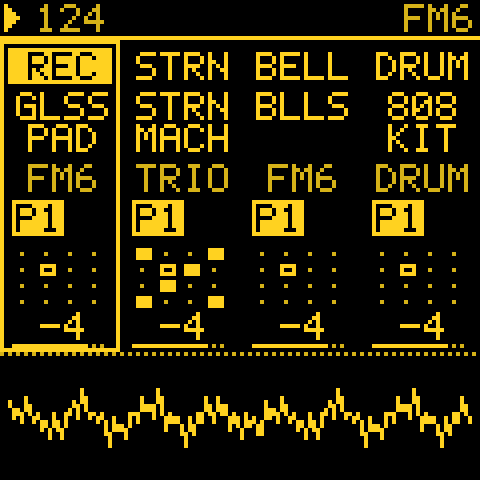
The four sounds a new project starts with are an ambient set: GLASS PAD, STRINGS and BELLS on FM6, the 808 KIT on DRUM.
🎼 Scales
Seven Japanese and Okinawan scales after SIKAH in SCL: IN, YO, HIRA (Hirajoshi), IWATO, KUMOI, RYUKYU and MINYO (Min'yo, the folk-song scale), as 12-tone pitches.
✨ Generators and pages
- CHORD generator: a progression's chords in the track's scale (POP, 50S, 2-5-1, CIRCLE, TWO, DRONE, WALK, or your own with USER), held, on the beat or on every step. On other tracks, SCL > QNT CHRD snaps their notes to the chord playing now.
- BREATH on CHORD (hold OCT+ on GEN, KNOB 4): a held chord's voices each swell and fade on slow cycles of their own (11 to 19 s), one now and then sitting out.
- ENERGY page (SEQ, after TIMING), the project's slow shape after Zen-1's conductor: ARC swings the generators between full and sparse over 3 to 6 minutes; RESTS lets them fall silent for 8 to 18 s now and then, while a CHORD drone holds. Both 0 by default. ENERGY is also a mod source.
- TIMING page (after LENGTH): RATCH x1 to x8 plays a generator's step 2 to 8 times, as often as CHANCE says; SHAPE places the hits: EVEN, ACCEL (a roll that speeds up) or DECEL (a bounce). On a STEP track TIMING holds SHAPE alone, for every step's Ratchet.
- Ratchet and Nudge per step on a STEP track: OCT+ on a note (or a drum hit) opens its sheet, where Ratchet plays the step x1 to x8 in equal parts and Nudge moves it up to 8/16 of a step early or 7/16 late.
- ANSWER generator (after Zen-1's call and response): play a phrase on the keys and it answers with variations that change a little more each time and fade (VARY, ECHO, FADE; OCT+: ORDER, SHIFT, SPACE, LEN).
- One key for the project: SCL > Key link (LINKED in a new project) sets ROOT on every melodic track at once, as the scale already was; OWN keeps a key per track. Saved with the project.
- MIDI OUT page (GLO, after SYSTEM): each track's notes on a MIDI channel of its own, 1 to 16, so each track can play its own instrument; AUTO works as before (ROUT, the DRUM channel), OFF sends nothing. Saved with the project.
- HUMAN (TWEAK) now moves timing too: a generator's step lands up to 20 ms behind the beat at 100, never early, the same each time the piece plays.
- STEP EVOLVE: on a STEP track, EVOLVE varies your written steps as they play; hold REC to keep the changes.
- Print: hold REC on a generator track to put its last bars into STEP and play on from there.
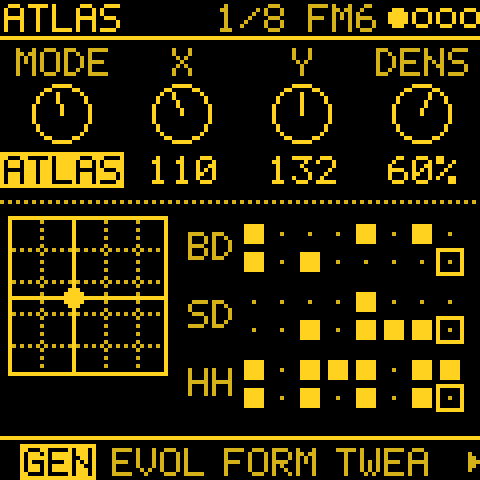
- ATLAS (was GRIDS): KICK, SNR and HAT each take their own share of DENSITY, and TOMS adds a fourth part from the hits the kick and snare just miss, on TOM, CLAP, OPEN HAT, RIM or BELL (a black key with OCT+ held).
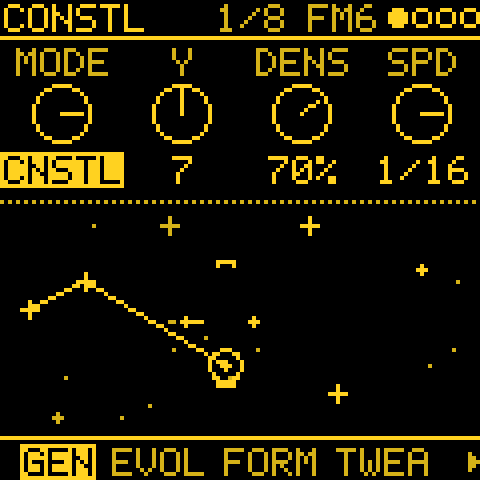
- CONSTELLATION: straight SPEEDs, a loop LEN, FILL ARP and an OCT+ layer. MARKOV and MORPH loop over PATTERN's LEN.
- OCT+ layers on GEN for ATLAS, CHORD, QUAD and CONSTELLATION: hold OCT+ for a second set of knobs.
- FOLLOW draws the followed track in its own colour, and can follow STEP tracks.
- MENU > LIGHTS AUTO: the panel goes dark 30 s after the last touch and wakes on the first, for long ambient sets.
- LFO on an FM6 track opens MODS first, as on every engine; FM6's own FM LFO page comes after the others.
- Tessera on ABOUT, the installer and the editor; the power-on mosaic now holds a moment (a button skips it).
- Six TRIO presets (FAT BASS, SUB BASS, ARP LEAD, SOFT LEAD, ANALOG BRASS, BREATH FLUTE) release with a short fade instead of stopping dead on short steps.
- Tracks stay on the beat after a DIV or tempo change.
🎚️ Good to know
- Voices are shared. All tracks draw on one pool of voices (GLO > GLOBAL > BUDGET, 16). Two or more busy FM6 tracks with long releases (for example TINE EP at full density, 1/16) are past what the FM-1 can render and start to crackle; thin one, shorten its notes, or lower BUDGET. The manual's "How many voices at once" has the details.
🏷️ New names
Other makers' product names are no longer used on screen; the credits still name the originals.
- GRIDS → ATLAS (inspired by Émilie Gillet's Grids, Mutable Instruments; mod destinations AT X, AT Y, AT DENS, AT KICK, AT SNR, AT HAT, AT TOMS)
- SLOTH → TIDE (inspired by Nonlinear Circuits' Triple Sloth): TIDE 1, 2 and 3 by speed
- OCHD → SWARM (inspired by Instruō and DivKid's ochd): SWARM 1 to 8
Saved projects and mods keep working across the renames: only the names on screen changed.
🎨 The look
Tessera's own palette SMALTI (lapis and gold), square tiles, Elektron-style dials, the Chakra Petch typeface, a mosaic splash, page tabs, a colour per track, bigger GEN pictures, and a help card for every knob that scrolls (hold ARP, turn a knob). MARMO, VITRO, NIGHT and CONTRAST are in MENU > COLOR. Lists: KNOB 1 picks the row, KNOB 2 changes it. MENU > TRACK KNOB sets which knob picks the track.
📦 Installation
Flash it with the web installer (Chrome or Edge), or download a
.fwscfrom the assets below:tessera-2.0.fwsc: the standard (dual-core) build. Start here.tessera-2.0-1core.fwsc: single core, for FM-1s that crash with the standard build (red TESSERA CRASH screen, freezes, or restarts into update mode).
Do not unplug the FM-1 while it is writing. This is experimental firmware: use it at your own risk.
🙏 Credits
- Melodee by keremimo, and Felucca by Leo Kuroshita / Hügelton Instruments: the firmware Tessera is built on. TRIO comes from Felucca.
- Grids by Émilie Gillet / Mutable Instruments: ATLAS' drum map and the way it is read.
- ZEN-1 by aceyprime and FuMi-1 by cartesive: the 15 FM6 presets above (SOFT PAD to FURIN from ZEN-1; HYOSHIGI, MOKUGYO, the kotos and KUGO HARP from FuMi-1), and ZEN-1's ideas behind BREATH and ENERGY.
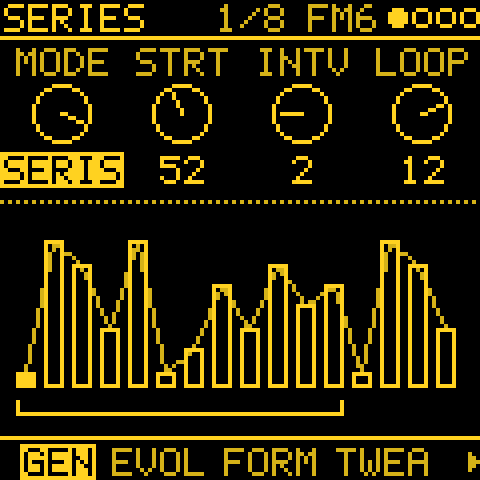
- norns scripts, as ideas restated in C: Awake (tehn), Fall (ambalek), Constellation (timothy-taylor), initenere (QUAD) and nørgård (SERIES).
- Turing Machine (Music Thing Modular), Triple Sloth (Nonlinear Circuits) and ochd (Instruō, DivKid).
Every third-party part and its licence is listed in LICENSING.md.
Show all 3 filesHide 1 files
Other filesv1.3.3Melodee (Tess) v1.3.32 files
Melodee (Tess) v1.3.3 is an experimental generative sequencing fork of the M-Vave FM-1 alt-firmware Melodee (GPL-3.0-only). It is also listed on altstrument.org.
✨ What's New since v1.3.1
- TWEAK 2 page (after TWEAK, on generator tracks):
- BRANCH sends hits to another track's sound. COIN tosses a coin for each hit, TOGGLE alternates and LATCH picks once per bar. In COIN mode the fork picture shades each arm by its share of the hits.
- LOGIC combines this track's hits with another track's: AND, OR, XOR or NOT.
- COND plays only on certain bars: 1:2, 2:2, 1:4 to 4:4, 1:8, 8:8, FIRST or !FIRST.
- SLOTH and OCHD, slow organic mod sources, one set per track:
- SLOTH has three chaotic circuits: TORPOR (about 17 minutes a turn), APATHY (about 1 minute) and INERTIA (about 3 minutes).
- OCHD has eight free-running LFOs, from 64 s down to 2.4 s a turn.
- SPEED and RATE are on the new LFO > ORGANIC page, which shows them moving. PLAY restarts them from the track's SEED, so a piece replays the same way.
- Live mod feedback:
- When a mod reaches a knob, its card shows a mark where the mods are moving it now.
- Each MODS row has a moving mark.
- The new MATRIX page shows which tracks modulate which, lit as the mods move. OCT+ opens a mod in MODS.
- Track 1 starts on PHYS DRONE STRING at power-on and on a new project.
- New projects start with no mods. Until now a new project, or power-on without a BOOT project, came with 8 DRIFT mods on each track's CUTOFF and FX SEND. Now all 16 slots start empty, so movement is only there if you patch it. Saved projects keep their own mods.
- BRANCH as a mod destination, and the 11 new mod sources described in the online parameter reference.
📦 Installation
Flash it with the web installer (Chrome or Edge), or download a
.fwscfrom the assets below:melodee-tess-1.3.3.fwsc: the standard (dual-core) build. Start here.melodee-tess-1.3.3-1core.fwsc: single core, for FM-1s that crash with the standard build (red MELODEE CRASH screen, freezes, or restarts into update mode).
Projects saved by earlier Tess versions still load and convert. The new settings start off, so old projects play as before. Do not unplug the FM-1 while it is writing. This is experimental firmware: use it at your own risk.
- TWEAK 2 page (after TWEAK, on generator tracks):
v1.3.1Melodee (Tess) v1.3.12 files
Melodee (Tess) v1.3.1 is an experimental generative sequencing fork of the M-Vave FM-1 alt-firmware Melodee (GPL-3.0-only). It is also listed on altstrument.org.
⚠️ Sound engines changed
This release offers SID, TRIO, PHYS and DRUM. FM6, CZ-1 and Prophet are no longer in the build: a track saved with one of them loads SID INIT. Stay on v1.2.7 if you rely on those engines.
✨ What's New since v1.2.7
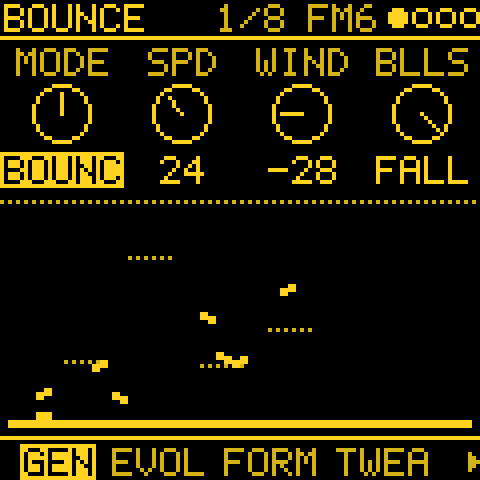
- Three new generators: BOUNCE (up to four balls bouncing in a box, a note where they hit the walls), AWAKE (two loops in the style of norns' Awake, with step entry from the keys) and POLY (four rhythms moving four notes, over up to 3 octaves).
- SEQ MODE menu: SEQ opens on GEN, where KNOB 1 picks the track's mode (STEP, ARP, or a generator), and SEQ then shows only that mode's pages. The ARP button switches the track to ARP.
- TWEAK picture: SHIFT, DROP, HUMAN and FOLLOW drawn on the page, instead of the audio scope.
- Mod shortcut: hold FX and turn a knob to set that parameter's cord amount.
- Boot screen: MELODEE / TESS.
📦 Installation
Flash it with the web installer (Chrome or Edge), or download a
.fwscfrom the assets below:melodee-tess-1.3.1.fwsc: the standard (dual-core) build. Start here.melodee-tess-1.3.1-1core.fwsc: single core, for FM-1s that crash with the standard build (red MELODEE CRASH screen, freezes, or restarts into update mode).
Projects saved by earlier Tess versions still load and convert. Do not unplug the FM-1 while it is writing; this is experimental firmware, use at your own risk.
v1.2.7Melodee (Tess) v1.2.72 files
Melodee (Tess) v1.2.7 is an experimental generative sequencing fork of the M-Vave FM-1 alt-firmware Melodee (GPL-3.0-only). It is also listed on altstrument.org.
✨ What's New since v1.1.0
- Grids: a fifth generator mode, Mutable Instruments Grids' drum map.
- GEN family: tap ARP for GEN, EVOLVE, FORM, TWEAK, then ARP and ARP 2. GEN owns the generator's knobs; SEQ's PATTERN page is upstream's again and FEEL is gone.
- Seeds and ROLL: each generator track has its own seed (1–128) and random stream. ROLL on EVOLVE steps through lines and comes back to the same one, note for note; while playing it waits for the track's next bar line.
- Cords and MODS: a modulation bus with 16 cords (room for 32) across 41 destinations, saved with the project. Generators are cord sources (their CV). MODS replaces MOD and shows every route with activity lights; new projects start with a default patch, including the slow DRIFT source.
- Help: hold ARP and turn a knob to see what it does. Every parameter now has a number, range and help text.
- Generator fixes: FOLLOW accepts STEP tracks as sources and shifts in scale degrees; mutation stays in bounds (Turing, Euclid, Markov); Markov DENSITY defaults to 70; stuck notes on stop fixed; autosave also saves generator-only changes; backups include the generators.
- From upstream Melodee: merges of 1.3.1 and 1.3.6 (boot protection, power and clock fixes), plus picks from 1.4.1: SID C64 models with C64 POLY chord arpeggios, SID KIT and SID DIGI drums, a shared voice BUDGET, faster DSP, and about 16 KB more RAM for audio.
📦 Installation
Flash it with the web installer (Chrome or Edge), or download a
.fwscfrom the assets below:melodee-tess-1.2.7.fwsc: the standard (dual-core) build. Start here.melodee-tess-1.2.7-1core.fwsc: single core, for FM-1s that crash with the standard build (red MELODEE CRASH screen, freezes, or restarts into update mode).
Projects saved by earlier Tess versions still load and convert. Stock Melodee projects load with Tessera off. Do not unplug the FM-1 while it is writing; this is experimental firmware, use at your own risk.
v1.1.0Melodee (Tess) v1.1.01 file
Melodee (Tess) v1.1.0 is an experimental generative sequencing fork of the M-Vave FM-1 alt-firmware Melodee (GPL-3.0-only).
✨ What's New
- Four Generative Engines: Adds Turing (looping shift register), Euclid (Euclidean rhythms with saved seeds), Markov (random walk over 8 scale degrees), and Morph (preset pattern blending).
- New Workflow Pages: Adds dedicated UI pages for FEEL (managing divide, swing, and gate while engines run), EVOLVE (mutation and deja-vu controls), FORM (song structure building), TWEAK (shift, drop, humanization, and follow), and FLOURISH (dynamic phrase-ending transitions).
- Dedicated Flash Storage: Stores Tessera state in its own flash object (
OBJ_TESSERAat0x9D000) with parent-project hash tagging and range validation to keep save files safe and compatible. - Optimized Build: Fully adapted to strict hardware memory constraints, outputting
melodee-tess.fwsc.
📦 Installation
Download
melodee-tess.fwscfrom the assets below and flash it to your M-Vave FM-1. Projects saved by stock Melodee load normally with Tessera off, and projects saved by this fork remain fully compatible.