Taktile
Loud88/100A groovebox module for Ableton Move (Schwung): 16 tracks of synths and drums with a step sequencer, sounds, effects and live performance tools.
Taktile is custom firmware for the Ableton Move, by @taktonmusic. Open source under MIT, latest release latest (October 2026), 3 stars on GitHub.
forAbleton Move·by@taktonmusic
Unclaimed. Is this yours? Sign in with GitHub as @taktonmusic to claim it.
taktile-module.tar.gz· 685 KB
MIT· taktonmusic/Taktile·downloads come from the creator’s GitHub releases
latestTaktile 1.0.0Latest1 file
Taktile - groovebox for the Ableton Move
16 tracks of synths and drums, step sequencer, 704 sounds, effects, sampler with microphone recording and live performance tools. A Schwung overtake module. Current version: 1.0.0
What is new in 1.0.0
- Back to the proven 1.6.5 program with only these changes
- Recording into an empty clip: stopping with the Play button now gives the length you played too (it used to stay one bar too long, e.g. 48 instead of 32 steps); a downbeat played a little early no longer adds a bar, it goes to step 1
- Every synth sound list starts with INIT; synth sound names are written out and easier to read (for example Electric Piano, Kick Hard)
- Sound browser and Sample browser: tapping a pad plays the highlighted sound or WAV right away, without clicking it first
- Sequencer page: holding Shift no longer replaces the sound knobs by BPM / Swing / Length / Clip (Shift + knobs 1-4 still change them)
- Naming (project, scene, speech text): after the last letter there is an OK field; a click on it confirms the name (the Menu button still works)
- Clip and mixer pages: synth tracks are shown as SY1, SY2 ... (not SSY1)
- Synth presets reworked: every role list starts with a clean INIT (single plain voice), no empty categories any more, 64 new soft synth sounds plus 130 restored distinct older ones; harsh, piercing sounds were softened
- Drums: only the drum synth is left (drum categories removed); it has lists for Kicks, Snares, Hats, Cymbals, Claps, Toms, Rims and Percussion with INIT first and 48 new sounds; the browser opens in the list of the sound you just played; drum hiss reduced
- Every synth list now starts with INIT (also Classic, Modal, Vocal, Chip and the FX / percussion lists); the KIT page is gone from the menus, drums are only the drum synth
- Fixed: opening the sound browser on a synth track could put the cursor in the wrong place (even behind the end of the list); it now lands on the current sound
- Sound and preset counts are the same everywhere now (704 sounds, 10 insert effects, 11 MIDI effects) in README, module description, manuals, guide and release text; manuals and guide no longer mention drum kits
- Web app (app/) updated to the current user interface and sound engine
- Tests: all UI tests run in the build, plus a new browser-cursor test; two compiler warnings in the sound engine fixed
- Song mode, transitions: tempo, mutes and transposition of the next step now change exactly on the bar line together with the clips (before, they changed one beat early)
- Song mode, live: a step you tap while the song plays starts at the end of the bar (the title shows the step, the key blinks); tap it again to jump right away. Hold the Loop key to stay in the running step (STAY)
- Song page: the title shows the running and the next step (STEP 02>03), dotted frames mark the clips of the next step, and the bottom line shows the whole song as boxes (the running step fills up, the next one is dotted)
- Recording into an empty clip: pressing Rec the second time near a bar line now ends the clip on that bar line, counted from the bar line where the take began (a first note late in the bar no longer costs a bar); the stop counts from the moment Rec is pressed, not released
- TAPE page extended (HOME > TAPE, 8 knobs): new Flutter (fast fine shake), Age (darker, less steady worn tape), Dropout (short level dips) and Tone (top end brighter or darker); the tape hiss is quieter now; everything at 0 (Tone in the middle) is off
- Slices on a NEW DRUM TRACK: the pads without a slice are blank (silent sampler pads) instead of the default drums
- Synth tracks start Mono again; Voices = Poly lets you hold up to eight notes together (choosing a sampler sound switches that track to Poly)
- MIC page: Shift + Gain knob switches a live monitor on (you hear the input; use headphones). It is off when you leave the page or record
- Notes To Scale first reads the notes of the other synth tracks, sets master Key + Scale to the best match (major, minor, dorian ...) and then moves the notes of this clip into it
- Tracks are shown as DRM1, SY1, SY2 ... instead of T01 / S02
- A step can hold several notes: pads played together while recording (or pads held + a step button) are stored as a chord and all notes play back, in Mono and Poly
- CHORD pad mode is only a pad layout now (left = notes, right = chords): entering or leaving it does not change the track's MIDI effect or sound; chord pads are recorded as full chords
- Note Repeat works on synth tracks too (Shift + step 11 > Repeat)
- Drum synth: an INIT sound for kick, snare, hat, clap, tom, rim and metal (first entry in DRUM SYNTHS > every group), and a new ENGINE 2 page (Shift + Jog click on a drum-synth sound) with Overtone, Ratio, Punch and Noise Decay
- Arp rate: 1/4 and 1/2 added (slower than 1/8)
- Scale Q runs once per turn instead of again and again while the knob keeps turning
- Full Velocity: live pad hits now play at full velocity too, like the steps they record
- Drum tracks: the Delay and Reverb sends of the drum sounds now work (they were reset to 0 whenever the sounds were sent to the engine)
- Turning a knob on any page shows the changed value top right next to the page dots (also with Big Values off)
- Three new synth engines with 10 sounds each: ACID 303 (TB-303 style filter, squelch, accent), SWARM (a wide swarm of detuned saws) and DX 6-OP FM (six operators, the 32 DX algorithms)
- Presets cut from 1468 to 420 clearly different sounds plus 36 new sounds = 456; sounds of old projects, favorites and kits become the most similar kept sound of the same synth; levels evened out inside every synth
- Sound browser: the melodic synths are grouped into 6 groups
- Groove templates (MPC, Shuffle, Laidback, Dilla, Drunk, Push, Funk, Ghost, Human, Roll) with Groove Amt on the SWING page (Shift + step 7)
- Master pages (TEMPO, QUANT, OPTIONS, PROJECT, DESIGN ...) use tiles instead of round knobs
- Safe start: if the last start did not finish, Taktile opens an empty project and keeps the old file as a copy
- Tape hiss is mono
- Euclid sequencer: OFF / ON again (the ADD mode is gone, so it can be switched off)
- Pads: a pad that sends its note-on again while it is still held (a deeper press) no longer triggers the sound a second time
- Fixed: sustained sounds (Strings, Pad, Lead, Organ ...) no longer sound a second time when the pad is released
- Hold a step button + left / right arrow = nudge of that step
- Button lights (Mute, Copy, Delete, Back, Sample, Loop, arrows) glow softly by default
- Fast repeated drum sounds (kicks in sixteenths) no longer click: the old tail fades out in 10 ms instead of being cut
- Master output: the limiter is never fully off (ceiling 95 %) and a sum above 85 % is rounded off softly, so two loud sounds together no longer clip
- Drum tracks: Delay and Reverb sends on the FX page (Output moved to the SOUND page)
- No Track Speed
- New LFO page: 4 LFOs per track (last tab) with assignable targets, rate, depth and shape
- Shift + Menu opens the Mixer; Mix Vol knobs turn slower and finer
- Duplicate a whole track (simple copy of all clips and sound)
- Recording: clip length is taken from the first note, a second Rec press within 16 steps no longer jumps to 32 steps; the header shows bars instead of steps
- Chord mode: what you played with chords stays recorded after leaving chord mode
- Granular Pitch can now go down as well (+-24 semitones)
- New GUIDE in the main menu: an easy step-by-step guide
- Rename menu can be left with Back
- Delay and Reverb are only sends now and removed from the Insert FX in all tracks (old projects convert)
- Six new human voices: Granny, Grandson, Mother, Father, Kid, Teenager (456 sounds)
- Song mode: song pads no longer play the synth in the background; copying clips works
- Note Repeat is recorded when Rec is pressed while Note Repeat is held (drum and synth)
- Mixer pads: a tap mutes / unmutes at once, a muted track is dimmed (not dark), Shift + pad opens that track; clip view shows muted tracks dimmed too
- Drum FX page: page 1 = Delay and Reverb sends + Insert 1, Jog click = Insert 2
- Filter knobs (LPCut, Reso, HPCut) turn a little faster
- Song page like the clip view: Mute + pad (Shift = solo) mutes a track, muted tracks are dimmed and marked, the playing clip shows its progress
- Pad switch to the UI is sent at once when a page changes (mixer, clips, song)
- Shift + knobs 1-4 no longer change BPM / Swing / Length / Clip on the SEQ page (Shift is only a modifier again)
- Delay type DUB keeps more low end in the echoes (808 and sub sounds no longer fade out)
- A sound change with the jog opens the filter again (LP up, HP and FltEnv at 0), like the preset browser
- Scope latch: Shift + jog click in the scope keeps it on top of every page (you can keep playing and editing, toasts still show), Shift + jog click anywhere switches it off; also in the menu (EXPERT > Scope latch)
- A muted track still shows its normal pad colours in the drum / synth pad modes (the display shows M)
- Song page: a pad of an empty clip no longer creates or picks anything - the song only picks clips that exist in the clip view
- Safer running: a failing part of the update loop no longer stops the rest; the error screen shows the line number (ERR ... Lnnn), repeated note-repeat hits are checked before they are recorded
- A pad hit that reaches the sound engine twice (host MIDI and the module message) is played once: a second note-on of the same pad within 35 ms is ignored
- Song page: the title shows NEXT nn while a jump waits for the end of the bar, that step button blinks, and the running section shows BAR n/m
- SAMPLER is an engine of its own: in the sound browser under SYNTHS (synth tracks) and DRUMS (drum tracks) - pick a WAV, then One / Reverse / Loop, start / end, voices, filter, envelope, LFO and effects like any sound
- SAMPLER as an entry of its own after SYNTHS in the sound browser: it makes a synth track that plays a sample instead of a synth (empty start, default values, filter open; with no sample loaded the file browser opens)
- Sampler ENGINE page like a synth: SAMPLE block (file, start, end, mode) and SHAPE + FILTER block (gain, stretch, WarpBars, voices); knob 1 = file, jog click = file browser; Attack and Release of the sample on the SOUND page; tab strip like a synth
- Timewarp in the sampler (WarpBars OFF, 1/2, 1, 2, 4, 8, 16): the region lasts exactly that many bars at the current tempo with the pitch kept, so long loops run in sync
- New sample mode FWD-REV (ping-pong); saved sounds with ONE, REV and LOOP are unchanged
- Sample folder: Shift + click on a folder in the file browser sets it (also a loaded file remembers its folder, kept after a restart); knob 1 on the ENGINE page walks through its WAVs (listen while turning, loads when you stop), Shift + knob 1 jumps to the next / previous folder beside it
- The browser preview cuts the sample before at once when you move to the next one
- Volume is shown 0 to 127 everywhere (track, pad, mixer, step lock)
- The tab strip scrolls with the page you are on when not all tabs fit (sampler, chords, LFO), with < and > marks
- The NEW ENGINES folders are hidden in the sound browser; the sounds stay in the synth lists and under MORE > ALL SOUNDS
- LFO shape: S&H and SMOOTH are replaced by one RANDOM (a new random value every cycle, hard steps); the shape list is now Sine, Tri, Saw up, Saw down, Square, Random, Pluck (an old SMOOTH becomes Pluck)
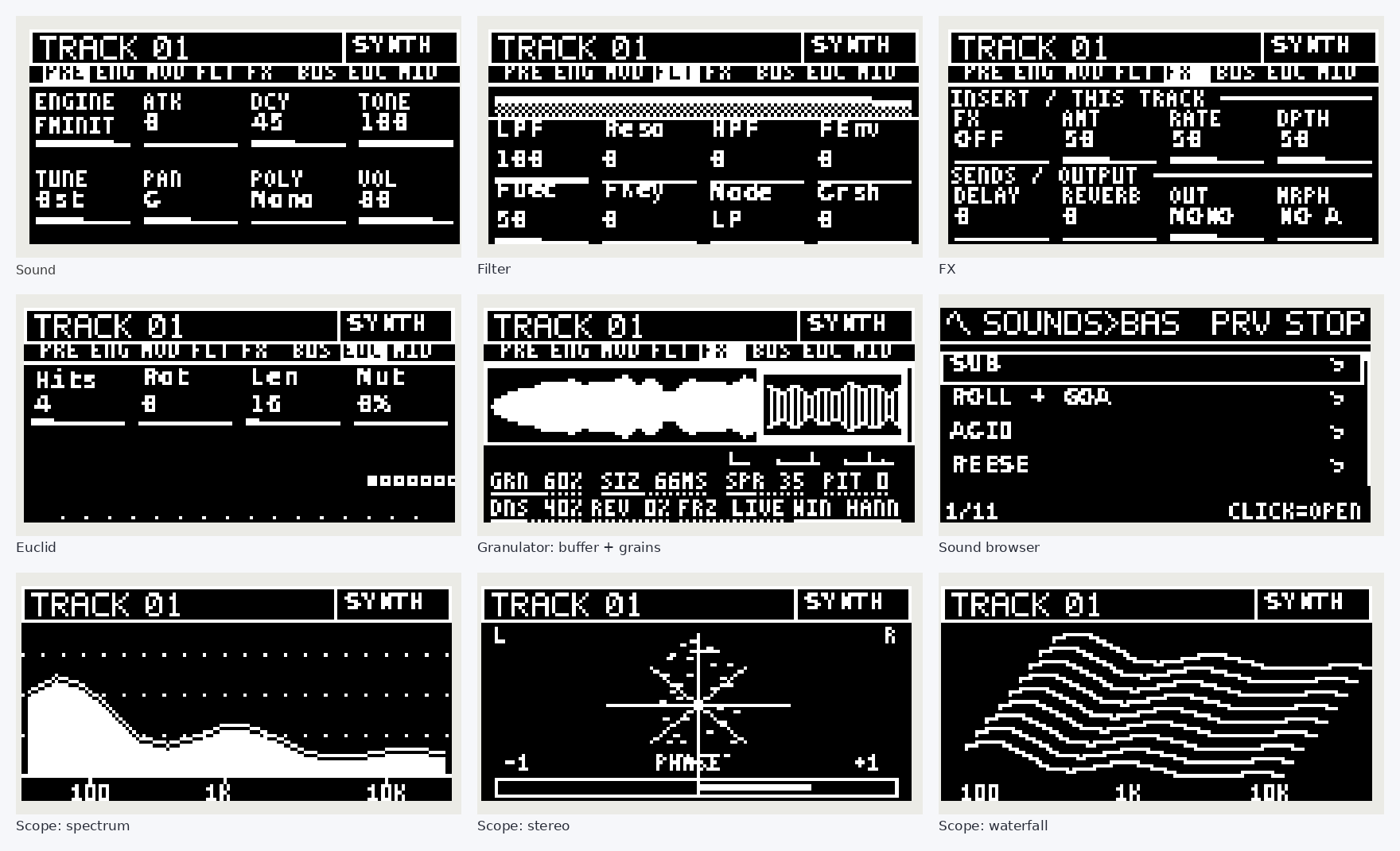
- Page strip on top: whole page names in small letters, the current page on white, and one dot per page right under it (the big dot = where you are); the strip scrolls with the page
- Sampler: SAMPLER is an engine of its own with an ENGINE 2 page (Scan, Voices, Spread, Tape stop); outside it there is a simple sample mode with SAMPLE and SLICE; TOOLS and MIC are only in the sampler engine
- Slices can go to this track or to a new drum track (Shift + jog click on SLICE); a new sample puts filter, stretch and the rest back to their defaults
- Page numbers no longer pop up when you change pages
- Song mode: entering the song page starts the song at once, Back ends song mode, the page follows the playing step, the title shows knob name and value while you turn, holding a step key shows its 8 options, turning the Song knob on starts the song
- Song: Bars, Repeat, insert, delete, move, copy and record scene while the song plays keep it playing at the same place; the bar counter (BAR 2/4) is right; the page stays on your step while you hold or turn
- Song: Shift + pad opens that track while the song plays on (SONG shows top right); Back returns to the song page, Back again ends song mode
- Song: hold a step key + a track key = mute that track in this step; Shift + Change sets the change (HARD, FILL, DRUMS 1ST) of all steps
- Song and clips: clips change exactly on the bar line whatever Launch is set to; a launched clip always starts at its own first step (a synth with a long loop no longer comes in only in the second pass)
- Recording: Rec + Play now records every knob (also Master, Delay, Reverb, Tape, tempo, swing; list values too), master moves loop over 4 bars, Delete + knob clears them; saved projects keep the recorded LFO knobs
- Send reverb with 16 ms pre-delay and a more open top; ping-pong delay repeats without low rumble and rounded off softly
- List knobs of the sampler engine (Sample Mode, Voices, Filter Mode, speech letter) turn as slowly as all other list knobs
- Guide in the menu: new pages for song, knob recording and samples; manuals updated
- Short messages (track name, play, stop, knob values) appear in the dots row on the right instead of covering the tabs; the dots slide left meanwhile
- Step page: header in the style of the tab strip (clip as white block, tempo, mode, lane line)
- Applying slices to a drum track: pads without a slice and without notes are muted instead of playing the default drums; the message says "N PADS REST OFF"
- Arp rate: 1/8T and 1/1 added too (1/4 and 1/2 are listed above)
- Loop held: the step buttons show the clip length (white = steps, green = bars); one button = that many steps, two or more together = that many bars
- INIT in every engine family is the engine's own Init sound (it pointed to other presets before); duplicates removed from the family lists
- MY PRESETS in the sound browser (synth tracks): + SAVE THIS SOUND stores the whole sound, click loads it, Delete + click removes it
- Master: the Groove template turns at the normal speed (it needed 14 clicks per step); the knob you turn shows on the right of the header
Install
- Download taktile-module.tar.gz below. Do not unpack it.
- Put the Move and your computer or phone in the same Wi-Fi and open http://move.local:7700
- Upload the file as a custom module and restart Schwung if Taktile does not show up.
Docs
English and German manuals are in taktile/docs. All changes are in CHANGELOG.md. Please report problems as an issue and name your firmware and Schwung version.
Thanks
Big thanks to Neuro... No Neuro (https://www.neurononeuro.net) for testing and honest feedback.