SonicMaster
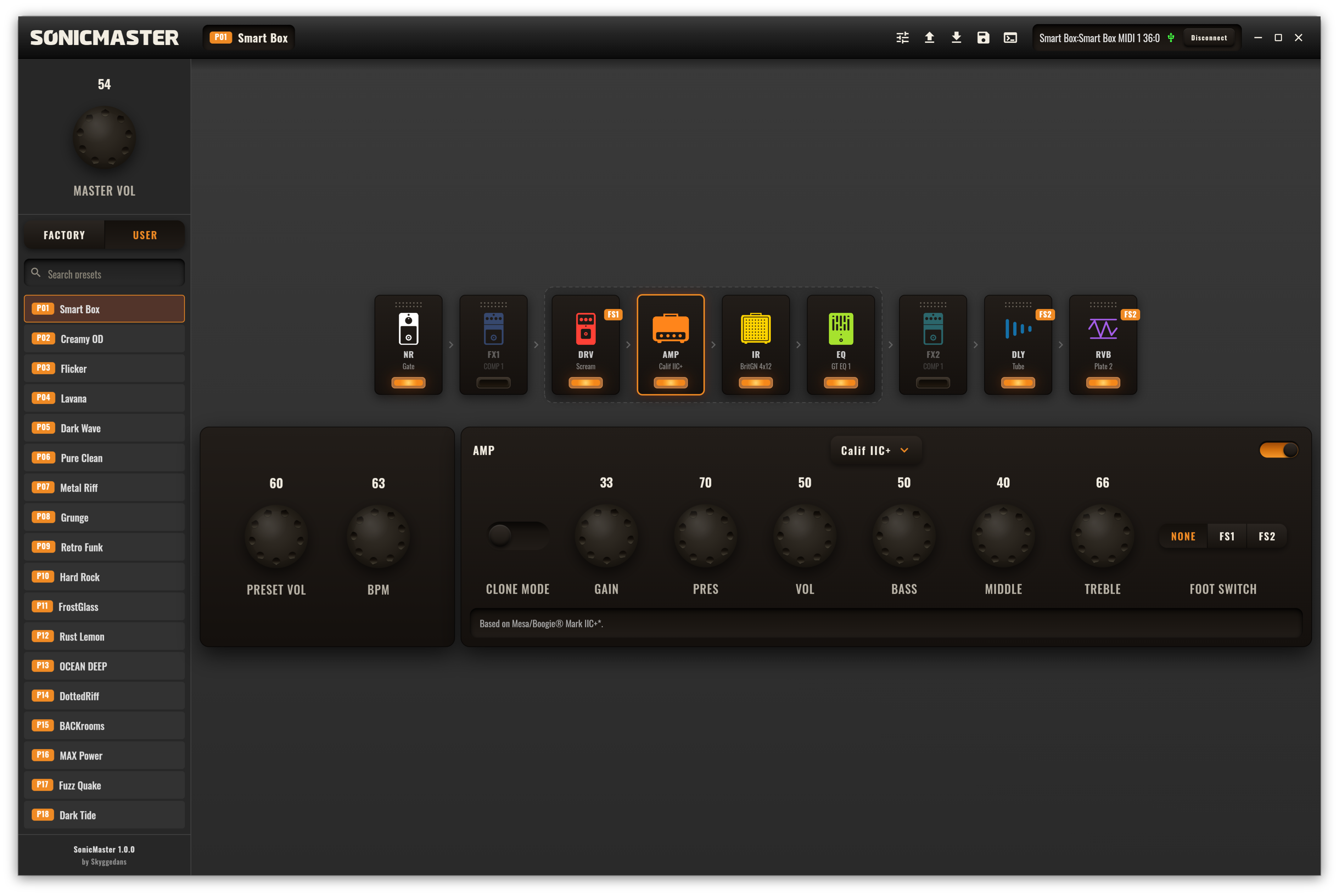
SonicMaster is a desktop and browser editor that gives you deep, real-time control over the Sonicake Pocket Master and Sonicake Smart Box multi-effects pedals. Browse and manage presets, edit every effect, reshape your signal chain, map footswitches, and load your own amp captures and cabinets — from a fast native app or straight from your browser, with the same full feature set either way.
It began as a side project and is written ≈99.9% by AI. The remaining 0.1% is the stubborn human work: reverse-engineering the device protocol by hand, reading BLE/HCI and USB-MIDI packet captures until the pedal gave up its secrets.
▶ Try it now in your browser — no install: skyggedans.github.io/SonicMaster (Chrome / Edge / Opera on desktop, Chrome or Samsung Internet on Android; see Platforms for USB-MIDI / Bluetooth support.)
Supported devices & connections
SonicMaster auto-detects your hardware on connect and tailors the editable effect set to it.
Devices
| Device | |
|---|---|
| Sonicake Pocket Master | Full editing; effect choices per module are gated to the model's capabilities. |
| Sonicake Smart Box | Full editing; the larger, superset effect set. |
Connection interfaces
Connect over either transport, with live two-way sync — parameters you change in the app land on the pedal instantly, and edits made on the pedal itself show up in the app.
| Interface | |
|---|---|
| USB-MIDI | Recommended. Plug in and go. |
| Bluetooth LE (BLE-MIDI) | Wireless. Automatically reconnects if the link drops. |
Both transports work identically in the web app, driven by the browser's Web MIDI and Web Bluetooth APIs — no native drivers or plugins. See Platforms for browser support.
Features
- Real-time editing — tweak any parameter and hear the change on your device immediately.
- Two-way communication — changes made directly on the pedal are reflected live in the editor.
- Full preset management — browse, search, and load all 50 Factory and 50 User presets with a click.
- Visual signal chain — see the whole chain at a glance; click a module to edit it, and drag to reorder the movable modules (NR, FX1, FX2, DLY, RVB).
- A deep model library — swap any module's type from a dropdown, drawing on 130+ models of classic amps, cabinets, overdrives, distortions, fuzzes, modulation, delay, and reverb.
- Footswitch mapping — assign modules to the pedal's FS1 / FS2 switches (see below).
- NAM amp profiles — import and convert your own captures (see below).
- Custom cabinets — load your own
.wavimpulse responses. - Tap tempo & BPM — set a per-preset tempo, with note divisions (1/8, dotted 1/8, 1/4, 1/2) for delay times.
- Master & preset volume — one global level plus per-preset trim.
- Automatic sync on connect — preset names, effect types, user IRs, user profiles, and global settings are pulled from the hardware so the editor always matches your pedal.
- Unsaved-change guard — an edited preset is marked, and the app warns you before you switch away without saving.
- Instant, reliable saves — precise CRC-8 preset writing (no brute-forcing).
- Log panel — manual sync buttons and a raw communication log for troubleshooting.
Footswitch support
The pedal has two assignable footswitches, FS1 and FS2, and each can toggle up to three modules at once. In SonicMaster every module carries a None / FS1 / FS2 selector, and its current assignment is shown as a corner badge on the module card — so you can build and read your entire stomp layout at a glance, then sync it to the pedal.
NAM amp profiles (Clone Mode)
The AMP module has a Clone Mode that plays a captured amp model instead of a built-in
voicing. SonicMaster takes a standard NAM (Neural Amp Modeler) .nam profile and converts
it — entirely on your machine, with no vendor tools or DLLs — into the pedal's native .clo
clone model, then uploads it into one of the five User Profile slots.
The conversion runs a WaveNet inference plus a Wiener–Hammerstein post-filter design — native (Rust) DSP on desktop, and a bit-exact pure-Dart port on the web (run off the UI thread in Web Workers) — reproducing the amp's response on the hardware's own clone engine.
Supported capture formats
| Format | Status |
|---|---|
NAM WaveNet — standard (v0.5.x – v0.7.x) | ✅ Imported & converted |
NAM WaveNet inside a SlimmableContainer (Tone3000, v0.7.0) | ✅ Uses the highest-quality WaveNet inside |
| NAM LSTM / other architectures | ❌ Not convertible to this hardware |
.nam files are the standard captures shared on ToneHunt, Tone3000, and similar sites — drop
one in and it becomes a slot on your pedal.
Cabinets, impulse responses & presets
| Data | Format | Destination |
|---|---|---|
| Amp captures | NAM .nam (WaveNet) → converted to .clo | User Profile 1–5 |
| Cabinets / IRs | .wav impulse responses | User IR 1–5 |
| Presets | .json (import / export) | User bank |
Presets import and export as plain JSON, so you can back them up, share them, and version-control your tones in an open format.
Getting started
- Connect your Pocket Master or Smart Box over USB, or power it on for Bluetooth.
- Launch the SonicMaster app — or open the web app in a supported browser (see Platforms) — and click Connect.
- Pick the USB-MIDI port, or choose Bluetooth and pair with "Sonic Master BLE". In the browser, the first connect prompts for MIDI / Bluetooth access and opens the device chooser — this must come from your click.
- Wait for the initial sync overlay to finish — then start editing.
Using the editor
- Load a preset — click any entry in the Factory / User lists in the sidebar.
- Edit a module — click a module in the chain to open its controls below.
- Change a model — use the module's type dropdown (e.g. swap a Scream overdrive for a Red Fuzz).
- Reorder the chain — drag the movable modules (NR, FX1, FX2, DLY, RVB) into a new order.
- Save — edited presets show a marker; save to write your changes back to the pedal.
Platforms
Desktop — Windows, Linux, and macOS, shipped as a Windows installer, a Linux
AppImage / tarball, and a macOS .dmg.
Web — live at skyggedans.github.io/SonicMaster, with the same full feature set (presets, editing, footswitches, NAM conversion, IR / preset import & export). Because the page talks to the hardware directly, no server or driver is involved.
Phones — on Android, Chrome and Samsung Internet run the full editor in a compact, landscape-only layout; a phone held upright shows a "rotate" prompt. Turning the phone sideways switches Chrome to fullscreen; where the browser refuses, tap the fullscreen button in the title bar. Installed from the browser menu (Install app / Add to Home screen), the editor always opens fullscreen in landscape. Tablets keep the desktop layout in landscape and use the compact one in portrait. iPhone and iPad browsers can show the editor but cannot reach the pedal.
| Browser | USB-MIDI | Bluetooth LE |
|---|---|---|
| Chrome / Edge / Opera (desktop) | ✅ | ✅ (on Linux, enable chrome://flags/#enable-experimental-web-platform-features) |
| Firefox 108+ (desktop) | ✅ | ❌ (no Web Bluetooth) |
| Safari (macOS) | ❌ | ❌ (ships neither Web MIDI nor Web Bluetooth) |
| Chrome / Samsung Internet (Android) | ✅ over a USB-C / OTG cable (not yet confirmed on a device) | ✅ |
| Any browser on iPhone / iPad | ❌ | ❌ (all iOS browsers run on WebKit, which has neither API; the third-party Bluefy browser adds Web Bluetooth, untested with SonicMaster) |
Building from source
Desktop — requires the Flutter SDK and a Rust toolchain (for the native NAM→.clo
DSP bridge):
cd app
flutter pub get
flutter run -d linux   # or: macos | windows
Web — no Rust toolchain needed; the web build uses the pure-Dart DSP port. The helper scripts
also compile the DSP Web Worker, which a bare flutter build web would skip:
cd app
flutter pub get
tools/run_web.sh       # dev run in Chrome, with Web Bluetooth enabled
tools/build_web.sh     # production bundle → build/web
Made with AI
SonicMaster is, by design, ≈99.9% AI-written. The other 0.1% is the hands-on part AI can't do for you: capturing BLE/HCI and USB-MIDI traffic and reverse-engineering the Pocket Master / Smart Box protocol frame by frame.
Not affiliated with, or endorsed by, Sonicake. All product, amp, and pedal names are trademarks of their respective owners and are used only to describe the modeled gear.
License
Code is released under the MIT License (see LICENSE). The bundled Oswald font is licensed under the SIL Open Font License 1.1 — see THIRD_PARTY_NOTICES.md.