SMK37 OPEN V01
English · 简体中文
SDK included: this development kit contains the matching native binary SDK.
Workbench and development kit · Official forum
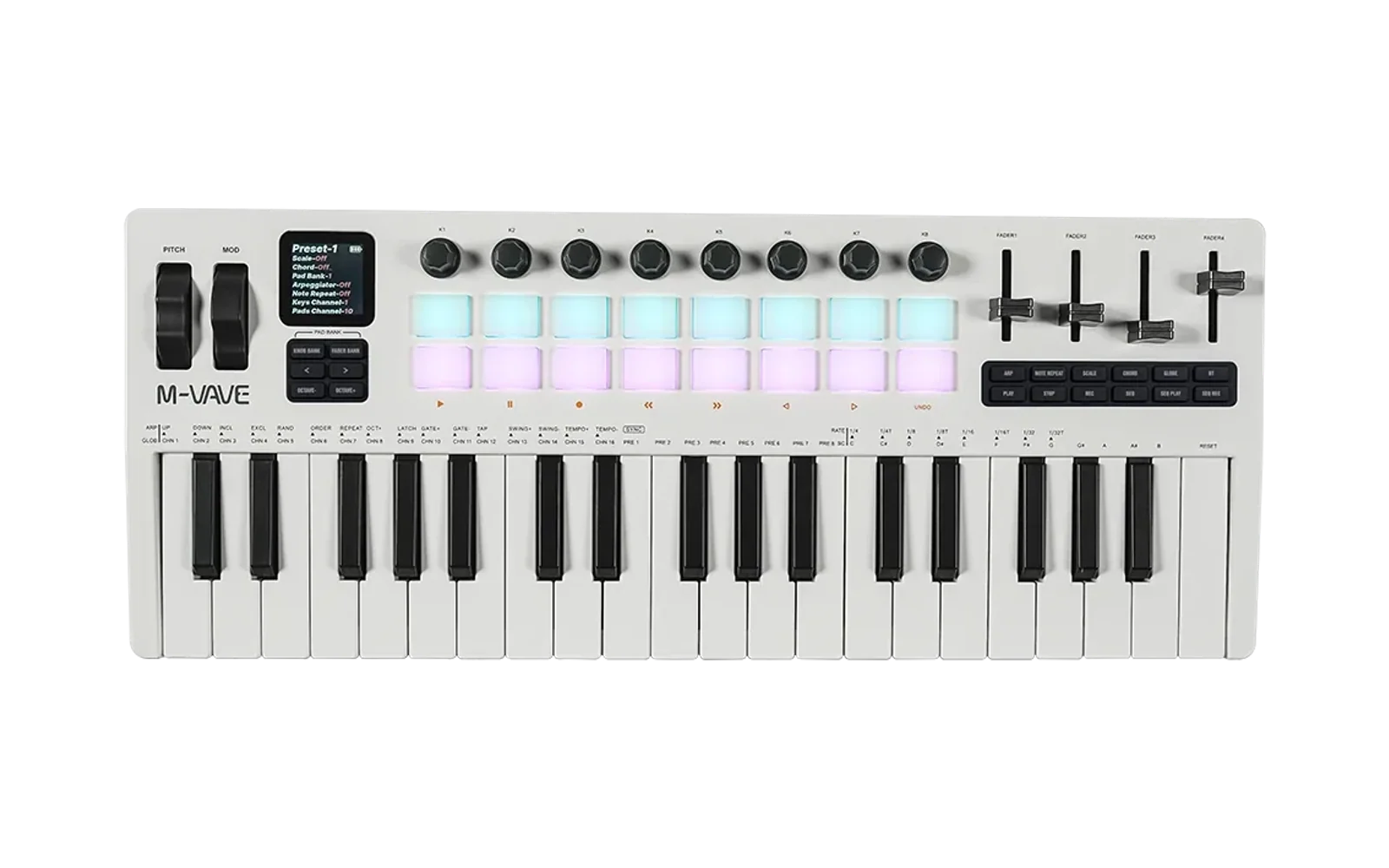
For M-VAVE SMK-37 Pro and SMK-37 Elite, with 37 keys, 16 pads, eight encoders and four faders. The SMK37 OPEN workbench provides firmware updates, browser playback and project, sample and DX7 voice management. Select Source and SDK for the development kit matching that release.
V01 features
- Eight tracks with DX7 FM, 303, 808, PSG, plucked string and sample engines; 16–64-step sequences, arpeggiators, chords, parameter locks, effects and 16 project slots.
- DX7 library: 128 presets in four groups of 32. Import/export standard single-voice or 32-voice DX7 SysEx; extension parameters are not handled. Saved user banks take priority. Library edits leave voices already stored in projects unchanged.
- Track modes: SHIFT + HOME, K2 selects PROJECT, LIVE or OFF. LIVE retains sound and held notes across project changes; export its timbre separately, or save DX7 voices to the independent library. PROJECT and LIVE have separate solo groups.
- Recording: on PROJECT tracks, REC while stopped enables step recording; releasing all played keys or mapped pads advances one step. During playback, REC records in time. LIVE tracks do not record notes.
- Tempo: 30–300 BPM. Tap with the workbench TAP button, SEQ on FX DELAY, or HOME + SEQ elsewhere. Delay supports tempo sync or fixed times of about 30–2040 ms.
SMK37 controls
- PAD / STEP enters or leaves the Pad instrument; SHIFT + PAD / STEP switches step editing. SELECT chooses the focused instrument's track. KEY and PAD assignments are independent, initially track 1 / channel 1 and track 8 / channel 10. SHIFT + Pads 1–8 selects tracks; SHIFT + Pads 9–16 toggles mute.
- SHIFT + HOME / SRC opens source selection: Pads 1–6 or K1 chooses, SAVE applies, HOME cancels. EDIT, ENV, LFO, FX and OCT follow the focused instrument. K1–K4 edit screen parameters; PAGE changes pages; PRESETS selects the current page's preset, voice or step.
- FADER BANK assigns the faders to tracks 1–4 or 5–8. Move through the displayed target to take control after switching banks or loading a project. Pitch/modulation wheels and the pedal follow KEY; return the wheels to rest before powering on.
- Pad pressure sends channel aftertouch on the original Pad note channel; the final release resets it to zero. DX7 responds with vibrato. Other engines and external instruments determine their own response. Browser Pads support upward dragging or a pressure-sensitive pen.
- Sampler: slots 1–8 follow the first eight white keys (C, D, E, F, G, A, B, C), unaffected by OCT. Pads and external MIDI keep their drum mapping. On Sampler/808 ENV and tone-edit pages, playing a mapped note selects its part for editing.
See the workbench Help tab for page controls. Browser and device storage are separate; write browser edits to the device explicitly.
MIDI and Bluetooth
USB/BLE MIDI input; DIN/USB/BLE MIDI output. Pro and Elite have no DIN MIDI input. Input channels default to 1–7 for tracks 1–7 and 10 for track 8. Shared input channels layer tracks.
- SEQ 5/7 SYNC / LOOP: clock mode, BPM, loop length and clock input.
- SEQ 6/7 MIDI TRACK / SHIFT + SEQ: K1 IN CH, K2 OUT CH, K3 SEQ (LOCAL / BOTH / MIDI), K4 OUT PORT (ALL / OFF). IN CH and OUT CH are independent; assign OUT CH on each track for multitrack output.
- SEQ 7/7 MIDI OUTPUT: SEQ OUT is OFF, ON, or CLOCK (clock/transport only). KEY OUT independently enables keyboard/Pad output. SEQ settings do not control ARP: ARP always uses BOTH, following the track's OUT CH and the shared OUT PORT. For clock-only output, also turn KEY OUT off and disable ARP.
Defaults are SEQ BOTH, KEY OUT ON, OUT PORT ALL and SEQ OUT ON. Upgrades retain saved choices; preferences are independent of projects. Local playing stays enabled and MIDI Thru is disabled. MIDI Clock, Start, Continue, Stop and Song Position Pointer are supported; external-clock loss stops synchronized playback. The browser previews settings without sending performance MIDI to external devices.
In Bluetooth DEVICE mode, use SMK37 Pro Open_BLE or SMK37 Elite Open_BLE for MIDI with a compatible computer application/driver. For audio, enable BLUETOOTH and BT AUDIO, then pair SMK37 Pro Open or SMK37 Elite Open. DEVICE/HOST selects the MIDI role only. If an old MIDI pairing fails, use FORGET MIDI PAIRS and remove the old computer entry before pairing again.
Updates and recovery
Choose the workbench matching the physical Pro or Elite. Use desktop Chrome/Edge with USB and MIDI/SysEx permission. Back up projects, voices and samples, then follow Device update. Migration from production firmware uses force mode; a loader connection requires physical-model confirmation. Keep power and USB connected until firmware and sample checks finish.
If Sampler shows EMPTY, use Check / initialize samples without flashing again. Uninitialized storage receives the built-in bank; valid banks, including empty slots, are preserved. For an invalid bank, restore a .fm1s backup or explicitly write the built-in bank in Projects & sounds → 8-slot sample bank. Writing a bank replaces the current samples.
Restore factory V16 uses the unmodified, matching V016 package from M-VAVE Downloads, dated 2026-08-12. Back up Open data first; power-cycle after resource verification succeeds. Switch to Open firmware returns to the Open update flow. Pro and Elite firmware are model-specific; the loader name alone does not identify the model.
Firmware switching does not make data formats interchangeable. Export voice groups A–D and samples separately; projects do not contain sample audio. Eight slots share about 19.55 seconds of new sample storage. Larger legacy banks remain readable but may need trimming before writing the independent library. Keep backups for rollback; compatibility with every third-party firmware is not established.
Build
Requires Windows x64, PowerShell, curl.exe and tar.exe. This SMK37 SDK uses the JieLi 2.5.3 Windows toolchain, containing PI32v2 clang 4.0.1 for the r3 target; see the installation guide. sdk/manifest.json verifies all 22 toolchain files and the SDK. Update the complete source and SDK kit together, keeping the manifest checks enabled.
For a local web preview:
.\tools\Build-Web.ps1 -LocalPreview
For distribution, set FM1_SOURCE_URL to the HTTPS URL of the matching source archive, including changes, licenses and build/install scripts. A moving repository page is not a matching source archive. Then run:
$env:FM1_PI32_TOOLCHAIN = 'C:\JL\pi32'
.\build.bat pro --package
.\build.bat elite --package
For firmware alone, use .\sdk\Build.ps1 -Model pro -FirmwareOnly -Toolchain 'C:\JL\pi32' (or -Model elite). The web build downloads WASI SDK 27 on first use; set FM1_WASI_SDK to reuse it. Environment variable names are shared with FM1.
Outputs: build/preview/index.html, build/<model>/generated/ and build/official-web/<model>/SMK37-Open-Source.html. See HOSTING.md for static hosting. Both models share the APP; hardware drivers are in app/board/. The per-track tuning API is available without a dedicated tuning editor.
License
APP and web application sources: GPLv3 with the SDK linking exception, except files with their own license notices. The native SDK and factory recovery firmware are supplied as binaries under separate terms. Retain the applicable SDK terms, third-party licenses and contributor notices when redistributing.