
A live groovebox firmware for the M-VAVE FM-1 — for any style.
Free and open source (GPL-3.0), based on Felucca by Leo Kuroshita / Hügelton Instruments.
Install from the browser · Manual · Guide en français · Web editor · Releases · Report a bug
SLOOP turns the FM-1 into a four-track groovebox you play live: three synths and a drum machine with 16 sounds on the white keys, nine synthesis engines, 68 sounds, 37 drum kits, your own samples, a song mode you play with your hands — and now USB audio, a MIDI keyboard on the jack, MIDI clock, lights for playing in the dark and a full backup. House, techno, hip-hop, trap, drum & bass, amapiano, synthwave, lo-fi, ambient, chiptune — it does not pick a style for you. No factory patterns, nothing to load: everything you hear, you play.
Status: 2.3. Still a beta: install at your own risk, and please report what you find. Your projects, presets, samples and settings are kept when you update, and you can go back at any time (see Going back).
Contents
- What's new in 2.3
- Screenshots
- Features
- Install
- Your first beat in 60 seconds
- The controls
- The menu: settings of the FM-1
- MIDI and USB audio
- The web editor
- Compatibility
- Troubleshooting
- Specifications
- Documentation
- Building and tests
- Contributing
- Credits and thanks
- Licence
What's new in 2.3
| USB audio | On USB the FM-1 is also an audio input (Felucca, 44.1 kHz stereo, no driver): record it in your DAW or Audacity over the same cable. Its level follows the MASTER knob, or stays at a fixed full level (HOME menu → USB AUDIO). From Felucca 1.0. |
| MIDI keyboard on the jack | The 3.5 mm TRS MIDI IN works: a keyboard or a pad controller through a TRS-to-DIN adapter. Channels 1–3 the synths, 10 the drums, 4–16 the selected track. No note left hanging. |
| MIDI clock in | GLO → SYSTEM → SYNC = USB or TRS: SLOOP follows a DAW or a drum machine — tempo, START, CONTINUE, STOP — pulse by pulse, with no drift. |
| Record your way | The REC screen has three dials: mode (free: the tempo follows your playing, or tempo: the tempo you set), length (1, 2 or 4 bars), start (your first note, or a one-bar count-in after PLAY). |
| Lights for playing in the dark | HOME menu: LIGHTS (every button glows, LOW / MID / HIGH), KEYS (the C keys or every white key), NOTES (the notes playing light their keys, by @renebohne). |
| Backup and restore | The web editor saves everything on the FM-1 in one file — the music in progress, projects, user presets, samples, settings — and puts it all back. |
| CHOP, any length | A recording longer than a sample slot (about 7 s) works: keep the chops you want, shorten them, or Fit to slot. |
| Back to the official firmware | From the installer page, with a backup first: select M-VAVE's FM-1 V15 file and install it. |
| Steadier | Knobs that answer every click; no dropped notes over USB MIDI; one voice fades on overload, never the bass or the lead; keys a millisecond faster; no stuck note after a VOICE change; stricter checks of what is read back from flash. |
The full list, and what came in 2.0, 2.1 and 2.2: SLOOP.md. Release notes: Releases.
Screenshots
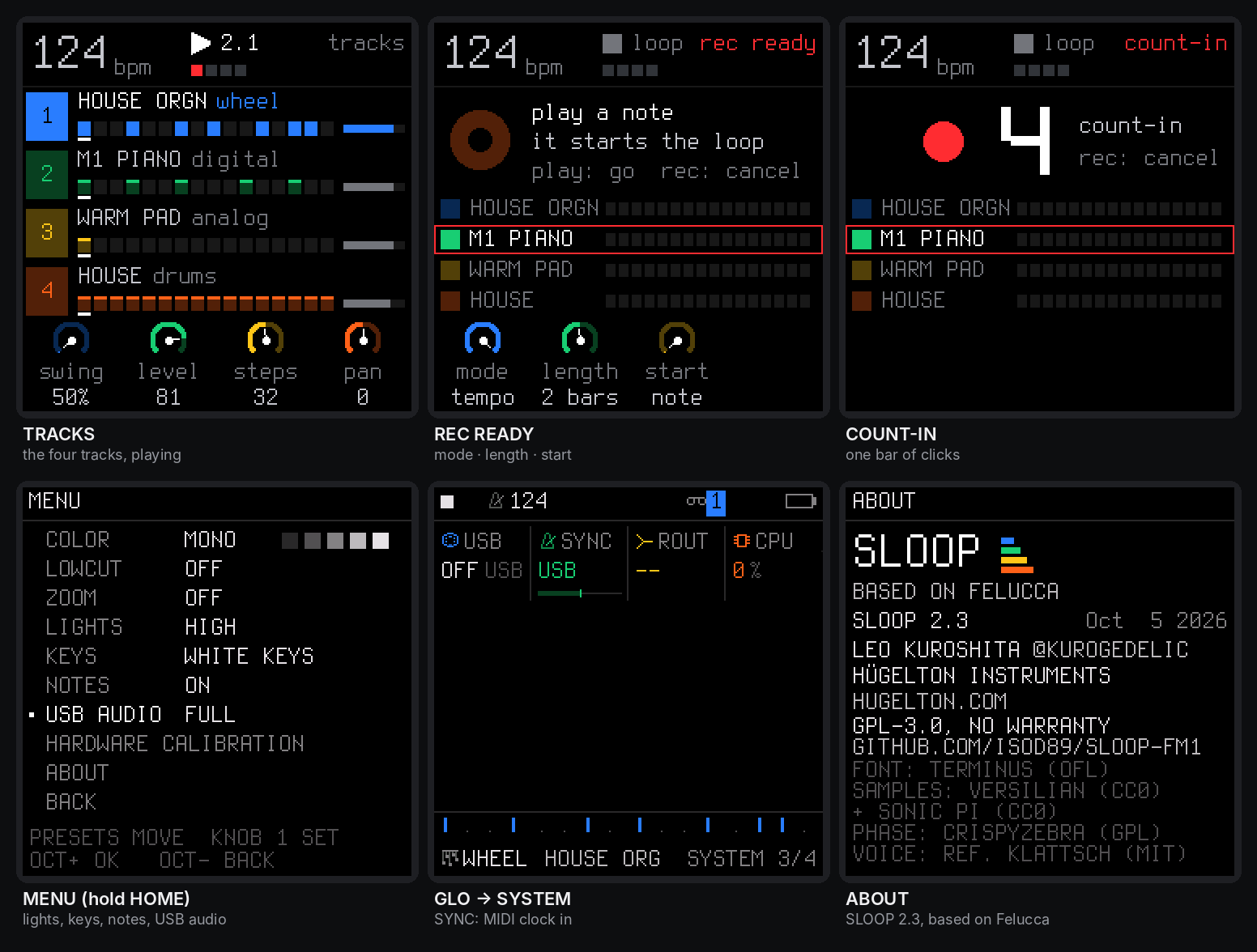
The FM-1's screen in 2.3: the tracks, the REC screen and its count-in, the menu (lights and USB audio), MIDI clock, about.
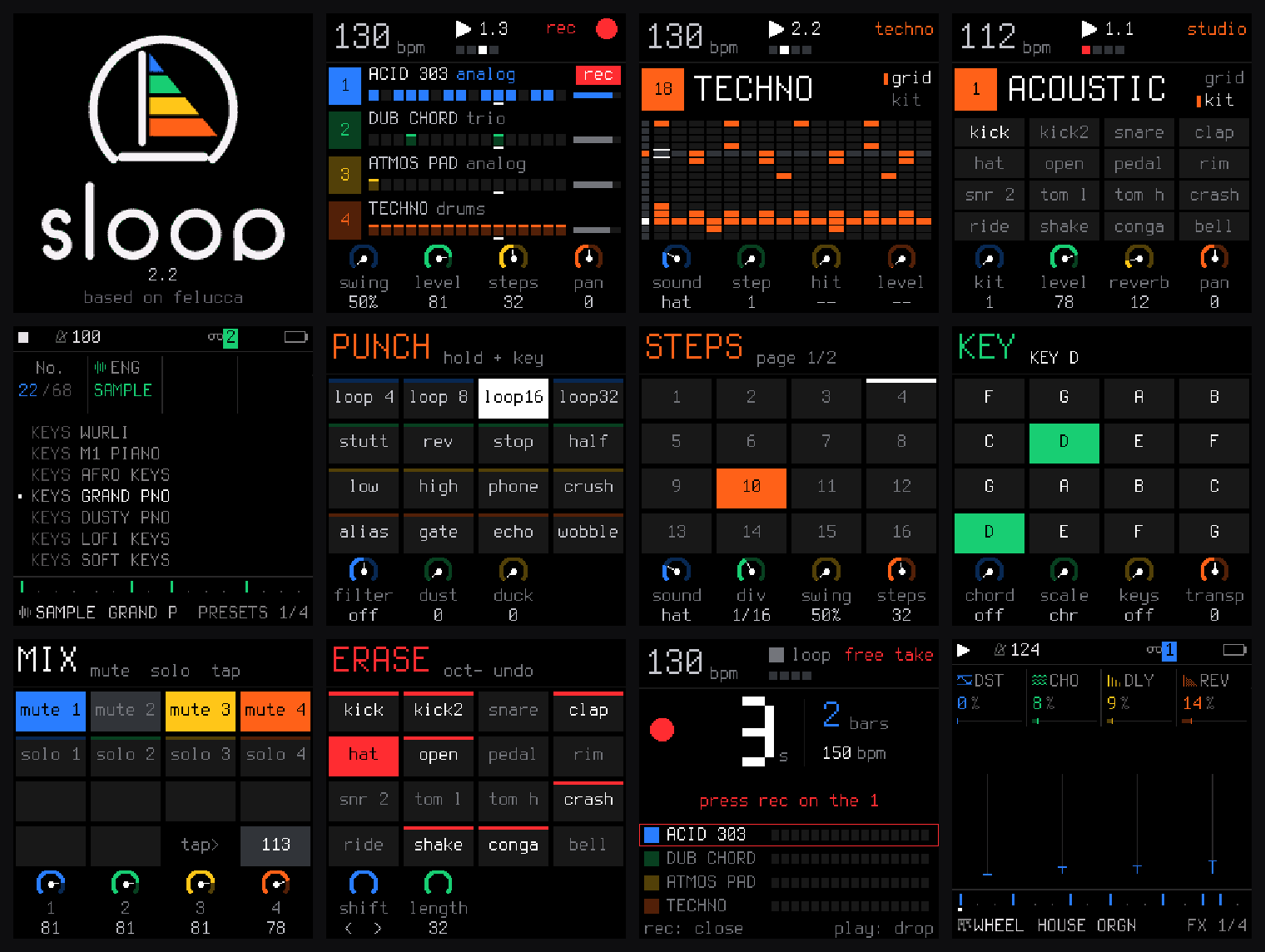
Start-up, the four tracks (recording), the drum grid and the acoustic kit, the sounds by kind, the layers (punch-in FX, steps, key and chords, mix, erase), a free take, the FX sends.
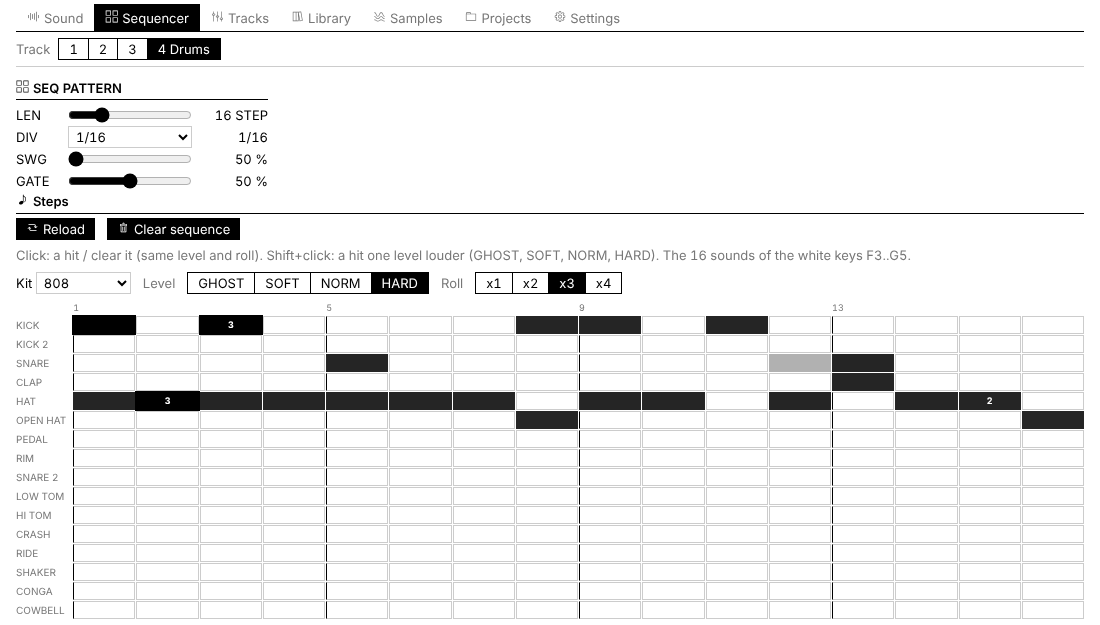
The web editor: the drum track as a 16-lane grid, with levels and ratchets.
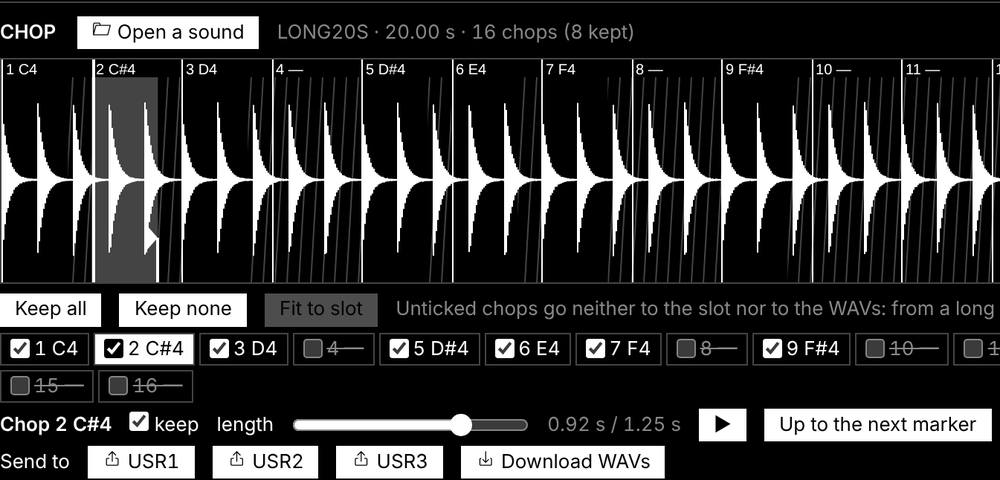
CHOP: a 20 s recording cut into 16 chops, 8 kept, fitted to the slot.
Features
Play it live: hold a button, touch a key
Every function button is a layer: hold it and the 16 white keys and the four knobs change job, and the screen shows how. Tap it and its pages open. Hold a layer button and tap HOME to lock it open, both hands free.
| Hold | The white keys | KNOB 1 · 2 · 3 · 4 |
|---|---|---|
| FX — punch | 16 punch-in effects on the whole mix: loops 1/4–1/32, stutter, reverse, tape stop, half speed, filter sweeps, phone, bit crush, alias, gate, echo, tape wobble | FILTER · DUST · DUCK |
| EDIT — erase | erase a sound or a note as the loop plays (stopped: from the whole pattern) | SHIFT · LENGTH ×2 / ½ · TRANSPOSE |
| ARP — roll | note repeat on the grid, recorded as ratchets | RATE (1/8 … 1/64) |
| SEQ — steps | the 16 steps of the page, with a level and a ratchet per step | SOUND / NOTE · DIV · SWING · LENGTH |
| SCL — key | the key of the song | CHORD · SCALE · KEYS · TRANSPOSE |
| GLO — mix | 1–4 mute, 5–8 solo, 16 tap tempo | the levels of tracks 1–4 |
| SAVE — song | 1–4 play sections A–D, 5–8 save the loop into them, 13 loop / song, 14 record the song, 16 the chain | — |
Keys 1, 5, 9 and 13 glow dimly while a layer is held: the first key of each row of the 4 × 4 grid on the screen. EDIT + OCT− / OCT+ is undo / redo.
Drums
- 16 sounds on the white keys, kick to cowbell; a black key doubles the white key on its left (fast rolls with two fingers).
- Ghost and hard hits: hold OCT− / OCT+ while you play. Every hit keeps its level (GHOST, SOFT, NORM, HARD) and a ratchet (x1–x4).
- 37 kits, all level-matched: a sampled acoustic kit in 5 treatments (CC0 studio recordings) and 32 synthesised kits — 808, 909, 606, 80s, vintage, trap, drill, boom bap, lo-fi, phonk, house, deep house, techno, minimal, electro, disco, UK garage, jungle, dubstep, reggaeton, amapiano, afrobeat, latin, tribal, synthwave, chiptune, arcade, glitch, industrial, hyperpop, ambient, jazz brushes. Each synthesised sound is built like on the classic machines; softer hits are darker as well as quieter.
- Grid and kit pages on the FM-1 (EDIT or SEQ on the drum track), and a 16-lane grid in the web editor.
Synths and sounds
- Nine engines: analog, 4-op FM, phase distortion, three-oscillator, tonewheel organ, formant voice, granular, lo-fi chip, sampler.
- 68 sounds, browsed by kind — basses (sliding 808s, acid 303, reese, FM), keys (Rhodes, a real Steinway grand, house and afro keys), organs, pads, leads (supersaw, talkbox), plucks and bells, stabs and dub chords — every one level-matched. 32 slots for your own presets.
- Envelopes (with a pitch punch for 808s), LFO, arpeggiator, glide and voice modes (POLY, MONO, LEGATO, UNISON), per-track drive and slicer, sends to a stereo chorus, a tempo delay and a stereo reverb.
- Key and chords (SCL): the key of the song for all synths, 16 scales, one-key chords (triad, 7th, 9th, sus4, power), keys snapped to the scale or the scale on the white keys.
Recording and the sequencer
- Records as you play, no click needed: while it plays, REC records at once and every pass is added on top (overdub). Notes land where you heard them: the ~12 ms of the keys are taken back.
- The REC screen (2.3): mode free — no tempo, no grid: play, press REC on the "1" after your last bar, and the loop's length sets the tempo — or tempo — record at the tempo you set; length 1, 2 or 4 bars; start on your first note, or after a one-bar count-in.
- Hold REC ~2 s to clear a track; undo / redo brings it back.
- 64 steps per track, each track with its own length and division (polymeters stay in phase); chords up to 4 notes a step, ties, slide; MPC swing 50–75 %; one sample-accurate clock for everything: no drift at any tempo.
- The PLAY light flashes on every beat (a visual metronome); an audible click is in GLO → GLOBAL → CLICK and is never recorded.
Songs
Save up to four sections A–D (SAVE + keys 5–8), play them live on the next bar (SAVE + keys 1–4), and record the song as you play it (SAVE + key 14). In song mode PLAY plays the whole chain. The SONG screen edits it by hand.
Effects and master
- 16 punch-in effects (FX + a key), locked to the tempo.
- Master: DUST (an old sampler and a record: bits, rate, crackle), DUCK (the kick pumps the synths), FILT (a DJ filter: low-pass ← off → high-pass), and an output limiter.
Your own samples
- Three slots (USR1–USR3) of about 7.4 s each, played by a synth track; up to 16 WAV files per slot, each on its own key.
- CHOP in the web editor: open or drop a recording (WAV, MP3, AIFF…) of any length, tap along while it plays (each tap snaps to its hit), or find the hits, a tempo grid, equal parts; keep the chops you want, shorten them or Fit to slot; send them to a slot, one per key, or download them as WAV files.
MIDI
- USB MIDI in and out, class compliant.
- TRS MIDI IN (the 3.5 mm jack, 2.3) for a keyboard or a pad controller.
- MIDI clock in (USB or TRS): tempo, START, CONTINUE, STOP.
- Details: MIDI and USB audio.
USB audio (2.3)
The FM-1 is also a USB audio input: record its master output on a computer, no driver, over the same cable as MIDI and the editor. Details: USB audio.
Lights for playing in the dark (2.3)
Every button can glow so its label is readable on a black FM-1; the C keys or every white key can glow too; the notes playing can light their keys. Details: The menu.
Memory and safety
- Autosave: stop and leave it 2.5 s, your work is kept; at power-on SLOOP comes back exactly as you left it.
- 4 projects, 32 user presets, undo / redo.
- Full backup and restore from the web editor (2.3).
- Safe updates: the installer checks the package (SHA-256) before writing it, the update loader checks it again (CRC) before starting it; an interrupted install finishes when you press Install again; USB rescue (OCT− at power-on).
Install
From the browser (recommended)
- Open the SLOOP installer in Chrome or Edge on a computer.
- Connect the FM-1 by USB — a data cable, directly (no hub).
- Press INSTALL, allow MIDI access, and wait for Done. The FM-1 restarts on the SLOOP logo.
Nothing to download or compile. Your projects, user presets, samples and settings are kept. After an install, unplug and plug the FM-1 back in once so the computer finds its USB audio input.
Other ways
- Python: the
.fwscof a release withpython tools/fm1_install.py sloop-2.3.fwsc(needspip install mido python-rtmidi). - Build it yourself: see Building and tests; on Windows,
INSTALL-SLOOP.batbuilds SLOOP and opens the installer locally.
Going back
- To an earlier SLOOP: install the
.fwscof its release (for example 2.2). It keeps your work and simply ignores the 2.3 settings. - To the official firmware: on the installer page, open Return to the official firmware (V15). Save a backup with the editor first, download FM-1 V15 from m-vave.com and select its
FM-1.fwsc— only that exact file is accepted. M-VAVE's updater, M-UPGRADE, works too. To come back, install SLOOP again and restore your backup.
Rescue
- The FM-1 no longer starts SLOOP: hold OCT− alone while switching it on (SLOOP USB RESCUE), then install again.
- An install was cut off: the FM-1 stays in update mode; press INSTALL again and it finishes.
- If an FM-1 no longer starts at all, recovery needs FM-1-transporter.
Custom firmware is installed at your own risk. No warranty.
Your first beat in 60 seconds
- ALGORITHM to track 4 (orange, drums). The white keys are 16 drum sounds; PRESETS picks a kit (try 808 or BOOMBAP).
- Press REC and play a beat freely, at your own tempo. Hold OCT− while you hit for ghost notes, OCT+ for hard ones.
- Press REC on the "1" after your last bar. The loop closes, its length sets the tempo, the hits snap to the grid and it plays at once. (Prefer a set tempo, or a count-in? Turn KNOB 1 and KNOB 3 on the REC screen before you start.)
- REC again while it plays: you record on top. Hold ARP and hold the hat key for a hat roll.
- ALGORITHM to track 1, REC, play a bass line. Hold SCL and press the key of your song; on track 2, hold SCL and turn KNOB 1 to 7TH: every white key now plays a chord.
- Hold FX and press a white key for a punch-in effect; still holding FX, turn KNOB 2 for DUST, KNOB 3 for DUCK.
- A mistake? Hold EDIT and press OCT−: undo.
The controls
| Control | What it does |
|---|---|
| MASTER | volume (and the USB audio level, if USB AUDIO is on MASTER) |
| SELECT | tempo, on every page, even inside a layer |
| ALGORITHM | the selected track: 1 · 2 · 3 (synths) · 4 (drums) |
| PRESETS | the selected track's sound, or the drum kit |
| KNOB 1–4 | what the four dials at the bottom of the screen show, each in its colour |
| OCT− / OCT+ | octave (both: back to 0) · on the drum track, held: ghost / hard hits |
| FX · SCL · ENV · LFO · EDIT · GLO (top row) | tap: their pages · hold FX, SCL, EDIT, GLO: a layer. SCL is the second button of the top row, between FX and ENV |
| HOME | the TRACKS screen · hold: the menu · tapped while a layer is held: lock it |
| SAVE | on TRACKS: the SONG screen · elsewhere: the SAVE pages · hold: the song layer |
| ARP · SEQ | tap: their pages · hold: note repeat · steps |
| PLAY | start / stop all four tracks; its light flashes on every beat |
| REC | playing: record now / stop · stopped: arm (the REC screen) · hold: clear the track |
| EDIT + OCT− / OCT+ | undo / redo |
Colours: blue track 1 and KNOB 1, green 2, yellow 3, orange 4 (drums). White is what you touch; red is recording.
The menu: settings of the FM-1
Hold HOME. PRESETS moves, KNOB 1 sets, OCT+ steps round, OCT− closes. These are settings of the FM-1, not of a project: loading a project or NEW PROJECT does not change them, and the backup keeps them.
| Item | Choices | What it does |
|---|---|---|
| COLOR | 5 palettes | the screen's colours |
| LOWCUT | OFF / ON | a low cut for the small built-in speaker |
| ZOOM | OFF / ON | a large readout of the value you turn |
| LIGHTS | OFF / LOW / MID / HIGH | every button glows at that level; what is active stays at full light |
| KEYS | OFF / C KEYS / WHITE KEYS | the C keys, or every white key, glow too |
| NOTES | OFF / ON | the notes playing on a synth track light their keys, on every page and in every layer |
| USB AUDIO | MASTER / FULL | the level of the USB audio input: follows the MASTER knob, or a fixed full level |
| HARDWARE CALIBRATION | the panel table, if a key or a knob answers wrongly | |
| ABOUT | the version (SLOOP 2.3) and its build date, the credits |
Two more settings of the FM-1 live elsewhere: SYNC (GLO → SYSTEM: INT, USB or TRS) and the REC screen's mode and start.
MIDI and USB audio
MIDI in
SLOOP takes MIDI from two places at once:
- The MIDI IN jack (3.5 mm TRS): a keyboard or a pad controller with a MIDI output, through a TRS-to-DIN MIDI adapter. If nothing plays, try the other adapter type (A / B).
- USB, from a computer or a phone (a DAW, a MIDI routing app) or a USB MIDI host box.
| MIDI channel | Plays |
|---|---|
| 1, 2, 3 | synth tracks 1, 2, 3 |
| 10 | the drum track (the nearest of its 16 sounds; GLO → DRUMS → CH changes the channel) |
| 4–16 | the selected track: set your keyboard to channel 4 and it follows ALGORITHM |
A USB keyboard plugged straight into the FM-1 cannot work: both are USB devices, and a USB link needs a host (a computer, a phone, or a USB MIDI host box). Bluetooth MIDI is not supported: SLOOP, like Felucca, never switches the radio on.
MIDI clock in
GLO → SYSTEM → SYNC = USB or TRS (INT: SLOOP's own tempo). START plays from the top, CONTINUE carries on, STOP stops; the tempo follows the master and the steps follow its 24 pulses a beat, so SLOOP never drifts. When the clock stops for half a second, PLAY on the FM-1 plays at its own tempo again.
USB audio: record the FM-1 on a computer
On USB the FM-1 is also an audio input named "Felucca": 44.1 kHz, 16-bit stereo, class compliant — no driver on Windows, macOS or Linux. Choose it in your DAW or in Audacity and record: you get the master output, exactly what the headphones play (after DUST, DUCK and FILT). MIDI, the web editor and the installer keep working on the same cable.
- The level: HOME menu → USB AUDIO. MASTER (default): the recording follows the MASTER knob, as the headphones do — keep MASTER well up while you record. FULL: a fixed level, as with MASTER all the way up, kept from clipping by the limiter; MASTER then only sets the headphones (the right choice for an interface with no level control).
- The first time (and after an install), the computer sets the FM-1 up again as a MIDI + audio device: unplug and plug it back in if the input does not show. The MIDI port keeps its name.
- The audio input comes from Felucca 1.0.
The web editor
Open it from the installer page (or the editor link) in Chrome or Edge, with the FM-1 on USB, and press Connect. It follows the device live: turn a knob on the FM-1 and the editor moves.
- Sound — every parameter of the selected track, the engines and the presets.
- Sequencer — the steps; on the drum track a grid of 16 sounds × the steps, with levels and ratchets, and the kit.
- Tracks — the four channel strips.
- Library — your user presets and preset files.
- Samples — the three user slots, files and CHOP.
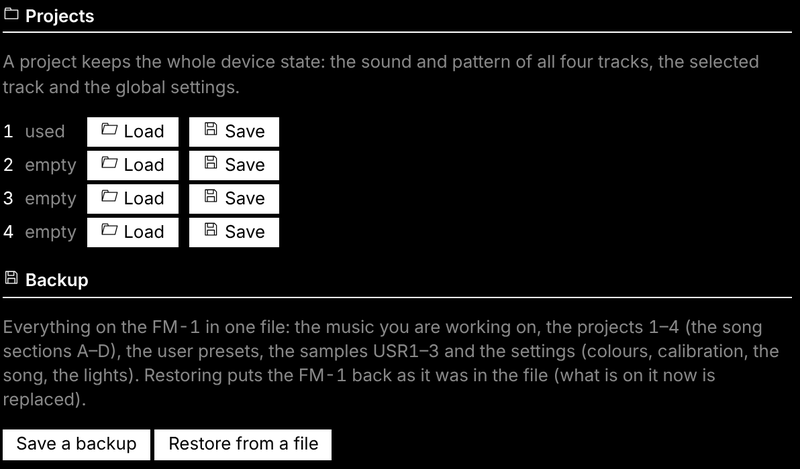
- Projects — the four projects, and Backup: Save a backup writes everything on the FM-1 to one file; Restore from a file puts it all back (stop playback first).
- Settings — global, master (DUST, DUCK, FILT, ROLL), drums.
The protocol is documented in web/EDITOR_PROTOCOL.md.
Compatibility
| Device | M-VAVE FM-1 (the official firmware can be put back at any time) |
| Installer and editor | Chrome or Edge on Windows, macOS or Linux (they use Web MIDI with SysEx) |
| Cable | a USB data cable, plugged directly (no hub) |
| USB audio | any computer that takes a class-compliant USB audio input (no driver) |
| MIDI IN jack | 3.5 mm TRS, through a TRS-to-DIN MIDI adapter (type A or B) |
| Not supported | Bluetooth MIDI; a USB keyboard plugged straight into the FM-1 |
Troubleshooting
The installer or the editor does not find the FM-1. Use Chrome or Edge, a data cable, no hub, and allow MIDI access. Close every other app or tab that uses MIDI (a DAW, M-UPGRADE, another editor tab), then reload the page.
An install stopped half-way. The FM-1 waits in update mode: press INSTALL again. If SLOOP no longer starts, hold OCT− alone while switching on (SLOOP USB RESCUE) and install again.
The black keys make no sound on a synth track. That track plays chords or the scale on the white keys: hold SCL (between FX and ENV) and set KNOB 1 CHORD to OFF and KNOB 3 KEYS to OFF. The drum track always uses the black keys.
Nothing plays from the MIDI IN jack. Try the other adapter type (A / B); check the keyboard's channel (1–3 synths, 10 drums, 4–16 the selected track).
The USB audio input does not show. Unplug the FM-1 and plug it back in (after an install the computer must find it again). In Audacity: Transport → Rescan Audio Devices. On Windows: Sound settings → Recording → show disabled devices.
The USB recording is too quiet, or follows the volume knob. Set HOME menu → USB AUDIO to FULL, or turn MASTER up.
Recorded notes move to the grid. SLOOP quantises what you record to the steps of the track (its DIV: 1/4 … 1/32, triplets). For finer timing, set DIV to 1/32; for groove, use SWING.
Notes fade out on a dense part. The processor is at its limit: SLOOP fades one voice at a time (never the bass or the lead) rather than glitching. Fewer held notes or a lighter engine help.
The lights or SYNC went back to OFF / INT. You went back to an earlier SLOOP, which does not keep them; set them again in 2.3.
Something else? Open an issue: what you did, what you expected, what happened, and the version shown in HOME menu → ABOUT.
Specifications
| Tracks | 3 synth parts (8 voices shared) + drums (16 sounds, 6 voices) |
| Sounds | 68 presets on 9 engines (browsed by kind, level-matched), 8 sampled sets (CC0), 3 slots for your own samples, 32 user presets |
| Drum kits | 37 (5 sampled, 32 synthesised, 16 sounds each), level-matched |
| Sequencer | 64 steps per track, own length and division each; chords with a level and ratchet per note; drums with a level and ratchet per sound; ties, slide; MPC swing 50–75 %; one sample-accurate clock (no drift) |
| Recording | live, quantised as heard (latency-compensated), overdub; free take (the tempo follows you) or the tempo set; start on the first note or a one-bar count-in; 1, 2 or 4 bars |
| Performance | layers: punch-in FX, erase, note repeat, step entry, key / chords, mute / solo / tap tempo, song sections |
| Effects | 16 punch-in effects; master DUST, DUCK, DJ filter, limiter; per track drive, slicer, sends to a stereo chorus, a tempo delay and a stereo reverb |
| Memory | autosave, undo / redo, 4 projects, 32 user presets, song of 4 sections × 16 steps × 1–64 bars, full backup / restore (editor) |
| Audio | 44.1 kHz, fixed-point DSP; USB audio input (the master output, 16-bit stereo, class compliant) |
| MIDI | USB class-compliant in / out; TRS MIDI IN (3.5 mm); MIDI clock in (USB or TRS) |
| Lights | button backlight (3 levels), C keys / white keys, played notes |
| Update | over USB from the browser (SHA-256 and CRC checked), USB rescue, return to the official V15 |
Documentation
- SLOOP.md — the full manual (every page, layer, sound and kit)
- DEMARRAGE-RAPIDE-FR.md — guide de démarrage en français
- BUILDING.md — building, build options and tests
- web/EDITOR_PROTOCOL.md — the editor's SysEx protocol
- LICENSING.md — the licences of the code and the assets
Building and tests
See BUILDING.md. In short: the JieLi toolchain and three files of the AC79 SDK, then ./build.sh (Linux / macOS) or INSTALL-SLOOP.bat (Windows with WSL), which builds the firmware and serves the installer and the editor on http://localhost:8766.
tests/run_tests.sh runs the host test suite with no hardware: audio renders against golden hashes, CPU budgets, the sequencer's timing (no drift, swing, ratchets, rolls, the REC modes and the count-in, MIDI clock), the UI pages and layers, the knobs, flash storage, the update loader, MIDI and USB audio, and the web pages (editor, backup, CHOP, installer).
Contributing
- Bugs and ideas: open an issue — what you did, what you expected, what happened, and the version in HOME menu → ABOUT.
- Pull requests are welcome. Keep the style of the code around your change, add a host test when you can, and make sure
tests/run_tests.shpasses. Contributions are credited in the release notes and the manual. - By contributing you agree that your code is released under GPL-3.0, like the rest of SLOOP.
Credits and thanks
- Felucca by Leo Kuroshita (@kurogedelic) / Hügelton Instruments — the engines, the sequencer, the editor, the installer, and in 2.3 the USB audio input, the MIDI clock, the knob reading and many fixes (Felucca 1.0 / 1.0.1). Thank you.
- @renebohne — the played-note key lights (pull request #11).
- ChanceTheMaker and keremimo — the TRS MIDI input fix (Felucca Salt) and contributions to the MIDI clock.
- Everyone who installed SLOOP, made music with it, commented, reported a bug or asked for a feature — most of 2.3 comes from your messages.
- Samples: Versilian Studios VSCO-2 CE and VCSL, Sonic Pi (all CC0). Font: Terminus (SIL OFL 1.1). Icons: Fukiai (MIT, Hügelton Instruments). PHASE engine after CrispyZebra (GPL); VOICE after klattsch (MIT).
- Interface ideas after teenage engineering's pocket operators and EP-133, Elektron's step entry and Akai's MPC (swing, note repeat, erase).
Licence
Code: GPL-3.0-only (see LICENSE, and LICENSING.md for the assets). No warranty. M-VAVE and FM-1 are trademarks of their owners; SLOOP is not affiliated with M-VAVE, teenage engineering, Elektron or Akai. Drum kit names describe styles, not products.