SIDTracker
A dual-SID music tracker for the original Polyend Tracker. SIDTracker is
replacement firmware: it turns the Tracker into a Commodore 64 style music
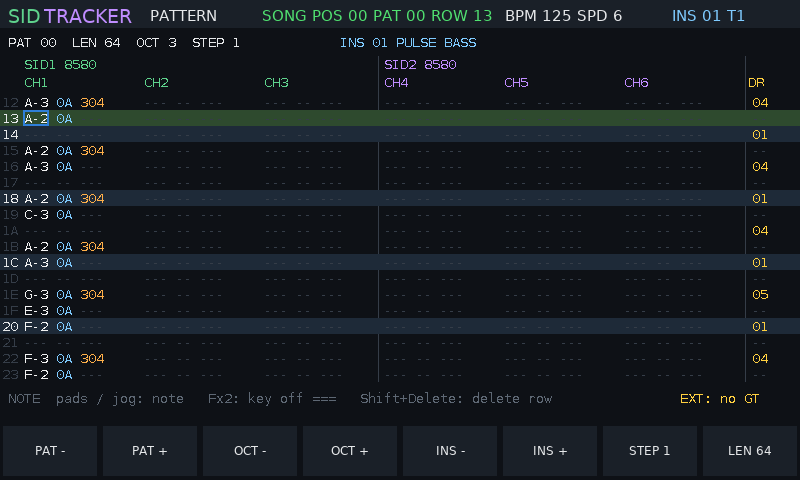
machine with two emulated SID sound chips, six voices, a pattern editor, an
instrument designer and library, and export to real C64 .sid files and to
GoatTracker.
Disclaimer: use at your own risk. SIDTracker is experimental, unofficial firmware, provided "as is" without warranty of any kind (see
LICENSE). The authors are not responsible for any loss of data, damage to your Tracker or SD card, or any other harm caused by installing or using it. Back up your SD card before you start. Installing third-party firmware may affect your warranty. SIDTracker is an independent project, not affiliated with, endorsed by or supported by Polyend, and it contains no Polyend code.
Version 0.9.1. New to SIDTracker? Read the manual
(also in the release zip as MANUAL.md).
Downloads
From the Releases page:
| File | Contents |
|---|---|
SIDTracker-0.9.1.zip | everything for the SD card: the firmware, example songs and their .sid files, the instrument library, the manual |
SIDTracker-instruments-0.9.1.zip | the instrument library only (65 instruments, GoatTracker .ins) |
SIDTracker-examples-0.9.1.zip | the example songs only (.sidt and C64 .sid) |
Each zip unpacks onto the root of the SD card.
How it works
- Firmware swap. The Tracker has a built-in update loader that installs
any firmware image (
.ptffile) from the SD card's/Firmwarefolder. SIDTracker is such an image. Installing it replaces the stock firmware; the stock image stays on the card, so you can go back at any time (see Back to stock). - Two SID chips in software. The SID (MOS 6581 / 8580) is the sound chip of the Commodore 64. SIDTracker emulates two of them, each with three voices: oscillators (triangle, saw, pulse, noise), ADSR envelopes, ring modulation, hard sync and the analogue filter. You choose 6581 or 8580 per chip. The sound is computed live at 44.1 kHz.
- A tracker drives the chips. Like a C64 music routine, the player updates the SID registers about 50 times a second (one "tick"). A song is a list of patterns; a pattern has six tracks (tracks 1-3 play SID 1, tracks 4-6 SID 2), and each row holds a note, an instrument and a command.
- Instruments are small programs. As in GoatTracker, an instrument points into tables that run every tick: a wave table (waveform and pitch steps: arpeggios, drums), a pulse table (pulse-width sweeps) and a filter table (cutoff sweeps). You rarely need to touch them: shape a sound with synth-style controls, try presets from the library, or let the randomiser suggest one.
- Your music stays portable. Songs are saved on the SD card. They export
to
.sidfiles with SIDTracker's own C64 play routine, which play in any SID player and on a real C64, and to GoatTracker (.sng/.ins, also imported).
Screenshots
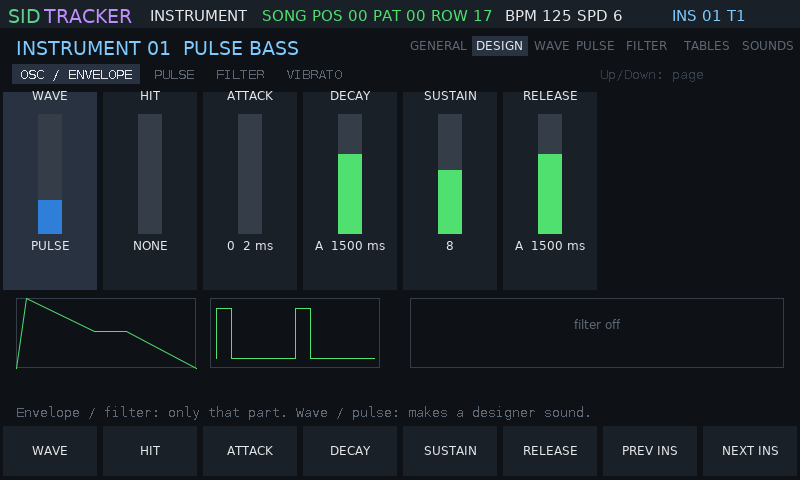 Instrument > DESIGN: synth controls on pages of columns; every change is heard on the pads Instrument > DESIGN: synth controls on pages of columns; every change is heard on the pads | 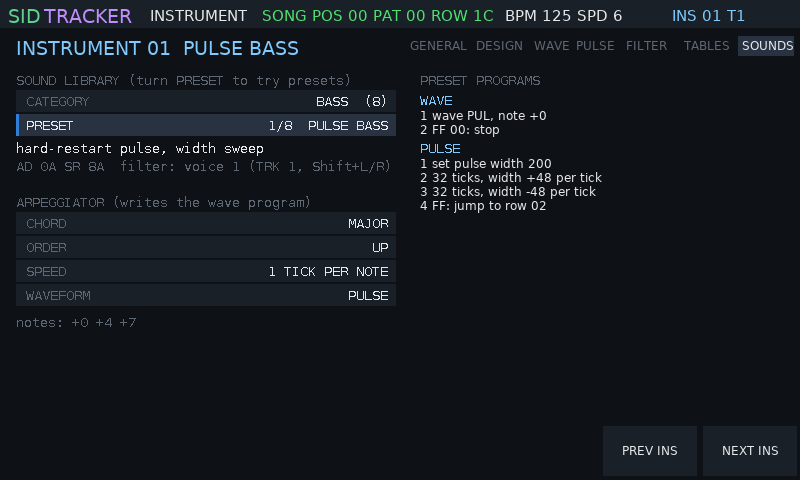 Instrument > SOUNDS: turn the jog to try presets or the instruments on the card, CANCEL / KEEP Instrument > SOUNDS: turn the jog to try presets or the instruments on the card, CANCEL / KEEP |
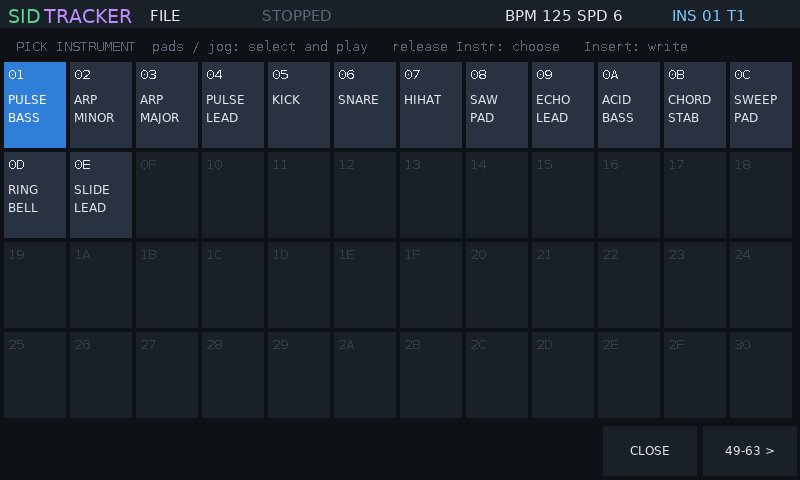 Hold Instr: pick an instrument on any screen; the pads play each slot Hold Instr: pick an instrument on any screen; the pads play each slot | 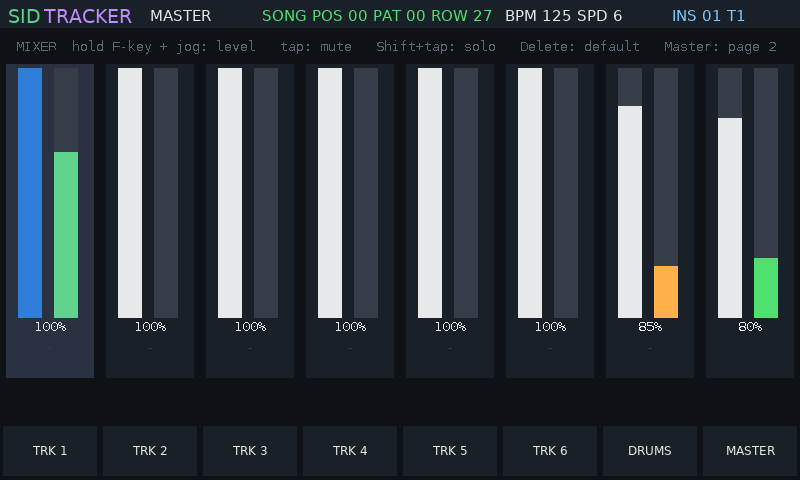 Master: track mixer with meters (hold a track button, turn the jog) Master: track mixer with meters (hold a track button, turn the jog) |
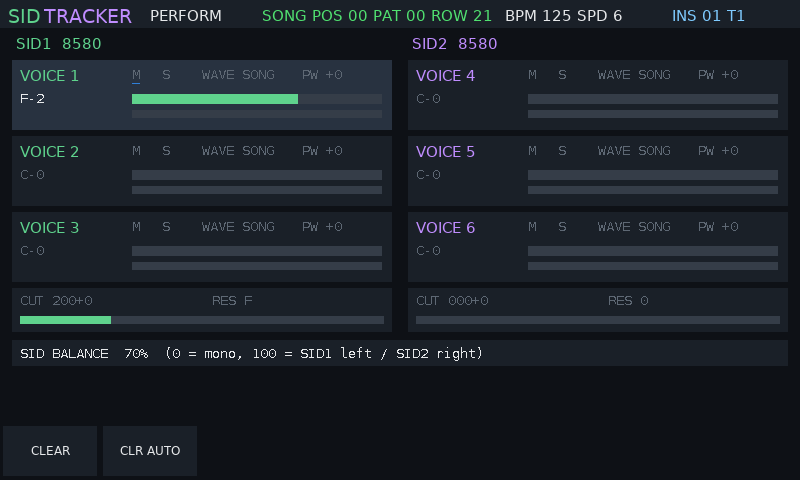 Perform: live mute / solo, waveform, pulse width, filter Perform: live mute / solo, waveform, pulse width, filter | 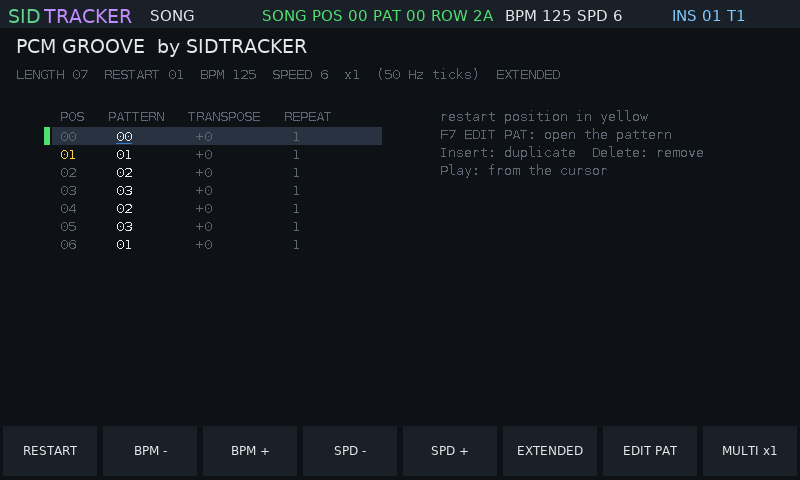 Song: the order list, tempo, multispeed Song: the order list, tempo, multispeed |
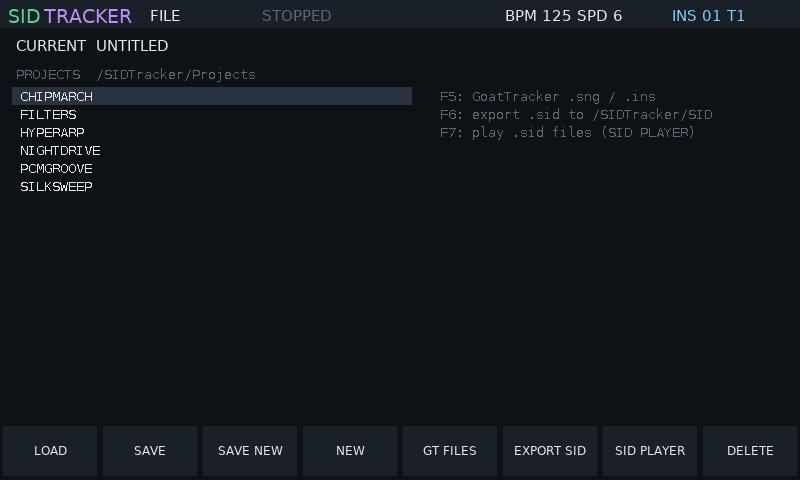 File: projects, GoatTracker, File: projects, GoatTracker, .sid export, SID player |
Screenshots from the desktop simulator (make screenshots). On the Tracker,
Shift+Power saves the screen to /SIDTracker/Screenshots.
Install
You need the original Polyend Tracker and its SD card.
- Back up your SD card (copy everything to your computer).
- Unzip
SIDTracker-0.9.1.ziponto the root of the SD card. It adds the firmware to/Firmware, and songs and instruments to/SIDTracker. Leave the stock image (PolyendTracker_1.9.2.ptf) in/Firmware. - On the stock firmware: Config > Firmware update, choose
PolyendTracSIDTRv091.ptfand confirm. The Tracker restarts into SIDTracker.
Updating SIDTracker
Copy the new .ptf into /Firmware, then in SIDTracker: Config, the
FIRMWARE UPDATE row, turn the jog wheel to the new image, press
INSTALL twice. Or put a text file /Firmware/ot_restore.txt on the card
whose first line is the image name: it is installed at the next power-on.
Back to stock
- In SIDTracker: Config, FIRMWARE UPDATE, choose
PolyendTracker_1.9.2.ptf, INSTALL twice. - If SIDTracker does not start: create
/Firmware/ot_restore.txtcontaining the linePolyendTracker_1.9.2.ptf, insert the card and power on.
Image names must be exactly 24 characters and start with PolyendTrac; the
Tracker's loader ignores other names.
Your first song in two minutes
The eight buttons under the screen do what the label above each one says; this README names them by their label.
- Pattern key: the pattern screen. Press Rec (edit mode).
- Play notes on the pads: each note is written at the cursor, which moves down. OCT - / OCT + change the octave, the arrows move the cursor, Shift+Left/Right jump between tracks.
- Instruments, the stock way: press Instr to reach the instrument column; now each pad is an instrument (1-48) and writes it into the step. Hold Instr for the full list (63) on any screen.
- Instr. Params key, press it until SOUNDS, press Down to PRESET and turn the jog: every preset plays on the pads at once; KEEP keeps it, CANCEL goes back. The CARD category lists the instrument library on the SD card.
- Play plays the song (Shift+Play loops the pattern).
- Song key: add patterns to the order list. File key, SAVE NEW: type a name on the pads.
The manual covers every screen; instruments, tables and every command are in docs/commands.md.
Keys
| Key | Function |
|---|---|
| Pattern | pattern editor (notes, instruments, commands; drum column). In the instrument column the pads are instruments 1-48; Shift + the buttons below mutes tracks |
| Instr. Params | instrument; press again for the next page (GENERAL, DESIGN, WAVE, PULSE, FILTER, TABLES, SOUNDS). GENERAL: ADSR, INIT / COPY / PASTE / SAVE; DESIGN: synth columns, Insert = variation, Shift+Insert = random sound; tables: INS ROW / DEL ROW / POINT HERE / USERS / PACK |
| hold Instr | instrument picker on any screen |
| Performance | live controls; with Rec on while playing, changes are recorded |
| Song | order list and tempo; EDIT PAT opens the pattern, MULTI multispeed |
| Master | mixer: TRK 1-6, DRUMS, MASTER; hold one + jog = level, tap = mute, Shift+tap = solo; Master again: balance, effects, CPU |
| Sample Loader | Extended: effects, PCM drum kit, LFOs, voice pan |
| Config | SID models and clock, volume, THEME, ONE SID ON BOTH SIDES, MIDI, song settings, firmware update |
| File | load / save projects, GT FILES (GoatTracker), EXPORT SID, SID PLAYER |
| Help | key help on screen |
| Play / Rec | play / stop; edit mode |
| Shift+Rec / Shift+Sample Recorder | undo / redo |
| Jog wheel | changes the value under the cursor (Shift: coarse), otherwise scrolls |
| Insert / Delete / Copy | insert, delete (Shift: remove), copy / paste (Shift) |
| Shift+Power | screenshot; holding Power alone switches off |
Questions (delete, overwrite, export) show two buttons: the answer and CANCEL.
Features
- Two SIDs, six voices: 6581 / 8580 per chip, PAL / NTSC, stereo balance; one SID on both sides for one-SID songs and tunes.
- Tracker: 128 patterns of up to 128 rows, order list with transpose and repeat, 16 commands (portamento, vibrato, tempo, filter, ...), hard restart, multispeed x1-x8, undo / redo.
- Instruments: every new instrument sounds at once (init patch); ADSR on GENERAL; the DESIGN page (synth controls that write the tables); a randomiser; GoatTracker-style tables with insert / delete rows that keep every reference.
- Sound library: 49 built-in presets and an arpeggiator, plus a
65-instrument library on the card (
/SIDTracker/Instruments, GoatTracker.ins); try any of them live, keep or cancel; save your own. .sidexport: PSID files with SIDTracker's own 6502 player (two SIDs: the second chip at$D420), checked frame by frame against the tracker.- GoatTracker:
.sng/.insimport and export; playback follows GoatTracker 2. - SID player: plays C64
.sidfiles (PSID, one or two SIDs, subtunes) from anywhere on the card, e.g. the HVSC collection. - Perform: mute / solo and live overrides, recorded as automation.
- Mixer: a level per track (Extended), drums, master; meters.
- MIDI and real SIDs: notes and CC from a keyboard, MIDI clock in and out, and ASID output to drive real SID chips (e.g. a USBSID-Pico) over DIN or USB; SIDLink bridges the Tracker to a USBSID-Pico with a Raspberry Pi Pico 2 and a powered hub.
- Extended engine (not part of the C64 or GoatTracker exports): PCM drum column with a 16-slot kit, delay / chorus / reverb, two LFOs, voice pan, track levels.
- Themes: SIDTracker, Commodore 64, Green Screen, Amber.
Files on the SD card
| Folder | Contents |
|---|---|
/Firmware | firmware images (stock, SIDTracker) |
/SIDTracker/Projects | your songs (.sidt) and the examples |
/SIDTracker/Instruments | instrument library (.ins): stock folders and User |
/SIDTracker/SID | .sid exports and the examples as .sid |
/SIDTracker/GoatTracker | .sng / .ins to import, GoatTracker exports |
/SIDTracker/Kit | your drum samples: NNname.wav goes into kit slot NN (01-16) |
/SIDTracker/Screenshots | screenshots (SHOTnnnn.bmp) |
/SIDTracker/settings.txt | volume, theme, MIDI, one-SID copy |
Example songs
The release includes original songs, each also as a .sid file:
- DUALDEMO, NIGHTDRIVE, PCMGROOVE, FILTERS, CHIPMARCH;
- HYPERARP and SILKSWEEP, written for multispeed x4 / x2;
- three demoscene tunes made from the instrument library: CRACKINTRO (a one-SID cracktro), RASTERBARS (a two-SID main part) and ENDSCROLL (a slow two-SID end part);
- the 13-song dual-SID soundtrack of the game Blast Grid 64 (
BG_*, music by Marcin Spoczynski, used with permission).
Building from source
Needs arm-none-eabi-gcc (newlib-nano), g++ and Python 3.
make           # the firmware image: build/PolyendTracSIDTRv091.ptf
make release   # the release zip: firmware, songs, instruments, manual
Licence
MIT, see LICENSE; the software is provided without warranty and the
disclaimer above applies. Third-party code keeps its own licence
(src/platform/PROVENANCE.md). No GPL code is used in the firmware. The
Blast Grid 64 music is by Marcin Spoczynski.