


Shroud of Turing
Turing Machine Inspired Random Sequencer with Musical Quantization & Sequence Manipulation Tools
Firmware v1.2.7 for the Nocturne Alchemy Platform
FlatSix Modular
What Is This?
The Shroud of Turing is a Eurorack firmware for the FlatSix Modular Nocturne Alchemy Platform, inspired by Tom Whitwell's Music Thing Modular Turing Machine. It transforms the Ardunio Nano-based module into a generative, performance-focused, shift register sequencer with additional tools to help you evolve your generated phrases.
At its heart is a 16-bit shift register that generates evolving pseudo-random CV sequences — turn the probability knob to sweep between locked, repeating patterns and ever-changing generative melodies, or find the sweet spot in between where sequences gradually mutate over time.
What sets the Shroud of Turing apart is its built-in musical quantizer. Use the onboard keyboard to define custom scales, and the sequencer's output snaps to musically meaningful notes — no external quantizer needed. Build scales from any combination of notes, save up to six scales to memory, and recall them instantly during a performance. Leave quantization off for raw, unquantized voltage, or engage it to bring harmonic structure to generative sequences.
Once you've found a pattern you love, the Shroud gives you hands-on tools to shape it. Use pattern rotation to nudge your sequence forward or backward, shifting the starting point until it lands perfectly on the downbeat — no need to rebuild from scratch. Create variations on the fly by rotating the same pattern into new phrasings, or use it to sync melodic accents with other elements in your patch. In addition, use loop reset to snap the sequence to step one on command for tight synchronization, and even clear or set individual bits to sculpt patterns by hand.
Key Features
- 16-bit shift register with probability control — from locked loop to total randomness
- Variable sequence length: 3, 4, 5, 6, 8, 12, or 16 steps
- Live scale building: press notes on the button matrix to define a quantization scale; long-hold any note (800ms) to remove it individually
- 6 persistent scale save/recall slots (stored in EEPROM across power cycles)
- 5 full state save/recall slots — snapshot the complete module state (pattern, scale, rotation, range, window, slew) to any black key and restore it instantly
- 1–4 octave voltage range (0–4V, calibrated 1V/octave)
- Voltage window shift — hold SHIFT and press Octave Up/Down to slide the voltage window up or down in 1V steps; a 1-octave window at offset 2 produces C2–C3 rather than C0–C1; window position is saved and restored with full state
- Slew/portamento — hold SHIFT and adjust the pot to dial in glide between notes; slew is saved and restored with full state
- Musical sequence rotation — shift your locked pattern's starting note immediately, preserving the rotation across save/load and reset
- Pattern manipulation: reset to chosen downbeat, rotate, clear bits, set bits
- CV Keyboard mode: play notes directly from the button matrix with portamento
- Three boot modes: Turing Machine, CV Keyboard, Calibration
Hardware
This firmware runs on the Nocturne Alchemy Platform by FlatSix Modular — an Arduino Nano-based Eurorack module with a 3×4 button matrix, potentiometer, CV output, gate output, clock input, and octave up/down buttons.
The hardware design is proprietary and is not part of this open-source release. You cannot build this module from this repository alone. If you own a Nocturne Alchemy Platform, this firmware is a drop-in replacement that you can flash yourself.
Quick Start
Requirements
- Nocturne Alchemy Platform module
- Arduino IDE 1.8.x or 2.x
- Adafruit_MCP4725 library (install via Library Manager)
- USB cable for flashing (Arduino Nano)
Installation
- Download or clone this repository
- Open
firmware/ShroudOfTuring_v1_2_7/ShroudOfTuring_v1_2_7.inoin the Arduino IDE - Select Board: Arduino Nano, Processor: ATmega328P (Old Bootloader)
- Ensure
DEBUG_MODEis set tofalse(line ~50) for production use - Upload to your module
Before uploading, read
firmware/shared_libraries/README_SHARED_LIBRARIES.md. The shared library files manage your module's factory calibration data. They must not be modified.
First Patch
- Connect a clock source (LFO, sequencer) to Clock In
- Connect CV Out to an oscillator
- Turn the pot to 12 o'clock (random mode)
- Start the clock — the module begins generating random CV
- Slowly turn the pot toward 5 o'clock to hear a pattern emerge and lock
Controls
Potentiometer
Normal operation:
7 o'clock ────────────── 12 o'clock ────────────── 5 o'clock
 DOUBLE        SLIP          RANDOM        SLIP        LOCKED
(2x inv.)   (evolving)     (chaos)      (evolving)   (loop)
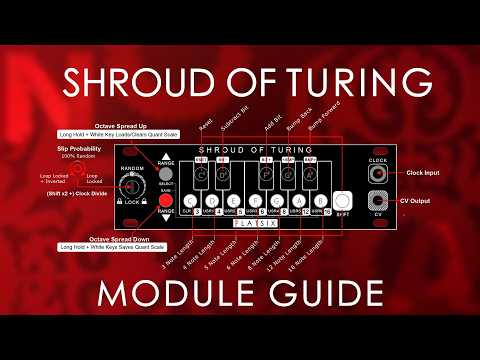
| Position | Mode | Behaviour |
|---|---|---|
| 7 o'clock | DOUBLE | Plays pattern then inverted version (2× length) |
| 8–11 o'clock | SLIP | Pattern slowly evolves |
| 12 o'clock | RANDOM | Total chaos — 100% probability of change |
| 1–4 o'clock | SLIP | Pattern slowly evolves |
| 5 o'clock | LOCKED | Perfect repeating loop — 0% change |
While SHIFT is held — pot controls slew/portamento:
7 o'clock ──────────────────────────────────────── 5 o'clock
  No slew                                         Max slew
 (instant)                                      (long glide)
Pickup protection is active in both directions — the value won't jump when you press or release SHIFT. Slew is saved and restored with full state.
Buttons
| Action | Result |
|---|---|
| Press a note button | Add note to quantization scale |
| Long-hold a note button (800ms) | Remove that note from scale |
| Octave Up | Increase voltage range (1→2→3→4 octaves) |
| Octave Down | Decrease voltage range (4→3→2→1 octaves) |
| SHIFT + Octave Up | Slide voltage window up 1V (stop at top) |
| SHIFT + Octave Down | Slide voltage window down 1V (stop at 0V) |
SHIFT Mode (Hold High C / Shift button ≥150ms)
| Combination | Result |
|---|---|
| SHIFT + C | Set sequence length to 3 steps |
| SHIFT + C# | Reset to chosen downbeat (LOCKED / DOUBLE only) |
| SHIFT + D | Set sequence length to 4 steps |
| SHIFT + D# | Clear current bit (force to 0) |
| SHIFT + E | Set sequence length to 5 steps |
| SHIFT + F | Set sequence length to 6 steps |
| SHIFT + F# | Set current bit (force to 1) |
| SHIFT + G | Set sequence length to 8 steps (default) |
| SHIFT + G# | Rotate sequence backward one step |
| SHIFT + A | Set sequence length to 12 steps |
| SHIFT + A# | Rotate sequence forward one step |
| SHIFT + B | Set sequence length to 16 steps |
| SHIFT + Pot | Adjust slew/portamento amount |
Scale Save / Recall
| Action | Result |
|---|---|
| Long hold Octave Down + D/E/F/G/A/B | Save current scale to slot |
| Long hold Octave Up + D/E/F/G/A/B | Load scale from slot |
| Long hold Octave Up + C | Clear current scale |
State Save / Recall
Saves and restores the complete module state: pattern, scale, sequence length, voltage range, rotation offset, probability, and slew.
Save captures what you're hearing, not the physical pot position. If pickup is active at save time, the effective probability is saved rather than the knob's physical location. Slew is always saved exactly as set.
| Action | Result |
|---|---|
| Long hold Octave Down + C#/D#/F#/G#/A# | Save full state to slot |
| Long hold Octave Up + C#/D#/F#/G#/A# | Load full state from slot |
| Black Key | Slot |
|---|---|
| C# | 1 |
| D# | 2 |
| F# | 3 |
| G# | 4 |
| A# | 5 |
After a load, the pot is ignored for probability until it moves deliberately (~30 ADC counts) from its position at load time. Slew is restored directly with no pickup needed — it stays frozen until you next hold SHIFT.
Boot Modes
On power-up, hold a button during the 2-second detection window:
| Hold during boot | Mode |
|---|---|
| Nothing | Turing Machine mode (default) |
| SHIFT (High C) button | CV Keyboard mode |
| Both Octave buttons | Calibration mode |
CV Keyboard mode turns the button matrix into a direct-play CV keyboard with portamento controlled by the potentiometer and gate output on the clock jack.
Calibration mode is for re-tuning the module's CV output. This should only be needed if calibration data has been lost or if you are setting up a freshly built module.
Repository Structure
shroud-of-turing/
│
├── README.md                              ← You are here
├── LICENSE                                ← CC BY-NC-SA 4.0
├── CHANGELOG.md                           ← Version history
│
├── firmware/
│   ├── ShroudOfTuring_v1_2_7/
│   │   ├── ShroudOfTuring_v1_2_7.ino      ← Release firmware (flash this)
│   │   ├── CalibrationMode.h
│   │   ├── CalibrationMode.cpp
│   │   ├── EEPROMHandling.h
│   │   └── EEPROMHandling.cpp
│   ├── ShroudOfTuring_v1_2_7_DEV/
│   │   ├── ShroudOfTuring_v1_2_7_DEV.ino  ← Development build
│   │   ├── CalibrationMode.h
│   │   ├── CalibrationMode.cpp
│   │   ├── EEPROMHandling.h
│   │   └── EEPROMHandling.cpp
│   ├── ShroudOfTuring_v1_2_6_DEV/
│   │   ├── ShroudOfTuring_v1_2_6_DEV.ino  ← Previous release
│   │   ├── CalibrationMode.h
│   │   ├── CalibrationMode.cpp
│   │   ├── EEPROMHandling.h
│   │   └── EEPROMHandling.cpp
│   ├── ShroudOfTuring_v1_2_5_DEV/
│   │   ├── ShroudOfTuring_v1_2_5_DEV.ino
│   │   ├── CalibrationMode.h
│   │   ├── CalibrationMode.cpp
│   │   ├── EEPROMHandling.h
│   │   └── EEPROMHandling.cpp
│   ├── ShroudOfTuring_v1_2_4_DEV/
│   │   ├── ShroudOfTuring_v1_2_4_DEV.ino
│   │   ├── CalibrationMode.h
│   │   ├── CalibrationMode.cpp
│   │   ├── EEPROMHandling.h
│   │   └── EEPROMHandling.cpp
│   ├── ShroudOfTuring_v1_2_0.ino         ← Original v1.2.0 release
│   └── shared_libraries/
│       ├── README_SHARED_LIBRARIES.md     ← Read before touching
│       ├── CalibrationMode.h
│       ├── CalibrationMode.cpp
│       ├── EEPROMHandling.h
│       └── EEPROMHandling.cpp
│
├── docs/
│   ├── ShroudOfTuring_v1_2_0_User_Manual.pdf  ← Official user manual
│   ├── DEVELOPER_GUIDE.md                 ← For modders and contributors
│   └── QUICK_REFERENCE.md                 ← One-page cheat sheet
│
└── hardware/
    └── HARDWARE_NOTE.md                   ← Hardware licensing notice
License
Copyright © 2026 FlatSix Modular
The Shroud of Turing firmware is licensed under Creative Commons Attribution-NonCommercial-ShareAlike 4.0 International (CC BY-NC-SA 4.0).
In plain language:
- You can use, modify, and share this firmware freely
- You can build your own version for personal or non-commercial use
- Derivatives must be released under the same CC BY-NC-SA 4.0 license
- You may not sell this firmware or derivatives of it
- You must credit FlatSix Modular in any derivative work
Full license text: LICENSE
License details: https://creativecommons.org/licenses/by-nc-sa/4.0/
The Nocturne Alchemy Platform hardware design is NOT covered by this license and remains proprietary.
The shared platform libraries (CalibrationMode, EEPROMHandling) are included for compilation purposes only. See firmware/shared_libraries/README_SHARED_LIBRARIES.md for important usage restrictions.
Credits
Original Turing Machine concept: Tom Whitwell / Music Thing Modular
Nocturne Alchemy Platform: FlatSix Modular
Firmware development: FlatSix Modular
Reference implementation: Ornament & Crime Hemisphere Suite (Jason Justian)
State Save / Recall concept: Beni Rose
Support
This firmware is open-sourced as-is. FlatSix Modular has limited capacity to provide support for community modifications or derivative builds.
For issues specific to the released firmware on a purchased Nocturne Alchemy Platform module, please refer to the documentation in the docs/ folder first. Enable DEBUG_MODE true in the source for serial diagnostic output.
Please do not open GitHub issues for questions about building the hardware — the hardware is not open source.
Shroud of Turing v1.2.7 — FlatSix Modular — 2026
Inspired by Tom Whitwell's Turing Machine MKII