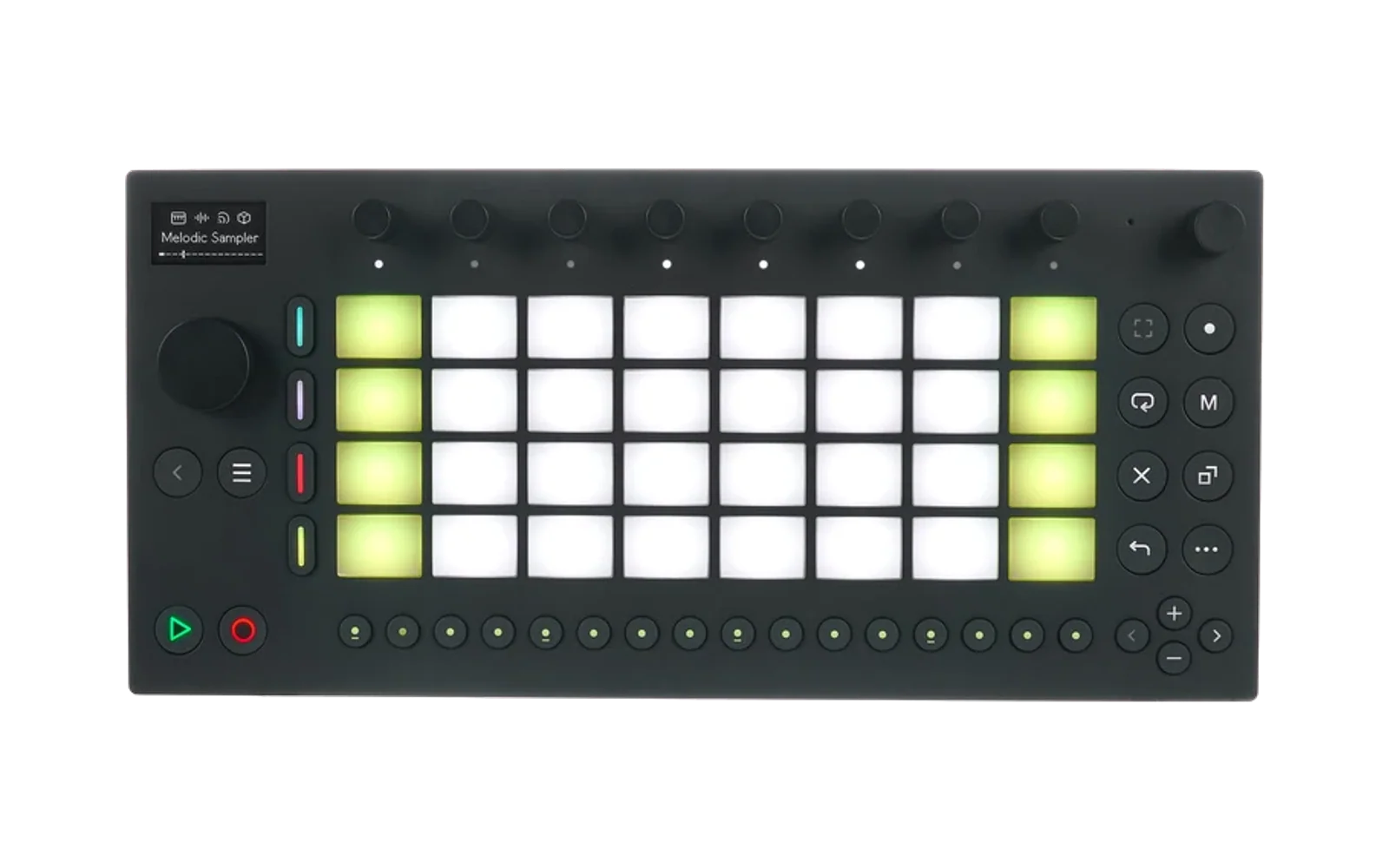
Norns on Ableton Move
Run Monome Norns — the open-source sound computer — as a module on Ableton Move hardware via Schwung.
Norns runs inside a Debian chroot alongside Move's native firmware. Audio, MIDI, screen, and controls are bridged between the two systems through the Move's JACK2 audio server (provided by RNBO Takeover).
Schwung Store
Norns v0.4.3 can be installed and updated from the Schwung Store. The Store installs the module itself, but AbletonOS does not allow it to create the privileged helper or the Debian chroot that Norns needs.
Before installing Norns from the Store:
- Install RNBO Takeover for Move.
- Install the Norns Debian chroot once. The quick installer below handles a
clean device, or you can keep an existing
/data/UserData/pw-chroot. - Install Norns from the Schwung Manager, then run the one-time bootstrap:
ssh root@move.local 'sh /data/UserData/schwung/modules/tools/norns/bootstrap-norns.sh'
After the bootstrap, future Norns module updates can be installed directly from the Store. The bootstrap command is also shown on Move after installation.
v0.4.3 was tested on Move firmware 2.1.0b2 with Schwung 0.11.6 and RNBO 1.4.3-alpha.1.
Quick Install Instructions (tested with Linux and macOS)
- Install Schwung and RNBO Takeover for Move.
- Run the quick install script:
./quickinstall-norns.sh
Prerequisites
-
Schwung — the host runtime that loads third-party modules on Move hardware.
-
Debian chroot — provided by the quick installer or an existing schwung-chroot-linux installation at
/data/UserData/pw-chroot. -
RNBO Takeover for Move — provides the JACK2 audio server (
/data/UserData/rnbo/bin/jackd) that norns connects to for audio and MIDI I/O. Must be installed before running schwung-norns.
Install
# Build the module (requires Docker for ARM64 cross-compilation)
./scripts/build.sh

# Deploy to Move (SSH must be configured)
DEVICE_HOST=move.local ./scripts/install.sh

# Install Norns into the chroot (run once, on the Move)
ssh root@move.local 'NORNS_BUILD_FROM_SOURCE=1 sh /data/setup-norns.sh'
Load Norns from the Tools menu in Schwung.
Controls
Norns Controls
| Control | Function |
|---|---|
| Knobs 1-3 | Norns encoders E1/E2/E3 |
| Track Mutes | Norns keys K1/K2/K3 |
| Knob 8 double-tap | Restart Norns |
| Back double-press | Exit to Schwung |
Pad Modes
Press the Mute (M) button to toggle between MIDI Keys and Grid mode. A brief "KEYS" or "GRID" indicator flashes on screen when switching.
MIDI Keys Mode (default)
The 32 pads are mapped chromatically as a keyboard:
- Blue LEDs mark root notes (C)
- Grey LEDs mark all other notes
- Up/Down arrows shift the octave (default octave 3 = C3 through G5)
- Notes are sent to Norns via the virtual MIDI device "Move Pads" — assign it in SYSTEM > DEVICES > MIDI to receive notes in scripts via
midi.connect()
Grid Mode
The pads emulate a Monome 16x8 grid, visible as "virtual grid" in SYSTEM > DEVICES > GRID. Since Move has 8x4 pads, the 16x8 grid is divided into 4 quadrants navigated with the D-pad:
              Left (cols 0-7)    Right (cols 8-15)
           ┌─────────────────┬─────────────────┐
  Up       │   Red (Q3)      │  Purple (Q4)    │  rows 4-7
  (rows    ├─────────────────┼─────────────────┤
  4-7)     │   Blue (Q1)     │  Green (Q2)     │  rows 0-3
           └─────────────────┴─────────────────┘
  Down                  Default: Q1 (Blue)
Each quadrant has its own color family so you always know where you are on the grid:
| Quadrant | Position | D-pad | Color family |
|---|---|---|---|
| Q1 | Bottom-left (cols 0-7, rows 0-3) | Down + Left | Blue |
| Q2 | Bottom-right (cols 8-15, rows 0-3) | Down + Right | Green |
| Q3 | Top-left (cols 0-7, rows 4-7) | Up + Left | Red |
| Q4 | Top-right (cols 8-15, rows 4-7) | Up + Right | Purple |
Grid LED brightness (0-15) from Norns scripts is mapped to 4 intensity levels within each quadrant's color family: off, dim, medium, bright.
Display Dithering
The Move's 1-bit 128x64 OLED requires converting Norns' 16-level grayscale output. Two knobs control the conversion:
Knob 6 — Brightness threshold (0-15, default 3). Pixels brighter than this value become white.
Knob 7 — Dither mode (cycles through 8 modes):
| # | Name | Description |
|---|---|---|
| 0 | OFF | Pure threshold — simple cutoff, no processing (default) |
| 1 | ROW INV | Adaptive row inversion — inverts entire bright rows for menu selection visibility |
| 2 | WORD INV | Adaptive word inversion — inverts only the bright text span, not the full row |
| 3 | F-S DITH | Floyd-Steinberg error diffusion — distributes quantization error to neighboring pixels |
| 4 | BAYER | Bayer 4x4 ordered dithering — pattern-based halftoning |
| 5 | ATKINSON | Atkinson dithering — classic Mac algorithm, crisper than Floyd-Steinberg |
| 6 | CURSOR | Highlight cursor — no dithering, draws a > marker next to selected menu items |
| 7 | HI-CON | High contrast — only the brightest pixels (level > 10) are visible |
The current setting flashes briefly at the bottom of the screen when changed.
Tips:
- OFF or ATKINSON work well for most scripts
- ROW INV or WORD INV help with menu navigation where selected items are hard to distinguish
- BAYER gives a retro halftone look with good grayscale approximation
- HI-CON is useful for cluttered UIs where you only want to see the active element
- Adjust the threshold with Knob 6 to fine-tune visibility for any mode
Architecture
┌─────────────────────────────────────────────────────────────┐
│  Move Hardware (host)                                       │
│  ┌─────────────────────────────────────────────────────┐    │
│  │  DSP Plugin (norns_plugin.c) — JACK client            │    │
│  │  - JACK audio: crone → SHM ring → render_block()     │    │
│  │  - JACK MIDI: system:midi_capture ↔ midi_playback    │    │
│  │  - Screen: 4-bit grayscale → 1-bit dithered mono     │    │
│  │  - Grid LEDs: 16x8 buffer → pad LED colors           │    │
│  └─────────────────────────────────────────────────────┘    │
│            ↕ JACK + FIFOs (screen, input, grid)             │
│  ┌─────────────────────────────────────────────────────┐    │
│  │  jackd (/data/UserData/rnbo/bin/jackd)              │    │
│  │  Debian Chroot                                       │    │
│  │  ┌───────────┐ ┌──────────┐ ┌───────────────────┐   │    │
│  │  │  matron    │ │  crone   │ │ sclang + scsynth  │   │    │
│  │  │  (Lua UI)  │ │  (audio) │ │ (SuperCollider)   │   │    │
│  │  └───────────┘ └──────────┘ └───────────────────┘   │    │
│  │  norns-input-bridge: JACK MIDI → enc/key/grid events │    │
│  └─────────────────────────────────────────────────────┘    │
└─────────────────────────────────────────────────────────────┘
Script Compatibility
Most Norns scripts work. Known limitations:
- Audio input supported (v0.4.0) — norns scripts that use audio input (recording, sampling, live processing) can now access the Move's mic/line input via
system:capture - No USB MIDI devices — only Move's own pads/knobs are available as MIDI input
- No real Monome grid — the grid emulator covers basic grid scripts but is 8x4 (paged) not 16x8 simultaneous
- Community SC plugins supported — PortedPlugins, mi-UGens, f0plugins, and 7 other collections are compiled natively for Move's 64-bit ARM. Scripts like AmenBreak work with their custom engines. Set
SC_PLUGINS_BUILD_FROM_SOURCE=1to rebuild from source if needed. - 1-bit display — scripts designed around grayscale visual effects will look different. Use the dithering modes to find the best rendering for each script.
Development
Building the Module (host machine)
The DSP plugin, pw-helper, and norns-input-bridge are cross-compiled for ARM64 in Docker:
./scripts/build.sh          # Cross-compile → dist/norns-module.tar.gz
./scripts/install.sh        # Deploy to Move via SSH
Building Norns (on the Move)
Norns itself (matron, crone, SuperCollider integration) is built inside the chroot on the Move. The apply-move-patches.sh script patches the upstream norns source for Move compatibility (FIFO-based screen/input/MIDI/grid, no GPIO/SPI/libmonome dependencies).
ssh root@move.local

# Apply patches and rebuild (takes ~90 seconds)
cp /data/UserData/schwung/modules/tools/norns/patches/apply-move-patches.sh /tmp/
chroot /data/UserData/pw-chroot sh -c "cd /home/we/norns && \
    git checkout -- matron/src/ crone/src/ wscript matron/wscript && \
    sh /tmp/apply-move-patches.sh"
chroot /data/UserData/pw-chroot su - move -c "cd /home/we/norns && \
    python3 waf clean && python3 waf build"
Creating a Release
A release consists of three artifacts:
-
norns-module.tar.gz— the Schwung module (DSP plugin, scripts, binaries). Built on the host with./scripts/build.sh. -
norns-move-prebuilt.tar.gz— pre-built norns binaries (matron, crone, SC engines, Lua core, Maiden). Built on the Move so end users don't need to compile from source. -
sc-plugins-arm64.tar.gz— pre-built 64-bit SuperCollider community plugins (PortedPlugins, mi-UGens, f0plugins, and 7 others). Built on the Move.
To create the on-device artifacts:
ssh root@move.local 'sh /data/package-norns-chroot.sh'
# Output: /data/UserData/norns-move-prebuilt.tar.gz
#         /data/UserData/sc-plugins-arm64.tar.gz
scp root@move.local:/data/UserData/norns-move-prebuilt.tar.gz .
scp root@move.local:/data/UserData/sc-plugins-arm64.tar.gz .
Upload all three tarballs to GitHub Releases, then update PREBUILT_URL and SC_PLUGINS_URL in scripts/setup-norns.sh.
Other Notes
- Maiden web IDE:
http://move.local:5000(when module is running) - Debug logs:
/tmp/norns-audio-debug.log,/tmp/norns-dsp-debug.log,/tmp/pw-start.log - JACK server:
/data/UserData/rnbo/bin/jackd(from RNBO Takeover)
License
GPL-3.0 — same as Norns.
Special Thanks
Huge thanks to everyone that has contributed, including but not limited to: charlesvestal, seajaysec, tomduncalf, and timncox!
AI Assistance Disclaimer
This module is part of Move Everything and was developed with AI assistance, including Claude and other AI assistants.
All architecture, implementation, and release decisions are reviewed by human maintainers. AI-assisted content may still contain errors, so please validate functionality, security, and license compatibility before production use.