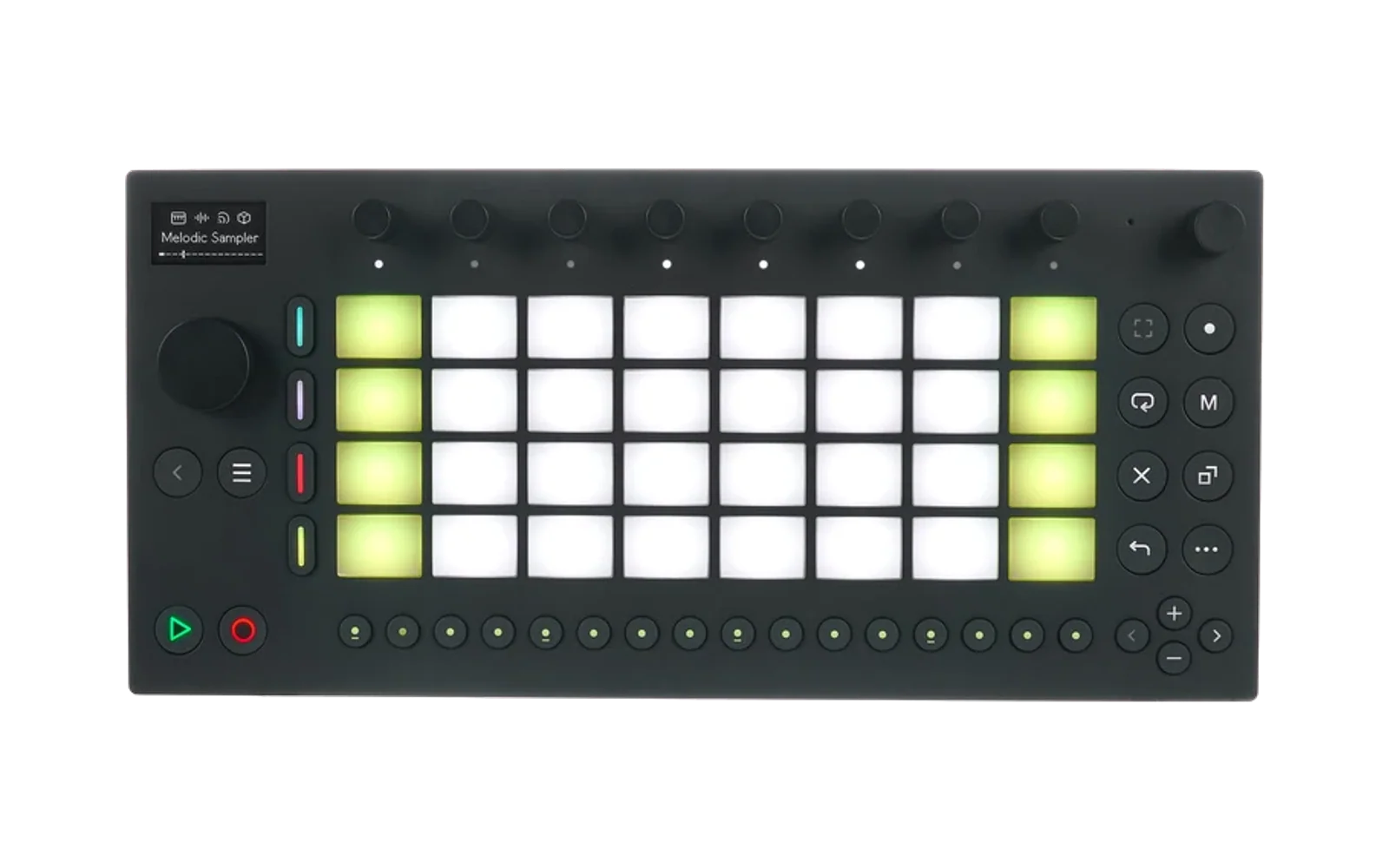
Mono
Mono is a clean-room, Monomachine-inspired digital instrument for Ableton Move, built as a Schwung module.
It ships as a two-module suite from one source tree and one GitHub release:
- Mono Voice (
mono-voice) — one machine voice inside a normal Move track, using Move's pads and sequencer. - Mono (
mono) — a full-surface six-track instrument with an internal 64-step sequencer, per-step parameter locks, independent track timing, probability, retrigs, conditions, and slide.
Install from GitHub
Schwung's Module Store resolves both modules from this repository's multi-module release manifest. Schwung Manager's Custom GitHub installer does not yet offer a module picker, so the canonical repository defaults to Mono standalone and Mono Voice keeps a dedicated compatibility repository:
- Mono standalone: enter
https://github.com/timncox/schwung-mono - Mono Voice: enter
https://github.com/timncox/schwung-mono-voice
In Schwung Manager, open Modules → Custom Install → From GitHub URL and paste the repository for the form you want. Both archives are built and published together from this canonical repository; the Mono Voice repository only mirrors its archive for direct installs.
Operation manual
Open the interactive Mono manual for the quick start, full Move control map, parameter-lock workflow, seven-page editor, and machine reference.
Current machines
- SuperWave Saw
- SuperWave Pulse
- SuperWave Ensemble
- SID 6581-style digital oscillator
- DigiPRO-style 512-sample, 12-bit wavetable oscillator
- FM+ Static-style two-block FM oscillator
Every track also has an AHDR envelope, dual-cutoff resonant filter, distortion, EQ, sample-rate reduction, stereo filtered delay, portamento, pan, and three assignable LFOs.
Each track remembers a separate 16-control synthesis panel for every machine. Switching from Saw to Pulse and back restores the Saw settings you left behind; those per-machine sounds are included in Mono state and presets.
Hold Shift while turning knobs 1–8 on any sound page to open its secondary bank. SYNTH adds machine-specific controls plus Drift, Fold, Bits, and Noise; AMP adds envelope curves and performance response; FILTER adds tracking, drive, slopes, mix, and saturation; EFFECT adds deeper EQ and delay shaping; each LFO adds fade, delay, slew, symmetry, steps, polarity, velocity, and key tracking. Shift + jog continues to change machines.
Each LFO has 114 named destinations: Off, Pitch, and every one of the 112 sound parameters. That includes all primary and Shift banks, envelopes, filters, effects, and every setting on all three LFOs. LFO-to-LFO and self-modulation use a bounded one-sample feedback path so recursive routings stay stable. On Move, destination readouts use compact five-character names that stay in their knob column. Trigger and Wave are five-position controls with named readouts: Free/Retrigger/Hold/One Shot/Half Shot and Sine/Saw/Triangle/Square/Random.
Voice modeling
The current engine follows the documented control topology more closely while remaining a clean-room implementation:
- SuperWave discontinuities use lightweight band-limiting. Saw contains its base, close and extended unison pairs plus three documented sub types; Pulse contains its base and close unison pair plus two sine subs. Pulse width animation can restart on each note.
- Ensemble supplies up to four chord voices, including Off and just-intonation pitch choices, a saw-to-square-to-spike wave control, and independent chorus level and width.
- SID uses a quantized phase counter, pitch-clocked LFSR noise, pulse-width animation, named waveform/modulation modes, and selected-frequency or previous-track modulation sources.
- DigiPRO keeps the original, factory-independent 32 x 512-sample, 12-bit table design while making wave position, position modulation/restart, and selected-frequency/previous-track sync behave as separate controls.
- FM+ Static uses its displayed frequency-ratio choices, two feedback paths, the combined operator envelope/volume behavior, and a Tone control that opens additional harmonic content.
- FILTER treats BASE as the high-pass edge and WDTH as the octave interval to the low-pass edge. Eight parameter steps equal one octave, and new sounds key-track by default.
The Move and Remote UIs show the discrete machine choices as names, ratios, notes, or On/Off states instead of raw numbers. State v11 migrates older Pulse panels and their parameter locks to the corrected control layout.
Performance expansion
- Arp Designer: per-track On/Latch, Up/Down/Pendulum/Random/Played/Converge modes, eight clock divisions, one to four octaves, gate, fixed-or-played velocity, and a 16-step ±24-semitone offset lane. In Mono Voice, jog past LFO 3 to reach ARP, then ARP STEP; knobs edit offsets 1–8 and Shift + knobs edit offsets 9–16. Turning Latch off releases the latched chord.
- Patch Lab: 12 original starting sounds, Init, bounded randomization, and two complete same-machine parameter snapshots that morph across all 112 controls. Discrete choices switch cleanly at the midpoint.
- DigiPRO user waves: eight persistent 512-sample slots shared by Mono and Mono Voice. Remote UI imports an audio file; the engine DC-centers, normalizes, and 12-bit quantizes it before an atomic bank save.
- Neighbor and track FX: routing is set on the receiving track: Track 2 receives Track 1, Track 3 receives Track 2, and so on. The receiving track can mix, replace, ring-modulate, or FM its oscillator from that preceding voice, then use dedicated chorus, flanger, ring modulation, reverb, compression, or crushing. The source must be triggered, but it can be muted from the final mix while continuing to modulate the receiver. Track 1 has no preceding source.
- Deeper sequencing: every step adds ±23/48-step microtiming, tie, and accent. Sixteen song rows chain arbitrary windows with repeats and ±24 semitone transposition.
- Calibration: Remote UI can replace output with a conservative 440 Hz sine, logarithmic sweep, impulse, deterministic noise, or stereo-polarity test and reports device-side output peaks/non-finite counts.
Live knob recording
Press Move's Record button to arm Mono automation, start playback, and turn any Mono knob. Mono writes the current value into the active 16th-note step; turning more than one knob records each parameter independently. In Mono Voice, Move continues to own the notes while the voice stores a clock-synced 16-step parameter-lock lane. Full-surface Mono records into its selected track and internal pattern.
Continuous controls glide to each captured value over about 30 ms to avoid zipper noise. Enumerated choices such as waveform, LFO destination, trigger, and wave remain stepped so automation never passes through an unintended mode.
MIDI CC control
Every sound parameter of every track responds to CC from a controller on the Move's USB-A port. The CC's MIDI channel picks the track (channel 1–6 → track 1–6, exactly like note input; Mono Voice ignores the channel) and the CC number picks the parameter:
| page | base CCs | Shift CCs |
|---|---|---|
| SYNTH | 8–15 | 64–71 |
| AMP | 16–23 | 72–79 |
| FLT | 24–31 | 80–87 |
| FX | 32–39 | 88–95 |
| LFO1 | 40–47 | 96–103 |
| LFO2 | 48–55 | 104–111 |
| LFO3 | 56–63 | 112–119 |
Within a page the eight CCs follow the eight knobs left to right. Values 0–127 write directly (selector params scale across their choices), and CC moves record into param locks under Live knob recording just like the hardware knobs. CC 0–7 and 120+ are ignored, so mod-wheel and bank-select traffic can't corrupt a patch. In a chain slot (Mono Voice) set the controller to the slot's receive channel — Move's auto channel mapping remaps notes, not CCs.
The Move screen follows CC as it arrives: a value you change from the controller updates on the display, and the matching Move knob then continues from that value instead of jumping back to the one it had before. (Up to v0.4.2 the display kept the pre-CC value on Mono Voice's sound pages, and turning the knob wrote it back over your CC edit.)
Saving and recall
- Mono Voice sound preset: in Schwung's Chain Editor, highlight the synth block, hold Shift and click the jog wheel, open User Presets, then choose Save current. The voice's live automation locks are part of this preset.
- Mono Voice sound plus Move sequence: save the Move Set. Move's native clips belong to the Set, not to a component preset. Open Set Overview with Shift + Step 1; Move saves Sets automatically.
- Mono six-track pattern: inside the full-surface build, hold Shift and click the jog wheel. Save current captures all six sounds, all 64 steps, every machine variation, track timing, mute/solo state, advanced step settings, and every parameter lock; choosing a saved name recalls it without starting transport automatically. Confirming a save returns to Mono. Back cancels the naming screen or closes the preset browser without leaving Mono; at the main instrument screen it parks Mono and returns to Move. Shift + Left provides a safe two-press delete gesture inside the preset browser.
Mono 0.3.3 is compatible with Schwung 0.11.6's native ownership of Copy, Delete, and Undo. The dedicated buttons still work on hosts that forward them; the controls below include hardware-safe alternatives that work on stock 0.11.6.
Build and test
make test       # native host simulator
make sanitize   # ASan + UBSan
make arm        # aarch64 module archives via Docker
make arm produces:
build/mono-voice-module.tar.gzbuild/mono-module.tar.gz
Deployment is separate because it writes to Move hardware:
scripts/deploy.sh
Overtake controls
- Top-row pads 1-6: select track
- Top-row pad 7: cycle machine; Shift reverses direction
- Top-row pad 8: start/stop internal sequencer
- Shift + top-row pad 8: open Setup; turn the jog for Sequence, Step Detail, Arpeggiator, Routing + FX, and Song Mode
- Mute + top-row pads 1-6: mute/unmute a track (Delete + pad also works when the host forwards Delete)
- Shift + Mute + top-row pads 1-6: solo/unsolo a track
- Lower three pad rows: chromatic performance keyboard
- Up / Down: shift the selected track's performance keyboard by ±4 octaves
- Back: return from Mono to native Move
- Step buttons: select/toggle steps; arrows select one of four 16-step pages
- Jog wheel: select one of seven parameter pages
- Knobs 1-8: edit the current page
- Shift + knobs 1-8: edit the current page's secondary bank
- Hold step + turn knob: write a parameter lock
- Hold step + Shift + turn knob: remove that parameter lock
- Hold step + top-row pad 7: copy a step; add Shift to paste it
- Hold step + Record: clear that step
- Shift + Left / Right: copy / paste the selected track
- Shift + Record: undo or redo the most recent sound, pattern, or timing edit
- Copy, Delete, and Undo retain the same operations on hosts that forward them
- Move Record by itself: arm/disarm live knob-lock recording during playback
Setup keeps performance controls off the sound-editing screen. Its Sequence page uses knobs 1–4 to set global start, length, Forward/Reverse/Pendulum/Random order, and swing. Knobs 5–8 set the selected track's start, length, rotation, and clock division; Shift + turn on that bank returns it to the global window. Tap a step to set the focused start directly. The Remote UI shows all 64 steps together, dims steps outside the saved window, and exposes the same global and per-track timing controls. Changing the global length during playback keeps the current playhead whenever it remains inside the resized window; it does not restart the sequence.
The Move display shows four parameters at a time. Touching knobs 1–4 or 5–8 automatically focuses that bank, while all eight knobs remain active. Schwung's playhead uses a lightweight runtime poll on every UI tick; complete editor state refreshes happen separately so the white step LED follows the audio without repeatedly pulling the entire pattern. The selected track's octave is shown in the header and saved with the pattern. Schwung's Remote UI opens a full editor for either build, including a browser keyboard for quickly checking the note and audio path. Its audition keys play MIDI notes 48–60 on the selected track; the large labels are notes and the smaller A–K labels are optional computer-key shortcuts. Hold a key to sustain it; even a quick click gets a short, audible gate. The status confirms the event was sent, while the counter and last measured peak provide device-side diagnostics when Schwung refreshes the module state. If the panel is waiting, select a different Remote UI Slot tab and return to reconnect Schwung's slot subscription. Remote edits use Mono's event command channel so Schwung does not remount the custom editor for every value emitted during a slider drag. The Remote sequence panel also provides step/track copy and paste, undo/redo, mute/solo, and an Edit Step mode for note, velocity, gate, trig mask, probability, 1–8 retrigs, 1:2/2:2/1:4…4:4 conditions, slide, microtiming, ties, and accents. Patch Lab, Arp Designer, user-wave import, neighbor/track FX, song rows, and calibration live alongside the sequence panel.
Clean-room scope
Mono contains no Elektron firmware, factory wavetables, factory samples, or copied visual assets. The synthesis algorithms are original implementations guided by publicly documented behavior and regression measurements. The calibration signal suite supports controlled comparisons, but exact response-curve matching still requires recordings from reference hardware.
Current fidelity boundary
Mono does not yet include VO-6, BeatBox, FM+ Parallel/Dynamic, or dedicated FX machines. Its neighbor routing, per-track FX, user waves, arpeggiator, and song mode are original clean-room implementations rather than firmware clones. The factory-independent algorithms still need A/B measurements against reference hardware before they should be described as sonically faithful.