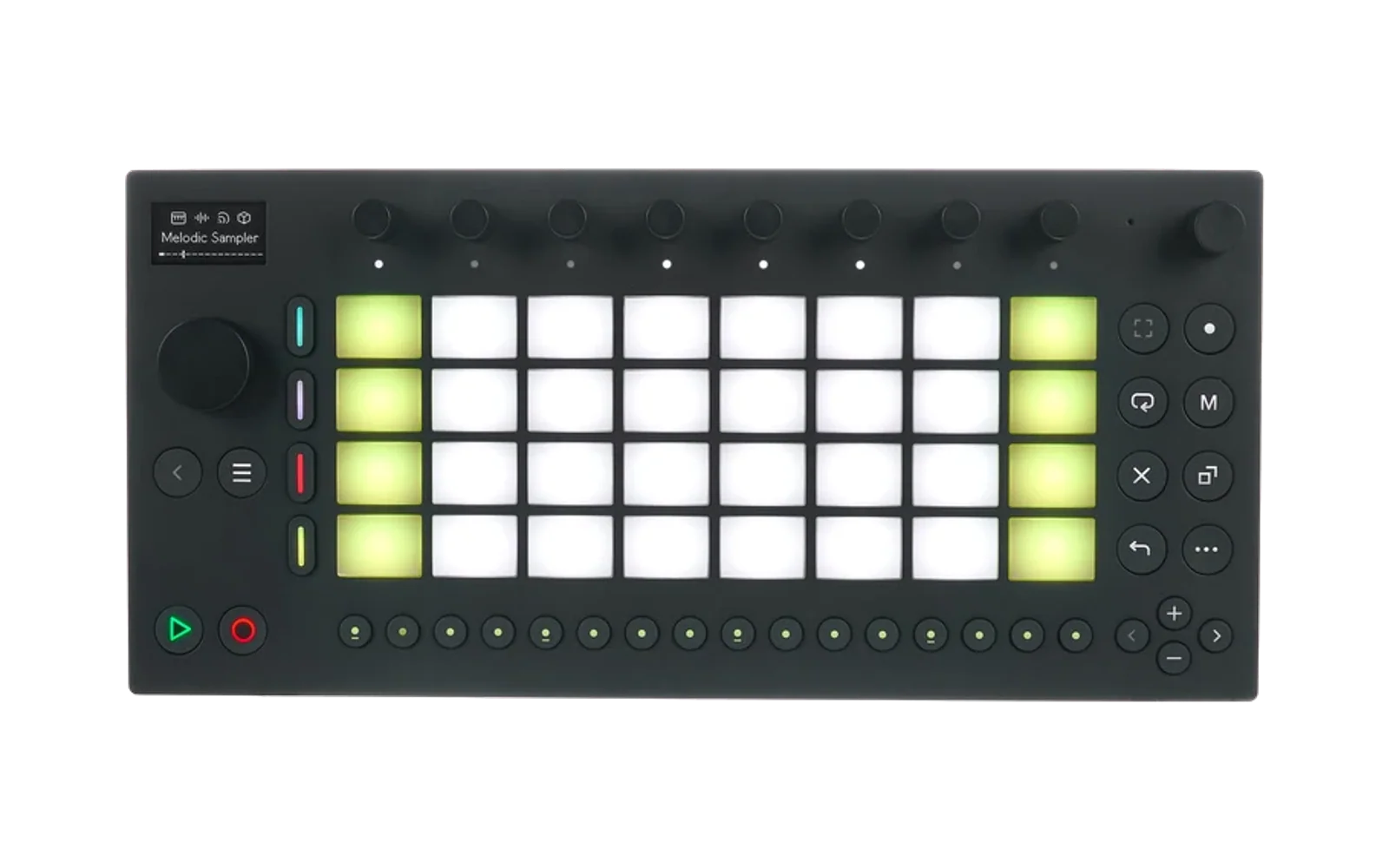
DJ Deck Module for Move Everything
Turns an Ableton Move into a standalone CDJ/turntable-style dual-deck DJ player using the Move Everything framework.
Designed for use with a physical DJ mixer between multiple Moves. Each Move runs two independent decks with timestretch, pitchshift, cue points, loops, stutter effects, slip mode, and BPM sync.
Supported Formats
- Audio: WAV, MP3, M4A/AAC, FLAC (all sample rates, resampled to 44.1kHz on load)
- Tracker: MOD, XM, IT, S3M (decomposed into per-channel stems via libxmp)
Installation
Install Move Everything , go to Move Anything settings (shift+touch vol knob+step 2), scroll to Updates, Module Store, Tools, select and click DJ Deck with the data wheel, scroll the data wheel down to Install, and click the data wheel.
Building/Development
./scripts/build.sh          # Docker cross-compile for ARM64 (auto-fetches dependencies)
./scripts/install.sh        # Deploy to Move over SSH
Optional build flags:
DISABLE_LIBXMP=1 ./scripts/build.sh    # Without MOD/tracker support
DISABLE_MP3=1    ./scripts/build.sh    # Without MP3 support
DISABLE_M4A=1    ./scripts/build.sh    # Without M4A/AAC support
DISABLE_FLAC=1   ./scripts/build.sh    # Without FLAC support
Usage Guide
Display Layout (Normal Orientation)
The 128x64 OLED is split into two halves:
|  > 120.0BPM  |  || 125.0BPM  |   <- Deck A / Deck B header (play state + BPM)
|  +0st 100%   |  -2st 95%     |   <- Pitch semitones + speed %
|  [=====>    ] |  [===>      ] |   <- Playback position bars
|  1 2 3 4      |  1 x 3 4     |   <- Stem status (x = muted)
|  A:100 XF:50  |  B:100       |   <- Mixer info (volumes, crossfader)
|  A:Cue 12345--                |   <- Active page info
|  ─────────────────────────────|   <- Footer: page/knob mode/shift
The active deck is indicated by an underline beneath its header. The display rotation can be cycled with the Menu button (0/90/180/270 degrees).
When a deck is within 30 seconds of the track ending, a flashing double border appears around that deck's half of the screen as a warning.
Deck Architecture
Both decks are fully independent — each has its own playback position, stems, cue points, loops, pitch, speed, and effects. One deck is the "active" deck at any time, which determines which deck the knobs and track buttons control.
Loading Files
- Data knob push: Open file browser (loads to Deck A)
- Shift + Data knob push: Open file browser (loads to Deck B)
- Data knob turn: Scroll through files/folders in browser
- Back button: Go up one directory in browser
- Track buttons 1-4: Select stem slot (when in browser)
Files are loaded in a background thread — playback on the other deck is not interrupted.
Transport
| Button | Function |
|---|---|
| Play | Toggle Deck A playback |
| Record | Toggle Deck B playback |
| Back (double-press) | Exit DJ module (1-second confirm window) |
| Menu | Cycle display rotation (0/90/180/270) |
Step Buttons
The 16 step buttons along the bottom are mapped as follows:
| Step | Function | LED Color |
|---|---|---|
| 1 | Pad page: Hot Cue | White (active) / Grey |
| 2 | Pad page: Stutter | White (active) / Grey |
| 3 | Pad page: Loop | White (active) / Grey |
| 4 | Pad page: Cue Edit | White (active) / Grey |
| 5 | Knob page: Main (Mix) | Green (active) / Grey |
| 6 | Knob page: FX | Orange (active) / Grey |
| 7 | Knob page: Stems | Cyan (active) / Grey |
| 8 | Active deck toggle (A/B) | Blue (A) / Orange (B) |
| 9 | Deck A Slip Mode toggle | Green (on) / Grey |
| 10 | Deck B Slip Mode toggle | Green (on) / Grey |
| 11 | Deck A BPM Sync toggle | Orange (on) / Grey |
| 12 | Deck B BPM Sync toggle | Orange (on) / Grey |
| 13-16 | (unused) | Off |
Knob Pages
Knob assignments change depending on the selected knob page. Double-tap a knob to reset it to its default value.
Main (Mix) Page — Step 5
| Knob | Function |
|---|---|
| 1 | Pitch shift, active deck (-12 to +12 semitones) |
| 2 | Speed / timestretch, active deck (50-200%) |
| 3 | Deck A volume (0-175%) |
| 4 | Crossfader (0=full A, 50=center, 100=full B) |
| 5 | Deck B volume (0-175%) |
| 6 | Active deck select (turn left=A, right=B) |
| 7 | Deck A vinyl speed (50-150%, affects pitch+rate together) |
| 8 | Deck B vinyl speed (50-150%) |
| Master | Master volume (0-100%) |
FX Page — Step 6
| Knob | Function |
|---|---|
| 1 | Pitch shift, active deck |
| 2 | Speed, active deck |
| 3 | Deck A DJ filter (0-49=LPF, 50=bypass, 51-100=HPF) |
| 4 | Crossfader |
| 5 | Deck B DJ filter |
| 6 | Active deck select |
| 7 | Deck A vinyl speed |
| 8 | Deck B vinyl speed |
Stems Page — Step 7
| Knob | Function |
|---|---|
| 1-4 | Deck A stem 1-4 volume (0-100%) |
| 5-8 | Deck B stem 1-4 volume (0-100%) |
Cue Edit Page (automatic when on Step 4 pad page)
| Knob | Function |
|---|---|
| 1 | Cue position scrub (coarse) |
| 2 | Cue position scrub (fine) |
| 3 | Waveform horizontal zoom (1x-16x) |
| 4 | Waveform vertical zoom (1x-4x) |
| 5 | Waveform scroll |
| 6 | Active deck select |
| Master | Master volume |
Track Buttons
The 4 track buttons control stem mutes on the active deck:
| Button | Function |
|---|---|
| Track 1-4 | Toggle stem mute (active deck) |
| Shift + Track | Switch active deck (A/B) |
Muted stems show a bright LED; unmuted stems show a dim LED.
Pad Pages
The 32-pad grid is split: left 4 columns = Deck A, right 4 columns = Deck B. Each deck uses its bottom 8 pads for performance functions and its top 8 pads for hot loops (on the Cue page).
Hot Cue Page (Step 1)
Bottom 8 pads (per deck):
- First press on an empty pad: sets a cue point at the current position
- Press on a set pad: jumps to that cue point
- Shift + press: clears the cue point
- Each cue point has a unique color (red, orange, yellow, green, cyan, purple, pink, teal)
Top 8 pads (per deck) — Hot Loops / Rolls:
- Hold a pad to activate a loop at that size (1/32 to 4 beats)
- Release to deactivate the loop
- If slip mode is on, playback snaps back to where it would have been
Stutter Page (Step 2)
Bottom 8 pads: Hold to activate stutter at the selected beat division (1/32, 1/16, 1/8, 1/4, 1/2, 1, 2, 4 beats). Release to stop stutter.
Loop Page (Step 3)
Bottom 8 pads: Select loop size. Pads correspond to beat divisions from 1/64 up to 64 beats. The active loop size is highlighted.
Cue Edit Page (Step 4)
A waveform overview with cue markers is displayed. Knobs automatically remap to cue editing controls (see Cue Edit knob table above).
- Tap a pad to select a cue point for editing (creates one at the current position if empty)
- Use Knobs 1-2 to scrub the selected cue's position
- Use Knobs 3-5 to zoom and scroll the waveform
- Use the Data knob to scrub (Shift for fine scrub)
- Shift + pad: delete cue point
Slip Mode
Slip mode maintains a shadow playback position that advances normally even while loops, hot loops, or stutter effects are active. When the effect ends, playback snaps back to where it would have been if the effect had never been engaged.
- Step 9: Toggle Deck A slip mode (green LED when active)
- Step 10: Toggle Deck B slip mode (green LED when active)
Slip mode affects:
- Loop deactivation (snaps back)
- Hot loop release (snaps back)
- Stutter release (snaps back)
BPM Sync
When sync is enabled on a deck, its speed is continuously adjusted to match the other deck's effective BPM (accounting for speed and vinyl speed settings).
- Step 11: Toggle Deck A sync (orange LED when active)
- Step 12: Toggle Deck B sync (orange LED when active)
BPM is auto-detected when a file is loaded using spectral flux analysis with harmonic-enhanced autocorrelation.
End-of-Track Warning
When a playing deck reaches 30 seconds before the end of the track, a flashing double border appears around that deck's half of the display.
Architecture
src/
  dsp/dj_plugin.cpp    C++ DSP engine (Plugin API v2)
  ui.js                JavaScript UI (overtake module)
  module.json          Module metadata
  dsp/bungee/          Bungee timestretch library (submodule)
  dsp/libxmp/          MOD/XM/IT/S3M playback (submodule)
  dsp/minimp3/         MP3 decoder (submodule)
  dsp/fdk-aac/         AAC decoder (submodule)
  dsp/dr_flac.h        FLAC decoder (header-only)
scripts/
  build.sh             Docker cross-compile for ARM64
  install.sh           Deploy to Move over SSH
  Dockerfile           Build environment
DSP Engine
The C++ DSP plugin runs at 44100 Hz / 128 frames per block. Each deck has:
- 4 stem tracks (stereo float buffers)
- A single Bungee stretcher (all stems pre-mixed before stretching for efficiency)
- Independent cue points, loops, stutter, and slip state
- Background loading via pthread (non-blocking)
All audio formats are resampled to 44100 Hz at load time.
MOD/tracker files are decomposed by rendering each channel independently through libxmp into separate stem buffers, so channel mutes are instant (no re-rendering needed).
UI
The JavaScript UI communicates with the DSP via host_module_set_param / host_module_get_param. Parameters are prefixed with a_ or b_ for per-deck routing.
License
Copyright (c) 2026 DJ Hard Rich
This project is licensed under the CC BY-NC-SA 4.0.
See THIRD_PARTY_LICENSES for individual dependency licenses.