Retrack for Polyend Tracker
A from-scratch 4-track looper firmware for the original Polyend Tracker.
https://github.com/user-attachments/assets/0d21f3ef-e740-4524-94a1-e38987e352ee
[!WARNING] Very beta. This runs on the Tracker and is being tested on the device, but expect bugs and performance issues (audio glitches, a slow screen under load). Keep the stock firmware on the SD card as the way back, and don't trust it with anything you can't afford to lose.
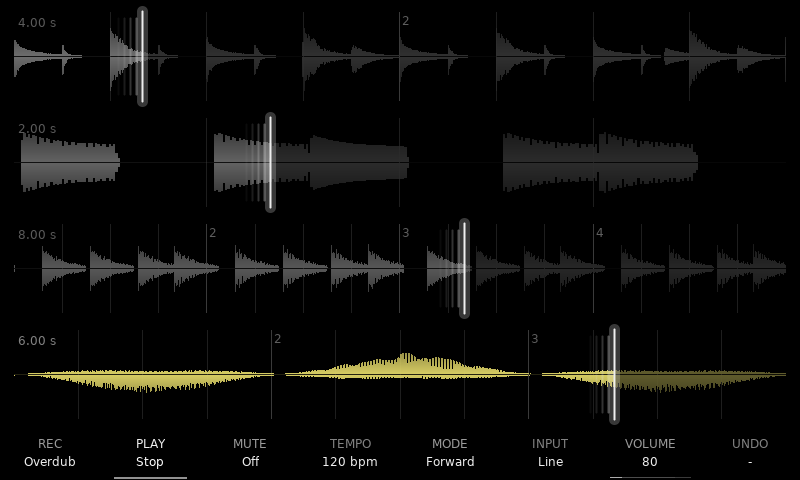
- A looper: four stereo tracks, locked to one bar clock
- Record, overdub, replace (punch in), undo and redo
- Recording latency compensation, measured with a patch cable
- Takes up to 5 minutes per track, streamed from the SD card
- Count-in, start on sound, stop on the bar or beat, fixed lengths
- Click-free loop points
- Playback modes: reverse, ping-pong, half and double speed, half time, octave up / down
- Granular playback (speed and direction too), with the grains drawn on the waveform
- Tempo changes as tape varispeed or time-stretch, tap tempo
- Two send effects: delay, ping-pong, reverb, chorus, flanger, Mutable Instruments Clouds
- A mixer with sends, DJ filters, returns, FX chaining, meters and mutes
- Performance mode: beat repeats, filters, sweeps, vibrato, tape stop, on one track or all at once
- A loop editor: trim, cut, erase, copy and paste; duplicate a track into the next
- Load any WAV on the card into a track; name tracks and projects
- Projects saved to the SD card, WAV export
- MIDI clock in and out, learnable footswitch actions
- Metronome with accent, four sounds, count-in length, click only while recording
- Input monitoring through the effects, at the selected track's sends
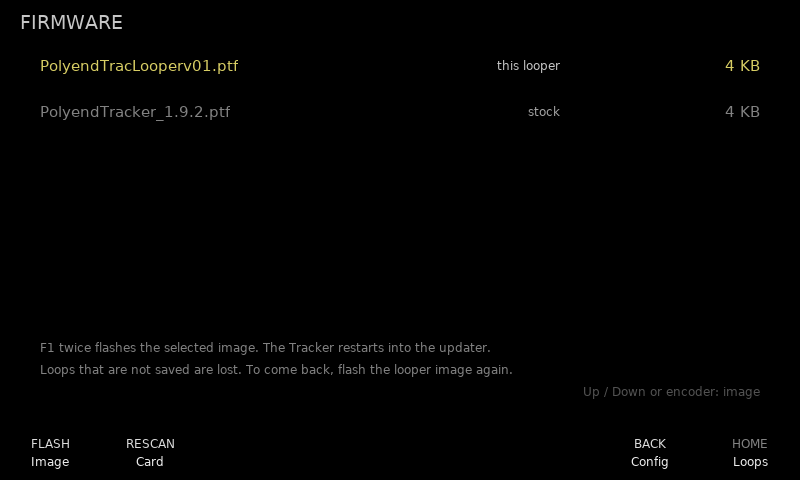
- An on-device manual, and a firmware flasher back to stock
Install
- Download
PolyendTracLooperv<XY>.ptffrom the latest release. - Copy it into
/Firmwareon the Tracker's SD card. - On the Tracker, update the firmware and pick that file.
To go back, flash the stock firmware the same way (Config > F1 Firmware).
Features
Four stereo tracks on one bar clock
Each track records up to about 21.5 s of stereo (43 s mono) in the Tracker's 16 MB SDRAM, and with an SD card up to 5 minutes (10 mono): a longer take goes on to the card (see Long takes). The first take sets the bar; every later take, every playback mode and every effect follows the same bar clock, so nothing drifts. Takes start with a count-in (or at once, or when sound arrives), stop on the bar line, and blend their end into their start so the loop point does not click. Overdub (with feedback), replace (punch in), undo and redo. Takes and overdubs are placed back by the codec's round-trip delay (Config > Rec latency, measured with a cable from an output into the input), so layers land where they were played and do not drift.
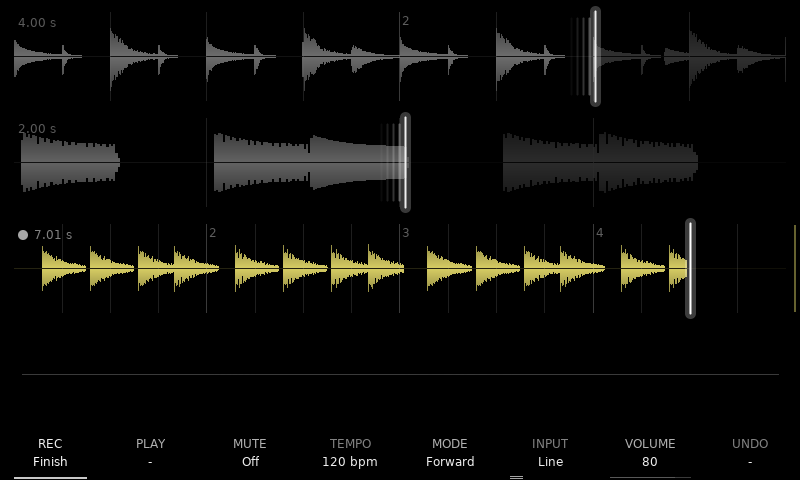
The home page is the four waveforms, left channel above the line and right below, with the bar and beat lines faintly behind them. The playhead leaves a fading trail as long as its speed, on the side it came from. While a track records or overdubs, in every fourth bar of the take a thin line at the right end of its lane brightens slowly: the end of the four bars coming. The eight screen keys act on the selected track and show its state; the selected track stays selected from page to page.
A take in progress, a pulsing dot by the lane's tag, the REC key showing what a press does:
Playback modes
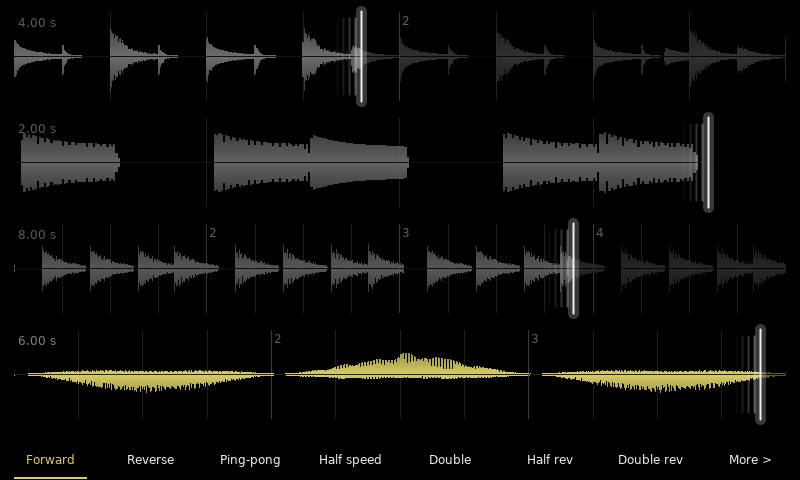
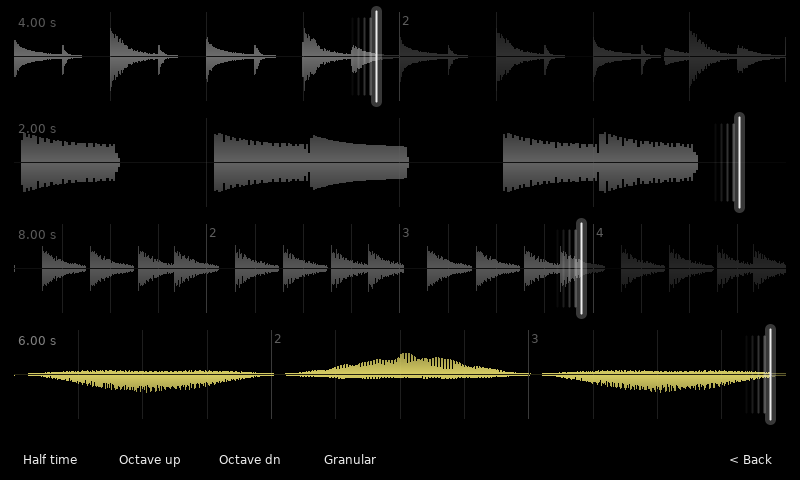
The mode bar (F5) has two pages: Forward, Reverse, Ping-pong, Half speed, Double, Half rev and Double rev; then Half time, Octave up, Octave down and Granular. Each mode reads from the bar clock, so a track stays in time in any mode and a switch carries on from where it is.
| Page 1: playback | Page 2: grains |
|---|---|
 |  |
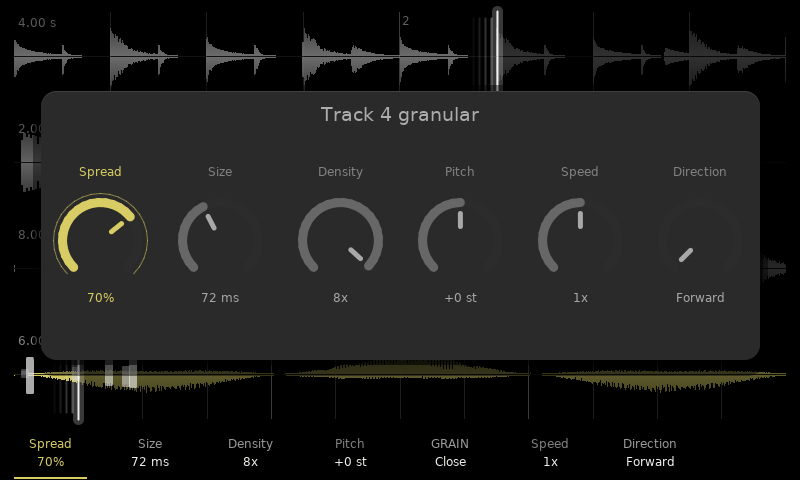
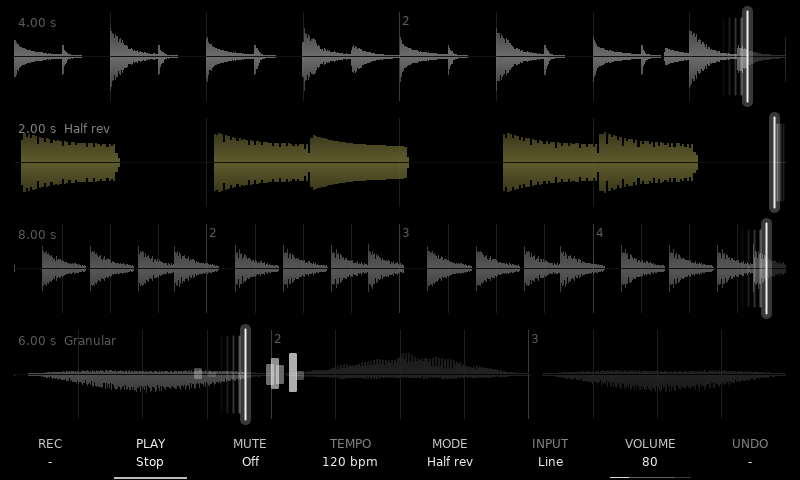
Granular plays the loop through Clouds grains around the playhead. Hold F5 for the grain menu with its six knobs (Spread, Size, Density, Pitch on F1–F4; Speed and Direction on F6–F7: the playhead moving through the loop at 1/2, 1 or 2x, forward, reverse or ping-pong, the grains reading the way it goes); it stays open until F5 again. The lane draws every grain where it reads, as long as it is and as bright as it sounds. Below, track 2 plays in Half rev (the trail on the right of its playhead) and track 4 is Granular, its grains scattered by Spread:
| Grain knobs | Grains on the lane |
|---|---|
 |  |
Shift layer: track options
Holding Shift relabels the screen keys: Replace, Play / stop all, Solo, Click level, then the selected track's options: Stop (free / on bar / on beat, or a fixed length in bars), Start (now / count-in / on sound, with its threshold), After rec (play / overdub / stop) and Tempo (Tape or Stretch).
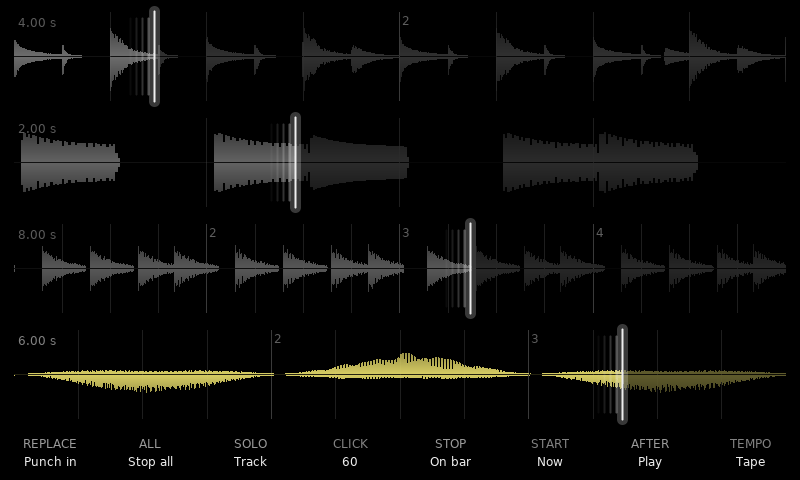
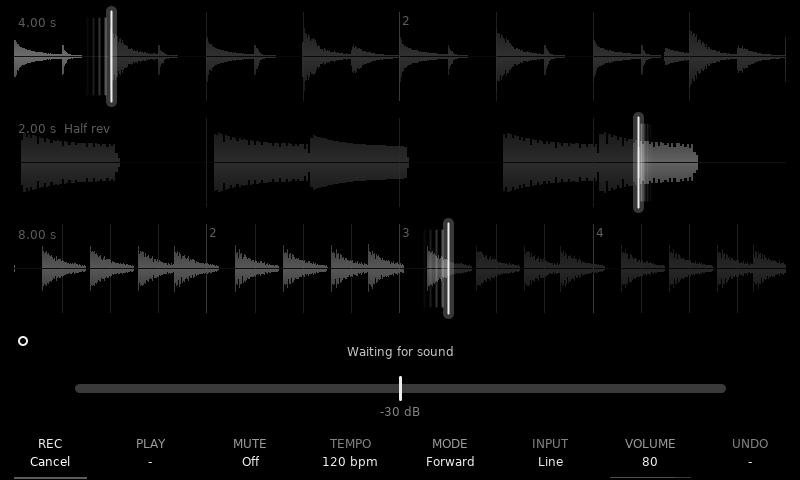
A track set to start on sound waits armed (a ring by its tag), showing the input level against the threshold:
Tempo, volume and input, under your fingers
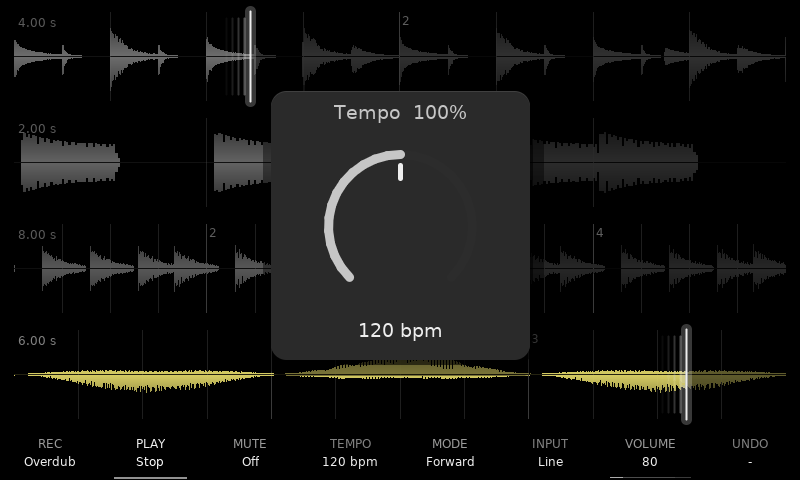
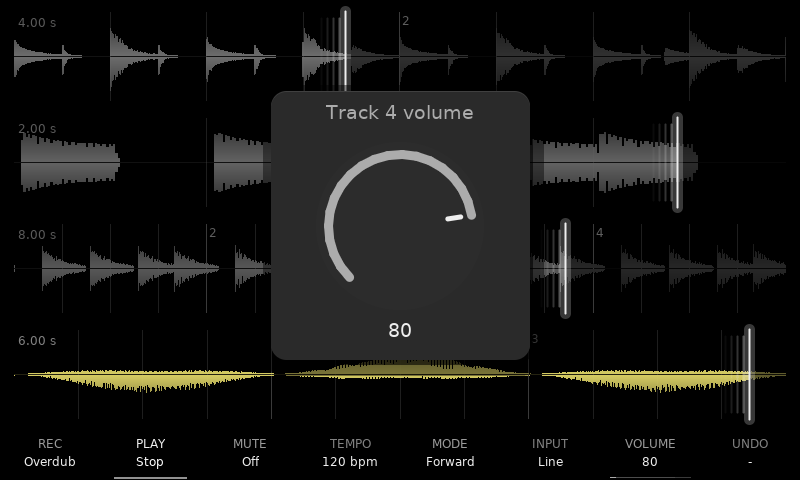
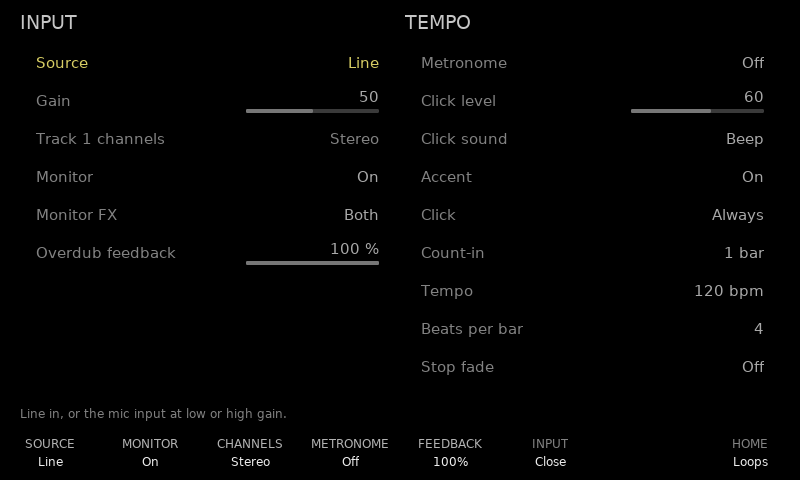
Hold F4 and turn for the tempo: before a loop it sets the bar, after it it is tape-style varispeed from 50 to 200 % (Stretch tracks keep their pitch). Hold F7 for the selected track's volume, tap it for its strip on the mixer; hold F6 for the input gain, tap it for the Input page (source, gain, channels, monitoring through the effects, overdub feedback, and the tempo card: metronome, click level and sound, accent, click always or only while recording, count-in length, tempo, beats per bar, stop fade).
| Tempo (F4) | Volume (F7) |
|---|---|
 |  |
Two send effects, including Clouds
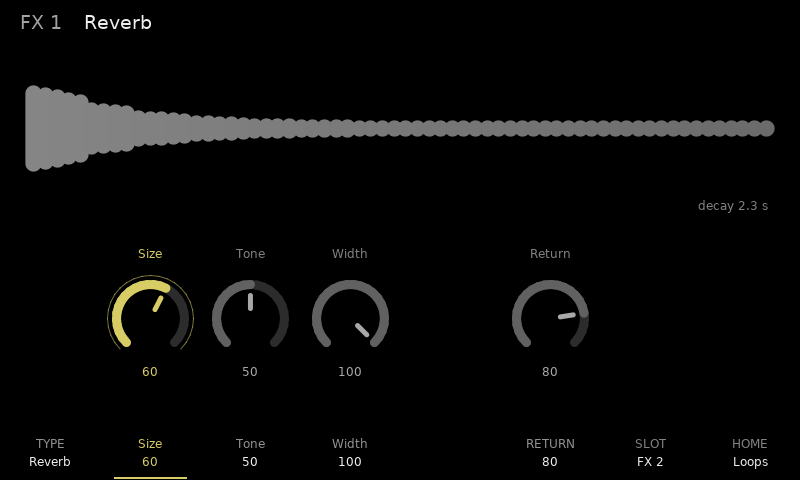
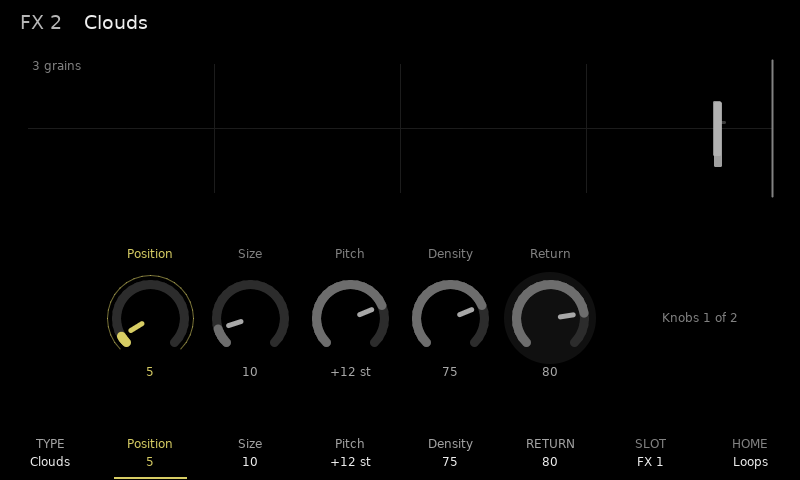
FX 1 and FX 2 each hold a Delay, Ping-pong delay, Reverb, Chorus, Flanger or Mutable Instruments' Clouds granular processor. Each page shows the effect live (echo taps, the reverb's decay, LFOs, Clouds' grains in its buffer) over its knobs. One slot can feed the other, so Clouds can run into the reverb.
| Reverb | Clouds |
|---|---|
 |  |
Mixer
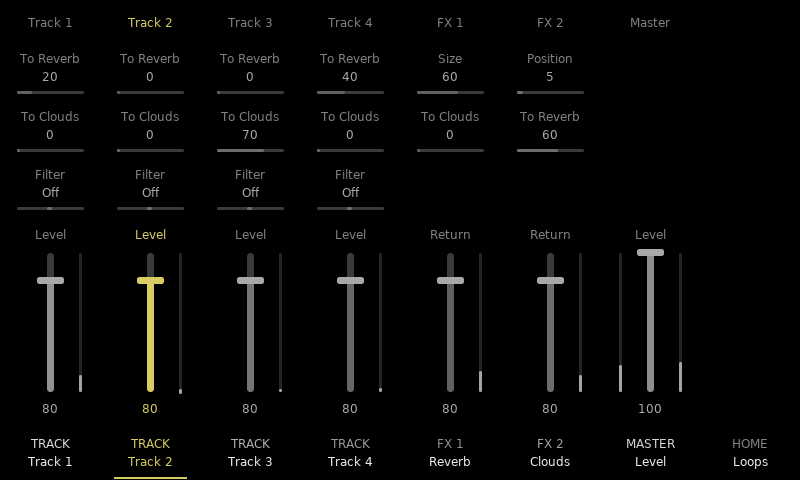
Master opens seven strips: per track the two pre-fader sends, a DJ filter (down from the middle a low-pass closing, up a high-pass opening) and the level, per FX slot a knob, the chain send to the other slot and the return, and the master, with meters on every fader. Hold Shift for the mutes on F1–F7 (the tracks, both FX returns and the master), and Shift + F8 to name the strip's track.
Performance mode
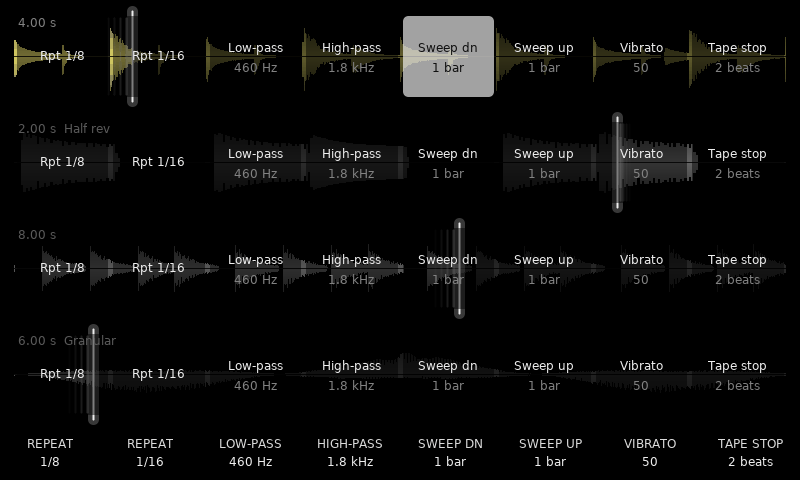
Perform turns pad columns 5 to 12 into eight effects per track: two beat repeats, low-pass, high-pass, two filter sweeps, vibrato and tape stop. Hold a pad to play one, Shift + pad to latch it; play as many as you like on as many tracks at once. The screen keys along the bottom play the eight effects on every track at once (Shift + key latches); hold one and turn the encoder to set its knob on every track. Each track keeps its own settings: hold a pad and turn the encoder to set that track's alone. Repeats and tape stop land back in time when released, and the playhead shows where they read.
Loop editor
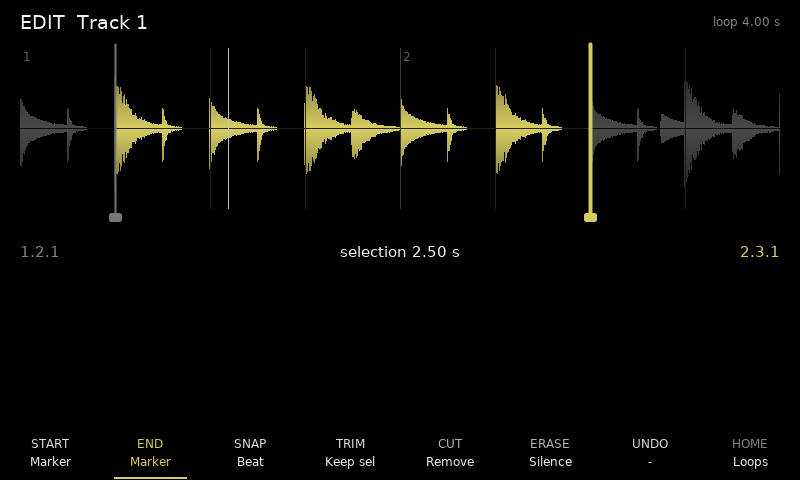
Note (or S.Edit) opens the selected track's waveform with start and end markers on a bar / beat / 1/16 grid: trim (instant, with undo), cut and erase. Copy copies the selection; Shift + Copy (Paste) puts it at the start marker over what is there, Insert puts it in there (the loop gets longer), on the same track or another. On the home page Copy duplicates the selected track into the next one (empty), in time with it; long takes too (a few seconds through the card).
Projects, samples, export, settings, MIDI and the manual
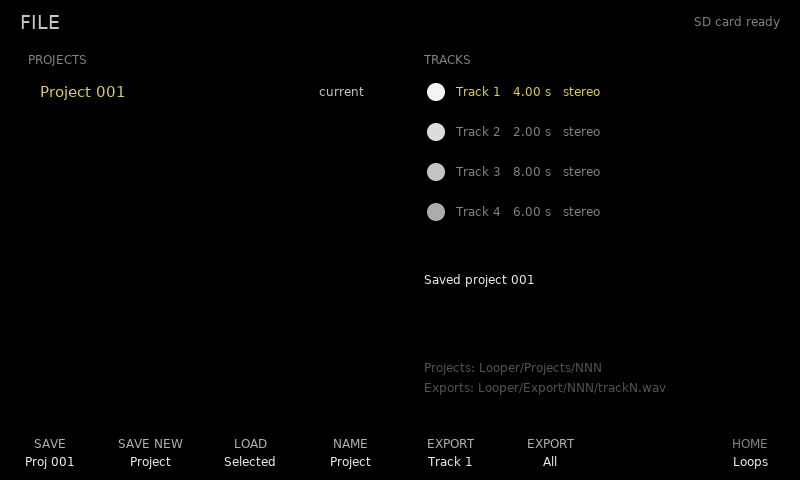
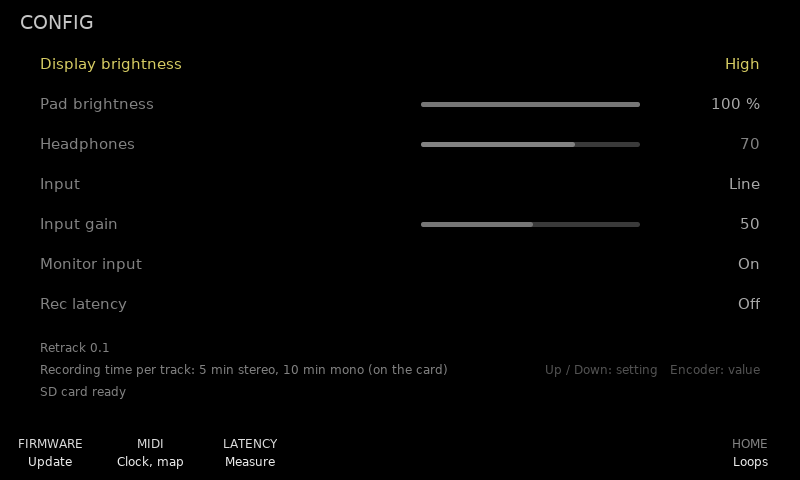
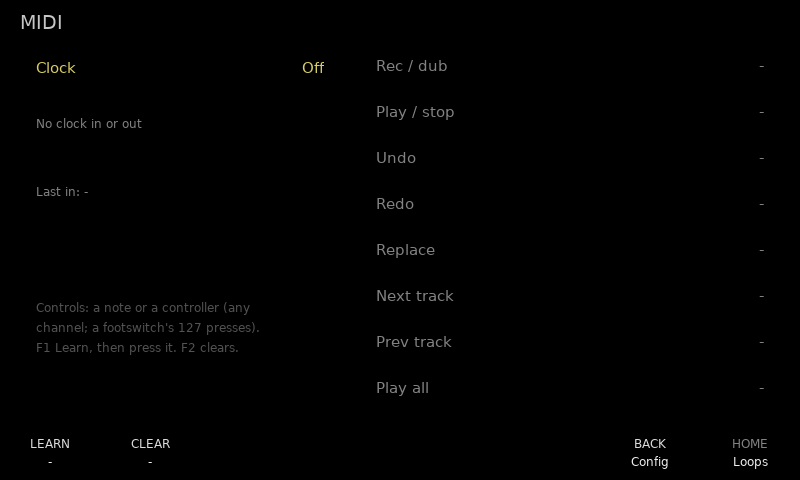
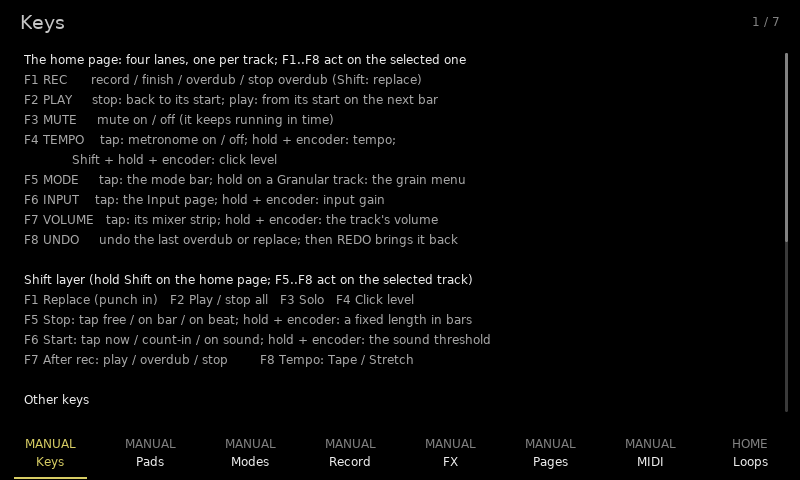
File saves and loads projects (every loop as a WAV plus all settings, the track names too) and exports tracks as WAVs, in the background while the loops play; F4 names the selected project. S.Load lists the card's folders and WAV files (16-bit, 44.1 kHz, mono or stereo) and loads one into the selected track (empty): it comes in stopped, its Play starts it on the bar, and on an empty session it sets the bar. Longer than the track's RAM, it goes on to the card like a long take. Config holds the settings, the recording latency, a firmware flasher (the way back to the stock firmware) and MIDI: clock out or follow, and eight learnable footswitch actions. Song opens a seven-chapter manual on the device.
| File | Config |
|---|---|
 |  |
| MIDI | Manual |
|---|---|
 |  |
Reference
Controls
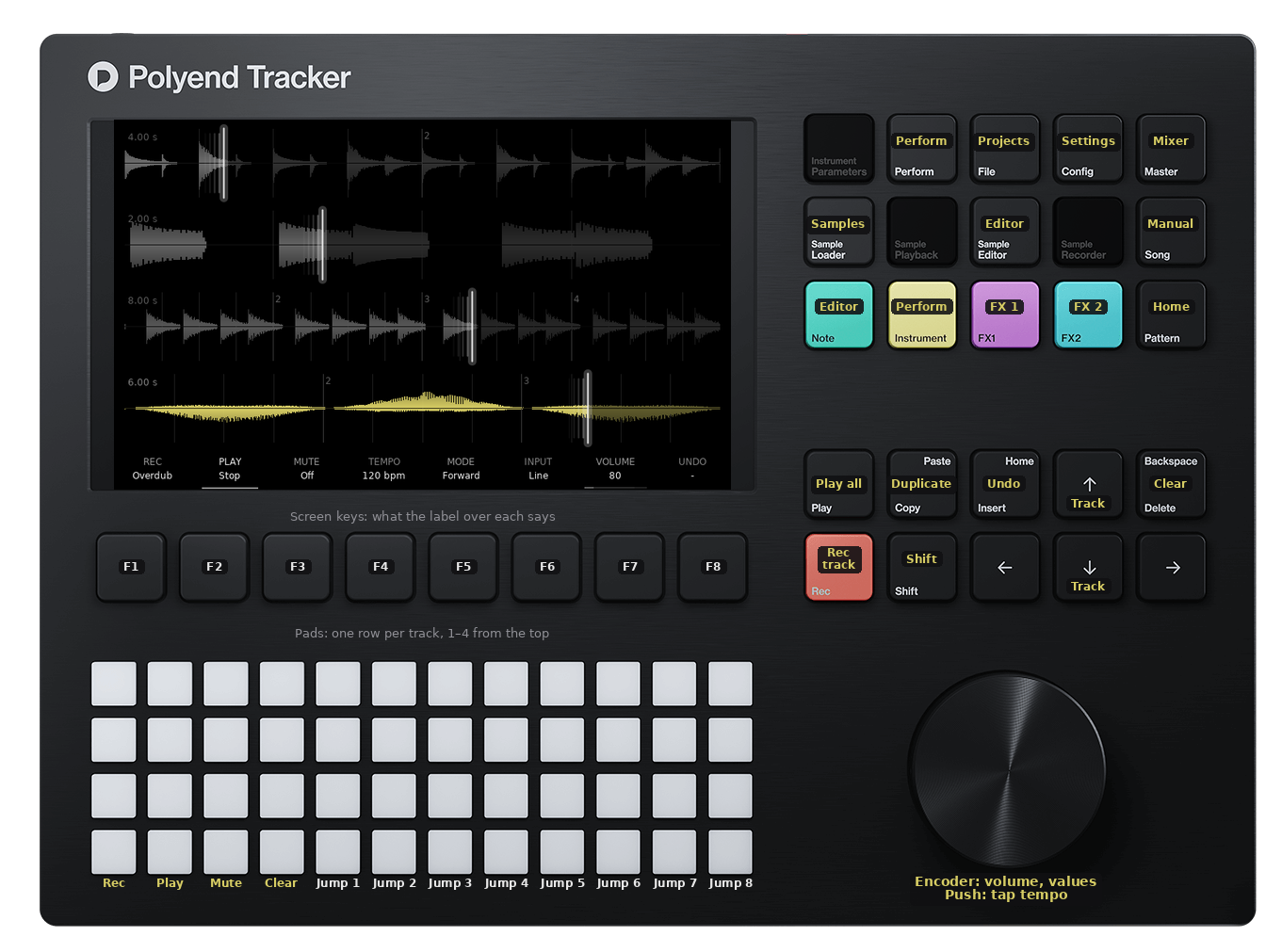
The eight screen keys (F1–F8) do what the screen labels over them say, on every page (Shift shows their second layer). The rest of the panel has no labels on screen; this is what it does. Every control, the screen keys included, is in the reference.
| Pads (one row per track) | |
|---|---|
| Column 1 | Record / overdub (empty → record → play ↔ overdub); Shift + pad: replace |
| Column 2 | Stop / play the track |
| Column 3 | Mute |
| Column 4 | Clear (in performance mode: Freeze a Clouds slot) |
| Columns 5–12 | Jump to that eighth of the loop, staying in time (in performance mode: the eight effects) |
| Any pad | Also selects its track |
| Key | Action |
|---|---|
| Play | Transport: everything stops, or starts from bar 1. Shift + Play: metronome on / off |
| Rec | Record / overdub the selected track only; Shift + Rec: replace |
| Insert | Undo the last overdub / replace; Shift + Insert: redo. In the editor: paste, inserted at the start marker |
| Delete | Clear the selected track; Shift + Delete: clear all |
| Copy | Duplicate the selected track into the next one (empty). In the editor: copy the selection; Shift + Copy pastes it at the start marker |
| Encoder | The selected track's volume, or the value being set; Shift + encoder: input gain (on pages: fine steps) |
| Encoder push | Tap tempo, three taps or more |
| Up / Down | Select a track (on pages: a row) |
| Left / Right | On pages: a column, strip or knob |
| Pattern | Home: the loop lanes, from any page; leaves performance mode |
| Perform (or Instr) | Performance mode: tap to latch, hold for while held |
| Master | The mixer |
| Note (or S.Edit) | The loop editor for the selected track |
| S.Load | Load a WAV from the card into the selected track |
| FX1 / FX2 | That send effect's page |
| Config | Settings |
| File | Projects and WAV export |
| Song | The on-device manual |
| Shift + Config | Show / hide the CPU, frame-rate and display-list readout |
| Power (hold 1.5 s) | Switch off |
The SD card
- FAT32. exFAT is not supported (the build leaves it out), and cards over 32 GB come formatted exFAT: reformat them FAT32 (the SD Card Formatter only does exFAT on those, so use a tool that can, or a card of 32 GB or less).
- 32 KB clusters (allocation unit). The SD Card Formatter's default for 8 to 32 GB cards. FatFs sends at most one cluster per card command, so with small clusters (4 KB) writing is too slow for long takes: measured on an 8 GB card, 1.7 MB/s against 8 MB/s with 32 KB clusters.
- Room: 424 MB for the stream files (two of 53 MB per track), allocated once in one contiguous run each, so a freshly formatted card is best; then the projects and exports. With no room the looper still works, with takes up to the RAM's 21.5 s (Config shows the recording time).
- Speed: a decent card (Class 10 / U1 or better). Four tracks playing long takes need about 0.7 MB/s, four overdubbing 1.4 MB/s.
- Keep
PolyendTracker_1.9.2.ptfin/Firmwareas the way back.
Loop points, punches and undo
- Loop point: a take records 5 ms past its end and blends that into its first 5 ms, so the end runs on into the start with no click (the loop stays exactly on the bar). A take that starts after silence in its loop (mid-bar) fades in over 2 ms. Overdub and replace ramp in and out over 2 ms at the punch points.
- Replace (Shift + REC / pad 1 / F1) records over the loop; the REC key lights brightest while it does.
- Undo / redo (F8, or Insert / Shift + Insert) take back the last overdub or replace and bring it back, as often as you like, at any length. The audio under an overdub is kept at the end of the track's own memory for loops up to half of it (about 10.8 s stereo, 21.5 s mono); a longer one (with a card) keeps its passes on the card's two files, like a long take, though it plays all from RAM. Trims, cuts and erases clear it.
- Stop fade (Input page, Tempo card, last row): Stop fades the track over 1 beat, 1 bar or 2 bars, then stops it; a second press stops at once.
Playback modes
Every mode's read position is computed from the shared bar clock, so tracks stay in time whatever mode they are in. Switching modes carries on from the current position instead of jumping.
| Mode | What it does | Overdub |
|---|---|---|
| Forward | Plays as recorded | yes |
| Reverse | Plays backwards | yes |
| Ping-pong | Forwards then backwards (one cycle = two loop lengths) | yes |
| Half speed | Tape style: half tempo, an octave down | no |
| Double | Tape style: double tempo, an octave up | no |
| Half rev | Tape style, backwards: half tempo, an octave down | no |
| Double rev | Tape style, backwards: double tempo, an octave up | no |
| Half time | Time-stretched: half tempo, same pitch (two cross-faded 46 ms grains); page 2 | no |
| Octave up | Pitch-shifted: same tempo, an octave up (grains); page 2 | no |
| Octave dn | Pitch-shifted: same tempo, an octave down (grains); page 2 | no |
| Granular | Clouds grains read around the playhead, so the loop keeps its time; page 2 | no |
Page 1 of the mode bar, the playback modes: F1 Forward, F2 Reverse, F3 Ping-pong, F4 Half speed, F5 Double, F6 Half rev, F7 Double rev, F8 More. Page 2, the grain modes: F1 Half time, F2 Octave up, F3 Octave dn, F4 Granular, F8 Back. The playhead trails a fading tail on the side it came from, as long as its speed: backwards modes show it on the right, half speed short, double long.
Granular plays the loop through up to eight Clouds grains (Mutable Instruments' grain and window code), each centred on where the loop is now. The lane draws each sounding grain where it reads, as wide as it is long, taller and brighter as it gets louder, higher the more it is panned left. Hold F5 on a Granular track for the grain menu: it stays open after the release, F1–F4 and F6–F7 pick one of its six knobs, F8 is blank and a tap on F5 closes it (so do Pattern, the page keys and selecting a track that is not Granular). The knobs: Spread (0 %: at the playhead … 100 %: a second either way, or a quarter of a shorter loop; finer at the bottom), Size (20–500 ms), Density (from a grain every four lengths, with gaps, to eight overlapping), Pitch (±24 semitones), Speed (how fast the playhead, the grains' centre, moves through the loop: 1/2, 1x, 2x; the loop keeps its time, so at 1/2 it takes two loop lengths to get round) and Direction (Forward, Reverse or Ping-pong, as the other modes; the grains read the way the playhead goes). With the track's Tempo option on Tape, a tempo change moves the grains' pitch too; on Stretch it stays. Projects save the knobs.
Overdub needs speed 1 so it can write where it reads; in the other modes REC shows a hint instead.
Track options and tempo
The track options are on the home page's Shift layer and act on the selected track: Shift + F5 Stop (hold + encoder: Length), Shift + F6 Start (hold + encoder: the threshold), Shift + F7 After rec, Shift + F8 Tempo. The F-key labels show each one's value while Shift is held. Channels are on the Input page; the tempo settings below are on its Tempo card.
| Option (per track) | Values |
|---|---|
| Stop | Free: the take ends when you press. On bar / On beat: it records on to the next bar / beat line (a press less than an eighth of a unit late stops on the line it just passed). Default On bar. |
| Length | Off, or a fixed length in whole bars (up to 64 beats): recording stops by itself. A fixed length shows in place of the Stop value. |
| Start | Count-in (default): the count-in's bars of click (Tempo card), then the take starts on the bar line; with loops running it waits for the next bar line at least half a bar away. Now: at once. On sound: the track arms and starts when the input crosses the threshold, keeping the 6 ms before it so the attack is not cut; with no loop yet the bar clock starts there. The armed lane shows the input level against the threshold. Press again to cancel. |
| Channels (Input page) | Stereo, Mono L, Mono R, Mono sum. Mono uses half the memory, so a track holds about 43 s in RAM (10 minutes with long takes on the card). Only while the track is empty. |
| After rec | Play, Overdub or Stop when the take ends. |
| Tempo | Tape (default): a tempo change speeds the track up or down and its pitch follows. Stretch: it keeps its pitch, played through two cross-faded 46 ms grains while the tempo is not 100 % (at 100 % it plays as recorded). Stretch tracks do not overdub off 100 %; a take recorded on one off 100 % is still resampled like tape. |
| Tempo card (Input page) | |
|---|---|
| Tempo | 40–240 bpm (default 94). It sets the bar until there is a loop. After that it is tape-style varispeed: 50–200 % of the loop's own tempo, every loop speeds up or slows down together and the pitch follows (or, on a track set to Stretch, stays). The metronome, count-ins, beat repeats and delay times follow it; new takes are resampled onto the loops' timeline, and only Forward Tape tracks overdub off 100 %. Clearing every track goes back to 100 %. Projects save it. |
| Beats / bar | 1–12 (default 4): the click, on-beat stops and the beat lines. |
| Metronome | Click on every beat while the transport runs (the count-in always clicks). Also Shift + Play. |
| Click level | Its volume. |
| Click sound | Beep, wood block, hi-hat or cowbell. |
| Accent | On (default): beat 1 louder (and higher, but for the hi-hat and cowbell). |
| Click | Always, or only while a track records or overdubs (and in count-ins). |
| Count-in | Off (a Count-in take then starts at once), 1 bar (default), 2 or 4 bars. |
| Threshold (Shift + hold F6) | Input level that starts an "on sound" take, −60 … 0 dB (default −30 dB). |
| Stop fade | Off, 1 beat, 1 bar or 2 bars. |
A free first take still sets the bar to its own length, as before; an on-bar, on-beat or fixed-length first take keeps the tempo's bar. Every waveform shows the bar lines (numbered) and the beat lines where they fall in that take.
Performance mode
Perform (or Instr, which does the same): tap it to latch performance mode on (tap again to leave), or hold it to use it only while held. Each lane's waveform shows eight effect cells, laid out like pad columns 5–12 of that track's row. Hold a pad to play its effect on that track; Shift + pad latches it (a dot in the cell) until pressed again. Leaving performance mode turns everything off. Pad columns 1–3 keep record / play / mute; column 4 is Freeze for a Clouds slot (row 1 FX 1, row 2 FX 2; lit while frozen) instead of clear.
Each effect has one knob, and each track its own settings (each cell shows its track's). Along the bottom, F1–F8 are the eight effects for all tracks at once, labelled with the selected track's settings: hold a key and its effect runs on every track with a loop, Shift + key latches it on all of them (again: off), and holding a key and turning the encoder sets its knob on every track (its big knob shows while the key is held). Holding a pad and turning the encoder sets that track's effect alone, without the knob. Holding pads never covers the lanes, so effects can run on several tracks at once. The track keys come back when performance mode is left (pad columns 1–3 keep record / play / mute meanwhile). A beat repeat or a tape stop moves the playhead to where it reads.
Perform opens the performance page from anywhere, the mixer included. The mixer opened while performance mode is on keeps its own keys: F1–F7 pick a strip, Shift + F1–F7 mute; the pads keep playing effects per track.
| Pad column | Effect | Knob (default) |
|---|---|---|
| 5 Repeat | Beat repeat: loops the note it was pressed in, on the beat grid | Length 1/4, 1/8, 1/8T, 1/16, 1/16T, 1/32 (1/8) |
| 6 Repeat | A second repeat | Length (1/16) |
| 7 Low-pass | Resonant low-pass cut | Cutoff 80 Hz – 8 kHz (450 Hz) |
| 8 High-pass | Resonant high-pass cut | Cutoff 100 Hz – 8 kHz (1.8 kHz) |
| 9 Sweep dn | Low-pass sweeping 18 kHz → 200 Hz while held | Time 1/4 – 4 bars (1 bar) |
| 10 Sweep up | High-pass sweeping 20 Hz → 4 kHz while held | Time (1 bar) |
| 11 Vibrato | 5.5 Hz pitch wobble | Depth (50) |
| 12 Tape stop | Slows to a stop | Time 1 beat – 2 bars (2 beats) |
The repeats, vibrato and tape stop move the read position while the loop's phase keeps running underneath, so releasing them lands back in time. Overdub pauses while one of those is held. Effects stack (a low-pass and a high-pass together make a band-pass). Sends take the effected sound.
The pads are single-colour (brightness only), so the pad grid shows state as brightness and blinking: REC fast blink while recording, slow blink while overdubbing, a flash per beat in the count-in; PLAY lit while playing; MUTE full when muted; columns 5–12 the playhead's eighth, or in performance mode the running effects.
Loop editor
Note (or S.Edit) opens a big waveform of the selected track (Up/Down for another) with a start and an end marker. The selection is yellow, the rest dim; the bar and beat lines are drawn over it, and the markers read bar.beat.sixteenth from the loop start.
| Key | Action |
|---|---|
| F1 START / F2 END (or Left / Right) | Pick the marker the encoder moves |
| F3 SNAP | Marker steps: bar, beat, 1/16 or free (10 ms); Shift + encoder: a quarter step (free: 1 ms) |
| F4 TRIM | Keep only the selection. Instant and non-destructive: the loop just starts and ends at new points in its buffer, and the kept part stays where it was on the bar grid |
| F5 CUT | Remove the selection; the rest closes up and the loop gets shorter. Press twice. The track is silent for the moment the audio takes to move |
| F6 ERASE | Silence the selection, same length. Press twice |
| F7 UNDO | Undo the last trim (a cut clears it, since the audio has moved) |
| F8 HOME | Back to the lanes |
Mixer and send effects
Two send effect slots, FX 1 (a delay to start with) and FX 2 (a reverb). Every track has a pre-fader send to each (the track's volume does not change it; mute and stop do). Either slot can hold any of six effects:
| Effect | Knobs |
|---|---|
| Delay | Time (1/32 … 3/4 of a bar, glides like tape when changed), Feedback, Tone (of the repeats), Spread (right side later) |
| Ping-pong | Time, Feedback, Tone, Width: the echoes cross from side to side |
| Reverb | Size (decay 0.3–9 s), Tone (dark … bright), Width |
| Chorus | Rate (0.1–5 Hz), Depth, Width |
| Flanger | Rate (0.05–2 Hz), Depth, Feedback, Manual (0.5–8 ms) |
| Clouds | Mutable Instruments' granular processor on a 4.1 s record buffer (at 32 kHz, as in the OpenTracker fork; Density asks for as many grains as the 40-grain original, up to 12; defaults as in the OpenTracker fork). Knobs 1: Position (how far back the grains read), Size, Pitch (±24 semitones), Density (Clouds' deadband at noon; up from there grains come at random, down from there evenly). Knobs 2 (Shift + F2–F5): Texture (window shape; past 75 % a diffuser), Feedback, Spread (stereo), Freeze (the buffer stops recording; also pad 4 in performance mode) |
FX1 / FX2 open that slot's page: a live picture of the effect on top (the echo taps on the beat grid, the reverb's decay, the LFOs moving, Clouds' grains) and its knobs below, each over its screen key; holding Shift shows Clouds' second four. F1 TYPE opens the type bar (the labels become the six effects; the key under one picks it). F2–F5 pick a knob (Clouds: Shift + F2–F5 the second four), F6 the return, F7 the other slot, F8 home; Left/Right move between knobs and the encoder turns the selected one. Changing the type silences the slot for about 0.2 s while its delay line is cleared.
The Master key opens the mixer page: seven strips, each over its screen key, plus F8 home. The sends are named after the effect in their slot (To Delay, To Reverb, ...). On the two FX strips the second row is the slot's output into the other one (taken before its return), so Clouds can run into a reverb. One way at a time: with both up, FX 1 → FX 2 runs and the other shows "off".
| Strip (key) | Row 1 | Row 2 | Row 3 | Fader |
|---|---|---|---|---|
| Track 1–4 (F1–F4) | Send to FX 1 | Send to FX 2 | DJ filter | Track level |
| FX 1 (F5), FX 2 (F6) | The slot's first knob | Into the other slot | – | Return level |
| Master (F7) | – | – | – | Master level |
F1–F7 or Left/Right pick a strip, Up/Down a row (the row stays when you change strip), the encoder sets the value, Shift + encoder in single steps (the DJ filter ten times finer than its plain steps, about 1.5 % of cutoff). Holding Shift, F1–F7 mute and unmute the strips: tracks 1–4, the FX 1 and FX 2 returns (the effect still takes its sends and feeds the chain) and the master (the labels read MUTE, lit while muted); a muted strip shows "Muted" where its name is. Projects save the return and master mutes. Faders show their level meter; the master shows left and right. Sends start at 0, returns at 80, track levels at 80, master at 100. Mixer settings stay when a track is cleared.
Tracks are stereo. Each lane draws the left channel above its centre line and the right channel below it.
Every take starts in phase with the bar grid; how it ends is the Stop option (Shift + F5; on bar by default).
Credits
The app is new; the hardware layer (board bring-up, SDRAM, FT81x display,
SGTL5000 codec, keypad, pad LEDs, SD card, USB) is copied from
OpenTracker, MIT, the same
way SIDTracker does it. See
PROVENANCE.md for exactly what was copied.